



 Team UNO
Team UNO is an online UNO card game for 2 to 10 teammates on a shared board. Everyone gets seven cards, matches the active color, number or symbol, and races to empty their hand first.
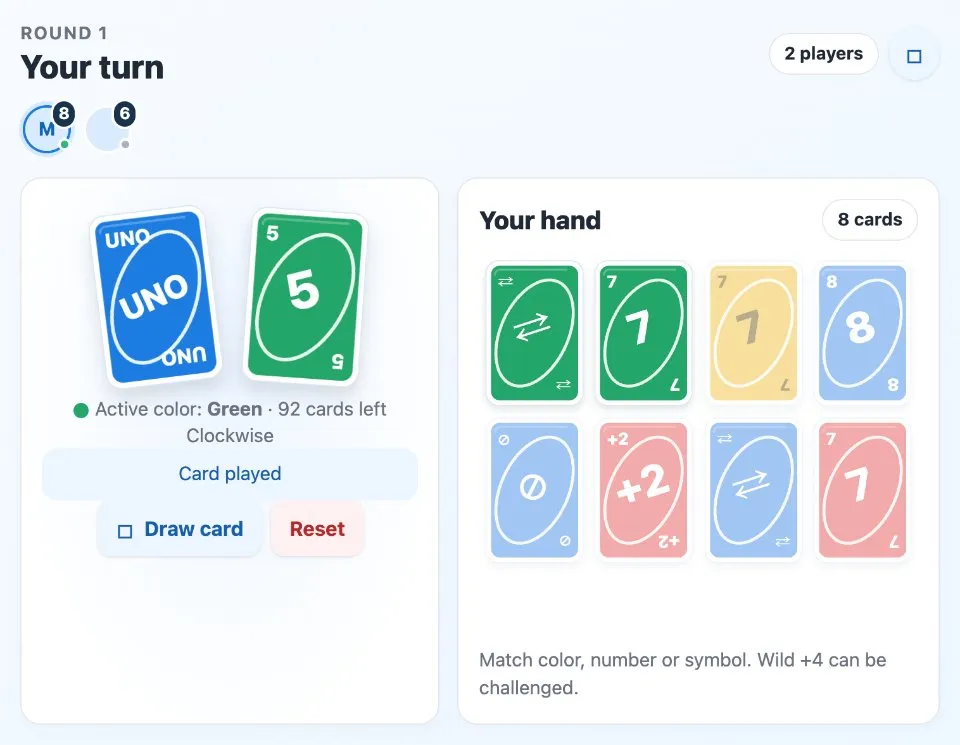
Play Team UNO online together.
The app follows the classic 108 card rules: Skip, Reverse, Draw Two, Wild and Wild Draw Four, opening action cards, UNO calls and catches, and Draw Four challenges. Each player sees their own hand, while the discard pile and turn order are shared with the table.
It runs on a shared MockFlow board, so a quick round can sit right next to the work, and every card played appears on every screen at once.
- Classic rules built in. Matching, the draw option, opening action cards, UNO catches, Draw Four challenges and final penalties are all handled for you.
- 2 to 10 players. Up to ten teammates can join a round. Anyone who has not joined watches the round and can join the next game from the lobby.
- Your own hand. Your cards show in Your hand with a card count, while other players appear as avatars with how many cards they hold.
- Clear table status. The active color, cards left in the deck, play direction and whose turn it is are always on screen.
- Help on hand. The How to play panel explains every card and rule with short examples, ideal for first timers.
How to play Team UNO.
Join the game
Each player presses Join game. Once at least two teammates are ready, anyone can press Deal cards and everyone receives seven cards.
Match a card
On your turn, play a card from Your hand that matches the active color, number or action symbol. A red 5 accepts any red card or any 5.
Draw when you need to
Press Draw card instead of playing. Only the card you just drew can be played, otherwise press Pass.
Use the action cards
Skip misses the next turn, Reverse changes direction, and Draw Two makes the next player draw 2 and miss a turn. Wild lets you choose the next color.
Accept or challenge a Draw Four
When someone plays Wild Draw Four, the next player can press Draw 4 and skip, or Challenge +4. An illegal play makes its owner draw 4, a failed challenge costs the challenger 6 cards.
Say UNO
With two cards left, press Say UNO before playing. If someone forgets, anyone can press Catch UNO to add 2 cards to their hand.
Win the round
The first player to empty their hand wins. Press Play again for a fresh round, or Reset to return everyone to an empty lobby.
Who uses Team UNO.
A remote team on a Friday break
Everyone joins from their own screen and plays a few quick rounds together.
A team building session
Up to ten people play at one table, with others watching and joining the next round.
A meetup that runs early
Fill the waiting minutes with a round of UNO on the same board as the agenda.
Friends playing online
Open a board, invite friends and play the card game together from anywhere.
Add Team UNO to your board.
Use on a board opens a new board with Team UNO already on it. To add it to a board you already have, follow these steps. Each copy keeps its own data, so a vote on one board never changes another.
Open your board
Open the MockFlow board you want to use it on.
Add it from the Artifact Library
Click Add anything (the plus button) in the toolbar at the bottom of the board, switch to Artifacts and pick Team UNO under Games. Adding it does not use AI credits.
Use it together
Click Interact with Component (the hand button), or switch the board to Play mode. Everyone on the board uses the same app, and Reset shared data clears it for the next session.





 Brainstorm with MockFlow MCP


