 Klondike Solitaire
Klondike Solitaire is the classic patience card game, laid out online on a green felt table. Build the four foundations from Ace to King, one suit each, by moving cards down the seven columns.
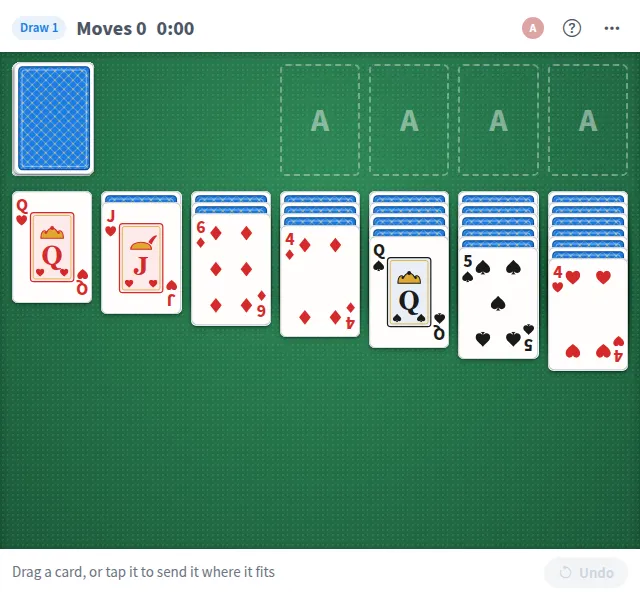
Play Klondike Solitaire online together.
The deal is shared: everyone at the board plays the same game together, and the footer names who made each move. A clock and a move count run in the header, and a solved game shows the time and moves it took.
It runs on a shared MockFlow board, right next to the work, so a quick game is always one click away.
- Classic Klondike rules. Seven columns, four foundations and a stock, with alternating colors down the columns and suits built up from Ace.
- Drag or tap. Drag cards and runs of cards, or tap a card and it moves to the best place it fits. The keyboard works too, with Enter or Space on a card.
- Draw 1 or draw 3. Start an easier game that turns one card at a time, or a harder one that turns three.
- Auto-move to foundations. Safe cards play up by themselves. Turn this off in the more actions menu to place every card yourself.
- Undo and restart. Take back any move, or restart the same deal from the beginning.
- Played together. Everyone on the board shares one deal. The footer says who moved which card, and Who is playing lists each person's moves.
- Moves and time. The header counts moves and keeps the time, and a solved game shows both.
How to play Klondike Solitaire.
Look at the deal
Seven columns are dealt with the top card of each face up. The rest of the deck waits in the stock.
Move a card
Drag a card onto another column, or tap it to send it where it fits best: a foundation first, then the first column that takes it.
Build the columns
Stack cards down in alternating colors, like a black 5 on a red 6. When a face down card is uncovered, it turns face up.
Turn the stock
Tap the stock to turn over a card, or three in draw 3. When the stock runs out, tap it again to turn the waste back over.
Fill the foundations
Cards that are safe to play go up to the foundations by themselves. Once every card is face up, Finish plays them all home.
Take a move back
Undo takes back the last move, and Restart this deal starts the same deal over.
Deal again
When all four suits are home, press New game, or pick New game, draw 1 or draw 3 from the more actions menu at any time.
Who uses Klondike Solitaire.
A remote team on a coffee break
Open the board and solve a deal together while you chat.
Someone waiting for a meeting to start
Play a quick game on the meeting board until everyone arrives.
Teammates who like a challenge
Switch to draw 3 and work out a tough deal as a group.
A team social or offsite
Put solitaire on the board as a calm break between activities.
Add Klondike Solitaire to your board.
Use on a board opens a new board with Klondike Solitaire already on it. To add it to a board you already have, follow these steps. Each copy keeps its own data, so a vote on one board never changes another.
Open your board
Open the MockFlow board you want to use it on.
Add it from the Artifact Library
Click Add anything (the plus button) in the toolbar at the bottom of the board, switch to Artifacts and pick Klondike Solitaire under Games. Adding it does not use AI credits.
Use it together
Click Interact with Component (the hand button), or switch the board to Play mode. Everyone on the board uses the same app, and Reset shared data clears it for the next session.






 Brainstorm with MockFlow MCP



