




 Word Tiles
 is a multiplayer crossword tile game in the style of Scrabble that you play online with 2 to 4 people. Everyone holds seven letter tiles, takes turns building words that cross on a shared board, and scores points for every word they make.
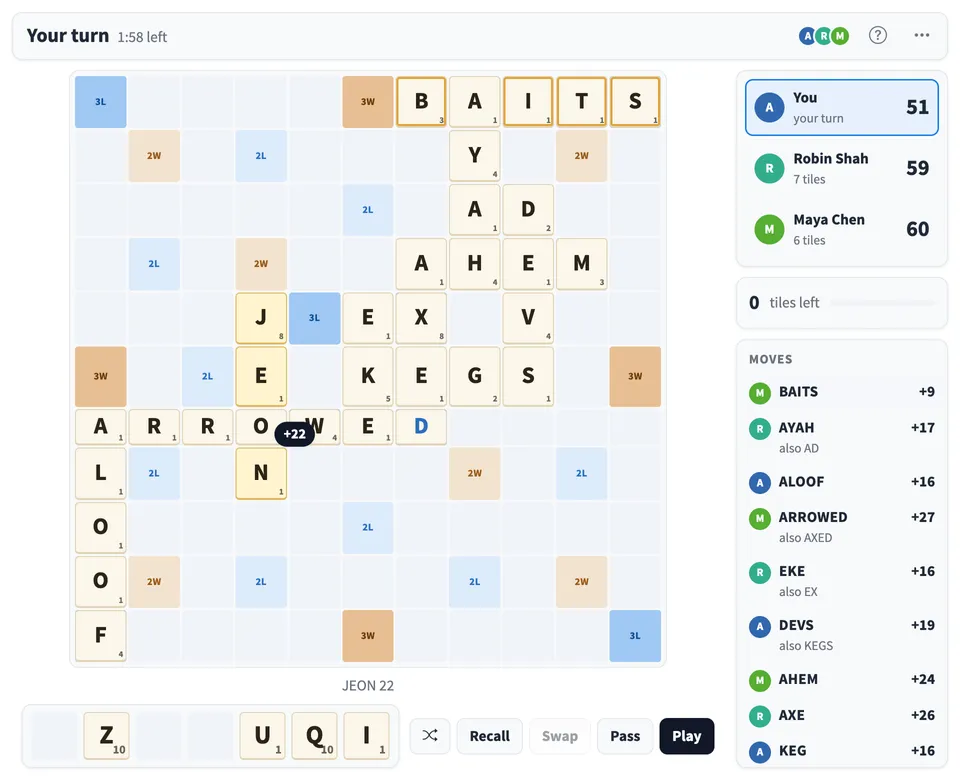
Play Word Tiles online together.
Choose a Quick game on an 11 by 11 board with 50 tiles, about 15 minutes with three players, or the Standard game on a 15 by 15 board with 100 tiles. Words are checked against a built in word list, or the players can vote on them instead, and an optional timer keeps turns moving.
It runs on a shared MockFlow board, so the game sits right next to your work. Each player plays from their own screen, only you see your tiles, and the board and scores stay in sync for everyone.
- Quick or full length games. The Quick game fits a short break with a smaller board and bag, while Standard gives the full length game with a 15 by 15 board and 100 tiles.
- Bonus squares and big plays. Double and triple letter and word squares boost a move on the turn you cover them, cross words score too, and using all seven tiles in one turn earns 50 extra points.
- Words checked for you. With Dictionary on, every word is checked against a list of about 168,000 English words when you press Play. A word that is not in the list is named, and your tiles stay put so you can try again.
- Players vote option. Switch to Players vote and the others accept or challenge each word. A challenged word goes back to the player with no points, and a word nobody votes on is accepted after 30 seconds.
- Turn timer. Set 1 or 2 minutes per turn and a countdown shows whose move it is. When time runs out, the turn passes to the next player.
- Live score preview. See the points and the words a move makes before you commit, with a plain message when tiles are placed in a way the rules do not allow.
- Built for people who are away. A player can leave the game from the menu, and the others can remove someone who has stepped away, so the game carries on without them.
- Clear help for new players. How to play walks a first time player through a turn step by step, explains how points work with a worked example, and covers how the game ends.
How to play Word Tiles.
Take a seat
Each player presses Join. Up to four people can sit at the table, and anyone else on the board can watch. You can also start on your own to practise.
Pick the game
Choose Quick or Standard, a time per turn of no limit, 1 minute or 2 minutes, and Dictionary or Players vote for checking words. Then press Start game.
Make a word
On your turn, drag tiles from your rack onto the board, or click a tile and then a square. Place them in one line, across or down, with no gaps. The first word covers the star in the middle, and every word after that joins tiles already on the board.
Check the points and play
The points for your move show on the board as you place tiles, along with every word it makes. Press Play to score them and draw new tiles from the bag, or Recall to take your tiles back.
Swap or pass when stuck
Swap returns tiles you do not want to the bag for new ones while at least seven tiles are left, and Pass skips your turn. Either one ends your turn with no score.
Finish the game
The game ends when the bag is empty and someone uses their last tile, or after six turns in a row with no score, eight with four players. Tiles left on a rack count against that player, the player who went out gets those points, and the highest score wins. Rematch starts a new game with the same players.
Who uses Word Tiles.
A remote team taking a break
Start a Quick game in the middle of a long working session and play a few rounds in about 15 minutes without leaving the board.
A team building session
Seat up to four players for a friendly word battle while the rest of the team watches the board fill up and the scores change.
A classroom spelling and vocabulary activity
Students take turns building words, check them against the word list, and learn new words from what the others play.
Friends and family across different places
Play a full Standard game together on one shared board, each person on their own screen with their own tiles.
A quiet solo practice
Start a game on your own to try out words and moves before playing with others.
Add Word Tiles to your board.
Use on a board opens a new board with Word Tiles already on it. To add it to a board you already have, follow these steps. Each copy keeps its own data, so a vote on one board never changes another.
Open your board
Open the MockFlow board you want to use it on.
Add it from the Artifact Library
Click Add anything (the plus button) in the toolbar at the bottom of the board, switch to Artifacts and pick Word Tiles under Games. Adding it does not use AI credits.
Use it together
Click Interact with Component (the hand button), or switch the board to Play mode. Everyone on the board uses the same app, and Reset shared data clears it for the next session.








 Brainstorm with MockFlow MCP


