



 Fighting Game
 is an online 2 player fighting game in the style of classic arcade fighters. Pick one of twelve fighters, pick a stage, and go best of three rounds against the computer, a friend on the same keyboard, or a teammate on the same board.
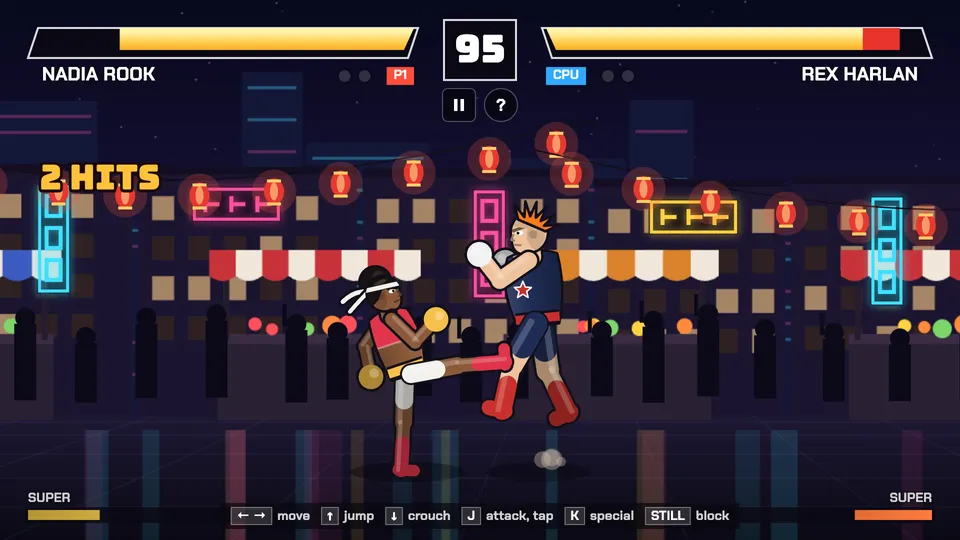
Play Fighting Game online together.
It plays with two buttons. Attack throws a jab, and tapping it again runs a three hit combo. Special fires your fighter's signature move, and once the super meter fills, the same button fires a super with a full screen cut in. Stand still and you block on your own.
It runs on a shared MockFlow board. Two people take the seats and fight live, and everyone else on the board watches the same fight as it happens.
- Twelve fighters. Sora Lin throws a Chi Orb, Mira Vale rushes in with a Comet Kick, Bruno Kade sends a Quake Slam along the ground, Nadia Rook launches a Rising Hook, Kofi Ames travels with a Spin Wheel, Rex Harlan leaps across with a Cannon Dive, Ines Duarte pokes from far away with her staff, Ash Okoro throws straight through a block, Lena Voss vanishes and strikes from behind, Arjun Malik sets fire rings on the
- Twelve stages. Rooftop at Dusk, Night Market, Temple Courtyard, Harbor Docks, Subway Platform, Canyon Highway, Storm Pier, Lantern Festival, Night Train, Snow Summit, Volcano Forge and Skyline Club. The newer stages react to the fight: lightning on a super, fireworks on a knockout, a crowd that jumps on big hits and weather that gets heavier each round.
- Two buttons. Attack and Special are all you need. Tapping Attack chains a jab, a kick and a knockdown finisher, and crouching changes it to a low jab and a sweep.
- Supers. The meter fills as you land and take hits. When it flashes, Special fires your super with a cut in banner.
- Automatic blocking. Standing still blocks incoming attacks, so new players can hold their ground. It can be switched off in the help settings.
- Live matches with spectators. On the board, the two seated players fight live and everyone else on the board watches. Wins and losses are kept for the board.
- Computer opponent. Three levels. Easy blocks now and then, Hard blocks most attacks and punishes jumps.
- Help on every screen. The question mark button opens How to play with the controls, each fighter's moves and the settings for auto block and touch buttons.
How to play Fighting Game.
Choose a mode
Pick VS Computer and choose Easy, Normal or Hard, pick One screen for two players on one keyboard, or pick On the board to fight a teammate.
Take a seat
On the board, click Take seat on one of the two seats. When a second person takes the other seat, both of you move on to choosing a fighter. Everyone else watches.
Choose your fighter
Move across the twelve fighters with the keys or the mouse and pick one. Each card shows power, speed and health, plus the special and the super. Against the computer, its fighter is picked at random.
Choose a stage
Player 1 picks one of twelve stages, or Random stage, and the fight starts with Round 1.
Fight
Move with A and D or the arrow keys, jump with W, crouch with S. Press J to attack and keep tapping it for a combo, press K for your special. A control strip stays on screen the whole fight.
Win two rounds
Knock out the other fighter, or have more health when the 99 second timer runs out. First to two rounds wins the match, then choose Rematch or Change fighters.
Who uses Fighting Game.
A team on a break
Two people take the seats for a quick best of three while the rest of the board watches and cheers.
A remote team after a long meeting
Drop the game on the meeting board and run a few rematches to end the call on a high.
Friends on one laptop
Pick One screen and play side by side, one on the WASD keys and one on the arrow keys.
Someone with five minutes to spare
Pick VS Computer, set Hard and see how long you last.
A team event
Keep a board standing for the week and see who leads on wins.
Add Fighting Game to your board.
Use on a board opens a new board with Fighting Game already on it. To add it to a board you already have, follow these steps. Each copy keeps its own data, so a vote on one board never changes another.
Open your board
Open the MockFlow board you want to use it on.
Add it from the Artifact Library
Click Add anything (the plus button) in the toolbar at the bottom of the board, switch to Artifacts and pick Fighting Game under Games. Adding it does not use AI credits.
Use it together
Click Interact with Component (the hand button), or switch the board to Play mode. Everyone on the board uses the same app, and Reset shared data clears it for the next session.





 Brainstorm with MockFlow MCP


