 Flashcard Flip
Flashcard Flip is a multiplayer flashcard game online that the whole board plays at once. Everyone answers the same card in secret, then it flips for all together.
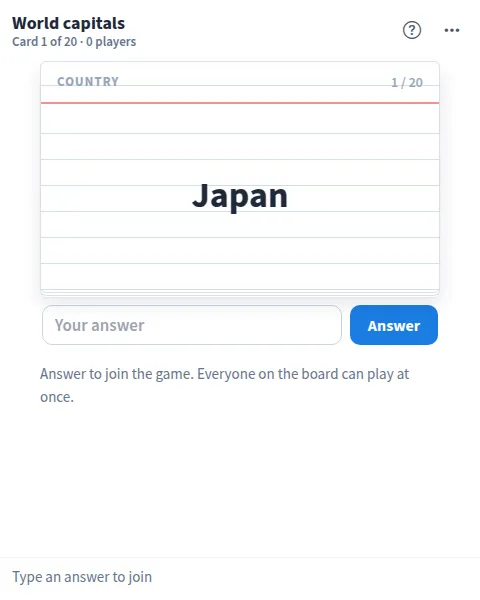
Use Flashcard Flip together on your board.
A right answer scores points, with a bonus for the quickest, and a live scoreboard keeps track. Cards most players missed come back at the end of the deck, and the game ends on a podium.
It runs on a shared MockFlow board, so a class, a study group or a team can play together from anywhere. The sample deck is world capitals, and Update content with AI turns it into any topic.
- Secret answers, shared flip. Nobody sees anyone else's answer until the card flips for everyone at the same time.
- Speed bonus. The first three right answers on each card earn extra points on top of the 10 for being right.
- Fair spelling. Close spellings can be accepted by another player, and a card can list other accepted answers.
- Missed cards return. Cards most of the group missed are queued again at the end, so the deck teaches as you play.
- Live scoreboard and podium. See your place as you play, open the scoreboard any time, and finish on a podium with the team total.
- Timer and direction. Set the timer to 10, 20 or 30 seconds or turn it off, and flip the direction to answer from either side of the card.
- Shuffle and restart. Start a new game in order, or shuffle the deck and restart, from the more actions menu.
How to play Flashcard Flip.
Join by answering
Type your answer to the card and press Answer or Enter. Answering is how you join the game, and everyone on the board can play at once.
Wait for the flip
Answers stay hidden until the card flips. It flips when everyone has answered or when the timer runs out.
Score your points
A right answer scores 10, plus 3, 2 or 1 for the first three right answers.
Accept a close spelling
A near miss shows as close. When another player taps Accept, it counts as right.
Think it for long answers
When the answer is long, like a definition, think of it and tap Ready. After the flip, mark yourself Knew it or Didn't know.
Move to the next card
Press Next card. Cards most players missed come back at the end of the deck.
Finish on the podium
When the deck is done, the podium shows the top players and how many cards the team knew. Press Play again for a shuffled rematch.
Who uses Flashcard Flip.
A teacher running a class review
Put a vocabulary or facts deck on the board and let the whole class answer each card together.
A study group before an exam
Drill the deck as a group, with missed cards coming back until everyone knows them.
A remote team at a social
Play a trivia deck as an icebreaker and crown the winner on the podium.
A team onboarding new hires
Turn product terms or team names into flashcards and learn them as a game.
Language learners practicing words
Make a deck of words in the language you are learning and quiz each other.
Add Flashcard Flip to your board.
Use on a board opens a new board with Flashcard Flip already on it. To add it to a board you already have, follow these steps. Each copy keeps its own data, so a vote on one board never changes another.
Open your board
Open the MockFlow board you want to use it on.
Add it from the Artifact Library
Click Add anything (the plus button) in the toolbar at the bottom of the board, switch to Artifacts and pick Flashcard Flip under Quizzes. Adding it does not use AI credits.
Use it together
Click Interact with Component (the hand button), or switch the board to Play mode. Everyone on the board uses the same app, and Reset shared data clears it for the next session.
Update content with AI changes the content without changing how the app works, for example "Make flashcards about a different topic, for example the planets or Spanish food words".




 Brainstorm with MockFlow MCP



