



 Flappy Flock
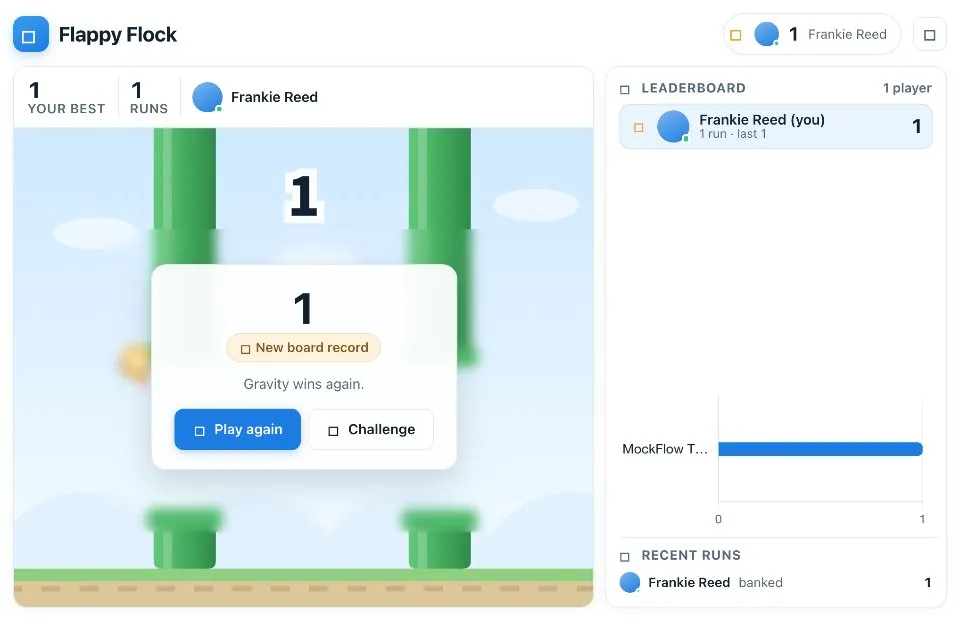
 is a tap to fly arcade game that everyone on a board plays from their own screen. Tap the sky or press Space to flap, steer through the gap in each pipe, and score a point for every pipe you clear.
Play Flappy Flock online together.
Runs are solo, but every score you bank is shared live. The leaderboard, the record crown and the score chart update for the whole board the moment you crash.
It runs on a shared MockFlow board, so the whole team competes on one leaderboard right next to the work.
- One button play. Tap, click, Space or the up arrow is all it takes, so anyone can pick it up in seconds.
- Shared leaderboard. Every player's best score ranks on one leaderboard that the whole board sees update live.
- Best score only. Only your best score ranks you, so bad runs never hurt your place.
- Rising difficulty. The gap narrows and the pipes speed up as your score climbs.
- Record crown. Take the board record and everyone watching sees the celebration.
- Score chart and feed. A chart compares scores and a feed lists recent runs.
- Challenges. Send a teammate your score as a target that stays on their screen until they beat it.
How to play Flappy Flock.
Join the flock
Press Join the flock to take a seat on the leaderboard with your board name and photo.
Start a run
Press Start run, then tap the sky or press Space or the up arrow to flap. Each tap gives the bird a lift and gravity does the rest.
Clear the pipes
Steer through the gap in each pipe. One pipe cleared is one point. Touching a pipe or the ground ends the run.
Bank your score
When you crash, your best score updates and the run joins the board feed. Take another run whenever you like.
Challenge a teammate
Beat somebody? Challenge them after a run and they will see your target on their screen until they clear it.
Who uses Flappy Flock.
A remote team on a Friday afternoon
Open a leaderboard battle that people can drop into for a few runs between tasks.
A host warming up a workshop
Give early arrivals something quick to play while everyone joins the board.
A team celebrating a launch
Run a high score contest and crown the board record holder.
Friends sharing a board
Challenge each other to beat a score and watch the leaderboard change.
Add Flappy Flock to your board.
Use on a board opens a new board with Flappy Flock already on it. To add it to a board you already have, follow these steps. Each copy keeps its own data, so a vote on one board never changes another.
Open your board
Open the MockFlow board you want to use it on.
Add it from the Artifact Library
Click Add anything (the plus button) in the toolbar at the bottom of the board, switch to Artifacts and pick Flappy Flock under Games. Adding it does not use AI credits.
Use it together
Click Interact with Component (the hand button), or switch the board to Play mode. Everyone on the board uses the same app, and Reset shared data clears it for the next session.
Update content with AI changes the content without changing how the app works.









 Brainstorm with MockFlow MCP


