 Coding Interview Pad
Coding Interview Pad is a shared code editor for live coding interviews. The question sits at the top, the candidate writes code underneath, and everyone in the interview watches it come together line by line.
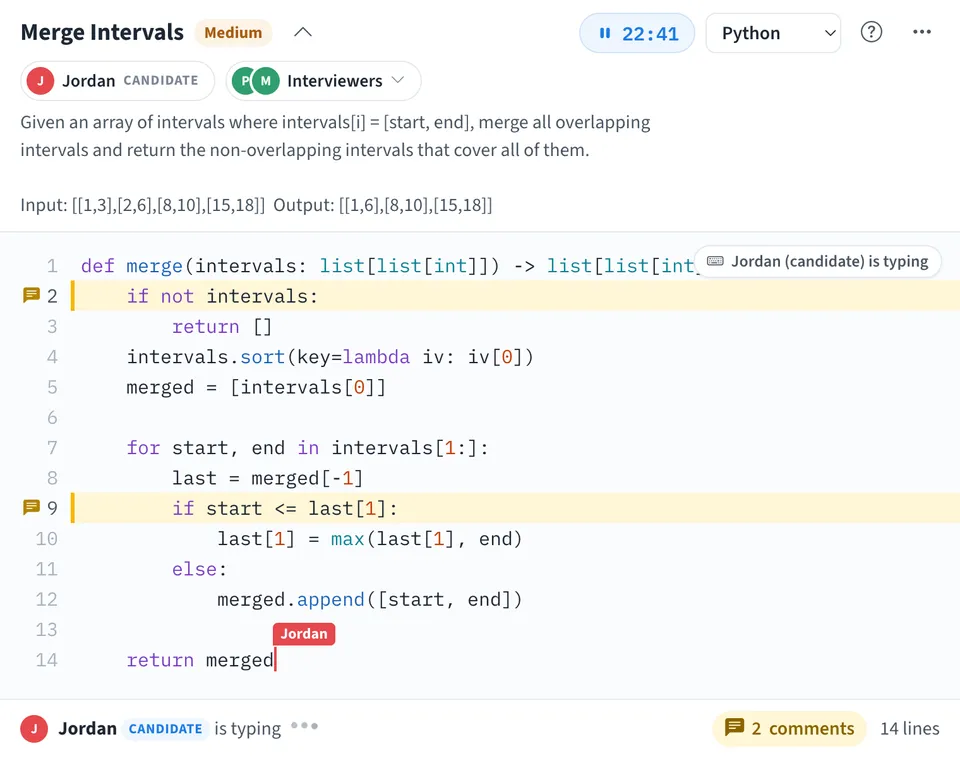
Use Coding Interview Pad together on your board.
Write your own question or start from a classic, choose from 13 languages including Python, JavaScript, Java, C++ and Go, and start the countdown. Interviewers can leave a comment on any line, and when the round is over one action clears the pad for the next candidate.
It runs on a shared MockFlow board, so the pad sits next to your sketches, sticky notes and diagrams. Everyone on the board uses the same pad at once and the code stays in sync for all of them.
- Question on top. The question and its examples stay above the code. Fold it down to the title when the candidate needs more room.
- Syntax highlighting. Keywords, strings, numbers and comments are colored for Python, JavaScript, TypeScript, Java, C++, C#, Go, Ruby, Kotlin, Swift, PHP, Rust and SQL, with line numbers and automatic indentation on Enter and Tab.
- Candidate and interviewers. Two chips under the question name the candidate and show who is on the panel. The footer, the typing badge and every comment carry a Candidate or Interviewer tag.
- One typist at a time. The footer shows who is typing and their cursor is labeled with their name. Everyone else's editor waits until they pause, then anyone can type again.
- Line comments. Comments pin to a line and follow it when code above it moves. The footer counts open comments and takes you to the first one.
- Countdown timer. Use 30, 45 or 60 minutes or set your own length up to 180 minutes. The timer turns orange in the last five minutes and shows Time's up at zero.
- Your own questions. Write any question you like, or edit the one on the pad. Four classic questions with starter code in 12 languages are ready when you need one fast.
How to use Coding Interview Pad.
Set the question
Type a title and a description with an example input and output, then choose Use this question. Or pick a classic: Valid Parentheses, Merge Intervals, LRU Cache or Number of Islands, which come with starter code.
Mark who is who
Tap the Candidate chip and pick the candidate, or the candidate picks I'm the candidate. Each interviewer taps the Interviewers chip and chooses I'm interviewing. Anyone else on the board stays untagged.
Choose the language
Pick Python, JavaScript, TypeScript, Java, C++, C#, Go, Ruby, Kotlin, Swift, PHP, Rust or SQL from the menu in the header. On a classic question, untouched starter code switches to the language you choose.
Start the timer
Tap the timer to start a countdown, and tap it again to pause. In the more actions menu, choose 30, 45 or 60 minutes, or type your own length from 1 to 180 minutes.
Code together
The candidate types in the editor while interviewers follow along. While one person is typing, the others wait a moment, so nobody types over anyone else.
Comment on a line
Tap a line number to leave a comment on that line, such as a question about an edge case. Commented lines are highlighted, and comments can be resolved when they are handled.
Clear it for the next candidate
Choose New question in the more actions menu to clear the question, the code, the comments and both chips. Undo brings them back if you clicked it by mistake.
Who uses Coding Interview Pad.
A hiring team running a remote coding round
The interviewer sets the question and starts the timer, the candidate codes and talks it through, and the panel leaves line comments to discuss afterwards.
An engineering manager running a loop of candidates
Keep one pad on the hiring board and choose New question between candidates, so every round starts clean.
Two developers pairing on a problem
Sketch the approach on the board, then write the code side by side in the pad and comment on the lines you want to revisit.
A teacher or bootcamp mentor in a live class
Put an exercise at the top, let a student code it while the class watches, and point at lines with comments.
A study group practicing interview questions
Take turns on the classics with the timer running, then review each other's code with comments.
Add Coding Interview Pad to your board.
Use on a board opens a new board with Coding Interview Pad already on it. To add it to a board you already have, follow these steps. Each copy keeps its own data, so a vote on one board never changes another.
Open your board
Open the MockFlow board you want to use it on.
Add it from the Artifact Library
Click Add anything (the plus button) in the toolbar at the bottom of the board, switch to Artifacts and pick Coding Interview Pad under Utilities. Adding it does not use AI credits.
Use it together
Click Interact with Component (the hand button), or switch the board to Play mode. Everyone on the board uses the same app, and Reset shared data clears it for the next session.
Update content with AI changes the content without changing how the app works, for example "Swap the classic questions for ones from your own interview loop, for example frontend Jav".





 Brainstorm with MockFlow MCP



