



 Prototype Test
 is a usability test tool for product and design teams. Pick a prototype from your board, write a few tasks, and everyone on the board tries them in the live prototype.
Use Prototype Test together on your board.
Record the path you expect for each task. Each task ends by itself when the tester reaches the goal, so nobody has to say they are done. Results stay hidden until the person who started the test ends it.
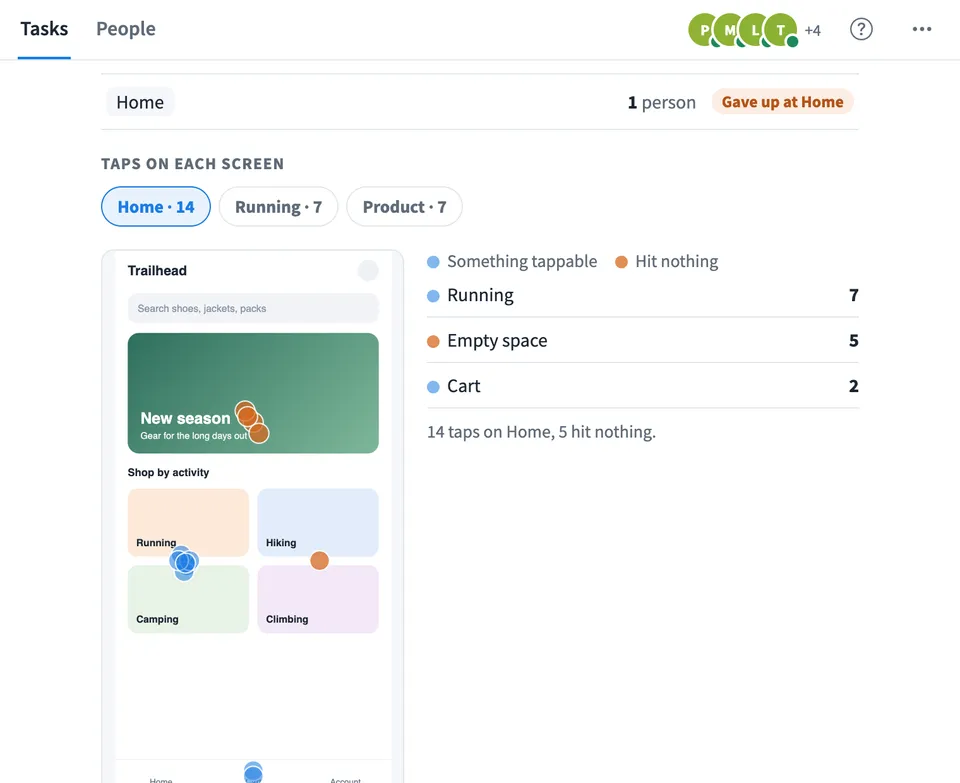
Then see who got there directly or another way, where people gave up, how long it took, how easy it felt, the paths people took and where they tapped, including taps that hit nothing.
- The prototype from your board. Test the prototype you already have on the board. Nothing to export or upload, and older prototypes work too.
- Expected path. Record the path once, and results split into people who went straight there and people who got there another way.
- Tasks end by themselves. Reaching the goal screen or the goal tap finishes the task, so the time and path are exact.
- Taps on each screen. See where people tapped on every screen, with taps that hit nothing shown in a different colour, and a count for each spot.
- Where people gave up. For every task, see the screen people were on when they said they were stuck.
- Download the results. Save every task's success, paths, misclicks and ease as a Markdown file to share in a report or a ticket.
How to use Prototype Test.
Pick the prototype
Choose a prototype on your board. The test reads its screens, so you can set goals and read results by screen name.
Write the tasks
Add up to 5 tasks, written the way a person would think of them, like You need new running shoes. Add a pair to your cart.
Record the expected path
Click through the prototype the way you expect people to. The screens you pass become the expected path and your last tap becomes the goal. Or just choose the screen that ends the task.
Try it yourself first
Take the test the way testers will see it. Nothing is recorded, so you can check the tasks read well and end where you expect.
Start the test
Press Start test. Everyone else on the board sees a short intro, then each task with the live prototype beside it or below it.
People try each task
Testers use the prototype as they would the real thing. A task ends when they reach the goal, or when they say they are stuck. After each task they can rate how easy it was.
End the test and read the results
Press End test and show results. See each task's success, misclicks, time and ease, then open a task for its paths and the taps on each screen.
Who uses Prototype Test.
A designer checking a new flow
Before the design goes to build, see whether people can finish checkout or sign up without help, and where they hesitate.
A product team settling a debate
Replace opinions about a flow with paths and tap maps from people who actually tried it.
A UX workshop or class
Run a live usability test together and walk through the paths and the taps that hit nothing.
A remote team testing during a call
Everyone takes the test on their own screen, then the results open for the whole team at once.
Add Prototype Test to your board.
Use on a board opens a new board with Prototype Test already on it. To add it to a board you already have, follow these steps. Each copy keeps its own data, so a vote on one board never changes another.
Open your board
Open the MockFlow board you want to use it on.
Add it from the Artifact Library
Click Add anything (the plus button) in the toolbar at the bottom of the board, switch to Artifacts and pick Prototype Test under Planning. Adding it does not use AI credits.
Use it together
Click Interact with Component (the hand button), or switch the board to Play mode. Everyone on the board uses the same app, and Reset shared data clears it for the next session.






 Brainstorm with MockFlow MCP


