



 User Persona
 is a user persona generator that writes personas for your product with AI and keeps them where your team works. Describe your product in one sentence, or paste interview notes, and get a set of personas with a name, a quote, a short bio, a job to be done, a day in the life, goals, frustrations, motivations and the tools they use.
Use User Persona together on your board.
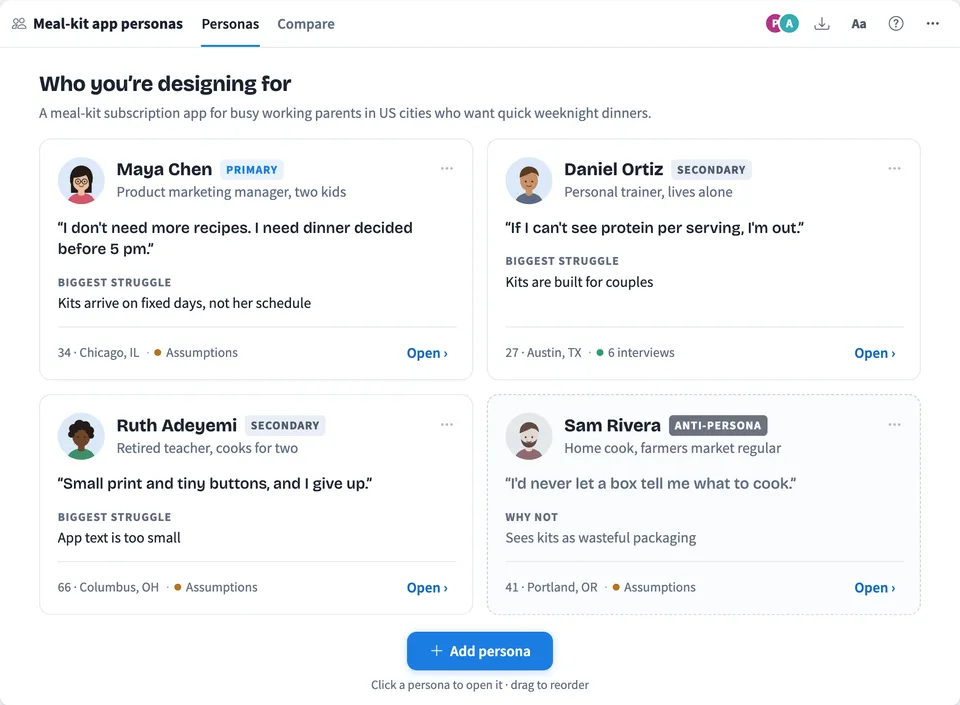
Every line can be edited in place. Ask AI to change a whole persona, add or rewrite one section, interview a persona to test an idea, and compare all of them side by side with the needs they share marked. Add an anti-persona to show who you are not designing for.
It runs on a shared MockFlow board, next to your journey maps, wireframes and sticky notes. Everyone on the board sees the same personas at once and every edit stays in sync.
- Personas from a sentence or from research. Start from a one line product description, or paste research notes so the personas quote real people and show how many interviews they are based on.
- A complete persona on one screen. Name, role, age and location, a quote, a bio, a job to be done written as When, I want, so I can, a day in the life, goals, frustrations, motivations, tools and channels, and three trait sliders.
- Primary, secondary and anti-persona. Mark who you design for first, who else matters, and who the product is not for. Anti-persona cards show what that person wants instead and why the product does not fit.
- Interview a persona. Ask questions and get answers in the persona's own voice. The whole board sees the conversation, and it is labeled clearly as AI role play, not research.
- Dashboard and compare view. With more than one persona the tile opens on a dashboard of cards. Compare puts them in columns with the traits on one scale, so differences read straight across.
- Drawn avatars or your own photo. Each persona gets a drawn portrait you can redraw, or use a picture from your MockFlow file library.
- Easy text size. The Aa button switches between Small, Medium, Large and Extra large, so the personas stay readable on a big screen or when the board is zoomed out.
How to use User Persona.
Describe your product or paste research
Open Add persona and choose New personas with AI. Describe your product and who uses it, or switch to Paste research notes and paste interview notes, survey answers or support tickets, up to 2,600 characters.
Choose the type and how many
Pick Customer, B2B buyer or Employee, choose 1, 3 or 5 personas, and tick the box to add an anti-persona. Choose Create personas and the cards fill in one by one.
Edit any line
Open a persona and click any text to change it. Enter saves the line and starts the next one, and clearing a line removes it. Drag the trait sliders, mark low points in the day, and set the role and the evidence behind it.
Change it with AI
Choose Ask AI and say what to change, such as make her a first time parent and more budget conscious. Each section's menu can also add one more line or rewrite the section. Every change can be undone.
Interview the persona
Switch to Interview and ask a question, or pick a suggested one. The persona answers in character, and a new insight from an answer can be added to the persona with one click.
Compare the set
Go back to all personas and choose Compare to see everyone in columns with the same rows. Needs that appear in more than one persona are marked.
Who uses User Persona.
A product team starting a new feature
Generate three personas and an anti-persona in a minute, then argue about them on the board next to the problem statement and the first sketches.
A UX researcher after a round of interviews
Paste the interview notes to draft personas grounded in what people said, then tidy the wording with the team and mark them as validated.
A design thinking workshop
Build the personas together in the empathize step, then interview them to test ideas before anyone draws a wireframe.
A marketing team planning a campaign
Create buyer personas with goals, objections and channels, and compare them to decide which message goes to whom.
A founder writing a pitch or a product brief
Turn a one line idea into clear personas with a job to be done, and keep them on the same board as the plan.
Add User Persona to your board.
Use on a board opens a new board with User Persona already on it. To add it to a board you already have, follow these steps. Each copy keeps its own data, so a vote on one board never changes another.
Open your board
Open the MockFlow board you want to use it on.
Add it from the Artifact Library
Click Add anything (the plus button) in the toolbar at the bottom of the board, switch to Artifacts and pick User Persona under Planning. Adding it does not use AI credits.
Use it together
Click Interact with Component (the hand button), or switch the board to Play mode. Everyone on the board uses the same app, and Reset shared data clears it for the next session.








 Brainstorm with MockFlow MCP


