



 Pyramid Builder
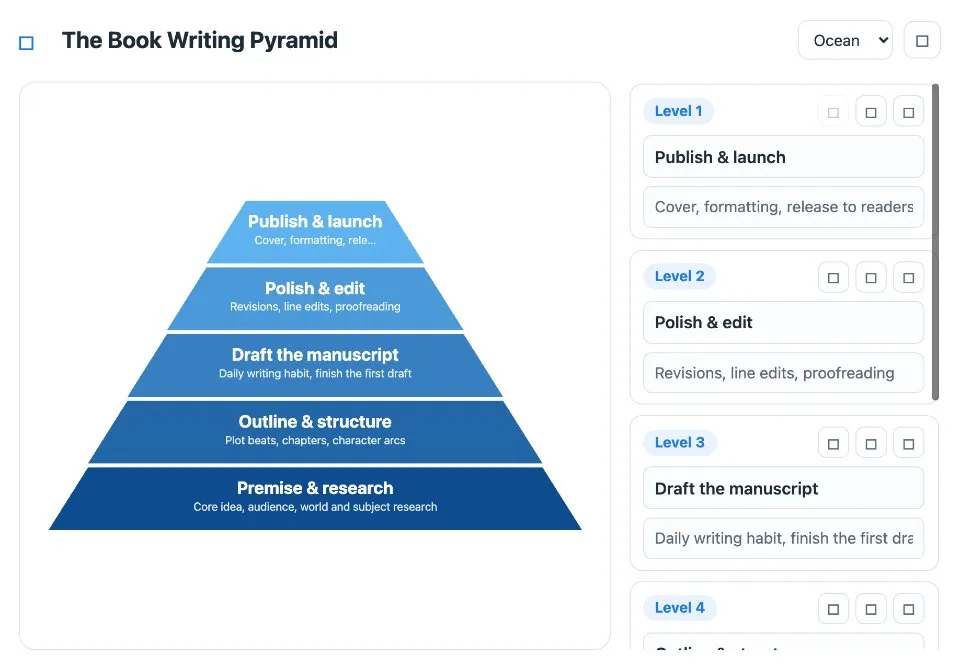
Pyramid Builder is a pyramid diagram maker for hierarchies, funnels and priority stacks. Type a name and an optional short description for each level, and the pyramid is drawn live as you type.
Use Pyramid Builder together on your board.
Level 1 sits at the top. Reorder or remove levels with the buttons beside them, add a new base layer when you need one, rename the title and pick a color palette.
It runs on a shared MockFlow board, next to the rest of your plan. Everyone on the board works on the same pyramid at once and sees each change as it happens.
- Live drawing. The pyramid redraws as you type, so you see the shape of the idea while you write it.
- Names and notes. Each level has a name and an optional short description that explains it.
- Up to 8 levels. Start small and add base layers as the structure grows.
- Easy reordering. Move a level up or down, or remove it, with the buttons on each row.
- Color palettes. Choose a palette so the pyramid matches the rest of your board.
- Built in help. The help dialog walks through editing, reordering, adding levels and styling.
How to use Pyramid Builder.
Name the pyramid
Rename the title at the top, for example The Book Writing Pyramid.
Edit a level
In the side panel, type the level's name and an optional short description. The pyramid updates instantly.
Add levels
Press Add level to append a new base layer, up to 8 levels in all.
Reorder or remove
Use the arrow and trash buttons on each level. Level 1 is the top of the pyramid.
Style it
Pick a color palette for the layers.
Draft it with AI
Use Update content with AI on the tile and describe the pyramid you want, such as a 4 level product strategy pyramid, and the levels are drafted for you.
Who uses Pyramid Builder.
A product team setting strategy
Lay out vision, goals and initiatives as a product strategy pyramid everyone can edit.
A marketer mapping a funnel
Show each stage from awareness down to purchase as its own layer.
A writer planning a book
Stack the work from premise and research up to publish and launch.
A teacher explaining a hierarchy
Build a layered model with the class, one level at a time.
A team agreeing on priorities
Put what matters most at the top and talk through the order together.
Add Pyramid Builder to your board.
Use on a board opens a new board with Pyramid Builder already on it. To add it to a board you already have, follow these steps. Each copy keeps its own data, so a vote on one board never changes another.
Open your board
Open the MockFlow board you want to use it on.
Add it from the Artifact Library
Click Add anything (the plus button) in the toolbar at the bottom of the board, switch to Artifacts and pick Pyramid Builder under Planning. Adding it does not use AI credits.
Use it together
Click Interact with Component (the hand button), or switch the board to Play mode. Everyone on the board uses the same app, and Reset shared data clears it for the next session.
Update content with AI changes the content without changing how the app works, for example "Rewrite this as a 4-level product strategy pyramid".












 Brainstorm with MockFlow MCP


