 Bezier Easing Editor
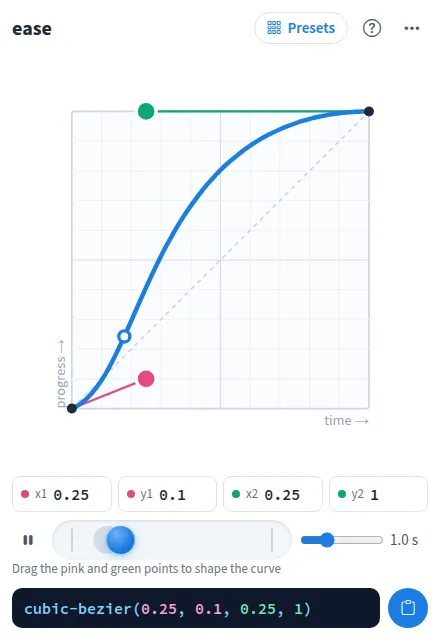
Bezier Easing Editor is a cubic bezier easing editor for CSS animations and transitions. Drag the pink and green control points, or type their values, and the curve and its cubic-bezier() value update as you go.
Use Bezier Easing Editor together on your board.
A ball runs along a track with your curve so you can feel the motion, next to a linear ball for comparison. Start from the CSS keywords or a full set of named easing functions, then copy the CSS.
It runs on a shared MockFlow board, so designers and developers shape the same curve together and everyone sees each change as it happens.
- Draggable curve. Two control points on a graph, with exact values you can type and keyboard nudging.
- Easing presets. The CSS keywords plus the Sine, Quad, Cubic, Quart, Quint, Expo, Circ and Back easing functions in, out and in out, each with a small curve preview.
- Live motion preview. A ball animates with your curve, with an adjustable duration from 0.2 to 3 seconds.
- Compare with linear. A second ball moves at a constant speed so the difference is easy to see. Turn it off from the menu.
- Copy ready CSS. One click copies the cubic-bezier() value, and the CSS sheet gives transition, animation-timing-function and custom property lines to copy one by one.
- Shared editing. Everyone on the board edits the same curve, and the footer shows who changed it last.
- Reset curve. Go back to the CSS ease curve from the more actions menu.
How to use Bezier Easing Editor.
Start from a preset
Open Presets and pick a CSS keyword such as ease or ease-in-out, or an easing function such as easeOutBack.
Shape the curve
Drag the pink and green control points. Values above 1 or below 0 give an overshoot, like easeOutBack.
Type exact values
Enter x1, y1, x2 and y2 directly and press Enter. A value that is not a number is flagged and not saved.
Fine tune with the keyboard
Focus a control point and use the arrow keys to nudge it, holding Shift for bigger steps.
Watch the preview
The ball shows how motion with this curve feels. Set the preview duration with the slider, pause or play it, and turn on Play back and forth from the more actions menu.
Copy the CSS
Press Copy CSS for the cubic-bezier() value, or Show CSS for ready lines: a transition, an animation timing function and a named variable.
Who uses Bezier Easing Editor.
A designer and developer agreeing on motion
Tune a modal or menu transition together on the board, then copy the exact value into the code.
A design system team defining easing tokens
Shape each curve and copy it as a named CSS variable for the token set.
A front end developer picking an easing
Try the presets side by side with linear motion before settling on one.
A teacher explaining animation timing
Show a class how moving the control points changes how motion speeds up and slows down.
Add Bezier Easing Editor to your board.
Use on a board opens a new board with Bezier Easing Editor already on it. To add it to a board you already have, follow these steps. Each copy keeps its own data, so a vote on one board never changes another.
Open your board
Open the MockFlow board you want to use it on.
Add it from the Artifact Library
Click Add anything (the plus button) in the toolbar at the bottom of the board, switch to Artifacts and pick Bezier Easing Editor under Utilities. Adding it does not use AI credits.
Use it together
Click Interact with Component (the hand button), or switch the board to Play mode. Everyone on the board uses the same app, and Reset shared data clears it for the next session.










 Brainstorm with MockFlow MCP



