



 Team Mood Check-In
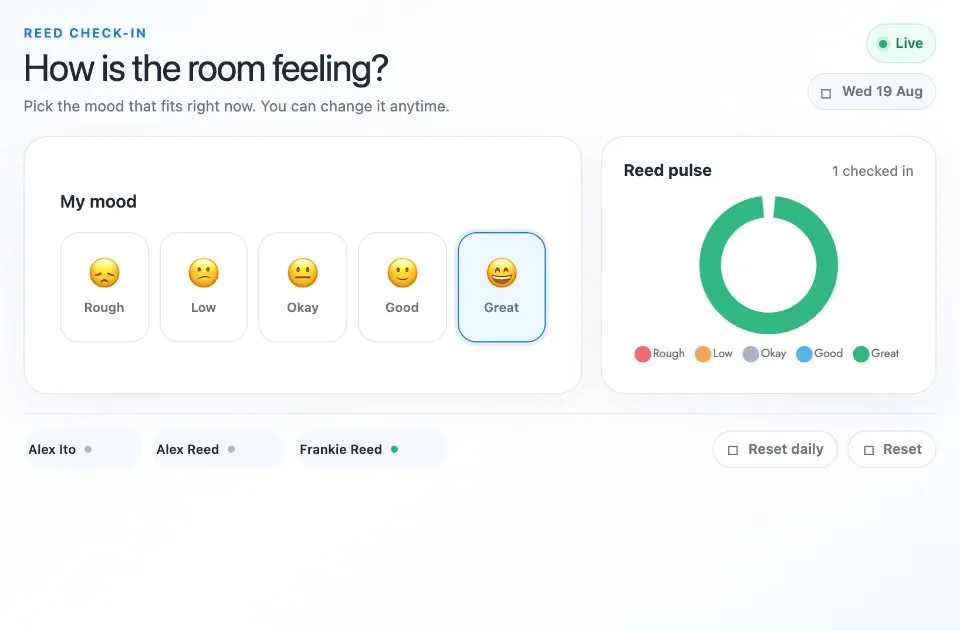
Team Mood Check In is a daily mood tracker for teams. Each person picks one of five moods, from Rough to Great, and the board tallies the answers into a live chart of how the group feels today.
Use Team Mood Check-In together on your board.
It takes a few seconds, works as an opener for a standup or a retro, and shows the team's mood without a long conversation.
It runs on a shared MockFlow board, so everyone checks in on the same tracker and sees the same result.
- Five moods. A simple scale from Rough to Great, each with its own emoji.
- Live chart. The tally updates the moment someone picks or changes a mood.
- Who has checked in. Board members' photos show who has answered today.
- Your own scale. Update content with AI can change the moods and labels without changing how the app works.
How to use Team Mood Check-In.
Open today's check in
The tracker shows today's date so everyone checks in for the same day.
Pick your mood
Choose Rough, Low, Okay, Good or Great. You can change your pick and it updates right away.
See the group mood
The chart tallies every pick, and each person's photo shows who has checked in.
Talk about it
Use the result to open the standup or retro and check on anyone having a rough day.
Who uses Team Mood Check-In.
A remote team at the daily standup
Start with a ten second check in to see how everyone is doing.
A scrum master opening a retro
Take the mood of the sprint before the discussion starts.
A manager running one to ones
Spot a low mood early and follow up with care.
A teacher starting a class
Ask students how they feel before the lesson begins.
Add Team Mood Check-In to your board.
Use on a board opens a new board with Team Mood Check-In already on it. To add it to a board you already have, follow these steps. Each copy keeps its own data, so a vote on one board never changes another.
Open your board
Open the MockFlow board you want to use it on.
Add it from the Artifact Library
Click Add anything (the plus button) in the toolbar at the bottom of the board, switch to Artifacts and pick Team Mood Check-In under General. Adding it does not use AI credits.
Use it together
Click Interact with Component (the hand button), or switch the board to Play mode. Everyone on the board uses the same app, and Reset shared data clears it for the next session.
Update content with AI changes the content without changing how the app works.








 Brainstorm with MockFlow MCP


