



 Team Color Picker
Team Color Picker helps a group agree on one color palette. Each person chooses five colors on their own, publishes them, and the team votes its way to a shared palette.
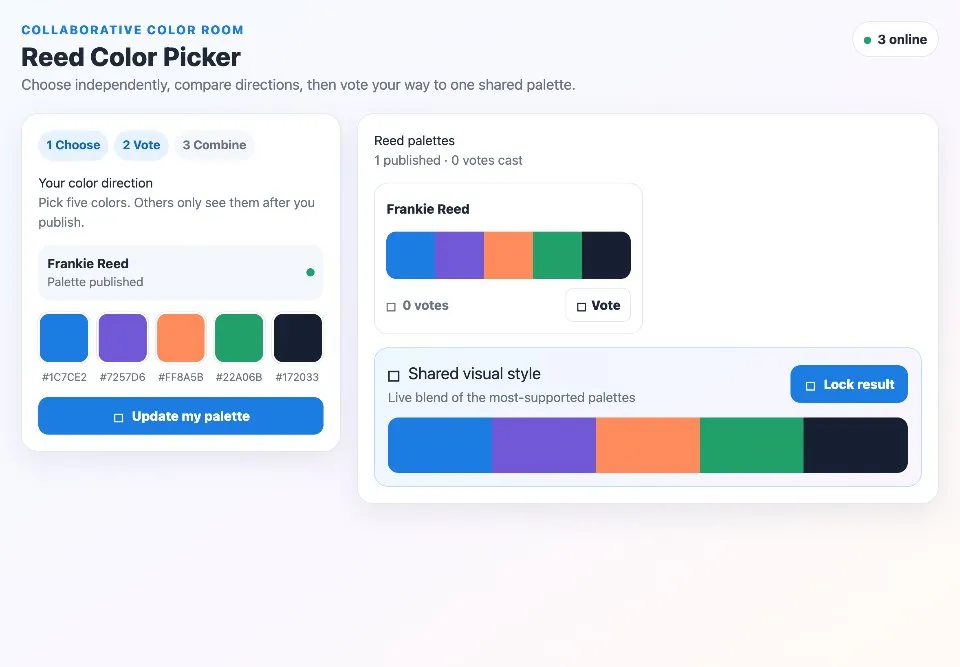
Use Team Color Picker together on your board.
Palettes stay private until they are published, so nobody anchors on the first idea. As votes come in, a shared visual style shows a live blend of the most supported palettes, ready to lock as the result.
It runs on a shared MockFlow board, so everyone sees the published palettes, the votes and the blend at the same time.
- Choose, vote, combine. Three clear steps take the team from separate ideas to one palette.
- Private until published. Each person's colors stay hidden until they publish them.
- Hex codes shown. Every swatch shows its hex code, ready to copy into your design.
- Votes per palette. Each published palette shows who made it and how many votes it has.
- Live shared style. A blended palette updates as votes change, led by the favorites.
- Lock the outcome. Lock result fixes the shared palette once the team agrees.
How to use Team Color Picker.
Choose your colors
Pick five colors for your color direction. Others only see them after you publish.
Publish your palette
Publish your palette to add it to the team palettes, and update it any time with Update my palette.
Vote
Compare the published palettes and press Vote on the one you like best.
Watch the blend
The shared visual style shows a live blend of the most supported palettes.
Lock the result
Press Lock result to settle on the shared palette.
Who uses Team Color Picker.
A design team starting a new brand
Gather everyone's color direction and vote toward one palette.
A product team theming a feature
Agree on accent colors before anyone starts building screens.
A class or workshop exploring color
Let each person propose a palette, then compare and vote together.
A team planning an event or deck
Settle the colors for slides or visuals without a long debate.
Add Team Color Picker to your board.
Use on a board opens a new board with Team Color Picker already on it. To add it to a board you already have, follow these steps. Each copy keeps its own data, so a vote on one board never changes another.
Open your board
Open the MockFlow board you want to use it on.
Add it from the Artifact Library
Click Add anything (the plus button) in the toolbar at the bottom of the board, switch to Artifacts and pick Team Color Picker under General. Adding it does not use AI credits.
Use it together
Click Interact with Component (the hand button), or switch the board to Play mode. Everyone on the board uses the same app, and Reset shared data clears it for the next session.
Update content with AI changes the content without changing how the app works.









 Brainstorm with MockFlow MCP


