



 Decision Dice
Decision Dice is an online decision maker that puts your choices on a die. Add between two and six options, each becomes a numbered face, and anyone can roll to let chance pick, fairly and in front of everyone.
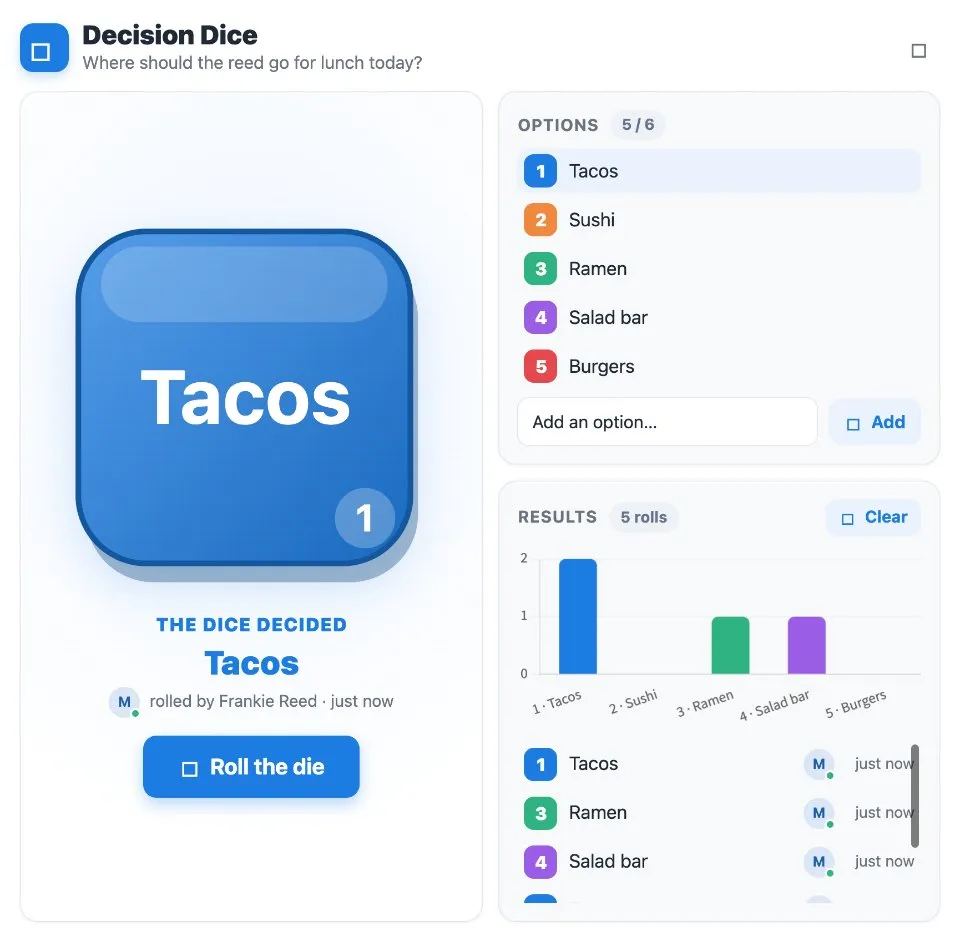
Use Decision Dice together on your board.
The winning face is highlighted with the name of whoever rolled it, and a Results chart tallies how often each option came up.
It runs on a shared MockFlow board, so everyone on the board sees the same roll land at the same moment.
- Your own faces. Put between two and six options on the die, each on its own numbered face.
- One shared roll. Everyone on the board sees the same roll land, so nobody can question the result.
- Who rolled it. The result names the person who rolled and when.
- Results chart. A running tally shows how often each option came up, until you clear it.
- Built in help. A short guide explains how it works with a worked example.
How to use Decision Dice.
Ask the question
Start from the question you need settled, for example where the team should go for lunch today.
Add the options
Type an option and press Add. Each one becomes a numbered face, from two options up to all six faces.
Roll the die
Anyone presses Roll the die, and every board member watches the same roll.
See what the dice decided
The winning face is highlighted and shows who rolled it.
Check the results
The Results chart counts how often each option has come up across rolls.
Start a fresh decision
Hover an option to remove it, and press Clear to reset the results.
Who uses Decision Dice.
A team that can't pick lunch
Put the places on the die and let one roll end the debate.
A scrum master planning the next retro
Add the retro formats you rotate through and roll for next sprint.
A remote team choosing who goes first
Put names on the faces and roll to pick the first speaker.
A group stuck between a few ideas
When the options are all fine, roll and move on together.
Add Decision Dice to your board.
Use on a board opens a new board with Decision Dice already on it. To add it to a board you already have, follow these steps. Each copy keeps its own data, so a vote on one board never changes another.
Open your board
Open the MockFlow board you want to use it on.
Add it from the Artifact Library
Click Add anything (the plus button) in the toolbar at the bottom of the board, switch to Artifacts and pick Decision Dice under Voting & Polls. Adding it does not use AI credits.
Use it together
Click Interact with Component (the hand button), or switch the board to Play mode. Everyone on the board uses the same app, and Reset shared data clears it for the next session.
Update content with AI changes the content without changing how the app works, for example "Make the dice decide which retro format we run next sprint".







 Brainstorm with MockFlow MCP


