 Pool
Pool
Pool is an 8 ball pool game you play online with another person on a drawn, top down table. The balls roll, bounce off the cushions and drop into the pockets with real rolling physics.
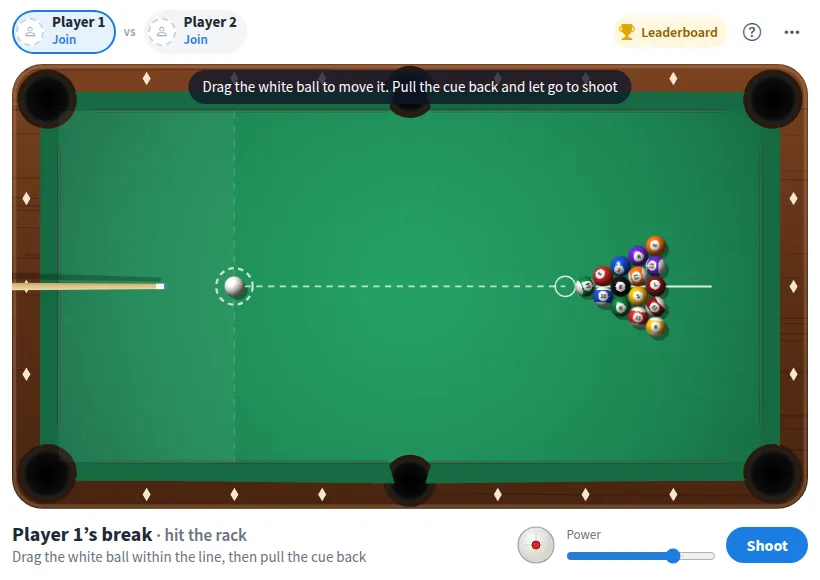
Play Pool online together.
Two people take the seats and shoot in turns. Everyone else on the board watches each shot play out on their own screen, and a leaderboard keeps count of who wins.
It runs on a shared MockFlow board, so a quick game sits right next to the work, ready for a break between meetings.
- Real rolling physics. Balls slow down, collide, bounce off cushions and fall into pockets the way they do on a real table.
- Slingshot or slider. Pull back the cue to shoot in one move, or aim, set the power slider and press Shoot.
- Follow and draw. Put spin on the cue ball to control where it goes after it hits.
- 8 ball rules built in. Groups, extra turns, fouls and ball in hand are handled for you, and the table tells you what happened after every shot.
- Live for the whole board. Every viewer sees the same shot play out, so the rest of the team can follow the game.
- Leaderboard. Wins against another member count toward a shared leaderboard that shows who leads.
- Rematch or new game. Rematch racks the balls again for the same two players. New game clears the seats for anyone to join.
How to play Pool.
Take a seat
Tap Join on an open seat to play as Player 1 or Player 2, or simply take the break. One person holds one seat.
Shoot
Grab the white ball or the cue, pull back away from where you want it to go, and let go. The further you pull, the harder the shot. You can also drag to aim, set the power and press Shoot.
Add spin
Tap the white ball icon high for follow or low for draw, so the cue ball rolls on or comes back after contact.
Pick your group
After the break, the first ball you sink makes you solids (1 to 7) or stripes (9 to 15).
Keep your turn
Sink one of yours and you shoot again. Otherwise it is the other player's turn.
Watch for fouls
Sinking the white ball, hitting nothing, or hitting the other group first is a foul, and the other player gets ball in hand to place the white ball anywhere.
Win with the 8
Sink all of your group, then sink the 8. Sink the 8 early, or the white ball with it, and you lose.
Who uses Pool.
Two teammates on a break
Rack up a quick game of 8 ball without leaving the board you are working on.
A remote team after a long meeting
Two people play while the rest watch the shots and cheer on the board.
An office running a friendly rivalry
Keep the leaderboard going over the week and see who ends on top.
A team social or offsite night
Put Pool on the board as an easy game everyone already knows how to play.
Add Pool to your board.
Use on a board opens a new board with Pool already on it. To add it to a board you already have, follow these steps. Each copy keeps its own data, so a vote on one board never changes another.
Open your board
Open the MockFlow board you want to use it on.
Add it from the Artifact Library
Click Add anything (the plus button) in the toolbar at the bottom of the board, switch to Artifacts and pick Pool under Games. Adding it does not use AI credits.
Use it together
Click Interact with Component (the hand button), or switch the board to Play mode. Everyone on the board uses the same app, and Reset shared data clears it for the next session.











 Brainstorm with MockFlow MCP



