


 Python Coding Assignment
 is a classroom tool for Python homework and practice. The teacher sets a coding question, students write and run their Python code right on the board, and the teacher reviews and scores every answer in one place.
Use Python Coding Assignment together on your board.
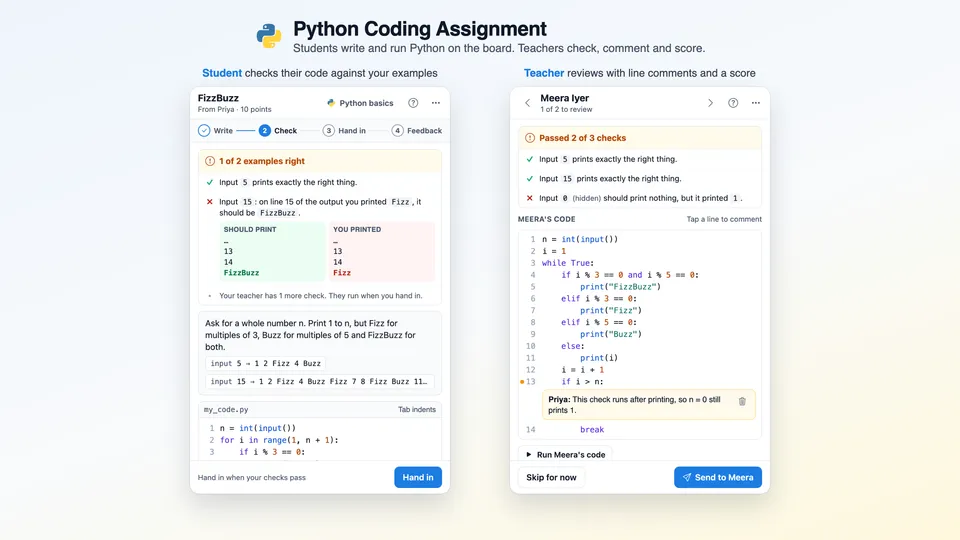
It works in three steps. You write the question and your own answer, and add a few inputs to check with. Each student codes, presses Run to try it and Check my code to compare with your examples, then hands it in. You open each answer, see which checks passed, comment on the exact lines and send a score that the student sees straight away.
It runs on a shared MockFlow board, so the whole class uses the same tile at once and nothing needs to be installed.
- Real Python in the browser. Students write and run Python on the board, with input, loops, lists, dictionaries, functions, f-strings, error handling and the math and random modules. Nothing to install.
- Six kinds of question. Write a program, write a function, fix the bug, fill in the blanks, predict the output, or a free project that you score by hand.
- Automatic checks from your answer. You type only the inputs or calls. The expected output comes from running your own answer, so nobody types expected results by hand.
- Clear results for students. A failed check names the line that differs and shows what should print next to what the student printed. Errors come with a plain English hint.
- Line comments and suggested scores. Comments sit under the exact line they are about. The score starts from the checks passed, and you can change it, add quick feedback tags and a note.
- Try again when you allow it. Let a student fix their code and hand it in again after your review, and see the new answer back in Ready to review.
- AI question ideas. Suggest questions with AI writes three questions of the kind you picked, each with an answer and checks that are tested before you see them.
- Python basics guide. Ten short steps from print to functions, each with an example students can edit and run, one tap away from the assignment.
How to use Python Coding Assignment.
Add it to a board
Open Add anything with the plus button in the bottom toolbar, choose Artifacts and add Python Coding Assignment. Use on a board on this page opens a new board with it already on.
Pick the kind of question
Choose Set a question, then pick one of six kinds: write a program, write a function, fix the bug, fill in the blanks, predict the output or a free project.
Write the question and your answer
Describe what students should make, or let AI suggest three questions on a topic and level you choose. Then write your own answer and run it once to be sure it works. Students never see it.
Add the checks
Type the inputs or function calls to try. The output your answer gives fills in by itself. Tick Students see for the examples students may look at, and keep a tricky one hidden. Optional code rules can ask for a loop, a function or a word.
Students code, check and hand in
Each student writes code in the editor, presses Run to try it and types into the terminal when the program asks for input. Check my code compares the output with your examples, then Hand in runs every check.
Review and send
Open the next answer from Ready to review, tap any line to leave a comment, adjust the score suggested from the checks, add quick feedback and choose Send. The next answer opens by itself.
Who uses Python Coding Assignment.
A teacher running a coding lesson
Set one Python exercise at the start of class, watch who is working and who is ready, and review answers while students are still in the room.
A computer science class doing homework
Students write and hand in their code on the board after school, and find the score and line comments waiting when they open it again.
A coding club for beginners
New members start with Python basics and a fill in the blanks question, then move on to writing whole programs.
A tutor working with one student
Set a fix the bug question, review the answer together and let the student try again.
A bootcamp checking understanding
Use predict the output questions to see whether learners can read code before they write it.
Add Python Coding Assignment to your board.
Use on a board opens a new board with Python Coding Assignment already on it. To add it to a board you already have, follow these steps. Each copy keeps its own data, so a vote on one board never changes another.
Open your board
Open the MockFlow board you want to use it on.
Add it from the Artifact Library
Click Add anything (the plus button) in the toolbar at the bottom of the board, switch to Artifacts and pick Python Coding Assignment under Quizzes. Adding it does not use AI credits.
Use it together
Click Interact with Component (the hand button), or switch the board to Play mode. Everyone on the board uses the same app, and Reset shared data clears it for the next session.




 Brainstorm with MockFlow MCP


