



 6502 Emulator
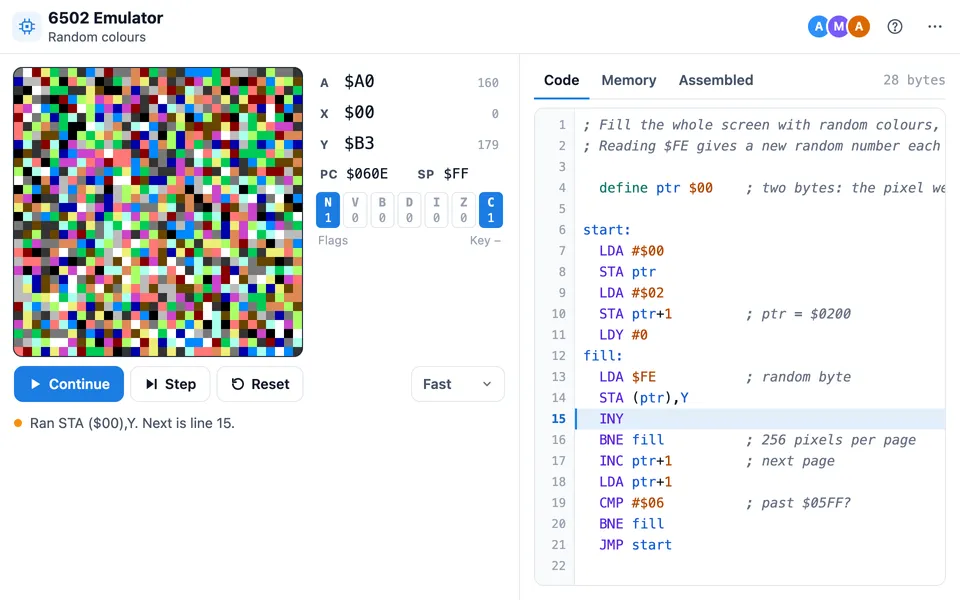
 lets you write 6502 assembly and run it on a simulated 6502 chip, the processor inside the Apple II, Commodore 64 and NES. Press Run to assemble and start, or Step to run one instruction at a time and watch the registers, flags and memory change.
Use 6502 Emulator together on your board.
Programs draw on a 32 by 32 pixel screen, read keys and random numbers, and follow the same memory map as easy6502, so tutorial code from there runs unchanged. Teachers can present a run to the whole room or set an assignment that students write, check and hand in.
It runs on a shared MockFlow board, so everyone on the board uses the same tile at once and nothing needs to be installed.
- A complete 6502 CPU. All 56 official instructions and their addressing modes, decimal mode and the stack, with BRK ending the program. The CPU passes Klaus Dormann's well known 6502 functional test.
- Screen, keys and random numbers. A 32 by 32 pixel screen at $0200 to $05FF with 16 colours, the last key pressed at $FF and a new random byte at $FE, the same map easy6502 uses.
- Friendly assembler. Labels, define, .byte and DB with text, EQU, org and local labels, with hex, binary and decimal numbers. Mistakes are explained in plain words, with suggestions for misspelt instructions and labels.
- Step, breakpoints and memory views. Step one instruction at a time, stop at breakpoints, see changed registers and bytes highlighted, browse memory by page and read the assembled listing.
- Present to the room. One person presents and every other tile replays the same run, the same random numbers and the same key presses, so the whole class sees the same thing on their own screen.
- Assignments with automatic checks. Four kinds: write a program, fix the bug, predict the result and a free project. Checks set starting values and compare registers, flags, memory or the whole screen with your answer. Optional rules limit the size or forbid an instruction.
- Review with line comments and scores. See who is ready to review, how each answer did on every check, leave comments under exact lines, and send a score suggested from the checks. You can let a student fix it and hand in again.
How to use 6502 Emulator.
Add it to a board
Open Add anything with the plus button in the bottom toolbar, choose Artifacts and add 6502 Emulator. Use on a board on this page opens a new board with it already on.
Write or pick a program
Type 6502 assembly in Code, or start from one of six examples: Three pixels, Add two numbers, Count with X, Bouncing ball, Draw with keys and Random colours. Problems show while you type, in plain words with the fix.
Run, step and set breakpoints
Run assembles the code, loads it at $0600 and runs it at Slow, Normal or Fast speed. Step runs one instruction and highlights the next line. Click a line number to stop there.
Look inside the machine
The registers A, X, Y, PC and SP and the flags N, V, B, D, I, Z and C update as the program runs. Memory shows any page, and Assembled lists every line with its address and bytes.
Present a run to everyone
Choose Present to everyone in the menu. Every other tile on the board follows your Run, Pause, Step and key presses until you stop, and anyone can choose Stop following.
Set an assignment
Choose Set an assignment, pick the kind, write the task and your own answer, then add checks such as start with $10 = 7 and look at $12. The expected value fills in from your answer, and Give to class sends it to every student on the tile.
Review and send feedback
Students check their code and hand it in. Open each answer from Ready to review, run it, comment on any line, adjust the suggested score and choose Send. The next answer opens by itself.
Who uses 6502 Emulator.
A computer architecture lecture
A teacher explaining how a CPU works steps through a loop live, presents the run to the class, and points at the registers, flags and stack as they change.
Assembly homework for a class
A lecturer sets a write a program or fix the bug task with hidden checks, students hand in on the board, and the lecturer reviews and scores every answer in one place.
Quick understanding checks
A tutor gives a predict the result task: students read short code without running it and say what ends up in A, X or memory, and the tile marks their answers.
Bootcamps and workshops
A workshop introducing low level programming starts everyone on the examples, then has pairs write a small program that draws on the screen.
Retro programming sessions
Hobbyists who work through easy6502 style tutorials paste in their code, try a game like Snake, and sketch ideas together next to their notes.
Interview and study groups
A study group walks through what does this code leave in A puzzles, stepping each line together to check the answer.
Add 6502 Emulator to your board.
Use on a board opens a new board with 6502 Emulator already on it. To add it to a board you already have, follow these steps. Each copy keeps its own data, so a vote on one board never changes another.
Open your board
Open the MockFlow board you want to use it on.
Add it from the Artifact Library
Click Add anything (the plus button) in the toolbar at the bottom of the board, switch to Artifacts and pick 6502 Emulator under Utilities. Adding it does not use AI credits.
Use it together
Click Interact with Component (the hand button), or switch the board to Play mode. Everyone on the board uses the same app, and Reset shared data clears it for the next session.





 Brainstorm with MockFlow MCP


