
Brainstorm with the New Storyboard Component in MockFlow Board
Discover how the new Storyboard component in MockFlow Board transforms your whiteboard into a powerful visual planning tool. Streamline brainstorming, organize narratives, and collaborate efficiently with built-in AI and media management. Perfect for film, animation, marketing, and educational projects.
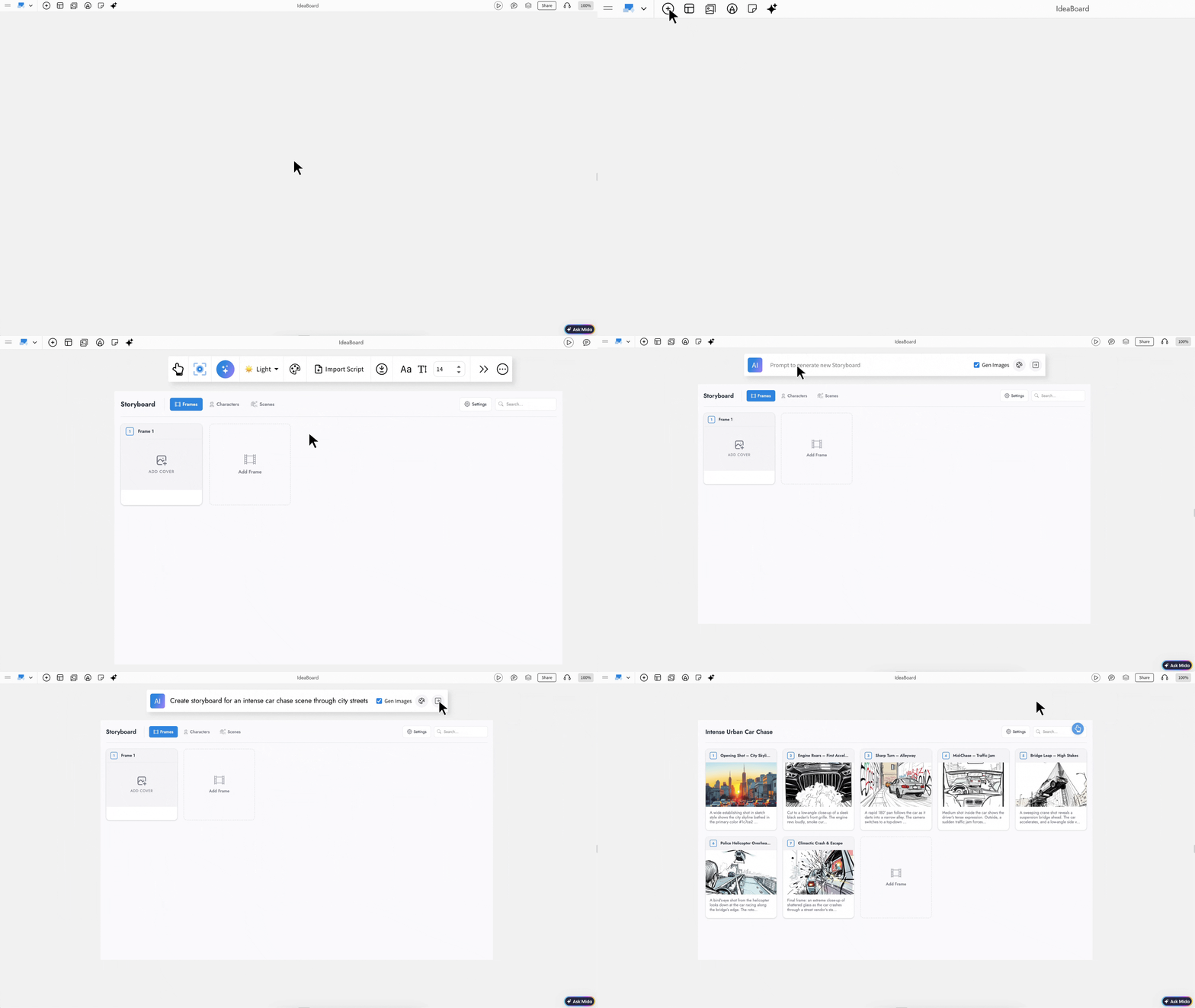
The new Storyboard component in MockFlow Board turns your online whiteboard into a powerful visual planning workspace. You can now brainstorm narratives, map scenes, organize frames, and structure entire productions without switching tools. Whether you are planning a film, designing a product journey, or pitching a campaign concept, everything happens directly on your board.
Storyboarding Without the Workarounds
If you have ever tried creating a storyboard in a traditional whiteboard tool, you know how frustrating it can be. Teams often drag rectangles into rows, manually align sticky notes, number frames one by one, and hope nothing shifts out of place. The result may look like a storyboard, but it behaves like disconnected shapes without structure, metadata, or export capabilities.
The Storyboard component eliminates that workaround. Instead of building from loose objects, you now work inside a structured storyboard system designed specifically for visual narratives. Frames belong to scenes. Metadata is built in. Media is organized properly. Exports are production ready.
This is not a workaround. It is a purpose-built storyboarding experience inside your whiteboard.
Why Storyboarding Belongs on a Whiteboard
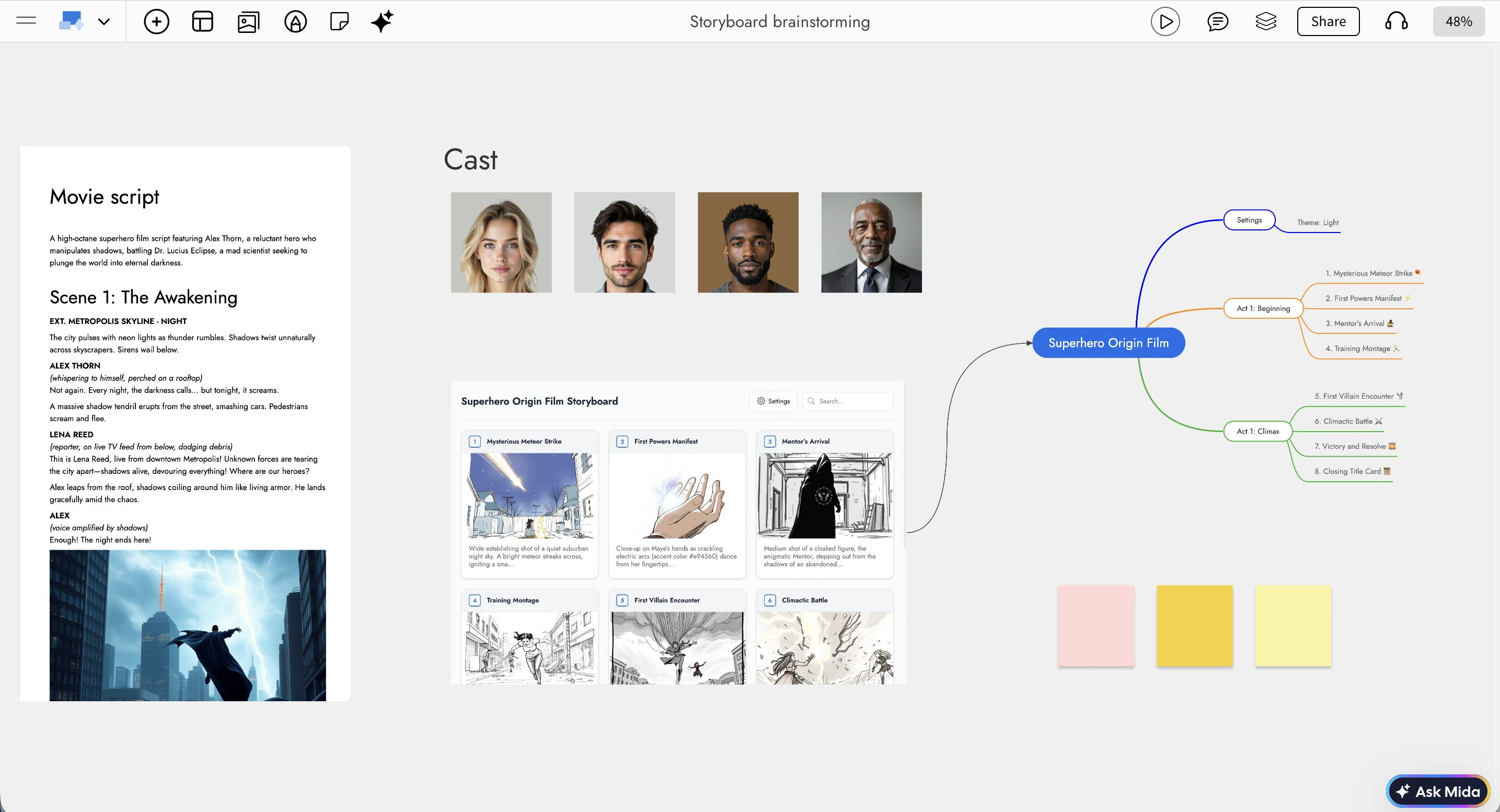
Most dedicated storyboarding software lives separately from your brainstorming space. You ideate in one tool, design frames in another, and track production tasks somewhere else. Every switch slows momentum and breaks creative flow.
MockFlow Board changes that completely. Your team is already using sticky notes, mind maps, flowcharts, mood boards, and freeform sketches on an infinite canvas. Now you can move from a rough idea to a structured frame-by-frame storyboard without leaving the board.
Creative thinking and production planning finally happen in one continuous workspace.
Rich Media and Structured Metadata in Every Frame
Each storyboard frame supports:
Cover image, video, or audio uploads directly from your media library
Preset metadata fields such as Duration, Dialogue Text, Camera or Shot Type, Location, Action Notes, and SFX Audio
Fourteen built-in shot types including Wide Shot, Close-Up, POV, Tracking, and more
Custom metadata fields tailored to your production workflow
This structured approach ensures your storyboard behaves like a production document, not just a visual layout.
Generate and Refine Storyboards with Mida AI
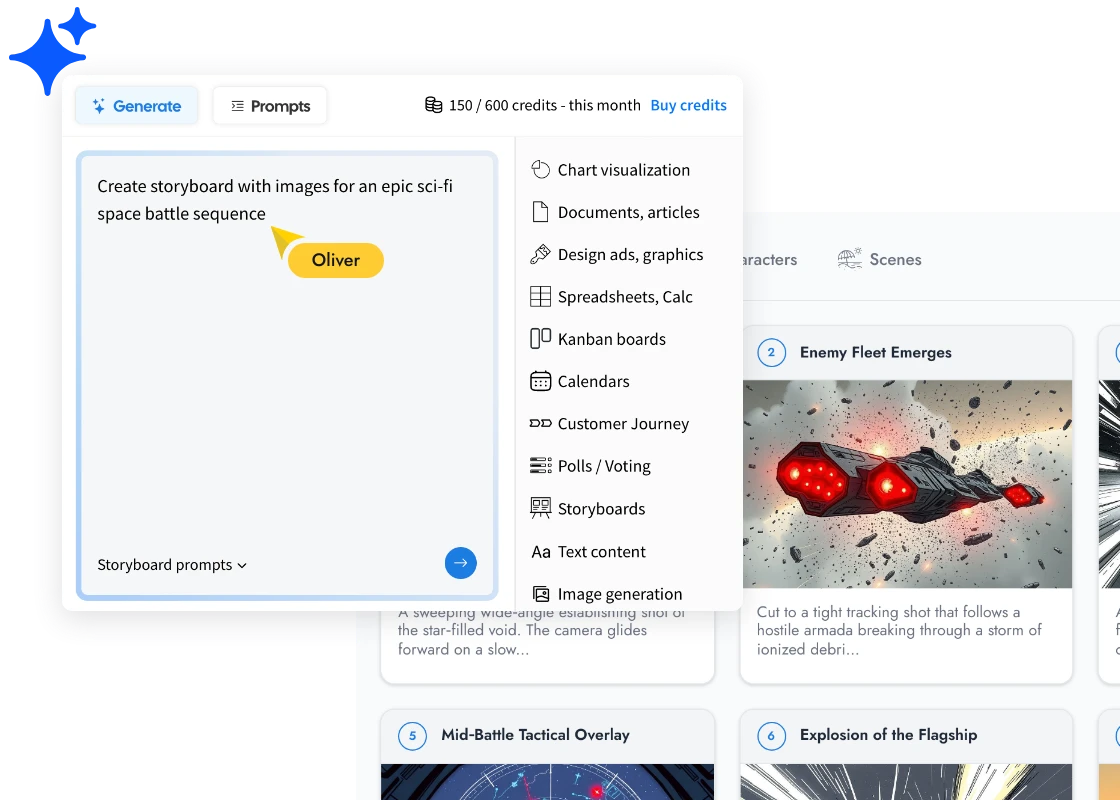
The Storyboard component becomes even more powerful with Mida, MockFlow Board’s AI co-pilot.
With Mida, you can:
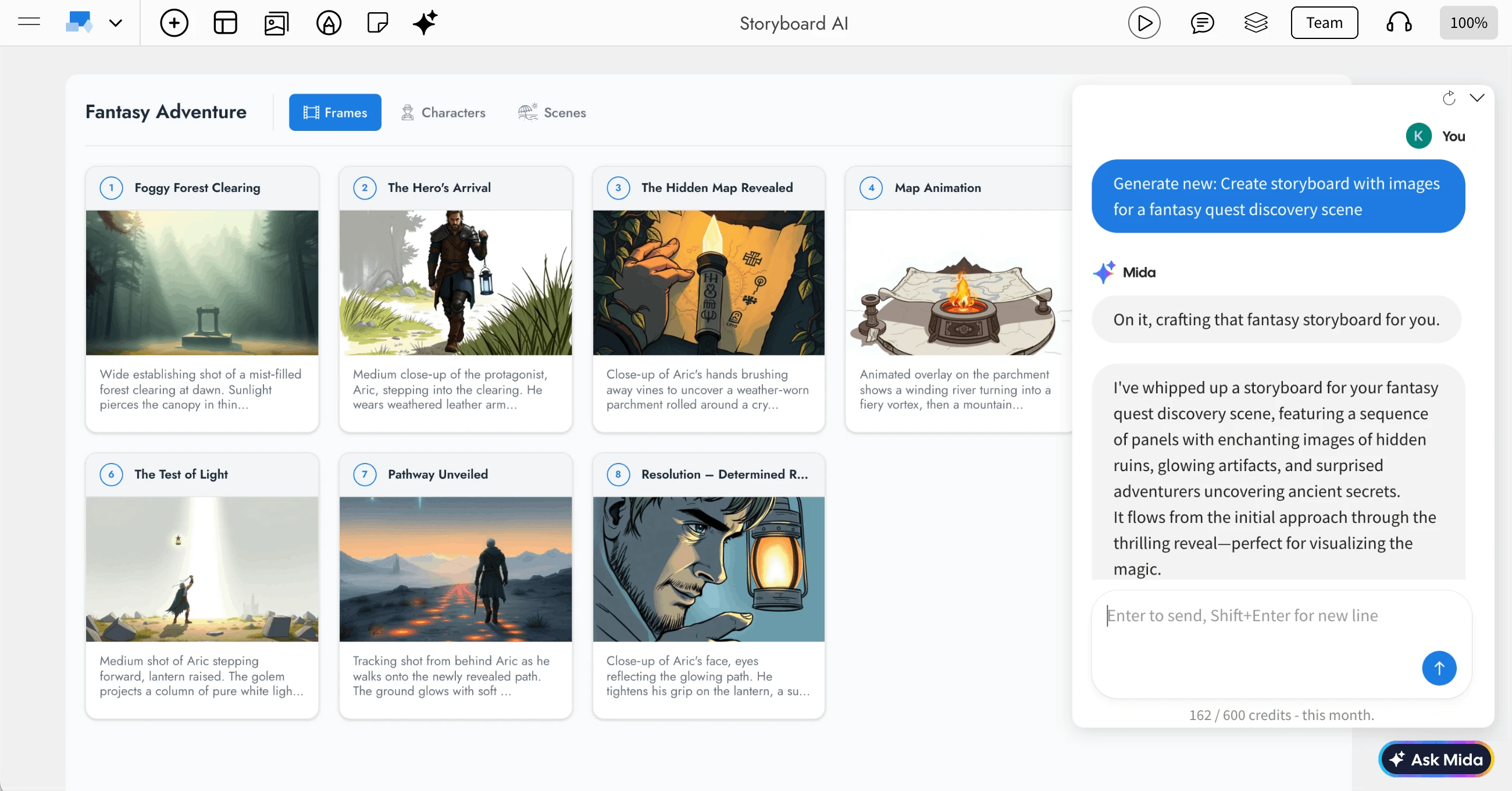
Generate a complete storyboard from a single prompt by simply describing your story
Modify and expand an existing storyboard with follow-up instructions
Generate AI images for frames, characters, and scenes based on descriptions
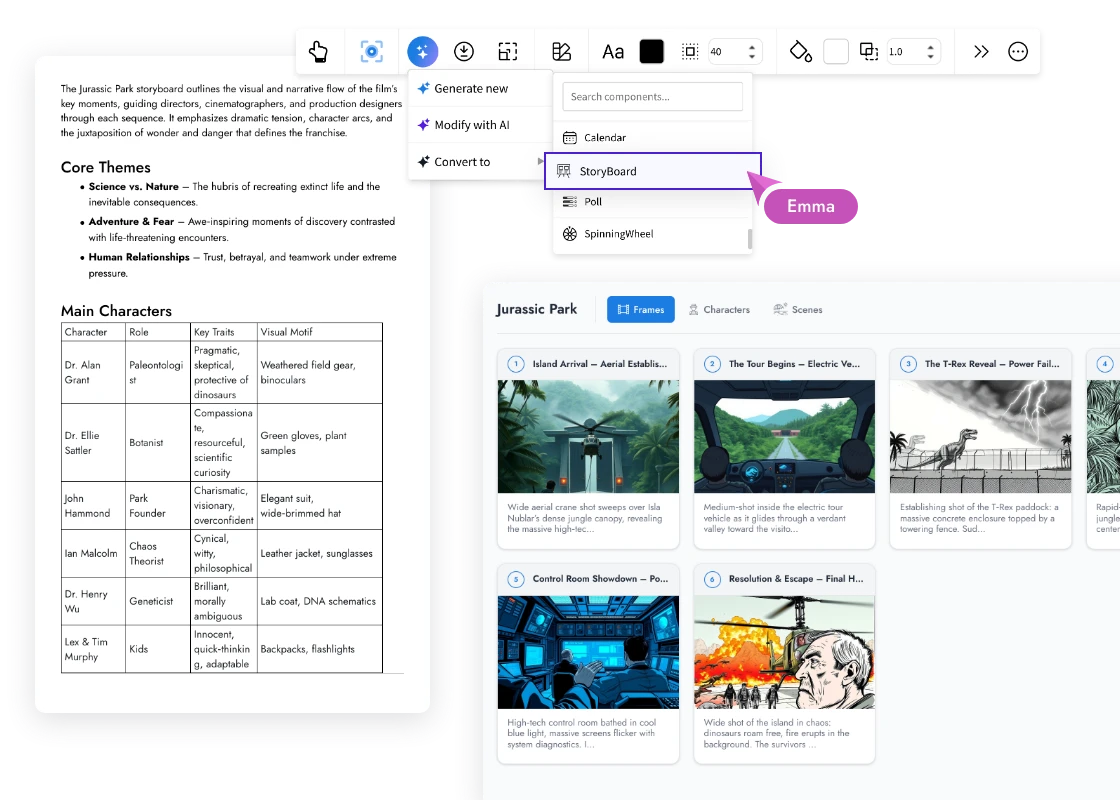
Convert your storyboard into other MockFlow Board components such as Kanban, Gantt, or Calendar to transition from creative planning to execution
The AI prompt bar includes options like Gen Images and Brand Guide integration, giving you full control over whether visuals are generated and how they align with your defined style.
Maintain Visual Consistency with Brand Guide
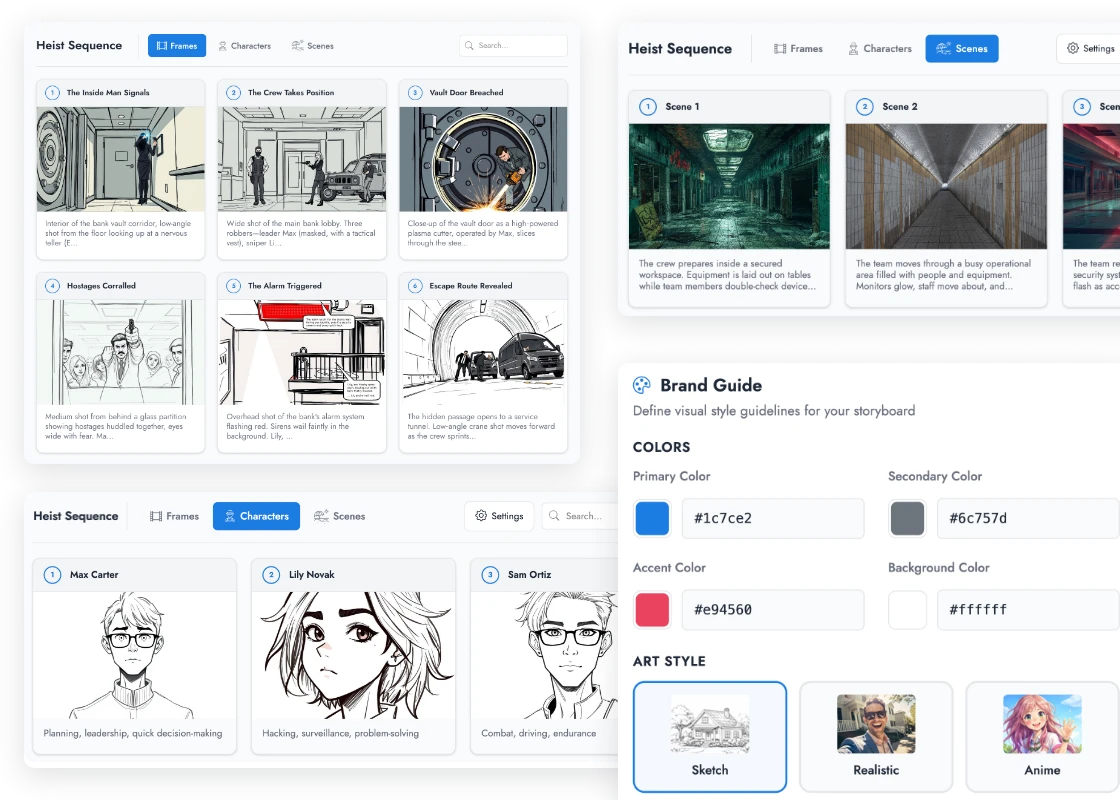
The built-in Brand Guide ensures every storyboard maintains a consistent visual identity. You can define:
Art style such as Sketch, Realistic, Anime, Comic, Minimalist, or Watercolor
Color palette preferences
Style notes and visual references
Do and do not guidelines for creative direction
These settings feed directly into Mida’s AI image generation, so your visuals stay aligned with your project’s tone and aesthetic.
Import Scripts from Industry Standard Tools
If you already have a screenplay or script, importing it is simple. The Storyboard component supports:
Fountain files
Final Draft XML
Celtx project files
Plain text scripts
The parser automatically detects the format and converts scenes, dialogue, and action lines into storyboard frames. You can choose to replace your existing storyboard or merge imported scenes into your current board.
Export and Share with Production Teams
When your storyboard is complete, export options include:
CSV
JSON
PDF
Image ZIP
This makes it easy to hand off to production teams, share with stakeholders, or archive for future reference.
Built for Team Collaboration and Brainstorming
Every feature is designed for teamwork:
Per-frame comments with user attribution
Collaborator awareness so you always know who is contributing
Read-only mode for reviewers
Full undo and redo support
Search functionality to filter frames, characters, and scenes
Light and dark themes
Focus Mode for distraction-free editing
This makes MockFlow Board one of the most collaborative online storyboard tools available today.
Who Is This For
Film and video production teams can plan shots, manage characters, and map scenes before filming begins.
Animation and motion design teams can sequence frames, define camera angles, and attach reference media.
UX and product teams can map user journeys visually, with each frame representing a touchpoint and metadata capturing interaction details.
Marketing and advertising teams can pitch campaign concepts visually and use AI to generate rapid storyboard drafts for clients.
Game development teams can design cutscenes, define narrative beats, and generate AI-assisted concept art.
Education and training teams can script instructional videos, import lesson scripts, and attach audio narration to each frame.
How to Get Started
Open any MockFlow Board.
Go to the Components panel and search for Storyboard.
Drag the Storyboard component onto your board.
Add frames manually or use the AI button to generate a storyboard from a prompt.
Organize scenes, define characters, and customize your Brand Guide.
Collaborate with your team and export when ready.
The Storyboard component brings structured visual storytelling directly into your online whiteboard. From early brainstorming to production-ready exports, everything happens in one connected workspace.
Your story starts here.