
Auto-Generated Style Guide for Wireframes in Specs Mode
Discover how WireframePro's Specs mode simplifies design handoff by auto-generating style guides from your wireframes. Effortlessly transition from concept to implementation with structured visual documentation, ideal for developers and designers.
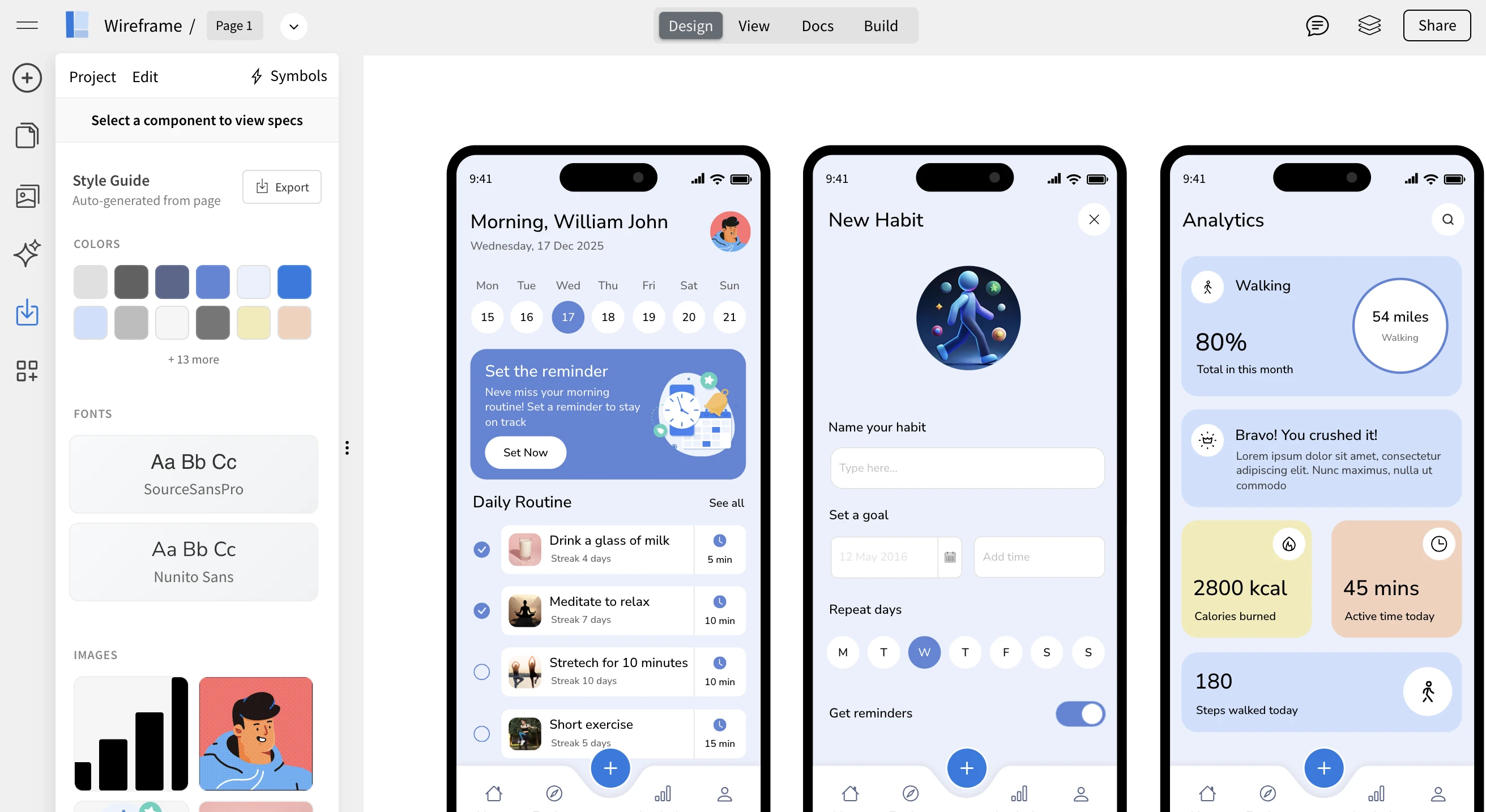
WireframePro now makes design handoff even easier with auto-generated style guides inside Specs mode. Your wireframes can automatically produce a structured style guide based on the colors, fonts, icons, and images used in your design, ready to be reviewed or exported for development.
This enhancement bridges the gap between early-stage wireframes and implementation-ready design documentation, without requiring extra setup or manual work.
From Wireframe to Style Guide — Automatically
Traditionally, teams start with a brand or style guide and then create wireframes based on those rules. In real-world workflows, however, wireframes often come first.
Wireframes are usually created early in the product lifecycle, often by product managers, founders, or non-designers who are focused on layout, flow, and functionality rather than visual styling. As the wireframe evolves into a more detailed and high-fidelity version, colors, fonts, and visual elements naturally start taking shape.
WireframePro now flips the traditional process by automatically generating a style guide from the wireframe itself. Instead of manually documenting styles afterward, Specs mode analyzes your design and extracts:
Colors used across the wireframe
Font families and text styles
Icons and images
Common visual patterns
This gives you a clear, structured overview of the visual system emerging from your wireframe.
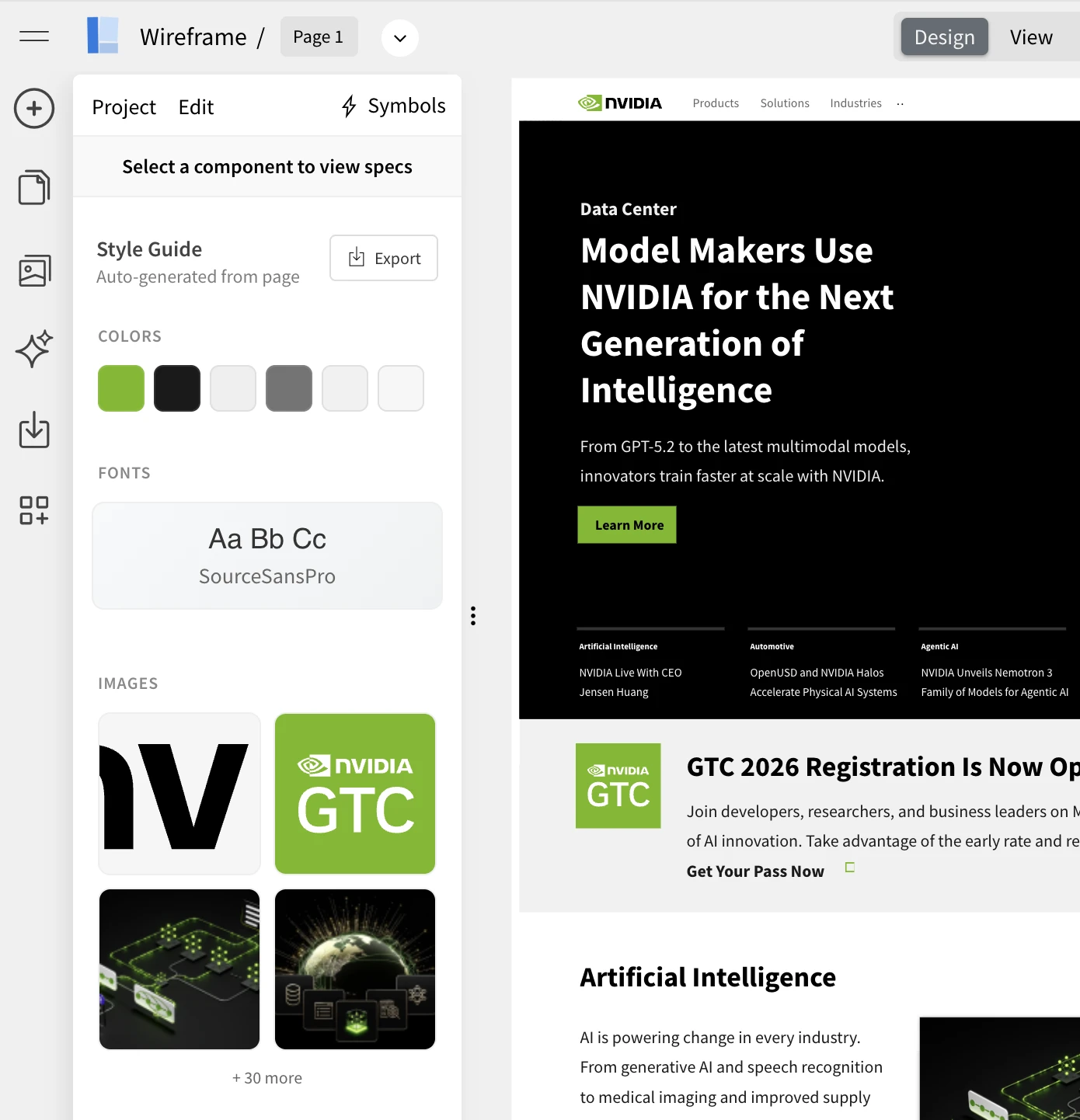
The above screenshot , shows nvidia.com homepage converted to wireframe using chrome extension and then its style guide extracted.
Why This Is Useful
The auto-generated style guide helps in multiple real-world scenarios:
Simpler developer handoff – Developers get a ready reference of styles used in the wireframe.
Better collaboration – Designers and engineers can quickly align on visual decisions.
Clarity for evolving designs – As wireframes become more detailed, the style guide updates automatically.
Ideal for non-designers – Teams can focus on ideas first, without worrying about formal style systems upfront.
Faster transition to high-fidelity designs – The extracted styles act as a foundation for UI refinement.
Instead of manually documenting design tokens, WireframePro turns your working wireframe into a usable style reference instantly.
How to Auto-Generate the Style Guide
Generating the style guide is simple:
Open your wireframe in WireframePro
Switch to Specs mode (available in both Editor and View modes)
The system automatically generates a complete style guide based on your wireframe
You’ll see a structured overview of colors, typography, icons, and other visual elements used — just like the example shown in the screenshot above.
No setup, no configuration, and no manual tagging required.
Export Formats Supported
The auto-generated style guide can be exported in multiple developer-friendly formats:
CSS Variables – Ideal for web projects
JSON (Design Tokens) – Useful for design systems and tooling
Tailwind Config – Perfect for Tailwind CSS–based workflows
These exports help teams directly plug design values into their codebase, reducing back-and-forth and speeding up implementation.
What’s Coming Next
This is just the beginning. Upcoming improvements to the auto-generated style guide will include:
Editing and refining styles directly inside the style guide
Applying updated styles back to the wireframe
More control over tokens and grouping
Expanded export options
The goal is to make the style guide not just a reference, but an active part of the design workflow.
The Auto-Generated Style Guide in WireframePro turns your wireframes into living design documentation helping teams move faster from concept to implementation, with clarity and consistency built in.