
MockFlow Developer Platform: the Boards API, OAuth apps and webhooks
Build boards from your own code. Create spaces and boards, add kanbans, timelines and mind maps, ask Mida to build a board, let your customers connect their MockFlow accounts and hear back when boards change.

The MockFlow Developer Platform opens your visual boards to your own code. The Boards API is a REST API for everything you do in MockFlow by hand: create spaces and boards, place items such as kanbans, mind maps, timelines, charts, flowcharts and wireframes, read boards back as text or images, share spaces and ask Mida, the AI assistant, to build a board from a sentence. OAuth apps let your customers connect their own MockFlow accounts to your product, and webhooks tell your server when boards change.
Everything starts in the developer console, where you create API keys, register OAuth apps, add webhooks and try every call in the browser before you write any code.
What teams build with the MockFlow API
An agency starts every client with a workshop board. When a client signs, the agency's server sends the brief to MockFlow with a prompt such as "Kickoff workshop for a booking app: goals mind map, launch timeline, task kanban", and the board is ready before the first call.
A course planning tool sends each term to a teacher's board. Teachers click Connect MockFlow in the tool, approve it, and the tool creates a term board in their own account with a timeline and the topic for each week.
A marketing team gets a fresh results board every Monday. A script reads last week's numbers and draws them as charts and a table on a new board, ready for the weekly review.
An IT team sets up spaces for new projects. When a project opens in their tracker, a script creates a space named after it and shares it with the project team as editors and the client as reviewers.
A product team keeps a wall of new boards. A webhook reports each new board in the design space, and a script reads its outline and posts a picture of it to the team channel.
An internal assistant answers questions from planning boards. Asked "what did we decide for the Q3 launch?", it finds the board with search and reads it as text, sections and items in reading order.
Three ways to connect: API keys, OAuth apps and webhooks
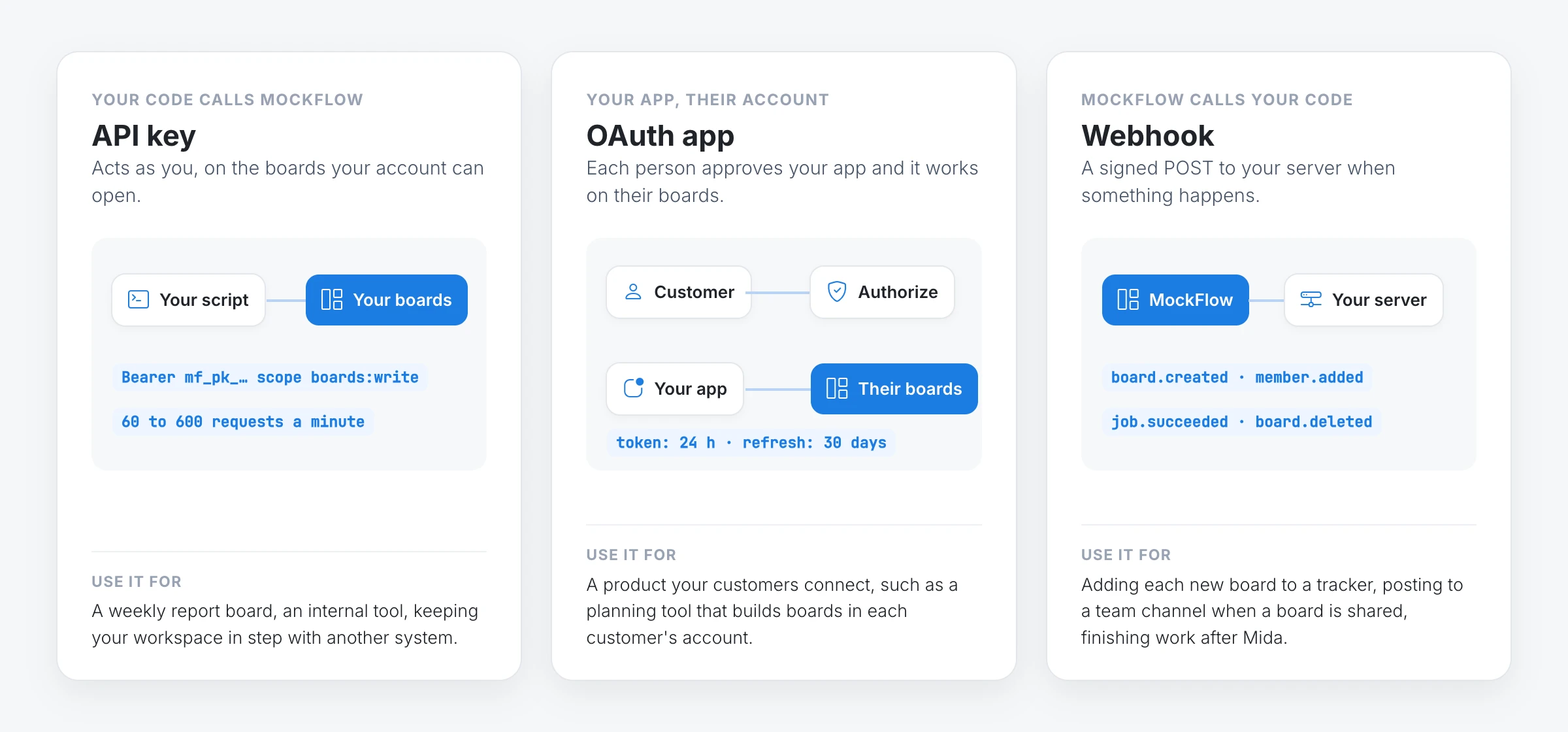
API key: acts as you, on the boards your account can open. Use it for your own scripts, servers and internal tools. You choose its scopes, when it expires and, optionally, the only IP addresses it works from. A workspace owner can also make a key that belongs to the workspace, so it keeps working after the person who made it leaves.
OAuth app: acts for each person who connects it, on their boards, with the scopes they approved. Use it for a product your customers connect to their own accounts.
Webhook: MockFlow calls your server when a board is created, renamed, locked, moved, trashed or restored, when someone gains or loses access, and when a job you started finishes. Each request is signed, retried for a day if your server is down and kept in a seven day delivery log with a Replay button.
How to make your first request with an API key
Open the developer console and sign in to MockFlow.
On the API keys tab, click Create key, give it a name and tick the scopes it needs, such as user:read, boards:read and boards:write.
Copy the key. It is shown once, because MockFlow keeps only a hash of it.
Call the API from a terminal with the commands below.
Keep the key in an environment variable on your server, never in code that runs in a browser:
export MOCKFLOW_API_KEY="paste your key here"
curl https://api.mockflow.com/v1/me -H "Authorization: Bearer $MOCKFLOW_API_KEY"
Create a board and let Mida build it from a prompt. The answer comes back at once with the board's link and a job:
curl -X POST https://api.mockflow.com/v1/boards \
  -H "Authorization: Bearer $MOCKFLOW_API_KEY" \
  -H "Content-Type: application/json" \
  -d '{"title": "Northwind kickoff", "prompt": "Kickoff workshop for a booking app: goals mind map, launch timeline, task kanban"}'
Check the job until its status is succeeded, or add a callbackUrl to the request and MockFlow tells your server when the board is ready:
curl https://api.mockflow.com/v1/jobs/JOB_ID -H "Authorization: Bearer $MOCKFLOW_API_KEY"Prompts need the ai:generate scope as well. To place items yourself instead, add them with POST /boards/{boardId}/items, or many at once with POST /boards/{boardId}/items:batch. Each item type page shows the data a kanban, mind map, timeline or chart takes. The Quickstart walks through the whole flow.
Let your customers connect MockFlow with OAuth apps

An OAuth app lets your product work in other people's MockFlow accounts, with their permission. Each person sees your app's name, logo and description on the MockFlow consent screen, with one line for everything the token will be allowed to do, and chooses Authorize or Deny.
On the OAuth apps tab of the developer console, click Register an app. Give it a name, a description, a logo, your redirect URI and the scopes it may ask for.
Send each person to
https://mockflow.com/mcp-oauth/with your client ID, redirect URI, scopes and a randomstate. They sign in with Google, Microsoft or their email and approve your app.MockFlow sends them back to your redirect URI with a one time code. Your server exchanges it for an access token and a refresh token.
Call the API with the access token exactly as you would with a key. It works on that person's boards only.
curl -X POST https://mockflow.com/mcp-oauth/token \
  -H "Content-Type: application/x-www-form-urlencoded" \
  -d grant_type=authorization_code \
  -d code=AUTHORIZATION_CODE \
  -d redirect_uri=https://yourapp.com/callback \
  -d client_id=YOUR_CLIENT_ID \
  -d client_secret=YOUR_CLIENT_SECRET \
  -d code_verifier=YOUR_CODE_VERIFIER
A new app starts in development, so you and the people in your workspace can connect it while you build. When it is ready, press Publish in the console and anyone with a MockFlow account can connect it. Apps that run on people's devices, such as desktop, mobile or command line apps, are registered as unable to keep a secret and sign in with PKCE. People can disconnect any app themselves under Connected apps in their MockFlow account settings. The OAuth apps guide covers every step.
Hear back with webhooks
Add a webhook on the Webhooks tab of the developer console, or from code, with your server's https address and the events you want:
curl -X POST https://api.mockflow.com/v1/webhooks \
  -H "Authorization: Bearer $MOCKFLOW_API_KEY" \
  -H "Content-Type: application/json" \
  -d '{"url": "https://yourapp.com/mockflow/webhook", "events": ["board.created", "member.*"]}'
Check the MockFlow-Signature header on each request before you trust it, answer within 10 seconds, then do the work. The Webhooks guide has signature checks in JavaScript and Python.
API limits on each MockFlow plan
Every plan can use the API, and the API follows the same rules as the app: a call is refused exactly when the same action would be refused in MockFlow.
Basic | Plus | Max | |
|---|---|---|---|
Requests a minute, per key | 60 | 300 | 600 |
Boards | 3, trashed ones included | Unlimited | Unlimited |
Spaces | 1 | Unlimited | Unlimited |
Generate, modify and review with Mida | Not available | With AI credits | With AI credits |
Share a space | As reviewer, up to 5 per space | Admin, editor or reviewer | Admin, editor or reviewer |
Trash, restore and move boards between spaces | Not available | Yes | Yes |
What the API does not do
A key reaches only what its account can open. A scope is necessary, not sufficient: a key with
boards:writestill cannot change a board its owner cannot open.Webhooks do not fire for each edit to the items on a board. They report boards being created, changed, shared, trashed and restored, and jobs finishing.
Tokens and codes expire. OAuth access tokens last 24 hours and refresh tokens 30 days, and an authorization code must be exchanged within 10 minutes.
Published OAuth apps need a real domain. Publishing needs a description, a logo and an https redirect on your own domain rather than localhost.
A workspace can have up to 25 OAuth apps and 25 webhooks.
Many other parts of MockFlow, such as live presence, team chat and board exports, are also available through the API. The API reference lists every operation and the scope it needs.
Start building
Quickstart: a key and your first board in a few minutes.
What you can build: ideas with the steps each one takes.
API examples and OAuth app examples: complete projects to download and run.
Developer console: keys, OAuth apps, webhooks and the Try it console.
To work on your boards from an AI assistant such as Claude or Cursor instead of your own code, use the MockFlow MCP server.