10 Best Whiteboarding Tools with AI & Templates for Teams in 2025
Introduction
Brainstorming has gone digital, and it’s never looked this interactive.
From mapping product ideas to planning marketing campaigns, modern teams now think, draw, and collaborate on a shared digital canvas. Whiteboarding tools have replaced the cluttered meeting room boards with something smarter, infinite, visual, and built for remote and hybrid collaboration.
These tools turn scattered thoughts into connected ideas. Teams that actively collaborate on a shared digital canvas often find their discussions more focused and meetings shorter, since the board itself becomes a living reference point for ideas and decisions.
But with so many options available, from simple sketch-style boards to advanced AI-powered platforms, choosing the right one can feel overwhelming. The best whiteboarding tools today combine clarity with creativity, offering smart templates, integrations, and collaboration features that keep teams aligned from idea to execution.
In this guide, we’ve curated the best whiteboarding tools for 2025, tested for usability, collaboration, and innovation. Whether you’re a designer, marketer, educator, or product manager, you’ll find the perfect tool to turn ideas into action.
Let’s explore the platforms redefining how teams brainstorm and build together.
10 Best Whiteboarding Tools for 2025
The best whiteboarding tools help teams brainstorm, visualize ideas, and collaborate in real time. These platforms provide digital canvases for sketching, mapping, and sharing workflows across remote or hybrid teams.
Modern whiteboards include AI features, templates, and integrations with apps like Zoom, Slack, and Jira. They enhance creativity, speed up decision-making, and improve team alignment.
In 2025, tools like MockFlow, Miro, and FigJam lead this space with secure, cross-platform, and facilitator-friendly features for education, design, and enterprise collaboration.
Verified Market Reports suggest the global online whiteboard software market is expected to grow to over $6.7 billion by 2033 at a CAGR of nearly 12.3%, reflecting how visual collaboration has become a core part of digital teamwork.
Here are the 10 best whiteboarding tools you can consider in 2025.
Quick Comparison of the Best Whiteboarding Tools in 2025
Tool | Best For | Key Strengths | Pricing (monthly*) |
MockFlow IdeaBoard | End-to-end ideation to design | Brainstorming, ideation, collaborative workspace, AI features, offline access, and strong security options for hybrid teams. | Freemium; Paid plans start ~$5/user/month |
Miro | Remote, cross-functional collaboration | Intuitive infinite canvas with templates for agile planning, retros, and mapping. | Freemium; Paid plans start ~$8 per user/month |
Lucidspark | Process mapping & documentation | Good in data-linked diagrams and structured visuals for technical workflows. | Freemium; Starting at ~$9/month for paid plan |
Mural | Workshops & design sprints | Good for facilitation with built-in timers, voting, and guided templates. | Freemium; Paid plans start ~$9.99/user/month |
Limnu | Realistic, sketch-based collaboration | Mimics the feel of a physical whiteboard with smooth drawing and real-time updates. | Free plan available; Pro ~$5/month (individual) |
Microsoft Whiteboard | Teams within Microsoft 365 ecosystem | Seamlessly supports hybrid meetings and shared documents. | Free (included with most Microsoft 365 plans) |
FigJam | Creative design collaboration | Playful, designer-first interface for ideation and concept sharing. | Free version available; Paid from ~$3/user/month |
Conceptboard | Structured remote collaboration | Emphasizes security, project organization, and real-time teamwork. | Paid plans start at €5/user/month |
Stormboard | Agile planning & brainstorming | Helps convert ideas into actionable tasks with built-in analytics. | Free plan available; paid plans start at $8.33/user/month |
Canva Whiteboard | Visual storytelling & presentations | Easy drag-and-drop visuals for brand storytelling and content planning. | Available as part of the Canva Pro subscription |
*Approx. starting prices (2025)
Let’s dive deep and start with one of the most feature-rich and forward-thinking options: MockFlow.
1. MockFlow IdeaBoard
MockFlow IdeaBoard is the overall best whiteboard tool that stands out as a powerful, end-to-end ideation and design ecosystem. It focuses on transforming scattered ideas into structured, actionable plans.
Built for modern teams, MockFlow IdeaBoard serves as a central hub where designers, product managers, and marketers collaborate visually, refine workflows, and move ideas from sketch to execution.
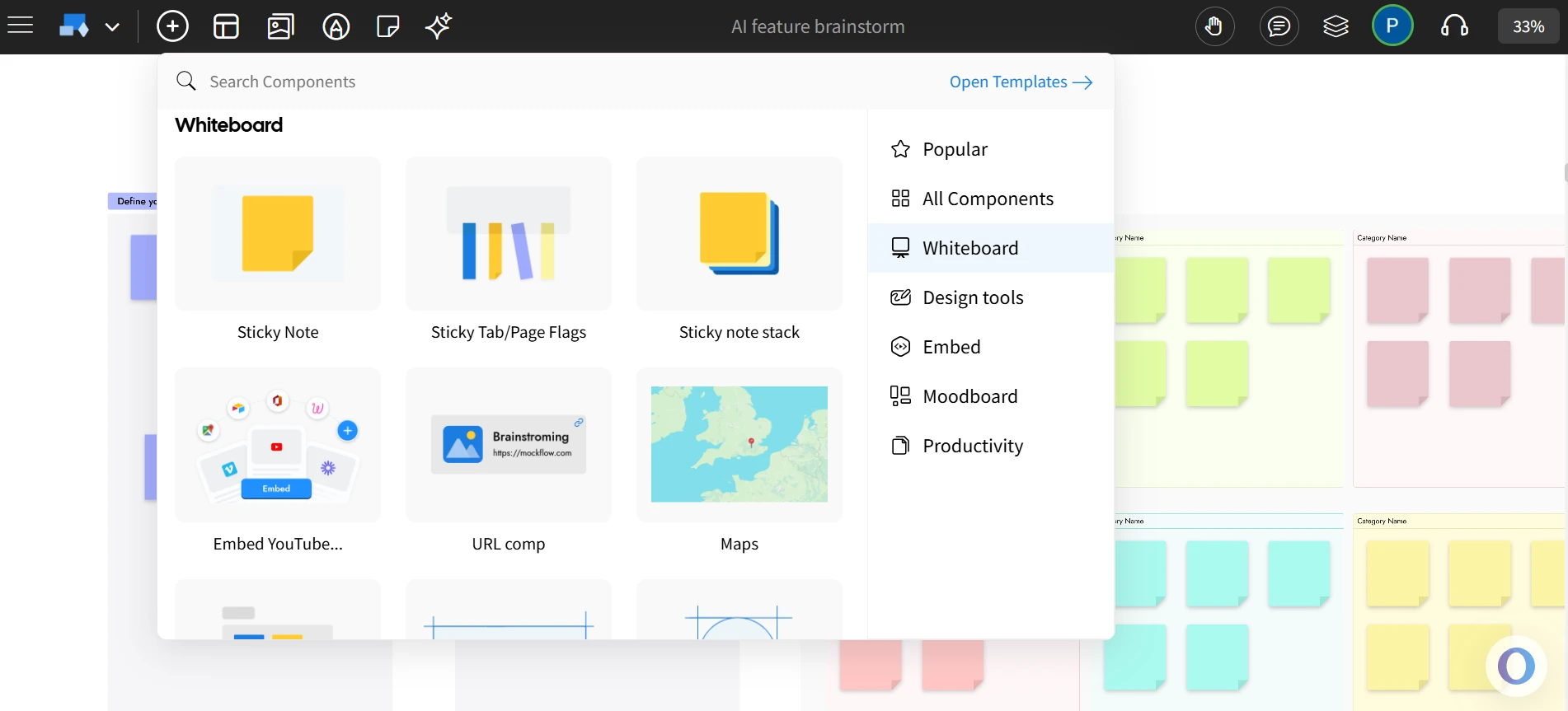
MockFlow lets teams brainstorm visually with sticky notes, moodboards, and quick layouts in real time. It keeps ideas organized and easy to share, so nothing gets lost between the initial sketch and the final design.
Key Features
- Unified Ecosystem: IdeaBoard provides a flexible, drag-and-drop whiteboarding space where teams can visualize ideas, structure discussions, and build on each other’s inputs seamlessly within the same workspace.
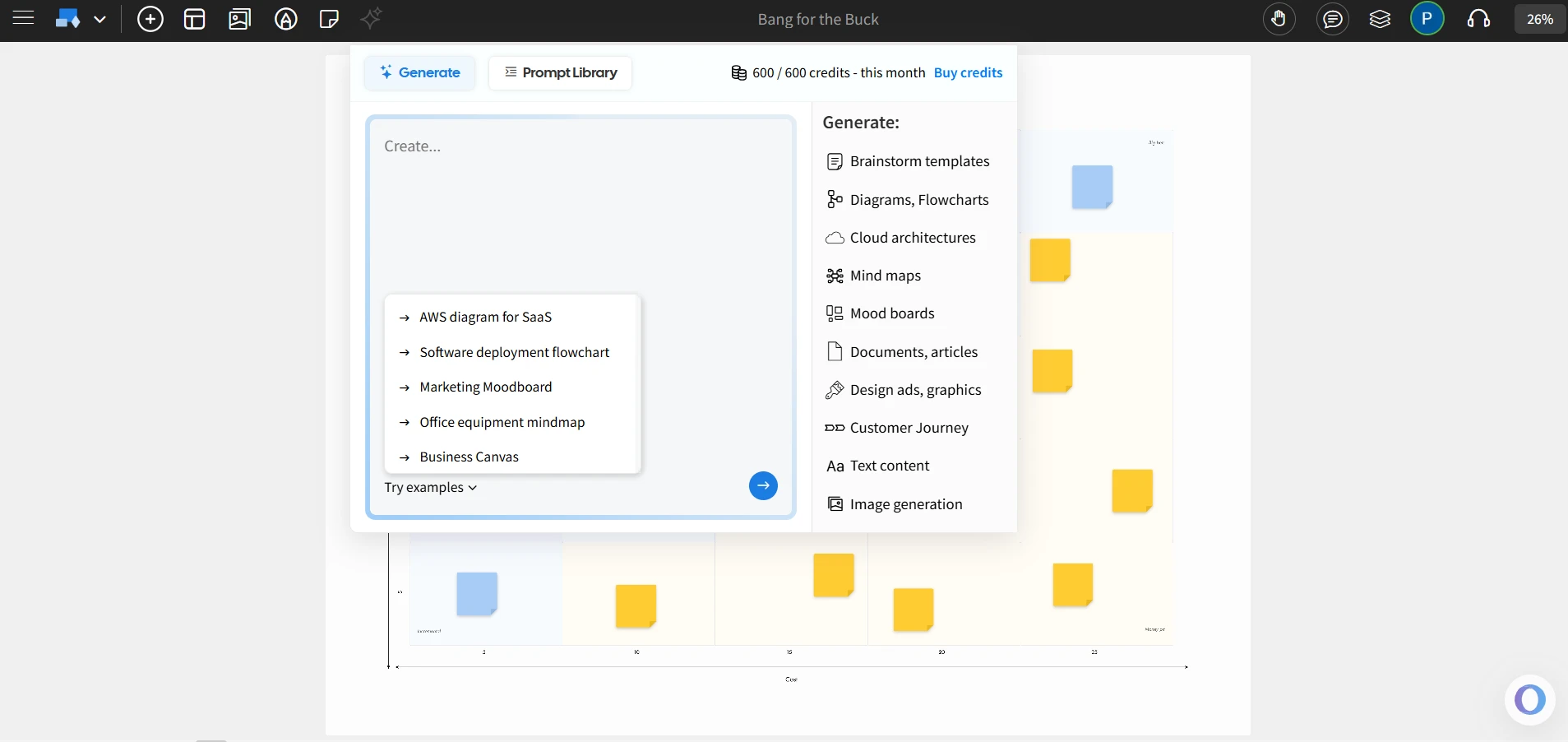
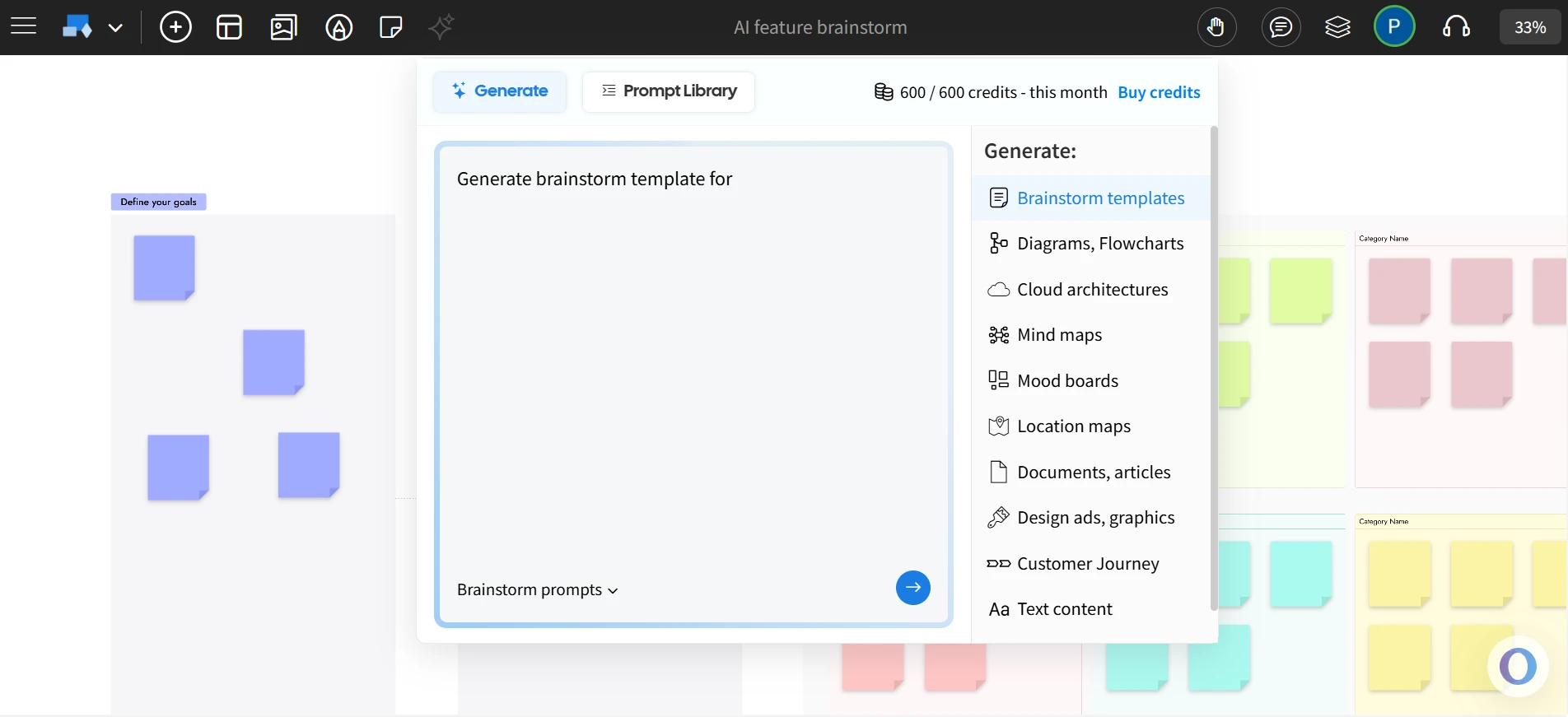
- AI Toolbox for Whiteboarding: The AI toolbox helps teams turn text prompts into custom whiteboards. It generates tailored templates like brainstorming templates, cloud diagrams, customer journey maps or moodboards in seconds, letting teams skip the blank canvas and start creating.
- Offline Collaboration: IdeaBoard’s offline app runs locally, saves files on your device, and gives full control of your data from visual brainstorming sessions. The new File mode lets teams save your whiteboards as encrypted .board files, ideal for teams that prioritize full data control, compliance, and collaboration in a self-hosted workflow.
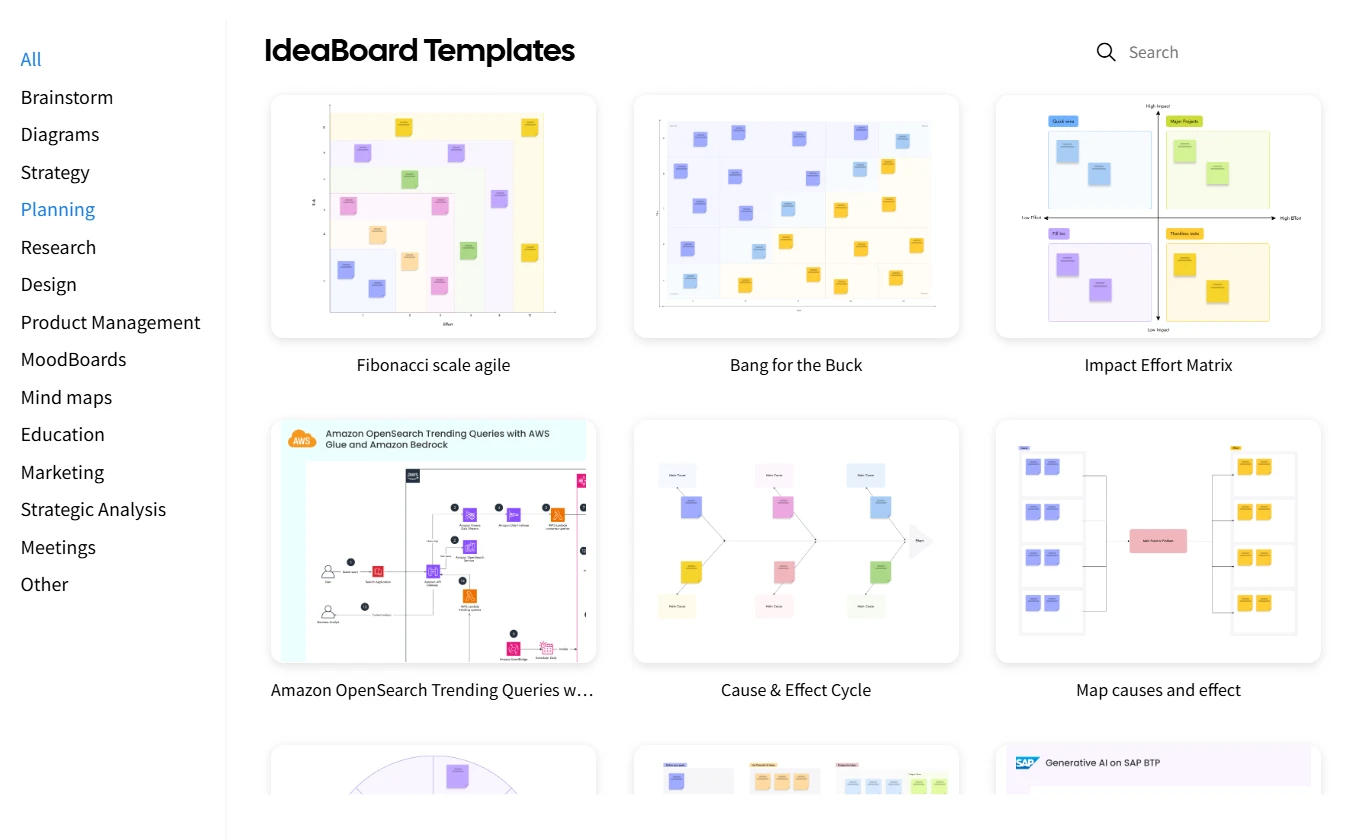
- Customizable Templates: Choose from a library of templates accompanied with an AI prompt library to get started quickly. Teams can also personalize their boards using custom backgrounds.
- Real-Time Collaboration: Teams can collaborate live with comments, reactions, and discussion threads, now including video and voice comments for richer, more natural feedback.
- Seamless Integrations: Connects with tools like Trello and Google Docs for smooth, connected workflows.
- Enterprise Controls: Offers advanced admin permissions, SSO, and secure data access management for enterprise teams.
- Chrome Extension: IdeaBoard chrome extension helps you instantly transform any webpage or web app into a visual brainstorming board. Convert online content into structured mind maps, flowcharts, or summarized documents, turning passive reading into active idea creation.
What It’s Best For
MockFlow IdeaBoard is ideal for teams that rely on visual brainstorming to align ideas quickly and turn discussions into structured concepts.
It suits:
- Product managers using drag-and-drop whiteboards to run collaborative brainstorming and prioritization sessions.
- Remote teams conducting real-time visual workshops with voice and video comments for seamless collaboration.
- Design teams using the board to sketch, cluster ideas, and prepare visual storyboards before wireframing.
- Enterprises using on-premise File Mode to whiteboard securely within internal networks while maintaining data control.
Why It’s a Great Choice
Among the best online whiteboard tools, MockFlow stands out for its ability to connect creativity with structure. With AI-enhanced ideation, offline-first collaboration, and enterprise-ready security, MockFlow transforms virtual collaboration into a smooth, creative workspace for modern, distributed teams.
With cloud deployments now accounting for nearly 72% of all collaborative whiteboard usage in 2024 as per Mordor Intelligence, platforms like MockFlow that offer both online and on-premise flexibility are well-positioned to serve hybrid teams securely.
You can explore pricing at MockFlow Plans or see how it supports remote teamwork for teams of all sizes.
2. Miro
Miro is a widely used online whiteboarding tool designed for teams that collaborate remotely. It helps users brainstorm ideas, plan workflows, and visualize concepts in real time, keeping everyone aligned during distributed work sessions.
Key Features
- Infinite canvas that allows teams to organize ideas, diagrams, and workflows without space limits.
- A diverse template library covering design sprints, retrospectives, and brainstorming sessions.
- Real-time collaboration with commenting, reactions, and built-in video chat.
- Integrations with tools like Slack, Asana, Jira, and Microsoft Teams for connected workflows.
- Options for admin controls, SSO, and permissions suitable for team-based management.
What It’s Best For
Miro is best suited for teams that collaborate frequently across departments or geographies. It simplifies brainstorming, sprint planning, and design mapping for product, marketing, and creative teams that prefer a visual workspace to structure their ideas.
Real-World Use Cases
- Remote teams conducting sprint planning sessions.
- Marketing teams mapping out campaign strategies visually.
- Designers creating mood boards and wireframes collaboratively.
- Product teams running retrospectives or prioritizing features.
3. Lucidspark
Lucidspark serves as a visual diagramming and whiteboarding tool that helps teams clarify ideas, map workflows, and communicate processes efficiently. It bridges creative collaboration with technical documentation through structured visuals.
Key Features
- Drag-and-drop diagram builder with flowchart, network, and process templates.
- Real-time collaboration and commenting for distributed teams.
- Data linking that syncs live information from spreadsheets or CRMs.
- Integration with Google Workspace, Microsoft 365, and Slack for ease of use.
- Version history and sharing controls for maintaining document accuracy.
What It’s Best For
Lucidspark works well for teams that focus on process visualization and structured documentation. It’s useful for engineering, operations, and project management teams who need to translate complex systems and workflows into clear, editable diagrams.
Real-World Use Cases
- Engineering teams outlining system architecture and network flows.
- Operations teams mapping internal procedures and approvals.
- Marketing teams visualizing campaign workflows or customer journeys.
- Project managers presenting task dependencies and milestones.
4. Mural
Mural is a digital collaboration and whiteboarding platform designed for teams that prioritize creativity and structured ideation. It provides an organized visual space for brainstorming, workshop facilitation, and agile planning.
Key Features
- Infinite canvas that supports sticky notes, flowcharts, and diagrams.
- Pre-built templates for design thinking, retrospectives, and project roadmaps.
- Timer, voting, and outline tools for guided workshops.
- Integrations with Microsoft Teams, Slack, and Jira to streamline collaboration.
- Facilitator tools that help control permissions and organize sessions.
What It’s Best For
Mural is suitable for teams conducting design sprints, collaborative workshops, or structured brainstorming sessions. It’s often used by facilitators, UX teams, and project leaders who need a clean digital environment to capture and refine ideas during group sessions.
Real-World Use Cases
- Design teams running ideation or empathy mapping workshops.
- Remote teams hosting brainstorming sessions with guided facilitation.
- Agile coaches conducting retrospectives and sprint planning meetings.
- Consultants leading collaborative problem-solving exercises.
5. Limnu
Limnu is a versatile online whiteboard platform designed to replicate the feel of drawing on a real physical board, making it a popular choice among teams that value visual, organic collaboration. Known for its smooth sketching experience and responsive interface, Limnu bridges the gap between digital collaboration and traditional brainstorming.
Key Features
- Realistic, smooth drawing that mimics the feel of a physical whiteboard.
- Shared boards that update instantly for real-time collaboration.
- Guest access for quick brainstorming with external collaborators.
- Integration with Slack for instant sharing and teamwork.
- Supports video conferencing within the app for seamless discussions.
What It’s Best For
Limnu is ideal for creative teams, designers, educators, and remote collaborators who prefer a more natural drawing experience during brainstorming. It’s also well-suited for hybrid teams that want both structure and flexibility in visual ideation.
Real-World Use Cases
- Remote design teams sketching early product concepts.
- Educators explaining visual concepts to students in live sessions.
- Startups conducting virtual brainstorming and strategy workshops.
- Hybrid teams using Limnu as a shared canvas for interactive meetings.
6. Microsoft Whiteboard
Microsoft Whiteboard is a collaborative whiteboarding tool that integrates directly with Microsoft 365. It helps teams visualize ideas, manage discussions, and brainstorm during meetings in real time.
Key Features
- Cloud-synced whiteboard accessible across web, desktop, and mobile.
- Integration with Microsoft Teams for direct collaboration during calls.
- Drawing, sticky notes, text boxes, and templates for quick ideation.
- Ability to embed documents, images, and links for richer context.
- Auto-save and version history within the Microsoft ecosystem.
What It’s Best For
Microsoft Whiteboard is best suited for teams already working within Microsoft 365. It’s effective for real-time discussions, hybrid meetings, and visual planning across departments, particularly for organizations that prioritize centralized data management.
Real-World Use Cases
- Teams collaborating during Microsoft Teams meetings.
- Educators creating lesson plans or conducting interactive classes.
- Project managers aligning goals and progress in team syncs.
- Corporate teams brainstorming during hybrid workshops.
7. FigJam
Created by Figma, FigJam is a digital whiteboarding tool focused on creative collaboration and design ideation. It enables teams to sketch, plan, and align ideas within the same ecosystem they use for product design.
Key Features
- Infinite canvas optimized for wireframing, flowcharts, and quick sketches.
- Real-time collaboration with cursors and reactions visible to all users.
- Sticky notes, shapes, stamps, and drawing tools for fast ideation.
- Seamless integration with Figma for easy transition from brainstorming to design.
- Ready-made templates for sprints, mind maps, and workshops.
What It’s Best For
FigJam is most suitable for design and product teams that work visually and collaboratively. It helps streamline early-stage ideation and connects creative discussions directly with the design process in Figma.
Real-World Use Cases
- UX and product teams sketching early wireframes.
- Designers hosting brainstorming sessions for new features.
- Creative teams running sprint retrospectives.
- Cross-functional workshops aligning product and marketing ideas.
8. Conceptboard
Conceptboard is an online whiteboarding tool designed to support visual collaboration across remote and hybrid teams. It offers a structured digital canvas where users can brainstorm, map ideas, and co-create visual content in real time.
Key Features
- Infinite whiteboard canvas with support for images, notes, and files.
- Real-time multi-user collaboration and discussion threads.
- Built-in project organization tools for managing multiple boards.
- Access control and data security suited for enterprise collaboration.
- Integration with Microsoft Teams, Google Workspace, and Slack.
What It’s Best For
Conceptboard works well for teams that prioritize project visualization and collaborative review. It’s ideal for marketing, design, and remote project management teams who need a visual space to iterate and share structured feedback.
Real-World Use Cases
- Remote teams conducting visual workshops and planning sessions.
- Creative teams collaborating on mood boards and brand assets.
- Project managers reviewing deliverables and timelines with stakeholders.
- Enterprise teams using secure visual spaces for client presentations.
9. Stormboard
Stormboard is a digital brainstorming and collaboration tool built for structured team ideation. It blends visual whiteboarding with agile task management, helping teams capture ideas, assign ownership, and track progress seamlessly.
Key Features
- Digital sticky notes and templates for brainstorming and planning.
- Real-time collaboration with commenting, voting, and reporting tools.
- Built-in workflow boards for task tracking and project follow-up.
- Integration with Microsoft Teams, Slack, and Jira.
- Analytical dashboards for summarizing meeting outcomes.
What It’s Best For
Stormboard is best for teams that want both creativity and structure in their collaboration process. It’s suitable for agile teams, managers, and strategists who want to turn brainstorming outcomes into actionable tasks without leaving the platform.
Real-World Use Cases
- Agile teams running sprint planning or retrospective meetings.
- Remote teams collecting ideas and prioritizing them for execution.
- Managers tracking brainstorming outputs and next steps.
- Cross-functional teams documenting collaborative sessions.
10. Canva Whiteboard
Canva Whiteboard extends Canva’s design ecosystem into real-time collaboration, offering a flexible space for teams to brainstorm, plan, and visualize ideas. It combines Canva’s user-friendly interface with intuitive whiteboarding features for creative and strategic work.
Key Features
- Infinite canvas with drag-and-drop design elements, shapes, and text.
- Integration with Canva’s extensive library of templates, icons, and visuals.
- Real-time collaboration where multiple users can edit, comment, and react.
- Built-in presentation mode to share ideas directly with teams or clients.
- Compatibility across devices, allowing users to collaborate from anywhere.
What It’s Best For
Canva Whiteboard is ideal for creative teams and marketers who want to merge visual storytelling with planning. It simplifies brainstorming, campaign mapping, and design ideation while maintaining brand consistency within Canva’s ecosystem.
Real-World Use Cases
- Marketing teams planning content calendars and campaign flows.
- Designers collaborating on visual concepts before final mockups.
- Teams hosting visual workshops or remote brainstorming sessions.
- Educators or trainers presenting interactive lessons using visual templates.
Each of the above tools brings its own strengths. Some focus on design precision, others on visual collaboration or simplicity. The right choice depends on how your team works best and what kind of creative flow you want to enable.
Key Features to Look for in Whiteboarding Tools
With so many options available, choosing the right whiteboarding tool depends on how your team works. Some tools emphasize creativity, while others focus on structure or workflow efficiency. But no matter your use case, a few core features define the best whiteboarding tools for teams.
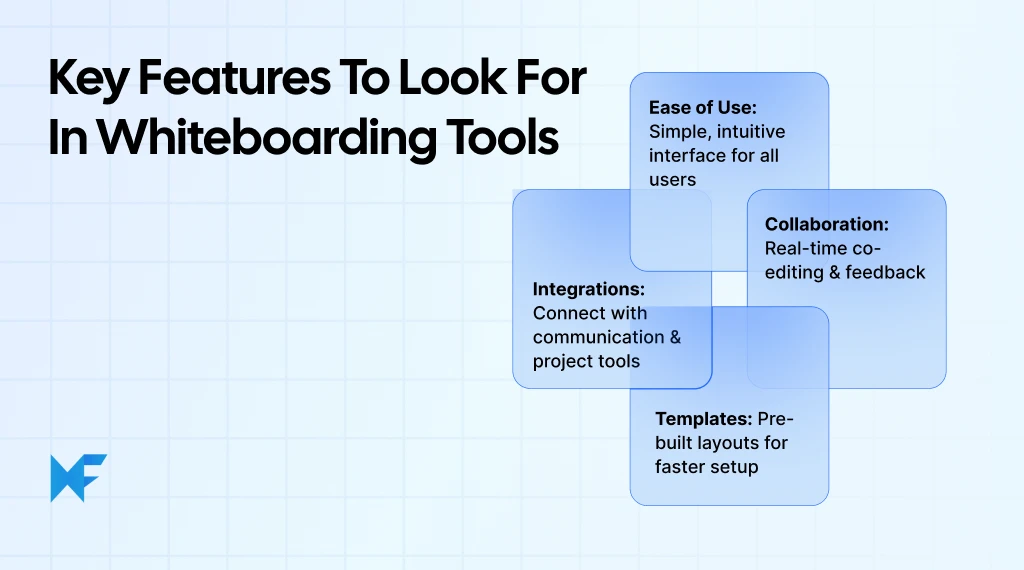
1. Ease of Use
A great whiteboarding tool should feel intuitive from the start. Teams should be able to create, edit, and share ideas without long onboarding or technical learning.
Look for:
- A clean and minimal interface that reduces clutter
- Drag-and-drop controls for notes, shapes, and text
- Ready-made templates for common tasks such as flowcharts or design sprints
- Fast, real-time responsiveness for uninterrupted collaboration
The easier it is to move and connect ideas, the faster brainstorming turns into progress.
2. Collaboration Capabilities
Collaboration is the core of any whiteboard platform. The right tool should bring everyone into the same visual space, whether your team is remote or in the office.
Key collaboration features include:
- Multi-user editing with live cursors and comments
- Built-in chat or reaction tools for instant feedback
- Role-based permissions and sharing controls for security
- Cloud sync that ensures everyone views the latest version
These features keep creativity flowing while maintaining structure and accountability.
3. Customization and Templates
Choose a tool that adapts to your workflow instead of forcing you into one.
Look for:
- A diverse template library for planning, strategy, or design
- Options to customize layouts, color schemes, and board formats
- The ability to reuse templates for recurring projects or workshops
- Support for adding brand visuals or frameworks
Customization helps teams maintain consistency while encouraging creativity. For instance, MockFlow Templates provide ready-to-use frameworks for sprints, mind maps, and product roadmaps. They help teams move from a blank canvas to a structured idea within minutes.
4. Integrations with Other Tools
Integrations help connect your brainstorming sessions with project management and communication platforms. As hybrid and remote work models continue to expand globally, organizations are increasingly relying on integrated SaaS ecosystems to stay connected.
Choose tools that integrate with:
- Project management software like Asana, ClickUp, or Trello
- Communication apps such as Slack or Microsoft Teams
- Design tools like Figma or Canva
- Cloud storage services like Google Drive or Dropbox
Seamless integrations prevent ideas from getting siloed and ensure teams can move from brainstorming to execution without switching platforms.
Why Use Whiteboarding Tools for Your Business?
Whiteboarding tools bring structure to group thinking and make collaboration clearer when we are not in the same room. Remote teams often juggle too many collaboration tools, leading to confusion about when to meet live versus async.
As Paul Leonardi, professor at UC Santa Barbara, notes in a Harvard Business Review podcast, “Companies that are doing well in remote work are helping their employees and giving them guidelines about what kinds of tools we might use for certain kinds of tasks.”
Whiteboarding fits that framework perfectly. It’s the go-to when you need shared visual problem-solving, fast feedback loops, and group alignment.
Below, we cover the practical benefits and how they improve day-to-day teamwork for distributed groups.
Benefits of Online Whiteboards
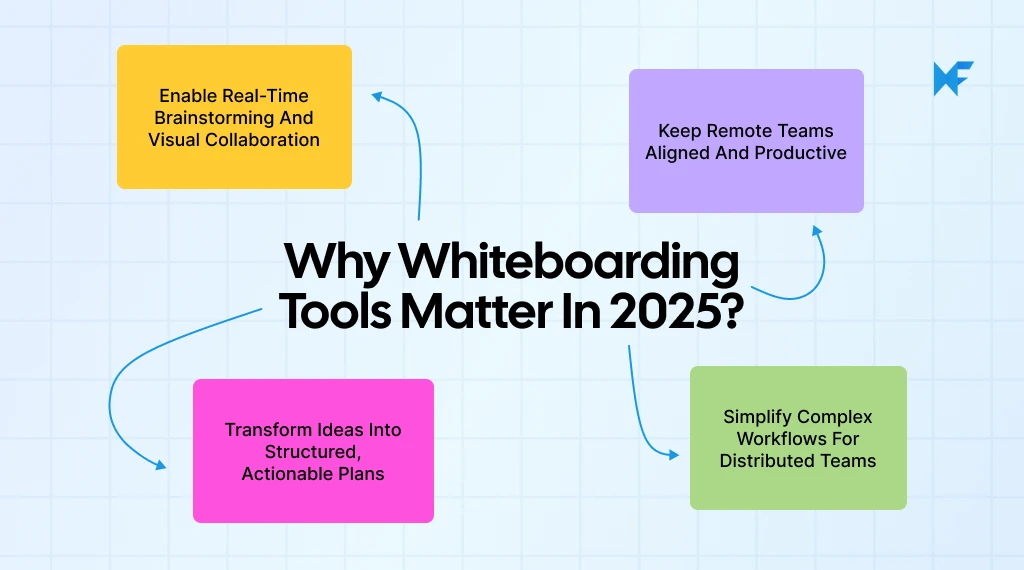
The best online whiteboards simplify how teams brainstorm and plan together.
- Faster idea capture: Sticky notes and shapes help record thoughts instantly.
- Shared visibility: Everyone works on the same canvas, ensuring alignment.
- Reusable templates: Common workflows like sprints or user journeys stay consistent.
- From concept to action: Boards evolve into tasks, roadmaps, or strategy outlines.
- Access anywhere: Cloud sync enables remote collaboration and supports digital workflow needs.
These features help teams stay organized, reduce repetitive meetings, and keep projects moving smoothly.
How Whiteboarding Enhances Team Collaboration
Modern whiteboards create a shared visual space that makes teamwork feel natural.
- Real-time alignment: Multiple users edit and contribute simultaneously, keeping everyone engaged in the same conversation.
- Contextual feedback: Comments and quick annotations add clarity without long back-and-forth threads.
- Flexible participation: Team members can join live or contribute later, which suits different schedules and time zones.
- Clear ownership: Sections, frames, and labels help assign next steps and track progress.
- Integrated workflow: Boards connect easily with tools like Slack or Asana for seamless follow-through, supporting team productivity and virtual project planning.
For teams searching the best whiteboard online or comparing whiteboard tools for teams, these collaboration gains are often the deciding factor, especially when work spans functions, locations, and timelines.
For example, MockFlow IdeaBoard enhances collaboration through its AI-powered whiteboarding tools that help teams generate, organize, and discuss ideas in real time. With features like AI mapping, voice and video comments, offline access, and Trello integration, teams can brainstorm visually and stay connected across any workflow.
Reports from Mordor Intelligence also show that North America holds nearly 38% of the current market share, while Asia-Pacific is expected to see the fastest growth thanks to strong digital adoption.
Also read → This is how you can create a mockup website for a client
How to Choose the Best Whiteboarding Tool for Your Needs
Finding the best whiteboarding tools depends on how your team works, collaborates, and scales. What feels intuitive for a small startup may not suit a large enterprise team running multiple projects. The goal is to choose a tool that enhances, not complicates, your workflow.
Here’s how to approach the decision logically.
Consider Your Team Size
Your team’s size directly shapes what features matter most:
- Small teams (1–10): Choose lightweight, free online whiteboard tools with easy setup, templates, and guest access.
- Mid-sized teams (10–50): Look for organized workspaces, permissions, and integrations with apps like Asana or ClickUp.
- Large teams (50+): Prioritize admin controls, SSO, and enterprise integrations with tools such as Microsoft 365 or Slack.
Consider Your Budget
Many whiteboarding tools online offer free versions, but scaling teams need advanced features.
- Free plans: Best for individuals, educators, and small teams that only need essential features like sticky notes, basic drawing tools, and a few boards.
- Mid-tier or paid plans: Ideal for teams that use whiteboards regularly for design sprints or workshops. These plans include advanced templates, unlimited storage, and better export formats along with improved admin tools.
- Enterprise plans: Built for organizations that require advanced compliance, centralized billing, and dedicated onboarding support. They are most useful for cross-department collaboration and long-term scalability.
Here, MockFlow IdeaBoard is a good option to consider. It stands out with tailored options for different stages of growth. Its startup plan helps early teams turn ideas into wireframes faster through intuitive whiteboarding, while the enterprise plan supports larger organizations with advanced security, admin controls, and scalable collaboration. Every plan delivers the same smooth, real-time design experience that helps teams move from brainstorming to execution effortlessly.
Evaluate Collaboration Features
A good tool keeps everyone aligned, wherever they are.
Key collaboration features to evaluate:
- Real-time co-editing: Multiple users should be able to edit simultaneously without lags or version conflicts.
- Commenting and tagging: Helps teammates provide feedback directly within the board context.
- Presentation mode: Simplifies sharing ideas with stakeholders without leaving the platform.
- Permissions and roles: Essential for managing who can edit, view, or comment.
- Cross-platform access: Ensure compatibility across desktop, tablet, and mobile so collaboration remains flexible.
- Offline sync: Some tools allow offline editing, which updates automatically once connected.
Team workflow enhancements to look for:
- Integration with Slack, Teams, or Google Workspace to keep everyone updated.
- Cloud storage options for autosaving and backup.
- Clear activity logs and version history for tracking progress.
- Shared templates to standardize sessions like sprint retros or roadmap planning.
Before finalizing a tool, run a few pilot sessions to test comfort, speed, and collaboration flow. The best whiteboard for your team will make creativity feel natural, eliminate friction, and turn ideas into outcomes faster.
If you’re looking for a tool that adapts to different team styles and collaboration needs, MockFlow’s whiteboarding platform offers an intuitive space for visual thinking. With AI-assisted ideation, drag-and-drop mapping, and secure enterprise controls, teams can turn scattered ideas into clear, actionable visuals without switching tools or losing creative flow.
Conclusion
Choosing the best whiteboarding tool isn’t about picking the flashiest interface. It’s about finding one that truly matches your team’s flow. The right platform should simplify how ideas move from thought to action, whether you’re mapping strategies, designing workflows, or collaborating remotely.
In 2025, whiteboarding tools have evolved from being simple sketchpads to becoming essential spaces for digital teamwork. They bridge creative thinking and structured execution, helping distributed teams work like they’re in the same room.
If your team values clarity, collaboration, and speed, it’s worth giving MockFlow IdeaBoard a try. With built-in brainstorming, planning, and AI features, it’s designed to make whiteboarding a natural part of your workflow, not an extra step.
Start with the free version or visit our pricing page to find a plan that scales with your workflow.
FAQs About the Best Whiteboarding Tools
1. What makes MockFlow one of the best whiteboarding tools in 2025?
MockFlow stands out for its IdeaBoard white-boarding workspace which supports drag-and-drop visual thinking, AI-assisted templates for brainstorming, diagramming and journey-mapping, video and voice comments for richer feedback, offline/desktop access and integrations with tools like Trello and Google Docs. Together these features help teams turn ideas into structured visuals efficiently.
2. What are the best whiteboarding tools for remote teams?
For remote workshops, tools like MockFlow (IdeaBoard), Miro, and Mural offer robust real-time collaboration. In particular, MockFlow IdeaBoard’s mix of whiteboard-centric features (template library, voice/video comments, offline mode) makes it especially capable for hybrid and distributed teams.
3. Which whiteboard is best for product and design teams?
MockFlow’s IdeaBoard is built for visual collaboration across product and design workflows. It supports brainstorming, mapping user journeys and organizing ideas. While the companion module WireframePro handles wireframing and prototyping, the whiteboard portion focuses on idea-generation and visual alignment before design hand-off.
4. What’s the top free digital whiteboard for online teaching?
MockFlow’s IdeaBoard includes a free plan that supports collaborative boards, drag-and-drop visuals, and easy link-sharing for student access. Educators can run visual lessons, brainstorming sessions, and interactive exercises without complex setup. MockFlow also offers 50% discounted plans for students, teachers, and educational institutions, making advanced features more affordable for teachers and academic teams.
5. Which whiteboard has the best templates and facilitation features?
IdeaBoard includes a wide pre-built template library (e.g., SWOT, customer journeys, diagrams) and supports facilitation features like voting and layout grids. Advanced collaboration elements like voice/video comments further enhance session productivity.
6. What AI capabilities does MockFlow offer for whiteboarding?
IdeaBoard now offers an AI Toolbox to generate whiteboard templates, diagrams, and flowcharts from text prompts. These capabilities help teams jump-start sessions and reduce setup time in brainstorming workflows.
Top 8 Microsoft Whiteboard Alternatives for Remote Work & Collaboration
Introduction For remote and hybrid teams, effective whiteboarding is crucial to maintaining visual collaboration and...

10 Best Miro alternatives: Best Whiteboard Tools for 2025
Introduction: Looking for the Best Miro Alternatives? Few tools have changed the way teams brainstorm quite like Miro. For many...

6 Best AI Storyboard Generators for 2026: Compare Features & Pricing
Introduction When the script is ready, but turning it into scenes, frames, camera directions, and visual flow takes time, teams...
