
10 Best Miro alternatives: Best Whiteboard Tools for 2025
Introduction: Looking for the Best Miro Alternatives?
Few tools have changed the way teams brainstorm quite like Miro. For many of us, it became the go-to space for capturing ideas, running workshops, and turning scattered thoughts into organized visuals. It’s flexible, creative, and filled with templates that make teamwork feel effortless.
But as our workflows evolved, so did our expectations. Some teams started wanting something simpler that loads faster and feels more focused. Others began prioritizing features like offline access, on-premise deployment, or clearer pricing for growing teams.
Even longtime Miro users have found themselves asking, is there another tool that fits the way we actually work?
Teams are now considering fresh options. These platforms combine whiteboarding, diagramming, and collaboration in ways that suit different types of teams, from startups to large enterprises. Some focus on real-time creativity, while others emphasize structure, data security, and workflow integration.
In this guide, we’ll walk through ten of the best Miro alternatives for 2025, exploring what makes each one unique and who they’re best suited for. We’ll also share why teams prefer MockFlow as the best alternative with a detailed comparison to guide your decision. Let’s start.
10 Best Miro Alternatives in 2025
Miro alternatives are online whiteboard tools that help teams collaborate, brainstorm, and plan visually. These platforms provide features like real-time editing, templates, voting, and integrations for seamless teamwork.
Many users explore Miro alternatives to find simpler, more affordable, or offline-ready options for design, education, or enterprise needs. Popular choices like MockFlow, FigJam, and Lucidspark offer flexible pricing, strong security, and unique facilitation tools.
Choosing the right Miro alternative depends on team size, workflow, and budget. Each option supports better collaboration and productivity for remote and hybrid teams.
Quick Comparison: Best Miro Alternatives (2025)
Tool | Best For | Features | Price* |
MockFlow IdeaBoard | Brainstorming & visual collaboration across teams | Real-time whiteboard + infinite canvas + templates + AI-powered ideation + offline app | Free plan; Paid from $5/mo |
FigJam | Design teams | Deep Figma integration | Free; Paid from $3/mo |
Lucidspark | Hybrid teams | Links to Lucidchart for structured flows | From $9/mo |
Mural | Workshops & sprints | Facilitation templates & tools | From $9.99/mo |
MS Whiteboard | Microsoft 365 users | Seamless Teams/Outlook sync | Free with Microsoft 356 |
Conceptboard | Enterprise & compliance | GDPR/ISO-certified security | From €5/mo |
Collaboard | Secure & offline teams | On-premise deployment | Free; Paid from €5/mo |
Creately | Process mapping | Diagramming + documentation | Free; Paid from $5/mo |
Excalidraw | Simple sketches | Lightweight, privacy-first | Free; Paid from $6/mo |
Klaxoon | Training & workshops | Interactive meetings & polls | Free trial; Paid from $24.90/mo |
*Approx. starting prices (2025)
Here’s the detailed guide to all of the best alternatives to Miro board:
1) MockFlow IdeaBoard — The #1 Miro Alternative for Teams
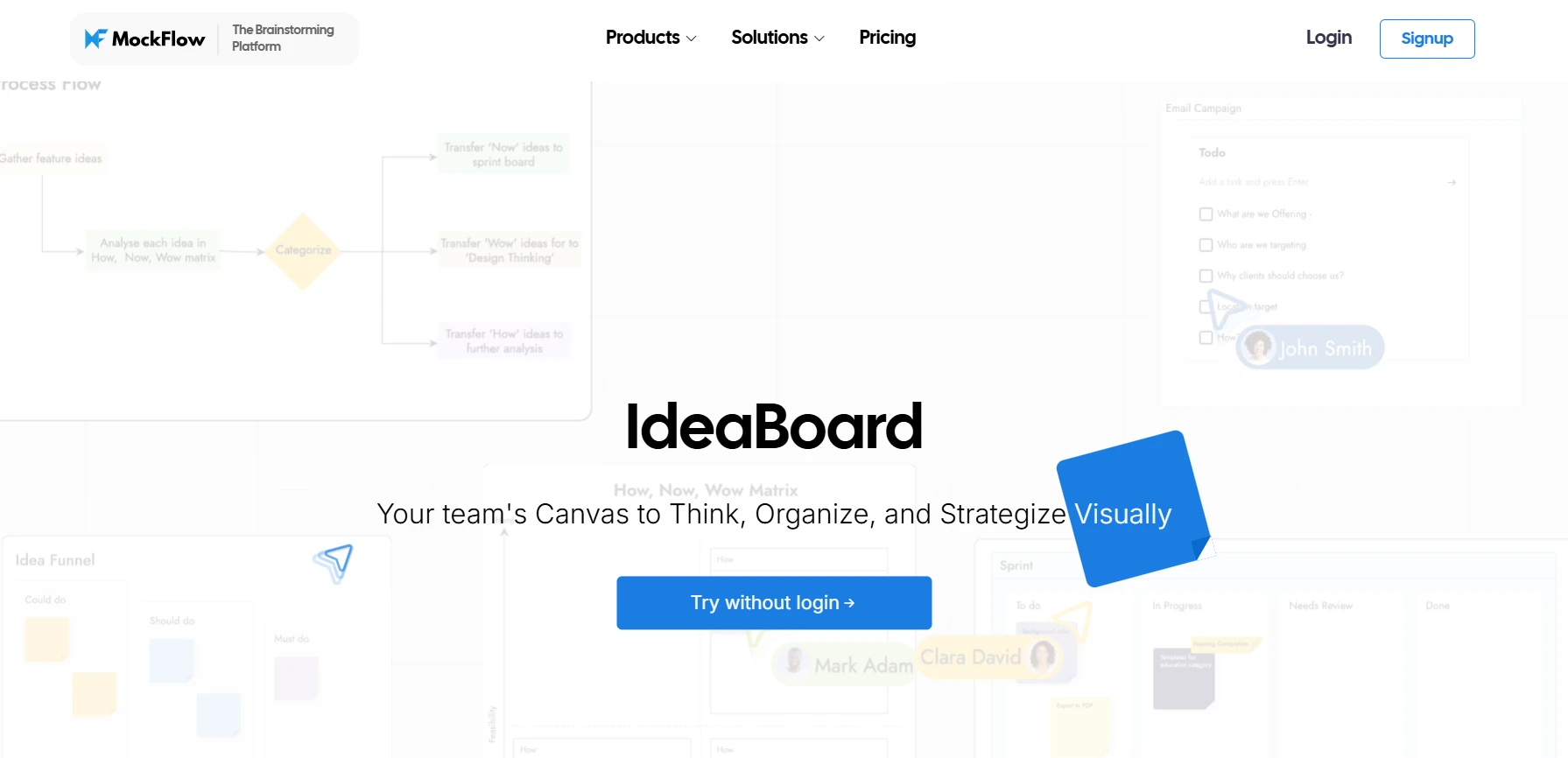
MockFlow IdeaBoard is an AI-powered whiteboarding and collaboration tool that helps teams brainstorm, plan, and visualize ideas in real time. It supports everything from sticky-note ideation to diagramming and flowcharting within one shared workspace that’s ideal for both creative and technical teams.
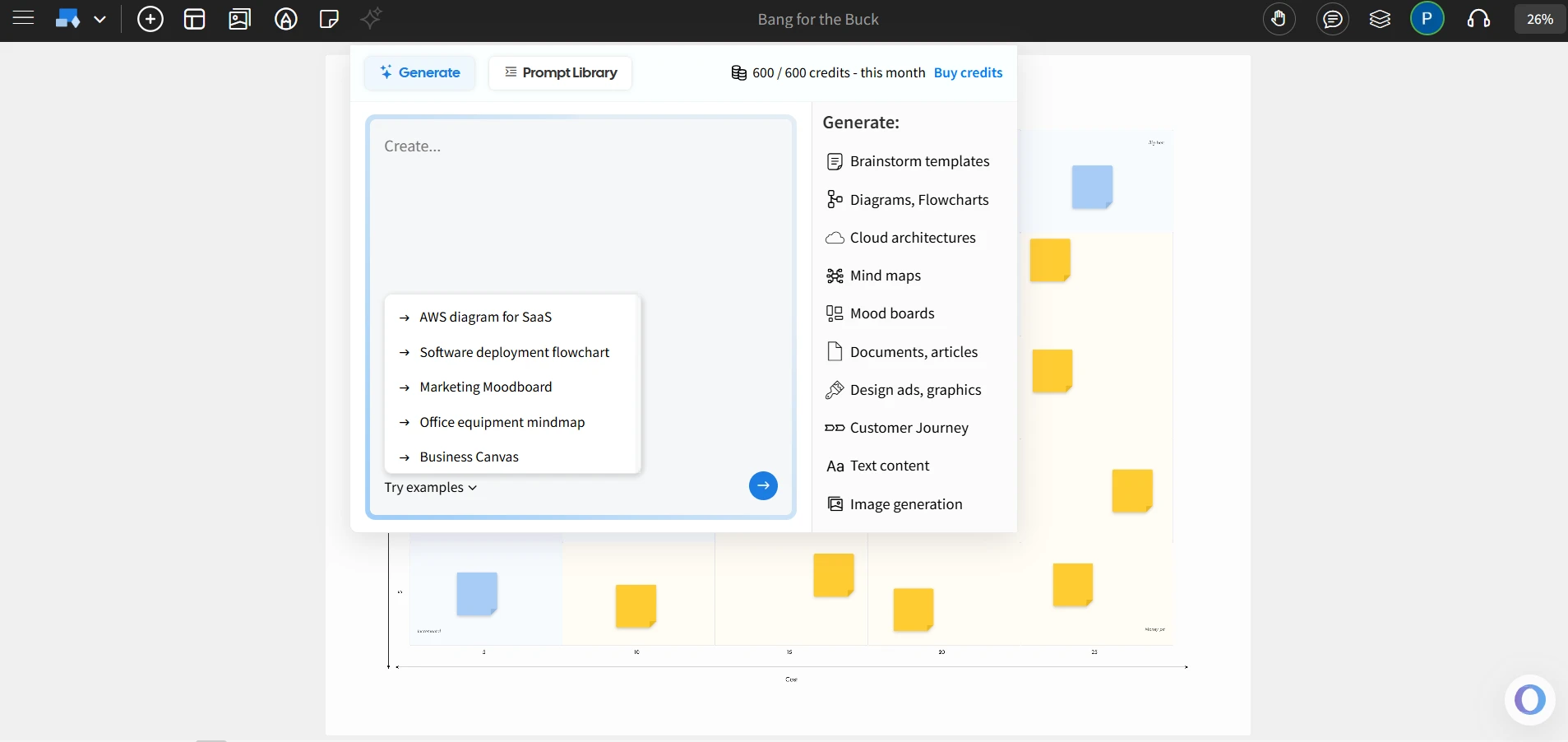
What sets IdeaBoard apart is its AI capabilities, which can automatically generate diagrams, layouts, and visual templates from simple prompts. Combined with features like real-time co-editing, commenting, and seamless integration with other MockFlow tools, IdeaBoard streamlines the early stages of product ideation and planning, keeping teams aligned from concept to clarity.
Best for: Product, UX, and cross-functional teams that want a unified workspace for ideation, whiteboarding, and visual collaboration.
Key features:
- Digital Whiteboard: MockFlow’s IdeaBoard provides an infinite canvas for teams to brainstorm, organize, and visualize ideas, much like Miro but with a simpler interface for ease of use.
- Dedicated tool for Wireframing: MockFlow’s WireframePro provides a wireframing workspace for designing web, mobile, and enterprise app interfaces. Includes precision tools, UI kits, templates for layout design and interaction flow, enabling teams to move from concepts to interactive prototypes effortlessly.
- Real-time Collaboration: Supports live cursors, commenting, and version control, ensuring teams stay aligned and support collaboration seamlessly, regardless of location.
- Intuitive Canvas: Drag-and-drop elements, stickers, images, and shapes onto a limitless board, all in real time with your team.
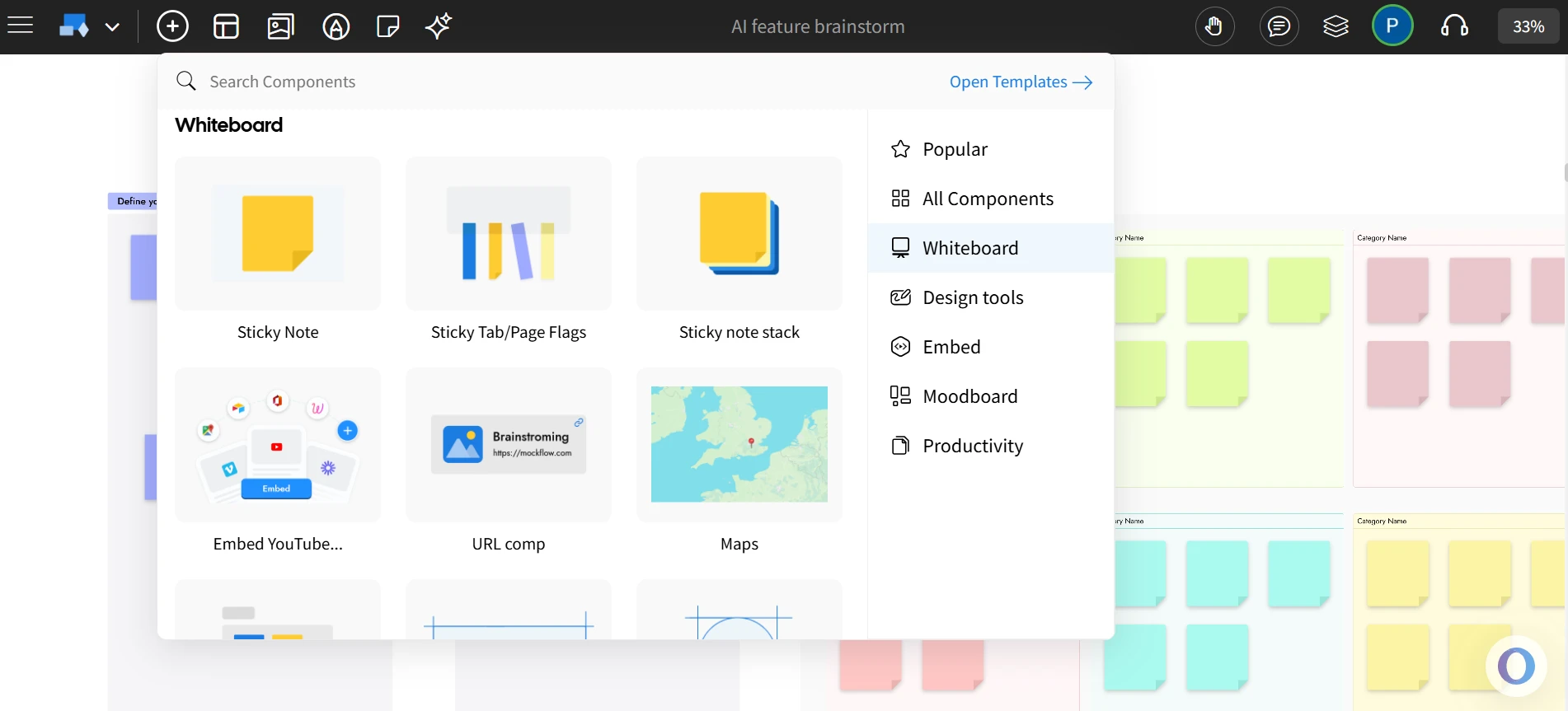
- Powerful components: With native components like customer journey map, design frame, location map, mindmap and more, IdeaBoard offers a richer user experience.
- Offline Capabilities: Offers desktop apps for Mac and Windows, allowing users to continue their work offline without losing access to critical features.
- Chrome Extension: Instantly transform any webpage or web app into a visual brainstorming board. Convert online content into structured mindmaps, flowcharts, or summarized documents.
- AI-Powered Design Tools: Leverage AI to automatically generate flowcharts, diagrams, and product documentation, speeding up the design process and enhancing productivity.
- Enterprise-Grade Security: Includes SSO, role-based permissions, and compliance features, ensuring secure collaboration and data protection for enterprise teams.
- Flexible Workflows: Supports real-time editing, commenting, and version control to streamline collaboration across product, design, and development teams.
Free plan and pricing:
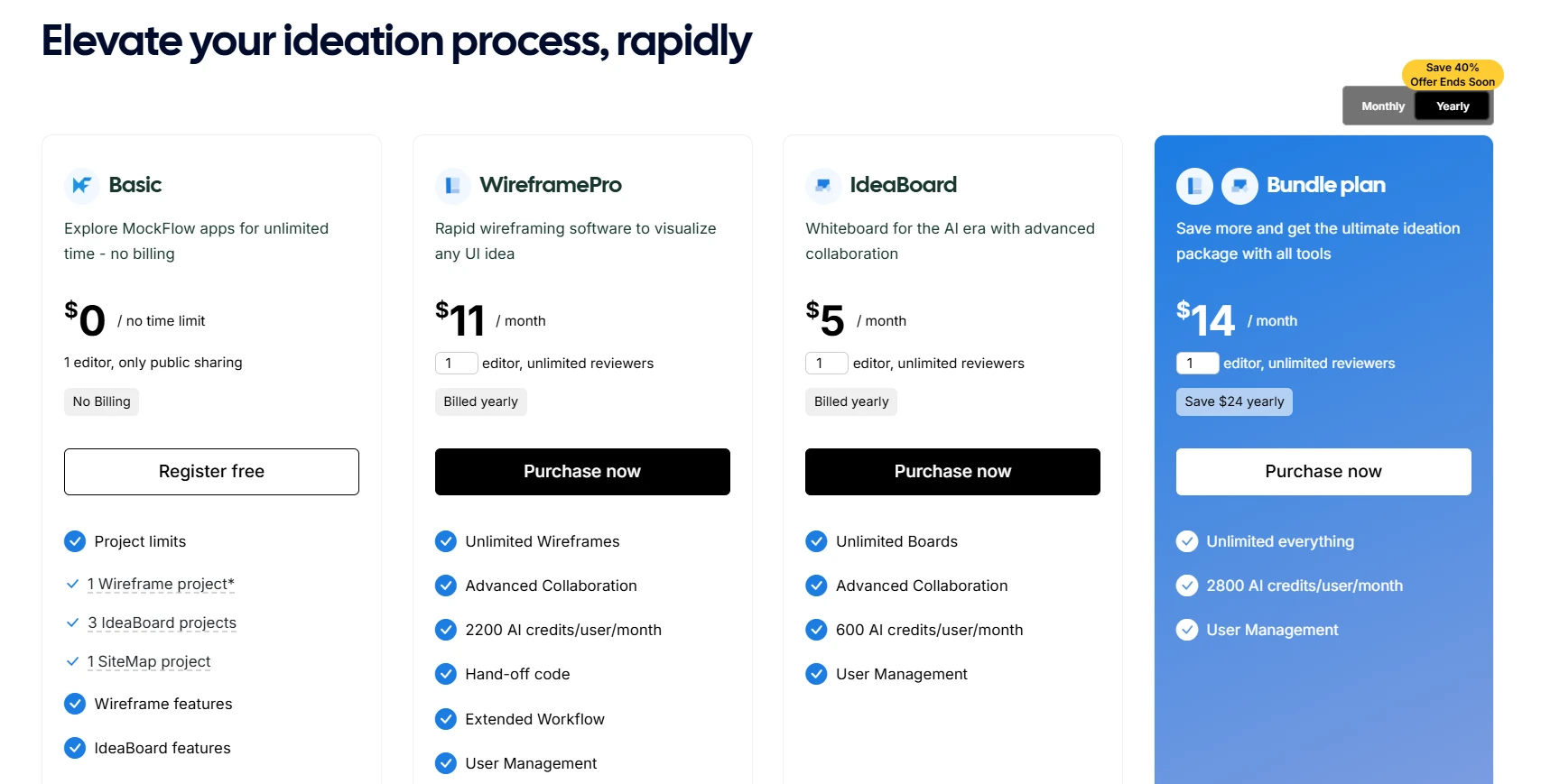
The free plan includes almost all core features with project count limitation. Paid tiers start at $5 per editor per month with extensive whiteboarding features, offering strong value compared to Miro’s $8 starter plan.
The Bundle Plan at $14 per editor per month combines WireframePro, IdeaBoard, and SiteMap with offline access and advanced AI credits, making it a cost-efficient choice among Miro alternatives. You can also find offers running on the plans.
MockFlow stands out as a whiteboard that keeps visual collaboration fast, focused, and friction-free. Instead of overwhelming users with complexity, IdeaBoard offers an intuitive infinite canvas where teams can brainstorm, organize ideas, and co-edit in real time.
With ready-to-use templates, AI-assisted ideation, visual grouping tools, and offline desktop access, teams can continue collaborating anywhere, even with limited connectivity. MockFlow’s streamlined approach makes it easier for distributed teams to stay aligned and move ideas forward quickly.
In short, it delivers a simple, scalable, and highly reliable whiteboarding experience that outperforms Miro for teams that want fast, continuous visual collaboration without unnecessary tool clutter.
2) FigJam (by Figma)
FigJam is a digital whiteboard from Figma designed primarily for design teams that already use the Figma ecosystem. It enables collaborative sketching, brainstorming, and workshop sessions within the same environment as the design system.
Best For: Teams focused on UX/UI design and creative ideation.
Key Features:
- Seamless integration with Figma for easy import and co-editing.
- Tools for collaborative sessions including stickers, emojis, and widgets.
- Pre-built templates for various brainstorming and design sessions.
- Works across browsers and devices for easy access.
- Integrates with tools like Slack, Jira, and Notion for enhanced collaboration.
Pros:
- Seamless workflow for teams already using Figma.
- Visually cohesive interface for creative projects.
Cons:
- Limited diagramming and facilitation tools.
- Less suitable for product or engineering workflows requiring complex visual mapping.
Free Plan:
A free plan is available with limited access controls; advanced permissions and team management are part of paid plans.
FigJam remains a focused option among Miro alternatives, catering mainly to design professionals who prioritize integration with Figma. However, for broader team collaboration or product workflows, platforms like MockFlow provide a more structured, all-in-one environment.
3) Lucidspark (by Lucid)
Lucidspark is a whiteboard platform from Lucid Software, built for visual collaboration and idea organization. It serves as a digital workspace for brainstorming and aligns naturally with Lucidchart for diagramming and documentation.
Best For: Hybrid teams that need a flexible environment for ideation and structured diagramming.
Key Features:
- Real-time collaboration with sticky notes and color-coded cursors.
- Infinite canvas for expanding ideas and thoughts freely.
- Templates for process mapping, brainstorming, and flowcharting.
- Voting and timer tools to help teams make decisions.
- Accessible on all browsers and mobile apps.
Pros:
- Well-suited for structured brainstorming and follow-up documentation.
- Integrates effectively with Lucid’s existing suite of visual productivity tools.
Cons:
- Many advanced facilitation and export features are restricted to premium plans.
- The interface can feel more formal and less creative compared to other Miro alternatives.
Free Plan:
A limited free tier is available, allowing small teams to explore core collaboration functions before upgrading.
Lucidspark remains a reliable option for structured visual collaboration, but teams looking for a unified experience with whiteboarding, wireframing, and design planning will find other options more comprehensive.
4) Mural
Mural is a digital workspace designed for collaboration through facilitation frameworks, making it a preferred tool for workshops, retrospectives, and sprint planning sessions. It focuses on enabling structured group activities rather than open-ended design workflows.
Best For: Teams that prioritize guided workshops, design thinking sessions, or remote retrospectives.
Key Features:
- Sticky notes, text, and images to quickly add and organize ideas.
- Infinite and resizable canvas to expand project space.
- Flexible permissions to control who can edit and view boards.
- Mapping and diagramming tools to visualize flows and processes.
- Icons, GIFs, and images for easy visual expression.
Pros:
- Effective for workshop-style collaboration and remote meeting facilitation.
- Offers a large library of templates designed for structured problem-solving.
Cons:
- The interface can appear dense, requiring a learning curve for new users.
- Limited diagramming and layout control make it less adaptable for detailed design work.
Free Plan:
Mural provides a free tier with restricted board creation and participant access.
Mural serves organizations that rely heavily on guided collaboration. But in this Miro vs Mural comparison, it lacks the flexibility which combines creative ideation, documentation, and interface design in a single ecosystem.
5) Microsoft Whiteboard
Microsoft Whiteboard is a free, lightweight digital canvas included in the Microsoft 365 suite. It’s designed to extend the collaboration experience for teams already working within Microsoft Teams, Outlook, and other Office applications.
Best For: Businesses that operate within the Microsoft ecosystem and require a simple whiteboard companion.
Key Features:
- Full integration with Microsoft 365 tools like Teams and Outlook.
- Simple whiteboarding with sticky notes, text, and basic shapes.
- Real-time collaboration on shared boards with unlimited participants.
- Cross-platform support for web, desktop, and mobile access.
- Option to export to Microsoft tools like PowerPoint and Word.
Pros:
- Simple to use for teams already embedded in Microsoft 365.
- Fully free for users with a Microsoft account.
Cons:
- Lacks advanced features for design, facilitation, or visual documentation.
- Limited integrations beyond the Microsoft suite reduce flexibility for diverse tool stacks.
Free Plan:
Microsoft Whiteboard is entirely free with Microsoft 365 and accessible across web, desktop, and mobile devices.
As a free Miro alternative, Microsoft Whiteboard fits the needs of internal collaboration within the Microsoft ecosystem. However, for product design and multi-departmental workflows, options like MockFlow provide more depth, flexibility, and creative structure.
6) Conceptboard
Conceptboard is a visual collaboration tool built for secure, large-scale enterprise communication. It emphasizes compliance, reliability, and audit-friendly workflows, making it suitable for organizations that must meet strict regulatory requirements.
Best For: Enterprise teams that need secure collaboration environments with detailed access control and compliance support.
Key Features:
- Real-time collaboration with live cursor tracking and comments.
- Visual project management tools for timelines and tasks.
- Secure, GDPR-compliant collaboration with encrypted data.
- File upload options to add PDFs, images, and other files.
- Presentation mode to walk teams through the boards.
Pros:
- Prioritizes privacy and data security for enterprise clients.
- Ideal for teams in industries with strict regulatory or compliance needs.
Cons:
- Offers limited creative templates and fewer design features than most alternatives to Miro board platforms.
- User interface can feel more formal and less intuitive for non-technical users.
Free Plan:
A limited free plan is available with restricted project and user capacity.
While Conceptboard suits compliance-driven enterprises, it lacks the flexible design ecosystem and visual collaboration depth like that of other options in the list.
7) Collaboard
Collaboard offers both cloud-based and on-premises deployment options, targeting organizations that prioritize data sovereignty and offline functionality. It’s one of the few Miro alternatives with offline capabilities, making it suitable for government institutions or teams with strict internal security policies.
Best For: Businesses and public-sector organizations that need control over data hosting and access.
Key Features:
- Self-hosted deployment for full control over data storage.
- Offline mode to continue working without internet access.
- Sticky notes and mind maps to structure ideas and thoughts.
- Real-time collaboration with digital drawing tools and shapes.
- Facilitator tools to manage meetings and workshops.
Pros:
- Provides complete data control through on-premise hosting.
- Useful for teams operating in regulated or security-conscious sectors.
Cons:
- Interface updates are less frequent compared to leading visual collaboration platforms 2025.
- Limited scalability for creative or cross-functional design projects.
Free Plan:
A free version exists with restricted board numbers and feature access.
While Collaboard addresses privacy and compliance, it lacks the creative agility and end-to-end design workflow.
8) Creately
Creately bridges diagramming and collaboration, enabling teams to visualize processes, mind maps, and organizational structures. It functions as both a diagramming and data-connected documentation tool, suitable for process-driven teams.
Best For: Teams focused on process mapping, organizational planning, and documentation-driven collaboration.
Key Features:
- Diagramming and whiteboarding tools for visual project mapping.
- Real-time collaboration with version control and commenting.
- Access to over 1000 templates for workflows and diagrams.
- Easy sharing and exporting to various formats like PNG and PDF.
- Strong data security measures to ensure privacy and safety.
Pros:
- Strong for workflow visualization and business process modeling.
- Offers hybrid collaboration through both online and offline desktop modes.
Cons:
- Less suited for freeform ideation or creative brainstorming compared to more visual Miro alternatives free tools.
- Diagram-heavy interface may overwhelm teams seeking a lightweight tool for quick collaboration.
Free Plan:
Creately’s free tier supports 45 items per canvas, ideal for small teams testing core functionality.
Creately works well for process mapping and visual documentation, but for integrated whiteboarding, wireframing, and ideation, other tools like MockFlow provides a more complete alternative to Miro.
9) Excalidraw
Excalidraw is an open-source whiteboard tool designed for simplicity and privacy. It delivers a hand-drawn aesthetic that helps users sketch ideas quickly without distractions, making it a practical choice for teams that value lightweight, browser-based collaboration.
Best For: Users and teams who prefer minimalistic, open-source tools with a focus on privacy and ease of use.
Key Features:
- Open-source platform with no sign-up required.
- Simple, minimalist design to quickly sketch and ideate.
- Real-time collaboration for instant team input.
- Offline mode for continuous work without internet.
- Hand-drawn style for a unique, organic visual approach.
Pros:
- Privacy-focused and fully open-source with no user tracking.
- Quick to launch and simple enough for spontaneous collaboration.
Cons:
- Lacks integrations with third-party productivity or design tools.
- No advanced facilitation, template library, or AI-assisted design features.
Free Plan:
Completely free and open-source, accessible via Excalidraw.
As one of the most minimalist free Miro alternatives, Excalidraw is excellent for quick diagrams but doesn’t provide the structured, multi-layered workspace that teams need for wireframing, UI design, and project planning.
10) Klaxoon
Klaxoon is a digital collaboration platform focused on interactive workshops, training sessions, and large-scale group engagement. It combines presentation tools with whiteboarding and polling to make meetings and learning sessions more dynamic.
Best For: Trainers, educators, and facilitators managing workshops or hybrid learning environments.
Key Features:
- Interactive features like polls, quizzes, and brainstorming sessions.
- Ready-made session templates to streamline facilitation.
- Real-time engagement with large participant groups.
- Analytics and reports to track team involvement and participation.
- Integrates with tools like Microsoft Teams, Google Meet, and Zoom.
Pros:
- Comprehensive set of tools for interactive meetings and live sessions.
- Useful for educators and teams running large-scale facilitated workshops.
Cons:
- Limited creative control and flexibility for design-driven projects.
- Pricing can be high for small teams focused on everyday collaboration.
Free Plan:
A time-limited free trial is available before transitioning to paid team plans.
Klaxoon fits organizations prioritizing interactive learning and workshops. However, for continuous product ideation, structured workflows, and design collaboration, look for other options.
Each of these tools brings a different take on visual collaboration. But if your goal is to brainstorm faster, stay aligned in real time, and keep ideas flowing without complexity, MockFlow remains the most complete and scalable Miro alternative for teams in 2025.
You can see how it supports remote teamwork for teams of all sizes or check out the free plan to start creating.
Key Criteria to Choose the Right Miro Alternative
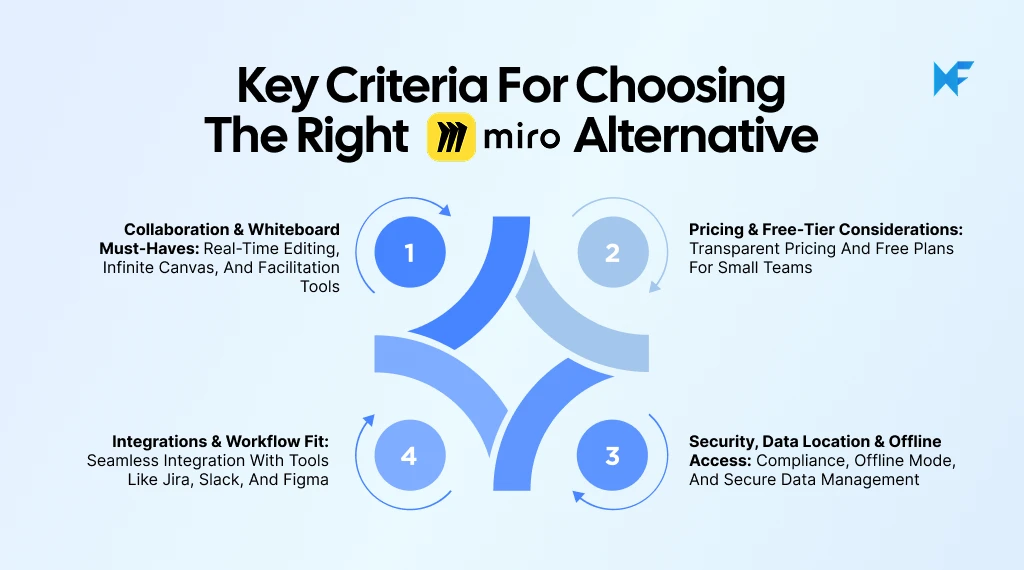
Choosing the right Miro alternative depends on how your team collaborates, manages cost, and ensures data security. The best tool aligns naturally with your workflows while remaining scalable and accessible.
As Paul Leonardi, Duca Family Professor of Technology Management at the University of California, Santa Barbara, states, “Companies that are doing well in remote work are giving their employees guidelines about what kinds of tools we might use for certain kinds of tasks. If the task requires a lot of coordination, you need the right tools to facilitate that.”
Below are some important criteria to keep in mind when choosing the right tool.
1. Collaboration Capabilities
A collaboration tool should make teamwork seamless and productive, not just for remote teams, but for real-time ideation and whiteboarding too. The best alternatives provide an infinite canvas, allowing teams to visualize complex ideas freely.
What to Look For:
- Infinite canvas, real-time co-editing with visible cursors, and instant updates for every participant.
- Ready-to-use templates, sticky notes, timers, and voting features that simplify workshops and design sprints.
- Visual hierarchy controls like grouping, alignment, and layering to organize complex boards.
- Commenting and mentioning systems that support clear asynchronous feedback.
These whiteboard must-haves ensure that distributed teams can brainstorm, align, and execute effectively.
McKinsey’s 2024 research finds that hybrid work routines remain well below pre-pandemic office levels, sustaining the demand for asynchronous, visual collaboration that keeps distributed teams connected.
2. Pricing Flexibility
Cost plays a major role in tool adoption, especially as teams expand. A good Miro alternative should offer transparent pricing and meaningful free tiers, not restrictive trials that limit collaboration.
What to Look For:
- Transparent per-user or team-based pricing that scales predictably.
- Free plans that support practical collaboration instead of limited trials.
- Billing models that allow temporary users or guests without full subscriptions (such as day-pass options).
- Discounts for startups, educators, or non-profits to reduce cost overhead.
For example, MockFlow IdeaBoard offers 50% discount plans for students, teachers, and educational institutions, making advanced features much more affordable for academic teams.
Compare the scope of each platform’s free tier along with EDU or enterprise discounts. Predictable pricing ensures that teams can focus on collaboration rather than cost management.
3. Integration Fit
Integrations determine how easily a whiteboard tool fits into your team’s ecosystem and existing workflows. The goal is to ensure that your whiteboard doesn’t sit in isolation but supports how your team already plans, designs, and communicates.
What to Look For:
- Direct connections with Slack, Teams, or Google Workspace for daily collaboration.
- Integration with Jira, Confluence, or ClickUp to turn whiteboard ideas into tasks.
- Compatibility with design tools like Figma or Adobe XD for visual consistency, and diagramming tools for mapping workflows.
- Support for standard export formats and API access for custom workflows.
For instance, MockFlow IdeaBoard adds free whiteboarding directly inside Trello via a Power-Up, letting teams brainstorm and sketch ideas side-by-side with tasks, all without leaving the Trello board.
When integrations align naturally with your workflow fit, ideas can move from visual discussion to actionable planning without friction.
4. Security and Accessibility
Collaboration platforms must ensure both data safety and reliable access, especially for organizations that manage sensitive client or project data. Beyond compliance, consider where and how your data is stored, and how the platform performs when offline.
What to Look For:
- Compliance with security standards such as SOC 2, ISO 27001, or GDPR.
- SSO, SCIM, and role-based permissions for controlled access.
- Regional hosting or on-premise deployment for teams with compliance or data residency needs.
- Offline or desktop access to maintain productivity during limited connectivity.
Balancing robust security with data location transparency and offline reliability is key to long-term trust and usability in any Miro alternative.
Hybrid work has redefined how teams connect, brainstorm, and execute.
As Harvard Business School’s Raj Choudhury explains, “You cannot expect hybrid work to succeed without updating your technology and management practices.” This underscores why the right collaboration tools are foundational for how hybrid and distributed teams brainstorm, align, and execute seamlessly.
When evaluated against the above core criteria, MockFlow checks every box. It delivers seamless teamwork, transparent and scalable pricing, smooth integration with leading tools, and enterprise-level security with offline access. For teams that need structure without complexity, MockFlow stands out as the best Miro alternative for 2025, offering the right balance between creativity, control, and collaboration.
Now let’s take a closer look at how MockFlow compares directly with Miro.
Miro vs MockFlow IdeaBoard: Detailed Comparison
Both Miro and MockFlow deliver visual collaboration, but they approach it from different angles. Miro is built as a broad-purpose whiteboard for ideation and workshops, while MockFlow channels its strength into structured visual collaboration with its IdeaBoard at the core.
Below is how they stack up across key dimensions:
1. Feature Comparison
Category | Miro | MockFlow IdeaBoard |
Primary Focus | General-purpose whiteboarding, workshops | Brainstorming and Ideation focused |
Ease of Use | Intuitive for quick use, but complexity rises in large boards/teams | Clean, structured interface focused on visual collaboration and fast onboarding |
Templates | Thousands of templates for brainstorming and workshops | Rich library of visual-collaboration and whiteboard templates in addition to AI generated templates with extensive prompt library |
Collaboration Tools | Infinite canvas, live cursors, sticky notes, voting | Video/audio comments, in-app chat, live video meetings, live cursors, version history |
Wireframing & Design | Limited native wireframe capability | Wireframing and UI-planning available via separate WireframePro app. |
AI & Smart Features | Smart clustering, diagram suggestions | AI powered components, visual organization and layout generation, AI assistant for help - MIDA. |
Integrations | Slack, Teams, Figma, Jira, etc. | Trello, Atlassian, Google Docs |
Offline & Access | Web & desktop app | Desktop app with offline mode. |
Security & Access Control | Role-based permissions, SSO available, enterprise-grade security | SSO, enterprise-grade security |
Learning Curve | Moderate to steep when scaling or structuring boards | Minimal; streamlined for visual collaboration and simple ramp-up |
MockFlow’s design-first, canvas-centric IdeaBoard is crafted to keep team focus on visual collaboration without the distraction of shifting across multiple tools.
2. Workflow Alignment
Miro excels at open free-form ideation and large team workshops where one can place ideas on the board, cluster, vote, and iterate. But when teams want more structure (version control, visual alignment, documentation), it can feel loose.
MockFlow IdeaBoard, on the other hand, keeps visual collaboration front-and-center: start with whiteboarding, then (if needed) expand into other MockFlow apps for wireframing or documentation. This means teams don’t lose context by switching tools.
- IdeaBoard: infinite canvas, visual grouping, live comments.
- Optional: WireframePro, SiteMap, if you move into UI/UX planning.
- This means the visual collaboration stays aligned under one roof and ideas stay connected.
Highlight: Teams that prioritize continuous visual collaboration (not just one-off workshops) tend to find MockFlow IdeaBoard better aligned with their workflows.
3. Pricing and Scalability
Pricing can make or break adoption, especially as teams grow. Here's how both compare:
Aspect | Miro | MockFlow IdeaBoard |
Free Plan | Free plan with limited boards/users | Free plan includes templates and AI credits with limited boards. |
Starter Pricing | ~$8/user/month (limited features) | ~$5/editor/month for IdeaBoard (billed yearly) |
Growth Plans | ~$16/user/month for advanced tools | ~$14/editor/month for expanding into other MockFlow apps |
Enterprise | Custom pricing | ~$5-$14/editor/month |
MockFlow’s pricing is designed so teams only pay for what they need. And if visual collaboration is your primary need, IdeaBoard offers strong value without unnecessary extras.
Usage data from TheirStack indicates that more than 100 companies actively use MockFlow, showing steady international adoption among product and UX teams.
4. Verdict: Why Teams Prefer MockFlow
For teams focused on visual collaboration, remote alignment, and whiteboarding that doesn’t lose momentum, MockFlow IdeaBoard is a strong choice. While Miro remains versatile for broad ideation and workshops, MockFlow is built to keep ideas moving: fast onboarding, real-time collaboration, offline support, and a single interface your team can rally around.
With its AI-assisted ideation and layout suggestions, MockFlow IdeaBoard enables teams to move from concept to execution faster than with Miro's AI capabilities.
If your goal is to centralize visual collaboration, simplify tool switching, and scale with structure, then MockFlow’s visually-centric approach makes it one of the most compelling Miro alternatives in 2025.
Conclusion
As collaboration continues to evolve, choosing the right tool is no longer just about features; it is about fit. Miro remains a capable option for general whiteboarding, but teams that want to move faster, collaborate deeper, and align design with execution need a more structured platform.
That is where MockFlow stands out. It brings together everything teams need to brainstorm, plan, and design without switching tools or overspending.
And with the broader user-experience-software market expected to grow from $6 billion in 2023 to $10 billion by 2028, demand for integrated, AI-powered design ecosystems like MockFlow is set to accelerate.
If you are ready to simplify how your team brainstorms and collaborates, start using MockFlow for free to see which option best fits your team. You can also install the IdeaBoard Chrome extension for quick access right from your browser.
FAQs About Miro Alternatives
1. What are the best Miro alternatives for teams in 2025?
The best Miro alternatives for 2025 include MockFlow, FigJam, Lucidspark, Mural, and Microsoft Whiteboard. MockFlow stands out for product and UX teams with its integrated wireframing, whiteboarding, and ideation features. FigJam appeals to Figma users, while Lucidspark and Mural are great for structured workshops. Microsoft Whiteboard offers simplicity and seamless integration for Microsoft 365 users.
2. Why is MockFlow the best Miro alternative for 2025?
MockFlow stands out for teams that want fast, structured whiteboarding without the complexity of traditional visual-collaboration tools. IdeaBoard provides an infinite canvas, real-time co-editing, AI-assisted creation, offline desktop access, and enterprise-grade security. It is simple and affordable to scale, making it a top Miro alternative for 2025.
3. Does MockFlow offer a free plan for whiteboarding?
Yes, MockFlow provides a robust free plan with 3 IdeaBoard project access, essential design tools, and real-time collaboration. The free plan is perfect for small teams or anyone looking to explore product ideation and design without any initial cost.
4. Is MockFlow the best Miro alternative for educators and classrooms?
It supports visual thinking through features like sticky notes, mind maps, flow-charts and built-in templates for brainstorming and concept exploration. Its whiteboard module lets teams collaborate in real time, annotate ideas, and organize content visually. For educational licensing, MockFlow offers a 50% discount for students, teachers and institutions, making it both affordable and classroom-friendly.
5. What features make MockFlow IdeaBoard ideal for design teams?
MockFlow IdeaBoard offers design teams real-time collaboration, an infinite canvas, grouping tools, and a range of templates for mind mapping, planning, and creative exploration. Teams can add sticky notes, images, and diagrams to organize concepts visually. And when they need to move from ideation to UI planning, dedicated tools like WireframePro within the MockFlow suite handle detailed wireframes and design documentation.
6. Is MockFlow suitable for enterprise teams?
Yes, MockFlow is enterprise-ready with features like Single Sign-On (SSO) and SCIM provisioning for automated onboarding/off-boarding. It offers on-premises and offline desktop deployment options for data-sensitive environments. You’ll also find SOC 2-certified hosting, advanced SSL encryption, multi-point backups/disaster-recovery, and a unified team admin panel for managing licenses and user access.
8 Best Milanote Alternatives for Visual Collaboration in 2026
Introduction You already know Milanote is not your only option. The harder part is figuring out which alternative actually fits...
How to Choose the Right Visual Project Management Software for Your Use Case
Introduction Projects tend to fail when no one has a clear view of what’s happening. A Wellingtone report found that 47% of...

6 Best AI Storyboard Generators for 2026: Compare Features & Pricing
Introduction When the script is ready, but turning it into scenes, frames, camera directions, and visual flow takes time, teams...
