8 Best Zoom Whiteboard Alternatives: Smarter Visual Collaboration for 2025
Introduction: Looking for a Zoom Whiteboard Alternative?
We’ve all been there: trying to capture fast-moving ideas on a Zoom Whiteboard during a brainstorming session, only to hit its limits. The canvas feels restrictive. Templates are basic. And when the meeting ends, so does the momentum.
Zoom Whiteboard remains a convenient built-in tool for quick sketches or meeting notes. But when your team’s creativity depends on more flexible collaboration, it starts to feel like a challenge rather than a booster.
That’s why many teams are now searching for a Zoom whiteboard alternative. They want tools that are:
- Easier to use
- More flexible for different collaboration styles
- Better suited for remote and hybrid work
- Designed to keep creativity moving
Whiteboarding isn’t just about sketching ideas anymore. It’s about visual thinking, team alignment, and planning. The right platform makes collaboration feel effortless, whether everyone’s working together in real time or adding thoughts later in their own time zone.
In this guide, we’ve picked the top Zoom Whiteboard alternatives for 2025 for seamless digital whiteboarding and visual communication. By the end, you’ll know exactly which platform fits your team’s workflow best and a detailed comparison between Zoom and MockFlow to help you make a confident choice for your next workshop.
Top 8 Zoom Whiteboard Alternatives in 2025
A Zoom Whiteboard alternative is a digital collaboration tool that offers advanced templates, facilitation features, and integrations beyond Zoom’s native board. It enables teams to brainstorm, diagram, and plan in real time across hybrid and remote setups.
Top alternatives like MockFlow IdeaBoard, Miro, FigJam, and Lucidspark provide AI-assisted whiteboarding, secure SSO access, and pre-built templates. These tools support workshops, agile ceremonies, and visual collaboration with seamless integration across tools like Zoom, Teams, and Google Workspace.
The whiteboard market has exploded in recent years. According to Straits Research, the global collaborative whiteboard software market is projected to reach $8.11 billion by 2033, growing at a CAGR of 14.3%. This surge shows just how rapidly teams worldwide are upgrading from basic tools like Zoom Whiteboard to more advanced platforms.
Below, we’ve shortlisted eight powerful alternatives to Zoom Whiteboard, each offering a unique mix of templates, integrations, and real-time collaboration capabilities.
Quick Comparison: Best Zoom Whiteboard Alternatives in 2025
Tool | Best For | Key Strengths | Free Plan | Starting Price |
MockFlow IdeaBoard | Remote & hybrid teams | AI-assisted brainstorming, offline mode, deep integrations, templates, multi-media collaboration | Yes | From $5/editor/month |
Miro | Large cross-functional teams | Infinite canvas, strong integrations, AI-powered clustering & summarization | Yes | From $8/user/month |
Lucidspark | Teams using Lucidchart | Idea tagging, voting, breakout boards, Lucidchart integration | Yes | From $9/user/month |
FigJam | Design teams using Figma | Figma integration, intuitive templates, playful collaboration | Yes | From $3/user/month |
ClickUp Whiteboard | Productivity-focused teams | Task linking, native ClickUp integration, visual workflows | Yes | From $7/user/month |
Microsoft Whiteboard | Microsoft 365 users | Seamless Teams integration, simple UI, cloud sync | Yes | Free for 365 users |
Mural | Enterprise workshops | Facilitator tools, SSO, analytics, template library | Yes | From $9.99/user/month |
Ziteboard | Educators & freelancers | Lightweight, browser-based, infinite zoom | Yes | From $5/month |
Let’s dive deep and start with the one that stands out the most for its simplicity and innovation: MockFlow IdeaBoard.
1) MockFlow IdeaBoard
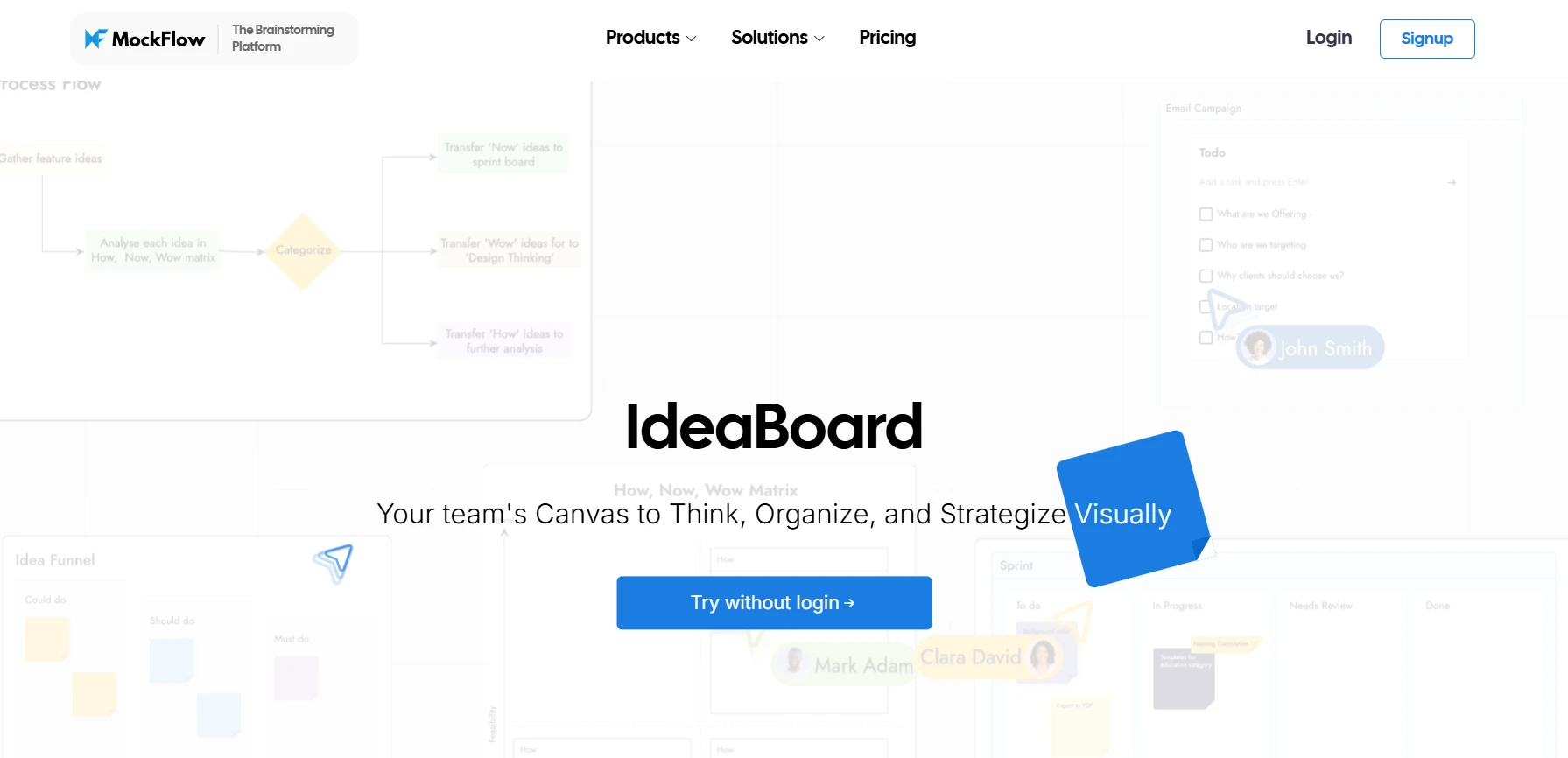
MockFlow IdeaBoard is a whiteboarding and visual collaboration platform designed to help teams brainstorm, plan, and design ideas faster. It brings together digital whiteboarding, AI-assisted ideation, and team communication in a single space.
From brainstorming product concepts to mapping customer journeys, MockFlow IdeaBoard provides the structure, flexibility, and intelligence that growing teams need to turn raw ideas into actionable plans.
Key Features:
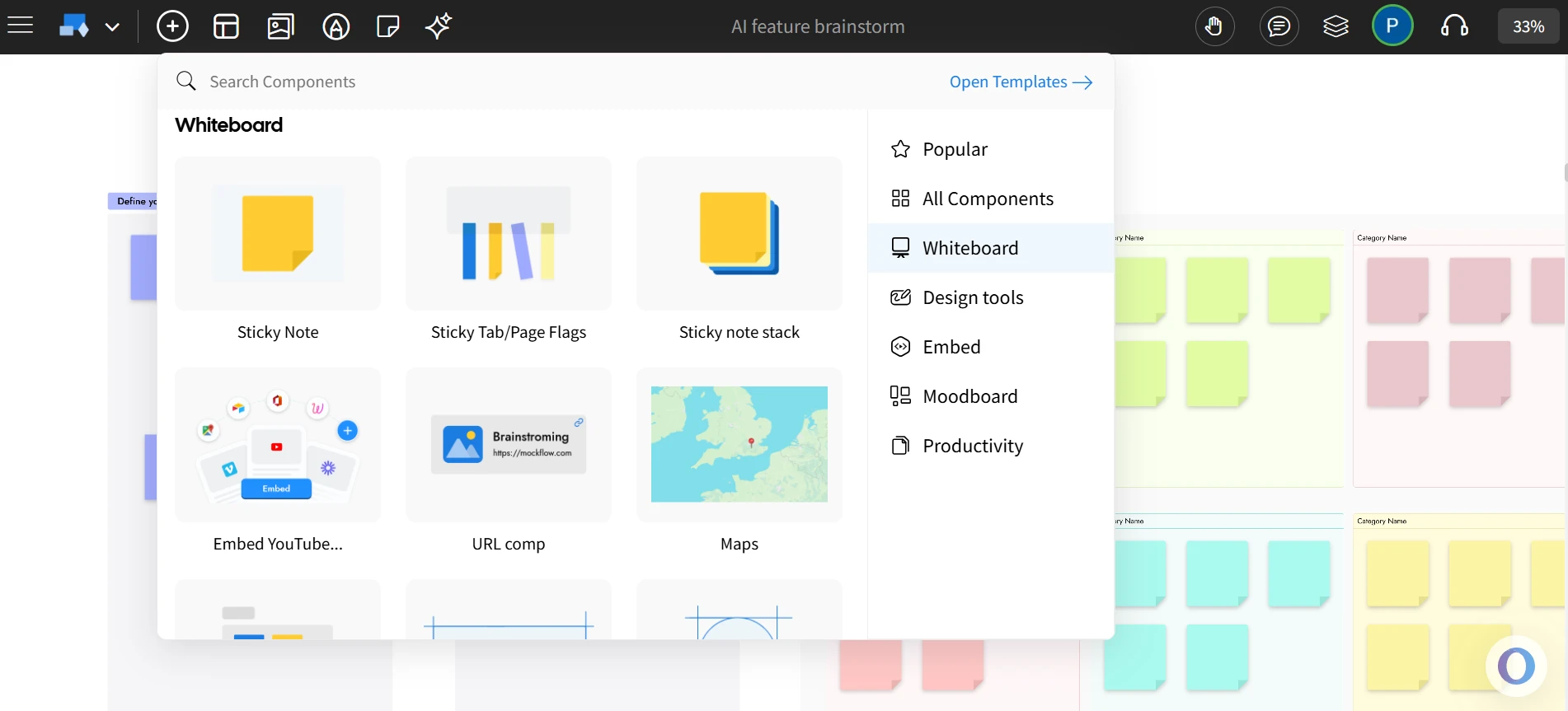
Digital Whiteboard: MockFlow’s IdeaBoard offers an infinite canvas for brainstorming, diagramming, and organizing ideas without clutter. It’s fast, intuitive, and eliminates the friction that often comes with heavier design tools.
Real-Time Collaboration: Multiple users can collaborate simultaneously, adding sticky notes, drawing connectors, or commenting visually. Video and voice comments ensure engagement stays high even during remote sessions.
- Live Audio/Video Whiteboarding: IdeaBoard supports integrated audio and video meetings within the whiteboard workspace in its online version. Teams can discuss ideas live and leave multi-media comments for asynchronous review.
Pre-Built Templates: Teams can choose from hundreds of ready-to-use templates for brainstorming, strategy planning, customer journeys, mood boards, and diagrams to start fast and stay organized.
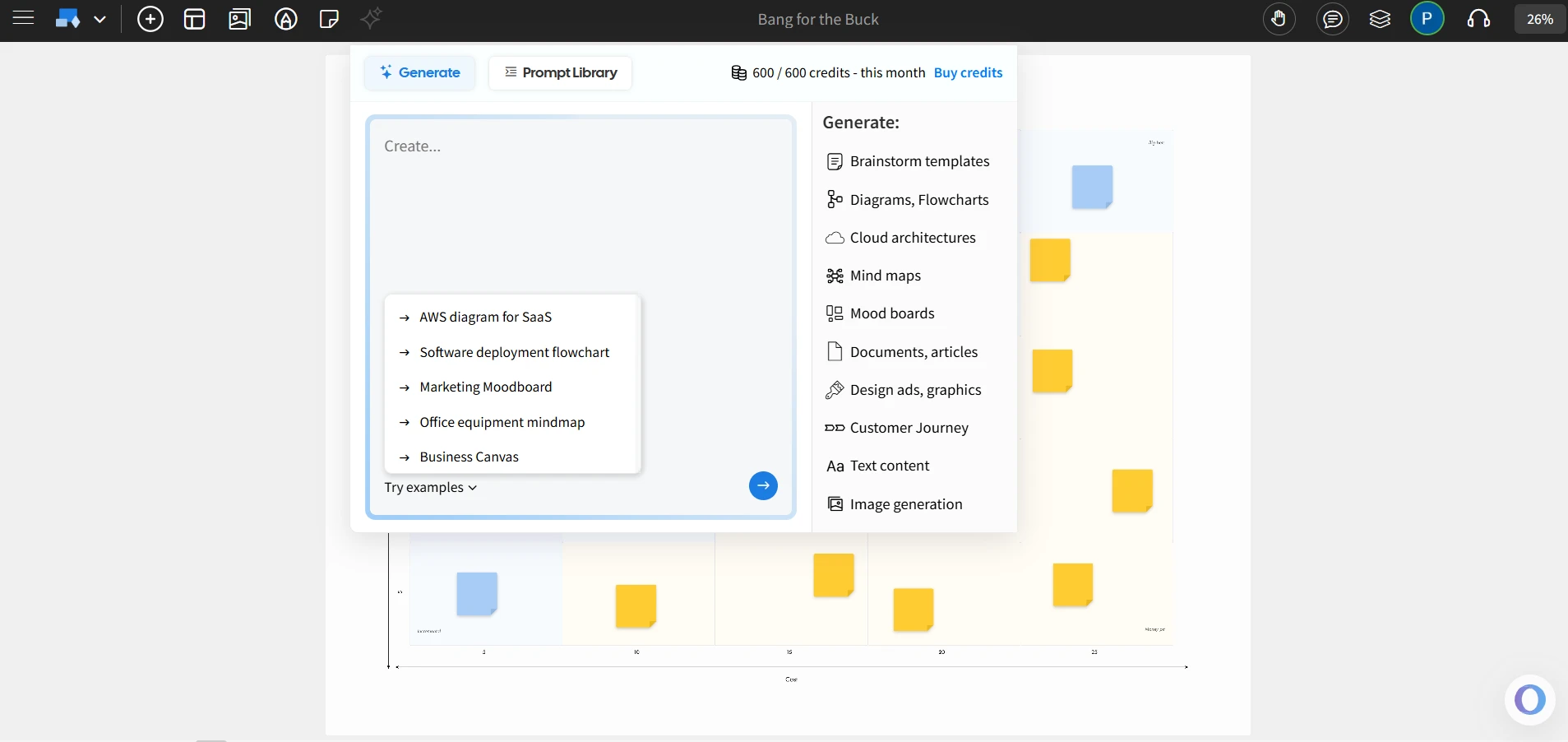
- AI-Enhanced Brainstorming: The built-in AI Toolbox helps generate whiteboard templates, flowcharts, and architecture diagrams instantly from prompts. The AI-powered Maps and Docs components make visual ideation faster and more dynamic.
- Offline Mode: The desktop version of IdeaBoard allows offline editing. Boards sync automatically once you’re online.
- Integrations: IdeaBoard directly integrates with Trello through its free Power-Up, allowing whiteboarding inside Trello boards. Other integrations include tools like Google Docs, etc.
- Enterprise-Grade Security: With enterprise, admins gain advanced access controls, SSO support, and compliance-ready data governance, which are crucial for large-scale organizations.
- Dedicated Wireframing Suite: Alongside IdeaBoard, MockFlow also offers WireframePro as a separate tool for teams to turn early whiteboard ideas into full-fledged wireframes and prototypes, bridging creativity and execution seamlessly.
Free Plan & Pricing Mention:
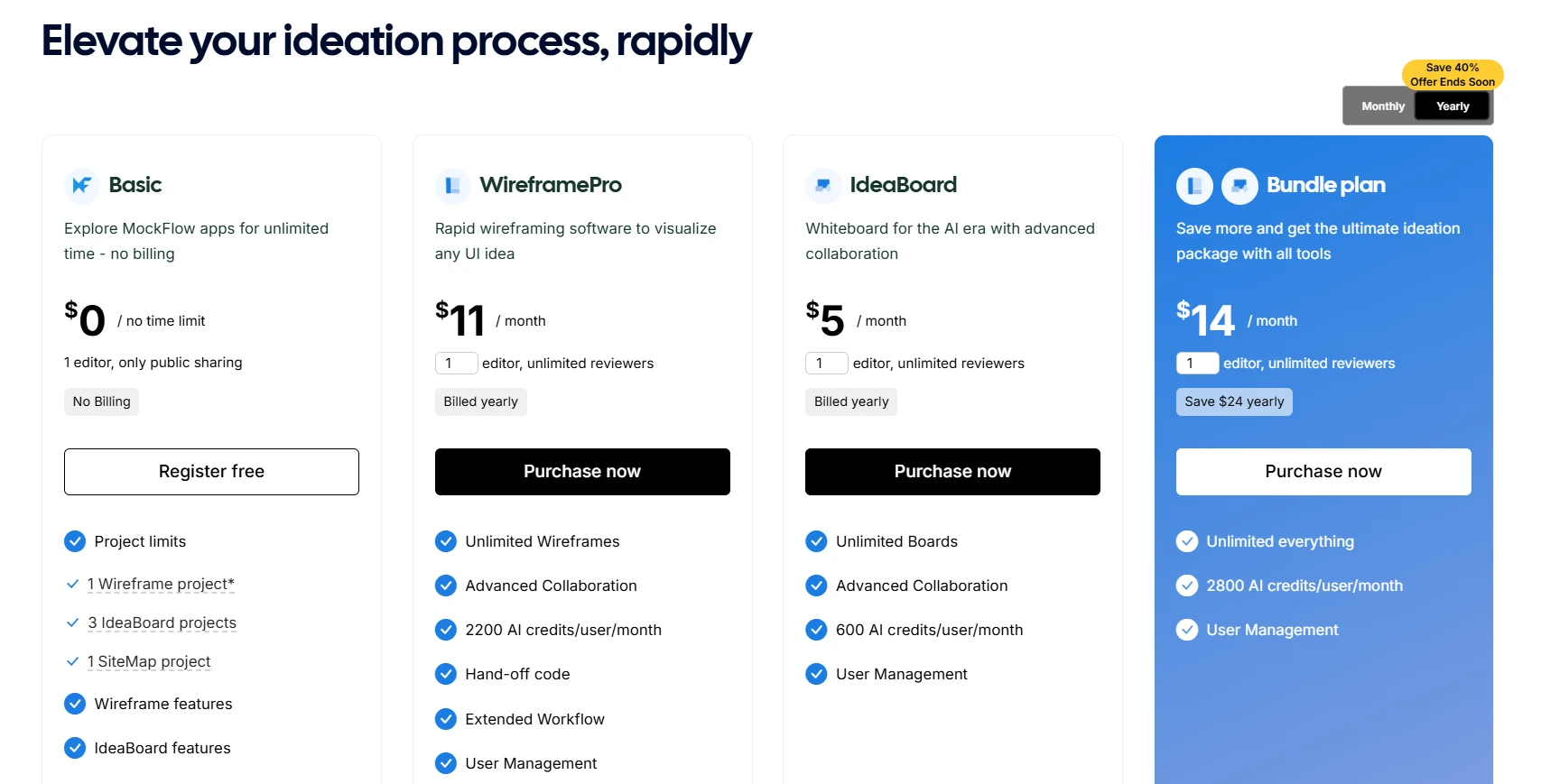
MockFlow IdeaBoard has a free plan covering core whiteboarding features. Paid plans for IdeaBoard start at $5/editor/month; bundle plans start at $14/month combining WireframePro, IdeaBoard, and SiteMap with advanced AI credits.
You can explore detailed tiers on the pricing page.
Best for: Remote and hybrid teams that need a fast, lightweight, and scalable whiteboarding tool for both live and asynchronous collaboration.
Why MockFlow stands out:
MockFlow IdeaBoard delivers everything, from a cleaner interface and infinite canvas to AI-powered brainstorming and offline functionality. It’s built to help distributed teams collaborate effortlessly, whether they’re hosting real-time workshops or leaving asynchronous feedback through video and voice comments. Its intuitive design, deep integrations, and enterprise controls make it ideal for both agile startups and global enterprises.
Start using MockFlow’s IdeaBoard for free or install the Chrome extension to whiteboard directly from your browser.
2) Miro
Miro is a widely used online whiteboard platform for distributed teams. It offers a collaborative workspace where users can brainstorm ideas, map workflows, and plan projects together in real time. Its visual interface makes it suitable for creative discussions, agile planning, and workshop facilitation.
Key Features:
- Infinite Canvas: Offers unlimited space for brainstorming, planning, and organizing ideas visually.
- Collaboration Tools: Supports sticky notes, shapes, text, and diagrams for real-time co-creation.
- Integrations: Connects with tools like Slack, Jira, Google Drive, and Microsoft Teams to streamline collaboration.
- Templates: Includes pre-built templates for brainstorming, retrospectives, and design-thinking workshops.
- AI Support (Miro Assist): Helps summarize content, cluster sticky notes, and automate repetitive tasks.
Best for: Cross-functional teams running workshops, retrospectives, and collaborative planning sessions.
Miro offers a free plan with limited boards and features. Paid plans start at $8/user/month.
Cons:
- The wide range of features can feel complex for first-time users.
- Pricing can be a concern for smaller, budget-tight teams.
- Some advanced features and integrations are available only on paid plans.
3) Lucidspark
Lucidspark is a collaborative online whiteboard by Lucid Software, designed for team brainstorming, idea organization, and planning. It integrates with Lucidchart, allowing teams to move from ideation to detailed diagramming within the same platform.
Key Features:
- Real-Time Collaboration: Multiple users can co-edit the board, add sticky notes, shapes, drawings, and comments simultaneously.
- Tagging and Voting: Teams can use tags and voting sessions to evaluate and prioritize ideas effectively.
- Lucidchart Integration: Enables a smooth handoff from brainstorming in Lucidspark to creating structured diagrams in Lucidchart.
- Facilitation Tools: Features like breakout boards, timers, and “Call others to me” help facilitators manage collaborative sessions.
Best for: Teams that already use Lucidchart for diagramming and want a connected experience for brainstorming and visualization.
Lucidspark offers a free plan with basic and limited features. Paid plans start at $9/user/month.
Cons:
- The interface can feel rigid for teams that prefer a free-form, design-first experience.
- Some features, such as advanced facilitation tools and integrations, are available only in paid plans.
4) FigJam
FigJam is Figma’s collaborative online whiteboard built for brainstorming, diagramming, and team workshops. It provides a visual space for teams to map ideas, plan projects, and collaborate in real time, all connected to the Figma ecosystem.
Key Features:
- Figma Integration: Connects with Figma, allowing teams to move from brainstorming in FigJam to design execution in Figma.
- Templates and Widgets: Offers ready-made templates and whiteboard widgets (including integrations with tools like Asana, Jira, and GitHub) for faster collaboration.
- Real-Time Collaboration: Includes live cursors, audio chat, and reactions like stamps and emojis for interactive sessions.
- AI Tools: Allows users to summarize or sort sticky notes automatically to organize discussions.
Best for: Design, product, and cross-functional teams who use Figma and need a collaborative space for brainstorming and planning.
FigJam offers a free plan with the basic features. Paid plans start at $3/user/month.
Cons:
- Primarily suited for Figma users or design-focused teams.
- Does not include advanced offline functionality or in-depth project management features.
5) Microsoft Whiteboard
Microsoft Whiteboard is a digital whiteboarding app within the Microsoft 365 ecosystem. It provides an infinite canvas for teams to brainstorm, visualize ideas, and collaborate in real time across devices.
Key Features:
- Integration with Microsoft Teams: Users can create, share, and co-edit whiteboards directly within Teams meetings and chats.
- Core Whiteboarding Tools: Includes pens, highlighters, erasers, sticky notes, text boxes, shapes, and pre-built templates for structured collaboration.
- Cloud Storage: Boards are automatically saved to OneDrive for Business, allowing users to access and continue their work anytime.
- Cross-Device Access: Available on Windows, web, iOS, Android, and Surface Hub devices.
Best for: Organizations already using Microsoft 365 that want a simple, integrated whiteboarding experience for meetings and discussions.
Included with Microsoft 365 subscriptions at no additional cost.
Cons:
- Lacks advanced visualization or customization options available in specialized whiteboarding tools.
- Limited third-party integrations outside the Microsoft 365 suite.
6) ClickUp Whiteboard
ClickUp Whiteboard is part of ClickUp’s productivity suite and helps teams visually brainstorm, organize ideas, and connect them directly to tasks. It’s designed for teams that want to move from ideation to execution without leaving the ClickUp workspace.
Key Features:
- Task Integration: Convert shapes, sticky notes, or text into ClickUp tasks, or add existing tasks directly onto the Whiteboard.
- Real-Time Collaboration: Collaborate live with multiple users, with visible cursors, comments, and shared editing access.
- Visual Tools: Use shapes, sticky notes, text, arrows, and frames to organize ideas and map workflows.
- Templates & Export: Start quickly with built-in templates and export boards as static PDFs for sharing.
Best for: Teams already using ClickUp for project management who want a visual workspace connected to their tasks.
ClickUp has a free plan which includes up to 3 Whiteboards. Paid plans start at $7/user/month.
Cons:
- Whiteboard exports are static and exclude interactive elements like linked tasks or docs.
- The interface can become dense during complex brainstorming sessions.
7) Mural
Mural is a visual collaboration platform designed for teams to brainstorm, plan, and facilitate workshops on a shared online whiteboard. It combines digital sticky notes, diagrams, and templates to help teams align and make decisions collectively.
Key Features:
- Templates: Offers a library of pre-built templates for brainstorming, agile sessions, and retrospectives.
- Facilitation Tools: Includes tools such as private mode, timer, and voting to manage group sessions.
- Integrations: Supports integrations with Microsoft Teams, Zoom, and Jira for connected workflows.
- Access Management: Provides enterprise-grade options like SSO, user permissions, and admin controls.
Best for: Enterprises and consulting teams needing a structured online whiteboard with facilitation tools for remote collaboration.
Mural provides a free tier with restricted board creation. Paid plans start at $9.99/month.
Cons:
- The interface can feel complex for users needing only simple whiteboarding.
- Performance may slow on very large boards with many participants.
8) Ziteboard
Ziteboard is a minimalist online whiteboard tool focused on simplicity and speed. It’s designed for quick sketching, teaching, and collaborative brainstorming directly in the browser.
Key Features:
- Real-Time Collaboration: Multiple users can draw, write, and edit simultaneously on a shared board through a link.
- Infinite Zoomable Canvas: Provides a scalable, vector-based canvas for diagrams, flowcharts, and visual explanations.
- Browser-Based: Runs entirely in a web browser with no installation required; only the board owner needs an account to create boards.
- Export Options: Supports PNG, SVG, and PDF exports for saving or sharing work.
Best for: Educators, freelancers, and small teams looking for an intuitive whiteboard that works directly in the browser without setup or heavy integrations.
Ziteboard is free to use with basic features. Paid plans start at $5/month.
Cons:
- Interface lacks advanced features such as templates, AI assistance, or integration with third-party apps.
- Not ideal for large teams or structured project workflows that require detailed collaboration tools.
Together, these tools show just how far digital whiteboarding has evolved beyond Zoom’s built-in option. Whether your team needs AI-powered brainstorming, design-first collaboration, or lightweight sketching, there’s a platform tailored to your workflow.
Detailed Comparison: Zoom Whiteboard vs. MockFlow IdeaBoard
Let’s break down how MockFlow IdeaBoard stacks up against Zoom Whiteboard across the metrics that matter most to remote and hybrid teams.
Feature | Zoom Whiteboard | MockFlow IdeaBoard |
User Interface | Simple and meeting-centric, limited design freedom | Intuitive drag-and-drop UI with advanced design controls |
Templates & Libraries | Limited pre-built templates | 1000+ templates for brainstorming, strategy mapping, mood boards, diagrams |
Collaboration | Real-time annotation only during meetings | Real-time multi-user editing, chat, and comments across projects |
Integrations | Works best within Zoom ecosystem | Integrates with Trello, Google Docs, and more |
Use Case Focus | Primarily brainstorming and note-taking | Visual ideation, strategy mapping, and collaborative planning for distributed teams |
Export & Sharing | PDF, PNG, and PPTX export | Export to proprietary .board file format; PDF export via Docs component |
Pricing | Free for basic use with 3 editable whiteboards; paid plans start at $13.33/user/month | Free tier with 3 IdeaBoard projects; paid plans start at $5/user/month |
Scalability | Tied to Zoom meetings, not scalable for async teams | Built for both live and asynchronous collaboration across remote and hybrid teams |
Why MockFlow IdeaBoard is Better for Remote Teams
Zoom’s whiteboard was designed to make meetings more visual. But MockFlow was built to make workflows more visual. That’s the key difference.
Recent McKinsey research shows hybrid work routines remain well below pre-pandemic office presence, solidifying the long-term need for asynchronous and persistent collaboration tools.
Teams that work asynchronously or across time zones find Zoom Whiteboard restrictive because it’s session-based and lacks long-term collaboration tools.
MockFlow IdeaBoard, on the other hand, provides a persistent workspace where design discussions and brainstorming sessions stay accessible long after the meeting ends.
With features like version control, user roles, embedded chat, and project history, teams can collaborate seamlessly whether they are online at the same time or not. It is designed for hybrid workplaces that run on autonomy and visibility, not constant meetings.
According to data from TheirStack, around 100 companies actively use MockFlow, including teams across the US, UK, India, and Canada, reflecting its growing traction among distributed teams.
Pricing and Scalability
Zoom Whiteboard offers basic whiteboarding under its free plan, but advanced tools require Zoom One Pro or Business subscriptions. These plans can become expensive if you only need whiteboarding capabilities.
MockFlow IdeaBoard offers a dedicated whiteboarding experience at a fraction of the cost, starting with a free tier and paid plans starting at $5/month/editor (billed annually).
The bundle plan starts at $14/month combining three tools including Ideaboard, with offline desktop access and advanced AI credits.
Verdict: When to Choose MockFlow IdeaBoard Over Zoom Whiteboard
Choose Zoom Whiteboard only if:
- You mainly need a lightweight brainstorming tool during live meetings.
- Your team already lives entirely within the Zoom ecosystem.
Choose MockFlow IdeaBoard if:
- You want a scalable, standalone whiteboard that supports real-time and async collaboration.
- Your team depends on templates, integrations, and AI to move faster.
- You need persistent projects that live beyond a Zoom meeting.
In short, if Zoom Whiteboard is for meetings, MockFlow is for making. It transforms brainstorming from a one-time session into a continuous creative process, making it the best alternative to Zoom Whiteboard in 2025.
How to Choose the Right Zoom Whiteboard Alternative
Choosing the right whiteboard tool goes beyond features. It’s about how well it fits into your daily workflow, scales with your team, and simplifies collaboration without friction. Use these four lenses to evaluate the best fit.
1. Collaboration Style and Team Size
Your collaboration model determines the kind of whiteboard that will actually work for you. For meeting-driven teams, a lightweight whiteboard might seem convenient at first, but as projects expand, limitations in scalability and file sharing become clear.
Teams that collaborate across time zones need persistent workspaces where discussions, feedback, and ideas live long after a session ends.
Here’s what to look for:
- Real-time co-editing and commenting to keep everyone aligned.
- Version history for tracking changes across multiple contributors.
- Project-based organization to manage ongoing work, not just one-off sessions.
- The ability to switch between synchronous and asynchronous workflows easily.
2. Integrations and Workflow Compatibility
Your whiteboard should work where your team already does. Integration with communication, project management, and documentation tools ensures a smooth creative flow.
Evaluate based on:
- Whether it connects with your messaging tools (like Slack or Teams).
- Compatibility with your document ecosystem (Google Drive, Confluence, Notion).
- Ability to embed boards or export visuals into existing projects.
Many teams get better outcomes when they turn whiteboard sessions into actionable next steps. Teams now embed or sync their whiteboard outputs directly within project management tools like Notion, Asana, or ClickUp, allowing sketches, diagrams, and flowcharts to live alongside tasks and documentation.
For instance, MockFlow IdeaBoard integrates directly with Trello through its IdeaBoard plugin. This allows teams to whiteboard directly inside Trello cards, turning every task into a visual workspace. Instead of switching between apps, users can brainstorm, sketch workflows, or map dependencies within the same Trello board, keeping ideation and execution in one place.
This kind of integration bridges the gap between planning and creativity, helping teams stay organized without losing momentum.
3. Pricing, Security, and Scalability
Pricing and security often determine whether a tool will sustain long-term adoption or become a short-term fix. Even if a tool starts free, costs can escalate as teams grow or need premium features.
Focus on:
- Flexible pricing tiers that support team expansion.
- Security options such as SSO, data encryption, and admin controls.
- Fair limits on collaborators and storage.
- Transparent upgrade paths without hidden dependencies.
The right alternative should scale as your organization evolves, supporting both creative freedom and compliance standards. For instance, MockFlow IdeaBoard is an affordable choice for educators with 50% discounts for educational institutions.
4. Ease of Use and Template Availability
Even the most feature-rich tool can fail if your team finds it hard to use. The best alternatives are intuitive enough that anyone can start creating without a learning curve.
Key things to check:
- A clean, intuitive interface that reduces setup time.
- Templates for different use cases like brainstorming, wireframing, and strategy mapping.
- Simple drag-and-drop functions for quick visualization.
- Collaborative cursors and comment markers for clarity in group sessions.
MockFlow IdeaBoard’s template library stands out here, offering ready-to-use blueprints that help teams start projects instantly. It also comes with an AI Toolbox designed for brainstorming and idea generation directly within the whiteboard.
Microsoft’s 2024 Work Trend Index found that 75% of global knowledge workers now use generative AI, nearly doubling in six months; further proof that collaboration tools need built-in AI to support faster ideation and alignment. MockFlow’s AI capabilities make a real difference.
To sum up, the ideal whiteboard alternative should feel natural within your workflow, not like another platform to learn. Focus on adaptability, team compatibility, and a smooth collaboration experience. For most teams, MockFlow strikes the right balance: powerful, flexible, and easy to scale as your creative needs evolve.
Conclusion - Choose MockFlow IdeaBoard as an Alternative to Zoom Whiteboard
As teams move beyond quick virtual brainstorming sessions, the need for a platform that supports continuous and structured collaboration becomes essential. Zoom Whiteboard is convenient for live meetings, but for teams that design, plan, and iterate daily, it often falls short.
MockFlow IdeaBoard bridges that gap with its intuitive interface, AI-powered Toolbox for brainstorming, and real-time plus asynchronous collaboration features that fit every stage of the creative process. Its ready-to-use templates, offline access, and integrations with tools like Trello make it more than just a whiteboard; it is a workspace built for innovation.
If you are looking for a flexible, intelligent, and easy-to-use whiteboarding tool that scales with your team, MockFlow IdeaBoard is the natural next step.
Get started for free or try the IdeaBoard Chrome extension to experience smarter brainstorming today.
FAQs About Zoom Whiteboard Alternatives
1. What are the best Zoom Whiteboard alternatives?
The best Zoom Whiteboard alternatives in 2025 include MockFlow IdeaBoard, Miro, FigJam, Lucidspark, and Mural. These tools offer more advanced templates, collaboration features, and integrations than Zoom’s native whiteboard. They support real-time brainstorming, agile workshops, and visual collaboration across hybrid and remote teams.
2. Is there a Zoom whiteboard alternative with free plans?
Yes, several platforms like MockFlow IdeaBoard provide free plans with generous limits on boards or collaborators. These are ideal for startups, educators, or small teams who need collaborative visualization without enterprise-level pricing. Free tiers usually include essential brainstorming and export features with optional paid upgrades for teams.
3. What features should enterprises look for in a secure Zoom Whiteboard alternative?
Enterprises should look for whiteboard solutions with SSO (Single Sign-On), role-based access, data encryption, and admin-level permissions. These ensure security compliance, protect confidential assets, and maintain control over who can view, edit, or export shared boards.
4. How does MockFlow IdeaBoard enhance collaboration compared to Zoom Whiteboard?
MockFlow IdeaBoard is designed as a comprehensive workspace for visual planning. Teams can work together on an infinite whiteboard, adding sticky notes, diagrams, and comments while discussing ideas through integrated audio and video. It supports simultaneous editing, voice or video feedback, and live sync across users, keeping all discussions and ideas organized in one shared workspace.
5. Can I use MockFlow IdeaBoard during online meetings for real-time collaboration?
Yes. IdeaBoard supports real-time collaboration including multiplayer board editing, integrated audio/video meetings, and multimedia comments, making it suitable for live ideation, project planning, and workshops during online sessions.
6. Does MockFlow IdeaBoard offer offline access?
MockFlow IdeaBoard supports offline work through its desktop app, allowing users to continue creating and editing even without an internet connection. Boards automatically sync once you’re back online.
8 Best Flowchart Software for Easy Design & Collaboration in 2025
Introduction You’re staring at a tangled web of processes. Multiple teams are working on different parts of the project, and no...
Top 8 Microsoft Whiteboard Alternatives for Remote Work & Collaboration
Introduction For remote and hybrid teams, effective whiteboarding is crucial to maintaining visual collaboration and...

10 Best Product Design Tools for UI, UX & Product Teams in 2026
Finding the right product design tools can make the difference between a smooth design process and one filled with unnecessary...
