
10 Best Design Collaboration Tools for Hybrid & Remote Teams in 2026
Introduction
Design teams, especially in today’s hybrid work environment, face the unique challenge of managing workflows that span time zones, devices, and varying levels of creativity. Imagine you’re in the midst of a design sprint, a feedback loop feels endless, and you've just found that you’re on the version “final_v9” again.
Sound familiar? These inefficiencies can easily derail what should be a smooth, collaborative process. Without the right tools, creative teams struggle to stay aligned, track progress, and manage feedback effectively.
Design collaboration is no longer just about sketching UI components in isolation. It’s an interconnected workflow that spans brainstorming, prototyping, content creation, sprint planning, and approvals, all across multiple platforms. Without the right tools at the right stage, things can quickly become chaotic.
But it doesn't have to be this way. In this guide, we’ll break down the best design collaboration tools by the stages of the design process, helping you find the right solutions for your team’s specific needs.
Let’s jump in.
Top Design Collaboration Tools (By Category)
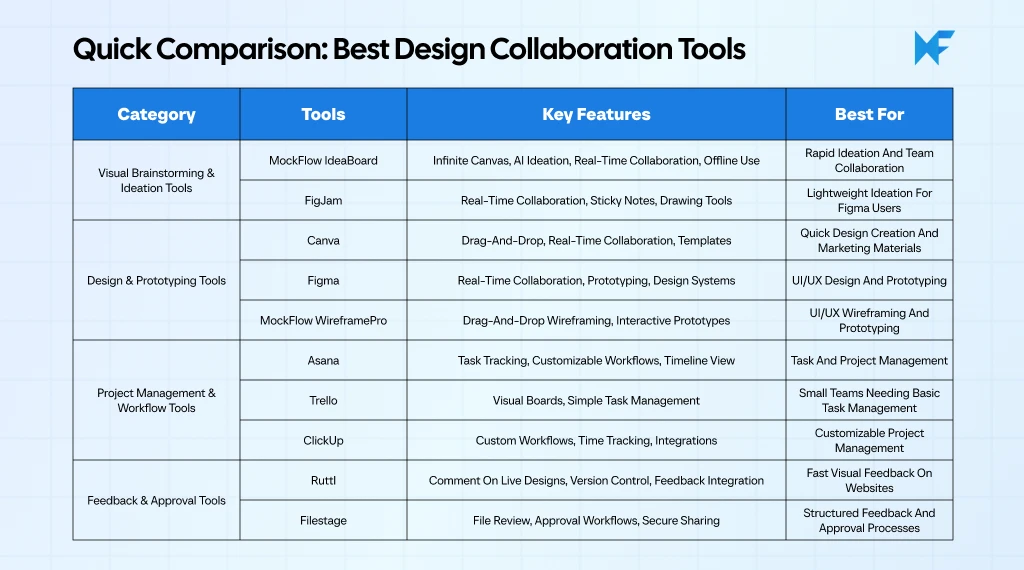
The best design collaboration tools help teams streamline workflows, improve communication, and enhance creativity. These platforms support real-time editing, feedback collection, and project management, allowing designers to collaborate seamlessly.
Cloud-based features ensure easy access and integration with other design tools. Whether you're working on brainstorming, prototyping, or client approval stages, the right collaboration tool can boost productivity and reduce project delays. For 2026, AI-powered tools and seamless integration with existing software stacks are becoming crucial for efficient design teamwork.
In this section, we'll explore the best design collaboration tools categorized by the specific stage they support in the design process.
Category 1: Visual Brainstorming & Ideation Tools
The design process begins with brainstorming and ideation, where creativity flows, concepts are mapped, and teams align on vision. At this stage, you need tools that enable rapid idea generation, seamless collaboration, and clear communication. These tools focus on unlocking creativity and setting the direction, not finalizing designs.
Here are two of the best tools for visual brainstorming and ideation:
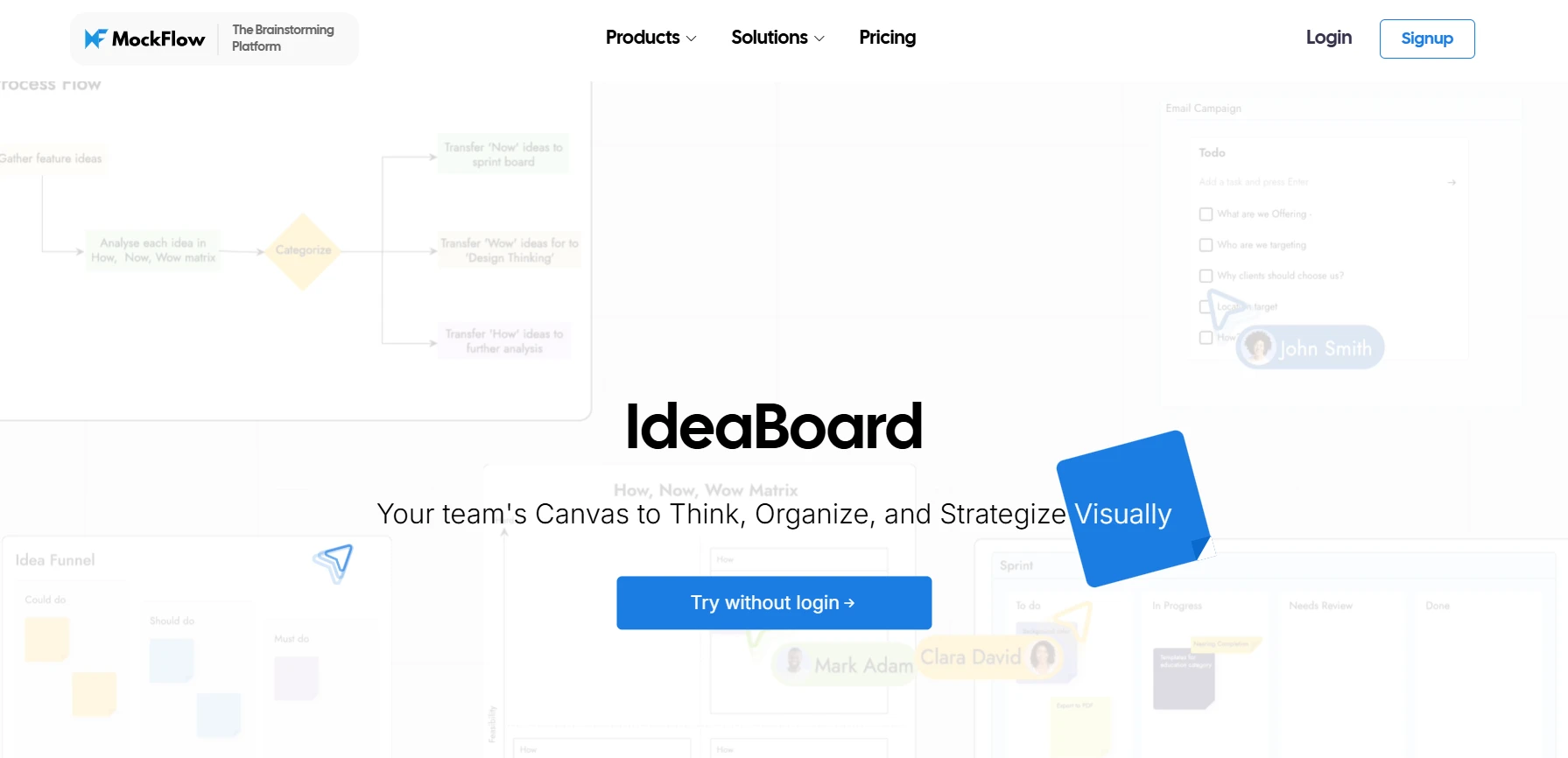
MockFlow IdeaBoard positions itself as a dynamic, digital whiteboard designed specifically for ideation, organization, and real-time collaboration. It’s a powerful tool for design teams to brainstorm, visualize ideas, and streamline their early-stage design workflows.
IdeaBoard is not just a standard whiteboard; it integrates AI-powered features and a user-friendly interface that encourages both creativity and productivity in the early stages of the design process.
Key Features for Design Collaboration:
- Infinite Canvas & Layout Flexibility:
IdeaBoard provides an expansive, infinite canvas, where design teams can freely drag, drop, and arrange elements. This flexibility mimics the creativity of a traditional whiteboard, allowing teams to visualize, iterate, and connect ideas without the constraints of predefined layouts.
Users can customize the canvas with backgrounds or set contextual wallpapers to fit the session's mood or theme.
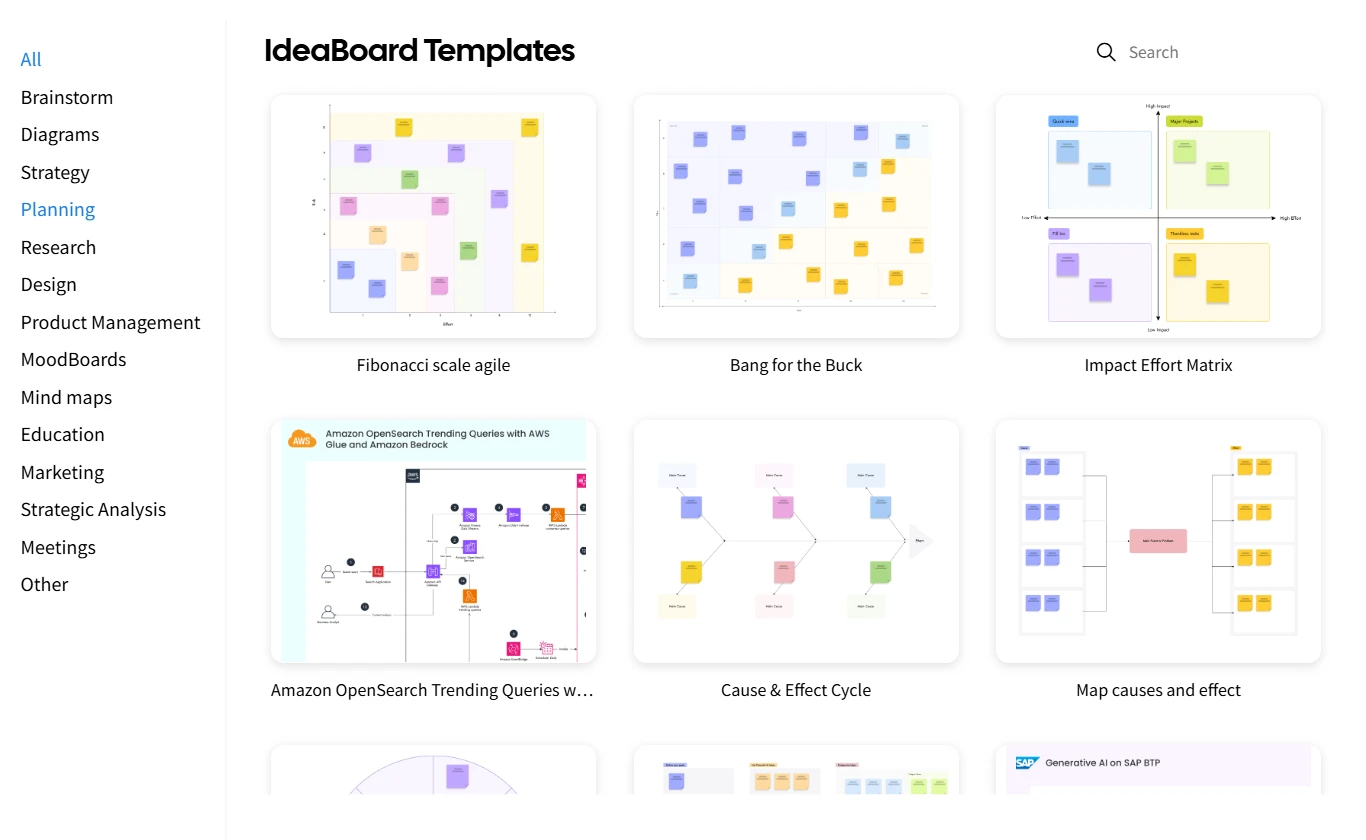
- Pre-built Templates & Structured Workflows:
Whether it's SWOT analysis, customer journey maps, or content strategy boards, IdeaBoard comes with a variety of pre-built templates tailored for different ideation workflows to ensure that teams can stay organized while diving into brainstorming without starting from scratch.
Teams can choose from a variety of visual tools like sticky notes, diagrams, mood boards, and planning boards to structure their ideas.
- Multimedia Comments:
One of the standout features is the ability to leave multimedia comments on board elements. Teams can use video and voice comments to offer real-time, dynamic feedback. These comments can be directly attached to specific areas of the board, allowing for more nuanced communication.
The 2-minute limit on video/audio comments ensures that feedback stays concise and focused.
- AI Toolbox for Streamlined Ideation:
The AI Toolbox in IdeaBoard takes ideation to the next level by generating custom templates, diagrams, and flowcharts from simple text prompts. Teams can quickly move from blank canvases to structured visual boards without spending time on the setup.
Pre-written, editable prompts are available for specific ideation scenarios like brainstorming or creating workflows, making the tool even more accessible to teams with varied needs.

- Real-Time Multiplayer Collaboration:
Real-time editing is key for teams working remotely or across different time zones. IdeaBoard’s multiplayer functionality allows multiple users to work on the same board simultaneously, fostering a collaborative environment where ideas evolve quickly, and all team members are always on the same page.
- Secure Sharing & External View Links:
Sharing work with external stakeholders is easy with IdeaBoard’s secure view links, which allow users to grant read-only access while maintaining control over privacy. This feature ensures that design feedback from clients or collaborators can be collected in a secure and organized manner, without exposing sensitive data to the public.
- Offline Capabilities:
IdeaBoard also supports offline whiteboard app, which is essential for teams working in areas with limited connectivity or those with strict data security requirements. Teams can collaborate and edit even without internet access, with the ability to sync changes when back online.

- Document Component for Rich Content Creation:
The Docs component allows teams to create visual documents directly on the board. Users can write, format, and embed images, tables, and callouts alongside their brainstorming work. This combines text-heavy content with visuals for streamlined workflows.
- Integrations via Trello Power-Up:
The Trello Power-Up allows users to embed or launch IdeaBoard whiteboards directly inside a Trello board. This integration ensures that tasks and visual brainstorming coexist within the same workspace, simplifying the workflow and reducing the need to switch between apps.
- Flexible Export Formats & File Mode:
IdeaBoard supports exporting sections as PNG images or saving entire boards as .board files for offline use or Git integration, giving teams control over deliverables and backups.
Best For:
MockFlow IdeaBoard is ideal for cross-functional teams involved in brainstorming sessions, UX workshops, or early-stage ideation. It’s especially suited for teams that need a simple, AI-powered tool that’s easy to learn and offers flexible collaboration options. It works exceptionally well for design sprints, strategy planning, and creative workshops where structure and freedom need to coexist.
Why It Stands Out:
What sets IdeaBoard apart is its specialized focus on ideation rather than being a general-purpose whiteboard tool.
With its AI-driven features, infinite canvas, real-time collaboration, and offline capabilities, it offers a tailored solution for design teams looking to maximize their creative output in a structured, organized manner.
Give MockFlow IdeaBoard a try and experience how much smoother your next brainstorming or design planning session can be. Try it instantly in your browser through Chrome extension or sign up for a free plan.
You can choose a paid plan that starts from $7/user/month, offering advanced features for design collaboration. Check out the pricing page for more details.

FigJam is Figma's collaborative whiteboarding tool, designed to help teams ideate and brainstorm quickly. It integrates seamlessly with Figma, making it easy for teams to move from ideation to design without switching tools.
Key Features for Design Collaboration:
- Real-Time Collaboration: Multiple users can edit and contribute to the board at the same time, ensuring seamless teamwork.
- Sticky Notes & Connectors: Capture and organize ideas using sticky notes and connectors, keeping the brainstorming process organized and visual.
- Emoji Feedback: Team members can leave emoji-based feedback for quick and intuitive reactions, adding a layer of interactivity to the ideation process.
- Interactive Drawing Tools: Use freehand drawing tools to sketch ideas, create diagrams, and visualize concepts as they develop.
- Templates: Access pre-built templates for brainstorming, mind mapping, and user journey mapping to kickstart ideation and maintain focus.
Best For:
Figma users who need a lightweight, intuitive tool to facilitate early-stage ideation and brainstorming, especially when working on UI/UX design projects.
Category 2: Design & Prototyping Collaboration Tools
At this stage, you need tools that support collaboration, interactive design, and seamless prototyping. These tools are critical for transforming early ideas into visual concepts and sharing them with stakeholders or development teams.
Canva is an easy-to-use design tool that simplifies the process of creating professional visuals. While it’s not as advanced as some prototyping tools, it’s perfect for teams that need to quickly generate marketing materials, presentations, or other design assets.
Key Features for Design Collaboration:
- Drag-and-Drop Interface: Quickly create designs with an intuitive drag-and-drop editor.
- Real-Time Collaboration: Work with your team on designs in real time, making it easy to co-create.
- Pre-built Templates: Choose from a wide variety of templates for presentations, social media posts, and marketing materials.
- Stock Library: Access a vast collection of stock images, videos, and graphics for your designs.
Best For:
Teams needing a simple, no-fuss tool for creating visuals and marketing materials quickly and collaboratively.
Figma is the industry-standard tool for collaborative design, particularly for UI/UX projects. It allows for real-time collaboration, making it an excellent choice for teams that need to iterate on designs and prototypes together.
Key Features for Design Collaboration:
- Real-Time Design Collaboration: Multiple users can work on a design simultaneously, providing instant feedback and making changes in real time.
- Prototyping & Interactive Features: Build interactive prototypes to demonstrate how your designs will work in the final product.
- Design Systems & Libraries: Create and share consistent design systems across your team, ensuring alignment and efficiency.
- Commenting & Feedback Tools: Leave comments directly on designs for easier collaboration and review.
Best For:
Design teams working on UI/UX projects who need real-time collaboration, prototyping, and design system management.
MockFlow WireframePro is a comprehensive wireframing and prototyping tool designed specifically for UI/UX design teams. It enables designers to quickly create wireframes, prototypes, and user interface designs within a collaborative platform.
With its emphasis on rapid wireframing and seamless feedback loops, MockFlow WireframePro streamlines the design process, helping teams quickly turn ideas into interactive prototypes for user testing.
Key Features for Design Collaboration:
- Drag-and-Drop Wireframing: Use a rich library of UI components to easily create wireframes with a drag-and-drop interface, speeding up the design process.
- AI assisted: MockFlow provides AI features for generating wireframes from text, converting screenshots and urls to editable wireframes and converting the wireframe designs to code in your preferred framework.
- Real-Time Collaboration: Collaborate with team members in real time, allowing for faster iterations and immediate feedback.
- Integrated Feedback Tools: Stakeholders can leave comments directly on designs, ensuring that feedback is easily captured and integrated.
- Interactive Prototypes: Create interactive prototypes that simulate user flows, helping teams conduct early-stage user testing and gather insights.
- Template Libraries: Access and generate a variety of templates with AI or pick a UI-kit to match a framework or design style to kickstart design workflows, reducing setup time and enhancing productivity.
- Seamless Integrations: MockFlow WireframePro integrates with popular project management and design tools, ensuring that your design workflows remain smooth and connected across platforms.
Best For:
UI/UX design teams, product teams, and agencies that need a dedicated wireframing and prototyping tool with strong collaboration features to streamline the design process and ensure efficient communication with stakeholders.
Category 3: Project & Workflow Collaboration Tools
Project and workflow collaboration tools are essential for managing tasks, tracking progress, and ensuring that deadlines are met. These tools help design teams stay aligned on timelines, dependencies, and project goals, ensuring that creative work moves forward smoothly without bottlenecks.
Key Features for Design Collaboration:
- Task Assignments & Progress Tracking: Assign tasks, set deadlines, and track progress to ensure that everything stays on schedule.
- Customizable Workflows: Tailor workflows to match your team’s specific design process, whether it's for prototyping, user research, or feedback collection.
- Integrations: Connect Asana with tools like Figma, Slack, and Google Drive to keep everything in one place.
- Timeline View: Visualize project timelines to keep track of design milestones and deliverables.
Best For:
Teams needing a robust project management tool to keep track of tasks, deadlines, and collaboration across different design phases.
Trello is a simple, visual task management tool based on a Kanban-style board. It’s perfect for smaller design teams or those looking for an intuitive, no-fuss way to manage tasks and track progress.
Key Features for Design Collaboration:
- Visual Boards & Task Tracking: Use boards, lists, and cards to organize tasks and track project progress.
- Due Dates & Labels: Easily set deadlines and categorize tasks with labels to stay organized.
- Integration with Other Tools: Trello integrates with tools like Google Drive, Slack, and more to streamline workflows.
- Collaboration on Cards: Team members can add comments, attach files, and collaborate directly within task cards.
Best For:
Smaller design teams or individuals looking for a simple, visual task management tool to organize tasks and projects without a steep learning curve.
ClickUp is an all-in-one project management tool that offers customizable workflows, task tracking, and extensive collaboration features. It’s highly flexible, making it a great choice for design teams that need a tool that adapts to their needs.
Key Features for Design Collaboration:
- Customizable Task Management: Tailor task views (list, board, calendar) and workflows to fit your design process.
- Multiple View Options: Switch between different views (list, board, calendar) to track progress in the way that suits your team best.
- Time Tracking & Reporting: Track how long tasks take and generate reports to understand where time is spent.
- Integrations: Seamlessly integrates with Figma, Slack, Google Drive, and more.
Best For:
Design teams looking for a highly customizable project management tool that can scale as the team grows and evolve as design workflows change.
Category 4: Design Feedback & Approval Tools
Design teams need tools that allow for easy collection, management, and integration of feedback from stakeholders, clients, and other team members. These tools help ensure that designs stay on track and meet the requirements of everyone involved, allowing for smoother communication and faster approval cycles.
Ruttl is a design feedback tool that allows teams to provide visual feedback directly on live websites or designs. This makes it easier for design teams to collect detailed input and ensure that revisions are made quickly and accurately.
Key Features for Design Collaboration:
- Comment Directly on Live Pages: Leave feedback directly on web pages or designs, ensuring comments are tied to specific areas of the design.
- Version Control & Comparison: Track changes and compare different versions of the design to see how it has evolved.
- Integration with Design Tools & Cloud Storage: Seamlessly integrate with tools like Figma and design systems for a smooth workflow.
- Centralized Feedback: Collect all feedback in one place, making it easier to review and implement changes.
Best For:
UI/UX designers working on live websites who need fast, visual feedback from stakeholders or clients.
Filestage is a file review and approval tool designed to streamline feedback collection for creative teams. It’s ideal for managing design deliverables that require structured review and approval from clients or stakeholders.
Key Features for Design Collaboration:
- Centralized File Review Process: Manage and collect feedback on files in one place, ensuring that nothing gets lost or overlooked.
- Commenting & Approval Stages: Set up approval workflows with comment sections for detailed feedback and approval tracking.
- Version Control: Keep track of different versions of designs and documents, ensuring you always have the latest version available for review.
- File Sharing & Security: Share files securely with external stakeholders without compromising privacy.
Best For:
Teams working with clients or stakeholders that need a structured, formalized review and approval process for design deliverables.
As per Gartner, visual collaboration tools are now considered a core part of the digital workplace stack, enabling teams to work synchronously and asynchronously on shared digital canvases. This evolution highlights the importance of visual collaboration in modern work environments.
With so many great tools to choose from, finding the right design collaboration platform can make all the difference in your team’s workflow. Whether it's for ideation, prototyping, or feedback, these tools help teams stay aligned and productive. Choose the one that best fits your team’s needs and watch your design process transform.
Also read → The 10 best Miro alternatives for whiteboarding | 8 best FigJam alternatives for design collaboration
Key Features to Look for in Design Collaboration Tools
1. Real-Time Editing & Multi-User Collaboration
2. Visual Feedback & Annotation Tools
3. Workflow & Project Management Capabilities
4. Integrations Across Design + Dev Stacks
5. Ease of Use & Learning Curve
6. Security, Storage & Version Control
Cloud-based solutions dominate the design collaboration software market, with cloud deployments holding 61% of the revenue share in 2024 and expected to grow at a CAGR of 15.8%. This growing preference for cloud deployment reflects the demand for scalable and accessible collaboration tools.
Conclusion
According to a recent SNS Insider report, the global design collaboration software market is set to grow from USD 3.92 billion in 2024 to USD 11.72 billion by 2032, reflecting a CAGR of 14.8% from 2025-2032. This market expansion highlights the growing demand for effective collaboration tools in design.
Choosing the right design collaboration tool is essential for streamlining your design process, improving communication, and boosting productivity. Whether you're brainstorming, prototyping, managing feedback, or handling design workflows, the right tool can transform your team’s efficiency.
FAQs about the Best Design Collaboration Tools
1. What are the best design collaboration tools available?
The best design collaboration tools allow teams to streamline workflows, communicate effectively, and collaborate seamlessly on creative projects. Popular tools include MockFlow IdeaBoard for brainstorming, WireframePro for prototyping, and Canva for quick visuals. These platforms support real-time editing, integrations with project management software, and secure feedback systems, helping teams work together more efficiently.
2. How does MockFlow IdeaBoard enhance team collaboration during the design process?
MockFlow IdeaBoard enhances team collaboration by offering real-time editing, allowing multiple users to work on the same board simultaneously. It also supports multimedia comments (video, voice, and text), making feedback more interactive and clear. With features like AI-powered brainstorming, sticky notes, and easy sharing, teams can align quickly and stay organized throughout every stage of the design process.
3. What features should I look for in design collaboration tools?
Look for tools that offer real-time editing, multi-user collaboration, visual feedback, and seamless integration with design and project management platforms. Also, prioritize ease of use, secure file management, version control, and the ability to collaborate visually on shared canvases. These features enhance productivity, streamline workflows, and support efficient design collaboration.
4. How do design collaboration tools improve team productivity?
Design collaboration tools improve productivity by streamlining communication and feedback processes. Features like real-time editing, integrated task management, and easy sharing of design files reduce delays and eliminate confusion. These tools ensure all team members are on the same page, minimizing back-and-forth and helping teams meet deadlines faster.
5. Can I use MockFlow IdeaBoard offline?
6. How do I integrate design collaboration tools with my project management software?
8 Best Flowchart Software for Easy Design & Collaboration in 2025
Introduction You’re staring at a tangled web of processes. Multiple teams are working on different parts of the project, and no...
12 Best Brainstorming Tools for Effective Idea Generation in 2026
Introduction Looking for the best brainstorming tools? You’ve come to the right place. Brainstorming should be exciting, but...
How to Choose the Right Visual Project Management Software for Your Use Case
Introduction Projects tend to fail when no one has a clear view of what’s happening. A Wellingtone report found that 47% of...
