Miro vs Milanote: Full Comparison of Features, Pricing & Workflows
Introduction
When teams compare Miro and Milanote, the discussion usually isn’t just about features - it’s about how each tool feels to use. Some digital whiteboards guide users toward structure from the start, while others encourage a more visual, free-flowing style. Depending on your team’s mindset, one approach can feel natural and energizing, while the other may feel limiting, even if both technically support the same work.
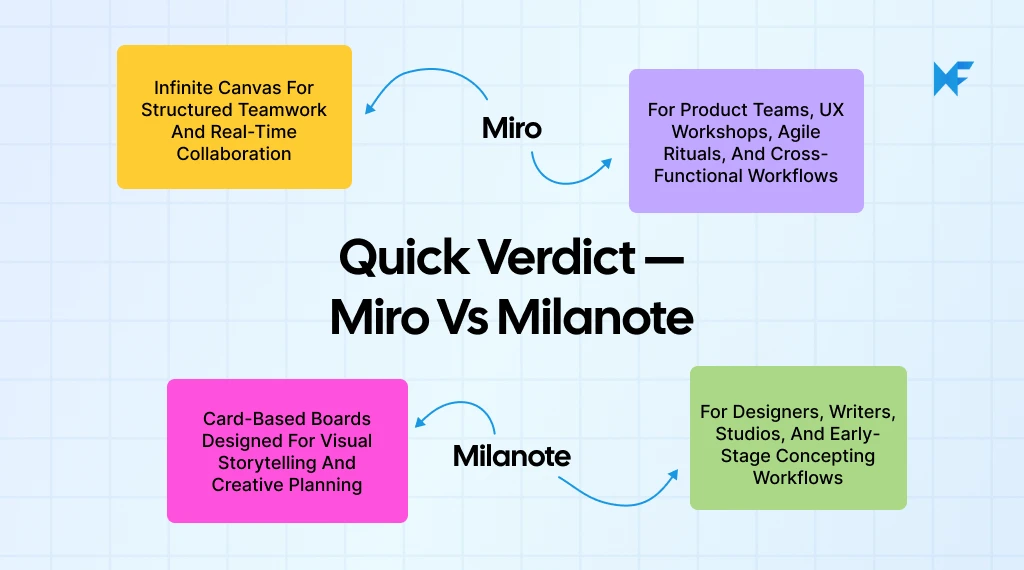
That’s why the Miro vs Milanote debate exists. The tools aren’t interchangeable; they represent two different philosophies of visual collaboration. Miro leans toward fast-paced teamwork, planning, and structured ideation - ideal for product teams, workshops, and cross-functional work. Milanote takes a more visual and expressive approach, making it well-suited for moodboards, creative thinking, and slower, exploratory work.
Between those two styles, there’s also a growing interest in tools that balance structure and creative freedom without unnecessary complexity. That’s where options like MockFlow IdeaBoard fit in - offering a clean, adaptable space with AI assistance and built-in structure when needed, without forcing a workflow upfront.
This guide is here to help you understand which environment your team naturally fits into. Because if digital whiteboarding is where your ideas live, choosing the right kind of space matters more than most people admit.
Miro vs Milanote Comparison — Feature Breakdown
Gartner positions visual collaboration applications as part of the modern digital workplace stack, supporting both synchronous and asynchronous teamwork on shared canvases. This makes the Miro vs Milanote comparison especially relevant for teams evaluating how they brainstorm, map ideas, and collaborate visually.
Miro vs Milanote compares two visual collaboration tools built for different workflows.
Miro supports real-time teamwork, structured diagrams, and large collaborative boards. Milanote supports creative planning, moodboards, and visually organized ideas. Miro fits product teams, workshops, and UX workflows. Milanote fits designers, marketers, and creators who want an aesthetic, minimal workspace. Miro offers extensive templates and integrations. Milanote offers simple layouts and creative templates.
This comparison helps teams choose the tool that best aligns with their collaboration style and project needs.
Quick Miro vs Milanote Comparison
Feature | Miro | Milanote |
UX & Interface | Infinite canvas, tool heavy, structured layouts | Visual boards, card based, simple and aesthetic |
Collaboration | Strong real time teamwork, facilitation tools | Light collaboration, mainly async, basic comments |
Customization | Advanced shapes, templates, scalable workflows | Creative templates, freeform layouts, visual focus |
Integrations | Deep ecosystem with Jira, Slack, Figma, Notion | Lightweight integrations, asset focused |
Use Cases | Product work, UX workshops, agile rituals | Moodboards, storytelling, concepting |
Pricing | Free plan + $8 Starter + $16 Business | Free plan + $9.99 Pro + $49 Team (10 users) |
Limitations | Can feel complex for beginners; heavy for simple planning | Not scalable for large diagrams; limited real time tools; finite board size |
Here’s a detailed breakdown of features of these online whiteboard and mind mapping tools:
1. User Experience (UX) and Interface
The user experience sets the tone for how teams interact with ideas. Miro focuses on structured collaboration, while Milanote prioritizes visual simplicity and creative ease.
Miro Features
- Infinite canvas with multi-user real-time editing and visible cursors
- Tool-rich interface with shapes, sticky notes, connectors, and diagramming components
- Smart alignment tools for clean and precise layouts
- Keyboard shortcuts and navigation aids for faster workflows
Milanote Features
- Visual, drag-and-drop boards that feel like arranging notes on a desk
- Card-based structure for text, images, checklists, and links
- Minimal interface with a very low learning curve
- Clean, aesthetic layouts suited for visual storytelling and moodboards
Limitations to Note
- Miro: Can feel complex for beginners because of the number of tools available
- Milanote: Not built for large diagrams or structured mapping, and boards cannot scale infinitely
2. Collaboration Features
McKinsey research notes that nine out of ten organizations now operate in hybrid models, which increases the need for flexible, async friendly visual spaces and collaborations. It is a core differentiator between Miro and Milanote.
Miro centers around live teamwork, while Milanote focuses more on asynchronous sharing and creative planning.
Miro Features
- Real-time collaboration with visible cursors for every participant
- Comments, threads, and mentions for structured feedback
- Facilitation features such as timers, voting, and presentation mode
- Smooth multi-user editing designed for workshops and team sessions
Milanote Features
- Asynchronous collaboration with shared boards for team reviews
- Basic commenting to exchange feedback on notes and visuals
- Simple multi-user editing without complex facilitation tools
- Designed for sharing inspiration, drafts, and creative direction
Limitations to Note
- Miro: Can feel heavy for individuals who only need simple planning
- Milanote: Limited real-time interaction and no advanced workshop tools
3. Customization Options
Board flexibility and content styling affect how teams express ideas. Miro offers structure and control, while Milanote emphasizes creative layout freedom.
Miro Features
- Custom templates for diagrams, workshops, and team rituals
- Advanced shapes, connectors, and structured diagramming tools
- Infinite canvas that adapts to detailed and large-scale workflows
- Components that can be configured for frameworks and repeatable patterns
Milanote Features
- Freeform board layouts using cards, images, links, and checklists
- Simple creative templates such as storyboards and moodboards
- Clean visual styling for narrative and concept boards
- Easy drag-and-drop placement that supports visual exploration
Limitations to Note
- Miro: Can become cluttered in very large boards if not organized
- Milanote: Limited shapes and diagramming tools for structured workflows
4. Integrations and Ecosystem
Integrations determine how a tool fits into broader team workflows. According to a Mordor Intelligence report, cloud deployments make up more than 71% of collaborative whiteboard revenue in 2024, reflecting how teams increasingly rely on cloud based, always accessible collaboration tools.
Miro supports deep multi-tool ecosystems, while Milanote focuses on simplicity and creative asset handling.
Miro Features
- Integrates with major team tools such as Slack, Jira, Figma, Notion, and Google Workspace
- Marketplace with apps and add-ons that extend board functionality
- API support for custom workflows and enterprise teams
- Alignment with product, engineering, and design ecosystems
Milanote Features
- Lightweight integrations with creative platforms such as Unsplash and YouTube
- Simple export options including PDF, PNG, and text
- Easy file uploads and links for reference content
- Focus on organizing creative assets rather than managing workflows
Limitations to Note
- Miro: Integration setup may require configuration for larger teams
- Milanote: Limited ecosystem for cross-functional or enterprise workflows
5. Use Cases and Ideal Workflows
Different teams work in different ways, and this shapes which tool fits their process best. Miro is designed for structured, collaborative sessions, while Milanote serves visual and creative exploration.
Miro Ideal For
- Product teams mapping roadmaps, workflows, and customer journeys
- UX teams running workshops, research synthesis, and ideation sessions
- Agile teams using boards for sprint rituals and planning
- Strategy and operations teams collaborating on frameworks and alignment
Milanote Ideal For
- Designers creating moodboards, visual directions, and concept boards
- Writers outlining stories, scripts, or content flows
- Creative teams organizing references, inspiration, and early concepts
- Marketing teams planning campaigns and high-level visual ideas
Limitations to Note
- Miro: Not optimized for aesthetic layouts or moodboard-style visuals
- Milanote: Not designed for team-scale execution or structured mapping
6. Pricing Comparison
Pricing determines scalability, especially for teams choosing between structured collaboration and creative planning. Both tools offer free plans, but their paid tiers focus on different types of users.
Miro Pricing Highlights
- Free plan: Unlimited members, up to 3 editable boards.
- Starter plan: US $8/month per member if billed annually (or US $10/month if billed monthly).
- Business plan: US $16/month per member billed annually.
- Enterprise plan: Custom pricing
Milanote Pricing Highlights
- Free Plan: 100 notes/images/links + 10 file uploads + unlimited shared boards.
- “Pay per person” Plan: US $9.99 per person/month billed annually or US $12.50 per person/month billed monthly.
- Team Plan: US $49/month (for up to 10 people, billed annually) for unlimited notes/images/links, file uploads, and shared boards.
Value Notes
- Miro: Cost increases as team size grows, especially for large collaborative groups
- Milanote: Team plan caps at 10 users, which may not scale for larger organizations
7. Reviews & Ratings: What Real Users Say
Miro
- What users like: With a 4.7 / 5 rating on G2 across over 10,500 reviews, users consistently highlight Miro’s intuitive interface and its ability to support real-time collaboration in hybrid/remote teams.
- Where users struggle: Some reviewers report that boards can become cluttered or slower to navigate when many collaborators are active or when the workspace contains many elements.
- Additional limitation: Several users mention that onboarding or ramping up non-technical team members takes time due to the tool’s depth of features.
Milanote
- What users like: Milanote users on Capterra (rated around 4.7/5) praise its visual simplicity, drag-and-drop board layout, and how naturally it works for creative planning and mood-boarding.
- Where users struggle: Several reviewers mention limitations when moving to mobile devices (iPad/mobiles) or when trying more complex board expansions; board behavior is less robust in large sessions.
- Additional limitation: Some users say Milanote lacks advanced workflow tools, making it less suitable for structured, large-scale collaboration or diagram-heavy planning.
Now that we have compared the features and pricing of both platforms, the decision ultimately comes down to the type of work your team does and the environment you want to create. Both support different approaches to visual collaboration tools, and the right choice depends on how your team brainstorms, organizes ideas, and manages its creative workflow.
In this Milanote vs Miro comparison, understanding your team’s habits and collaboration style will help you decide exactly which platform is the better fit.
How to Choose Between Miro and Milanote
Choosing between Miro vs Milanote depends on how your team thinks, collaborates, and moves ideas from concept to execution. Both serve very different types of team collaboration software needs.
If your workflows are structured, cross-functional, and built around real-time sessions, Miro is often the stronger fit. If your team prefers visually expressive planning, moodboards, and creative mapping, Milanote aligns better with that style.
Below is a helpful guide to match your team type with the platform that fits best.
Decision Table
Team Type | When They Should Choose Miro | When They Should Choose Milanote |
Product Teams | Agile workflows, diagramming, roadmapping, and sprint rituals | Early concepting and high-level visual direction |
UX and Design Teams | Workshops, research synthesis, ideation, wireframe-level structure | Moodboards, narratives, creative briefs, and inspiration boards |
Cross Functional Teams | Brainstorms, strategy sessions, structured collaboration | Lightweight planning and async idea sharing |
Facilitation Heavy Teams | Remote workshops, voting, timers, and interactive sessions | Small, informal creative sessions and concept boards |
Security Focused IT Teams | Enterprise compliance, SSO, SCIM, and admin governance | Simple collaboration needs without advanced security requirements |
With the core differences now mapped to team types, the choice becomes much clearer. If neither tool fits your workflow perfectly, it may be worth exploring Milanote and Miro alternatives that offer simplicity without sacrificing collaboration.
MockFlow IdeaBoard: An Alternative to Miro and Milanote

Some teams want the freedom of an infinite canvas without the complexity of a large platform or the creative limitations of a card-based board. This is where MockFlow IdeaBoard stands out. It offers a clean and lightweight whiteboarding experience designed for quick thinking, fast ideation, and seamless collaboration.
For teams who feel caught between Miro’s depth and Milanote’s visuals, IdeaBoard provides a balanced middle ground that keeps the focus on ideas.
Core Strengths
1. Infinite brainstorming canvas:
IdeaBoard provides an infinite, freeform canvas built for real time and async collaboration. It supports sticky notes, shapes, drawing tools, and text blocks, making it ideal for rapid idea capture.
2. AI Toolbox for brainstorming and template generation:
The built in AI Toolbox helps teams generate ideas, refine directions, and even produce board templates automatically. It speeds up early ideation and helps teams overcome blank board syndrome.
3. Offline mode for uninterrupted sessions:
IdeaBoard can run completely offline through its dedicated desktop experience. Boards load instantly without requiring servers or internet connectivity, which is useful for classrooms, workshops, and restricted IT environments.
4. Zero learning curve and minimal UI:
The interface is intentionally simple so teams can start brainstorming within seconds. There are no complex menus or onboarding sequences, which keeps sessions fast and focused.
5. Rich template library for instant ideation:
IdeaBoard includes a growing library of ready-made templates for brainstorming, mapping ideas, planning flows, and running quick workshops.


Key Differentiators
- Non-linear presentations with interactions: IdeaBoard supports interactive, non-linear presentations, allowing teams to turn boards into guided story paths. This is helpful for workshops, client reviews, and pitch sessions.
- Advanced components with AI support: IdeaBoard includes native components such as mind maps, customer journey maps, spreadsheets, and geographic maps. These elements can be populated or expanded using AI through a simple text prompt, helping teams move from ideas to structured outputs more quickly.
- Designer-friendly: Create moodboards and explore design ideas like ads or banners directly on the board using AI, making early concepting faster and more collaborative.
- Branded backgrounds for professional sessions: Teams can apply branded backgrounds or custom environments to boards, improving the visual quality of client presentations and internal workshops.
- Free whiteboarding inside Trello: IdeaBoard integrates directly into Trello as a free embedded whiteboard, allowing teams to ideate inside their project management workflow without switching tools.
- Flexible export options for sharing and archiving: Boards can be exported as images, PDFs, and other formats for documentation or external sharing. This makes it easy to distribute outputs after a brainstorming session.
- Multimedia comments for richer collaboration: Team members can leave video and voice comments in addition to text, allowing more expressive feedback and clearer communication.
- Instant access through browser and Chrome extension: IdeaBoard can be launched instantly in the browser through the Chrome extension with no setup, making it ideal for fast moving teams.
Ideal Use Cases
- Quick ideation sessions for teams that want lightweight visual collaboration
- Educators and facilitators who prefer minimal setup and instant engagement
- Startups and small teams that need a fast, flexible whiteboard without heavy onboarding
- Creative teams who want to combine brainstorming with visual exploration
Some teams testing alternatives to large whiteboard platforms note that smaller, focused tools tend to stay faster because they avoid loading heavy component libraries or large integration bundles in the background. This is often why lightweight whiteboards feel smoother when sketching, brainstorming, or creating quick layouts.
Teams can start using IdeaBoard with the free plan and begin collaborating immediately in the browser. Try IdeaBoard for free today.
IdeaBoard vs Miro vs Milanote: Which One to Pick
Here is a quick, structured comparison to help teams understand how all three tools differ across the most important workflow categories.
Comparison Table
Tool | Key Strengths | Considerations |
MockFlow IdeaBoard | AI-powered components, offline mode, moodboards, clean and focused UI, Trello integration. | Best suited for teams who want simplicity and quick ideation without complex workflows |
Miro | Large template ecosystem, deep integrations, Smart Meetings facilitation tools, highly scalable for enterprise teams | Can feel complex for small teams or basic brainstorming needs |
Milanote | Card based visual boards, moodboards, creative templates, clean layouts for storytelling | Not ideal for structured diagrams or large collaborative sessions |
With all three tools compared side by side, the final step is understanding what these differences actually mean for your team’s workflow. This brings us to our conclusion.
Conclusion
Choosing between visual collaboration tools often comes down to how your team thinks and the kind of work you want to move forward faster. In the Miro vs Milanote decision, both platforms offer strong capabilities, but each supports a very different creative workflow.
Miro works well when teams need structure, deep collaboration, and alignment across functions. Milanote works when ideas start visually and grow through moodboards, storytelling, and creative exploration.
MockFlow IdeaBoard offers a simpler middle ground for fast brainstorming and real time thinking without setup. It is especially useful when teams want clarity and momentum rather than managing a heavy workspace.
As you evaluate your next tool, ask yourself what helps your team think more clearly and collaborate more naturally. Want to test a simpler option first? Signup to try IdeaBoard for free or directly use it in your browser through the IdeaBoard Chrome extension.
FAQs About Miro vs Milanote
1. What is the difference between Miro and Milanote?
Miro and Milanote differ mainly in their core purpose. Miro is built for structured collaboration, real-time teamwork, and workflows like agile rituals, UX workshops, and product planning. Milanote, on the other hand, is designed for visually organizing ideas through moodboards, creative briefs, and aesthetic-first boards. Miro excels in interactive collaboration, while Milanote is better suited for creative concepting and visual storytelling.
2. Is Miro or Milanote better for creative workflows?
For creative workflows such as moodboarding, visual storytelling, and assembling inspiration, Milanote is a better fit due to its minimalist UI, drag-and-drop layouts, and aesthetic board design. Miro supports creativity too, but its strength lies in structured diagrams, research synthesis, and team workshops rather than purely visual planning.
3. Which tool is better for team collaboration — Miro or Milanote?
Miro is better for team collaboration. It supports true real-time co-editing, facilitator tools (timers, voting, presentation mode), multi-cursor presence, and advanced workshop capabilities. Milanote, while collaborative, focuses more on asynchronous planning and does not offer Miro-level interaction or real-time workshop features.
4. Which tool works better for UX research workflows?
For UX research workflows that require clustering insights, running workshops, mapping user journeys, or facilitating cross-functional sessions, Miro is the stronger choice. Its infinite whiteboard, real-time editing, diagramming tools, and integrations with Figma, Notion, Jira, and Slack support complex research processes. Milanote is more suited for early-stage concepting or visual briefs, not detailed research execution.
5. What makes MockFlow IdeaBoard different from other visual collaboration tools?
MockFlow IdeaBoard focuses on simplicity and speed rather than offering a heavy, multi-layered workspace. It provides an infinite canvas, offline mode, AI-assisted brainstorming, and a minimal interface that helps teams start collaborating immediately. Compared to tools like Miro and Milanote, IdeaBoard works best for quick ideation, lightweight planning, and teams that prefer a clutter-free whiteboard over complex workflows or card-based layouts.
6. Who is MockFlow IdeaBoard best suited for?
IdeaBoard works well for teams who want a fast, flexible whiteboard without onboarding time or setup. It supports brainstorming, mind mapping, visual exploration, and early planning in a clean, focused workspace. Teams choose it when their work centers on brainstorming, mapping ideas visually, and iterating - not managing tooling complexity.

Decision Tree Diagram: Symbols, Examples, and How to Create One
Introduction Some decisions look simple until you start mapping the consequences. Teams debate possibilities endlessly because...
Miro vs Visio: Side-by-Side Comparison of Features, Reviews & Pricing
Introduction Every team has its own rhythm when it comes to visual collaboration. Some think best when ideas spread loosely...

8 Group Brainstorming Techniques for Remote Collaboration in 2026
Introduction Group brainstorming is one of those activities that seems simple at first but can turn into something really...
