10 Best Visual Collaboration Tools for Remote and Hybrid Teams in 2026
Introduction
Let’s start with something we have all seen happen.
A team tries to pick a visual collaboration tool, opens a comparison search, and instantly finds themselves staring at a dozen tabs. Each one has a different feature list, a different pricing model, and a different idea of what “collaboration” means. After a while, everything looks similar and nothing feels easy to choose.
We often hear people describe the same struggle. They are not frustrated with collaboration itself. They are frustrated with choosing a tool that will not slow their team down. Many say they want something simple, visual, and frustration free, yet every option feels either too heavy, too limited, or overly focused on features they do not actually need.
This has become the real challenge and that is exactly what this guide aims to solve.
If you’re comparing the best visual collaboration tools to bring more structure to your teamwork, we’ll walk you through the top platforms for 2026, highlighting features, best-use scenarios, and who each tool is ideal for.
Let’s explore the tools that help teams think, plan, and co-create with confidence.
Top Visual Collaboration Tools for 2026
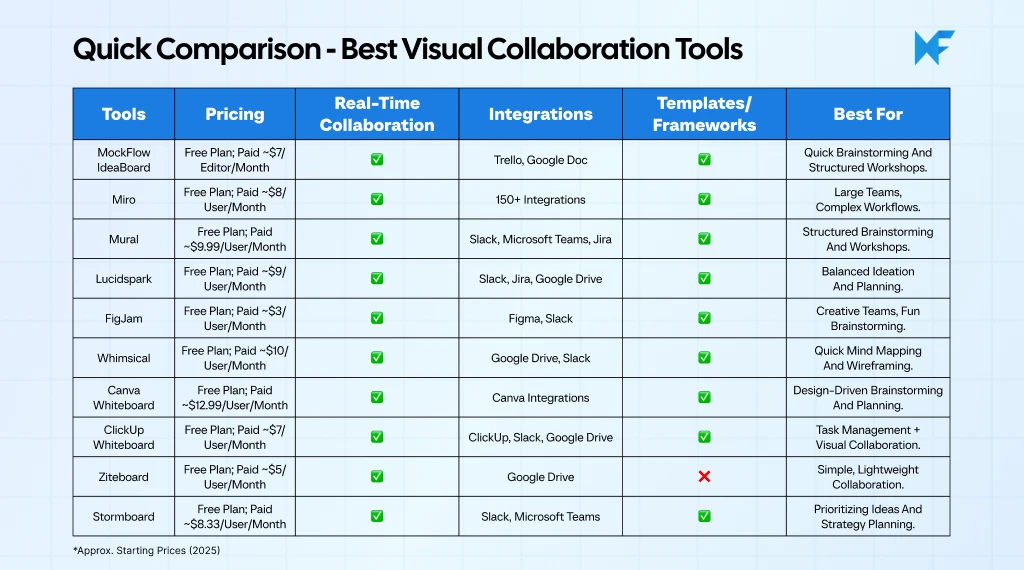
The best visual collaboration tools enhance team productivity by providing a shared space for brainstorming, design, and project management. These tools offer real-time collaboration, allowing multiple team members to interact seamlessly, regardless of location.
Whether you're looking to map ideas, organize workflows, or plan meetings, visual collaboration platforms simplify complex processes. With features like interactive whiteboards, customizable templates, and cloud-based integration, these tools improve communication and align teams across time zones.
Discover the top visual collaboration tools for 2026 to boost efficiency and collaboration in your team. Below, we break down the leading options for you:
1. MockFlow IdeaBoard

MockFlow IdeaBoard is a purpose-built visual collaboration and whiteboarding platform designed to help teams think clearly and work quickly. Unlike tools that pack in heavy layers of menus and complex workflows, IdeaBoard focuses on giving users a clean, intuitive space where ideas can be captured, expanded and organized without friction.
IdeaBoard works well for fast brainstorming, mind mapping, structured workshops, strategic planning sessions and asynchronous collaboration, making it a dependable choice for teams that want visual clarity without sacrificing depth or flexibility.
Key Features:
- Infinite, clutter-free canvas: The workspace expands in every direction, giving teams the freedom to brainstorm, map flows and build structured diagrams without fighting UI limitations or resizing constraints.
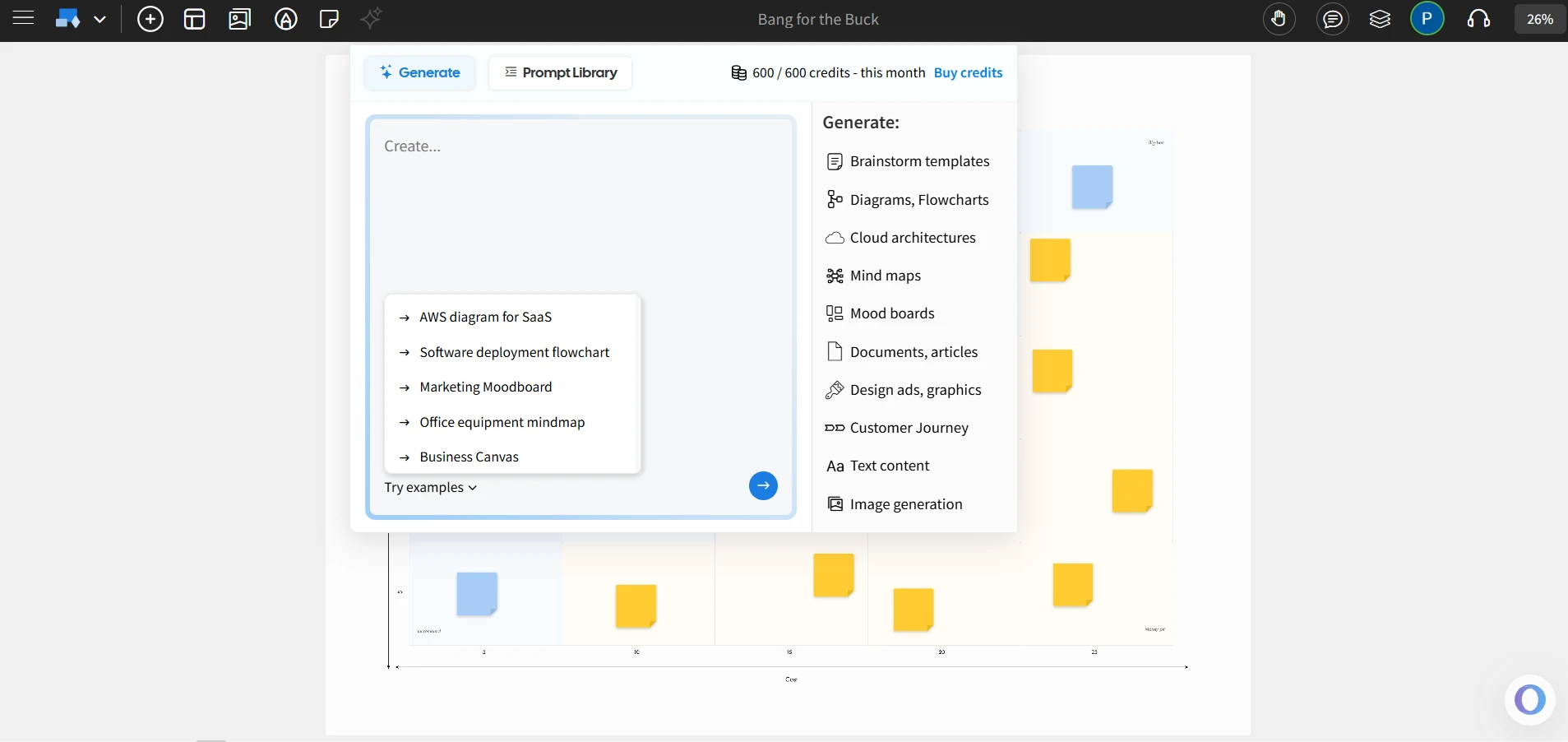
- AI Brainstorming Toolbox: The built-in AI system can generate ideas, expand thoughts, cluster related items and build structured themes, helping teams go from raw thinking to organized insights quickly.
- Real-time collaboration: Live cursors, board chat, multimedia comments, and live presentation features allow teams to share context and feedback fluidly during synchronous and asynchronous sessions.
- Complete visual toolkit: Sticky notes, shapes, arrows, mind-mapping, flow components and non-linear presentation paths support a wide range of brainstorming and facilitation needs without introducing complexity.
- Offline whiteboarding mode: Teams can create and edit boards without an internet connection with the desktop version. Changes sync once online again, making it ideal for secure environments, travel or low-connectivity locations.
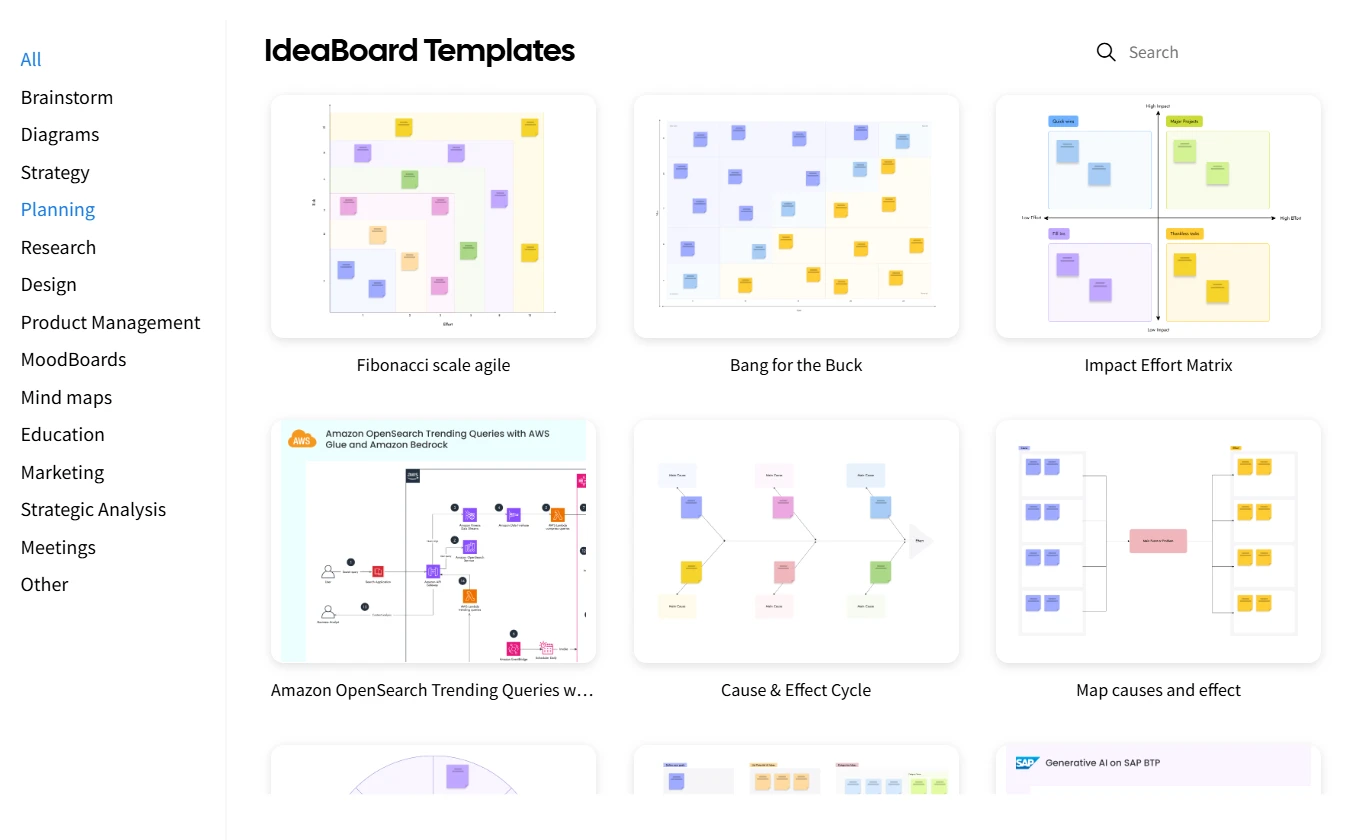
- AI-generated templates and maps: IdeaBoard includes AI-powered template creation and intelligent maps, allowing teams to generate ready-to-use frameworks for workshops, strategy discussions and planning meetings.
- Branded backgrounds and presentation elements: Users can add branded layouts or structured backgrounds to create polished, professional boards aligned with internal or client-facing standards.
- Flexible sharing and export options: Boards can be exported as images or PDFs, and file-mode options support on-premise use, giving teams flexibility in how they store, share or archive visual work.
- Free whiteboarding inside Trello: With the IdeaBoard Power-Up, teams can open a full-featured whiteboard directly inside Trello, brainstorm on tasks, attach boards and collaborate in real time without leaving their Trello workspace.
Best For: Teams that want a fast, minimal learning curve visual collaboration tool for brainstorming, planning workshops, retrospectives, design thinking sessions, class collaboration and remote teamwork.
Why IdeaBoard Is the Best Choice for Teams:
- Designed for simplicity without sacrificing depth: IdeaBoard removes unnecessary interface noise, giving teams a clean workspace that supports both quick idea capture and advanced facilitation.
- Optimized for hybrid and remote collaboration: Video comments, audio notes, async feedback and live multi-cursor collaboration make distributed work feel coordinated instead of chaotic.
- Powered by AI for faster ideation: Teams can move from blank canvas to structured thinking in seconds using AI-generated templates, grouped idea clusters and more.
- Built for reliability and flexibility: Offline mode, on-premise export options and seamless performance ensure smooth usage across devices, networks and working conditions.
- Cost-effective pricing: IdeaBoard offers a free plan with AI credits. The paid plan starts at $7/editor/month when billed yearly and offers unlimited boards and full templates, making it a very affordable choice compared to other platforms.
You can sign up and start using IdeaBoard for free. For browser access, the IdeaBoard Chrome extension helps you get started quickly.
2. Miro
Miro is a visual collaboration platform known for its extensive template library and enterprise-focused features. It is designed to support large-scale team workflows, making it suitable for cross-functional collaboration and complex team activities.
Key Features:
- Miro offers over 300 templates to help teams quickly start brainstorming, mapping, and planning activities, allowing them to begin without building frameworks from scratch.
- It integrates with over 150 tools, including Jira, Slack, Microsoft Teams, Google Workspace, and others, enabling teams to incorporate Miro into their existing workflows.
- AI-powered tools assist with organizing ideas and creating diagrams, which helps teams speed up the process of turning raw data into actionable insights.
- Miro provides enterprise-grade security features, such as SSO, audit logs, and GDPR compliance, to ensure it meets the needs of large organizations.
- The platform supports freeform whiteboarding and structured diagramming, allowing teams to create custom workflows, maps, and visualizations with ease.
Best For: Large teams and enterprises that require a highly customizable visual collaboration platform with strong integration options and security features.
3. Mural
Mural is an online collaboration platform designed to facilitate structured workshops, brainstorming sessions, and strategy development for teams of all sizes. It offers a highly organized environment that supports both real-time and asynchronous collaboration.
Key Features:
- Mural provides an infinite canvas where teams can add sticky notes, shapes, and connectors to organize ideas and visualize complex concepts.
- It offers a library of templates to help teams streamline their sessions by starting with pre-built frameworks for brainstorming, strategy mapping, and process flows.
- Real-time collaboration tools allow teams to work together with live cursors, comments, and reactions, enabling efficient communication during sessions.
- Mural includes voting and timer features, which help teams make decisions more efficiently by prioritizing ideas and managing session time.
- The platform offers integrations with major tools like Jira, Slack, Microsoft Teams, and Google Drive, ensuring seamless workflow integration.
Best For: Consultants, facilitators, and teams that require structured and guided collaboration during workshops and ideation sessions.
4. Lucidspark
Lucidspark is a collaborative visual workspace designed for ideation, brainstorming, and team collaboration. It offers tools for both freeform brainstorming and more structured collaboration, making it suitable for a variety of team workflows.
Key Features:
- Lucidspark offers a freeform whiteboard that allows users to add sticky notes, shapes, text, and connectors, helping teams visualize and organize ideas easily.
- Real-time collaboration enables team members to interact on the same board simultaneously, with live cursors and threaded comments to keep communication clear.
- Lucidspark includes integrations with popular tools such as Google Drive, Jira, Slack, and Microsoft Teams, allowing teams to keep their work connected with their existing software stack.
- AI-assisted tools help teams organize ideas by clustering similar concepts, automatically creating maps, and facilitating quicker ideation.
- Voting and emoji reactions allow teams to prioritize ideas during brainstorming sessions, helping quickly identify top concepts.
Best For: Teams looking for a combination of freeform ideation and structured organization tools to transform raw ideas into actionable plans.
5. FigJam
FigJam is a collaborative whiteboarding tool that provides a playful and interactive workspace for teams to brainstorm, ideate, and plan. It combines freeform creativity with structured collaboration, making it a good choice for teams that want an engaging, fun way to work together.
Key Features:
- FigJam offers a flexible whiteboard canvas where teams can add sticky notes, drawings, text, and diagrams to capture ideas and collaborate visually.
- Real-time collaboration tools include live cursors, comments, and audio chat, allowing teams to interact seamlessly during brainstorming sessions.
- FigJam integrates with Figma to enable easy sharing of design assets, components, and flows between the two platforms, creating a seamless workflow for design teams.
- Interactive elements such as emojis, stamps, and sound reactions keep sessions engaging and fun, helping to maintain energy during long brainstorming or ideation sessions.
- The platform includes a wide range of templates for different team activities such as brainstorming, mind mapping, and strategic planning, helping teams get started quickly.
Best For: Creative teams, product designers, and educators looking for an interactive, engaging visual collaboration tool to facilitate brainstorming and ideation sessions.
6. Whimsical
Whimsical is a minimalistic visual collaboration tool designed for teams that value simplicity and speed. It provides a clean, intuitive workspace for mind mapping, flowcharting, wireframing, and brainstorming, making it ideal for teams that prefer quick, efficient collaboration.
Key Features:
- Whimsical offers an easy-to-use canvas that supports mind maps, flowcharts, wireframes, and sticky notes, allowing teams to capture and organize ideas with minimal effort.
- Real-time collaboration enables teams to work together on the same canvas simultaneously, with live cursors and commenting tools to keep communication clear and focused.
- The platform’s minimal interface ensures teams can get started quickly with a clean layout that reduces distractions, making it easy to focus on the task at hand.
- Whimsical offers fast wireframing tools to help design teams create quick, low-fidelity prototypes and layouts for early-stage design discussions.
- Integrations with Slack and Google Drive enable teams to share boards, collaborate asynchronously, and link to relevant documents or files directly from within the tool.
Best For: Teams that need a fast, simple tool for mind mapping, flowcharting, and wireframing, with a focus on efficiency and ease of use.
7. Canva Whiteboard
Canva Whiteboard is a versatile visual collaboration tool integrated into Canva, designed for teams that want to combine creative visuals with collaborative brainstorming. It provides a simple, intuitive interface that makes it easy to work together on design-oriented projects and general brainstorming.
Key Features:
- Canva Whiteboard provides a collaborative canvas where teams can add sticky notes, text, images, and shapes to visually organize ideas and concepts.
- Real-time collaboration allows multiple users to work on the same board simultaneously, with live cursors and commenting features to ensure smooth communication throughout sessions.
- The platform offers a wide range of templates for brainstorming, planning, and project management, enabling teams to start with pre-designed layouts and customize them as needed.
- Canva Whiteboard is tightly integrated with Canva’s design tools, making it easy to incorporate design elements, such as images, icons, and fonts, directly from the Canva library into whiteboard sessions.
- The platform includes a simple drag-and-drop interface, which ensures that users can quickly add, move, and resize elements without a steep learning curve.
Best For: Marketing teams, educators, and small businesses that need a creative, easy-to-use visual collaboration tool for brainstorming, planning, and design.
8. ClickUp Whiteboard
ClickUp Whiteboard is a collaborative visual tool embedded within the ClickUp project management platform. It allows teams to map out ideas, processes, and workflows directly within their project management environment, making it ideal for teams that want to connect visual collaboration with task management.
Key Features:
- ClickUp Whiteboard offers an infinite canvas where teams can add sticky notes, shapes, lines, and text to create visual workflows and brainstorm ideas without limits.
- Real-time collaboration allows team members to interact simultaneously on the same whiteboard, with live cursors and comments to ensure seamless communication.
- ClickUp Whiteboard integrates with the full ClickUp suite, enabling teams to link tasks, projects, and deadlines directly to their whiteboard elements, creating a more streamlined workflow.
- It supports visual planning and mind mapping, helping teams to outline processes, create roadmaps, and structure brainstorming sessions in a visual way.
- Customizable templates allow teams to use pre‑designed structures or create their own, speeding up the process of setting up a whiteboard session or planning meeting.
Best For: Teams that use ClickUp for task management and want a visual collaboration tool that integrates seamlessly with their existing project management workflows.
9. Ziteboard
Ziteboard is a simple, lightweight online whiteboard that focuses on providing a fast and intuitive visual collaboration experience. It is designed for teams that need a basic yet effective tool for brainstorming, teaching, and real-time collaboration.
Key Features:
- Ziteboard offers an infinite, freeform canvas where teams can add freehand drawings, sticky notes, and text to capture and organize ideas quickly.
- Real-time collaboration supports multi-user editing, allowing team members to work on the same board at the same time and see updates instantly.
- It includes simple drawing and annotation tools, making it easy for users to sketch diagrams, highlight content, or mark up images during collaboration sessions.
- Ziteboard offers quick sharing options, with boards that can be shared via link or embedded directly into websites, making it easy for teams to collaborate across different platforms.
- The platform supports multiple device access, ensuring that users can collaborate on their whiteboard from various devices, including desktops, tablets, and smartphones.
Best For: Teams that need a lightweight, no-fuss whiteboarding tool for quick ideation, real-time collaboration, and simple brainstorming sessions.
10. Stormboard
Stormboard is a visual collaboration platform designed for brainstorming, planning, and organizing ideas using sticky notes and templates. It provides structured workflows that help teams capture, sort, and prioritize ideas during creative or strategic sessions.
Key Features:
- Stormboard offers an infinite canvas where teams can add sticky notes, images, text, and drawings to map out ideas and structure collaborative work.
- Real-time collaboration allows team members to edit and contribute simultaneously, with updates reflected instantly on the board for smooth communication.
- It provides customizable templates for various activities such as brainstorming, strategy planning, and product development, helping teams start quickly and stay focused.
- Stormboard allows for easy prioritization with features like voting and tagging, which help teams identify the most important ideas and next steps during brainstorming sessions.
- The platform includes cloud-based storage, ensuring that all boards are automatically saved and accessible from any device, allowing for seamless collaboration across time zones.
Best For: Teams that need a structured and easy-to-use tool for brainstorming, strategic planning, and organizing ideas in an accessible, cloud-based workspace.
To sum up, these tools represent the best in visual collaboration, each offering unique features to suit different team needs and workflows. As you evaluate which platform fits your team’s style and goals, keep in mind the specific features that will help streamline your collaboration and boost productivity.
As demand for collaborative tools continues to rise, the enterprise collaboration market is expected to grow at a CAGR of 12% from 2022 to 2030, emphasizing the increasing need for seamless digital collaboration across teams.
Also read → The 10 best Miro alternatives for whiteboarding | The top 8 Mural alternatives for remote teams | 8 best FigJam alternatives for design collaboration
Key Features to Look for in Visual Collaboration Tools
As 77% of companies now offer hybrid work models, the need for effective collaboration tools that support these work environments has never been greater. Teams now look for the remote teamwork tools with the right features that meet their unique needs.
In this section, we’ll explore the key features that make a visual collaboration tool stand out.
1. Real-Time Collaboration
Real-time collaboration is crucial for teams working together across time zones, especially in hybrid or remote settings. This feature ensures that everyone can contribute simultaneously and stay aligned during brainstorming sessions, workshops, or planning activities.
- Multi-user editing: Multiple users can edit the same board at once, making it easy for everyone to participate in real-time.
- Live cursors and chat: Visual cues like live cursors help teams see who is working on what, and in-app chat ensures communication remains within the tool.
- Comments and feedback: Team members can leave comments, tag each other, and react to ideas in real-time, enhancing the collaborative experience.
2. Visual Brainstorming & Communication Tools
A strong set of visual tools is essential for capturing ideas and turning them into actionable plans. Look for tools that provide a variety of options to support diverse brainstorming techniques.
- Sticky notes, shapes, and connectors: These basic tools help organize thoughts visually and make it easy to structure information during brainstorming sessions.
- Mind mapping and flowcharts: These features allow teams to organize ideas hierarchically and create visual representations of workflows, processes, and relationships.
- Freehand sketching: Some tools offer the ability to draw or doodle, enabling teams to capture more spontaneous ideas.
3. Templates, Frameworks & Ease of Use
Templates help teams get started quickly by providing pre-structured frameworks for common tasks, from ideation to project planning.
- Pre-built templates: Templates for brainstorming, mapping, retrospectives, and project planning help teams start with a framework, saving time and improving efficiency.
- Customizable options: Many tools allow users to create their own templates, ensuring that teams can adapt the tool to their specific needs.
- User-friendly interface: The tool should be easy to navigate, with a clean interface and minimal learning curve.
4. Integrations & Cloud-Based Sync
Seamless integration with your existing tech stack is key for smooth collaboration. Cloud-based collaboration and synchronization ensures that everyone stays on the same page, no matter where they’re working from.
- Cross-platform sync: Cloud sync ensures that updates to the board are reflected in real-time for all users, no matter the device they’re using.
- Third-party integrations: Look for tools that integrate with other software your team already uses, such as Slack, Jira, Google Drive, Microsoft Teams, and others.
5. Free Plans & Scalability
If you’re testing out tools, a free plan is essential for getting a feel of the features before making an investment. Scalability is also crucial as your team grows.
- Free plan availability: Many tools offer free plans with limited features, allowing you to test the platform before committing to a paid version.
- Scalable features: As your team grows, the platform should be able to accommodate increased user counts, more storage, and advanced features.
These key features will help you identify which visual collaboration tool fits your team’s workflow, from real-time collaboration to scalability. By focusing on these factors, you’ll ensure that your team can collaborate efficiently and stay aligned no matter where they are.
eShare’s State of Collaboration report shows that 82% of organizations use collaborative editing tools for internal collaboration. This shows how adoption of such team brainstorming tools have become indispensable for modern workspace.
Now that we’ve covered the key elements to consider, let’s explore how to choose the right visual collaboration tool for your team.
How to Choose the Right Visual Collaboration Tool
Choosing the right visual collaboration tool can be challenging with so many options available. However, by focusing on your team’s unique needs and workflows, you can find a tool that will enhance your productivity and streamline your collaboration.
As per Alludo’s State of Collaboration Survey, 69% of employees in the US believe collaboration tools increase productivity, proving that the right visual collaboration platform can significantly enhance team output and decision-making.
Here are some key factors to consider when making your decision.
Team Size & Use Case
Different tools cater to different team sizes and collaboration styles. Consider how your team will use the tool and choose one that fits your specific needs.
- Small teams vs. large teams: Some tools are better suited for small, agile teams, while others offer scalability for large enterprises or cross-functional groups.
- Use case-specific features: Choose a tool that aligns with your team’s primary goals, whether it’s brainstorming, project planning, or ideation.
Budget & ROI
Cost is always a factor in choosing a collaboration tool. Make sure to evaluate the tool’s pricing structure and determine whether it offers good value for the features it provides.
- Free plans vs. paid plans: Many tools offer a free tier that lets you test the basic features before committing. Paid plans usually come with additional features and higher user limits.
- Value for money: Consider the pricing against the benefits and features offered. A more expensive tool might be worth it if it saves your team time and effort in the long run.
For instance, IdeaBoard offers a highly cost-effective collaborative workspace, offering a free plan with AI-powered features and a paid plan starting at just $7 per editor/month. It provides access to all the essential features at a fraction of the price compared to other tools, making it a great ROI for small to mid-sized teams.

Adoption, Templates & Onboarding
Tools with user-friendly interfaces and built-in templates will help your team start collaborating quickly.
- User-friendly interfaces: A simple, intuitive interface will ensure your team gets up to speed without unnecessary training.
- Templates & frameworks: Tools with ready-made templates or frameworks for common use cases (e.g., brainstorming, project planning) can speed up the adoption process.
IdeaBoard stands out in this area, with its zero-learning-curve design that allows teams to start collaborating without extensive training. It also provides AI-generated templates and frameworks that help teams get started quickly with minimal effort, making it one of the best digital collaboration solutions.
Security, Sharing & File Control
Security and file management are critical, especially if your team is handling sensitive information or working in regulated industries.
- Access controls: Look for tools that allow you to control who can view, edit, or share boards.
- Compliance and data security: If your organization has specific security requirements, ensure the tool complies with standards such as GDPR or SOC 2.
By carefully considering these factors like team size, budget, adoption ease, and security, you can confidently choose a visual collaboration tool that aligns with your team’s goals and workflows.
MockFlow IdeaBoard, with its AI-powered templates, offline whiteboarding mode, and cost-effective pricing, offers a strong option for teams that want to get started quickly without sacrificing flexibility or depth. The platform offers a clutter-free, intuitive interface and seamless integration with tools like Trello and Google Docs, ensuring smooth collaboration in both remote and hybrid environments.
Explore MockFlow’s pricing and see how it supports remote teamwork for teams of all sizes.
Conclusion
In today’s fast-evolving work environment, visual collaboration tools have become indispensable for teams aiming to work together more effectively, especially in remote and hybrid setups. Whether you’re looking for a simple tool for brainstorming, a robust platform for workshops, or a solution that integrates with your existing workflows, there’s a tool out there that can enhance your team’s productivity and creativity.
By considering the key features we’ve discussed, such as real-time collaboration, templates, and integration capabilities, you can find the right platform that aligns with your team’s needs. MockFlow IdeaBoard offers a user-friendly, flexible, and cost-effective solution that fits the needs of teams of all sizes.
Choosing the right tool isn’t just about features or price. It’s about finding a platform that enhances your team’s collaboration and drives results. Ready to take the next step? Sign up with IdeaBoard for free or directly use it in your browser through the IdeaBoard Chrome extension.
FAQs: Best Visual Collaboration Tools
1. What makes MockFlow IdeaBoard the best visual collaboration tool for remote teams?
MockFlow IdeaBoard is designed specifically for remote teams to collaborate efficiently. It offers a clutter-free, infinite whiteboard canvas where teams can brainstorm, map ideas, and plan projects in real time. With features like AI-powered brainstorming tools, offline mode, and seamless integration with other platforms, IdeaBoard is ideal for distributed teams seeking a fast, frictionless collaboration experience.
2. How do visual collaboration tools improve team productivity?
Visual collaboration tools improve productivity by streamlining communication and simplifying brainstorming. With real-time updates, teams can collaborate efficiently on shared visual canvases, reducing miscommunication and improving clarity. Features like templates and integration with other productivity software enhance workflow organization and task management.
3. What are the real-time features of MockFlow IdeaBoard that enhance collaboration?
MockFlow IdeaBoard offers powerful real-time collaboration tools, including multi-user editing, live cursor tracking, and multimedia comments. Teams can engage in brainstorming sessions, leave feedback, and interact with the board simultaneously. These features improve communication, foster creativity, and ensure that everyone stays aligned during collaborative efforts.
4. What are the key features of the best visual collaboration tools?
The best visual collaboration tools include real-time collaboration, customizable templates, cloud-based syncing, and easy-to-use visual communication features like sticky notes and brainstorming frameworks. These tools allow for seamless integration with other platforms, promoting workflow efficiency and fostering better team coordination.
5. How do visual collaboration tools help in brainstorming sessions?
Visual collaboration tools provide digital whiteboards and mind-mapping tools that facilitate brainstorming by organizing ideas in a structured, visual format. These tools enable teams to track progress, group related concepts, and collaborate efficiently in real-time, ensuring a smooth and organized idea generation process.
6. Is there a free version of MockFlow IdeaBoard available?
Yes, MockFlow IdeaBoard offers a free version that provides essential features like access to templates, libraries, and 100 AI credits. The free plan is perfect for small teams or those who want to try out the platform before committing to a paid version with added benefits like advanced AI brainstorming and offline mode.
10 Best Remote Collaboration Tools for Hybrid and Remote Teams in 2026
Introduction Remote work has become the norm for many teams, but with it comes the challenge of maintaining seamless...
6 Best Padlet Alternatives for Teams and Educators in 2026
Introduction Padlet is a popular tool for organizing ideas, sharing content, and collaborating visually. However, it does not...

8 Best FigJam Alternatives for Remote Collaboration & Design
Introduction: What are FigJam Alternatives? You’ve probably been there: a team brainstorming session that’s supposed to be...
