10 Best Remote Collaboration Tools for Hybrid and Remote Teams in 2026
Introduction
Remote work has become the norm for many teams, but with it comes the challenge of maintaining seamless collaboration.
Have you ever been in a meeting where ideas float around but don’t seem to land anywhere? Or tried to organize tasks only to find everything scattered across multiple platforms?
These frustrations are common for remote and hybrid teams. Without the right tools, the potential for miscommunication, disconnected workflows, and inefficient collaboration grows exponentially.
This is where remote collaboration tools come into play. They help bridge the gap between teams working in different locations, ensuring smooth communication and streamlined processes. Whether you're brainstorming, managing tasks, or holding a video conference, there’s a tool for every need.
In this blog, we’ll explore the best remote collaboration tools for 2026 that are designed to elevate productivity, streamline communication, and enhance teamwork in remote environments. Let’s dive into the best solutions available today, making collaboration easier and more effective for your team.
Top 10 Remote Collaboration Tools for 2026
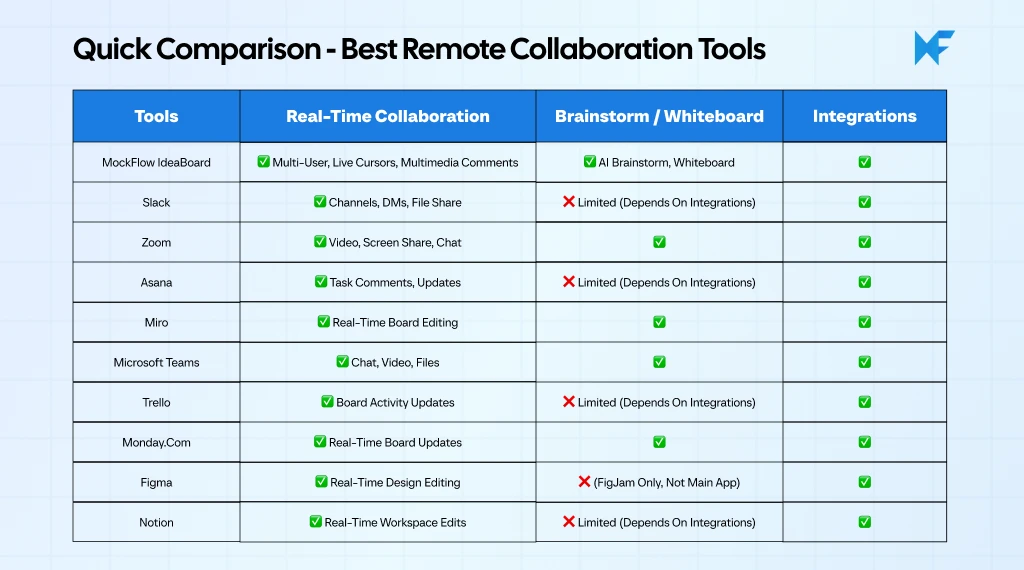
The best remote collaboration tools help teams stay connected and productive, no matter where they work. These tools improve communication, streamline workflows, and enhance team collaboration through features like real-time editing, file sharing, and seamless integrations.
As remote work continues to rise, choosing the right tool becomes crucial for maximizing productivity and ensuring secure, efficient teamwork.
Here are the top collaboration platforms for 2026, highlighting their key features and how they support remote and hybrid teams. Whether you're managing tasks or running meetings, the right tool can transform how your team collaborates.
1. MockFlow IdeaBoard
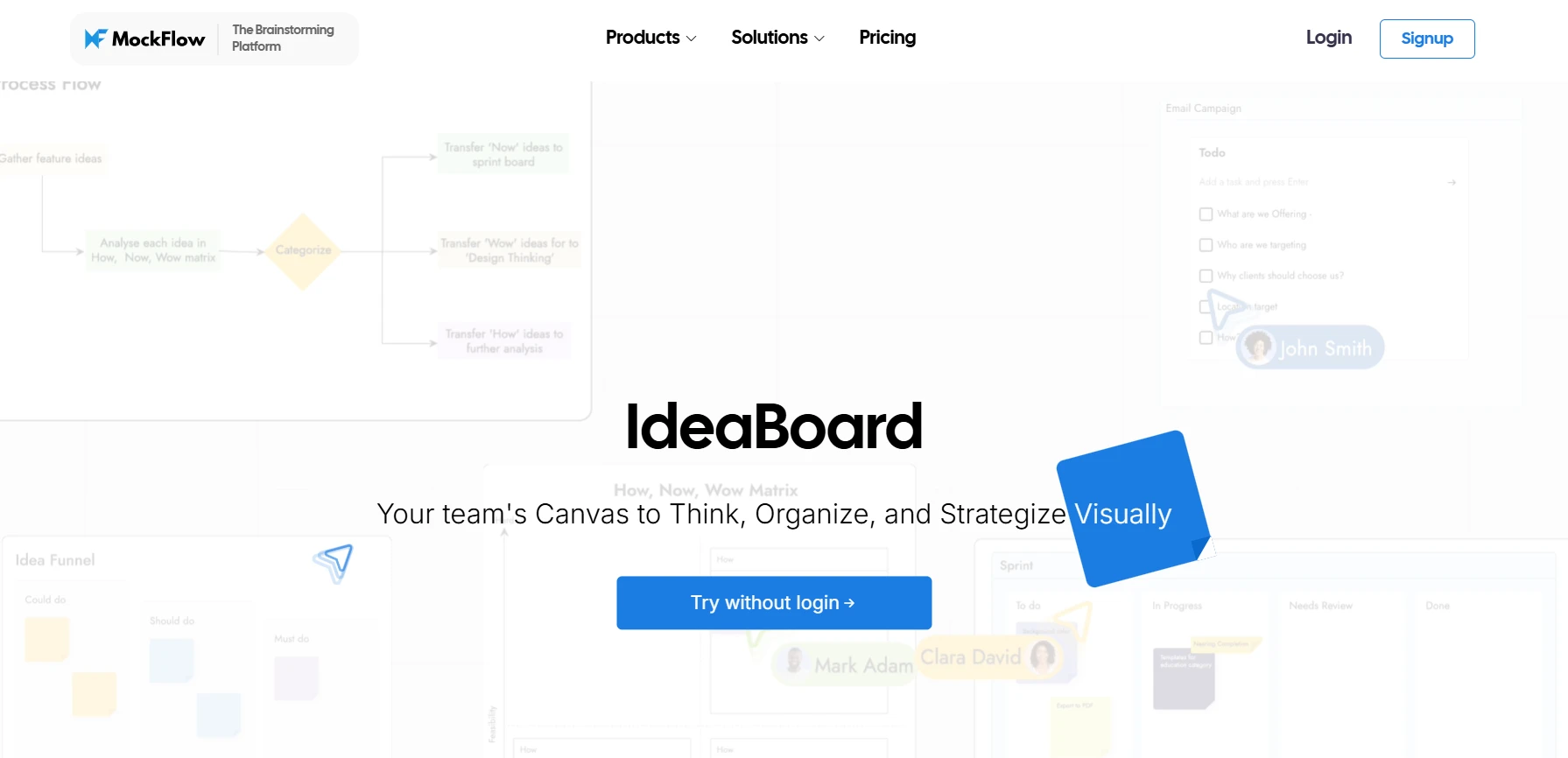
MockFlow IdeaBoard is an intuitive, real-time visual collaboration and whiteboarding platform designed to support brainstorming, mind mapping, flowcharting, and ideation. Its easy-to-use interface makes it an excellent tool for teams that need to collaborate creatively and quickly.
Whether you're conducting a design sprint, planning a project, or mapping out product features, MockFlow IdeaBoard offers the tools that remote teams need to stay aligned and productive.
Key Features for Remote Collaboration:
- Real-Time Multi-User Collaboration: MockFlow enables real-time collaboration, allowing multiple team members to contribute simultaneously. This reduces delays and ensures all team members work on the latest version of the board, enhancing communication across time zones.
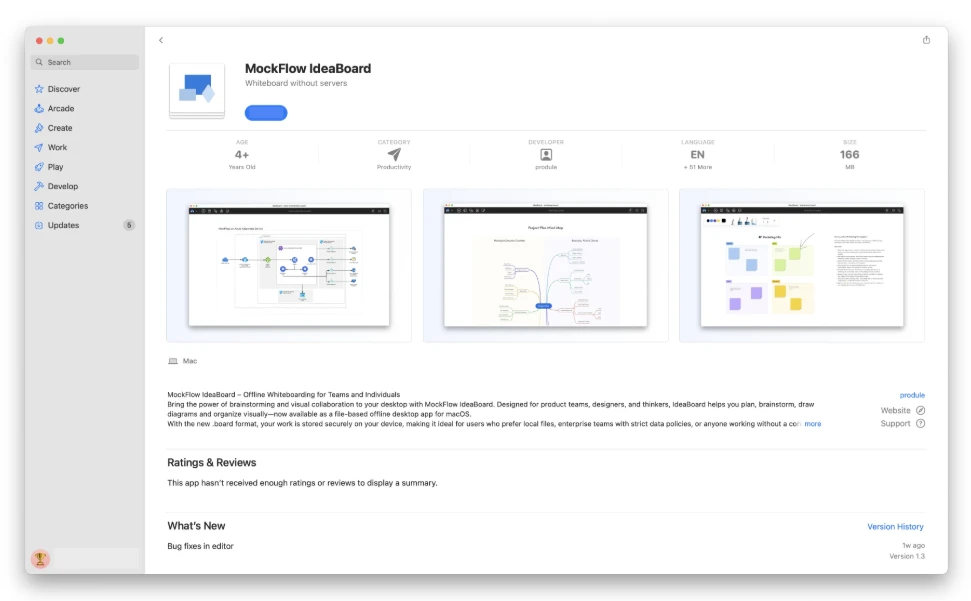
- Offline Mode: MockFlow IdeaBoard allows users to work seamlessly without an internet connection by offering full offline capabilities with its offline whiteboard app. This feature is essential for remote teams, as it ensures uninterrupted collaboration even when network access is limited or unavailable.
- Audio/Video Meetings: Teams can initiate audio and video meetings directly within the platform, making it easy to discuss ideas in real-time without needing to switch to a separate meeting tool. This streamlines the collaboration process for remote teams.
- Flexible Exports (PDF, Images, More): Export collaborative boards in PDF or image formats for easy sharing, ensuring that all team members and stakeholders have access to the latest information. Additionally, the File Mode feature enables teams to export their whiteboards for on-premise use, providing more control over their data.
- Multimedia Commenting: Remote teams can leave voice or video comments directly on the board. This makes it easier to convey tone, intent, and context, enhancing communication clarity and reducing misunderstandings in text-based exchanges.
- Board Chat: Board chat allows team members to chat within the board, providing an easy way to discuss ideas and updates without leaving the platform. This ensures that all communication stays centralized and connected to the relevant project or session.
- Secure View Links for External Users: MockFlow offers secure view links, allowing teams to share their whiteboards with external stakeholders or clients while maintaining control over permissions and access. This feature ensures that external collaborators can view your work without making changes.
- AI Brainstorming Toolbox: The AI-powered brainstorming toolbox helps teams generate and organize ideas faster by offering intelligent suggestions. This speeds up the ideation process, enabling remote teams to collaborate more effectively and break through creative blocks.
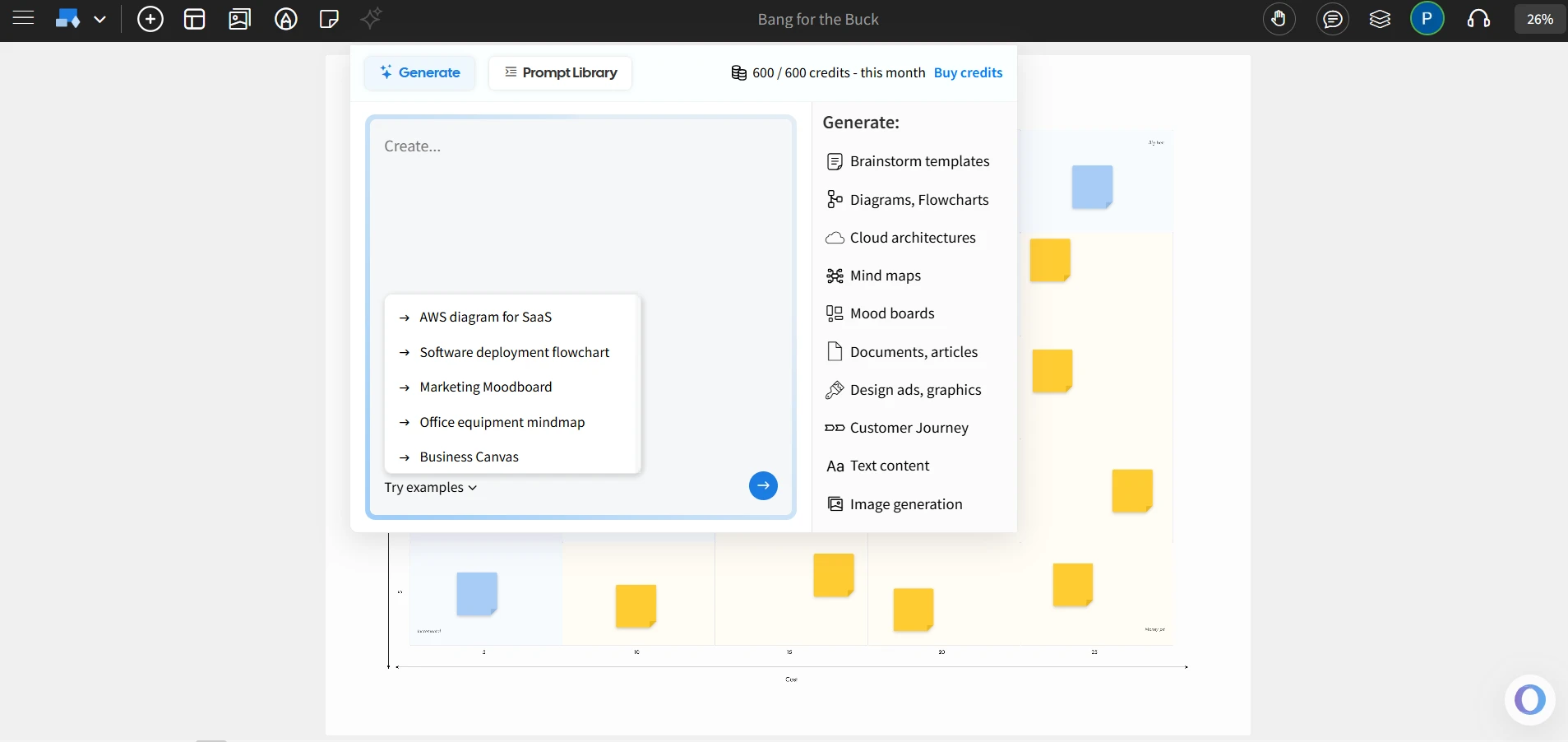
- Free Whiteboarding Inside Trello: IdeaBoard integrates with Trello to offer free whiteboarding directly inside Trello cards, allowing teams to brainstorm and visualize ideas while managing tasks. This integration makes it easy for remote teams to use their existing task management tools while enhancing creativity and collaboration within Trello’s project management framework.
- Non-linear Presentations with Interactions: Teams can create non-linear presentations with interactive elements, allowing for dynamic, engaging meetings where participants can freely navigate through the content. This enhances collaboration during remote meetings.
- Branded Backgrounds for Professional Sessions: For teams conducting client-facing sessions or presentations, IdeaBoard provides branded backgrounds to ensure that the sessions appear polished and professional, fostering trust and credibility in external collaborations.
- New Maps Component with AI: The AI-powered Maps component helps teams organize ideas visually using smart mapping tools. For remote teams working on complex projects, this tool offers a clear, visual representation of workflows and brainstorming outputs, which simplifies communication and decision-making.
- Zero Learning Curve & Minimal Setup: MockFlow’s seamless design ensures that remote teams can quickly set up and start using the platform with minimal technical hassle with its IdeaBoard Chrome extension. This is ideal for quick, spontaneous collaborations, fast-paced environments.
Best For:
Teams engaged in product strategy, design thinking, creative brainstorming, and hybrid work. Its versatility and offline capabilities make it especially valuable for distributed teams that require a high degree of collaboration.
Why It Stands Out:
IdeaBoard stands out for its combination of AI-powered ideation, offline-first reliability, and real-time collaboration features. This makes it a top choice for remote teams, especially those in fast-paced or creative fields like product design, strategy development, and project management.
IdeaBoard is one of the best free collaboration tools for remote teams as it offers a free plan with templates and AI credits. The paid plan starts at a reasonable price of $7/editor/month when billed yearly and offers unlimited boards and full templates, making it a very affordable choice compared to other platforms.
If you wish to start collaborating smarter today, you can sign up and try IdeaBoard for free.
2. Slack
Slack is a communication platform that facilitates collaboration among remote teams through channels, direct messaging, and integrations with other tools. It is designed to streamline communication and improve workflow by keeping all conversations in one place.
Key Features for Remote Collaboration:
- Channels for Team Communication: Channels help organize conversations by topics, projects, or departments, making it easier for teams to manage and find relevant discussions.
- Direct Messages and Group Chats: Slack offers one-on-one direct messaging as well as group chat options for team-based or small group conversations.
- File Sharing and Integration with Other Tools: Users can share files directly within the platform and integrate with tools like Google Drive and Zoom for a more connected workflow.
- Threaded Conversations for Easy Topic Tracking: Threaded conversations keep discussions organized within channels, allowing users to follow specific topics without disrupting the main conversation flow.
Best For:
Slack is suited for teams needing a central platform for communication, file sharing, and integration with other collaboration tools.
3. Zoom
Zoom is a video conferencing platform known for its HD video and audio quality. It is commonly used for remote meetings, webinars, and virtual events, offering a range of features that enhance communication and collaboration across remote teams.
Key Features for Remote Collaboration:
- HD Video and Audio: Zoom provides high-definition video and clear audio for virtual meetings, ensuring better communication and engagement during remote discussions.
- Screen Sharing and Breakout Rooms: Users can share their screens during meetings, and breakout rooms allow smaller group discussions within larger sessions, making it suitable for team collaboration and workshops.
- Recording and Transcription Services: Zoom offers the ability to record meetings and provides transcription services, allowing teams to refer back to discussions and maintain meeting documentation.
- Chat and Collaboration Tools: In-meeting chat allows participants to communicate via text during video sessions, and collaborative tools help in managing discussions and sharing resources.
Best For:
Zoom is best for teams needing high-quality video and audio conferencing for meetings, webinars, and virtual events.
4. Asana
Asana is a project management tool that helps teams organize, track, and manage tasks and projects. It provides features to ensure deadlines are met, and work is efficiently distributed among team members.
Key Features for Remote Collaboration:
- Task Assignments and Progress Tracking: Asana allows users to assign tasks, set due dates, and track progress, ensuring that all team members stay aligned on project deadlines and responsibilities.
- Timeline and Board Views for Project Management: With timeline and board views, teams can visualize project progress, plan workflows, and manage tasks more efficiently.
- Integration with Other Tools: Asana integrates with popular tools such as Slack, Zoom, and Google Workspace, enabling seamless collaboration and communication across platforms.
Best For:
Asana is ideal for teams requiring structured project management and task tracking, particularly those managing multiple tasks and deadlines.
5. Miro
Miro is an online whiteboard that enables teams to collaborate in real-time, supporting activities like brainstorming, ideation, and project planning. It provides a digital space for teams to map out ideas and visualize workflows.
Key Features for Remote Collaboration:
- Infinite Canvas for Real-Time Collaboration: Miro offers an infinite canvas that allows teams to add and organize content without spatial limits, enabling seamless real-time collaboration across remote teams.
- Sticky Notes, Mapping Tools, and Templates: Teams can use sticky notes and mapping tools to visualize ideas and workflows. Pre-designed templates help teams get started quickly on various planning or brainstorming activities.
- Collaboration Features like Voting, Timers, and Reactions: Miro includes interactive tools such as voting for decision-making, timers to manage session lengths, and reactions to keep team engagement high during brainstorming sessions.
Best For:
Miro is best suited for design teams, agile teams, or any team that needs a creative space to brainstorm, plan, and map out ideas.
6. Microsoft Teams
Microsoft Teams is a comprehensive collaboration platform that integrates with Office 365 to provide a wide range of features for communication, task management, and video conferencing. It enables teams to work together efficiently by combining chat, file sharing, and meetings in one platform.
Key Features for Remote Collaboration:
- Video and Audio Calls: Teams offers high-quality video and audio calls, making it easy for remote teams to hold meetings and discussions without interruptions.
- Direct and Group Messaging: Users can send direct messages for one-on-one communication or use group chats for team-wide discussions, ensuring effective communication across teams.
- File Sharing with OneDrive and SharePoint: Teams integrates with OneDrive and SharePoint, allowing users to share and collaborate on documents and files directly within the platform.
- Integration with Office 365 Apps: Microsoft Teams integrates seamlessly with Office 365 apps like Word, Excel, and PowerPoint, enabling teams to collaborate on documents and projects without leaving the platform.
Best For:
Microsoft Teams is ideal for teams using Office 365 who need a unified platform for communication, collaboration, and task management.
7. Trello
Trello is a visual project management tool that uses boards, lists, and cards to help teams organize tasks and manage workflows. It provides a simple, visual interface to track progress on individual and team projects.
Key Features for Remote Collaboration:
- Visual Boards and Task Tracking: Trello’s boards and cards offer a clear visual layout to organize tasks, making it easy to see project progress and task statuses at a glance.
- Due Dates, Labels, and Checklists for Task Management: Users can set due dates, apply labels, and create checklists within cards, ensuring that tasks are tracked and deadlines are met.
- Collaboration with Team Members: Trello enables teams to collaborate on tasks by assigning team members to specific cards, leaving comments, and sharing attachments within the platform.
Best For:
Trello is best suited for small teams and simple projects that require an easy-to-use tool for task management and visual collaboration.
8. Monday.com
Monday.com is a work OS designed to help teams plan, track, and manage workflows. It offers a highly customizable platform for project management, allowing teams to tailor the tool to their specific needs.
Key Features for Remote Collaboration:
- Customizable Workflow Templates: Monday.com provides customizable templates that allow teams to set up workflows tailored to their processes, enabling efficient project management across various industries.
- Visual Boards for Task Tracking: The platform uses visual boards to track tasks, deadlines, and project statuses, making it easy to see the progress of multiple projects at once.
- Time Tracking and Reporting Tools: Monday.com includes time tracking and reporting tools, helping teams monitor time spent on tasks and generate insights to improve productivity.
Best For:
Monday.com is ideal for teams with complex workflows that need a highly customizable project management solution to manage detailed projects across various departments.
9. Figma
Figma is a browser-based design tool that allows real-time collaboration for design teams. It enables teams to work together on design projects from anywhere, making it an ideal solution for remote design collaboration.
Key Features for Remote Collaboration:
- Real-Time Design Collaboration: Figma allows multiple team members to collaborate on designs in real-time, making it easy to work together, share ideas, and make changes instantaneously.
- Vector Editing and Prototyping: Figma offers vector editing tools for detailed design work and prototyping capabilities, allowing teams to create interactive design prototypes to showcase their work.
- Commenting and Feedback Features: Team members can leave comments and feedback directly on the design files, facilitating clear communication and improving the review process.
Best For:
Figma is best for design teams, UI/UX professionals, and product teams that need a collaborative, cloud-based design tool for creating and refining designs.
10. Notion
Notion is an all-in-one workspace designed for teams, combining note-taking, project management, and knowledge sharing. It allows teams to organize their work, collaborate on tasks, and document key information in one flexible platform.
Key Features for Remote Collaboration:
- Note-taking, Tasks, Wikis: Notion allows users to create detailed notes, manage tasks, and build wikis for documentation, providing a centralized space for team knowledge and project tracking.
- Collaboration Features with Real-Time Updates: Team members can collaborate in real-time, with changes syncing instantly, ensuring that everyone is always on the same page and able to contribute without delays.
- Customizable Workspace for Different Workflows: Notion offers a customizable workspace that adapts to various team needs, allowing teams to set up templates and workflows that align with their specific tasks and processes.
Best For:
Notion is ideal for teams looking for flexibility in their workspace to handle documentation, project management, and team collaboration all in one place.
To sum up, these are a few best collaboration tools for remote teams that provide a range of features to enhance communication, productivity, and workflow management. Each tool offers unique capabilities that cater to different team needs. Choosing the right one depends on your team’s specific requirements, so assess your needs and explore the options to find the best fit for your remote collaboration goals.
Also read → The 10 best Miro alternatives for whiteboarding | The 8 best Zoom whiteboard alternatives for remote teams
Key Features to Look for in Remote Collaboration Tools
When selecting a remote collaboration tool, it’s important to prioritize features that enhance productivity, streamline communication, and ensure seamless teamwork. Below are key aspects to consider when choosing the best tool for your remote team.
1. Real-Time Collaboration
Real-time collaboration is essential for any remote team that needs to work together effectively. Tools that support multi-user real-time editing help eliminate delays, ensuring that everyone is on the same page at all times.
- Instant updates: All changes made by team members are immediately visible to everyone.
- Real-time interaction: Team members can work on the same document or project simultaneously, providing immediate feedback and reducing lag.
- Improved collaboration: Real-time editing fosters a sense of shared involvement, increasing productivity and reducing the time spent on revisions.
A Dataintelo report notes that online whiteboards have become a core part of virtual classrooms and remote corporate collaboration, with education and corporate use cases leading overall demand.
2. Task & Project Management
Managing tasks and tracking project progress is crucial for remote teams to stay aligned. A good collaboration tool should integrate task management functionalities, ensuring that team members know their responsibilities and deadlines.
- Task assignment and deadlines: Allows for easy delegation of tasks with clear due dates.
- Visual timelines and boards: Helps track progress visually through Kanban boards, Gantt charts, or timelines.
- Progress tracking: Provides an overview of project status, ensuring teams stay on target and tasks are completed on time.
3. Cross-Platform Integration
Remote teams often rely on various tools for communication, file sharing, and scheduling. Therefore, cross-platform integration is key. A tool that integrates smoothly with other apps helps centralize workflows and eliminates the need for switching between multiple platforms, saving time and minimizing errors.
- App integrations: Easily connects with other tools your team already uses.
- Unified workflows: Integrates communication, file sharing, and project management into one platform.
- Streamlined processes: Reduces the need for manual updates between platforms, creating a seamless experience.
4. User Interface & Experience
An intuitive user interface (UI) is critical for ensuring quick adoption of the tool, especially for remote teams that may have varying levels of technical expertise. A simple, easy-to-use design promotes faster onboarding and reduces the time spent troubleshooting.
- Simple design: Easy-to-use layouts that reduce the learning curve.
- User-friendly features: Minimize clicks and navigation steps to access core functionalities.
- Quick onboarding: New users can get started faster, improving productivity from day one.
5. Security & Data Privacy
For remote teams working with sensitive data, security and data privacy should be a top priority. The tool you choose should meet industry security standards, such as data encryption, secure file sharing, and two-factor authentication (2FA).
- Encryption: Ensures that data is protected during transmission and storage.
- Two-factor authentication: Adds an extra layer of security to prevent unauthorized access.
- Data compliance: Ensures that the tool adheres to relevant privacy regulations (e.g., GDPR, HIPAA).
How to Choose the Right Remote Collaboration Tool
While many teams have adopted digital collaboration tools, a report from Insightful.io reveals that 21.38% of remote company leaders cite collaboration and communication difficulties as their primary challenge. This gap underscores the importance of selecting collaboration tools that are fully optimized and capable of delivering on their promises, especially in facilitating smooth, real-time communication across diverse teams.
Here’s a framework to help guide your decision-making process:
1. Assess Your Team’s Needs
Before choosing a tool, it's crucial to understand your team size and the complexity of the projects you manage. Do you need a tool primarily for communication, task management, brainstorming, or a combination of all three?
Factors to consider:
- Team size: Smaller teams might benefit from simple tools, while larger teams might need more robust project management solutions.
- Project complexity: If your projects require detailed tracking, task dependencies, and timelines, tools with project management features are necessary.
2. Evaluate Features and Integrations
Evaluate the specific features that align with your team’s workflow. Does your team need real-time collaboration, task tracking, file sharing, or video conferencing? Additionally, consider how well the tool integrates with other platforms your team already uses, such as Slack, Google Workspace, or Zoom.
Important features to consider:
- Task management: Look for features like task assignment, due dates, and progress tracking.
- Collaboration tools: Real-time editing, file sharing, and communication features should be evaluated for integration and usability.
3. Consider Budget and Scalability
Compare the pricing plans of various tools and see how they align with your team’s budget. Also, consider whether the tool can scale as your team grows. Some tools offer free trials or free versions with limited features, allowing you to test them before committing to a paid plan.
Points to assess:
- Pricing structure: Look for tools that offer flexible pricing tiers based on team size and feature needs.
- Scalability: Ensure the tool can grow with your team and that features or integrations can be added as needed.
4. Check for Security and Compliance
When selecting a remote collaboration tool, it's essential to prioritize security features like end-to-end encryption, two-factor authentication (2FA), and compliance with regulations such as GDPR. These features ensure that sensitive team data, including client information and proprietary work, remains protected.
Many teams have found that tools which offer these security measures provide the peace of mind needed for secure collaboration.
Security features to consider:
- Encryption: Check if the tool encrypts data at rest and during transmission.
- Compliance: Ensure the tool meets the security and privacy standards required for your industry.
5. Review User Experience and Onboarding
A tool with a low learning curve and easy onboarding can help your team start collaborating quickly. Evaluate whether the tool offers tutorials or support resources to help your team get up to speed fast. A user-friendly interface can save time and improve the overall experience for your team.
Key factors:
- Ease of use: A clean and intuitive interface ensures quick adoption and reduces the training time.
- Support: Look for tools that offer excellent customer support, including tutorials, documentation, and responsive service.
By assessing your team’s needs, evaluating features, considering budget, and ensuring security, you can choose the right remote collaboration tool that fits your workflow.
MockFlow IdeaBoard stands out as an excellent option for remote teams, offering real-time collaboration, seamless integrations, and intuitive design with a low learning curve. It provides the flexibility to brainstorm, plan, and manage projects effortlessly, making it a perfect fit for teams looking to enhance productivity and communication.
Try MockFlow IdeaBoard for free today and experience how it can streamline your remote collaboration.
Conclusion
According to the World Economic Forum, digital jobs that can be performed remotely are expected to grow by around 25%, reaching 92 million roles by 2030. This increasing pool of remote-capable jobs makes it even more essential to have the right tools to connect and collaborate effectively across locations.
The right collaboration tools help teams stay connected, organized, and productive, no matter where everyone is located. Whether it’s brainstorming ideas, managing projects, or staying on top of tasks, remote collaboration tools make it all possible.
When it comes to MockFlow IdeaBoard, it stands out with its AI-powered brainstorming, offline support, and easy-to-use interface, perfect for remote teams looking to stay creative and aligned. If you’re ready to take your collaboration to the next level, give it a try!
Start collaborating smarter today with MockFlow IdeaBoard. Sign up for free or dive right in by trying it directly in your browser.
FAQs: Best Remote Collaboration Tools
1. What are the best remote collaboration tools for teams?
The best remote collaboration tools help teams communicate, collaborate, and manage projects effectively. Popular tools for remote teams include MockFlow IdeaBoard, Slack, Zoom, and Asana. These tools offer features like real-time communication, task management, file sharing, and video conferencing to keep teams connected and productive, regardless of location.
2. How can remote collaboration tools improve productivity?
Remote collaboration tools improve productivity by streamlining communication, organizing tasks, and enabling real-time collaboration. Features such as task tracking, instant messaging, video conferencing, and cross-platform integration allow teams to collaborate more efficiently, reducing delays and improving team engagement.
3. How can MockFlow IdeaBoard enhance collaboration for remote teams?
MockFlow IdeaBoard is designed to facilitate seamless real-time collaboration for remote teams. With features like AI-powered brainstorming, multiplayer board editing, and offline support, it allows team members to work together on ideas and projects in real time, even when they’re in different locations. The platform’s sticky notes, mapping tools, and non-linear presentations help remote teams visualize concepts, track progress, and stay aligned, making it an ideal tool for brainstorming and creative work.
4. Is there a free version of MockFlow IdeaBoard available for teams to try?
Yes, MockFlow IdeaBoard offers a free plan that allows teams to get started without any commitment. The free version includes essential features like editable canvases, access to templates, and AI credits. You can sign up for free and start using IdeaBoard directly in your browser, making it easy to test the tool before deciding on a paid plan.
5. What are the top features to look for in remote collaboration tools?
Key features to look for in remote collaboration tools include real-time collaboration capabilities, task and project management tools, cross-platform integration, user-friendly interfaces, and robust security measures. Features like file sharing, video conferencing, and customizable workflows are also essential for enhancing team productivity and communication.
6. How can I choose the best remote collaboration tool for my business?
To choose the best remote collaboration tool, assess your team's specific needs, including communication, task management, and project collaboration. Consider the tool's integration with other software, security features, scalability, and ease of use. Also, evaluate pricing, user experience, and customer support to find a solution that fits your team's workflow and budget.

12 Best Design Thinking Software Tools Compared for 2026
Introduction You’ve narrowed down your options for design thinking software, but figuring out which one can support your team...
Top 8 Microsoft Whiteboard Alternatives for Remote Work & Collaboration
Introduction For remote and hybrid teams, effective whiteboarding is crucial to maintaining visual collaboration and...

12 Best Brainstorming Tools for Effective Idea Generation in 2026
Introduction Looking for the best brainstorming tools? You’ve come to the right place. Brainstorming should be exciting, but...
