What is Wireframe? - Definition, Types, and Best Practices for 2026
Every great digital product starts with a clear plan. Before colors, fonts, or visuals come into play, designers begin by mapping the structure of a website or app through wireframes. A wireframe acts as the foundation of your design, helping you visualize how users will navigate, interact, and experience your product.
It is not just a sketch; it is a communication tool that brings clarity to ideas, aligns teams, and helps you fix usability issues before they become expensive problems. By focusing on layout and functionality first, wireframes make the entire design process faster, smarter, and more collaborative.
In this blog, you will learn what a wireframe is, why it matters, when to create one, and how to design effective wireframes step by step. You will also discover the best practices and tools that make wireframing simple for anyone to start.
What Is a Wireframe and Why It Matters
A wireframe is the skeletal layout of a website or app that defines its structure, navigation, and content hierarchy. It acts as a visual blueprint showing how users interact with key elements before design or development begins. Designers use wireframes to plan usability and functionality, while stakeholders review them to validate layout flow and objectives.
In 2025, wireframes are adaptive and AI-assisted, helping teams iterate quickly and create responsive, user-focused interfaces for all devices.
Think of it as the bridge between an idea and a finished product, offering a simple, low-cost way to plan user experiences before design tools come into play.
By mapping out structure and user flow early, wireframes make it easier to identify usability gaps, refine navigation, and align everyone around a shared vision. Ultimately, they turn abstract ideas into clear, testable frameworks that guide the creation of user-friendly digital products.
According to Business Research Insights, the global wireframing software market is projected to reach $17.08 billion by 2033, growing at a CAGR of ~13.3%. This rapid growth highlights how essential wireframing tools have become for teams building structured, user-focused digital experiences.
Also read → Our guide on how to master the art of wireframing
When to Wireframe in the Design Process
Wireframing typically happens at the early stage of the design process, before any visual styling or development begins. It serves as the foundation for exploring ideas, validating concepts, and building alignment across teams.
At this stage, designers and product teams focus on structure and flow rather than aesthetics. By sketching out the layout early, it becomes easier to experiment with different approaches, identify potential usability issues, and ensure that the final product aligns with both business goals and user needs.
Wireframing is also a practical way to gather early feedback from stakeholders or users. Because wireframes are quick and inexpensive to create, they make it simple to test multiple ideas before investing time and resources in detailed design or coding. This iterative approach minimizes costly rework later in the project.
A recent UX Tools survey (2024) observed a strong shift toward early-stage design adoption, noting “unprecedented industry consolidation and specialized tools shaping how organizations select their design systems.” This shows that wireframing is increasingly seen as a critical early step in modern UX workflows.
Purpose & Key Benefits of Wireframe
Wireframing is more than a design formality. It’s a practical step that ensures every part of your website or app serves a purpose and works together seamlessly. Here are the key reasons why wireframing is an essential part of the design process.
1. Brings Clarity and Focus
Wireframes help you organize ideas and visualize how users will move through your product. By laying out sections, menus, and interactions early, you can define a clear visual hierarchy and make sure the most important content stands out. This structure keeps the user experience intuitive and the overall design goal-oriented.
2. Improves Collaboration and Communication
Wireframes act as a shared visual language between designers, developers, clients, and stakeholders. They make it easy to discuss ideas, provide feedback, and align expectations without getting lost in color palettes or font choices. This clarity speeds up decision-making and keeps everyone on the same page.
3. Identifies Usability Issues Early
Since wireframes focus purely on structure and flow, they help you spot navigation gaps, redundant features, or confusing layouts before design or development begins. Early detection of these issues saves significant time and cost later in the process.
4. Encourages Iteration and Experimentation
Wireframing allows for quick revisions and creative exploration. You can test multiple layout ideas, navigation patterns, or content placements without heavy investment. This freedom to iterate ensures that the final design is user-friendly, functional, and well-thought-out.
A 2024 report from 360 Research Reports found that over 64% of software development firms now use prototyping and wireframing tools during early UI/UX stages, leading to 27% faster product validation compared to traditional workflows.
In essence, wireframing gives your project a clear direction, strengthens collaboration, and ensures that design decisions are made with purpose and precision.
Core Components of a Wireframe
A wireframe uses simple shapes, lines, and placeholders to represent the key elements of a digital interface. The goal is not to design the final look, but to visualize how users will interact with each part of the page or screen. Understanding these core components helps you build wireframes that are both structured and functional.
1. Layout
The layout defines how different elements are arranged on a page or screen. It gives structure to your design and ensures visual balance.
- Sections: Divide your screen into clear sections such as headers, navigation bars, content areas, sidebars, and footers.
- Content hierarchy: Decide what users should see first and guide them toward the main action or message.
- White space: Leave enough breathing room between elements to improve readability and focus.
2. Navigation
Navigation shows how users move between different parts of your website or app. A well-planned navigation system makes exploration smooth and intuitive.
- Menus: Choose between horizontal menus, vertical sidebars, or hybrid styles based on the product type.
- Breadcrumbs: Add breadcrumbs to show users their current position within the site or app structure.
- Search bar: Include a search option if your platform contains a large amount of content.
3. Content Blocks
Content blocks represent where text, images, and media will appear. They act as placeholders to define structure before final content is added.
- Text boxes: Indicate sections for headings, paragraphs, or descriptions.
- Image frames: Use rectangles or icons to mark visual content.
- Video areas: Represent videos with simple boxes and labels.
4. Functional Elements
These are interactive components users will engage with directly. Keep them simple in your wireframe, focusing on functionality rather than style.
- Buttons: Represent actions such as “Submit” or “Learn More.”
- Forms: Use boxes and labels to show where users will input data.
- Icons: Use basic shapes to symbolize actions or linked pages.
When these components are thoughtfully combined, your wireframe becomes a clear visual guide for how users will experience your website or app.
Types of Wireframes (Low, Medium, and High Fidelity)
Wireframes can vary in detail and complexity depending on the stage of the design process. This level of detail is called fidelity. Understanding the three main types of wireframes helps you choose the right one for your project goals and timeline.
1. Low-Fidelity Wireframes
Low-fidelity wireframes are simple sketches or outlines that capture the basic structure and layout of a design. They are often created with pen and paper or simple digital tools and do not include any branding or styling.
Creating a sitemap to indicate the architecture of the website pages or the application screens is a good way to start the wireframing process, as it provides clarity on what pages need to be designed.
- Purpose: Quickly explore ideas and layout options.
- Details: Minimal, using boxes, lines, and labels to indicate content placement.
- Best for: Early brainstorming, client discussions, and quick feedback.
Low-fidelity wireframes help teams focus on function and flow instead of getting distracted by visual design details.
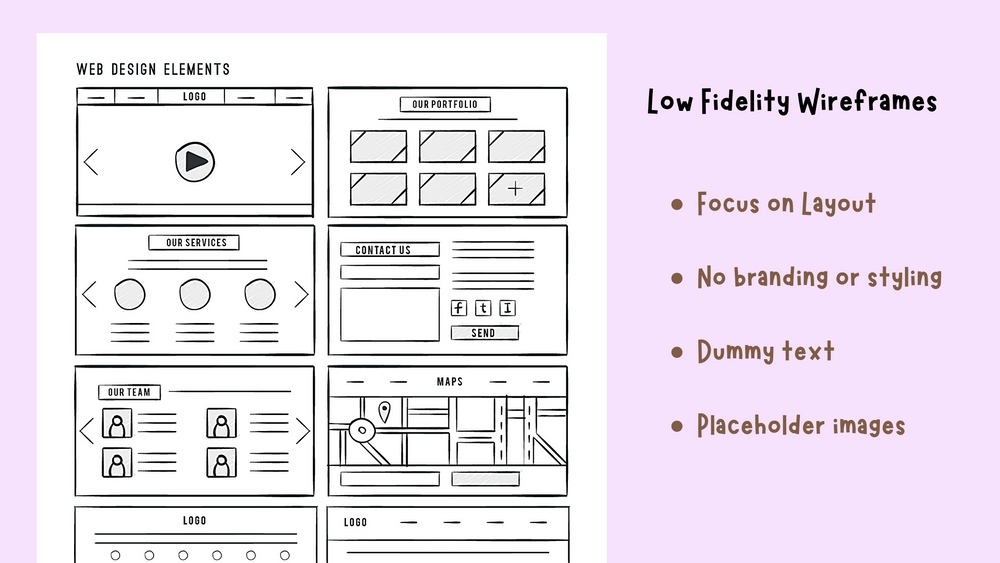
Below is an example of a low-fidelity wireframe. You can see that it is bare-bones in design, and the text is just some lorem ipsum content. There are no advanced UI elements used yet, such as drop-downs or accordions. The main focus here is to finalize the layout and to decide on the features to include and exclude.
2. Medium-Fidelity Wireframes
Medium-fidelity wireframes add more structure and detail and include some styling and branding elements. They start to resemble digital mockups, often using grayscale shades, defined typography, and consistent spacing.
You may also start creating a style guide at this stage to decide on the brand colors, logo design, etc.
- Purpose: Communicate layout hierarchy, user flow, and early interaction ideas.
- Details: Includes accurate element sizing, labeled buttons, and sample text.
- Best for: Design validation and usability reviews before visual design starts.
Medium-fidelity wireframes balance clarity and flexibility, making them ideal for refining page layouts and testing navigation logic.

3. High-Fidelity Wireframes
High-fidelity wireframes closely resemble the final product design in both layout and functionality. They often include realistic content, detailed icons, and early-stage visuals.
- Purpose: Test usability, demonstrate interactivity, and prepare for design handoff.
- Details: Includes clickable prototypes, color indicators, and real data placement.
- Best for: Final approvals and developer alignment.
High-fidelity wireframes are useful when you need to validate visual hierarchy and user experience in near-final form.
The example of a high-fidelity wireframe is shown below, and it can be seen that it is a very close representation of the actual website or application. These wireframes often implement show-hide functionality on a page, indicating hover states and more of such advanced representations.

In short, start with low-fidelity wireframes to explore ideas, move to medium-fidelity for clarity, and use high-fidelity to fine-tune and test your design before launch.
How to Create a Wireframe (Step-by-Step Process)
Creating a wireframe doesn’t require complex design skills. What matters most is clarity of thought and an understanding of how users will interact with your product. Here’s a simple step-by-step process to help you get started.
1. Define the Purpose and User Goals
Before you start drawing boxes and lines, identify why you’re wireframing. Understand your project objectives, target audience, and key user journeys. This context helps you decide which screens or pages to prioritize and what actions users should take on each.
2. Conduct Research and Gather Requirements
Collect all necessary inputs before designing, such as business goals, competitor examples, user research, or content requirements. These insights help you plan layouts that serve both user needs and brand objectives.
3. User Flow Mapping
This step involves outlining the different paths users might take when navigating your website or app. Mapping the user flow helps visualize how users will interact with the different components and functionalities.
4. Sketch the Basic Layout
Choose a wireframing tool that is user-friendly yet powerful, such as MockFlow, which combines ease of use with robust features. Begin with simple hand-drawn sketches or low-fidelity outlines. Focus on the placement of navigation bars, headers, content blocks, and CTAs. Keep it flexible; your goal here is exploration, not perfection.
5. Add Structure and Hierarchy
Once your rough layout feels right, move to a digital tool to refine it. Use consistent spacing, grid systems, and proportions to create balance. Ensure important elements like headings, forms, or buttons are placed where users expect to find them.
6. Include Interactions and Annotations
As you progress to a medium- or high-fidelity wireframe, add notes or interactive links to show how users will move through the interface. These annotations help developers and stakeholders understand how each element functions.
7. Gather Feedback and Iterate
Share your wireframe with teammates, clients, or users for feedback. Early input helps you identify missing elements or confusing layouts before moving into design. Use this feedback to make quick improvements and refine your wireframe.
8. Prepare for Design Handoff
Once the structure is approved, your wireframe becomes the foundation for the visual design and prototype stages. Export or link it to your design tool so the UI team can begin adding colors, fonts, and imagery without losing the structural intent.
Wireframing is an iterative process. The more feedback and testing you integrate at this stage, the smoother your design journey will be later.
At MockFlow, we understand not only the importance and value addition that wireframes add to the process but also the necessity of a very intuitive and easy-to-use tool that the entire team can use to brainstorm and visualize their ideas easily without having to face the hassles of learning a complex tool.
We have a complete set of tools that your entire team can use, right from brainstorming on a digital whiteboard, creating sitemaps and style guides, and drawing low-fidelity to beautiful high-fidelity wireframes using our super-easy wireframing editor.
If you haven't yet tried MockFlow, sign up right now for the free plan (no credit card is required, and it is forever free) and start visualizing your ideas.
Also read → A step-by-step guide on how to create your first wireframe
Best Practices of Wireframing (Tips for Beginners)
Now that you're excited to unleash your inner design innovator through wireframing, let's dive into some practical tips to get you started! Remember, these are beginner-friendly suggestions, so focus on getting your ideas down and exploring possibilities.
1. Keep it Simple
Don't get intimidated by fancy software! Use a tool that's beginner-friendly like MockFlow, for creating low-fidelity wireframes. Use basic shapes (boxes, circles) and labels to represent different elements. Focus on functionality and user flow, not aesthetics.
2. Start Small, One Page at a Time
Don't overwhelm yourself by trying to wireframe your entire website or app at once. Focus on a single page, like the homepage or a key landing page. This allows you to refine the structure and user flow in a manageable way, before moving on to other pages.
3. Get Feedback Early and Often
Don't wait until your wireframe is "perfect" to share it. Seek feedback from friends, family, or potential users early on. Their insights can help identify potential usability issues and spark innovative ideas you might have missed.
4. Focus on Clarity over Complexity
Remember, effective wireframes communicate ideas clearly, not through intricate details. Avoid cluttering your wireframes with unnecessary elements or overly complex layouts. Aim for a clean and organized representation that users can easily understand.
5. Label Everything
Even the most basic shapes in your wireframe need clear labels. This helps viewers understand the purpose of each element and how they interact with each other. Label buttons, menus, content blocks, and anything else that might need clarification.
6. Annotations are Your Friend
Annotations are an invaluable tool for beginners in wireframing. They help clarify specific functionalities, user interactions, and design considerations. By adding brief notes to your wireframes, you provide essential context that enhances understanding, particularly when sharing your designs with others. Annotations ensure that your vision is communicated clearly and effectively, making them a powerful addition to your wireframing toolkit.
For a deeper dive into the importance of annotations in product design, check out our blog post on Annotated Wireframes: The Importance of Clear Communication in Product Design. This post explores how annotated wireframes can significantly improve collaboration and streamline the design process.
7. Iterate and Refine
Wireframing is an iterative process. As you gather feedback and experiment with different ideas, don't hesitate to go back and revise your wireframes. The goal is to continuously improve and create a user-friendly and innovative foundation for your website or app.
Bonus Tip: Get inspired. Look at existing websites and apps, but don't just copy them. See how they handle navigation, content layout, and user flow. Use that inspiration as a springboard to brainstorm innovative approaches for your own project.
Best Beginner-Friendly Wireframing Tool
Now that you’re equipped with the essential tips for wireframing, it’s time to put your knowledge into action with the right tool. For beginners, MockFlow is an excellent choice. It combines ease of use with powerful features, making it the perfect tool to help you turn your ideas into practical wireframes.
MockFlow is a web-based wireframing tool (also available as a desktop app) designed with simplicity and ease of use in mind. Here are some reasons why it's perfect for beginners:
- Drag-and-Drop Interface: No need for complex design software! MockFlow offers a drag-and-drop interface with a library of pre-built UI kits and components. Simply drag and drop these elements onto your canvas to create your wireframe.
- Free Plan: MockFlow has a generous free plan that allows you to explore the tool and site features. This is perfect for beginners who want to experiment with wireframing before committing to a paid plan.
- Collaboration Features: MockFlow offers exceptional collaboration capabilities, including real-time editing. These features allow multiple team members to work on the same wireframe simultaneously, enhancing communication and efficiency.
- From low-fi to high-fi: MockFlow's robust editor supports every stage of your design process. You can create everything from rough, low-fidelity sketches to polished, high-fidelity prototypes within the same tool. This versatility ensures a seamless transition as your project evolves.
By taking advantage of beginner-friendly tools like MockFlow and the tips provided throughout this guide, you'll be well on your way to crafting innovative and user-friendly wireframes for your website or app.
Sign up for MockFlow here and get started with your innovative designs.
Also read → MockFlow vs Figma wireframe comparison | Balsamiq vs MockFlow wireframe comparison
Conclusion – Wireframe as the Blueprint of Design
Wireframing is one of the most important early steps in creating a digital product. It helps transform ideas into a clear visual structure before design or development begins. By defining layout, hierarchy, and user flow early, you save time, reduce confusion, and create a smoother path for collaboration between teams.
For beginners, wireframing is also a simple way to practice problem-solving and learn how good design is built; not through decoration, but through structure and usability.
Whether you’re planning a landing page, a mobile app, or an entire product interface, starting with a wireframe ensures that every design choice is purposeful and user-focused.
With MockFlow WireframePro, you can take your wireframing process a step further. Create, collaborate, and iterate in one place, from rough sketches to interactive prototypes. Try MockFlow today for free and see how simple it is to turn your ideas into functional design blueprints.
FAQs About Wireframes
1. What is a wireframe in web design?
A wireframe is a simplified visual guide that defines a website or app’s layout, navigation flow, and content hierarchy. It focuses on functionality and user experience rather than colors or design details. Wireframes help teams visualize page structure, align stakeholders, and validate usability before moving to detailed design and development stages.
2. Why are wireframes important in UX/UI design?
Wireframes are critical for planning user journeys and improving usability. They identify layout issues early, reduce design rework, and save time during development. In modern UX workflows, AI-enhanced wireframes streamline collaboration between teams, ensuring every interface is intuitive, responsive, and optimized for user goals.
3. What are the different types of wireframes?
Wireframes are categorized into three levels of fidelity:
- Low-fidelity wireframes show basic structure and layout using simple sketches.
- Mid-fidelity wireframes include more accurate spacing, labels, and interface details.
- High-fidelity wireframes closely resemble final designs, incorporating precise grids, typography, and content placeholders.
Each level supports different stages of testing and stakeholder feedback.
4. What is MockFlow and how does it help in wireframing?
MockFlow is a popular wireframing and UI planning tool used by designers and product teams to visualize web and app interfaces quickly. It offers ready-to-use templates, drag-and-drop components, and collaborative editing features. Teams use MockFlow to build interactive wireframes, plan user flows, and create design systems that scale efficiently across projects.
5. Why is MockFlow a preferred tool for wireframing in 2025?
MockFlow continues to be a go-to tool in 2025 because it integrates AI-assisted layout generation, cloud collaboration, and design system management. Its intuitive interface allows teams to move from low- to high-fidelity wireframes seamlessly. The platform’s built-in feedback and version control tools make it ideal for remote teams managing complex design cycles.
6. What is the difference between a wireframe, mockup, and prototype?
A wireframe defines the basic layout and functionality. A mockup adds visual design elements such as color, fonts, and imagery. A prototype simulates interactivity, allowing users to experience real navigation and functionality. Together, they form a complete design workflow, from idea validation to pre-development testing.
Miro vs Lucidspark: A Complete Feature-by-Feature Comparison for 2026
Introduction If you’re comparing Miro and Lucidspark, you’re likely exploring which digital whiteboard aligns best with your...
Quarterly Business Review: How to Plan, Structure & Run a QBR Meeting
Introduction Every quarter, we pause and ask ourselves a familiar question: are we actually moving the business forward, or are...
Lotus Diagram: Step-by-Step Guide with Examples & Benefits
Introduction Brainstorming sessions tend to fall apart when ideas are scattered or too shallow to build on. The lack of a clear...
