What Is a Mind Map? Examples, Templates & Steps to Create One
TL;DR: A mind map is a visual way to organize ideas around one central topic and connect related thoughts through branches. This guide explains the meaning, benefits, core elements, examples, templates, and steps to create mind maps for studying, brainstorming, project planning, meetings, and team collaboration. |
The hardest part of working with ideas is not always coming up with them. It is making sense of them after they start piling up. Notes get scattered across documents, meeting points lose context, and project ideas quickly become difficult to explain to someone else.
That is where mind maps help. They give us a simple visual thinking method to turn messy thoughts into clear idea organization. Instead of forcing ideas into a strict list, a mind map lets us place one topic at the center and build outward as related thoughts appear.
So, what is a mind map, and what does the mind map meaning look like in real work? This guide keeps mind mapping explained in a practical way. We will cover what mind mapping means, how mind maps work, when to use them, and how to create one with useful examples.
What is a mind map and what is it used for?
A mind map is a visual diagram that organizes information around one central idea. Related ideas branch outward from the center, helping you explore a topic, connect ideas, and structure thoughts without following a strict linear order.
The mind map is the visual output. Mind mapping is the process of building that structure. A simple mind map definition is a radial diagram that supports non-linear thinking.
For example, if website redesign is the central idea, your main branches could include:
- Goals
- Users
- Content
- Layout
- Timeline
- Risks
You can use mind maps for brainstorming, studying, project planning, meeting notes, product discovery, visual note-taking, and knowledge organization. For team sessions, mind maps also work well with brainstorming techniques and shared whiteboarding tools because everyone can see how ideas connect.
What are the benefits of using a mind map?
Mind maps help when you have too much information and no clear structure. They give you a practical way to group ideas, spot gaps, and turn loose notes into something easier to understand or act on.
A Springer meta-analysis of 21 studies found that mind mapping-based instruction had a more positive influence on student cognitive learning outcomes than traditional instruction. The same meta-analysis found positive effects across subjects, especially in STEM disciplines.
The table below shows how different audiences use mind maps in practical situations and why the format helps them organize, understand, and act on information more effectively.
Audience | What They Use Mind Maps For | Why It Helps |
Students | Summarizing chapters, revising topics, connecting concepts | Makes learning more visual and easier to recall |
Project Managers | Planning tasks, milestones, dependencies, risks | Turns a broad project into clear workstreams |
Designers | Mapping user needs, flows, ideas, and creative directions | Connects research, ideas, and design decisions |
Knowledge Workers | Organizing notes, meetings, research, and decisions | Reduces information overload and improves clarity |
Teams | Brainstorming ideas and grouping discussion points | Builds shared understanding |
What are the core elements of a mind map?
A mind map works best when each part has a clear objective. You should be able to scan it quickly, understand the main idea, and follow how the supporting points connect.
Use these elements to keep your mind map clear:
Element | What It Does |
Central idea | Places the main topic at the center so every branch stays focused |
Main branches | Shows the first-level categories connected to the central idea |
Sub-branches | Adds supporting details, examples, tasks, or questions under each main branch |
Keywords | Keeps the map readable with short words or phrases instead of long sentences |
Colors and icons | Helps you group ideas, separate categories, and scan the map faster |
Connectors | Uses lines, arrows, or links to show relationships between ideas |
A mind map should not look like a long document placed inside bubbles. Keep it lightweight. Use short labels, leave enough white space, and add visual cues only when they make the structure easier to read.
How does a mind map work?
A mind map works by starting with one broad idea and expanding into related details. Instead of writing information from top to bottom, you build outward from the center.
The basic flow looks like this:
Central idea → Main categories → Supporting details → Connections → Actionable structure
For example, an exam preparation mind map can start with that phrase at the center. From there, you can add branches such as:
- Subjects
- Deadlines
- Weak areas
- Resources
- Revision schedule
Each branch can then be split into smaller sub-branches. “Subjects” can include biology, math, history, and English. “Weak areas” can include formulas, diagrams, essay structure, or definitions. By the end, you have a visual study plan instead of scattered notes.
Top 7 mind map examples and templates to start with
Once you understand what a mind map is, the next step is choosing the right format for the task. The examples below help you move from a blank canvas to a practical structure you can use for studying, planning, meetings, or team brainstorming.
To start faster, teams can explore IdeaBoard’s full collection of mind map templates, which includes ready-made layouts for brainstorming, project planning, meetings, product development, business planning, and creative work.
1. Business planning mind map
A business planning mind map helps you organize a business idea, growth plan, market opportunity, or strategic initiative before writing a detailed plan.
It works well when you need to see goals, assumptions, opportunities, and risks in one place.
How to use it:
- Place the business idea or strategic initiative at the center.
- Add branches for market opportunity, target customers, product or service, revenue model, competitors, operations, risks, and growth channels.
- Add assumptions that need research or validation.
- Mark high-risk areas that need discussion.
- Turn the final branches into a strategy document, pitch outline, or execution plan.
For a new market expansion, your mind map can first cover market and customer inputs, such as market gaps, customer segments, pain points, alternatives, and offering details.
It can then cover growth and execution inputs, such as pricing, team needs, operational risks, sales channels, partnerships, and referral ideas.
Teams can use the business planning mind map template to map market ideas, risks, customer segments, and growth channels before turning them into a business plan.
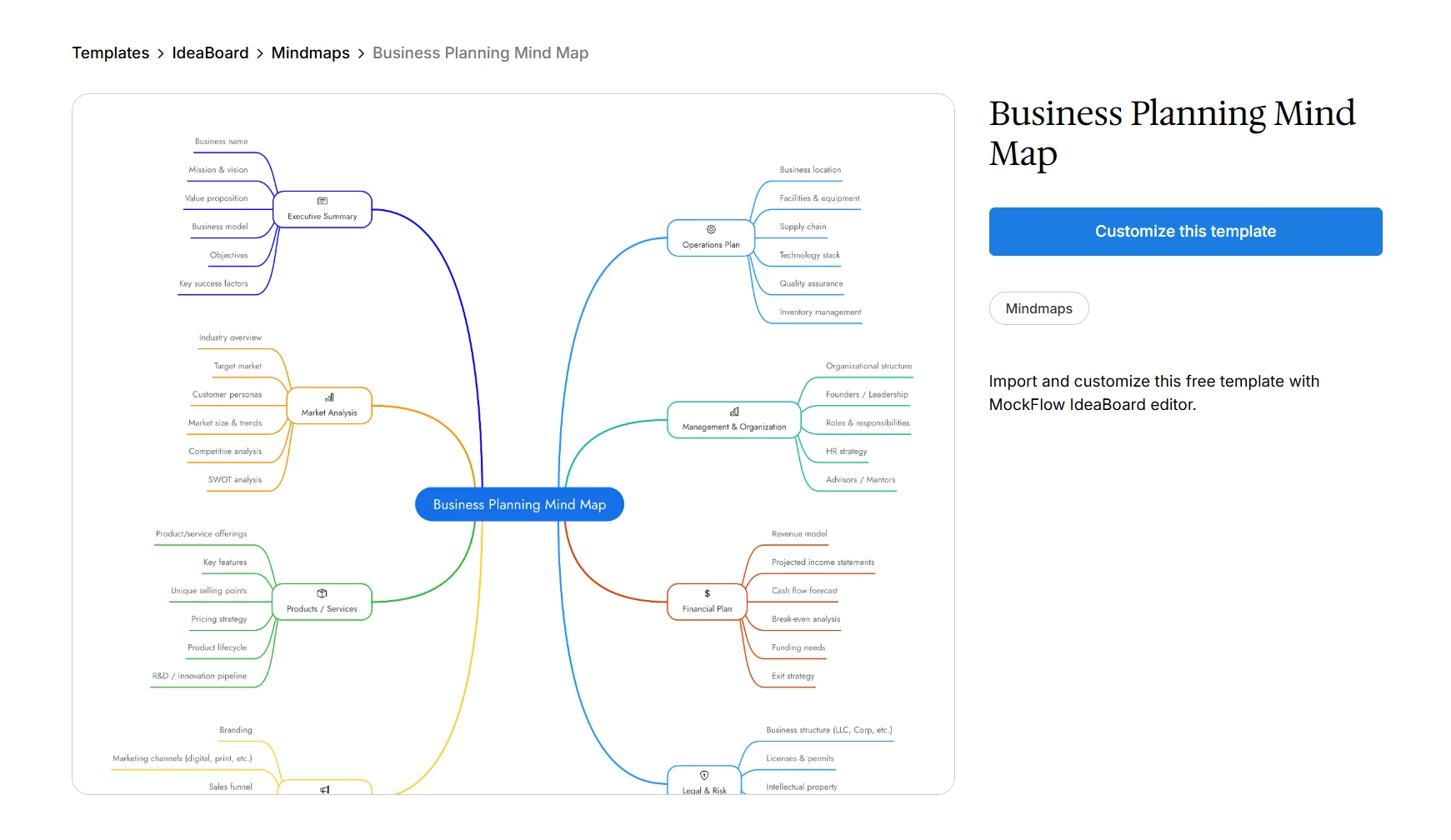
Customize this business planning mind map template
Here’s how teams can create a structured business mind map from a simple idea prompt using AI, along with editing branches, adding priorities, and organizing them visually.
2. Project plan mind map
A project plan mind map helps you organize the early structure of a project before you turn it into a detailed plan, timeline, or task board.
It works well when the project has multiple teams, moving parts, deadlines, and dependencies.
How to use it:
- Place the project name at the center.
- Add branches for goals, stakeholders, timeline, tasks, dependencies, risks, and success metrics.
- Break each branch into smaller details.
- Mark blockers or decisions that need attention.
- Convert the final branches into tasks, briefs, tickets, or roadmap items.
For product launch, your branches can include launch goals, reviewers, campaign phases, major deliverables, dependent teams, possible blockers, and impact measures.
Teams can use the project plan mind map template to map the work before creating tickets, timelines, or briefs.
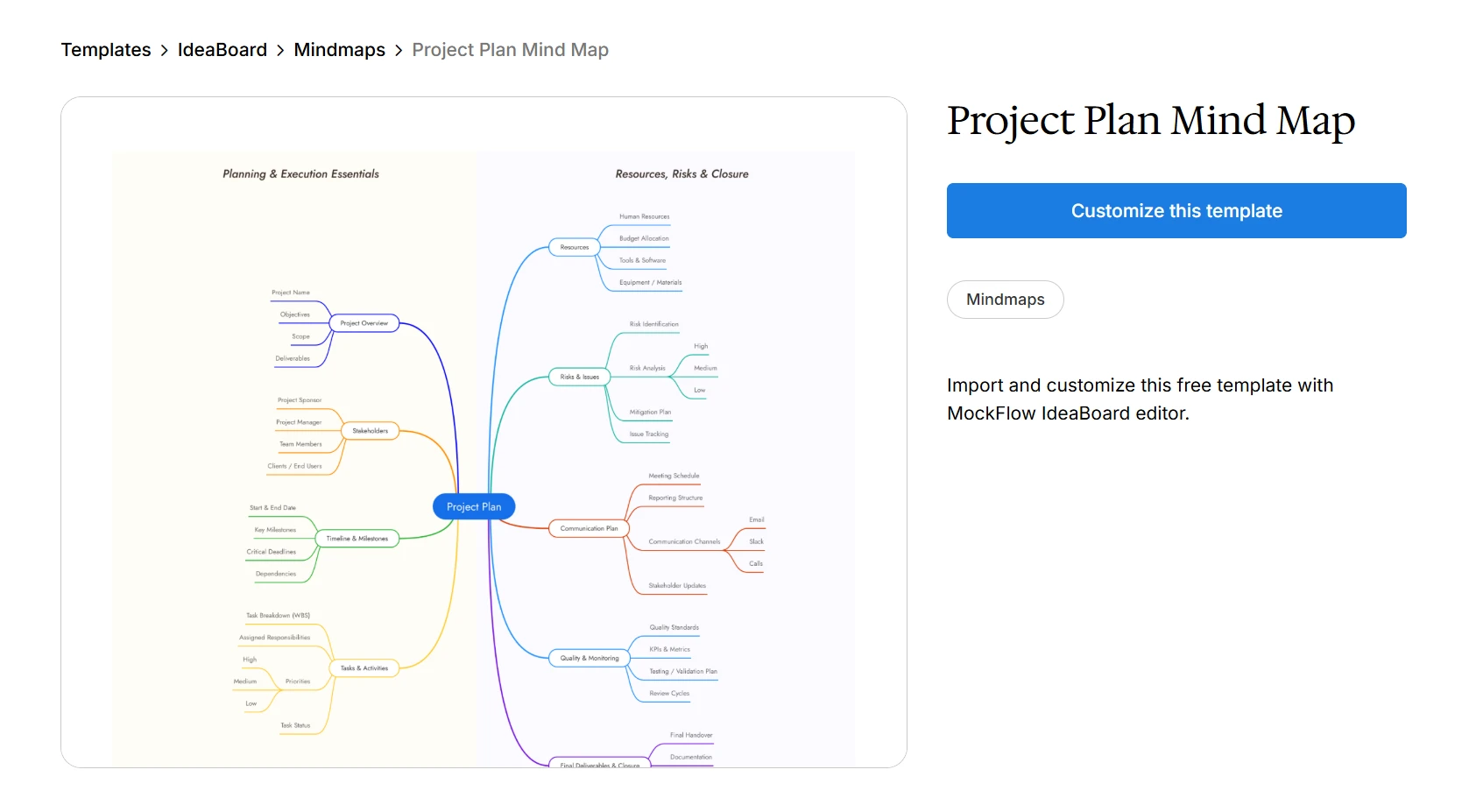
Customize this project plan mind map template
3. Moodboard mind map
A moodboard mind map combines visual inspiration with structured idea organization.
It works well when creative direction feels scattered across screenshots, references, colors, themes, and campaign notes.
How to use it:
- Place the campaign, product, or design direction at the center.
- Add branches for audience, mood, colors, typography, references, messaging, and channels.
- Attach visual references to the right branches.
- Group similar design ideas together.
- Turn the strongest direction into concepts to refine or test.
For a new brand campaign, a moodboard mind map can include branches for audience expectations, mood, emotion, color ideas, and typography options. You can also add visual references, messaging themes, and campaign channels.
The moodboard mind map template gives creative teams a clear place to connect visual ideas with campaign or design choices.
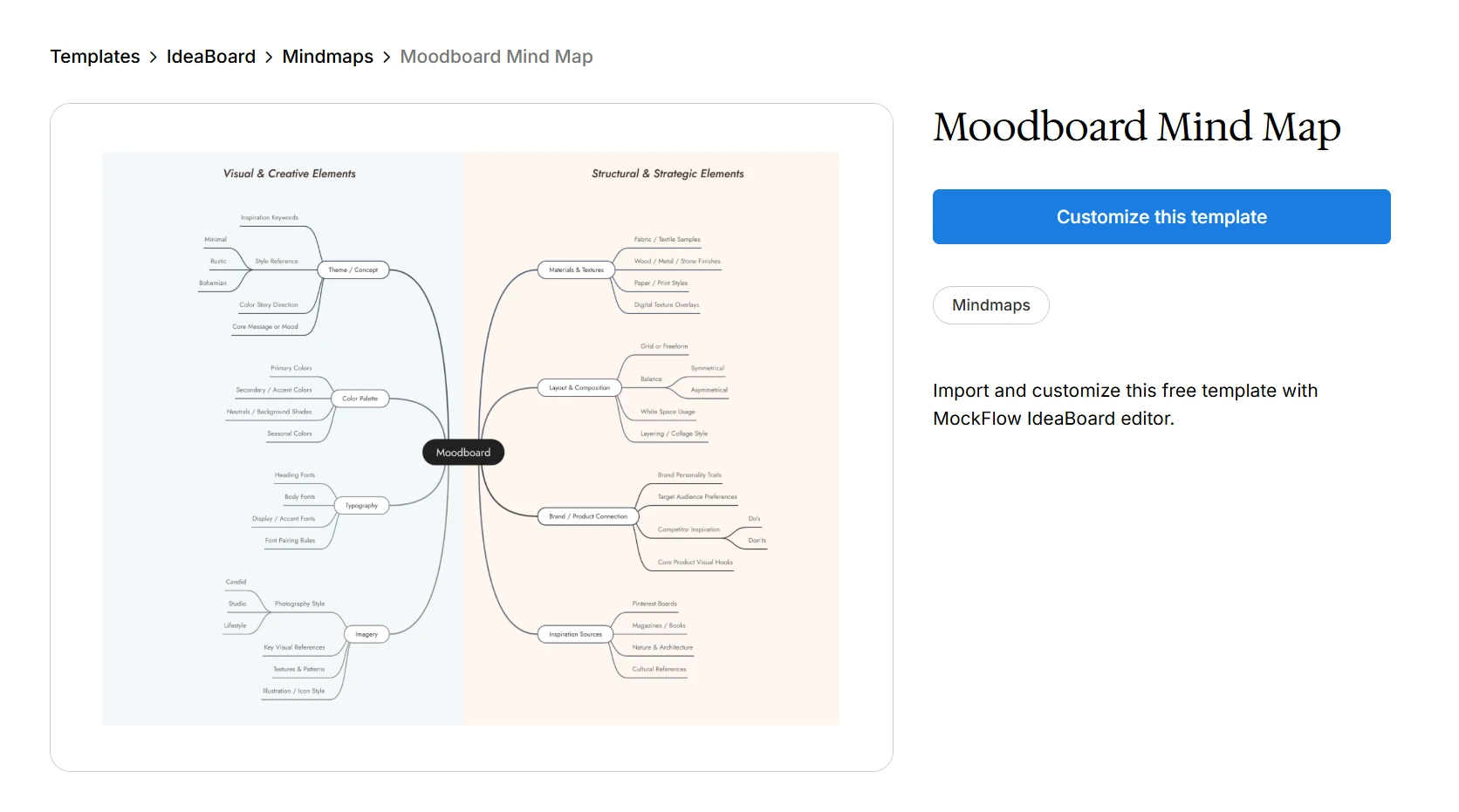
Customize this moodboard mind map template
If your moodboard later becomes a campaign sequence, product walkthrough, or narrative plan, you can shape it further with the AI storyboard generator. It helps turn your rough concept into frame-by-frame scenes with actions, camera directions, mood, and visuals, making it easier for creative teams to discuss, refine, and plan the final output.
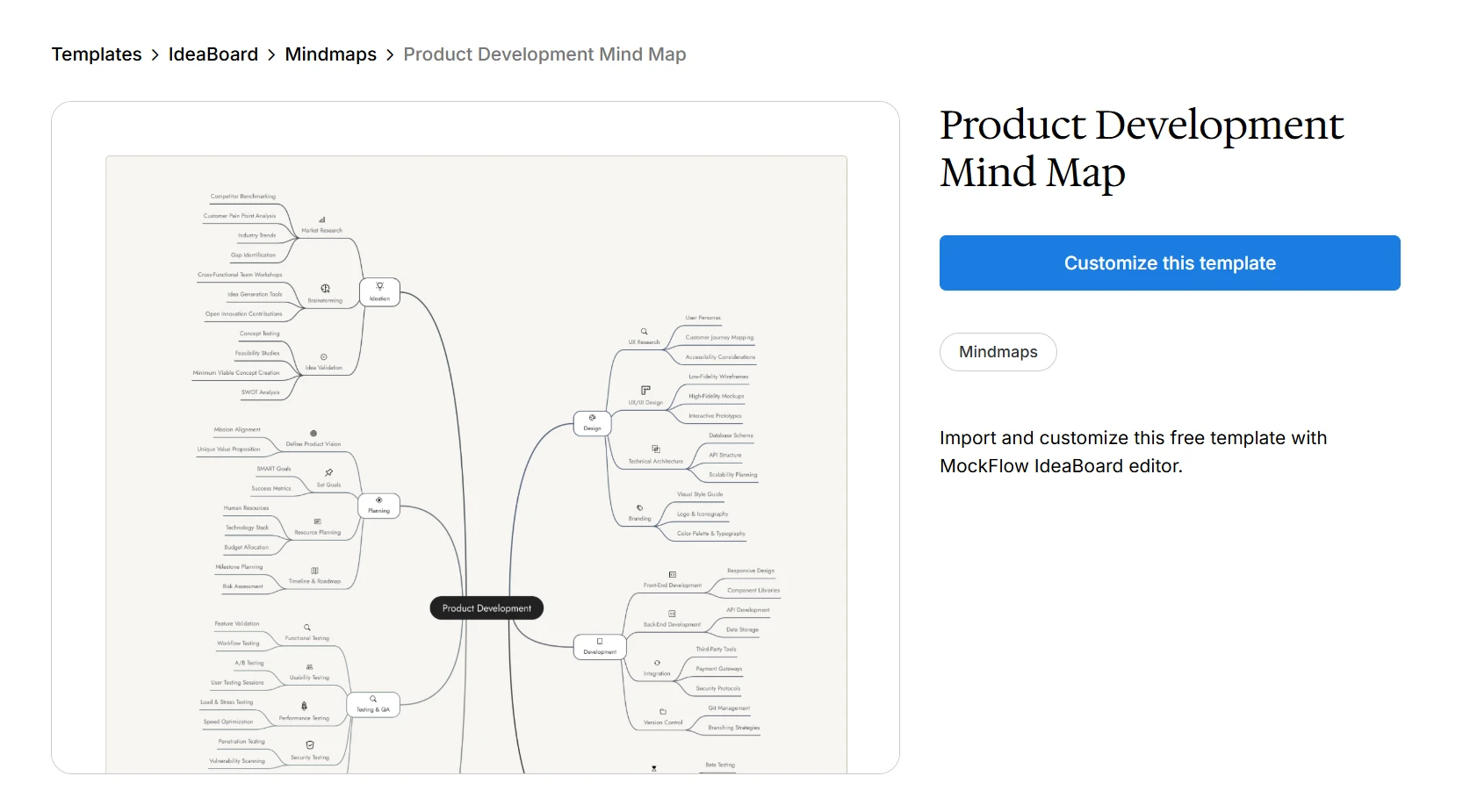
4. Product development mind map
A product development mind map helps you explore product ideas before moving into wireframes, user stories, roadmaps, or technical planning.
It works well when you need to clarify the problem, compare feature ideas, and decide what belongs in the first version.
How to use it:
- Place the product idea or feature area at the center.
- Add branches for user problems, feature ideas, research questions, competitors, risks, success metrics, and MVP scope.
- Add assumptions that need validation.
- Compare which ideas solve the clearest user problem.
- Move selected ideas into wireframes, user stories, or planning documents.
For a product like an AI writing assistant, your mind map can first cover user and research inputs, such as writing pain points, research questions, similar tools, and usability risks.
It can then cover product planning inputs, such as suggested workflows, engagement metrics, and first-version scope.
Teams can use the product development mind map template to organize product assumptions before execution.
Customize this product development mind map template
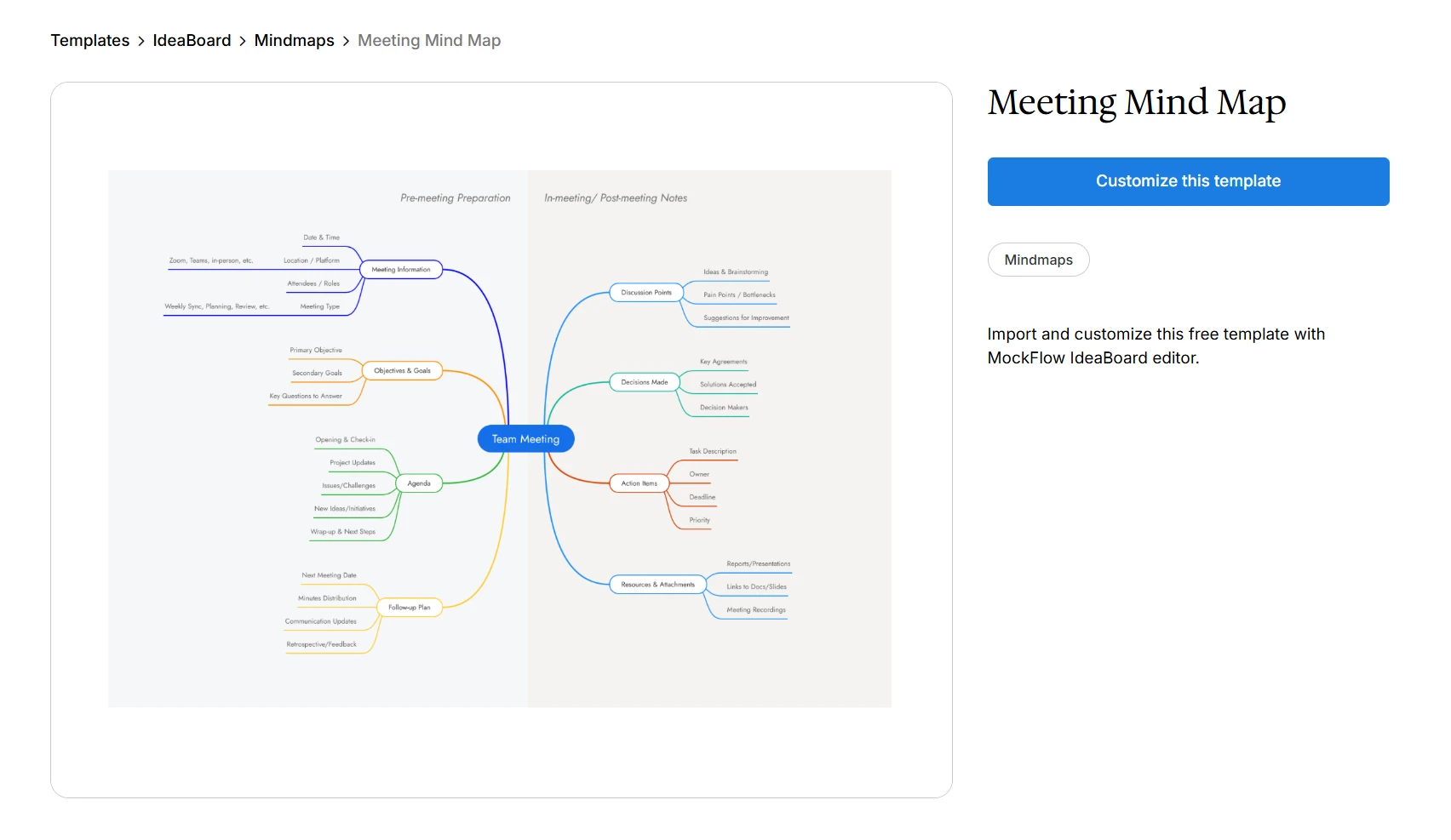
5. Meeting mind map
A meeting mind map helps you capture discussions visually instead of writing long linear notes. It works well when a meeting covers several connected topics, decisions, blockers, owners, and follow-ups.
How to use it:
- Place the meeting name at the center.
- Add branches for priorities, decisions, blockers, owners, follow-ups, and open questions.
- Add discussion points under the right branch as the meeting progresses
- Mark owners beside action items.
- Review the map at the end so everyone leaves with the same understanding.
For a sprint planning meeting, your mind map can first cover planning and execution inputs, such as sprint priorities, delivery blockers, task owners, and approved decisions. It can then cover discussion and follow-up inputs, such as follow-up topics, unresolved questions, and open decisions that need more clarity.
Microsoft’s 2025 Work Trend Index reported that employees in the top 20% by ping volume are interrupted every two minutes during core work hours, or 275 times a day, by meetings, emails, and chats. A meeting mind map template helps you reduce that context loss by keeping priorities, decisions, and follow-ups visible in one structure.
Customize this meeting mind map template
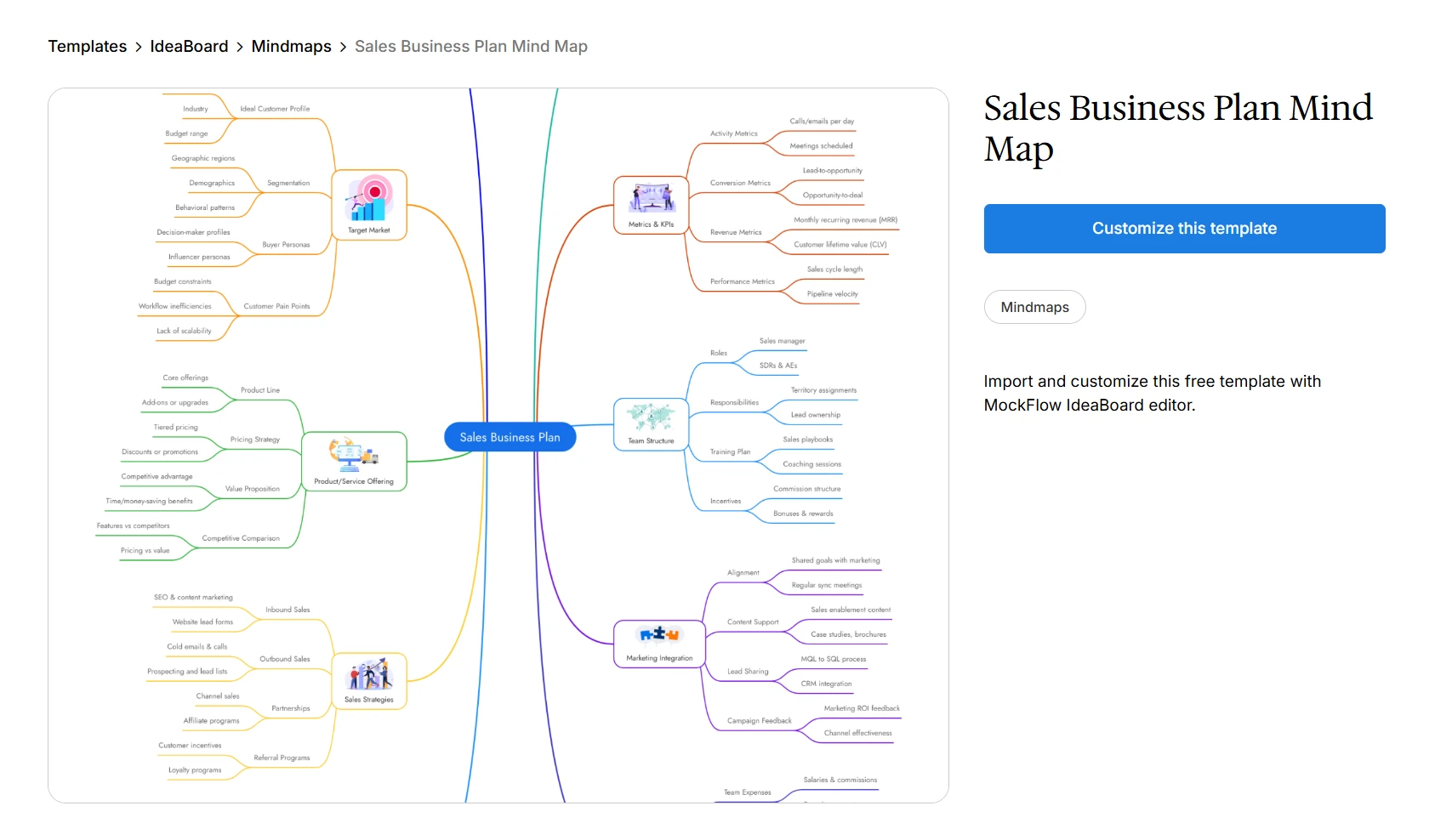
6. Sales business plan mind map
A sales business plan mind map helps you connect revenue goals with audiences, channels, messaging, objections, assets, and KPIs. It works well when sales and marketing teams need to plan outreach before creating a formal sales plan or campaign calendar.
How to use it:
- Place the sales plan or revenue goal at the center.
- Add branches for target audience, buyer personas, channels, messaging, objections, sales assets, and KPIs.
- Break target accounts into segments or industries.
- Add objection handling ideas beside each concern.
- Turn the final structure into sales plays, scripts, assets, or campaign tasks.
For creating a Q4 sales plan, your mind map can first cover sales goals and pipeline inputs, such as revenue targets, enterprise accounts, meetings booked, demos, pipeline, and close rate.
It can then cover outreach and conversion inputs, such as decision-makers, LinkedIn outreach, webinar ideas, proof points, common objections, and sales decks.
The sales business plan mind map template gives revenue teams a clear planning structure.
Customize this sales business plan mind map template
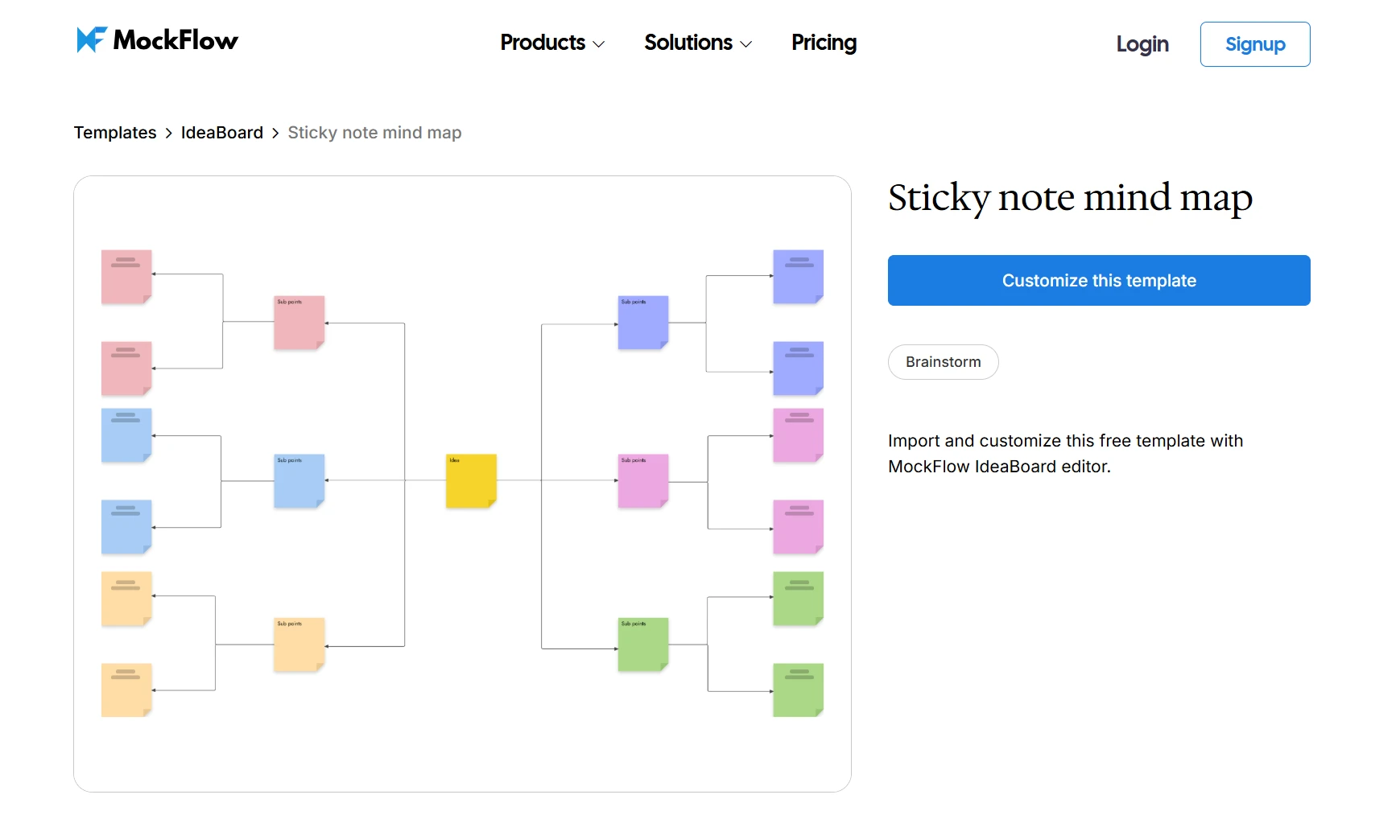
7. Sticky note mind map
A sticky note mind map is a simple mind map format where you capture ideas first and organize them later.
It works well when you want quick input first, then structure later.
How to use it:
- Start with a topic, challenge, or question in the center.
- Add sticky notes for every idea that comes up.
- Group related notes into clusters.
- Add branches for questions, examples, priorities, and next steps.
- Turn the strongest clusters into a cleaner mind map structure.
To improve customer onboarding, your branches can include user pain points, content ideas, product improvements, support touchpoints, automation ideas, and metrics.
This approach helps you capture loose thinking without forcing a structure too early. Teams often use the sticky note mind map template in IdeaBoard to organize notes with shapes, lines, arrows, and connectors so brainstorming can become clustered themes, workflows, or structured mind maps.
Customize this sticky note mind map template
When should you use a mind map?
You should use a mind map when you need to explore, understand, or organize a topic before turning it into a final plan, document, or decision. It works best when your ideas are connected but not ready for a strict sequence yet.
Here are common use cases by audience:
Audience | When to Use a Mind Map |
Students | To revise chapters, summarize lessons, connect concepts, and prepare for exams |
Project managers | To break projects into goals, stakeholders, timelines, risks, and tasks |
Designers | To explore user needs, design directions, product ideas, and creative references |
Knowledge workers | To organize research, meeting notes, insights, and decisions |
Teams | To brainstorm ideas, group discussion points, and build shared understanding |
A mind map may not be the best choice when you need strict sequencing, detailed documentation, formal process notation, or complex many-to-many relationship mapping. In those cases, a flowchart, concept map, process map, or project board may work better.
What are the best mind mapping tips and techniques?
A good mind map should make information easier to scan, not harder to follow. The goal is to move from scattered ideas to a clear structure that helps you study, plan, brainstorm, or make decisions faster.
Use these tips while building your map:
- Start with a focused topic: Avoid broad phrases like “marketing” or “project plan.” Use a clear central idea such as “Q4 email campaign” or “website redesign plan.”
- Use one idea per branch: This keeps the map easy to expand, rearrange, and turn into action points later.
- Keep labels short: Use simple keywords or short action phrases instead of full sentences.
- Group related ideas after the first draft: Add ideas freely first, then organize them into categories once patterns start to appear.
- Use colors with purpose: Assign colors to categories, priorities, teams, or stages instead of using them randomly.
- Add icons only when they improve clarity: Icons can highlight deadlines, risks, decisions, or important tasks, but too many can make the map noisy.
- Leave enough white space: A crowded mind map becomes hard to read, especially during team reviews or presentations.
- Use cross-links only when relationships matter: Add links between branches when two ideas depend on each other or share context.
- Use mind maps during brainstorming: They help teams capture ideas quickly, see common themes, and avoid losing useful suggestions during open discussion.
- Use mind maps when running brainstorming sessions: A shared map gives the session a clear structure, helps organize contributions in real time, and makes it easier to turn discussion points into follow-up actions.
- Turn final branches into outputs: Depending on the use case, your branches can become next steps, study points, meeting actions, content sections, or project tasks.
For fast-moving projects, mind maps can also support rapid ideation by helping teams map possible solutions, cluster the strongest ideas, and move from discussion to execution without losing context.
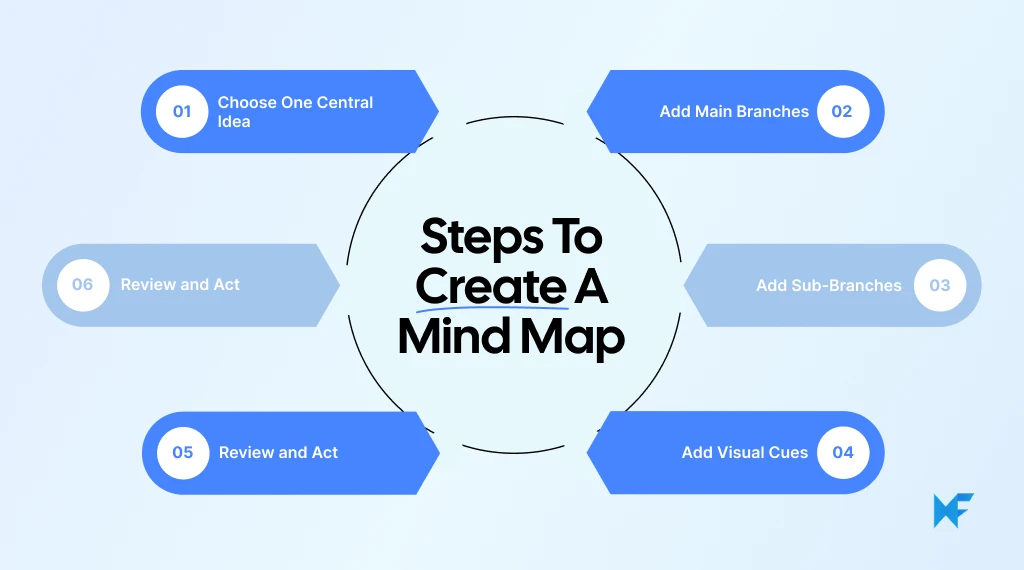
How to build a mind map in 6 key steps
Use this simple workflow to move from a rough idea to an organized mind map:
Step | What You Do | Output |
1 | Choose one central idea | A clear topic to build around |
2 | Add main branches | Broad categories around the topic |
3 | Add sub-branches | Details, tasks, examples, and questions |
4 | Keep labels short | A map that is easy to scan |
5 | Add visual cues | Better grouping and clearer relationships |
6 | Review and act | A cleaned-up structure with next steps |
Let’s explore these steps in detail:
Step 1: Start with one clear central idea
Your central idea is the main topic your whole mind map will explain, break down, or organize. Make it specific enough to expand because a vague topic creates vague branches.
Use this test before you begin:
- Clear central idea: “Improve onboarding experience”.
- Too broad: “Product”.
- Clear central idea: “Q4 content plan”.
- Too broad: “Marketing”.
- Clear central idea: “Exam preparation for physics”.
- Too broad: “Study”.
Step 2: Add main branches around the topic
Main branches are the largest categories connected to your central idea. They help you split the topic into manageable parts before adding details.
For a project planning mind map, your main branches could include:
- Goals
- Users
- Timeline
- Scope
- Risks
- Deliverables
- Stakeholders
- Success metrics
Step 3: Break each branch into sub-branches
Sub-branches add depth to each main branch. They can include examples, tasks, questions, dependencies, ideas, resources, or decisions.
For a website redesign mind map, a content branch could split into:
- Existing pages to keep
- Pages to rewrite
- New landing pages
- SEO updates
- Brand messaging
- Content owners
- Review deadlines
Step 4: Use short keywords instead of long sentences
A mind map should be quick to scan, not read like a document placed inside bubbles. Short keywords keep the structure clean and make relationships easier to see.
Use this format when labeling branches:
Instead of This | Use This |
“We need to improve the first email users receive after signup” | Welcome email |
“Customers are confused during the setup process” | Setup friction |
“The team needs to review all product screenshots” | Screenshot review |
Step 5: Add colors, icons, and connections
Colors and icons help you separate categories without adding extra text. Connectors show relationships between branches that are linked but not placed under the same category.
Use visual cues with a clear purpose:
- Use one color for tasks, another for risks, and another for ideas.
- Add icons only when they help you scan faster.
- Use arrows to show dependencies.
- Use connectors to link related branches across the map.
- Avoid adding too many styles because visual clutter weakens the map.
Step 6: Review, rearrange, and turn ideas into action
The final step is to clean up the map so it becomes useful beyond the first draft. Group related points, remove duplicates, rename unclear branches, and decide what should happen next.
Before you finish, check whether you can turn branches into action items:
- Tasks to assign
- Questions to research
- Ideas to test
- Risks to review
- Notes to convert into a brief
- Decisions to share with the team
Digital tools make mind mapping easier because you can build, revise, and organize ideas without redrawing the structure manually. A visual collaboration tool like MockFlow IdeaBoard can support this with an infinite canvas, templates, sticky notes, sketches, text blocks, references, diagramming tools, and AI generation.
How IdeaBoard makes mind mapping easier for teams
You can sketch a mind map manually, but a visual workspace like MockFlow IdeaBoard makes it easier to build, move, and refine ideas as your map grows. Instead of redrawing branches or starting from a blank canvas, you can use templates, sticky notes, connectors, and drag-and-drop editing to organize ideas faster.
Here are a few ways IdeaBoard can make mind mapping easier during planning, brainstorming, and team collaboration:
- Start with a ready structure: Use mind map templates to begin with a clear layout instead of building everything from scratch.
- Expand ideas without space limits: Use the visual canvas to add branches, notes, references, and supporting details as the topic grows.
- Move and group ideas easily: Drag branches, sticky notes, shapes, and connectors to reorganize the map as patterns become clearer.
- Generate a first draft with AI: Use AI mind maps to create an initial structure from a prompt, then edit it based on your team’s goals.
- Use prompts for faster planning: The prompt library can help teams start ideation, planning, research, or diagramming workflows without getting stuck on a blank canvas.
- Collaborate in real time: Let team members add ideas, review branches, and refine the structure together in one shared workspace.
- Refine the output: Use AI assistant, MIDA, to refine the output further without manually spending hours.
If you are starting from a rough prompt, you can also create mind maps with AI and then refine the output into planning notes, priorities, or action items. This helps teams move from loose thinking to a usable structure faster, especially when the session needs to produce something more concrete than a list of ideas.
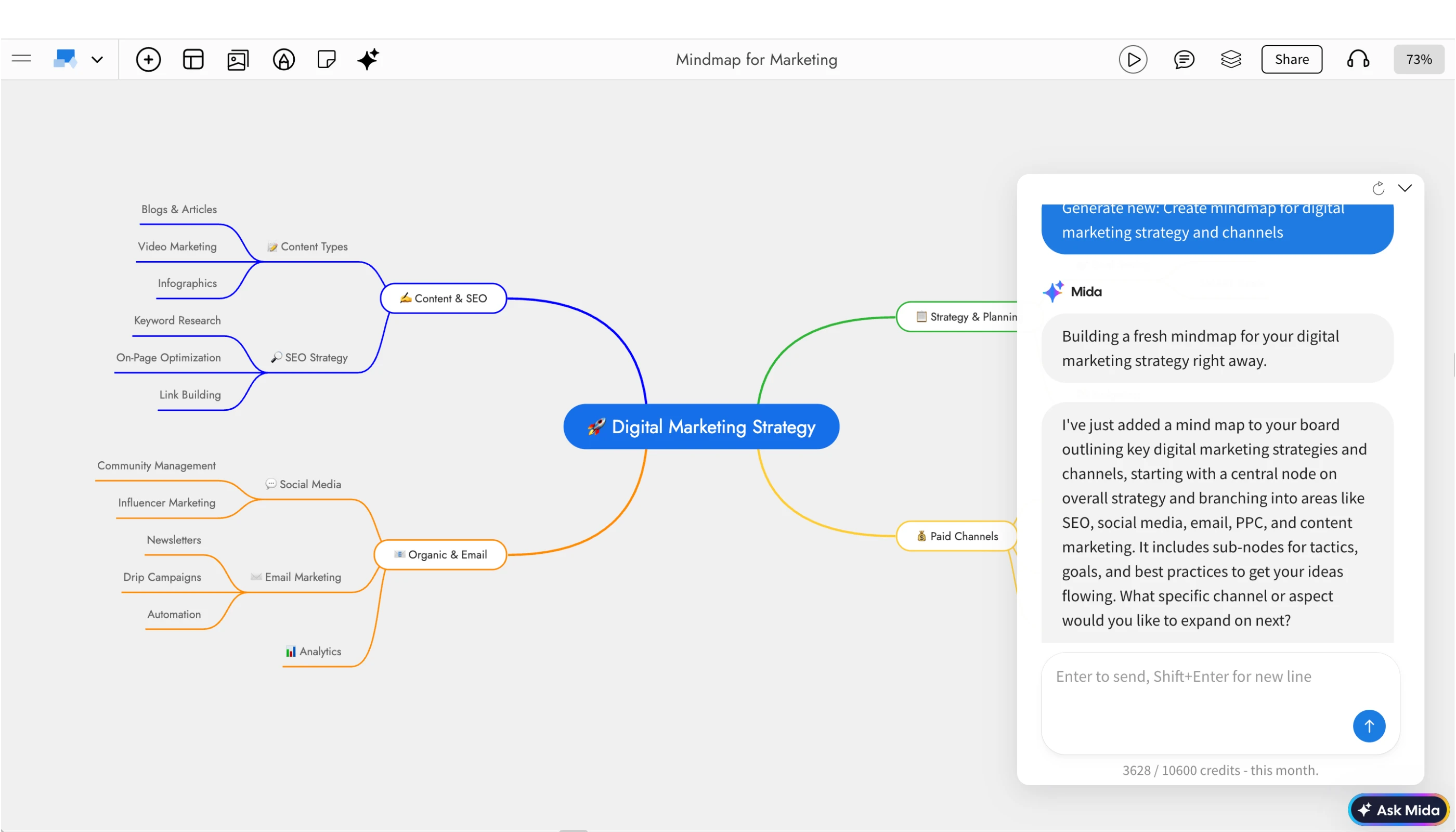
Create mind maps with AI instantly
Teams can reshape rough ideas into clearer formats, such as turning a task list into a mind map or converting scattered notes into a more useful structure with the help of AI. They can also keep reusable prompts directly on the canvas, so recurring brainstorming workflows are easier to repeat and improve.
By the end of the session, teams have more than a visual idea dump. They have a mind map that is organized, prioritized, and ready to turn into planning notes, action items, or the next discussion.
If your team wants a simpler way to build, refine, and collaborate on mind maps without starting from scratch, you can start using IdeaBoard for free and try it in your next brainstorming session.
FAQs
1. What is a mind map?
A mind map is a visual diagram that organizes ideas around one central topic. For example, a project launch mind map can have branches for goals, timeline, budget, tasks, risks, stakeholders, and marketing activities.
2. What is the purpose of a mind map?
The purpose of a mind map is to help you organize information, see connections, generate ideas, and understand a topic more clearly. It is useful when you have scattered notes or a broad idea that needs structure.
3. How do I create a mind map?
Start with one central idea, then add main branches for the key categories related to that idea. Break those branches into smaller sub-branches, use short keywords, add colors or icons where helpful, and review the map to turn ideas into next steps.
4. What three things must a mind map have?
A mind map should have a central idea, main branches, and supporting sub-branches. Colors, icons, images, and connectors can improve clarity, but these three elements form the basic structure.
5. What are mind maps best used for?
Mind maps are best used for brainstorming, studying, project planning, meeting notes, research organization, content planning, and problem-solving. They help you see both the big picture and the smaller details in one visual layout.
6. Can mind maps be used for team collaboration?
Yes, mind maps work well for team collaboration because they give everyone a shared space to add, group, and discuss ideas. Teams can use them during planning sessions, brainstorming meetings, product discussions, and creative reviews.
Rapid Ideation: How to Generate, Refine, and Act on Ideas Faster
Quick Answer: Rapid ideation is a structured brainstorming approach that helps generate a large volume of ideas quickly...
Miro vs Microsoft Whiteboard: A Breakdown of Features, Pricing & Fit
Choosing between digital whiteboard tools often comes down to how much structure your team needs. A simple canvas may work well...

8 SaaS Website Design Trends to Watch in 2026
Introduction If your SaaS website is due for a refresh, the hardest part is often knowing which design ideas are worth...
