Rapid Ideation: How to Generate, Refine, and Act on Ideas Faster
Quick Answer:
Rapid ideation is a structured brainstorming approach that helps generate a large volume of ideas quickly through time-boxed sessions. It uses techniques like Crazy Eights, brainwriting, and mind mapping to encourage fast, unfiltered thinking. Teams use rapid ideation to explore multiple solutions, break creative blocks, and quickly move from idea generation to actionable outcomes across product, design, and business workflows.
Introduction
We’ve all sat through brainstorming sessions that drag on longer than expected. Ideas slow down, focus drifts, and a few voices dominate, leaving you with safe outcomes rather than out-of-the-box inputs.
That’s where rapid ideation can help. It offers a faster, more structured, and time-boxed way to brainstorm that focuses on momentum instead of perfection. Instead of overthinking every idea, teams generate as many as possible in short bursts.
You can use this method in design sprints, UX workshops, and product development cycles. It encourages unfiltered thinking, which is where the most interesting ideas tend to come from.
In this guide, we’ll break down rapid ideation techniques and learn how to run a session with ready-to-use templates, so you can produce actionable ideas without slowing your team down.
Rapid Ideation Techniques Teams Use
Now that we’ve covered the benefits, let’s look at how teams actually do rapid ideation. These techniques help keep sessions fast, focused, and productive.
Crazy Eights
Crazy Eights is simple but effective. You’ve to fold a sheet into eight sections and sketch one idea in each box within eight minutes. The constraint forces you to move fast and avoid overthinking.
What this helps with:
- Push past obvious ideas quickly
- Explore multiple directions in a short time
- Build early momentum in the session
How to use it:
Begin with a crazy eights template. It provides a ready-made grid, which enables the team to focus entirely on idea generation rather than setting up the exercise. Set a strict 8-minute timer and fill each section with one idea. If you get stuck, move on quickly.
Once the time is up, review all eight ideas, identify promising directions, and expand on the ones worth exploring further.
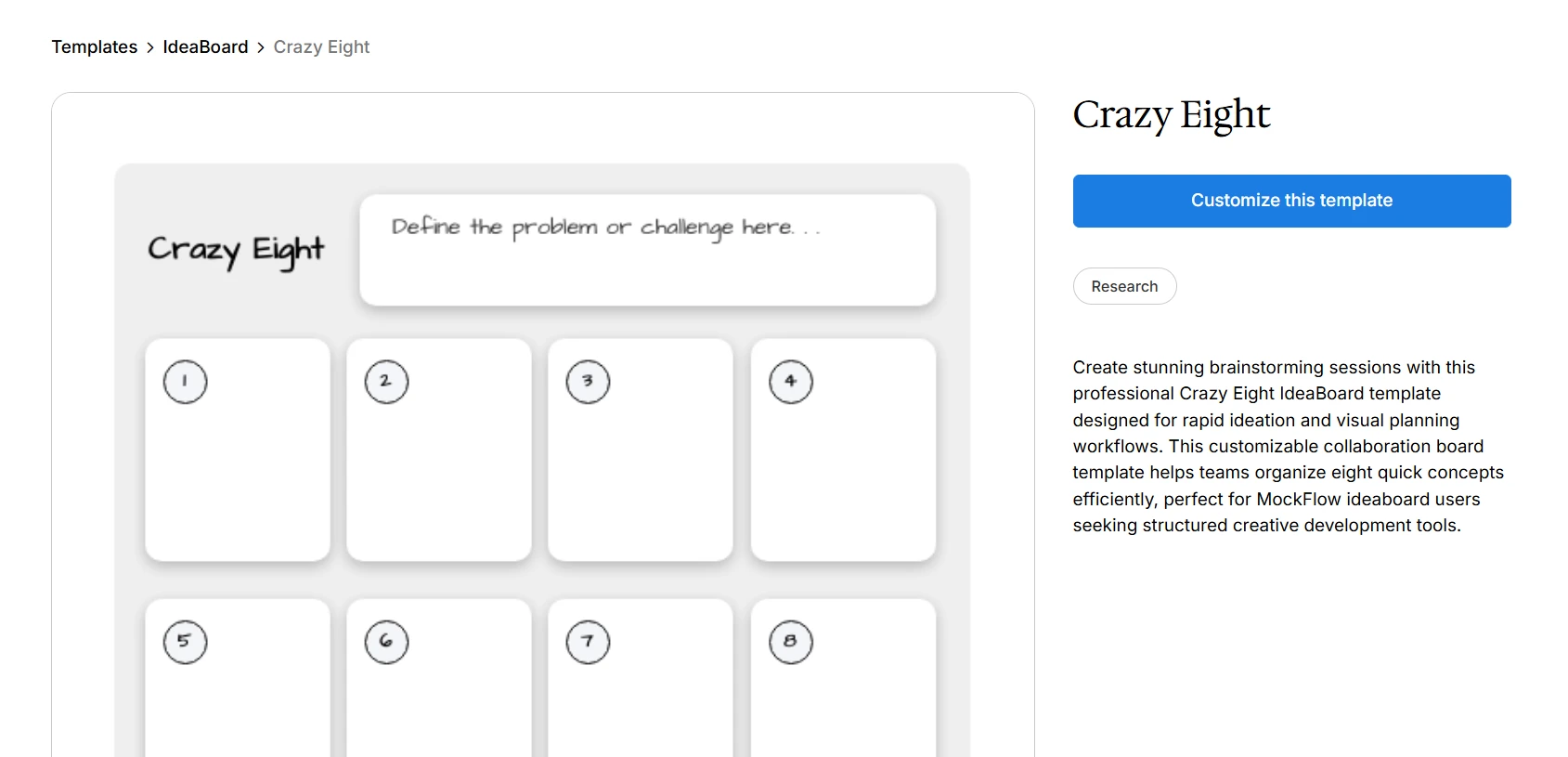
Customize this crazy eight template on IdeaBoard
Time-Boxed Idea Sprints
Once momentum builds, you would want to keep it going. That’s where time-boxed idea sprints come in.
Instead of one long discussion, the goal is to break ideation into short bursts of 5 to 10 minutes. Each time-boxing round focuses on generating as many ideas as possible. The team can repeat multiple rounds with different angles.
What this helps with:
- Maintain focus across the session
- Generate ideas consistently
- Avoid long, unfocused discussions
How to use it:
Define a clear goal for each round and set a strict time limit. Hold off on evaluating ideas until later.
How Might We Method
The “How Might We” method helps turn problems into opportunities. For example, instead of working with one problem statement, a team might create multiple “How Might We” questions, each leading to different idea paths. This keeps thinking open and solution-focused.
What this helps with:
- Reframe problems into opportunities
- Keep thinking open and flexible
- Align the team before ideation
How to use it:
Start with a clear problem and convert it into a “How Might We” question. For example, “How Might We Simplify the User Experience.” Then create variations to explore different angles.
Round Robin Brainstorming
Once ideas start forming, we need a way to build on them collaboratively.
Round robin brainstorming ensures that everyone contributes by passing ideas from one person to another for refinement. Each person adds to or improves the idea before passing it along.
You can use the round robin brainstorming template to make the process more structured and visible. It helps:
- Capture ideas in a clear, step-by-step sequence
- See how ideas evolve across contributors
- Ensure equal participation without interruptions
- Keep all iterations organized in one place
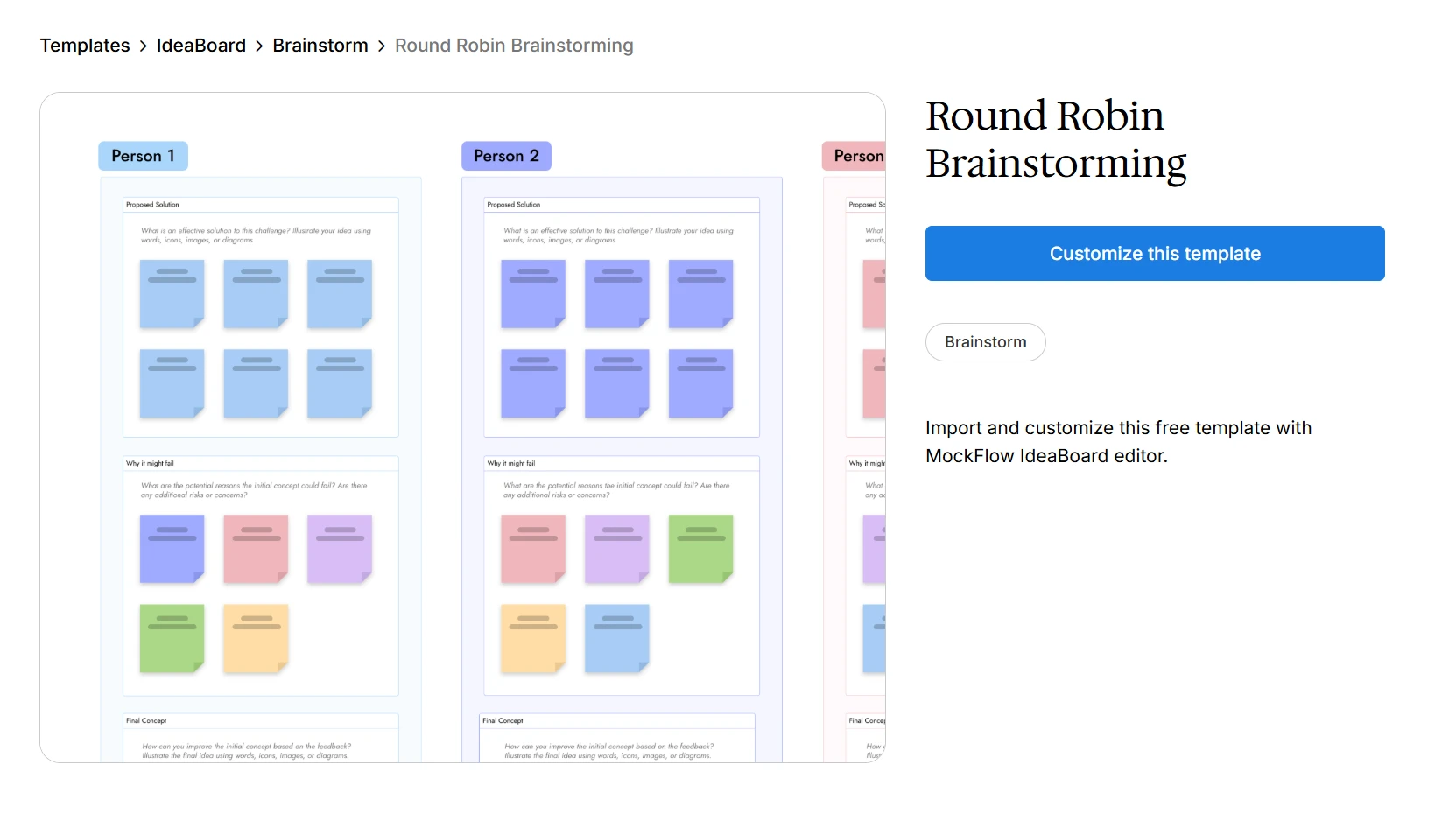
Customize this round robin brainstorming template on IdeaBoard
How to use it:
Start with one idea per person and then pass ideas after a fixed time. Build on what’s already there and review all versions together at the end
Pro Tip: This approach works well when different perspectives need to shape the same idea.
Brainwriting
If group discussions feel too dominant, we can shift the format entirely.
Brainwriting focuses on silent idea generation first. Every member writes ideas individually and then passes on to others to expand or refine. This reduces groupthink and gives everyone equal space to contribute. It also leads to more thoughtful ideas because people have time to think independently.
You can use a brainwriting template to keep this flow organized. It provides a clear layout where ideas can be captured, passed, and expanded without confusion.
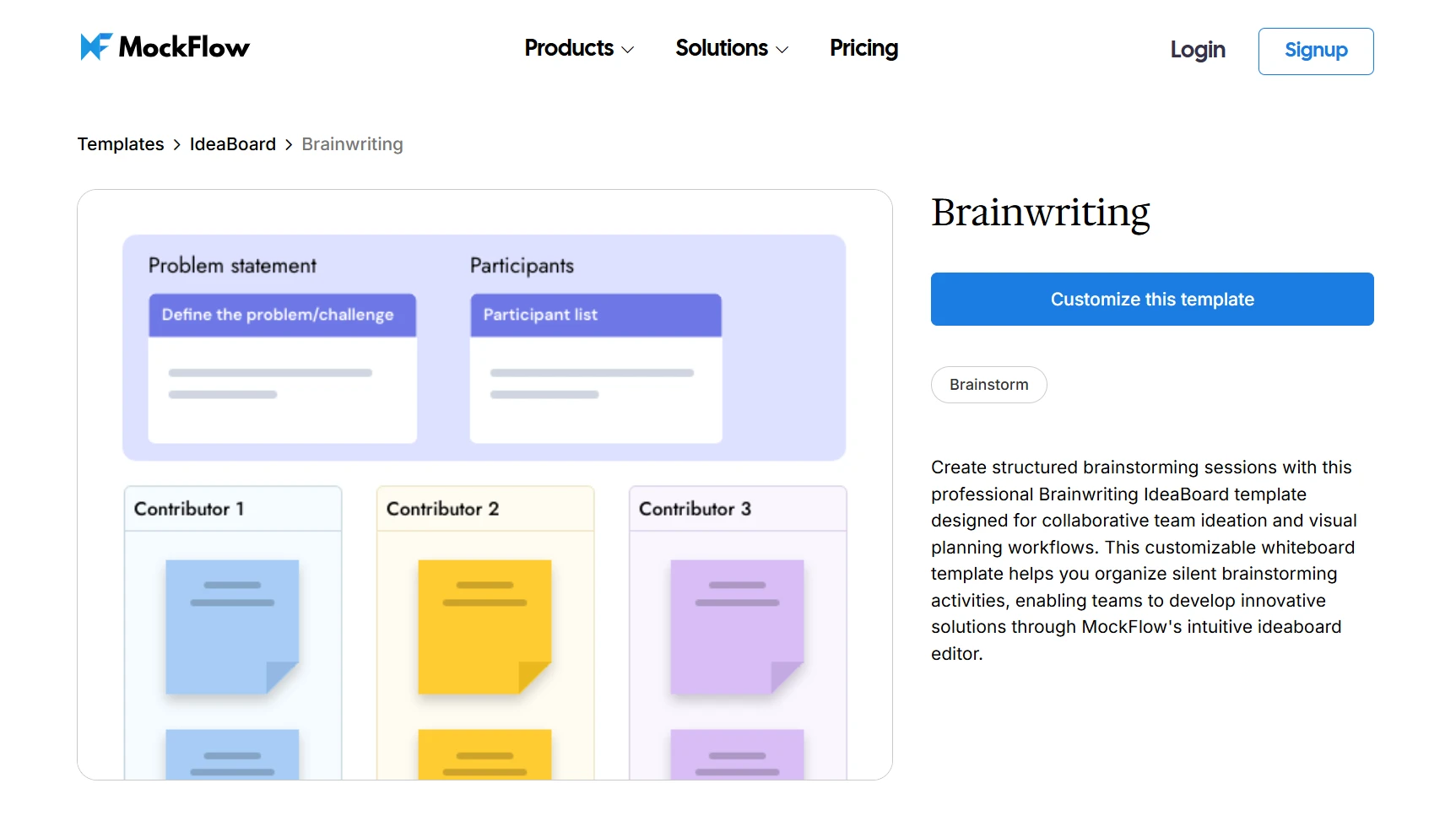
Customize this brainwriting template on IdeaBoard
Start with individual idea writing, giving each participant a fixed time window. Then pass ideas to others to refine and build on, repeating for a few rounds.
Using the template, assign each participant a section. As ideas rotate, contributors add refinements in the same space. Finally, review all ideas, spot patterns, and combine the strongest ones into clear actions.
As ideas move across the team, consider using multimedia inputs to:
- Add voice or video context to ideas
- Share thoughts more clearly without long discussions
- Collaborate asynchronously when needed
- Build on ideas without losing the original intent
Mind Mapping
Once we have a lot of ideas, we need a way to organize them. Mind mapping helps us visually connect ideas by starting with a central concept and branching out into related thoughts. As ideas grow, we can see patterns and relationships more clearly.
For example, while planning a product launch, we might branch into messaging, channels, audience segments, and timelines, each expanding further. This is where the sticky note mind map template can help. It allows teams to:
- Break down complex topics into connected ideas
- Visualize relationships between concepts
- Expand ideas without losing structure
- Keep everything organized as it grows
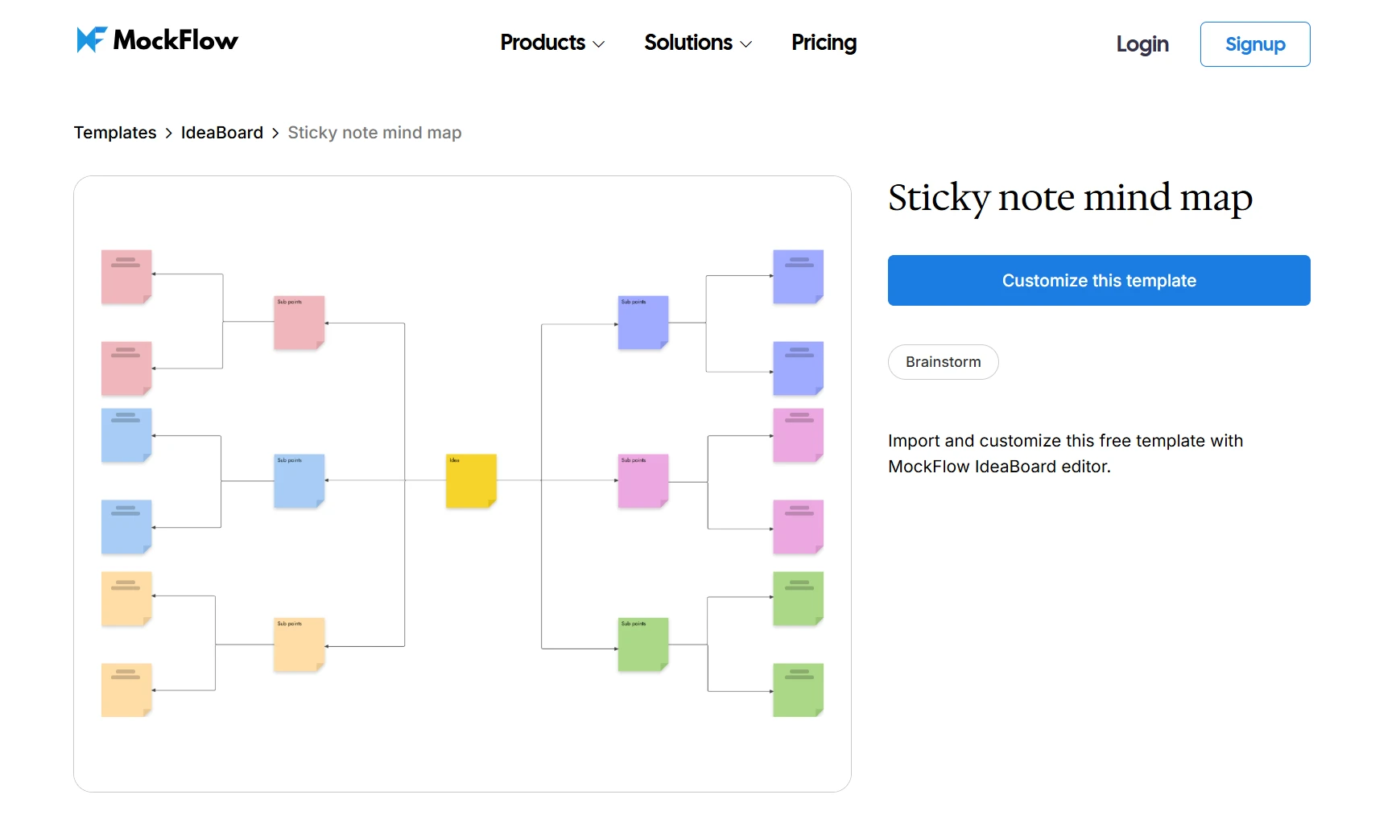
Customize this sticky note mind map template on IdeaBoard
How to use it:
Start with a central idea and add branches for key themes. Expand each branch with sub-ideas and review connections and patterns.
Why Use Rapid Ideation for Brainstorming
Traditional brainstorming often filters ideas too early. Rapid brainstorming flips that by encouraging us to generate first and evaluate later. The focus here is on speed, volume, and exploration first rather than refining every idea.
Breaks Creative Blocks Quickly
Creative blocks happen when teams chase the “right” idea too early. That pressure slows momentum. Timed ideation removes it. With just a few minutes, thinking becomes instinctive instead of overanalyzed. The first ideas may be obvious, but as pressure drops, new directions start to emerge naturally.
Rapid ideation is also a core part of the Design Sprint, developed by Jake Knapp at Google Ventures to move from problem to tested solution quickly.
Encourages Divergent Thinking
Instead of locking into one solution, fast ideation pushes us to explore multiple paths at once. It encourages generating a wide range of ideas, even unconventional ones, before narrowing them down.
Prevents Overthinking and Perfectionism
We often judge ideas too early, discarding them before they’re shared. Rapid ideation removes that habit. Its time-boxed structure limits overthinking and creates a judgment-free zone where the focus shifts from being right to simply generating ideas.
Progress beats perfection every time in early ideation. A research by Vitale and Co. found that 54% of respondents say perfectionism negatively impacts their work, and 59% say it increases their risk of burnout.
Ensures Equal Participation
In most speed brainstorming sessions, only a few voices lead while others hold back. Rapid ideation solves this through individual ideation, giving everyone time to think and contribute before discussion.
Research by i4cp shows that teams can improve productivity by 39% on average through stronger cross-functional collaboration. It shows the impact of giving every voice a chance to contribute.
Produces a Large Pool of Ideas Fast
In a typical session, we might spend 30 minutes discussing a few ideas. However, in a quick ideation session, we can generate dozens of ideas within the same duration. This increases the chances of finding high-value ideas.
When Should We Use Rapid Ideation?
Rapid ideation helps in scenarios where speed matters more than precision. So, let’s explore when to use it and when to slow things down.
Ideal Scenarios
- During design sprint ideation where teams need multiple solutions in a short time
- Early-stage product ideation when the direction is still unclear
- UX problem-solving sessions to sketch and compare different flows
- Marketing brainstorming to generate fresh campaign ideas or messaging angles
A McKinsey report highlights that performance today depends less on individual output and more on how effectively knowledge flows across teams. This is what rapid ideation supports.
When to Use a More Structured Approach Instead
There are certain situations where moving too fast can hamper outcomes such as:
- When deep analysis or detailed research is required
- When decisions need to be highly precise or data-driven
- When complex dependencies require structured planning and coordination
Rapid Ideation Examples
Understanding techniques is one thing, but seeing how rapid ideation plays out in real scenarios makes it much easier to apply. Here are a few practical examples:
Example 1: Product Feature Ideation
When working on product features, the challenge is often not a lack of ideas but a lack of direction.
Let’s say a product team is trying to improve the checkout experience. Instead of debating one solution, they run a 10-minute rapid ideation session and generate over 20 ideas like one-click checkout to guest checkout, saved preferences, and simplified forms.
However, it can get difficult to bring clarity to such a volume of ideas. With a proper structure, those ideas remain scattered and hard to evaluate. A product feature rapid ideation template solves this by offering a repeatable framework to move from raw ideas to a streamlined exploration. It enables teams to:
- Explore the feature from multiple angles
- Break down a feature into key dimensions
- Identify gaps or assumptions early
- Generate more targeted ideas based on insights gained
How to use it in a session:
Start with the feature or problem and expand outward using key questions. Use those questions to trigger new ideas. To speed things up further, use a prompt library. It offers ready-to-use, editable prompts for ideation. These prompts can provide useful starting points for mind maps, workflows, or feature exploration.
Example 2: Marketing Campaign
Marketing ideation often needs both speed and structure. Without it, ideas can feel scattered or repetitive.
Let’s say a marketing team is planning a campaign for a new productivity app launch. In a 10-minute rapid ideation session, they generate ideas like a “save 1 hour a day” campaign, a 7-day productivity challenge, and a comparison ad highlighting time wasted on current tools.
At this stage, the challenge is not generating ideas. It is organizing them into clear campaign directions. This is where the marketing campaign rapid ideation template becomes useful.
Instead of capturing ideas randomly, it helps teams break ideation into key areas such as audience segments, messaging themes, and creative concepts. This ensures that every idea connects back to a strategic direction.
This helps teams:
- Identify and define target audiences clearly
- Explore different messaging angles in parallel
- Connect creative ideas with underlying insights
- Turn scattered ideas into structured campaign directions
How to use it in a session:
Start with the campaign goal and define the target audience segments. Add different messaging angles like time-saving or performance. Then capture creative ideas under each angle, such as ads, content formats, or campaign concepts. Group similar ideas together to identify patterns and strong directions.
Pro Tip: Use a visual board to drag and drop ideas, rearrange them as thinking evolves, and group related concepts. It helps establish connections between ideas at a glance, making it easier for teams to move from scattered inputs to clear directions.
Example 3: UX Flow Improvements
Here the teams have to explore multiple solutions before committing to one.
For example, a team improving a checkout flow might quickly sketch different versions, fewer steps, alternate layouts, or new navigation paths. Instead of perfecting one idea, they have to focus on generating options and comparing them side by side.
A rapid ideation template helps teams to explore variations of a user journey without getting stuck on one direction too early.
You can also use a storyboard-style approach alongside the template to:
- Explore different user journeys quickly
- Visualize and compare flows
- Combine the strongest ideas into a better experience
How to use it in a session:
Start with the current user flow as a baseline and use idea sketching to quickly create multiple variations.
Once a few strong directions emerge, generate multi-screen wireframes from a single prompt. This provides a quick starting point with connected screens and flow structure already in place. You can map each idea as a step-by-step user journey and then compare flows to see what works best.
How to Run a Rapid Ideation Session
Running an effective rapid ideation requires structure more than creativity. Each step builds on the previous one, helping the team move from a clear problem to actionable ideas. Here’s how to get started:
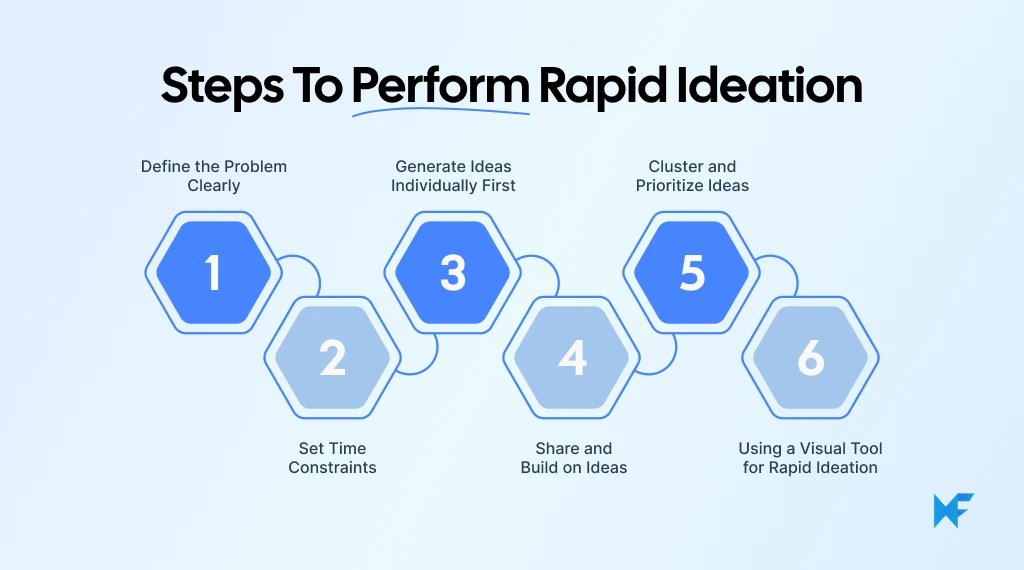
Step 1: Define the Problem Clearly
Start by setting up a visual workspace where the entire ideation session will take place. You can begin with a ready-made template, or generate multiple visualizations for a single prompt with Mida AI. It ensures all ideas, context, and discussions stay in one place from the beginning.
Every strong ideation session starts with clarity. If the problem is vague, the ideas will be too.
Frame the problem using a “How Might We” question to keep it focused yet open-ended. To make it clearer, map the problem visually with IdeaBoard’s storyboard. This helps visualize the full context, and avoid misinterpretation before ideation begins.
How to use it:
- Start with the core problem
- Map out the user journey or scenario
- Highlight friction points
- Convert those into “How Might We” questions
Step 2: Set Time Constraints
Once the problem is clear, the next step is to create urgency. For a strict time-boxing, keep each round between 5 to 10 minutes. It enforces quick thinking and prevents overanalysis. You can use structured templates to organize these rounds.
How to use it:
- Define the number of rounds
- Assign a time limit to each
- Stick to the timer, even if ideas feel incomplete
This helps maintain focus and avoid long, unproductive discussions.
Step 3: Generate Ideas Individually First
Before opening up discussion, start with individual thinking. This ensures that ideas are not influenced by dominant voices and gives everyone space to contribute. Capture ideas freely without worrying about space or structure with infinite canvas. It helps explore multiple directions freely and build a diverse pool of inputs before collaboration begins.
How to use it:
- Give everyone a few minutes to work independently
- Start with a blank canvas or import a relevant template
- Capture ideas in any format, notes, sketches, or flows
Pro Tip: Access the template library to use mind maps, journey maps, or flowcharts and adapt them to the problem at hand. Focus on quantity over quality here.
Step 4: Share and Build on Ideas
Once everyone has contributed individually, it’s time to share and expand ideas as a team. It helps build on each other’s thinking. Remote or hybrid teams can discuss ideas in real time using an AI whiteboard for Google Meet.
At the same time, team members can also edit, move, or annotate ideas simultaneously. With real-time collaboration, teams can add video and voice comments to clarify intent without long explanations. This keeps discussions focused even in distributed teams.
How to use it:
- Share ideas one by one on a common board
- Collaborate in real-time via Google meet to discuss individual inputs
- Add context where needed using voice or video notes
Pro Tip: For design-heavy ideas, work with 3D models during brainstorming. This allows teams to explore ideas as interactive objectives, making concepts easier to visualize and discuss in early stages.
Step 5: Cluster and Prioritize Ideas
After generating a large number of ideas, group similar ideas together, identify patterns, and then prioritize the most promising ones. With AI-assisted clustering, teams can automatically group related ideas, identify key themes, and prioritize important concepts.
How to use it:
- Group similar ideas together
- Use visuals connectors to map relationships
- Rank or vote on top concepts
The final step is turning scattered ideas into a shareable outcome. Turn the structured ideas into interactive walkthrough or non-linear presentations. This makes it easier to communicate concepts to stakeholders without rebuilding everything separately.
Move from Ideas to Execution with Visual Tools
Rapid ideation helps teams move fast, break creative blocks, and generate a high volume of ideas without overthinking. However, speed alone isn’t enough. The real impact comes from converting those ideas into actionable outcomes.
A visual workspace makes that transition easier. With tools like IdeaBoard, teams can capture ideas in real time, organize them on an infinite canvas, and use ready templates. Adding to this is the AI-assisted setup to quickly structure thinking without losing momentum.
When ideas are visible, connected, and easy to refine, it becomes much simpler to move from quick thinking to meaningful results. Try it yourself with the no sign-up required version of IdeaBoard.
Sign up to save your ideas, build on them, and collaborate with your team.
FAQs on rapid ideation technique
1. What is rapid ideation?
Rapid ideation is a time-boxed brainstorming technique focused on generating a large number of ideas quickly without overthinking. It prioritizes speed and quantity first, followed by evaluation and refinement.
2. What is a rapid ideation brainstorming example?
A common rapid ideation example is a team generating 20–30 ideas in 10 minutes for improving a product feature. The goal is to explore multiple directions quickly before selecting the most promising ones.
3. How do you perform rapid ideation step-by-step?
Start by defining a clear problem, set a strict time limit and generate ideas individually. Then share and build on ideas as a group and cluster the best ones for action.
4. What are the types of rapid ideation?
Common types include Crazy Eights, time-boxed idea sprints, brainwriting, round-robin brainstorming, and mind mapping. Each method focuses on fast idea generation with minimal filtering.
5. What tools can be used for rapid ideation?
Visual collaboration tools like IdeaBoard offer ready-to-use templates, infinite canvas, and team collaboration to help capture, organize, and refine ideas in real time.

Miro vs Microsoft Whiteboard: A Breakdown of Features, Pricing & Fit
Choosing between digital whiteboard tools often comes down to how much structure your team needs. A simple canvas may work well...

FigJam vs Mural: Compare Features, Pricing & Best Alternative in 2026
TL;DR FigJam vs Mura difference lies in their workflow fit. The better choice depends on whether the team needs fast...
Creative Problem Solving: The 4-Stage CPS Model and Techniques
Introduction Traditional problem solving breaks down when challenges are complex, ambiguous, or cross-functional. It pushes...
