What are Ecosystem Maps? Examples, Template, and How to Create One
When teams talk about how a business or product really works, the conversation rarely stays within one function. Someone mentions customers. Another brings up partners. Then platforms, internal teams, tools, and external dependencies enter the picture. Very quickly, the discussion shifts from individual processes to how everything connects.
That’s essentially the lens an ecosystem map brings to the table.
An ecosystem map helps us step back and look at a system as a whole. It focuses on relationships rather than steps, and interactions rather than sequences. Instead of asking what happens first or last, it captures who is involved, how they interact, and how value flows across the ecosystem.
This perspective is especially useful in business, product, and design contexts where outcomes depend on multiple stakeholders working together.
In this guide, we explore what an ecosystem map is, where it is commonly used, examples, practical templates, and a clear approach to creating your own ecosystem map with the right level of detail and clarity.
What is an Ecosystem Map?
An ecosystem map is a visual representation that shows how stakeholders, systems, and components interact within a connected environment. It maps relationships, dependencies, and value flow across customers, partners, teams, and platforms.
Ecosystem maps provide a system-level view instead of linear workflows. Teams use ecosystem maps to understand context, identify gaps, and align collaboration. Businesses, product teams, and designers rely on ecosystem maps to clarify roles, visualize interactions, and improve decision-making across complex systems.
What distinguishes an ecosystem map diagram is its emphasis on relationships over execution.
Unlike flowcharts or process maps that document sequences, an ecosystem map shows how different elements coexist and influence one another at the same time. This makes it particularly effective for understanding complex systems where ownership is shared and interactions are not strictly linear.
Common Ecosystem Map Layouts
Ecosystem maps aren't drawn in one fixed way, but most follow one of three common structures:
- Hub-and-spoke: the central user, product, or organization sits in the middle, with spokes connecting outward to the people, tools, and organizations it interacts with. This is the most common layout and works well when one entity is clearly at the center.
- Concentric rings: the same central entity sits at the core, surrounded by rings that represent distance or influence. Players with more direct or frequent impact sit in the inner rings, while indirect or occasional ones sit further out.
- Radial or network: instead of a single center, entities are connected based on how they relate to one another, showing a web of relationships rather than a hub. This suits complex ecosystems where influence is distributed rather than centered on one player.
Whichever layout you choose, make the connections directional and label what flows along them, whether that is money, information, influence, or trust. The real value in an ecosystem map often lives in those flows, not just the entities.
Characteristics of an Ecosystem Map
While ecosystem maps can look different depending on the use case, they share a few defining characteristics that make them effective for understanding complex systems.
1. Interconnected Components
At the heart of every ecosystem map are interconnected components. These components may include customers, internal teams, external partners, platforms, tools, regulators, or service providers. What matters is not listing them exhaustively, but showing how they relate to one another.
By placing components in context rather than isolation, ecosystem maps make it easier to see how changes in one area influence others. This interconnected view supports clearer system visualization and prevents teams from analyzing parts of the ecosystem in silos.
2. Stakeholder Relationships
Ecosystem maps place strong emphasis on stakeholder relationships. Instead of focusing on responsibilities alone, they show how stakeholders interact, depend on each other, and exchange value.
This makes a stakeholder ecosystem diagram especially useful in environments where collaboration spans multiple teams or organizations. Mapping these relationships helps surface overlaps, unclear ownership, or missing connections that may not be obvious in traditional documentation.
3. System-Level Overview
Another defining characteristic is the system-level overview ecosystem maps provide. They intentionally stay high-level, avoiding operational detail in favor of clarity. This perspective allows teams to understand how the ecosystem functions as a whole, rather than optimizing individual parts in isolation.
For strategy, design, and planning discussions, this broader view often leads to better alignment and more informed decisions.
4. Interaction Pathways
Ecosystem maps also highlight interaction pathways between components. These pathways represent how information, resources, or value move across the system.
Seeing these pathways visually helps teams understand not just who is involved, but how interactions actually flow. This clarity is particularly useful when diagnosing friction, delays, or unintended dependencies.
5. Ecosystem Structure Analysis
Finally, ecosystem maps enable ecosystem structure analysis. By reviewing how components are positioned and connected, teams can identify gaps, bottlenecks, single points of failure, or over-reliance on specific stakeholders.
These insights often shape follow-up conversations around improvement, alignment, or redesign, without requiring immediate changes to processes.
Benefits of Using Ecosystem Maps
Ecosystem maps are not about documentation for its own sake. Their value lies in how they support shared understanding and better conversations across teams. By visualizing relationships and interactions, ecosystem maps help organizations reason about complexity more effectively.
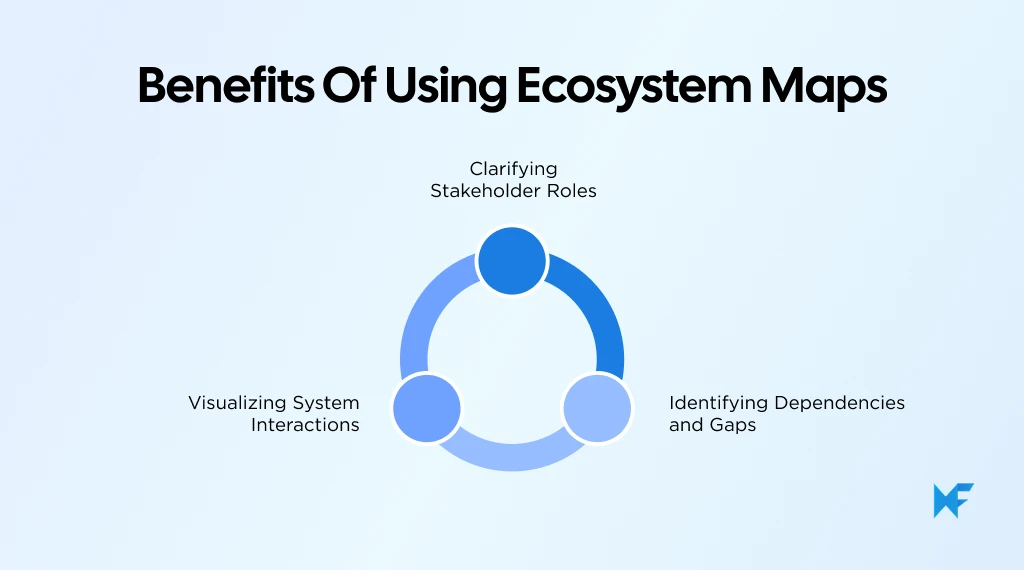
1. Clarifying Stakeholder Roles
One of the most immediate benefits of ecosystem mapping is clarity around stakeholder roles. When all participants are placed within the same visual context, it becomes easier to see who plays what role and where responsibilities intersect.
This clarity reduces confusion during planning discussions and helps teams align expectations, especially in cross-functional or partner-driven environments.
2. Identifying Dependencies and Gaps
Ecosystem maps make dependencies visible. They show which components rely on others to function and where those dependencies might introduce risk or friction.
At the same time, they help identify gaps, such as missing stakeholders, unsupported interactions, or unclear handoffs. This makes ecosystem maps particularly useful during business ecosystem mapping and early-stage planning.
3. Visualizing System Interactions
By presenting interactions visually, ecosystem maps support better communication. Complex systems are easier to discuss when everyone can see the same structure and relationships.
This shared visual reference improves collaboration, supports alignment, and enables teams to make decisions with a clearer understanding of how changes may affect the wider system.
This effectiveness of visual mapping is supported by research. A 2024 meta-analysis of 41 studies involving 10,562 participants found that visualization interventions had a medium positive effect on learning and understanding, reinforcing why visual tools like ecosystem maps help teams grasp complex relationships more quickly and consistently.
Together, these benefits explain why ecosystem maps are often used as a thinking and alignment tool rather than a documentation exercise. By making relationships, dependencies, and interactions visible, they help teams build a shared understanding of how a system functions before moving into deeper analysis or execution.
When to Use an Ecosystem Map
Ecosystem maps are most useful when conversations move beyond individual tasks and into how multiple elements influence one another. They help teams step back and understand context before making decisions. While they can be applied in many scenarios, there are a few situations where ecosystem mapping adds clear value.
1. Business Process Mapping
In business process mapping, teams often focus on workflows within a single function. An ecosystem map adds a broader layer by showing how those processes connect across departments, vendors, and external systems.
Instead of detailing every step, the map highlights who is involved, where handoffs occur, and which stakeholders influence outcomes. This approach is especially helpful when processes span sales, operations, finance, and third-party partners, making business ecosystem mapping more transparent and aligned.
2. Customer Experience Design
Customer experience rarely lives within one team or tool. It unfolds across marketing, product, support, logistics, and external services. Ecosystem maps help teams visualize this wider context by placing customers alongside internal teams, platforms, and partners.
By mapping interactions and dependencies, teams can better understand how experiences are shaped across touchpoints. This system-level view supports more coherent experience design and avoids optimizing isolated moments at the expense of the overall journey.
3. Product Development and Innovation
Product teams use ecosystem maps to understand how a product fits into a larger environment of users, integrations, services, and supporting systems. Rather than focusing only on features, the map shows relationships that influence adoption, usage, and value creation.
This perspective is particularly useful during early discovery or innovation discussions, where understanding constraints, dependencies, and opportunities matters more than execution detail.
4. Ecosystem Map vs Other Tools
Ecosystem maps are often confused with flowcharts, Gantt charts, or process maps. The difference lies in intent. While those tools focus on sequence, timelines, or execution, an ecosystem map focuses on relationships and structure.
Where a flowchart answers what happens next, an ecosystem map answers who is involved and how everything connects. This makes it the preferred choice when accountability, remote collaboration, and system visualization matter more than step-by-step progression.
Ecosystem mapping is also gaining traction beyond business and product teams. A July 2024 report from University College London notes increased use of systems approaches, including systems mapping, among civil servants for policy design and multi-stakeholder coordination, with simplified visual maps emerging as a common communication format.
In all the above scenarios, ecosystem maps act as a framing tool. They help teams align on context, relationships, and system boundaries before moving into detailed planning or execution.
Ecosystem Map Examples & Templates
Seeing an ecosystem map in action often makes the concept click faster than definitions alone. Examples help clarify how different elements come together, while templates give teams a practical starting point without forcing structure too early. This section covers both, focusing on how ecosystem maps are commonly represented in real-world contexts.
Ecosystem Map Examples
Ecosystem map examples vary based on what’s being explored, but they all share a common goal: showing relationships at a system level.
A business ecosystem map typically represents an organization in relation to everything that influences or supports its operations. This includes internal teams such as sales, marketing, operations, and finance, alongside external partners like vendors, logistics providers, technology platforms, and regulatory bodies. Customers are usually positioned as a central or influential element, depending on the context.
Instead of detailing internal workflows, the map shows how these entities interact, where dependencies exist, and how value moves across the ecosystem. Business leaders often use this view to align cross-functional teams and understand how decisions in one area affect the broader system.
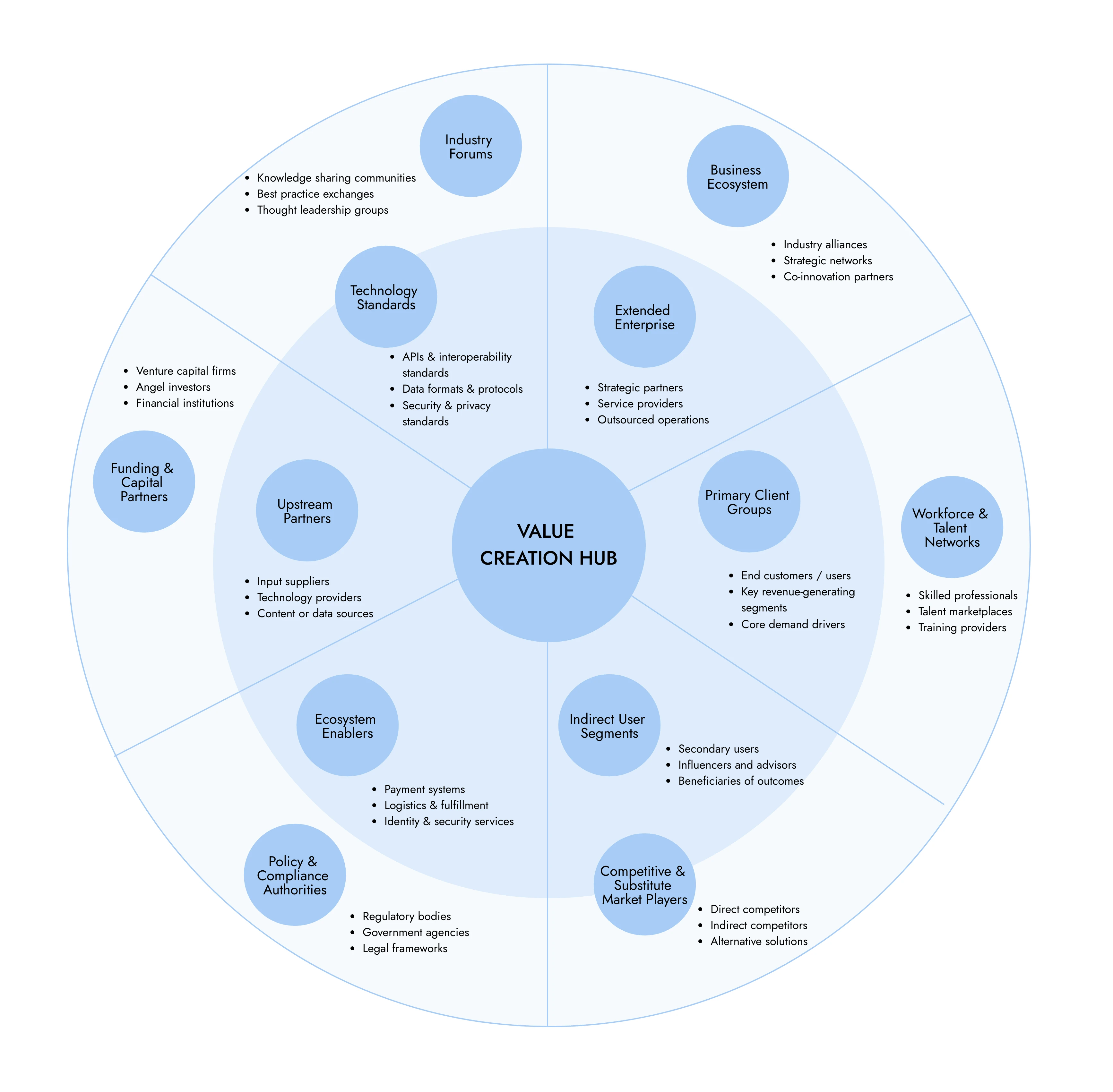
Digital Value Network Business Ecosystem Map
A product ecosystem map focuses more narrowly on how a product operates within its surrounding environment. It places the product alongside users, integrations, supporting services, data sources, internal product teams, and third-party platforms.
This type of map helps teams understand what enables the product to deliver value beyond its core features. It is commonly used in product strategy and design discussions to clarify constraints, dependencies, and opportunities that influence adoption and long-term success.
Across both examples, ecosystem maps prioritize relationships and context over execution detail, making them especially valuable early in planning and alignment conversations.
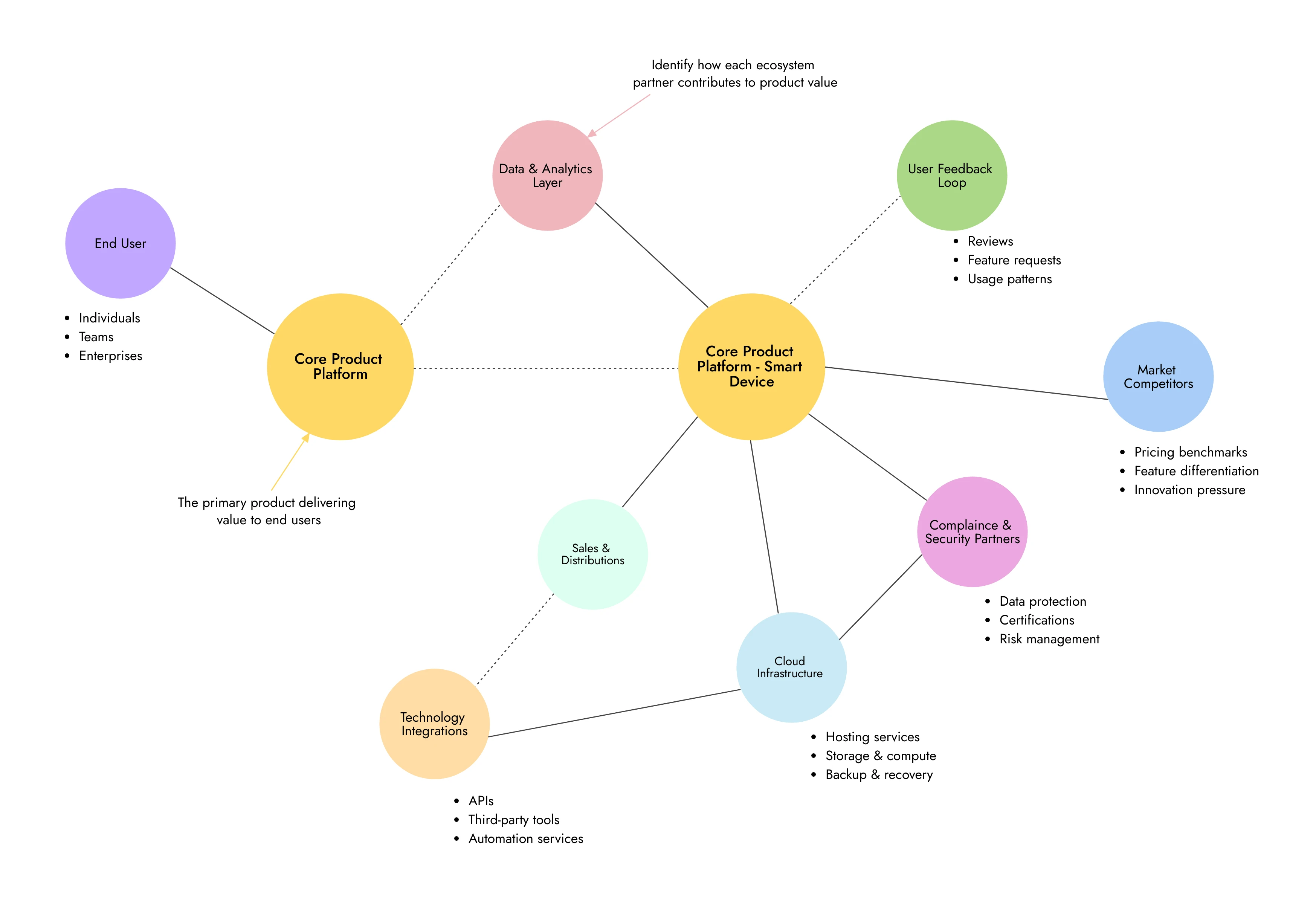
Product Ecosystem Map
Ecosystem Map Template
If you’re looking to move from concept to visual quickly, starting with an ecosystem map template can help. Templates provide a flexible structure that reduces setup time while still leaving room for interpretation and refinement.
Teams can customize and use ready-made ecosystem map templates available in IdeaBoard’s template library. These templates are designed for open-ended system visualization, making them suitable for mapping stakeholders, systems, and interaction pathways without enforcing rigid workflows. You can adapt the layout based on whether you’re mapping a business ecosystem, a product environment, or a broader stakeholder network.
For example, this ecosystem map template offers a simple starting point with clearly defined spaces for core entities and their relationships.
Because the template is built on a visual whiteboard, teams can easily add, remove, or reposition elements as their understanding of the ecosystem evolves. This makes templates particularly useful for collaborative discussions, early-stage planning, and alignment sessions where clarity matters more than precision.
How to Create an Ecosystem Map
Creating an ecosystem map is less about following strict steps and more about building a shared understanding of how a system operates. The goal is not perfection on the first attempt, but clarity. Most ecosystem maps evolve through discussion, iteration, and refinement as teams uncover relationships they hadn’t fully considered before.
Step 1: Identify Key Components
The first step is identifying the core components that make up the ecosystem. These components vary based on context, but usually include stakeholders such as customers, internal teams, partners, platforms, tools, and external entities that influence outcomes.
At this stage, it helps to think broadly rather than precisely. The intention is to capture everything that plays a meaningful role in the system, even if its impact feels indirect. This creates a foundation for system visualization and prevents important elements from being overlooked later.
Step 2: Define Stakeholder Relationships
Once key components are visible, the next focus is on stakeholder relationships. This involves understanding how different entities interact, depend on one another, or exchange value.
Rather than documenting responsibilities in isolation, ecosystem maps show connections. These relationships might represent collaboration, data flow, decision-making influence, or service dependencies. Clarifying these connections early helps teams align on how the ecosystem actually functions, not just how it’s designed on paper.
Step 3: Map Interactions and Dependencies
With relationships defined, interactions and dependencies start to take shape. This is where the ecosystem map begins to reveal patterns. Some components may emerge as central connectors, while others rely heavily on a single dependency.
Mapping these interaction pathways helps teams understand where friction, delays, or risk might exist across the system. It also supports ecosystem structure analysis by highlighting how tightly or loosely different parts of the system are connected.
Step 4: Refine and Validate
Ecosystem maps are rarely complete in one pass. Refinement is an essential part of the process. Teams review the map, question assumptions, and validate relationships with relevant stakeholders.
This step often surfaces missing components, unclear interactions, or oversimplified connections. By validating the map collaboratively, teams ensure it reflects real-world dynamics rather than theoretical structures.
Using IdeaBoard to Create Ecosystem Maps
Visual whiteboarding tools make ecosystem mapping easier to build and refine collaboratively. MockFlow IdeaBoard supports ecosystem mapping through a flexible, open-ended canvas designed for complex system visualization.
IdeaBoard offers an infinite canvas where teams can freely place and connect components without space constraints. Its template library includes structures such as stakeholder maps, network diagrams, spider diagrams, and context diagrams that work well as starting points for ecosystem maps. Teams can customize these templates to suit business, product, or service ecosystems.
IdeaBoard also includes AI-assisted features that can generate an initial visual layout from a text prompt, helping teams move faster during early mapping discussions. Real-time collaboration allows multiple stakeholders to edit the map together, while voice and video comments add context to complex relationships.
Its AI-powered maps component lets you combine geographical or network‑style maps with ecosystem elements to depict location‑based relationships or multi‑region stakeholder maps.
Once complete, ecosystem maps can be exported as images for sharing or documentation, keeping them useful beyond the whiteboarding session.
Taken together, these capabilities make IdeaBoard a practical environment for exploring, refining, and communicating ecosystem maps without locking teams into rigid structures or workflows.
Opting for the right tool makes the process easier. This shift toward visual collaboration is also reflected at a market level. Grand View Research estimates the global interactive whiteboard market will reach $7.30 billion by 2030, signaling widespread adoption of visual, collaborative tools for cross-functional work.
Conclusion
Ecosystem maps help teams make sense of complexity by showing how systems, processes, and stakeholders connect in the real world. Instead of viewing work through isolated workflows, they encourage a broader perspective that highlights relationships, dependencies, and value flow across the ecosystem.
This clarity makes ecosystem maps especially useful for alignment, planning, and informed decision-making across business, product, and design teams.
As organizations grow more interconnected, having a shared visual understanding of the ecosystem becomes less optional and more foundational. Ecosystem mapping supports better conversations, reduces blind spots, and helps teams reason about change before acting on it.
If you’re looking to create or refine your own ecosystem maps, tools like IdeaBoard provide a flexible, collaborative space to map relationships at scale. You can explore ecosystem mapping visually and iteratively by trying IdeaBoard for free via the browser extension or signing up directly. Sign up and try IdeaBoard for free today.
FAQs About Ecosystem Maps
1. What is an ecosystem map?
An ecosystem map is a visual representation of a system that shows how stakeholders, components, and entities interact. It focuses on relationships, dependencies, and value flow across customers, partners, teams, processes, and platforms within a connected environment.
2. What is the main purpose of an ecosystem map?
The main purpose of an ecosystem map is to provide a system-level view of how stakeholders, systems, and components interact. It helps teams understand relationships, dependencies, and value flow beyond individual processes or workflows.
3. What is the difference between an ecosystem map and a stakeholder map?
An ecosystem map presents a system-level view that includes stakeholders, processes, and interactions. A stakeholder map focuses only on identifying stakeholders and their roles. Ecosystem maps provide broader context by showing how stakeholders interact within the entire system.
4. When should you use an ecosystem map in design thinking?
You should use an ecosystem map during early design thinking stages such as discovery and problem framing. It helps teams understand context, visualize system interactions, identify gaps, and align stakeholders before moving into solution design.
5. What tools can you use to create an ecosystem map?
You can create an ecosystem map using visual collaboration tools that offer templates, infinite canvas, customization, and real-time collaboration. Tools like MockFlow IdeaBoard support ecosystem mapping through templates, diagramming features, and collaborative workflows.
6. Why use IdeaBoard instead of drawing an ecosystem map on slides or documents?
Slides and documents work for static visuals, but ecosystem maps evolve as understanding improves. MockFlow IdeaBoard allows teams to continuously refine relationships using an infinite canvas, real-time collaboration, and flexible templates, making it better suited for living ecosystem maps rather than one-time diagrams.

30+ Brainstorming Questions for Better Sessions and Ideas
Quick Answer: Brainstorming questions are open-ended prompts that help teams generate ideas, explore possibilities, and solve...

How to Run a Team Huddle for Better Team Collaboration
Keeping teams aligned has become harder as projects move faster, priorities shift frequently, and remote collaboration becomes...
How to Use Reverse Brainstorming for Creative Problem-Solving in 2026
Introduction So, reverse brainstorming. It’s not exactly your usual “let’s come up with solutions” kind of brainstorming....
