50 Team Meeting Ice Breakers for In-Person, Virtual, and Hybrid Groups
A team meeting ice breaker is a short question or activity that helps people start participating before the main discussion. It can reveal how the group is feeling, help new colleagues connect, or surface a priority for the agenda.
The challenge is choosing one that suits the time available and lets everyone contribute without feeling put on the spot. This guide covers 50 questions and activities, with timing and instructions for in-person, virtual, and hybrid meetings.
Team meeting ice breakers at a glance
The best team meeting ice breaker depends on how much time we have, how well the team knows one another, and whether everyone can participate in the same way. A quick question suits a packed agenda, while a game or shared activity gives the group more room to interact.
Here are five meeting ice breaker ideas to try first:
Meeting situation | Mockflow’s best pick ice breaker | How it works | Time |
A short weekly check-in | What’s one small win from this week? | Each person shares one recent success in a sentence. | 2–3 minutes |
A newly formed team | Two Truths and a Lie | Each person shares three statements; teammates guess the false one. | 5–8 minutes |
A virtual meeting | Chat Waterfall | Everyone types an answer, then posts together on cue. | 2 minutes |
The start of a working session | Mini Brainstorm Sprint | The team generates ideas for one small challenge under time pressure. | 5 minutes |
A large team meeting | Collaborative Team Headline | Small groups write a headline about a shared goal. | 3–5 minutes |
Choose one that fits the meeting’s purpose, explain the rules briefly, and set a time limit.
15 quick ice breaker questions for work
A question can be an effective team meeting ice breaker when everyone has a simple way to contribute. Choose one that fits the meeting, share a sample answer if needed, and keep responses short enough to leave room for the agenda.
1. Fun questions to energize a meeting
Use these when the group needs an easy start. They work well as a spoken round for small teams or a chat prompt for larger ones.
1. What’s one small win from this week?
Ask each person to name one thing that went well, however small. For example: “I finally got an answer on a task that had been stuck.” This brings progress into view without turning the opening into a status report.
- Best for: Weekly team meetings, Monday check-ins.
- Time required: 2–5 minutes.
- Tip: Share your own small win first so people know a major achievement is not expected.
2. What’s one tool you can’t work without right now?
Invite people to name a tool and explain its value in one sentence. Someone might say, “My calendar, because I use it to protect focus time.” The answers show how colleagues organize their work and may surface a useful shortcut.
- Best for: Cross-functional teams, new teams, remote meetings.
- Time required: 3–5 minutes.
- Tip: Accept simple answers, including a notebook or timer. This does not need to become a software discussion.
3. If our team had a theme song, what would it be?
Ask everyone to suggest a song that captures the team’s mood. A sample answer could be, “Something upbeat, because we have a lot happening this month.” The choices make it easier to talk about the group’s energy through a playful prompt.
- Best for: Familiar teams, project kickoffs, informal check-ins.
- Time required: 3–5 minutes.
- Tip: Collect titles in chat, then invite a few people to explain their picks.
4. What part of your workday do you look forward to most?
Ask people to name a specific moment, such as “the quiet hour before my first call.” Their answers can reveal when they prefer focused work or conversation. For distributed teams, this can also open a useful discussion about remote collaboration tools and working preferences.
- Best for: Remote teams, newly formed teams, planning meetings.
- Time required: 3–5 minutes.
- Tip: Ask people to describe what makes that moment useful, then move on without trying to redesign the schedule immediately.
5. What’s one tiny upgrade that would make your day easier?
Keep the emphasis on tiny. For example: “One place to find the latest project decisions.” The answers can uncover small points of friction that the team might otherwise overlook.
- Best for: Team check-ins, process reviews, retrospectives.
- Time required: 3–5 minutes.
- Tip: Note actionable suggestions for later; do not let the icebreaker become a problem-solving session.
2. Ice breaker questions that connect to the meeting
These prompts help the group move into a planning or working discussion. Ask for one short answer per person and return to anything that needs a longer conversation during the agenda.
6. What’s a challenge you’re excited to tackle right now?
Invite people to name a challenge they feel ready to work on. Someone might answer, “Making the handoff between design and development clearer.” This shows where people want to direct their effort and can reveal a useful link to the meeting’s purpose.
- Best for: Project kickoffs, planning meetings, team check-ins.
- Time required: 3–5 minutes.
- Tip: Keep the wording open. People should be free to choose a small challenge.
7. What’s one skill you’re building this month?
Ask each person to name a skill they are practicing. For example: “Giving clearer feedback on early drafts.” The responses help teammates learn where interests and experience overlap, without requiring anyone to assess another person’s performance.
- Best for: New teams, learning sessions, monthly check-ins.
- Time required: 3–5 minutes.
- Tip: Ask for the skill only. Save detailed development plans for another conversation.
8. What did you learn recently that surprised you?
Give people room to share a discovery from their work. A sample answer is, “Customers use that feature for a task we hadn’t expected.” This can bring useful knowledge across roles while keeping the opening conversational.
- Best for: Cross-functional meetings, project reviews, learning sessions.
- Time required: 3–5 minutes.
- Tip: Allow lessons from outside the current project so everyone has a way in.
9. What would make this week feel productive for you?
Ask for one outcome rather than a list of tasks. Someone might say, “Getting a decision on the launch date.” If several answers depend on the same decision, note it as a blocker and bring it into the next team huddle, where the group can clarify ownership and agree on a follow-up. The ice breaker reveals the dependency without turning the opening round into a problem-solving meeting.
- Best for: Monday meetings, sprint planning, weekly team check-ins.
- Time required: 3–5 minutes.
- Tip: Record issues that need discussion and return to them during the agenda.
10. What’s something you’d like more clarity on right now?
Invite a specific question, such as, “Who gives final approval on the revised design?” This can surface unclear ownership or expectations before they slow down the work.
- Best for: Project kickoffs, planning meetings, cross-functional teams.
- Time required: 3–5 minutes.
- Tip: Write down unanswered questions and assign a point in the meeting to address them.
3. Creative ice breaker questions for familiar teams
These questions leave more room for interpretation. Offer chat as an option, and let people pass if a prompt does not appeal to them.
11. What caption would you give this image?
Display a neutral, work-appropriate image and ask for a short caption. Someone might write, “The team five minutes before a deadline.” Comparing answers creates a quick shared moment and shows how differently people read the same scene.
- Best for: Creative teams, informal meetings, brainstorming warm-ups.
- Time required: 2–4 minutes.
- Tip: Choose the image before the meeting. Avoid photos of coworkers or anything that could make someone the joke.
12. Would you rather have fewer meetings or fewer emails this week, and why?
Ask everyone to pick one option before inviting explanations. A sample answer is, “Fewer meetings, so I can finish a proposal.” The split can start a light conversation about how people prefer to use their time.
- Best for: Weekly check-ins, remote meetings, familiar teams.
- Time required: 3–5 minutes.
- Tip: Use a poll or simultaneous chat replies so everyone chooses before hearing the first explanation.
13. What one work-related item would you take to a desert island?
Ask people to choose an item and give one reason. Someone might say, “A notebook, because writing helps me sort through ideas.” The imagined setting makes it easier to talk about tools and habits without asking a direct work-style question.
- Best for: New team introductions, creative warm-ups.
- Time required: 3–5 minutes.
- Tip: Treat the island as a playful prompt, not a survival exercise. Move on after one reason.
14. What one word describes your mindset as this meeting begins?
Collect a single word from each person, such as “curious,” “focused,” or “tired.” The responses give the host a quick sense of how the group is arriving without requiring anyone to explain a personal feeling.
- Best for: Short meetings, remote check-ins, meetings after a busy day.
- Time required: 1–2 minutes.
- Tip: Ask everyone to send their word in chat at the same time. Do not question someone about their choice in front of the group.
15. How would you finish this sentence: “Today, I’m coming into this meeting feeling…”?
Offer a short sample, such as “…ready to make a decision.” This gives people a way to state what they need from the conversation and can help the host adjust the opening pace.
- Best for: Planning sessions, retrospectives, team health checks.
- Time required: 3–5 minutes.
- Tip: Let people answer with a phrase or pass. A check-in should not require an explanation.
For a question that asks how someone is arriving at the meeting, share the prompt in advance with the agenda. Participants can prepare a brief answer and still choose to respond aloud, in chat, or not at all.
10 ice breaker games for team meetings
Ice breaker games work when we have a few extra minutes and want people to interact beyond answering one question. Most need only a prompt, a timer, or a place to collect responses. Choose a game that fits the group size, then explain the rules before starting.
4. Guessing and conversation ice breaker games
These games give people something specific to react to. Keep the pace brisk so everyone has a chance to participate.
16. Rapid fire round
Prepare a simple prompt, such as “What’s your favorite way to reset between tasks?” Set a 20-second limit per person and move around the group. Short answers keep people from overthinking and give us a quick introduction to different preferences.
- Best for: Small team meetings, quick warm-ups.
- Time required: 3–5 minutes.
- Tip: Use chat for groups too large to hear from everyone aloud.
17. Two truths and a lie
Ask each person to prepare two true statements and one false statement about themselves. They read all three aloud, and teammates vote on the lie before the answer is revealed. The guesses often lead to natural follow-up conversations.
- Best for: New teams, onboarding meetings.
- Time required: 5–10 minutes.
- Tip: Use pairs or small groups when more than eight people attend.
18. Team trivia
Prepare five questions about shared work, light industry knowledge, or general interests. Read one at a time, let everyone answer, then reveal the result. The game creates a shared challenge without requiring anyone to tell a personal story.
- Best for: Familiar teams, team celebrations.
- Time required: 5–8 minutes.
- Tip: Avoid questions that only longtime employees could answer.
19. Guess the teammate
Before the meeting, invite volunteers to submit one harmless fact about themselves. Read each fact without the name and ask the group to guess who submitted it. This helps colleagues learn something new without putting anyone on the spot unexpectedly.
- Best for: New or growing teams.
- Time required: 5–8 minutes.
- Tip: Let contributors approve the exact wording before you share it.
20. Name that sound
Prepare three to five short, recognizable sounds, such as a notification, an animal, or an everyday object. Play or make each sound and invite guesses in chat. The unusual prompt can wake up a quiet room without asking for lengthy answers.
- Best for: Virtual meetings, informal team calls.
- Time required: 3–5 minutes.
- Tip: Check that remote participants can hear the audio before the first round.
5. Collaborative games and challenges
These activities ask teammates to create or decide something together. Give the group a clear endpoint so the game leads smoothly into the meeting.
21. Mini brainstorm sprint
Prepare one small challenge tied to the agenda, such as “How can project handoffs become clearer?” When the team needs everyone’s input before discussion begins, IdeaBoard’s Brainwriting template provides a shared space for collecting ideas silently.
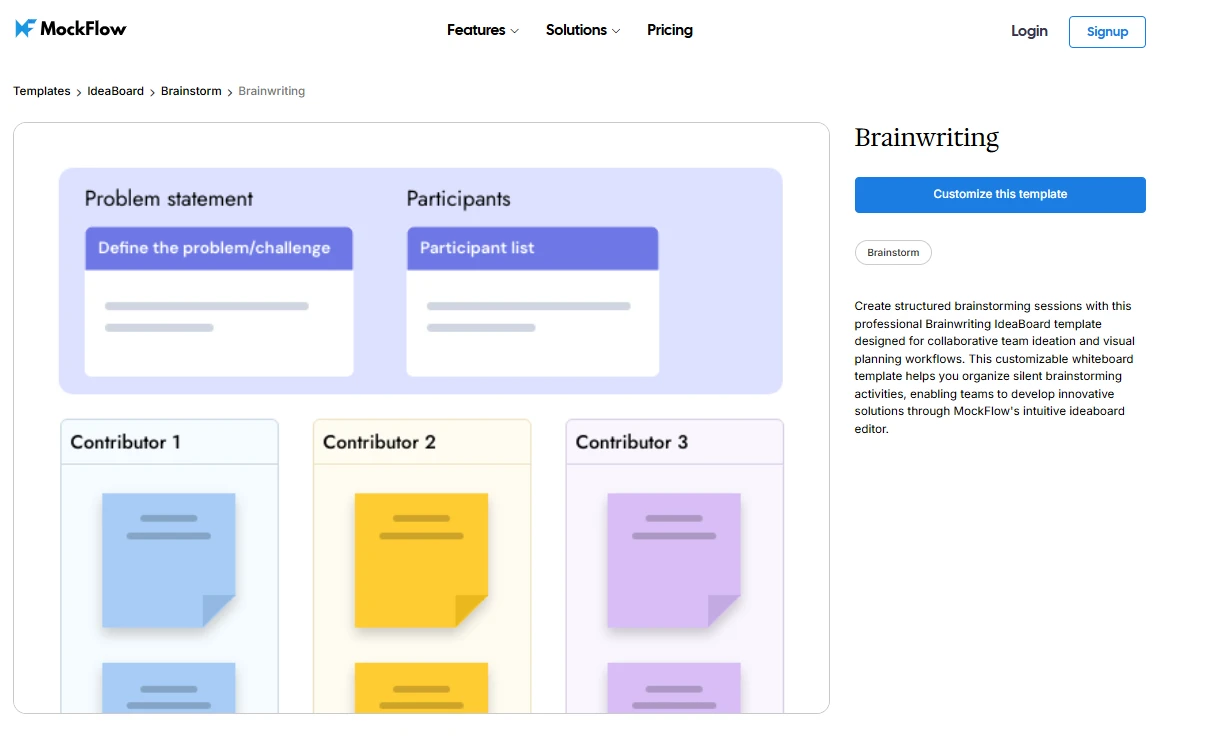
Customize this brainwriting template for your next team meeting
Give participants two minutes to add notes, then group similar responses and choose one to discuss. This prevents the first speaker’s idea from setting the direction for everyone else.
- Best for: Planning meetings, creative workshops.
- Time required: 3–5 minutes.
- Tip: Make the challenge narrow enough to generate ideas quickly.
22. One-word story
Choose an opening line or topic. Going around the group, each person adds one word to continue the story until it reaches a natural ending. The result is usually funny, but the useful part is listening closely and building on someone else’s contribution.
- Best for: Small teams, creative warm-ups.
- Time required: 3–5 minutes.
- Tip: Stop after one or two rounds; a long story loses its pace.
23. Common ground challenge
Split the meeting into groups of three or four. Give them three minutes to find three things they share beyond their job titles, then ask each group to share one discovery. It gives newer colleagues a reason to talk directly.
- Best for: New teams, cross-functional meetings.
- Time required: 5–7 minutes.
- Tip: Rule out broad answers such as “we all work here.”
24. 60-second sketch
Prepare one easy prompt, such as “Draw our project as a vehicle.” Give everyone a minute to sketch on paper or a shared canvas, then invite a few explanations. The different drawings can reveal how people see the same work.
- Best for: Creative teams, project kickoffs.
- Time required: 4–6 minutes.
- Tip: Say upfront that drawing skill does not matter.
25. Group prioritization challenge
Prepare a light scenario with three possible actions. In pairs or small groups, ask teammates to choose one and agree on a reason before sharing. This shows how people weigh options together. If the exercise raises a real decision, use nominal group technique afterward: gather ideas independently, clarify them as a group, then rank the options. That gives the decision more care than a quick ice breaker allows.
- Best for: Planning meetings, cross-functional teams.
- Time required: 5–8 minutes.
- Tip: Keep the ice breaker scenario low-stakes and schedule any real decision separately.
10 virtual and hybrid meeting ice breakers
A virtual or hybrid team meeting ice breaker works best when everyone can respond, including people away from the main meeting room. Use chat, polls, or a shared board for simultaneous answers, and offer a spoken option when it suits the group.
6. Chat and poll ice breaker activities
These activities need little preparation and can fit at the start of a call. Tell participants when to submit their answers so everyone has a chance to think first.
26. Emoji check-in
Ask everyone to post one emoji that reflects their energy today. For example, someone might choose “★” to show they feel positive. Invite explanations, but make them optional. The responses give the host a quick sense of the room without a lengthy round.
- Best for: Weekly check-ins, short remote meetings.
- Time required: 1–2 minutes.
- Tip: Do not ask someone to explain an emoji they chose to leave unexplained.
27. Live poll
Prepare one low-pressure question, such as “Which part of today’s topic needs the most discussion?” Ask everyone to vote at once, then briefly acknowledge the results. A poll lets remote and in-room participants contribute on equal terms and can help focus the agenda.
- Best for: Hybrid meetings, planning sessions.
- Time required: 2–3 minutes.
- Tip: Limit the poll to a few clear options and allow an “other” response.
28. Chat waterfall
Ask a question such as “What is one word you associate with this project?” Everyone types an answer but waits to press Enter until you give the cue. The answers appear together, so early responses do not steer the rest of the group.
- Best for: Virtual meetings, larger teams.
- Time required: 2 minutes.
- Tip: State the question and the “wait to send” rule before people begin typing.
29. Quick ranking
Give participants three meeting-related choices, such as speed, quality, and flexibility. Ask them to rank the choices in a poll or chat, then discuss one difference in the results. This shows where priorities vary without starting a full debate.
- Best for: Project kickoffs, planning meetings.
- Time required: 3–5 minutes.
- Tip: Choose options that are all reasonable; avoid making one answer obviously correct.
30. Where are we joining from?
Invite people to share a city, region, or time zone in chat. A sample answer could be “New York, just starting my morning.” The replies help a distributed team see who is present and recognize that colleagues may be joining at different points in their day.
- Best for: New remote teams, cross-location meetings.
- Time required: 2–3 minutes.
- Tip: Ask for a broad location only. No one needs to disclose a precise address.
7. Visual ice breaker activities for remote participants
Visual prompts give the group something shared to discuss. Let participants use an image, a brief description, or a pass option where showing their surroundings may feel uncomfortable.
31. Show and tell
Ask volunteers to share an object or image connected to their work and explain it in a sentence or two. For example: “This sketchbook is where I work out early ideas.” The activity gives colleagues a glimpse of how others approach their tasks.
- Best for: New teams, informal remote meetings.
- Time required: 5–8 minutes.
- Tip: Tell people about the activity in advance so they can choose an item.
32. Background story
Invite participants to explain a virtual background they chose, such as a favorite place or an image related to a hobby. The short story can start a conversation without requiring anyone to show their home.
- Best for: Familiar teams, informal video calls.
- Time required: 3–5 minutes.
- Tip: Accept a default background or a pass without asking why.
33. Collaborative whiteboard word cloud
When a hybrid team needs a quick way to collect everyone’s expectations, IdeaBoard’s sticky note mind map template provides a shared space for placing “What outcome should this meeting achieve?” at the center.
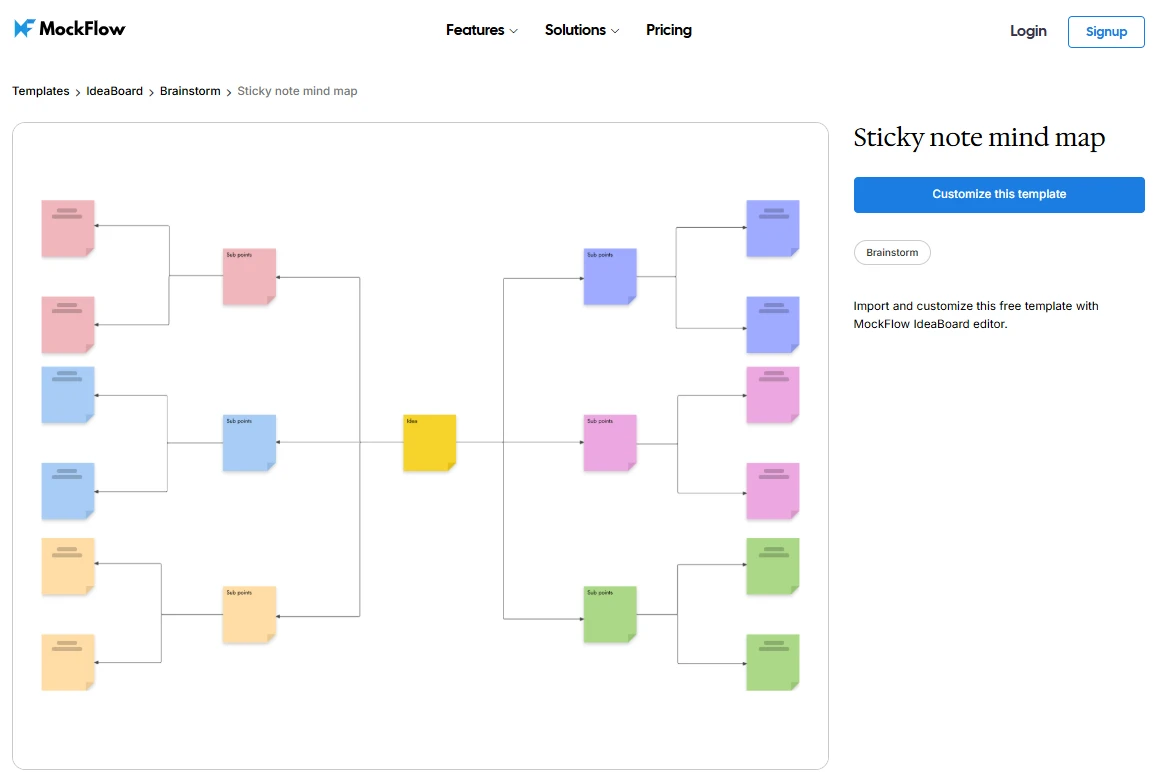
Customize this sticky note mind map
Ask each participant to add one word on a note at the same time. Group similar answers and discuss any differences. Remote and in-room participants can see every response, and the clusters give the meeting a clear starting point.
- Best for: Hybrid meetings, workshop openings.
- Time required: 3–5 minutes.
- Tip: Share the board before the call so remote participants can open it promptly.
For a last-minute virtual ice breaker, a free online whiteboard can remove the setup step. Open a board in the browser, add a prompt, and share its URL with participants. Everyone can add notes at the same time without creating an account, making it useful for a quick word cloud or group brainstorm.
34. Guess the desk
Before the meeting, invite volunteers to send a photo of a small part of their workspace. Display the photos without names and let teammates guess whose is whose. The reveal can start a light conversation about the objects people keep nearby.
- Best for: Established remote teams, informal calls.
- Time required: 5–7 minutes.
- Tip: Make photo submissions optional and let contributors approve what will be shown.
35. Virtual scavenger hunt
Name two or three harmless items, such as something blue or an object used every day. Participants can hold one up, describe it, or share a photo. A quick round works as an opener; with more time, it can become one of several virtual team building games played in small groups.
- Best for: Remote team socials, longer meeting openings.
- Time required: 5–8 minutes.
- Tip: Choose items likely to be available wherever people are joining from.
10 team building ice breakers
Team building ice breakers work best when they give colleagues a reason to learn about one another or work together. For a new team, start with introductions and shared interests. For an established team, use activities that draw on its experience of working together.
8. Activities for new teams
These activities help people move beyond names and job titles. Keep the first round simple so everyone has an easy way to join.
36. One-minute introductions
Ask each person to share their name, role, and one work preference. For example: “I’m Maya from design, and I like to review ideas visually.” Colleagues learn how to involve one another in future discussions without sitting through lengthy biographies.
For a group of about 20, run introductions in groups of four, then ask each group to share one work preference it heard. People still learn how colleagues like to collaborate without a long turn-by-turn round,
- Best for: Kickoffs, onboarding meetings.
- Time required: 5–10 minutes.
- Tip: Set a one-minute limit and go first to show the level of detail expected.
37. Team map
IdeaBoard’s Maps component puts an interactive map on the shared board. Participants can add location markers near their cities or regions, while the host zooms out to show where the team is spread. Ask everyone to add their time zone in a note beside their marker, then pair colleagues from different regions for a one-minute introduction.
The group can see its geographic spread in one place and use the time-zone notes to find overlapping hours for future calls.
- Best for: New remote teams, cross-location projects.
- Time required: 5–7 minutes.
- Tip: Request broad locations only. Time zones are added manually; the map does not calculate them.
38. Skills swap
Ask everyone to add two notes: “I can help with…” and “I’d like to learn…” A person might offer spreadsheet skills while asking to learn presentation design. Pair related notes so teammates can see where they may support each other.
If the activity runs on IdeaBoard during a Teams call, pin the board to the team’s channel afterward. Someone looking for help next week can find the offers there without relying on memory from the meeting.
- Best for: Cross-functional teams, new projects.
- Time required: 5–8 minutes.
- Tip: Save the notes on a shared board so people can return to them after the meeting.
39. What I bring to the team
Invite each person to name one strength they expect to use on the project. For example: “I’m good at turning scattered feedback into a clear list of decisions.” This helps colleagues understand contributions that may not be obvious from someone’s role.
- Best for: Project kickoffs, newly formed teams.
- Time required: 5–8 minutes.
- Tip: Ask for a specific example so the answers do not become a string of broad traits.
40. Shared interests hunt
Put people in pairs and give them three minutes to find two shared interests or experiences outside their current roles. Each pair then shares one discovery. The small-group conversation is easier to enter than speaking to the full team right away.
- Best for: Onboarding, cross-functional introductions.
- Time required: 5–7 minutes.
- Tip: Pair people who have not worked together closely.
9. Ice breaker activities for established teams
These prompts use the team’s shared history. Give people space to recognize useful work and name changes they would like to make.
41. Recent win round
Ask each person to highlight a teammate’s contribution to a recent team result. For example: “We finished the launch review because Priya resolved the last open question.” Unlike an individual small-win check-in, this round shows how people’s work connected.
- Best for: Weekly meetings, project milestones.
- Time required: 5–8 minutes.
- Tip: Keep recognition specific and invite anyone whose work has not been mentioned.
42. Gratitude round
Invite people to thank a colleague for one helpful action. A response might be, “Thanks for walking me through the customer feedback before the call.” The activity brings everyday support into view without requiring a formal awards moment.
- Best for: Team check-ins, project wrap-ups.
- Time required: 5–8 minutes.
- Tip: Make speaking optional; people can add a short note to a shared board instead.
43. Rose, thorn, bud
Ask everyone to share a rose (something that went well), a thorn (a difficulty), and a bud (an opportunity). Capture recurring themes rather than solving each issue immediately. The buds can later feed into group brainstorming techniques if the team decides to develop them together.
- Best for: Retrospectives, team health checks.
- Time required: 8–10 minutes.
- Tip: Let people write their three responses before the discussion begins.
44. Work style snapshot
Ask teammates to complete two prompts: “I do my best collaborative work when…” and “It helps me when others…” Someone might prefer an agenda before a meeting or written feedback after it. Comparing responses helps the team make practical adjustments to how it works.
- Best for: Established remote teams, project resets.
- Time required: 5–8 minutes.
- Tip: Discuss one useful adjustment, rather than trying to accommodate every preference immediately.
45. One thing that would help
Ask each person to name one small change that would improve the next stage of work. For example: “A decision log would help us avoid revisiting agreed points.” Group similar answers and identify any change the team can try.
- Best for: Planning meetings, retrospectives.
- Time required: 5–8 minutes.
- Tip: Keep the prompt focused on actions within the team’s control.
5 ice breakers for large team meetings
A team meeting ice breaker for a large group should let people participate at once or in smaller groups. Choose a clear prompt, set a short time limit, and ask for a few highlights rather than hearing from every person in turn.
46. People bingo
Prepare a card with work-appropriate descriptions, such as “has worked on a customer launch” or “speaks more than one language.” Give people a few minutes to find colleagues who match the squares. It starts conversations beyond the people they already know.
- Best for: In-person all-hands, department gatherings.
- Time required: 8–10 minutes.
- Tip: Include descriptions that new employees can match.
For a gathering of several departments, include squares that require participants to meet colleagues outside their usual team. Otherwise, people may finish the card by speaking only to coworkers they already know.
47. Rock–paper–scissors tournament
Pair everyone for a quick round. Winners find another winner and continue until a final pair remains; others can cheer them on. The familiar rules make it easy to start, even with a large group.
- Best for: In-person meetings, high-energy openings.
- Time required: 5–8 minutes.
- Tip: Explain how players find their next opponent before the first round.
48. Group connection map
Display a board with the teams or projects represented in the meeting. Ask participants to draw one connection between their work and another group’s, then discuss a few unexpected links.
If a line exposes a handoff with no clear owner, note it for a follow-up on cross-functional collaboration, where the teams can assign responsibility and agree on how information will pass between them. The activity makes those working relationships visible without trying to resolve every gap on the spot.
- Best for: Cross-functional meetings, project kickoffs.
- Time required: 5–8 minutes.
- Tip: Prepare the team or project labels before participants join.
49. Silent line-up
Ask participants to arrange themselves by a simple criterion, such as the month they joined the company, without speaking. Once the line is set, invite a few people to share what they noticed about how the group coordinated.
- Best for: In-person team gatherings.
- Time required: 5–7 minutes.
- Tip: Choose a criterion people can share comfortably and make the nonverbal rule clear.
50. Collaborative team headline
Split participants into small groups and ask each to write a headline about a shared goal, such as “What would success look like three months from now?” Display the headlines together and look for common themes.
- Best for: Large kickoffs, planning meetings.
- Time required: 5–8 minutes.
- Tip: Give groups a word limit so the headlines stay quick to read.
How to choose and run an ice breaker for a meeting
The right team meeting ice breaker depends on what the group needs from the first few minutes. Before choosing one, consider the agenda, the number of participants, and how comfortable people are with the format.
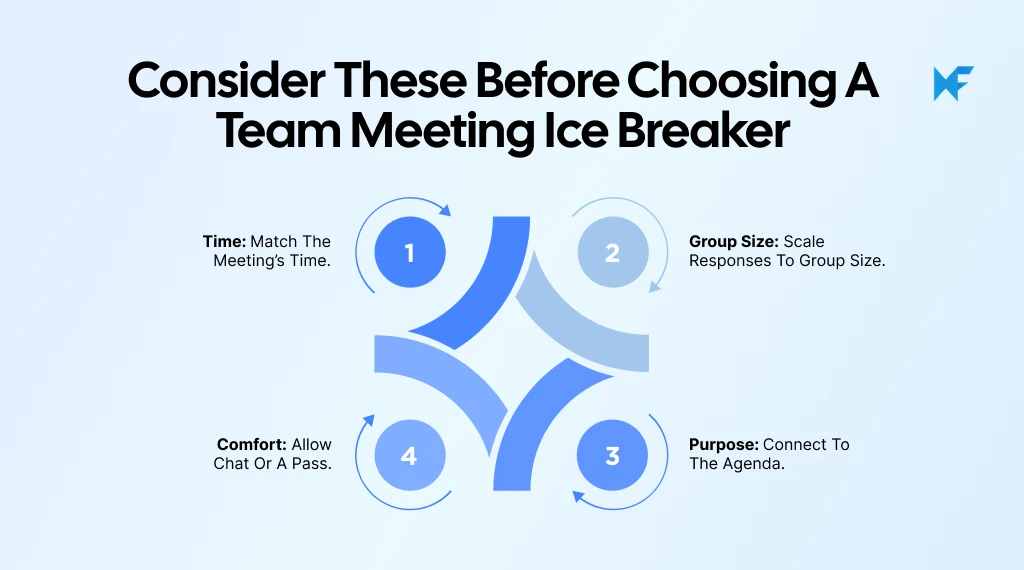
- Time: For a short meeting, ask one question that everyone can answer in a sentence. Save games with multiple rounds or preparation for a longer session.
- Group size: A spoken round works for a small team. For a larger group, use pairs, chat, a poll, or a shared board so people can respond at the same time.
- Meeting purpose: Use a reflective prompt before planning or a creative challenge before brainstorming. The activity should help people shift toward the discussion that follows.
- Comfort: Let people pass or answer in chat. Avoid requiring personal stories, a view of someone’s home, or camera use.
Once we have chosen the activity, explain the prompt, response method, and time limit before anyone begins.
Bring your next ice breaker to life with IdeaBoard
A team meeting ice breaker can do more than start a conversation when its answers help shape the agenda. MockFlow IdeaBoard helps a Teams host collect responses, find a shared priority, and keep the result available after the call.
- Start with a prompt: Adapt an editable idea from the IdeaBoard prompt library. For a planning meeting, ask participants to add one team win and one obstacle. Having the question ready keeps the opener brief.
- Build a board when the activity needs structure: Describe the check-in to Mida, such as “Create separate spaces for wins and obstacles.” It generates an editable visual board that the host can review before the call.
- Collect answers during the Teams call: Open IdeaBoard inside the Microsoft Teams meeting so participants can add notes to the same canvas simultaneously. Remote attendees can contribute before the first spoken answer shapes the discussion.
- Turn responses into the agenda: Group similar obstacles, ask which one needs attention first, and use that choice to begin the meeting. Pin the board to the Teams channel afterward so the result remains accessible.
Ready to make your next team meeting more engaging? Start building in MockFlow and turn a quick ice breaker into a shared starting point for the discussion.
FAQs
1. What are 5 great ice breaker questions?
A five-minute team meeting ice breaker can be a one-word check-in, chat waterfall, live poll, or mini brainstorm sprint. State the prompt and time limit upfront. Collect answers simultaneously, then discuss one useful pattern rather than every response.
2. What are some good 5-minute ice breakers for meetings?
Try a one-word check-in, chat waterfall, live poll, rapid-fire round, or mini brainstorm sprint. State the prompt and time limit upfront. Collect answers simultaneously for larger groups, then discuss one useful pattern rather than hearing every answer aloud.
3. What are some fun icebreakers for coworkers?
Two Truths and a Lie, Guess the Teammate, team trivia, and a 60-second sketch can spark conversation. Choose based on how well coworkers know one another. Keep facts work-appropriate, allow a pass, and stop before the game overtakes the meeting.
4. What are some good group icebreakers?
People Bingo works when participants need to meet colleagues outside their circle. For a faster opener, use a poll, chat waterfall, or group headline challenge. Small groups and simultaneous responses keep a large meeting from becoming an introduction round.
5. What are good ice breakers for virtual meetings?
Use a chat waterfall, quick poll, or shared-board word cloud. Put the prompt on screen, give everyone a moment to respond, and reveal answers together. Let participants use chat instead of speaking or turning on their cameras.
6. How can an ice breaker feel less awkward?
To make a team meeting ice breaker feel less awkward, choose a specific, low-pressure prompt. Share open-ended questions beforehand, explain how to respond, and allow people to pass. With unfamiliar teams, begin with work preferences before personal stories.
How to Implement Cross Functional Collaboration in Modern Teams
Introduction If you have ever been in a meeting where everyone agrees collaboration matters, but no one is quite sure how it...

Wireframe Testing: How to Find Usability Issues Early
Wireframe testing is the process of evaluating low-fidelity design layouts with real users before moving into detailed design or...

Inclusive UX Design: A Practical Guide to Accessible Interfaces
Inclusive UX design is the practice of building digital products that work for the widest range of people — regardless of their...
