How to Run a Team Huddle for Better Team Collaboration
Keeping teams aligned has become harder as projects move faster, priorities shift frequently, and remote collaboration becomes part of everyday work.
In fact, Axios HQ’s 2025 State of Internal Communications Report found that only 27% of leaders believe employees are fully aligned with organizational goals, while just 9% of employees agree, highlighting a major communication gap inside modern teams.
Many teams struggle with scattered updates, delayed communication, and meetings that consume time without improving clarity, making team huddles an important part of modern workflows.
A team huddle is a short recurring meeting designed to help teams stay aligned on priorities, progress, blockers, and immediate next steps. Most huddles last between 10 and 15 minutes and focus on maintaining visibility instead of solving every issue during the meeting itself.
In this guide, we’ll explain what a team huddle is, how to run one effectively, and how to structure a practical huddle agenda that teams can actually sustain.
What Is a Team Huddle?
A team huddle is a short recurring meeting used to align team members on current priorities, progress updates, blockers, and immediate next steps. Most team huddles follow a consistent daily cadence, typically lasting between 10 and 15 minutes. The focus is on improving visibility and coordination rather than solving every issue during the meeting itself.
Teams use huddles to maintain momentum, improve communication, and create shared awareness across ongoing work. In fast-moving environments, even a quick recurring meeting can improve productivity by helping teams identify risks early, clarify ownership, and stay aligned on shifting priorities.
Although terms like daily standup meeting, daily scrum, and team check-in are often used interchangeably, they serve slightly different purposes depending on the workflow and team structure.
Meeting Type | Purpose | Common Use Case |
Team huddle | Broad operational alignment meeting | Cross-functional team coordination |
Daily standup meeting | Fast-paced daily sync | Agile and product teams |
Daily scrum | Formal Scrum framework ceremony | Scrum-based development teams |
Team check-in | Lightweight communication-focused sync | General status updates |
Morning stand-up | Start-of-day alignment meeting | Operations and support teams |
What connects all of these formats is the need for consistent communication and shared visibility. Whether teams are coordinating sprint work, managing operations, or running remote workflows, effective team huddles help maintain alignment without creating unnecessary meeting overload.
Benefits of Team Huddles
When teams communicate in short, consistent intervals, work becomes easier to coordinate. Effective team huddles create operational clarity by giving everyone a shared understanding of priorities, progress, and blockers before small issues turn into larger delays.
Operational clarity matters because teams lose significant time searching for missing context and updates. Atlassian’s 2025 State of Teams report found that employees spend nearly 25% of their workweek searching for information, answers, or the right people to help them move work forward.
Some of the biggest benefits of team huddles include:
- Better alignment on project goals: Teams stay focused on current priorities and avoid confusion when work changes across projects.
- Faster blocker identification: Issues surface early during a daily update meeting before they slow down delivery timelines.
- Increased accountability across teams: Regular updates improve ownership visibility and make follow-ups easier to track.
- Improved team communication: Short recurring conversations reduce information gaps across departments and workflows.
- Better visibility into workloads and priorities: Teams can quickly identify overloaded contributors, shifting priorities, or delayed tasks.
- Reduced meeting overload: A structured daily sync often replaces multiple fragmented status meetings during the week.
- Stronger collaboration for remote and hybrid teams: Predictable check-ins help distributed teams stay connected and informed.
Many teams also use team charters and shared visual boards to make recurring huddles easier to manage. Sticky-note-based tracking, collaborative updates, and recurring meeting visibility help teams organize discussions visually instead of relying only on verbal updates.
Tools like IdeaBoard support this workflow by helping teams maintain meeting structure, capture updates in real time, and keep historical context accessible between meetings.
How to Run an Effective Team Huddle?
Knowing how to run a team huddle effectively comes down to consistency, structure, and follow-through. A good team huddle keeps communication clear, surfaces blockers early, and helps teams maintain alignment through a recurring short meeting that people can realistically sustain.
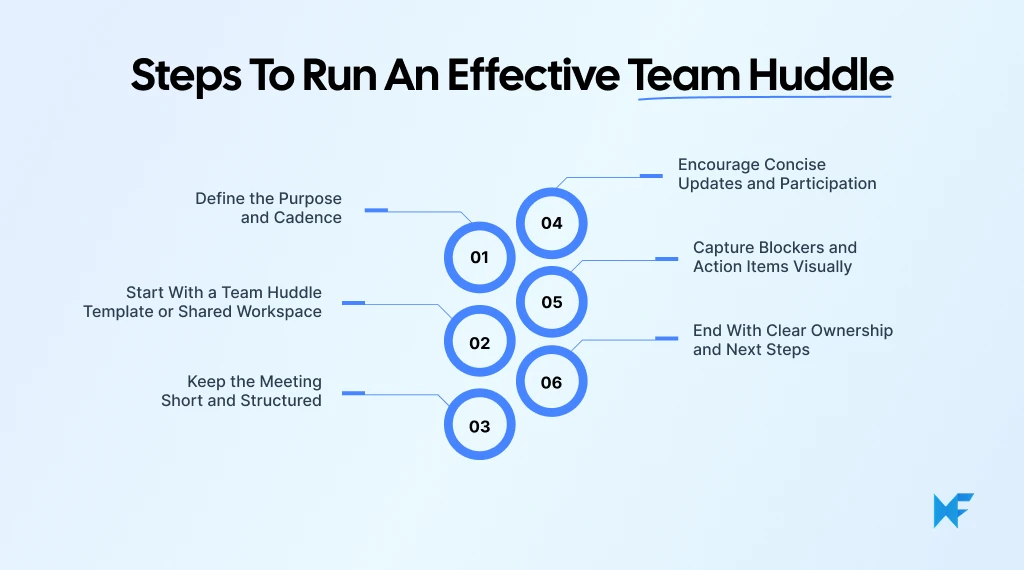
1. Define the Purpose and Cadence
Before setting up a team huddle, teams should first decide why the meeting exists, who needs to participate, and how often it should happen. A daily standup for engineering teams will look different from a weekly operations sync or a morning huddle for customer support teams.
Some common formats include:
- Daily operational syncs for cross-functional coordination
- Sprint standups for agile delivery teams
- Morning huddles for shift-based or support workflows
- Weekly alignment meetings for broader planning discussions
Consistency matters more than complexity, as teams build stronger communication habits when meetings happen at a predictable time and follow a familiar structure. A recurring cadence also improves accountability because blockers, updates, and ownership stay visible across the week.
2. Start With a Team Huddle Template or Shared Workspace
Templates help teams avoid rebuilding the same meeting structure every day. They create consistency across recurring team huddles and reduce setup friction for facilitators and participants alike.
Teams can use ready-made collaborative templates for organizing updates, priorities, blockers, and follow-ups visually. For instance, you can use the daily team huddle board by IdeaBoard for recurring standups, daily updates, blocker tracking, and cross-functional coordination without relying on scattered notes or disconnected tools.
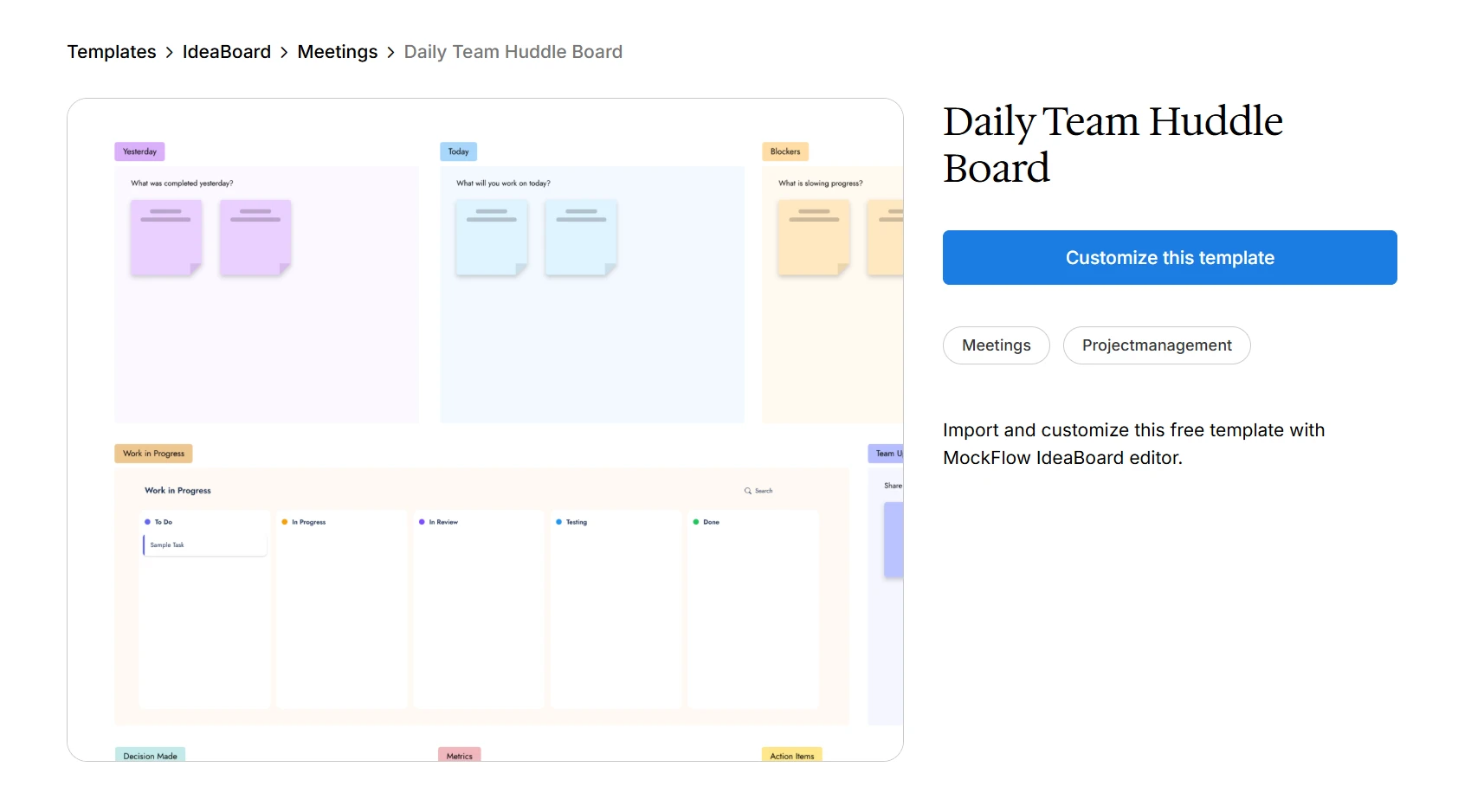
Customize this daily team huddle agenda board template for your next meeting
Here’s how teams can use this template effectively:
- Track daily priorities, ownership, and progress updates in one shared workspace
- Capture blockers and dependencies during the huddle itself for better follow-through
- Organize cross-functional updates visually instead of relying only on verbal discussions
- Maintain visibility across recurring meetings with a documented history of updates and action items
- Help remote and hybrid teams collaborate through shared real-time updates and async preparation
Templates also help teams standardize recurring meeting structures, improve participation consistency, reduce setup time, and maintain historical visibility across projects.
Using a collaborative workspace gives teams access to features like infinite canvas layouts, drag-and-drop editing, and real-time collaboration, making recurring huddles easier to organize visually.
3. Keep the Meeting Short and Structured
Most effective team huddles stay within 10 to 15 minutes, because the purpose is alignment and not deep problem-solving.
Keeping huddles short matters because constant interruptions already make focused work difficult. Microsoft’s 2025 Work Trend Index found that employees are interrupted every 2 minutes during the workday by meetings, emails, or chat notifications.
When discussions become too detailed, facilitators should move them into separate follow-up conversations.
A simple stand-up meeting structure keeps the discussion focused:
- What was completed since the last update
- What is being worked on today
- What blockers or dependencies exist
Timeboxing helps prevent meetings from drifting. The facilitator also plays an important role by maintaining concise communication, guiding participation, and keeping the team huddle agenda on track.
Teams running remote or hybrid huddles can also benefit from using collaborative visual boards directly during live discussions. For example, IdeaBoard’s Google Meet integration allows teams to collaborate visually, capture updates in real time, and maintain shared visibility without switching between multiple tools during recurring meetings.
4. Encourage Concise Updates and Participation
A productive huddle depends on focused communication from everyone involved. Updates should stay short, practical, and relevant to the team’s shared priorities.
Teams should also avoid allowing a few voices to dominate the conversation. Balanced participation creates better visibility and helps quieter team members contribute more comfortably during the meeting.
This balance matters because poorly facilitated standups can quickly become repetitive status meetings. A ScienceDirect study observing 12 software teams found that standups were viewed positively when they encouraged information sharing and problem-solving, but negatively when they felt like manager-led reporting sessions.
Async preparation can help here, especially for remote team collaboration workflows. Team members can add updates before the meeting starts, so live discussion time stays focused on priorities and blockers.
5. Capture Blockers and Action Items Visually
One of the biggest mistakes teams make is discussing blockers without documenting them clearly. Effective team huddles should capture blockers, dependencies, ownership, and follow-up tasks during the meeting itself.
Visual organization makes this process easier, allowing teams to group recurring issues, assign priorities, and maintain visibility between meetings instead of relying only on memory or scattered notes.
Some teams also report better standup outcomes when blockers and work items stay visible during the meeting itself. Teams described how running standups directly from a shared Kanban board helped reduce repetitive updates and encouraged more meaningful discussions around blockers and dependencies.
A shared workspace is best for teams to organize blockers visually and keep action items visible across recurring workflows. Teams can also use the IdeaBoard’s AI Toolbox to generate workflow structures, brainstorming layouts, and recurring meeting boards more quickly.
6. End With Clear Ownership and Next Steps
Before ending the huddle, facilitators should quickly summarize action items, ownership, and unresolved blockers. This prevents confusion once the meeting ends and reinforces accountability across the team.
If certain issues require deeper discussion, they should be documented for separate follow-ups instead of extending the huddle itself. Over time, this recurring cadence helps teams maintain clearer communication while keeping meetings focused and sustainable.
When team huddles follow a consistent structure, they become easier to sustain and far more useful for day-to-day coordination. The difference often comes down to having a clear meeting flow that helps teams share updates quickly, surface blockers early, and leave with visible next steps instead of scattered conversations.
How to Structure a Team Huddle Agenda?
Team huddles are most effective when teams follow a repeatable structure instead of improvising every meeting. A clear agenda keeps discussions focused, improves meeting speed, and helps everyone know what kind of updates to prepare before the huddle begins.
Many teams use visual agenda templates to make recurring huddles easier to organize and maintain over time. IdeaBoard’s weekly team huddle agenda board template can help teams structure recurring updates, track blockers, assign ownership, and maintain visibility across ongoing discussions without rebuilding the workflow every week.
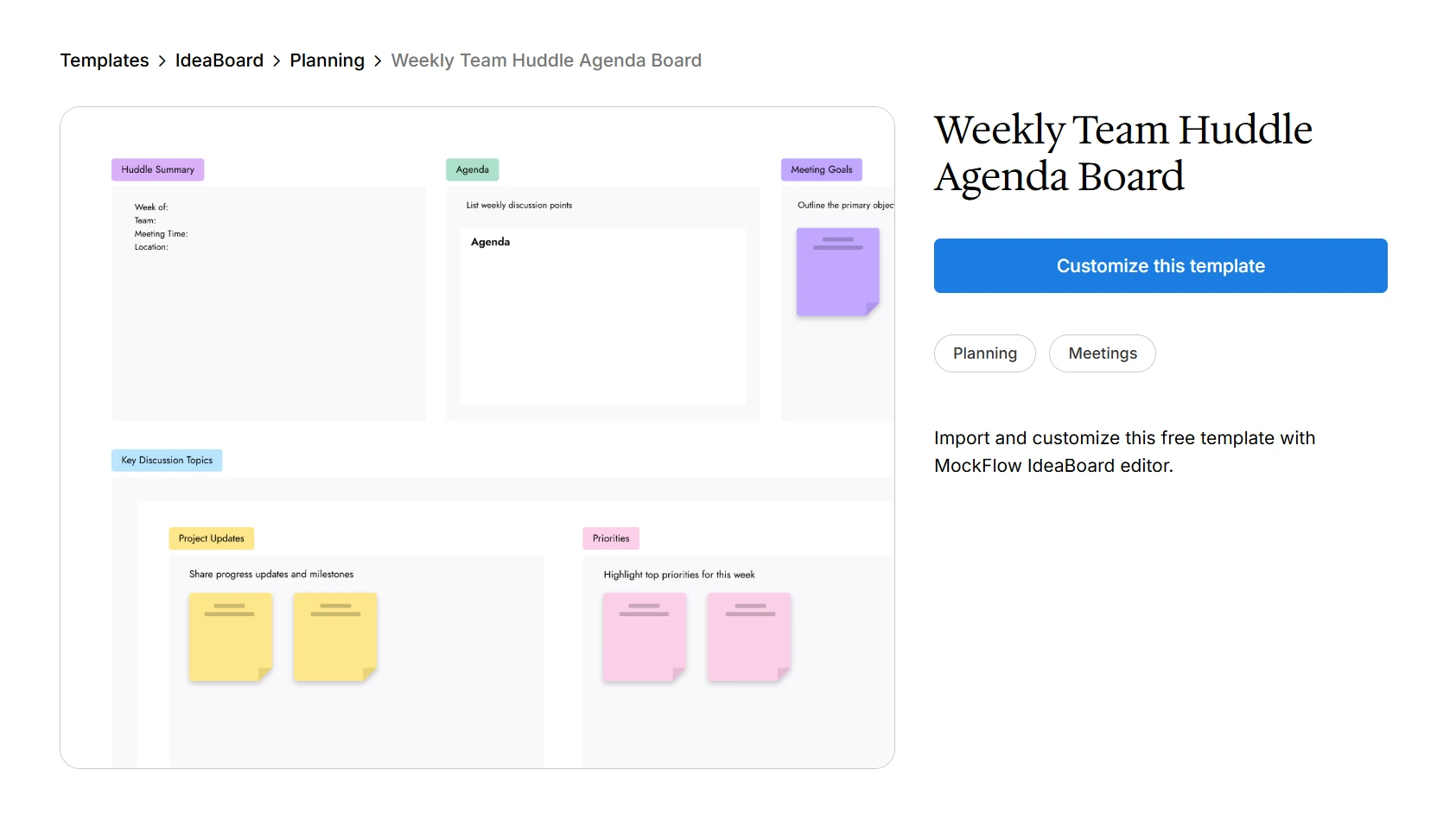
Set this weekly team huddle agenda board before every meeting
Teams can use this template for:
- Organizing recurring updates, priorities, and blockers in one shared workspace
- Tracking action items and ownership across weekly huddles
- Maintaining visibility into unresolved dependencies and follow-ups
- Standardizing meeting workflows across engineering, marketing, operations, and remote teams
- Keeping historical meeting context accessible for future planning and accountability
Most teams keep updates limited to one or two minutes per person to maintain momentum and avoid turning the huddle into a long discussion session.
A simple team huddle agenda usually includes:
- Quick progress updates: What was completed since the previous meeting.
- Today’s priorities: The main tasks, deliverables, or focus areas for the day.
- Current blockers or dependencies: Issues, delays, approvals, or cross-team dependencies affecting progress.
- Team announcements: Important updates related to schedules, launches, staffing, or workflow changes.
- Action items and ownership: Clear follow-ups, assigned owners, and unresolved tasks requiring visibility after the meeting.
Agenda consistency becomes especially important for teams managing recurring workflows. Engineering teams may focus more on sprint blockers and deployment updates, while marketing teams often prioritize campaign timelines, approvals, and content coordination. Operations teams may use huddles for shift planning or issue escalation, and remote teams often rely on structured agendas to improve visibility across distributed schedules.
Many teams also use visual templates to make recurring huddles easier to organize and track over time. IdeaBoard offers a template library that can help teams standardize recurring meeting workflows without starting from scratch each day.
Using structured templates also makes it easier to track follow-ups, maintain historical visibility, and keep recurring huddles consistent as teams grow.
Conclusion
When updates live across too many places, blockers get discussed without follow-through, and recurring meetings slowly turn into repetitive status conversations; team huddles start to fail.
A structured visual workspace makes those daily syncs much easier to manage. Instead of rebuilding agendas every day or relying on scattered notes, teams can use shared boards to organize priorities, track blockers, assign ownership, and maintain visibility across recurring workflows.
MockFlow's IdeaBoard helps teams run more organized and actionable huddles with ready-made templates, collaborative visual boards, recurring meeting workflows, and AI-assisted organization tools designed for everyday team coordination.
If you want a simpler way to organize recurring team syncs and keep everyone aligned, sign up for free on IdeaBoard and build a team huddle workflow your team can actually sustain.
Teams looking for a lightweight way to brainstorm or run quick visual discussions can also try online whiteboard, a free, no-sign-up version of IdeaBoard with limited features to get a sense of the product.
FAQs
1. What is a team huddle?
A team huddle is a short recurring meeting that helps teams stay aligned on priorities, progress, blockers, and next steps. Most team huddles last between 10 and 15 minutes and focus on maintaining visibility and coordination instead of detailed problem-solving or long status discussions.
2. What is the difference between a team huddle and a daily standup meeting?
A team huddle is a broader team alignment meeting used across operations, marketing, support, and cross-functional workflows. A daily standup meeting is usually tied to agile teams and focuses more specifically on sprint progress, development updates, and immediate blockers within Scrum-based processes.
3. How long should an effective team huddle last?
Most effective team huddles should stay within 10 to 15 minutes. Keeping the meeting short encourages concise communication, improves participation, and prevents unnecessary discussion. Longer conversations about blockers or planning should usually move into separate follow-up meetings after the huddle ends.
4. What should be included in a team huddle agenda?
A strong team huddle agenda usually includes progress updates, current priorities, blockers, team announcements, and clear action items. Teams often limit updates to one or two minutes per person to keep the meeting structured, improve clarity, and maintain a predictable communication rhythm across recurring workflows.
5. How often should teams run team huddles?
Many teams run daily huddles to maintain consistent communication and visibility across ongoing work. However, some organizations prefer weekly team check-ins or morning huddles, depending on project complexity, operational workflows, team size, and how frequently priorities or blockers tend to change.
6. What tools help teams run better team huddles?
Collaborative visual workspaces and recurring meeting templates help teams organize updates more efficiently. Tools like IdeaBoard support team huddles through shared visual boards, async collaboration, recurring workflows, and an AI-assisted organization that improves visibility across remote and hybrid teams.

Best UI Kits for Designers: Compare 14 UI Kits for Design Workflows
Every designer has a slightly different relationship with UI kits. Sometimes we need one because a blank canvas is slowing us...
Process Mapping Explained: 7 Types, Examples, Uses, and Best Practices
An approval sits untouched because no one knows who owns it. A customer request moves between departments without resolution. A...

UI Design Principles: A Practical Guide for Better Interfaces
Introduction You can usually tell when a screen is making things harder than it should. The main action is buried. The labels...
