
What Is an Activity Diagram? Symbols, Examples & How to Create One
Introduction
If you’ve ever tried to map out a process or explain how something works in a project, you know how quickly things can get complicated. Whether you're working on a business process or software design, visualizing the flow of actions and decisions is crucial to ensuring everyone is on the same page.
This is where activity diagrams come in handy. They’re like a roadmap that shows exactly how things flow from one step to the next, helping everyone involved understand the big picture.
And the best part? They’re not just for technical teams. Be it streamlining a business process or mapping out system behavior, activity diagrams can make complex concepts easier to grasp.
In this guide, we’re going to dive into what activity diagrams are, how to create them, and why they’re so useful. We’ll walk you through their key components, share examples that you can relate to, and even give you tips on using tools like IdeaBoard to start building your own, making your work smoother and your processes more efficient.
What is an Activity Diagram?
An activity diagram is a visual representation used to model workflows and system behavior, often employed in UML (Unified Modeling Language). It illustrates the flow of control or data through a system, breaking down processes into actions, decisions, transitions, and nodes.
These diagrams help visualize complex processes by clearly mapping out each step and decision point. They are essential for business process modeling and software system design, offering clarity, optimizing workflows, and improving collaboration among teams. Activity diagrams are particularly valuable for identifying inefficiencies and streamlining operations.
For example, in a software system, an activity diagram might show the process of logging in. First, the user enters their credentials. Then, the system checks if the credentials are correct. If they are, the user is logged in; if not, the process branches to an error message. This kind of branching decision-making, and the transitions between actions, is what activity diagrams excel at illustrating.
In a nutshell, activity diagrams are great for mapping out anything from a simple task to complex workflows, helping you visualize how each step flows into the next.
Benefits of Activity Diagrams
Activity diagrams are more than just helpful visuals. They offer clear, actionable benefits that make them indispensable for modeling workflows and system processes. Here’s how they can add value:
- Clarity and Understanding: Activity diagrams simplify complex processes by breaking them down into visual steps. This makes it easier for both technical and non-technical teams to understand workflows, reducing confusion and improving communication.
- Identify Bottlenecks and Inefficiencies: By mapping out the entire process, activity diagrams make it easy to spot delays or redundant steps. This visibility helps you streamline operations and improve efficiency.
- Collaboration and Communication: A visual representation fosters better collaboration. Teams can easily discuss processes, identify issues, and work together on improvements, all without needing to dive into complicated documentation.
- Versatility: Activity diagrams are flexible, allowing you to model anything from simple tasks to complex systems. Whether you’re designing software workflows or mapping business processes, they’re an effective tool for all kinds of process modeling.
In essence, activity diagrams don’t just show how things work; they help you make them work better.
According to a 2024 systematic literature review (SLR), UML remains the most widely used modeling language in practice, especially for documentation and communication in distributed software teams. This reinforces the importance of UML in system modeling, making activity diagrams a valuable tool in visualizing workflows.
Key Components of an Activity Diagram
To truly understand activity diagrams, it’s important to break down the key components that make them work. These elements represent the flow of actions, decisions, and processes in a system. Let’s go through each of them:

Activity diagrams are built around a few essential elements, which include actions, transitions, decision nodes, control flows, and swimlanes. These components work together to provide a visual structure that models the sequence of steps and decisions in a process.
1. Actions and Transitions
At the core of any activity diagram are actions and transitions.
- Actions are the tasks or operations performed during the process, such as "Login" or "Process Payment."
- Transitions show the movement from one action to another. These represent the flow of control, typically depicted as arrows connecting action nodes.
Together, actions and transitions show how the process flows from one step to the next.
2. Decision Nodes and Control Flows
Decision nodes and control flows are crucial for illustrating how decisions affect the flow of the process.
- Decision Nodes: These represent points in the diagram where a decision needs to be made. Based on conditions, the flow may branch into multiple directions, allowing for complex decision-making to be visualized.
- Control Flows: These indicate the order in which actions are performed. They ensure that the correct sequence is followed, whether sequentially or branching based on decisions.
These elements help to capture the dynamic nature of processes, especially when different paths can be taken based on decisions.
3. Swimlanes
Swimlanes are a powerful feature in activity diagrams, helping to organize and clarify the roles or departments responsible for different parts of the process.
- Swimlanes: These are horizontal or vertical sections that divide the diagram into lanes, each representing a specific actor or role. For example, one lane might represent the "Customer" while another represents the "Support Team," showing who is responsible for each action.
Using swimlanes improves readability, especially for more complex processes, by clearly defining responsibilities and interactions between different actors or systems.
Activity Diagram Symbols
When creating activity diagrams, the symbols used play a key role in conveying the structure and flow of processes. These symbols are the building blocks that help transform abstract workflows into something tangible and understandable.
Here's an overview of the most commonly used activity diagram shapes and symbols:
Symbol Name | Symbol Image | Description |
Start Node |
| Marks the beginning of the process. Represented by a filled circle, indicating the initiation point. |
End Node |
| Denotes the end of the process. Depicted as a circle within a circle, indicating the process conclusion. |
Action Node |
| Represents a specific task or operation performed within the process. Shown as a rounded rectangle. |
Decision Node |
| Marks a decision point where the process diverges based on a condition. Depicted as a diamond shape. |
Merge Node |
| Combines multiple paths into one. Like the decision node, but instead of branching, it merges flows back together. |
Fork Node |
| Splits the flow into parallel paths. Depicted as a horizontal bar, initiating concurrent actions. |
Join Node |
| Combines multiple parallel flows back into a single flow. Shown as a horizontal bar. |
Control Flow |
| Represents the direction of flow between nodes. Depicted as an arrow pointing in the direction of the process. |
Final Flow |
| Marks the end of the activity diagram. Depicted as a circle with a border, indicating that the process has reached its conclusion. |
Swimlane |
| Useful for organizing an activity diagram by assigning different responsibilities or actions to specific roles or departments. |








These symbols are what make activity diagrams so versatile and easy to understand, as they visually map out the flow and decision-making process step-by-step.
Activity Diagrams Examples
To better understand how activity diagrams work in practice, let’s take a look at a few real-world examples. These diagrams demonstrate how activity diagrams can be applied to various workflows, from software systems to business processes. By seeing these examples, you'll get a clearer sense of how to map out your own processes.
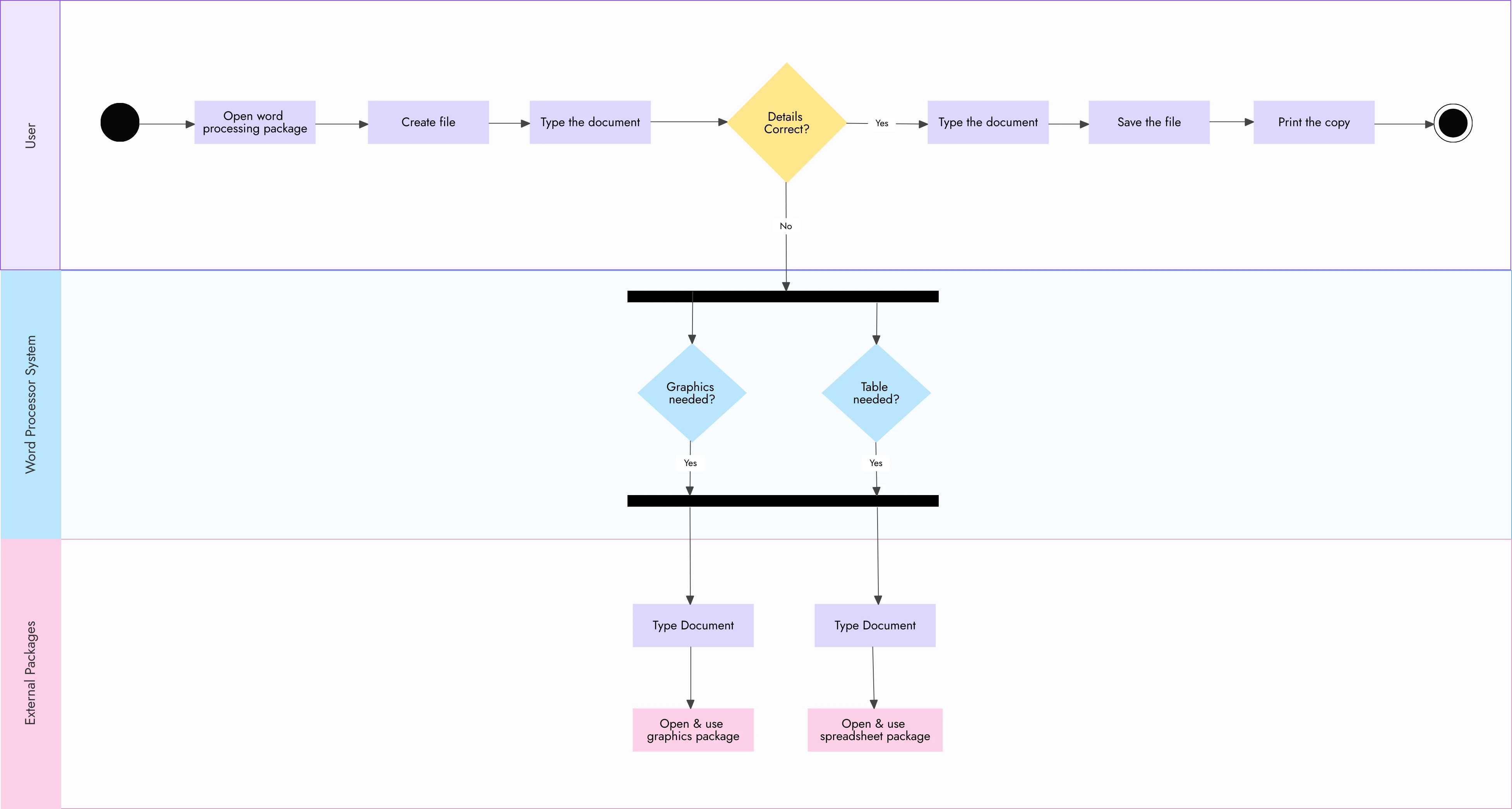
1. Word Processor Workflow
In a typical word processor, several actions are performed in a sequence, and an activity diagram can visually represent this process. Here’s an example of how the workflow might look:
- Start: Open Word Processor.
- Action: User starts typing.
- Decision: Is the document saved? If no, the flow moves to "Save document," if yes, continue.
- Action: User saves the document.
- Action: User closes the application.
- End: Process ends.
In this example, decision nodes help to handle the situation where a user might forget to save their work. It also illustrates the sequential flow of actions and decision-making.
Example Diagram:
2. Process Order Example
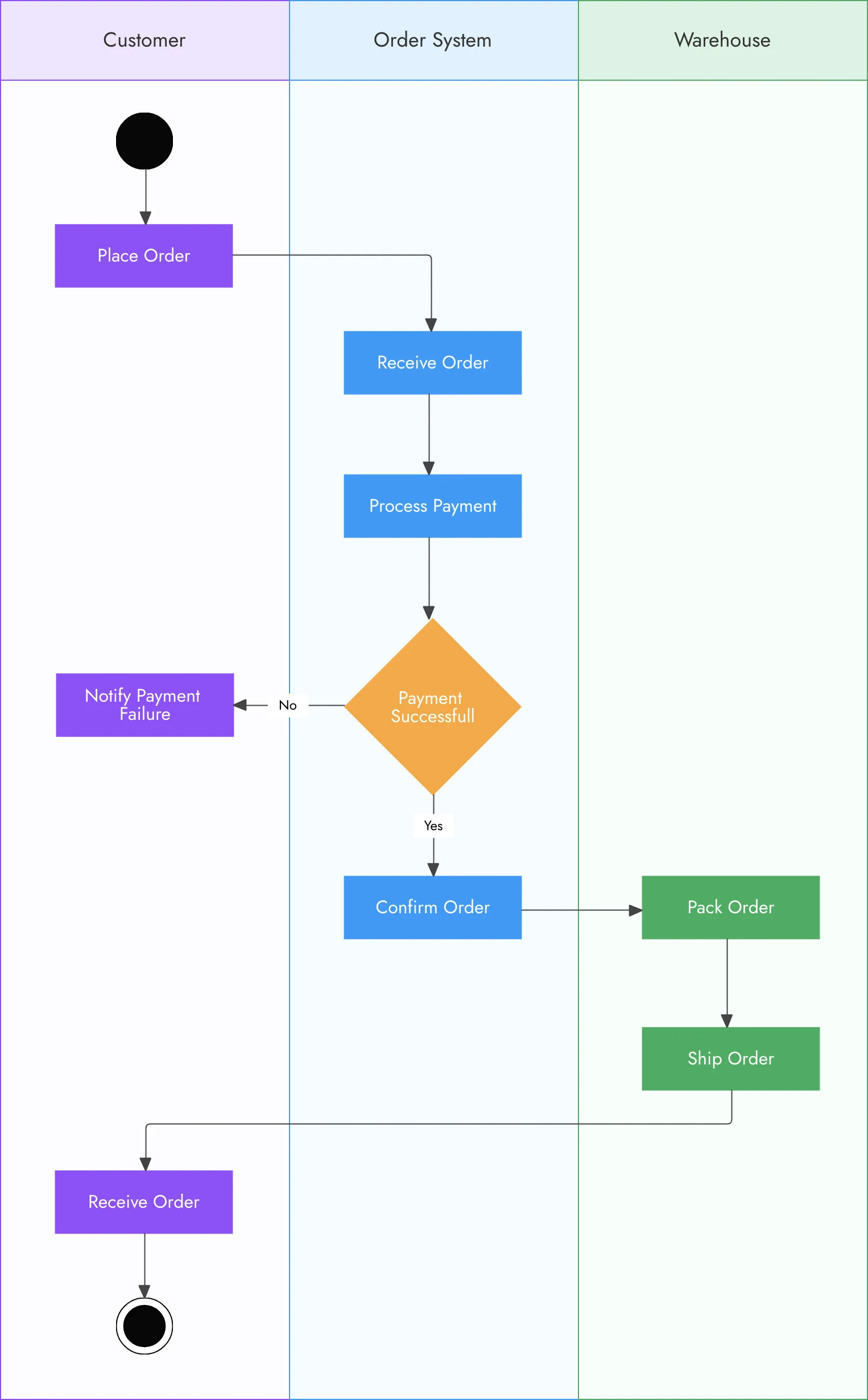
Activity diagrams are also great for representing order processing systems. Let’s take a look at a simplified version of an e-commerce order processing flow:
- Start: Customer places an order.
- Action: Verify payment.
- Decision: Is payment successful?
- If yes, process order.
- If no, notify customer of failed payment.
- Action: Ship the order.
- End: Order delivered to the customer.
This example shows how decision nodes guide the flow based on conditions (in this case, payment verification), leading to different paths based on the outcome.
Example Diagram:
3. Student Enrollment Workflow
Activity diagrams can also be applied to more complex systems, like student enrollment. This workflow might look like this:
- Start: Student submits application.
- Action: Verify application details.
- Decision: Are the details correct?
- If yes, move to registration.
- If no, notify student of errors.
- Action: Complete registration.
- End: Student enrolled.
In this example, the decision node helps manage the review process, ensuring the student’s details are accurate before moving to the next steps.
Example Diagram:

These examples illustrate just a few ways activity diagrams can be applied to different workflows, from simple processes like word processing to more complex systems like order processing or student enrollment. Each example uses decision nodes to guide the flow based on conditions, making the diagram flexible for a variety of use cases.
Activity Diagrams vs Flowcharts
At first glance, activity diagrams and flowcharts might seem similar, but they have distinct differences in their purpose and complexity. Both are visual tools used to represent processes, but understanding the differences between them can help you choose the right one for your needs.
Comparison: Activity Diagrams vs Flowcharts
Feature | Activity Diagrams | Flowcharts |
Purpose | Model complex workflows, system behaviors, and business processes | Represent simple, linear workflows or algorithms |
Complexity | Can handle branching paths, parallel activities, and decision-making | Simpler, usually linear with limited branching |
Level of Detail | Provides detailed insights, including roles, decision points, and transitions | Focuses on the overall process with fewer details |
Symbols Used | Uses a variety of symbols, including decision nodes, swimlanes, and control flows | Uses basic shapes like rectangles, diamonds, and arrows |
Use Cases | Ideal for modeling business processes, software systems, and decision-based workflows | Ideal for basic, linear processes or educational tools |
Best For | Complex systems and workflows with multiple actors or decision points | Simple, straightforward processes or algorithms |
While both activity diagrams and flowcharts are useful for representing processes, understanding their differences will help you choose the right tool for the task at hand. Activity diagrams shine when you need to depict complex workflows or systems, while flowcharts are great for simplifying linear processes.
How to Create an Activity Diagram
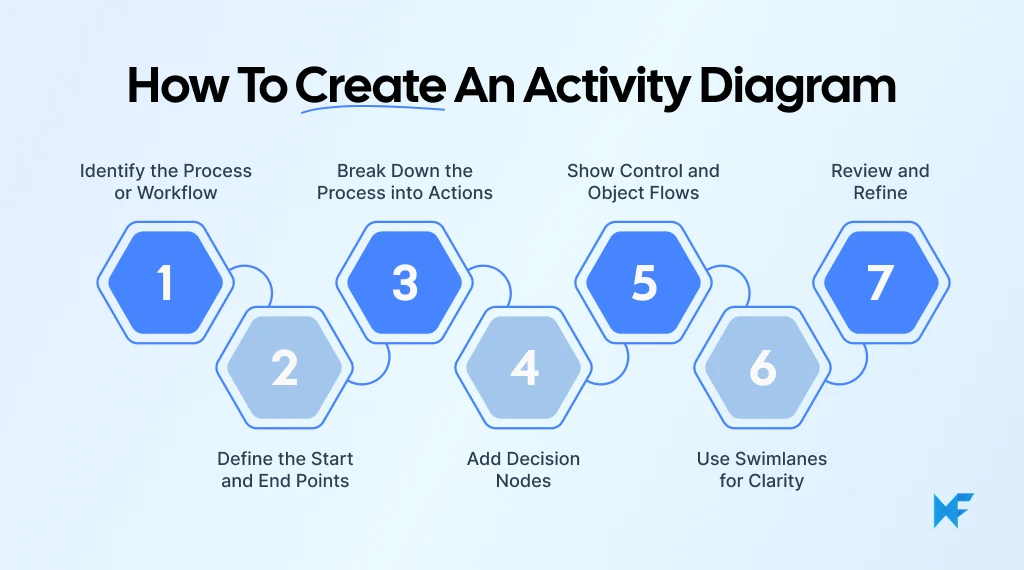
Creating an activity diagram can seem like a daunting task at first, but once you break it down step by step, it becomes much more manageable. Whether you’re mapping out a business process or system workflow, here’s how you can create an effective activity diagram.
Step-by-Step Guide
Step 1: Identify the Process or Workflow
Start by clearly identifying the process or workflow you want to model. This could be anything from a simple task like signing into an application to a more complex process like order processing. Write down the key actions that make up the process.
Step 2: Define the Start and End Points
Every process has a starting point and an ending point. Mark these clearly on your diagram. The start is usually represented by a filled circle, and the end by a double circle.
Step 3: Break Down the Process into Actions
Identify the individual actions or tasks that occur within the process. Each action becomes an action node, depicted as a rounded rectangle in the diagram.
Step 4: Add Decision Nodes
If there are points in the process where decisions need to be made, use decision nodes (diamond shapes). These nodes will represent where the flow diverges based on a condition (e.g., if payment is successful, proceed to order processing; if not, show an error message).
Step 5: Show Control and Object Flows
Use control flows (arrows) to show the direction of the process, linking the action nodes and decision nodes. If objects or data are moving between actions, use object flows (dashed arrows) to represent the transfer of data or objects.
Step 6: Use Swimlanes for Clarity
For complex workflows that involve multiple roles or departments, consider adding swimlanes. These help organize the diagram by separating the actions into different lanes based on responsibility (e.g., one lane for the customer, one for the support team).
Step 7: Review and Refine
Once you’ve laid out the diagram, review it to make sure the flow is clear and logical. Ensure that all actions and decision points are accounted for, and adjust any areas that seem unclear or overly complicated.
Key Tips for Creating Effective Diagrams
- Keep it Simple: Start with simple processes before trying to map out complex systems. Too many decision points or actions can clutter the diagram, making it hard to follow.
- Be Consistent: Use the correct symbols consistently. This ensures that your diagram is easy to understand and follows standard UML conventions.
- Organize with Swimlanes: When dealing with multiple actors or departments, swimlanes help keep the diagram organized and show clear ownership of tasks.
- Minimize Crossed Lines: Too many crossed lines can make the diagram hard to read. Try to layout the diagram so that the flow is as straightforward as possible.
Tools to Create Activity Diagrams
Creating activity diagrams manually can be time-consuming, but thankfully, there are several tools that make the process easier. These tools provide drag-and-drop functionality, ready-to-use templates, and real-time remote collaboration features, allowing you to create professional activity diagrams quickly and efficiently.
One of the standout tools for creating activity diagrams is MockFlow IdeaBoard. It’s an intuitive and flexible tool that allows you to design not just activity diagrams but also flowcharts, process diagrams, and even state-machine diagrams. Here’s why it’s worth considering:
- Easy-to-Use Interface: MockFlow IdeaBoard offers a user-friendly interface with drag-and-drop functionality for UML activity diagrams, making it accessible even for those who aren’t diagramming experts.
- Pre-built Templates: The tool provides ready-to-use templates specifically designed for UML diagrams, including activity diagrams, so you can get started right away. There are templates for workflows, order processing, and more, which saves you time and effort.

- Collaborative Features: With real-time collaboration, multiple team members can work on the same diagram simultaneously. This is especially useful when you need to gather input from different stakeholders or departments. It also offers an offline desktop version.
- Customization: You can easily customize your activity diagrams by adding swimlanes, decision nodes, actions, and more, using a variety of shapes and symbols.
- AI-Assisted Diagramming: MockFlow IdeaBoard also offers an AI toolbox that can generate flowcharts and diagrams from text prompts. This feature can help you quickly create a rough layout of your activity diagram, which you can then refine.

- Flexible Export Options: Once you’ve created your diagram, MockFlow IdeaBoard allows you to export it in various formats, such as PNG, PDF, or even directly to cloud-based tools.
The continued prominence of class, sequence, and use-case diagrams in UML, as mentioned in a 2025 study on UML modeling, points to the opportunity for activity diagrams to gain more traction as a critical tool for process and system design . Tools like MockFlow IdeaBoard make it easier to embrace this opportunity, offering an easy-to-use platform for creating detailed and accurate activity diagrams.
For more information, you can explore the MockFlow IdeaBoard tool for free to start building your own activity diagrams.
Conclusion
Activity diagrams are powerful tools that help visualize complex workflows and systems. By breaking down processes into clear steps, decisions, and actions, they make it easier to understand and optimize how things work. Whether you're working on a business process or a software system, using activity diagrams can improve communication, identify inefficiencies, and streamline operations.
As we've discussed, creating these diagrams doesn't have to be complicated. With tools like MockFlow IdeaBoard, you can create detailed, professional diagrams quickly and easily.
Now that you understand the value of activity diagrams and how to create them, it’s time to put your knowledge into practice. Start mapping out your processes, and see how these diagrams can help improve your workflows and systems. Try IdeaBoard for free today!
FAQ Section for Activity Diagram
1. What is an activity diagram used for?
An activity diagram is used to model the flow of control or data through a system. It visually represents workflows, including tasks, actions, decisions, and transitions between states. This diagram is essential for business process management and software system design, as it helps map out dynamic system behavior and breaks down complex processes into understandable steps.
2. How can an activity diagram help in business process management?
An activity diagram helps in business process management by providing a clear visualization of workflows, which makes it easier to identify inefficiencies, bottlenecks, and optimization opportunities. It fosters collaboration by offering stakeholders a standardized view of processes, enhancing communication and decision-making across teams.
3. How do activity diagrams differ from other types of flowcharts?
Unlike basic flowcharts, activity diagrams represent more complex workflows, decision-making processes, and system behavior. They include additional components like swimlanes, decision nodes, and control flows, which help in visualizing dynamic and concurrent actions. This makes activity diagrams more suitable for software and system modeling compared to simpler flowcharts.
4. What are the steps involved in creating an activity diagram?
To create an activity diagram, first, identify the process to model. Break down the process into discrete actions and decisions. Use appropriate symbols like action nodes, decision nodes, and swimlanes to represent tasks, choices, and responsibilities. Finally, define the flow of control or data between nodes and transitions to complete the diagram.
5. How do activity diagrams help with decision-making in systems modeling?
Activity diagrams assist in decision-making by visualizing the points in a process where choices must be made, such as decision nodes. By clearly representing these decision points and the paths that follow, activity diagrams help stakeholders understand how decisions impact the overall workflow, enabling better-informed choices and system designs.
6. What industries benefit the most from using activity diagrams?
Industries such as software development, business process management, and operations management benefit greatly from using activity diagrams. These diagrams are especially useful for system designers, business analysts, and project managers who need to model complex workflows, optimize processes, and streamline decision-making within their organizations.
Miro vs Visio: Side-by-Side Comparison of Features, Reviews & Pricing
Introduction Every team has its own rhythm when it comes to visual collaboration. Some think best when ideas spread loosely...

Miro vs Microsoft Whiteboard: A Breakdown of Features, Pricing & Fit
Choosing between digital whiteboard tools often comes down to how much structure your team needs. A simple canvas may work well...

How to Use the Starbursting Technique for Brainstorming in 2026
Introduction Some ideas feel “done” the minute we say them out loud. A new feature. A campaign hook. A process change. Everyone...
