Team Planning Process Guide: Steps & Best Practices in 2026
Team planning often starts when the team already feels the pressure. A new quarter is approaching. A major project is about to begin. Priorities have changed, but the work still needs to move without confusion.
That is when we need more than a list of tasks. We need a clear way to decide what the team should focus on, who owns each priority, what resources are available, and how progress will be reviewed.
In this guide, we will break down the full team planning process. We will cover what a team plan should include, when to create one, how to create a team plan step by step, and how to run a team planning session that turns discussion into a practical team execution plan.
Why Do Teams Need an Efficient Planning Process?
Team planning matters because effort alone does not create coordinated execution. Without a clear process, teams can work hard, make progress on individual tasks, and still miss the priorities that matter most.
An efficient planning process helps us:
- Connect team objectives to business goals: Everyone can see how their work supports the larger direction.
- Prioritize with more discipline: The team can focus on high-impact work instead of reacting to every new request.
- Clarify ownership early: Each priority has a clear owner, which makes accountability easier to manage.
- Reduce duplicated work: Teams can spot overlap, dependencies, and gaps before execution begins.
- Track progress with context: Milestones and performance reviews show whether the team is moving toward the intended outcome.
- Plan resources realistically: People, time, tools, budget, and capacity are checked before commitments are made.
Grant Thornton’s 2025 Digital Transformation Survey found that 67% of business leaders ranked resource optimization as a top technology project for the year. That makes resource planning a practical part of team planning, not an administrative detail.
The value of planning is simple: it turns strategy into a usable team roadmap. Goals become priorities. Priorities get owners. Timelines become easier to review. Progress becomes easier to adjust before work slows down.
What Should a Team Plan Include and Who Should Be Involved?
A team plan should be detailed enough to guide execution, but simple enough for the team to use every week. If it becomes a static document that only gets opened during planning season, it will not help with day-to-day decisions.
What a Team Plan Should Include
Team Plan Component | What It Should Cover |
Team goals | The outcomes the team needs to achieve |
Strategic priorities | The most important focus areas for the planning period |
Key initiatives | Major projects or workstreams tied to the goals |
Roles and owners | Who is accountable for each priority |
Resources | People, budget, tools, time, and support needed |
Dependencies | Other teams, approvals, or inputs required |
Milestones | Major checkpoints and timelines |
Success metrics | How progress and outcomes will be measured |
Risks | Potential blockers and mitigation plans |
Review cadence | How often the plan will be reviewed and updated |
These parts turn team objectives into a working team execution plan. They also make resource planning, team roles, team milestones, and the overall team work plan easier to revisit.
Who Should Be Involved in Team Planning?
The right participants depend on the scope. For a small team planning meeting, the team lead and core team members may be enough. For cross-functional or strategic team planning, include project owners, stakeholders who manage dependencies, department leaders, and partners from operations, finance, HR, or enablement when capacity or resources are involved.
Not everyone needs to join every team alignment session. Some people can provide input before the session, while others join when decisions about priorities, approvals, or team roles need to be made.
When Should We Create a Team Plan?
Team planning is not a one-time activity. Teams should create or refresh a team plan whenever goals, priorities, resources, or responsibilities need clearer alignment. The right timing depends on the planning horizon and the kind of decisions the team needs to make.
Annual Team Planning
Annual team planning is where we define the broad direction for the year. It connects team priorities with organizational goals and helps us agree on the outcomes the team is expected to support.
This is the right moment for strategic team planning. Teams look at the larger business direction, identify the most important focus areas, and outline the major initiatives that will shape the year. The output should be a clear team roadmap, not a detailed task list.
Annual planning should stay focused on direction, goals, key priorities, expected outcomes, major resource needs, and success metrics. Day-to-day tasks can come later during quarterly planning or project planning.
Quarterly Team Planning
Quarterly team planning turns annual goals into focused 90-day execution priorities. It gives us a practical rhythm for reviewing progress, adjusting team priorities, defining team milestones, and clarifying ownership for the next quarter.
During a quarterly review, teams should look at:
- What we completed last quarter
- What changed in the business or team
- What priorities matter most now
- What milestones we need to hit this quarter
- What resources or dependencies need attention
Teams can use IdeaBoard’s quarterly planning template to organize goals, initiatives, owners, and review points in one visual workspace. Start by adding the quarter’s main goals, then group initiatives under each goal. Assign owners, add key milestones, and mark dependencies or risks before the team agrees on next steps.
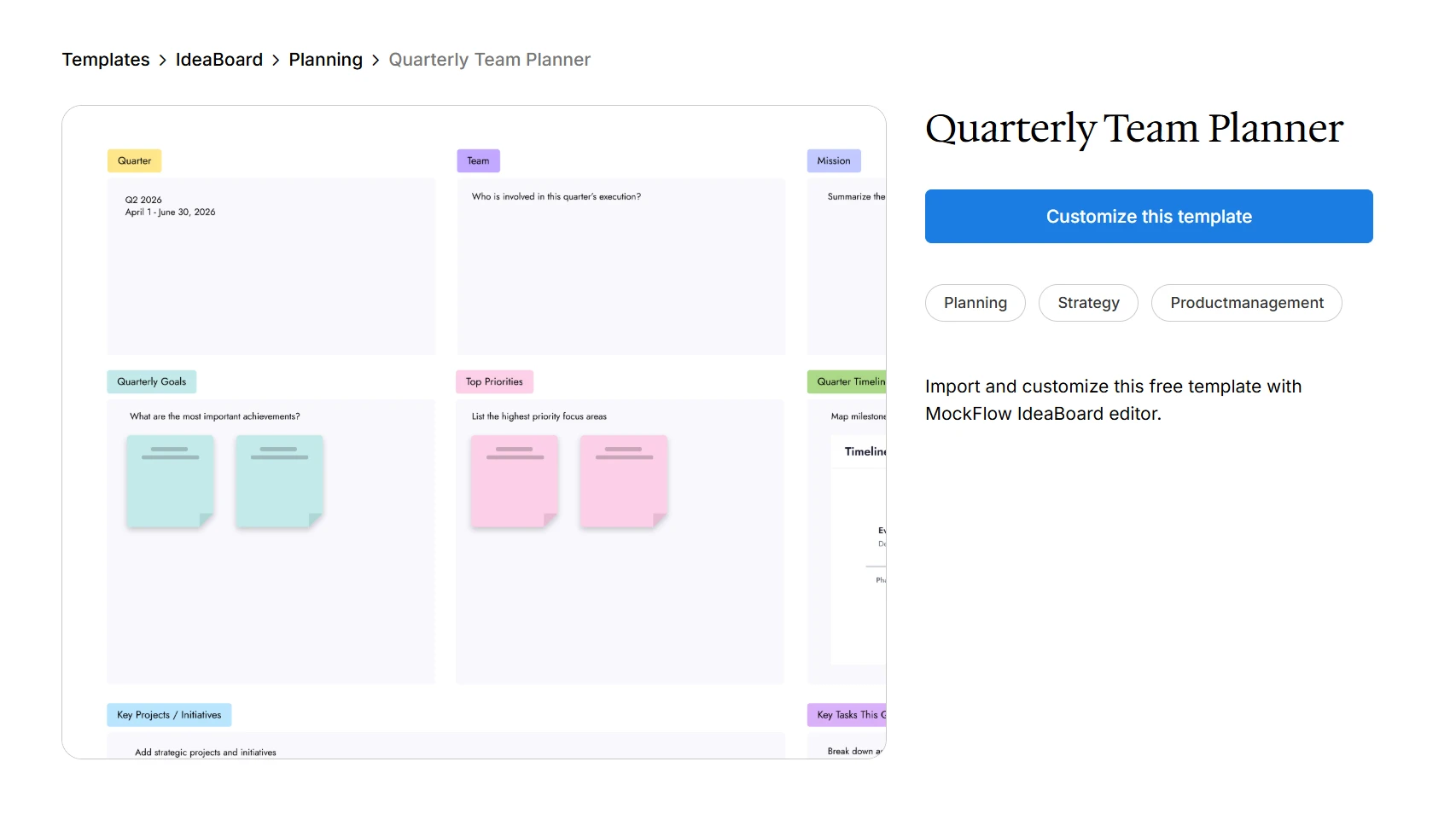
Customize this quarterly team planner for your next team meeting
Planning Before Major Projects or Strategic Changes
Team planning is also useful before any major shift in work. That could mean launching a new product, restructuring a team, starting a major project, changing strategy, entering a new market, or responding to operational changes.
In these moments, the team planning steps help us slow down before execution begins. We can clarify the goal, agree on responsibilities, map risks, and build a team execution plan that supports better project planning and operational planning.
How to Create a Team Plan: Step-by-Step Process
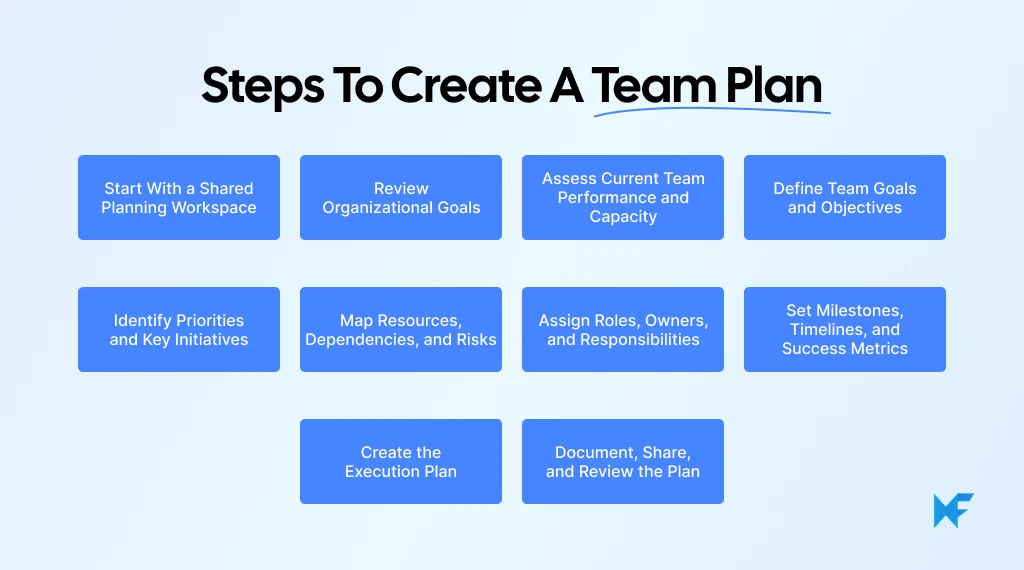
To create a team plan, we need to move from business context to goals, then from goals to priorities, owners, resources, milestones, and review systems. This keeps the team planning process practical and helps every decision connect back to execution.
Step 1: Start With a Shared Planning Workspace
Before the planning discussion begins, set up a shared workspace where the team can capture goals, priorities, timelines, owners, dependencies, and decisions in one place. This gives the session structure and makes the final plan easier to review later.
A visual collaboration tool like IdeaBoard works well here because teams can start with a template instead of a blank board. For example, the agile team sprint planner template can help organize goals, upcoming work, owners, and timelines quickly.
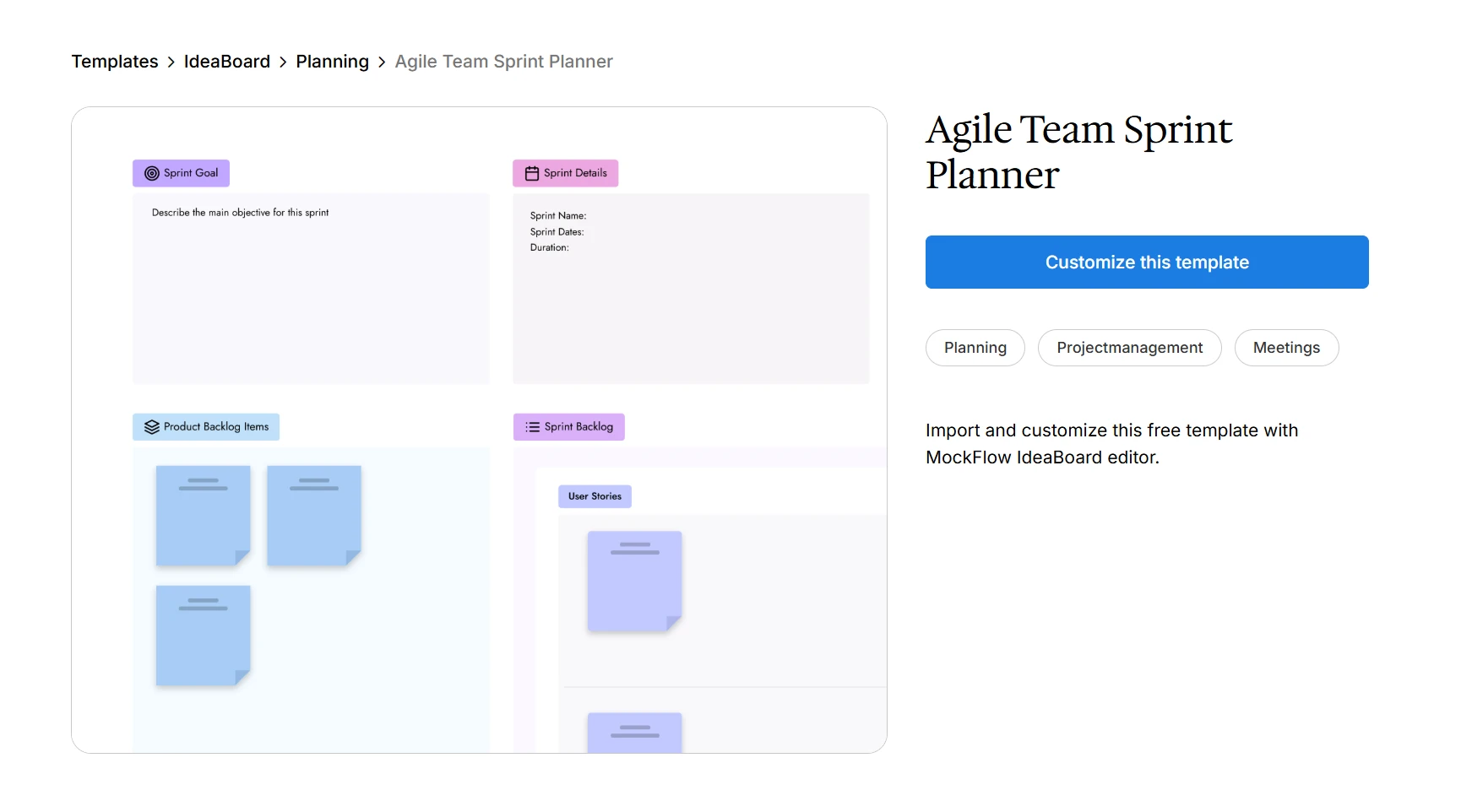
Customize this agile team sprint planner template to organize team goals
A simple setup flow can look like this:
- Choose a planning template that matches the session goal
- Add the planning period, such as the quarter, sprint, or project phase
- Create sections for goals, priorities, initiatives, owners, risks, and milestones
- Invite the team before the session so they can add inputs early
- Use the board during the meeting to capture decisions as they happen
IdeaBoard’s Google Meet integration also helps when the planning session is live. Teams can open the board inside the meeting, discuss priorities, add notes, and update the plan without switching between separate tools.
Step 2: Review Organizational Goals
Atlassian’s State of Teams 2024 research found that 70% of knowledge workers agree it would be easier to make progress if they had fewer, more specific goals. That is exactly where team planning helps. It forces the team to narrow focus before work starts, instead of trying to make every request a priority.
Start with the goals the organization has already committed to. This helps understand where the team can create the most value and where effort should be focused.
Before defining team priorities, answer these questions:
- What are the organization’s top goals for this planning period?
- Which goals does our team directly support?
- What outcomes are expected from us?
- What trade-offs have already been decided?
- What customer, market, or operational needs should shape our plan?
This step gives the team a clear planning boundary. It prevents creating goals that sound useful but do not support broader business priorities. It also helps leadership and team members see how daily work connects to organizational goals.
Step 3: Assess Current Team Performance and Capacity
Good planning starts with what the team can realistically deliver. Before adding new goals, review current performance, open work, capacity, and blockers.
Useful inputs include:
- Previous quarter performance
- Current projects and unfinished initiatives
- Available team capacity
- Skill gaps
- Process bottlenecks
- Stakeholder feedback
- Resource constraints
- Work that should be paused or reduced
This step helps avoid building a plan that looks good on paper but fails during execution. It also makes resource planning more honest. When we know what is already consuming time and attention, we can make better decisions about priorities, timelines, and ownership.
Step 4: Define Team Goals and Objectives
Turn business priorities into team goals that are clear enough to guide action. Each goal should state the outcome, the target, and the timeframe. This keeps team goal setting practical and makes progress easier to measure.
For example, a team goal could be to improve onboarding completion by a defined percentage, reduce customer support response time, launch a new internal process by a specific date, improve campaign delivery speed, or increase product adoption among a target user group.
The goal should also be relevant to the team’s role. If the team cannot influence the outcome, it should not own the goal. Teams can contribute to it, support it, or track it as a dependency, but ownership needs to sit where action can actually happen.
Teams can use IdeaBoard’s OKR planning board template to get started. Add objectives first, break each one into measurable key results, then map initiatives under the results they support.
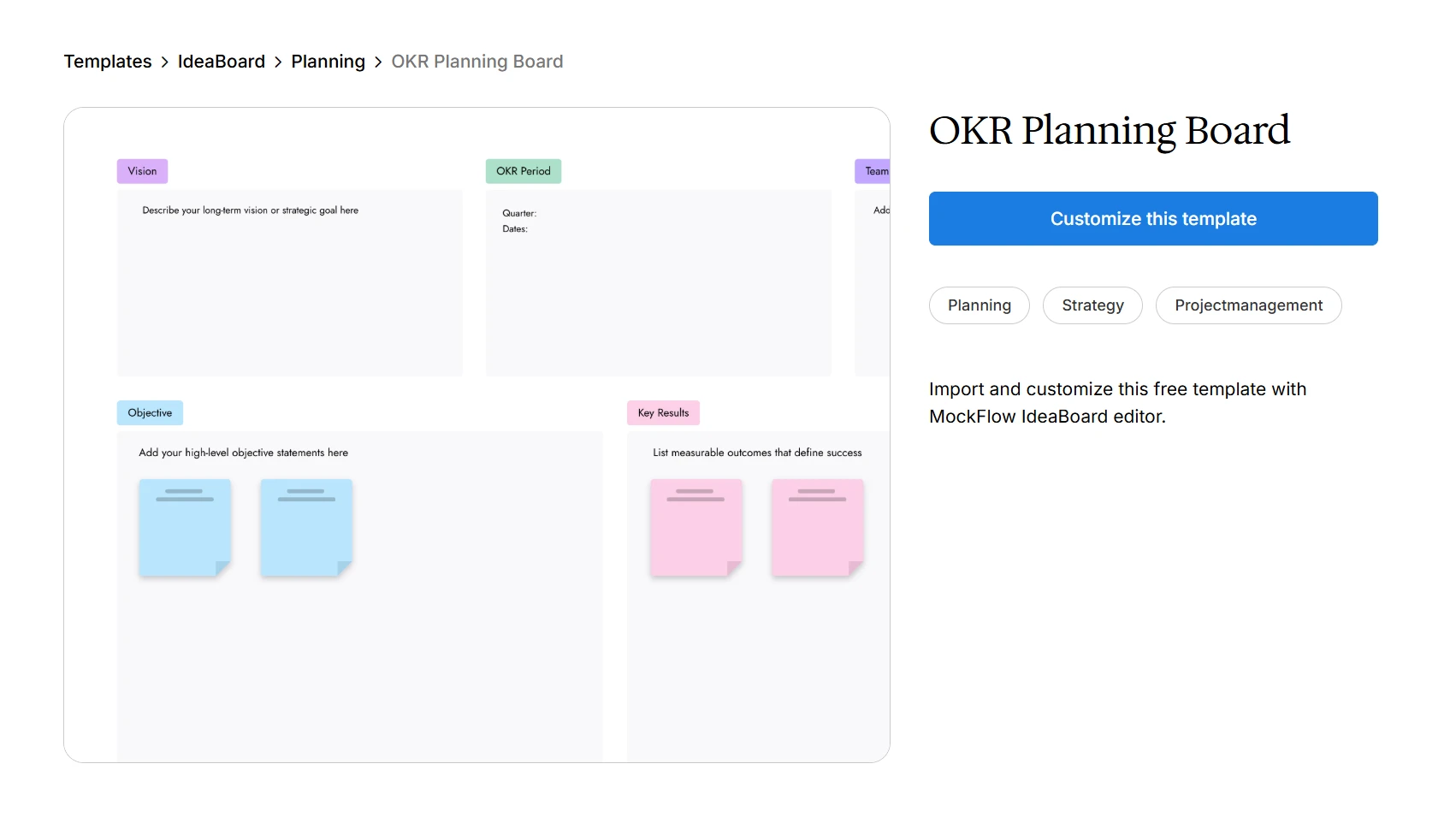
Use this OKR planning board template for your next team planning session
Step 5: Identify Priorities and Key Initiatives
Goals define the outcome. Initiatives define the major work needed to reach that outcome. This is where we choose the few priorities that deserve time, budget, and attention.
Use these prompts to make sharper decisions:
- Which initiatives directly support our goals?
- What work has the highest impact?
- What should we stop, pause, or deprioritize?
- What work is urgent but not strategic?
- What initiatives need cross-functional support?
The goal is to avoid turning the plan into a long task list. A strong team plan shows the work that matters most. It also makes trade-offs visible, so the team can focus on the initiatives that move the goal forward.
Step 6: Map Resources, Dependencies, and Risks
This step makes the plan realistic. Once priorities are clear, check whether the team has the people, budget, time, tools, approvals, and support needed to deliver them.
Use this checklist before execution starts:
- Do we have enough people?
- Do we have the right skills?
- What budget or tools are required?
- Which teams do we depend on?
- What approvals are needed?
- What risks could delay progress?
Mapping these early spot blockers before they turn into missed milestones. It also improves resource planning because the team can adjust scope, timelines, or ownership before work begins.
Step 7: Assign Roles, Owners, and Responsibilities
Every priority should have one clear owner. The owner does not have to do all the work, but they are responsible for moving the initiative forward, coordinating contributors, and reporting progress.
For each initiative, define:
- Accountable owner
- Contributors
- Reviewers
- Approvers
- Stakeholders
One initiative can have many contributors, but it should not have several unclear owners. When ownership is vague, decisions slow down and accountability becomes difficult to manage. Clear team roles help everyone know who decides, who supports, who reviews, and who needs to stay informed.
Step 8: Set Milestones, Timelines, and Success Metrics
Milestones help in checking progress before the final deadline. They show whether the work is moving at the right pace and give the team a chance to fix delays early.
Common milestones include:
- Requirements finalized
- Campaign brief approved
- Prototype reviewed
- Process tested
- Launch completed
- Performance reviewed
Success metrics answer a different question: did the work create the intended result?
For each goal or initiative, choose metrics that show actual progress. These may include completion rate, cycle time, adoption rate, revenue impact, customer satisfaction, error reduction, or delivery speed.
For example, in order to evaluate AI success, Gartner’s 2025 AI maturity survey notes that 63% of leaders from high-maturity organizations use financial analysis, ROI analysis, and customer impact measures. For team planning, the lesson is simple: outcomes need measurable proof, especially when a priority involves new technology or process change.
Step 9: Create the Execution Plan
The execution plan turns team goals into a working roadmap. It should show what happens, when it happens, who owns it, and how progress will be tracked.
Depending on how the team works, the execution plan can be organized by:
- Timeline
- Initiative
- Owner
- Goal
- Department
- Priority level
For example, a quarterly team execution plan might group work by initiative, then show the owner, supporting contributors, key milestones, dependencies, and review dates. A cross-functional plan may work better when organized by department or dependency, so everyone can see where handoffs need to happen.
The format matters less than the clarity. The team should be able to open the plan and quickly understand the next priority, the next decision, and the next checkpoint.
Step 10: Document, Share, and Review the Plan
A team plan should live where the team can access, update, and review it easily. After the planning session, share it with everyone involved in execution, approvals, or dependent work.
Useful review cadences include:
- Weekly execution check-ins
- Monthly milestone reviews
- Quarterly planning reviews
- Annual planning refresh
This is what keeps the plan active. When the team uses it during check-ins, reviews, and decision-making, it becomes part of how work moves forward. Without that habit, even a well-built plan can turn into another document no one revisits.
Best Practices for a Successful Team Planning Session
A strong team planning session should lead to decisions. Whether the session is live, async, or hybrid, the facilitator’s job is to keep the team focused on goals, trade-offs, ownership, and next steps.
1. Prepare the Planning Inputs Before the Session
Collect the inputs before the meeting so session time is used for alignment and decisions.
Bring these inputs together:
- Company goals
- Team performance data
- Current workload
- Open decisions
- Stakeholder inputs
- Resource constraints
- Proposed priorities
This gives everyone the same starting point and reduces time spent catching up during the session.
2. Start With Shared Context
Begin by clarifying why the session is happening and what needs to be decided. A simple opening flow works well:
- Where we are now
- What changed
- What matters next
- What we need to decide today
This keeps the planning session anchored to outcomes instead of drifting into general updates.
3. Keep the Session Focused on Decisions
Planning sessions can quickly become status reviews. Move information sharing before the session wherever possible.
During the meeting, focus on decisions around priorities, trade-offs, ownership, timelines, dependencies, and resource needs. If a topic does not lead to a decision, capture it as a follow-up.
4. Encourage Equal Participation
Planning quality improves when more perspectives are included. Use written input, silent brainstorming, rotating speakers, and structured prompts to avoid one or two voices shaping the full plan.
This is especially important in cross-functional team planning, where people closest to execution often see risks and dependencies earlier than leadership.
5. Capture Goals, Priorities, and Dependencies Visually
Team planning becomes easier when everyone can see goals, priorities, timelines, dependencies, and risks in one shared space.
A visual planning workspace like IdeaBoard can help teams map planning inputs using an infinite canvas, sticky notes, shapes, diagram tools, board chat, audio/video meetings, multimedia comments, AI-assisted layouts, and pre-built templates for collaborative sessions.
6. End With Owners, Next Steps, and Review Dates
A planning session should never end with vague agreement. Close by confirming:
- Final priorities
- Owners for each initiative
- First next step
- Timeline or milestone
- Dependencies
- Review date
This turns the session into an actionable plan and gives the team a clear path from discussion to execution.
Plan Better as a Team With IdeaBoard
Team planning falls apart when decisions live in too many places. The goals are in one document, the timelines are in another tool, and ownership is discussed in a meeting that no one fully revisits later. MockFlow IdeaBoard helps bring that work into one shared planning space.
Here is how it supports a better team planning process:
- Start with structure: Instead of opening a blank board, teams can use planning templates for sprint planning, strategy sessions, retrospectives, and team workshops. This helps us move into decisions faster.
- Make the plan visible: Teams can map goals, priorities, owners, timelines, dependencies, and risks on an infinite canvas using boards such as Kanban, timelines, mindmaps, swimlanes, and flowcharts.
- Plan together in real time: IdeaBoard supports live editing, sticky notes, comments, reactions, and built-in audio/video meetings. It also works with Google Meet, Trello, ChatGPT, and MCP integration, so planning can happen closer to existing workflows.
- Keep outcomes usable: Teams can use AI-assisted layouts, reusable AI generators and recipes for brainstorming workflows, audio/video comments, presentation mode, sharing, and exports to turn the planning session into a clear team execution plan.
To get started, teams can create a free account at MockFlow signup or try a quick whiteboarding session through our no-signup online Whiteboard.
Start your next team planning session in MockFlow IdeaBoard and turn scattered ideas into a clear, visual execution plan.
FAQs
1. What is the meaning of team planning?
Team planning means aligning a team around shared goals, priorities, responsibilities, resources, timelines, and success measures. It helps us turn broad business direction into a practical team work plan, so everyone understands what needs to happen, who owns it, and how progress will be reviewed.
2. What are the key points of planning a team plan?
The key points of team planning are goals, priorities, initiatives, roles, resources, timelines, risks, and review cadence. In practice, we need to define what we want to achieve, decide what work matters most, assign owners, map capacity, set milestones, and review progress regularly.
3. How do we define team roles and responsibilities in a plan?
Team roles and responsibilities should be defined by initiative. Each priority needs one accountable owner, along with contributors, reviewers, approvers, and stakeholders where needed. This prevents unclear ownership and helps the team know who makes decisions, who supports execution, and who needs to stay informed.
4. What is an example of team planning?
A quarterly marketing team plan may include goals such as improving campaign delivery speed, priorities such as launching two product campaigns, owners for each campaign, required design and content resources, key milestones, risks, and a monthly review cadence. The same structure can apply to product, operations, HR, or support teams.
5. Who should be involved in team planning?
Team planning should involve the team lead, core team members, initiative owners, and relevant cross-functional stakeholders. Leadership may join when the plan affects strategy, budgets, resources, or major business outcomes. Not everyone needs to attend every session, but the right inputs should be collected before decisions are made.
6. When should we create a team plan?
We should create a team plan during annual planning, quarterly planning, before major projects, and whenever goals, priorities, responsibilities, or resources change. Teams should also revisit the plan regularly so it stays useful as capacity, dependencies, and business needs shift.
50 Team Meeting Ice Breakers for In-Person, Virtual, and Hybrid Groups
A team meeting ice breaker is a short question or activity that helps people start participating before the main discussion. It...
25 Brainstorming Techniques: How Each One Works and When to Use It
Introduction Brainstorming is a natural part of how we think. We do it casually when ideas move around in a conversation,...
Miro vs Mural: Full Comparison of Features, Pricing & Use Cases (2026)
Introduction If you’re researching online whiteboarding tools, chances are Miro and Mural are already on your shortlist. They’re...
