12 Best Brainstorming Tools for Effective Idea Generation in 2026
Introduction
Looking for the best brainstorming tools? You’ve come to the right place.
Brainstorming should be exciting, but it can often feel like a struggle to organize thoughts and get everyone’s ideas flowing. That’s where the right tool comes in. Whether you’re working solo or with a team, the right platform can help you stay on track, boost creativity, and make your sessions more productive.
In this guide, we’re going to share the best brainstorming tools of 2026, broken down into categories. From mind mapping tools to visual whiteboards and structured brainstorming platforms, we’ll cover the options that will help you capture, organize, and build on your ideas.
Let’s dive in and find the right tool to make your next brainstorming sessions efficient and effective.
Best Brainstorming Tools - Quick Overview
Category | Tool | Best For | Key Features | Pricing |
Visual Whiteboard | IdeaBoard | Real-time collaboration, rapid brainstorming | Infinite canvas, AI-powered brainstorming, templates, offline mode | Free, Paid from $7/month |
Miro | Versatile team collaboration | Real-time editing, template library, integrations | Free, Paid from $8/user/month | |
FigJam | Design teams and creative brainstorming | Real-time collaboration, Figma integration, pre-made templates | Free, Paid from $3/user/month | |
Conceptboard | Smaller teams or simple projects | Real-time collaboration, simple interface, export and sharing options | Free, Paid from €5/user/month | |
Mind Mapping | MindMeister | Individuals and small teams for mind mapping | Real-time collaboration, templates, integrations with Google Drive | Free, Paid from $3.50/month |
XMind | Individual brainstorming and project planning | Multiple map structures, presentation mode, cross-platform syncing | Free, Paid from $4.92/month | |
Coggle | Simple, collaborative mind mapping | Real-time collaboration, unlimited branches, easy interface | Free, Paid from $5/month | |
Structured & Facilitation-focused | Mural | Workshops, design thinking, strategic planning | Pre-built templates, sticky notes and voting, session management tools | Free, Paid from $9.99/user/month |
Stormboard | Complex projects, strategic planning | Sticky notes and categories, voting, exporting ideas | Free, Paid from $8.33/user/month | |
Lucidspark | Combination of free-form brainstorming and frameworks | Real-time collaboration, built-in frameworks, Lucidchart integration | Free, Paid from $9/user/month | |
Documentation & Async Brainstorming | Notion | Organizing ideas asynchronously | Database, templates, real-time collaboration | Free, Paid from $10/month |
Slack | Teams already using Slack for communication | Channels for organizing ideas, integrations, searchable archives | Free, Paid from $7.25/user/month |
Each category serves a unique purpose, so understanding which type works best for your needs is key to a successful brainstorming session. Let’s discuss each tool in depth.
12 Best Brainstorming Tools
Brainstorming tools are essential for enhancing creativity and collaboration in teams. These tools help organize and visualize ideas in real-time, making them an invaluable resource for both individual and group brainstorming sessions.
Whether you need a visual whiteboard for free-form ideation, a mind-mapping tool for hierarchical thinking, or a structured framework for facilitated workshops, there is a tool designed to match your unique brainstorming style.
By streamlining the creative process, these tools allow teams to generate, prioritize, and refine ideas, fostering innovation and problem-solving efficiently.
Visual Whiteboard Brainstorming Tools
These whiteboarding tools offer a flexible, visual space for teams to brainstorm, organize, and collaborate in real-time. With sticky notes and simple organization features, they’re perfect for both in-person and virtual remote sessions.
Visual whiteboards are seeing rapid growth, with the collaborative whiteboard software market expected to reach $3.81 billion by 2026 and grow at an annual rate of 20.28%. This surge in adoption reflects the demand for interactive tools that foster real-time ideation and planning, especially as teams become more distributed.
Here are some visual whiteboarding tools you can consider:
1. MockFlow’s IdeaBoard
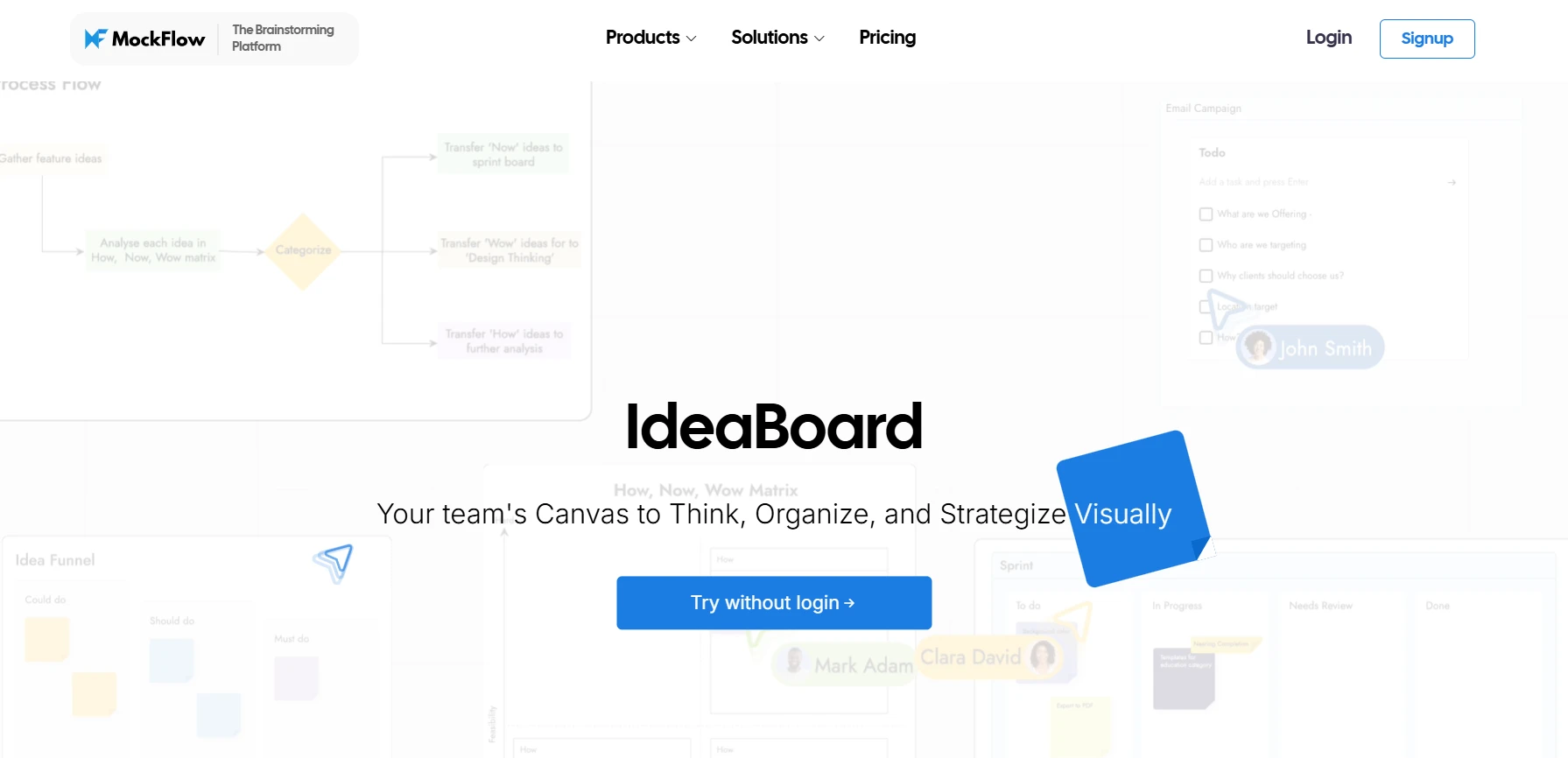
MockFlow’s IdeaBoard is a dedicated, all-in-one brainstorming platform that provides an infinite canvas for free-form ideation and collaborative brainstorming. It stands out with its ease of use, robust real-time collaboration features, and AI-powered tools that help structure your brainstorming sessions.
Best for: Teams looking for an intuitive platform that offers flexible brainstorming spaces with real-time collaboration, AI integrations, and customizable templates for both simple and complex sessions.
Key features:
- Infinite Canvas: IdeaBoard offers an expansive workspace, allowing teams to freely expand ideas without constraints, mimicking a physical whiteboard experience.
- Real-time Collaboration: Team members can add, move, and comment on ideas simultaneously, making it easy to work together even if you’re in different locations.
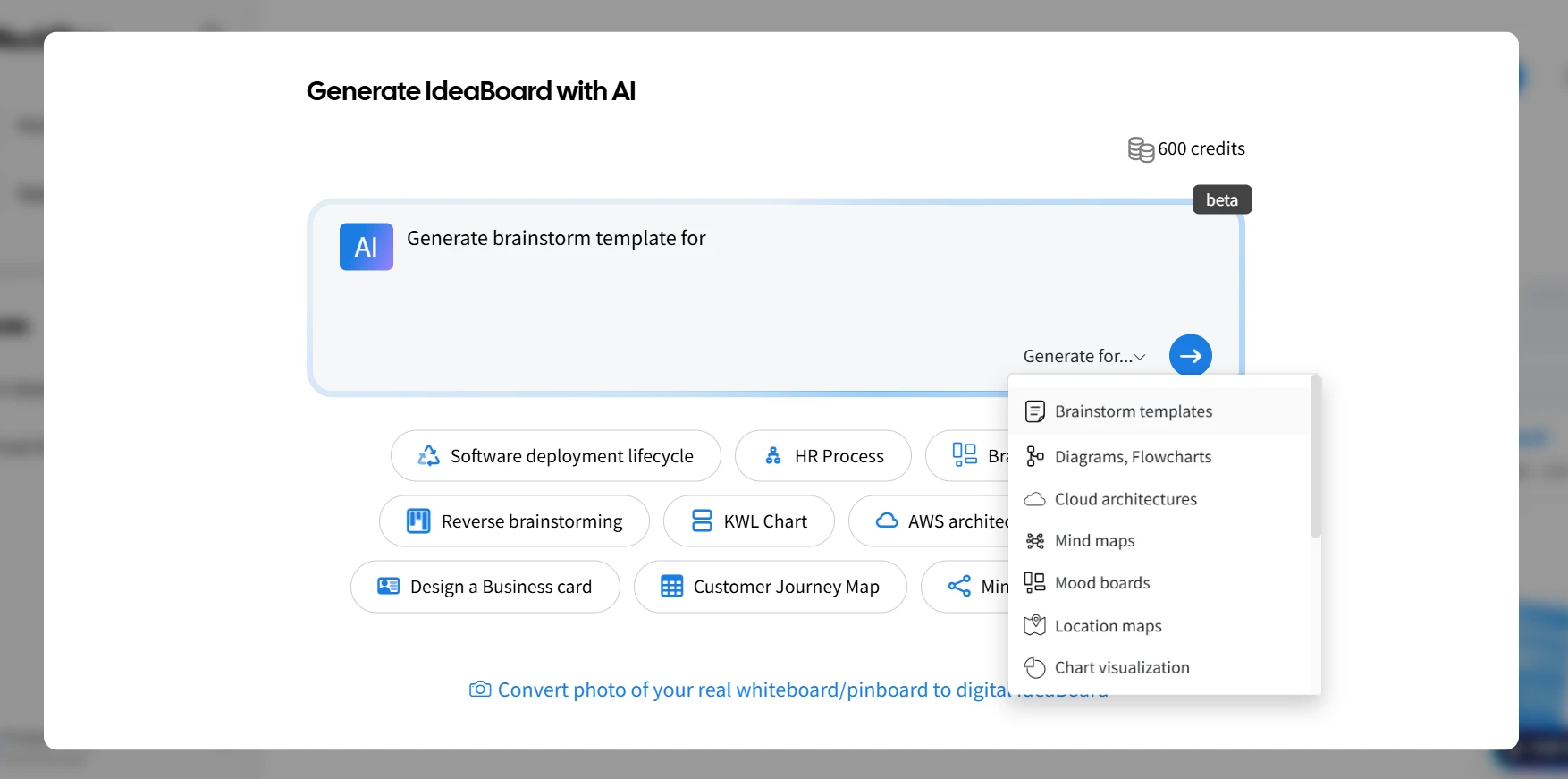
- AI-Powered Brainstorming: With the AI Toolbox, you can generate structured brainstorming boards from simple text prompts, helping kickstart your sessions quickly and efficiently.
- Offline Mode: Ideal for teams that work in environments where constant internet access is not available, allowing for seamless offline brainstorming.
- Multiple Formats & Sharing Options: Supports a variety of formats for exporting and sharing your boards, including file mode integration with Git and on-premise storage for enhanced collaboration.
- Trello Integration: Directly integrate IdeaBoard’s whiteboarding features within Trello, allowing teams to brainstorm and plan without leaving their task management platform.
- Templates: A library of brainstorming templates is available, including frameworks for strategic analysis, saving you time while ensuring structured ideation.
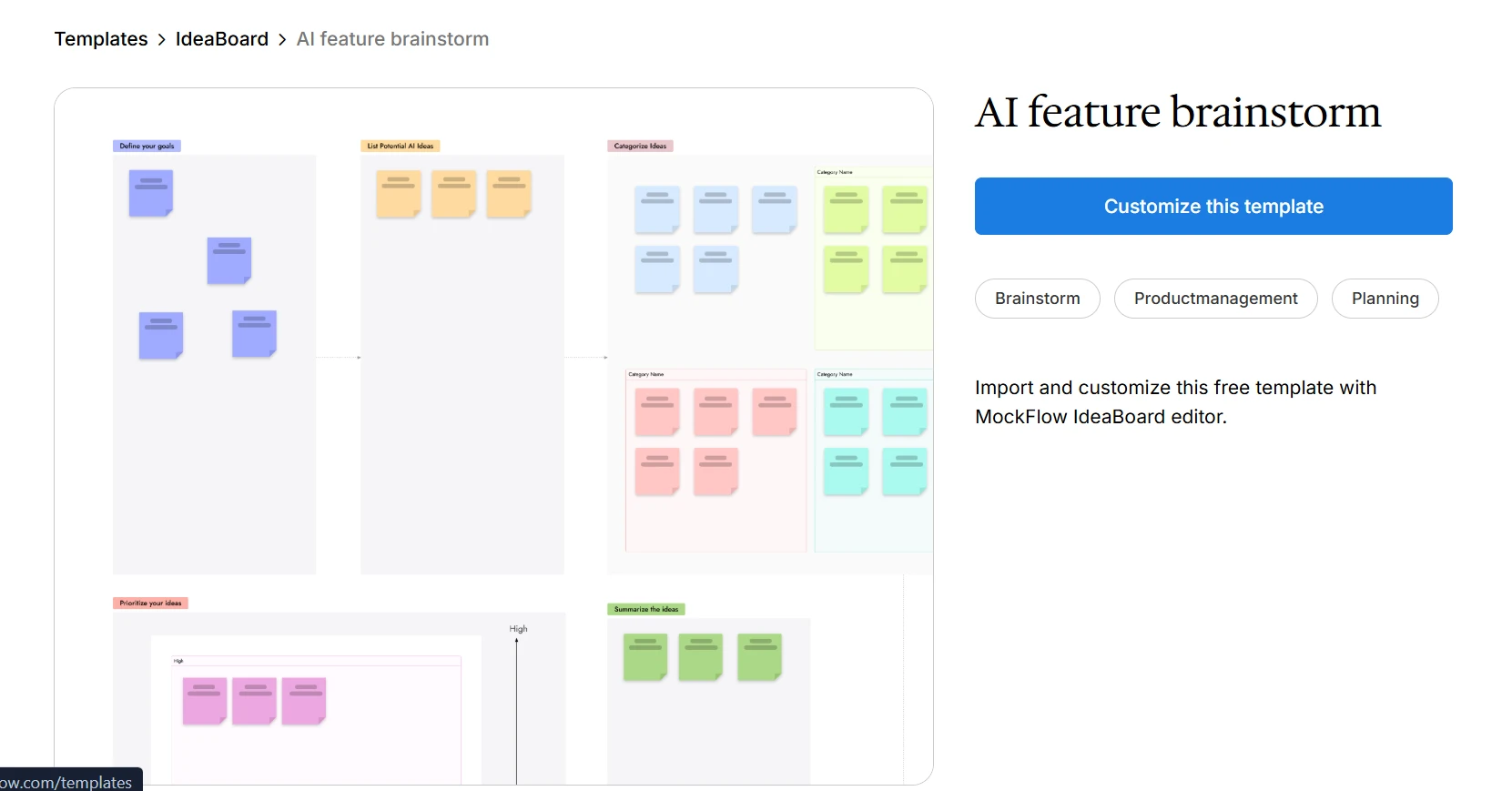
AI Feature Brainstorm Template (click on the image to edit this template on IdeaBoard)
Pricing: Free plan with basic features; paid plans start at $7 per month, unlocking additional features like real-time collaboration, AI tools, and more templates.
2. Miro
Miro is a popular visual collaboration platform used for brainstorming, ideation, and team collaboration. It’s widely known for its easy-to-use, interactive whiteboard where teams can work together in real time.
Best for: Teams of any size that need a versatile platform for brainstorming, mind mapping, and collaborating across multiple departments.
Key features:
- Real-time editing: Multiple team members can edit the same board simultaneously, ensuring smooth collaboration.
- Template library: A wide range of templates is available for different types of brainstorming and project planning.
- Integrations: Works seamlessly with other collaboration tools like Slack, Google Drive, and Microsoft Teams.
Limitations: The free version offers limited features, and large teams may need to upgrade to a paid plan for full functionality.
Pricing: Free plan with basic features, paid plans starting at $8/user/month.
Also read → 10 best Miro alternatives for team collaboration
3. FigJam
FigJam is an online whiteboard tool by Figma, designed for collaborative brainstorming and ideation. It’s particularly useful for design teams and offers simple tools for brainstorming sessions.
Best for: Creative teams and designers looking for a simple and user-friendly tool to brainstorm and visually organize ideas.
Key features:
- Real-time collaboration: Teams can brainstorm together in real time, adding text, shapes, and diagrams as they go.
- Integration with Figma: Works well for teams already using Figma for design-related work.
- Templates: Pre-made templates make starting brainstorming sessions quick and easy.
Limitations: May not offer as many features as other tools for more complex brainstorming sessions or large teams.
Pricing: Free plan available, paid plans start at $3/user/month.
Also read → 8 Figjam alternatives for better design collaboration
4. Conceptboard
Conceptboard offers an intuitive digital whiteboard designed for visual collaboration. It’s great for brainstorming sessions where clarity and structure are essential.
Best for: Teams that want a straightforward, visual tool for brainstorming, especially useful for smaller teams or simpler projects.
Key features:
- Real-time collaboration: All team members can interact with the board at the same time.
- Easy-to-use interface: The drag-and-drop interface is simple, allowing non-designers to contribute easily.
- Export and sharing options: After brainstorming, boards can be easily shared with others or exported for documentation.
Limitations: While it’s a great tool for simple brainstorming, it lacks some of the advanced integrations and features found in other tools like IdeaBoard.
Pricing: Free plan with limited features, paid plans start at €5/user/month.
Mind Mapping Brainstorming Tools
Mind mapping tools center around a core idea and branch outward to show connections. They help organize ideas hierarchically, making them ideal for early-stage brainstorming and breaking down broad concepts into manageable parts.
Here are a few tools to consider:
5. MindMeister
MindMeister is a popular mind mapping tool that allows users to create, share, and collaborate on mind maps. It's known for its clean interface and powerful features that help teams and individuals brainstorm and organize their ideas visually.
Best for: Individuals and small teams who need to explore a central idea and expand it logically, whether for personal brainstorming or group discussions.
Key brainstorming features:
- Real-time collaboration: Multiple people can edit and comment on mind maps at the same time.
- Templates: Ready-made templates for various types of mind maps, including project planning and idea generation.
- Integrations: Works with Google Drive, Slack, and Evernote for easy sharing and syncing across platforms.
Limitations: Less flexible than visual whiteboards when it comes to freeform brainstorming or complex project visualization.
Pricing: Free plan with basic features; paid plans start at $3.50/month for more features and collaboration options.
6. XMind
XMind is a versatile mind mapping tool designed for brainstorming, note-taking, and project management. It offers a variety of map structures, including logic charts and tree diagrams, making it ideal for both individual brainstorming and detailed project planning.
Best for: Individuals and teams who need to visually map out ideas in a structured, hierarchical way for both simple and complex brainstorming sessions.
Key brainstorming features:
- Multiple map structures: Choose from different types of mind maps, including tree diagrams, fishbone diagrams, and matrix diagrams.
- Presentation mode: Allows you to turn your mind maps into presentation slides directly within the tool.
- Cross-platform syncing: Sync your maps across devices to work seamlessly on any platform.
Limitations: Can feel rigid for those who prefer more open-ended brainstorming or visual flow.
Pricing: Free plan with essential features; paid plans start at $4.92/month for additional templates, export options, and collaboration features.
7. Coggle
Coggle is a simple yet powerful mind mapping tool focused on collaborative brainstorming. It’s designed for easy creation and sharing of mind maps, making it a great option for teams that need to quickly map out ideas.
Best for: Small teams or individuals looking for a straightforward tool to brainstorm and organize ideas in a visual format.
Key brainstorming features:
- Real-time collaboration: Allows multiple users to work on the same mind map simultaneously.
- Unlimited branches: You can add as many branches as needed, creating a flexible structure for your ideas.
- Simple interface: Easy-to-use with minimal learning curve, making it accessible for users of all skill levels.
Limitations: Lacks advanced features for complex mind mapping or detailed project management compared to other tools in the list.
Pricing: Free plan with basic features; paid plans start at $5/month for additional storage, export options, and collaboration tools.
Structured & Facilitation-Focused Brainstorming Tools
These tools guide brainstorming with built-in frameworks and structured formats, making them ideal for teams that need a more organized, process-driven approach to ideation.
According to Gartner research, a structured approach to idea generation helps teams overcome intellectual or creative barriers and improve innovative thinking, resulting in a greater number of high‑quality ideas from brainstorming sessions.
Below are a few tool options:
8. Mural
Mural is a popular digital workspace that helps teams collaborate visually. It’s known for its ease of use and structured templates that facilitate guided brainstorming sessions, workshops, and strategic planning.
Best for: Facilitated workshops, design thinking sessions, and any session that requires structured collaboration and easy visual mapping.
Key brainstorming features:
- Pre-built templates: Choose from a wide variety of templates designed for specific types of brainstorming and collaboration sessions.
- Sticky notes and voting: Capture ideas with sticky notes and use built-in voting features to prioritize them.
- Facilitation tools: Includes timers, a facilitator role, and session management features for smooth execution.
Limitations: Some users may find the platform overwhelming initially due to its many features, which could create a learning curve for new users.
Pricing: Free plan with basic features; paid plans start at $9.99/user/month for more advanced features and integrations.
Also read → Top Mural alternatives for remote teams in 2026
9. Stormboard
Stormboard is a brainstorming and planning tool that helps teams capture ideas, organize them, and prioritize them in a structured manner. It's focused on improving collaboration by turning brainstorming into actionable plans.
Best for: Teams working on complex projects that need structured idea capture, prioritization, and collaboration, such as project management and strategic planning sessions.
Key brainstorming features:
- Sticky notes and categories: Allows teams to organize ideas with color-coded sticky notes and group them into categories for easy analysis.
- Voting and prioritization: Helps teams identify key ideas by using voting and ranking systems.
- Exporting and reporting: Export brainstormed ideas into reports for further processing or sharing.
Limitations: The platform may be too structured for teams looking for a free-form brainstorming environment.
Pricing: Free plan with basic features; paid plans start at $8.33/user/month for additional features like more templates and integrations.
10. Lucidspark
Lucidspark is an online whiteboard platform designed for team collaboration, focusing on facilitating structured brainstorming and strategy sessions. It combines visual and structured elements to guide teams toward generating and organizing ideas.
Best for: Teams that need a combination of free-form brainstorming with the ability to implement frameworks and structure in their sessions.
Key brainstorming features:
- Real-time collaboration: Allows multiple users to brainstorm and organize ideas simultaneously, with a focus on seamless team interaction.
- Built-in frameworks: Lucidspark offers templates and tools for structured brainstorming, including SWOT analysis and other strategic models.
- Integration with Lucidchart: Connects directly with Lucidchart for diagramming and flowcharting, making it a great choice for visual teams.
Limitations: Its structure may feel restrictive for teams that prefer completely open-ended brainstorming.
Pricing: Free plan with basic features; paid plans start at $9/user/month for more features, including integrations and additional templates.
Documentation & Async Brainstorming Tools
These tools focus on capturing ideas in a text-based or discussion format. While they lack visual elements, they excel at collecting, organizing, and refining ideas asynchronously, making them ideal for teams that need to gather input over time.
Here’s a few options:
11. Notion
Notion is an all-in-one workspace that combines notes, tasks, databases, and wikis. It’s a flexible tool for documenting ideas, creating knowledge bases, and organizing projects, making it a useful platform for async brainstorming.
Best for: Teams or individuals looking for a highly customizable platform to collect, organize, and refine ideas over time.
Key brainstorming features:
- Database and wiki-style organization: Allows you to create structured spaces for brainstorming sessions, organizing ideas into categories or projects.
- Real-time collaboration: Though it's an async tool, Notion allows multiple users to contribute and edit ideas simultaneously.
- Flexible templates: Start brainstorming with customizable templates for various use cases, including project planning and idea documentation.
Limitations: Notion is more of a document and project management tool than a dedicated brainstorming platform, so it lacks visual tools like sticky notes or whiteboards.
Pricing: Free plan available with basic features; paid plans start at $10/month for additional storage, collaboration features, and integrations.
12. Slack
Slack is a team communication platform that facilitates collaboration through channels, messaging, and integrations. It supports async brainstorming by allowing team members to share ideas, discuss topics, and contribute feedback over time.
Best for: Teams that already use Slack for communication and want to integrate brainstorming into their existing workflows.
Key brainstorming features:
- Channels for organizing ideas: Create dedicated channels for specific brainstorming sessions or topics where team members can post and comment on ideas asynchronously.
- Integration with other tools: Slack integrates with tools like Google Docs and Trello, allowing you to link brainstorming sessions from other platforms.
- Searchable archives: All discussions and ideas are easily searchable, making it simple to revisit and build on previous brainstorming efforts.
Limitations: Slack is designed for communication, not specifically for brainstorming, so while it supports discussion, it lacks dedicated brainstorming features like mind mapping or whiteboarding.
Pricing: Free plan with basic features; paid plans start at $7.25/user/month for additional integrations and advanced features like unlimited message history.
A ResearchGate study of 200 IT professionals found that digital communication tools improved productivity for 87% of respondents and supported better collaboration for 92% of participants. Ease of communication was reported by 90% of users. This reinstates that digital platforms like brainstorming tools have a broadly positive impact on team output and collaboration.
Where AI Fits Into Brainstorming in 2026
AI has moved from a nice-to-have to a core part of how teams brainstorm. Often the most useful place for it is before the group even meets: ask an AI assistant like ChatGPT or Claude to generate 15 to 20 starting ideas, then pressure-test each one by asking "what would make this fail?" That way you walk into the session with a stronger starting point than a blank canvas. During and after a session, AI features built into a brainstorming tool can cluster sticky notes, summarize long discussions, and expand a one-line idea into a structured brief.
When comparing tools, look closely at what the AI actually does: can it generate ideas from a prompt, or does it only tidy up what you have already written? Tools like MockFlow's IdeaBoard build AI directly into the canvas, so idea generation, structuring, and summarizing all happen where your team is already working.
How to Choose the Right Brainstorming Tool
Choosing the right brainstorming tool depends on the type of ideas you’re generating and the specific needs of your team.
A reliable brainstorming workflow starts with capturing all raw thoughts and then organizing them visually or hierarchically; this can mean using a mind map application that also exports a structured outline so ideas can be easily transferred into a task planner later. so ideas can be easily transferred into a task planner later.
Here are key factors to help you narrow down your options:
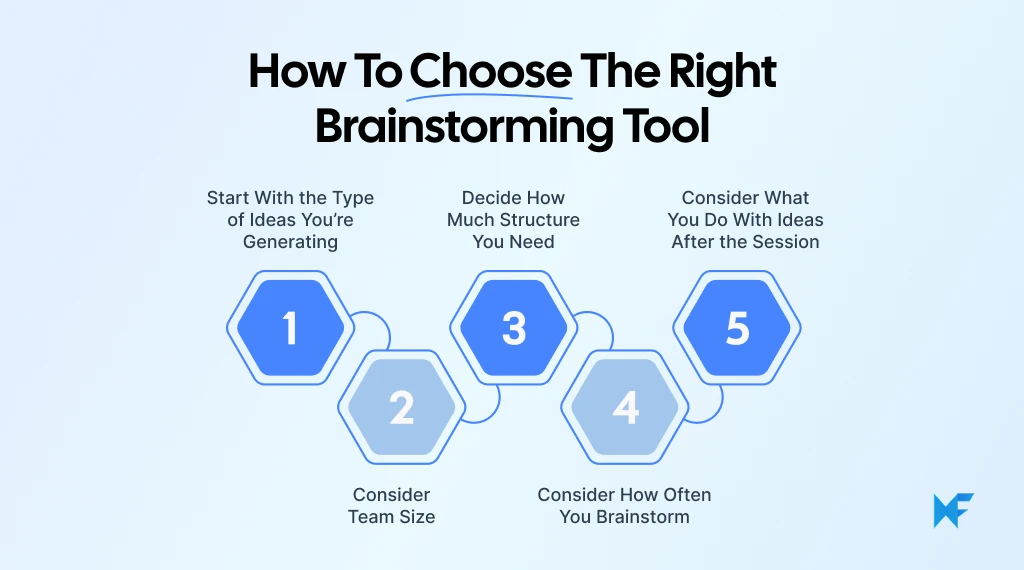
1. Start With the Type of Ideas You’re Generating
Before you even think about features or pricing, start by considering the type of ideas you’re trying to generate:
- Exploratory ideas: Look for tools that allow free-form ideation, such as mind mapping or visual whiteboards.
- Structured concepts: Choose tools that offer templates and frameworks for more focused brainstorming.
- Early vs refined ideas: For early-stage brainstorming, choose flexible tools; for refining ideas, look for those that help organize and categorize.
Think about the depth of ideation you need and choose the tool that matches the stage and type of brainstorming you're working on.
2. Consider Team Size
The size of your team is another key factor in choosing the right tool. Different tools are suited for different team dynamics:
- Solo brainstorming: A tool that helps you map out ideas individually works best.
- Small team ideation: Choose a platform with real-time collaboration for seamless teamwork.
- Larger groups: Select tools that handle multiple inputs while keeping ideas organized.
Remember, the tool should be able to support the level of participation and visibility that your team needs to collaborate effectively.
3. Decide How Much Structure You Need
Some brainstorming sessions require more freedom, while others need clear direction.
- Open-ended brainstorming: If you need flexibility, a tool with free-form capabilities is key.
- Guided sessions: If you require frameworks, go for a tool IdeaBoard that has built-in templates to keep things focused.
Consider how much guidance or flexibility your brainstorming session requires and choose a tool that fits.
4. Consider How Often You Brainstorm
Think about how frequently you plan to use the tool and whether you need ongoing access to your ideas:
- One-off sessions: A tool with ready-made templates is ideal for occasional brainstorming.
- Ongoing capture: If brainstorming is frequent, choose a tool that supports continuous idea capture and refinement.
The right tool will depend on how often you plan to brainstorm and how you want to store and organize your ideas after each session.
5. Consider What You Want to Do With Ideas After the Session
Finally, think about the post-brainstorm phase. Once you’ve captured your ideas, what happens next?
- Organizing ideas: You’ll need a tool that helps capture and organize your thoughts clearly.
- Sharing results: Ensure the tool allows easy sharing of ideas for collaboration.
- Turning ideas into actions: If you plan to follow through, look for a tool that integrates task management and follow-up features.
Look for tools that not only support idea generation but also help you follow through and make ideas actionable.
So, What is the Best Brainstorming Tool?
There’s no single “best” brainstorming tool for everyone. The right choice depends entirely on how your team brainstorms, the type of ideas you want to generate, and how you plan to follow through with them.
Whether you’re looking for flexibility, structure, or a combination of both, there’s a tool out there to fit your needs.
If you’re ready to start brainstorming with a tool that offers real-time collaboration, AI-powered templates, and an infinite canvas, give MockFlow’s IdeaBoard a try. It’s free to get started!
FAQs About Brainstorming Tools
1. What are the best brainstorming tools for 2026?
The best brainstorming tools for 2026 will offer real-time collaboration, AI features, and integrations with other productivity apps. These tools focus on visual ideation, mind mapping, and collaborative brainstorming, helping teams share and refine ideas effectively.
2. How can I use brainstorming tools to improve team collaboration?
Brainstorming tools enable real-time input and idea sharing, allowing all team members to contribute and organize ideas simultaneously. These tools streamline collaboration, making it easier for teams to brainstorm together.
3. What are the key features to look for in brainstorming apps?
Look for real-time collaboration, ease of use, mind mapping, visual organization, and templates. Integration with project management tools and cloud storage is also important for efficiency.
4. How do mind mapping tools help in organizing ideas during brainstorming?
Mind mapping tools visually connect ideas, starting from a central concept and branching out. This structure helps organize, prioritize, and refine ideas during brainstorming.
5. What are some effective virtual brainstorming tools for online meetings?
Effective virtual brainstorming tools like IdeaBoard allow teams to collaborate in real time, using features like sticky notes, diagrams, and templates to share and organize ideas during online meetings.
6. How do brainstorming tools support innovative thinking in teams?
Brainstorming tools like IdeaBoard provide spaces for teams to generate and refine ideas, visualize concepts, and prioritize solutions. These tools encourage out-of-the-box thinking and enhance creativity.
Top 8 Microsoft Whiteboard Alternatives for Remote Work & Collaboration
Introduction For remote and hybrid teams, effective whiteboarding is crucial to maintaining visual collaboration and...
8 Best Flowchart Software for Easy Design & Collaboration in 2025
Introduction You’re staring at a tangled web of processes. Multiple teams are working on different parts of the project, and no...

6 Best AI Storyboard Generators for 2026: Compare Features & Pricing
Introduction When the script is ready, but turning it into scenes, frames, camera directions, and visual flow takes time, teams...
