What Is a SIPOC Diagram? Components, Benefits, and How to Create One
Introduction
A SIPOC (Suppliers, Inputs, Process, Outputs, Customers) diagram helps teams define the scope of a business process by mapping its major steps, required inputs, and expected outputs. It also clarifies who supplies those inputs and who receives the results, helping teams identify missing information or unclear ownership across departments.
This is especially useful when teams disagree on where a process begins or ends, or which activities belong within the project scope. During the Define phase of Six Sigma projects, SIPOC helps settle these questions by documenting the process boundaries and the people involved before detailed analysis begins.
This guide explains how SIPOC works, with a practical example and steps to create your own diagram.
What is a SIPOC diagram? Components and example
A SIPOC diagram is a high-level process mapping tool used to define the scope of a business process before examining it in detail. It shows what resources the process depends on and how those resources are transformed into results.
A SIPOC chart typically captures four to seven major process steps, making it useful when teams need to agree on process boundaries and responsibilities. Once the scope is clear, detailed process mapping helps examine individual tasks, decisions, and handoffs to understand how the work actually happens.
The SIPOC model organizes a process into five columns, each representing one element of the acronym:
- Suppliers: People, teams, or systems that provide what the process needs.
- Inputs: Information, materials, or resources required to complete the process.
- Process: The main activities that turn inputs into outputs.
- Outputs: Products, services, or results produced by the process.
- Customers: People or teams that receive the outputs.
ASQ's SIPOC diagram guidance recommends establishing this high-level process view before creating a detailed flowchart.
SIPOC diagram example: Customer support ticket resolution
Consider a customer-support process where a team needs to understand how tickets move from submission to resolution. A SIPOC diagram captures the five key elements of the process, including where the required information comes from and who receives the results.
Here's how the process fits into a SIPOC chart:
Suppliers | Inputs | Process | Outputs | Customers |
Customer, CRM system, support knowledge base | Support ticket, account details, troubleshooting information | Receive → Categorize → Assign → Investigate → Resolve | Resolved issue, closure confirmation, documented solution | Requesting customer, support team, product team |
The SIPOC chart shows the five major stages of ticket resolution, but it doesn't explain what happens when a request needs additional approval or moves between departments. MockFlow's Service Request Management Process Map template provides a starting point for mapping these detailed activities, helping teams investigate where requests get delayed.
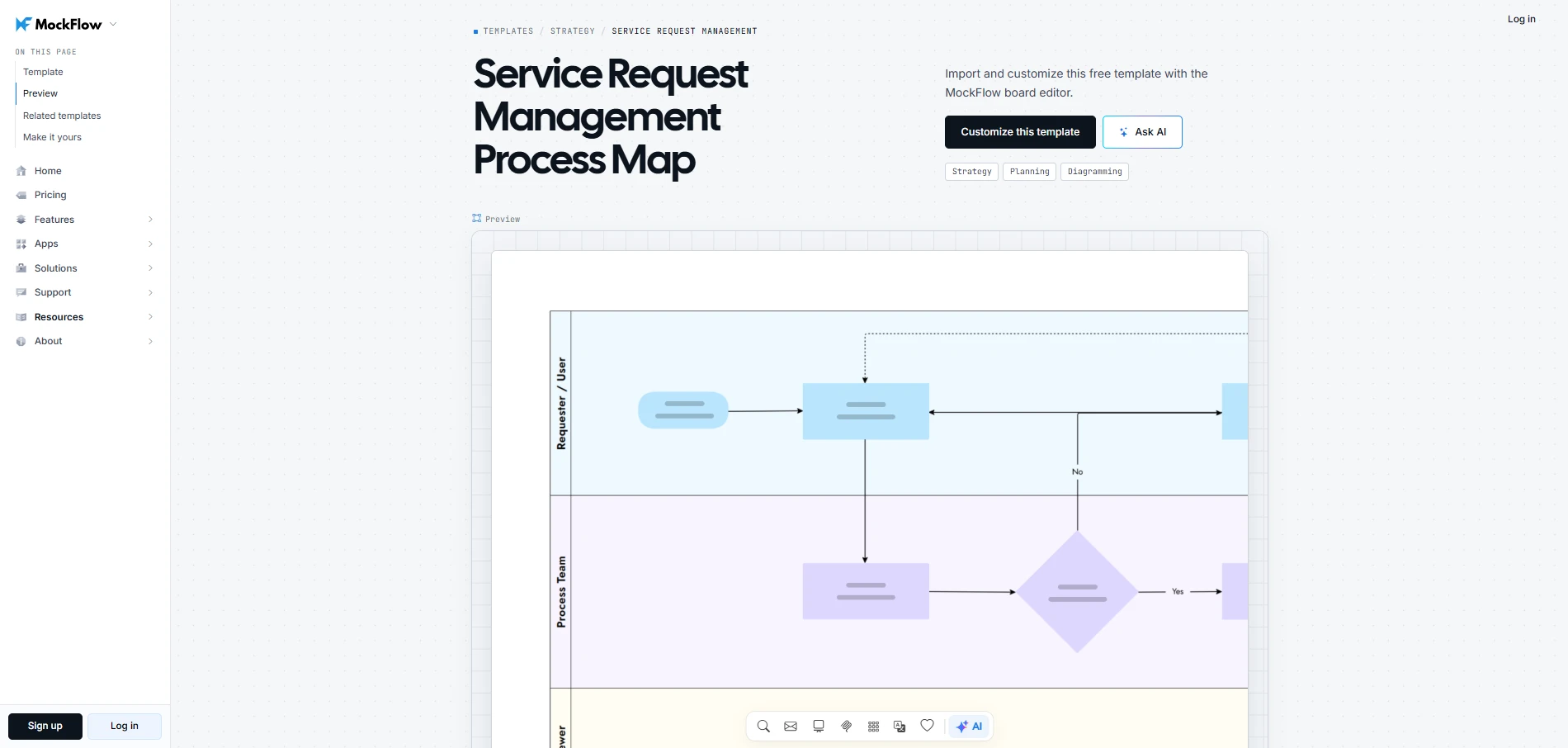
Customize this service request management process map
What are the benefits of using a SIPOC diagram?
The main benefit of a SIPOC diagram is that it helps teams settle important process questions before committing resources to improvement work. By giving process owners and stakeholders across departments a shared understanding of how work is carried out, SIPOC helps prevent disagreements that could delay the project.
Here are five practical benefits of using a SIPOC diagram:
- Prevent scope creep: Defined process boundaries help teams decide whether newly identified activities belong in the project, keeping improvement efforts focused.
- Align responsibilities across departments: SIPOC clarifies who supplies resources and receives results, reducing confusion during handoffs. A swimlane diagram helps teams define ownership of individual tasks and prevent delays caused by unclear responsibilities.
- Support Six Sigma measurement: During the Define phase of DMAIC (Define, Measure, Analyze, Improve, Control), SIPOC identifies the outputs that matter to customers, helping teams determine what to measure in the next phase.
- Identify missing inputs: Connecting each input to its supplier reveals gaps, such as missing customer information or an undefined source for a required document, before they disrupt the process.
- Focus further analysis: SIPOC highlights areas that need closer examination. Teams can use process mapping examples as a reference when documenting these areas in greater detail.
How to Create a SIPOC Diagram Using MockFlow
To create a SIPOC diagram, first define the process and map its major activities. Next, identify what the process produces and who receives those outputs. Then, work backward to determine the required inputs and their suppliers.
Starting with the process helps you identify the activities that need to be covered, so you can connect the right inputs and outputs to them. Once complete, arrange the information in the standard SIPOC order.
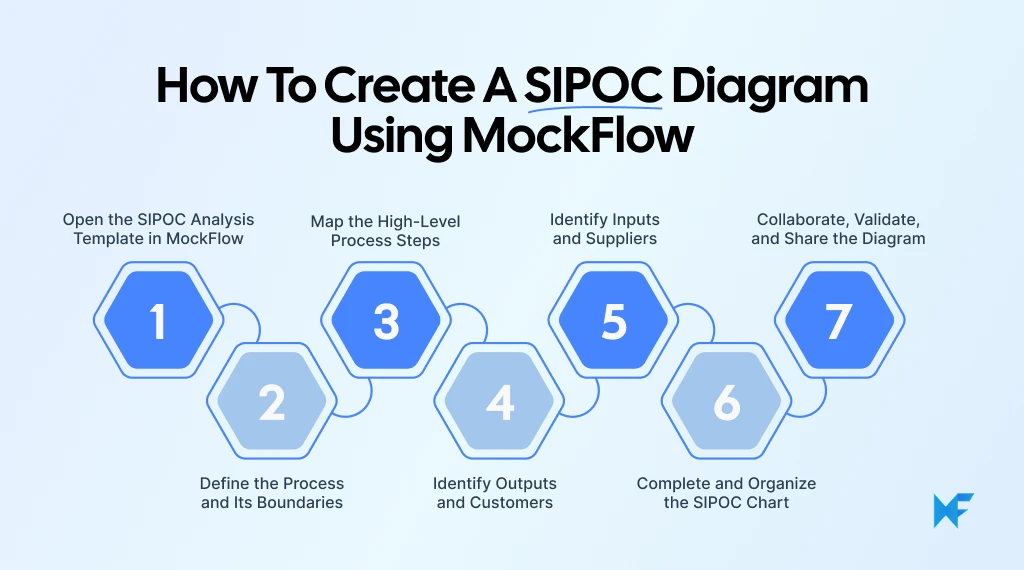
Step 1: Open the SIPOC Analysis Template in MockFlow
Start with the ready-made MockFlow SIPOC Analysis template. In the template, the five columns are already laid out, so you can begin documenting your process without building the chart from scratch.
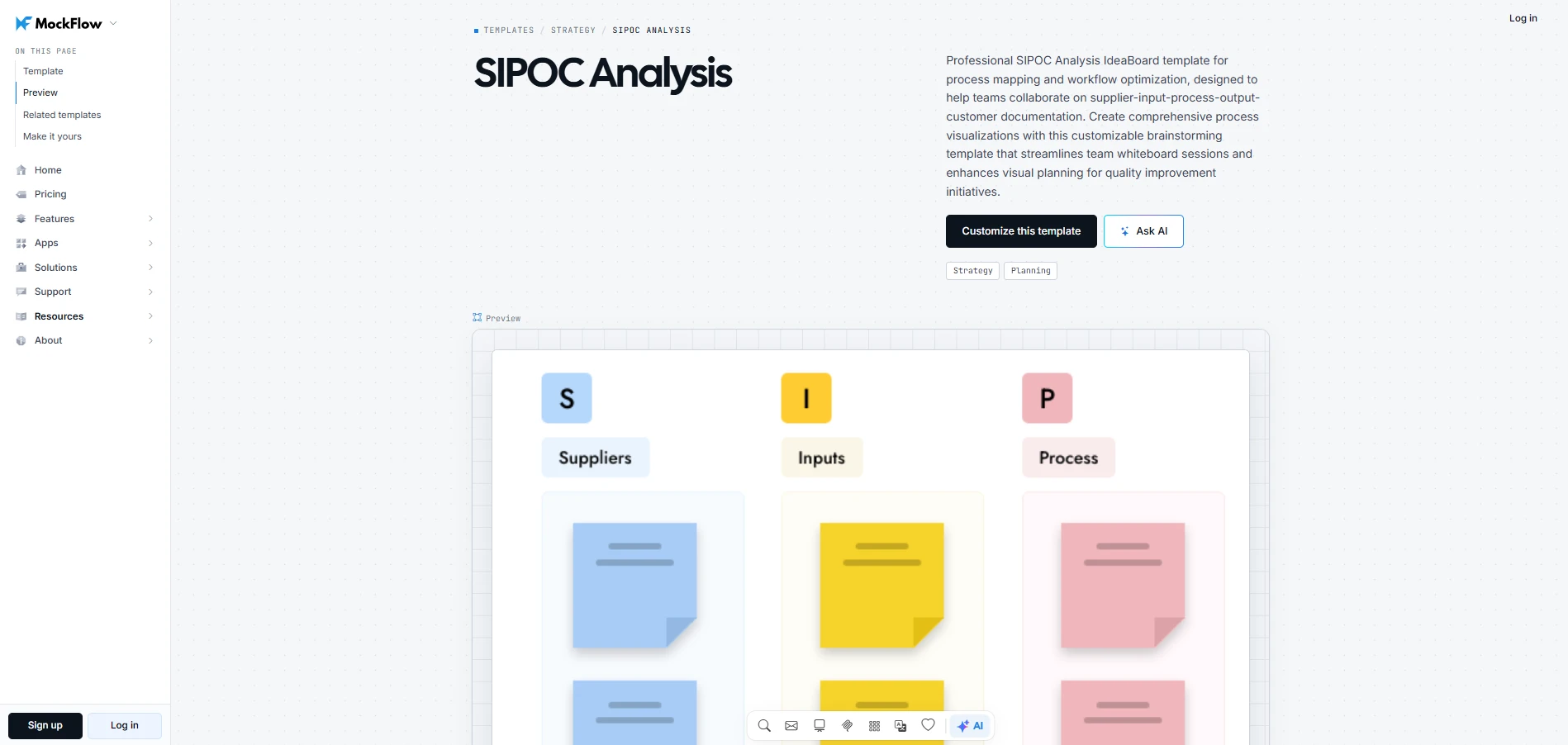
Customize the SIPOC analysis template
Open the template in MockFlow and set up your workspace:
- Edit the columns: Replace the placeholder text with information relevant to your process.
- Adjust the layout: Use drag-and-drop editing to keep entries organized and easy to read.
- Capture workshop notes: Use the infinite canvas to record questions or additional information outside the main chart.
As an example, we'll map a customer-support ticket resolution process. Begin by adding "Customer Support Ticket Resolution" as the process name at the top of your board. Keep the five columns in place to fill out in the following steps.
Step 2: Define the Process and Its Boundaries
Before filling in the SIPOC chart, decide which process you want to analyze and establish its boundaries. PMI's 2026 research found that 31% of complex projects fail to achieve all their intended benefits, highlighting the importance of defining the expected results early. Keep the SIPOC scope specific so stakeholders know which activities the improvement project covers.
For example, if you're mapping a customer-support ticket resolution process:
- Starting point: A customer submits a support ticket.
- Ending point: The issue is resolved and the customer receives confirmation.
- Expected outcome: The customer receives a resolution to their reported issue.
Add the process name and boundaries to your MockFlow canvas using editable text elements. You can update these details as stakeholders review the scope and clarify what should be included. For larger improvement projects, start with a high-level process scope and prioritize the workflows that need closer examination. This keeps the initial mapping effort manageable.
Step 3: Map the High-Level Process Steps
Next, break the process into four to seven major activities. Arrange them in sequence using short, action-oriented labels. For a more detailed view of how activities connect, a workflow diagram can help. MockFlow's Online Course Development Workflow Diagram template illustrates this through a course development process, with an editable layout you can adapt to your own workflow.
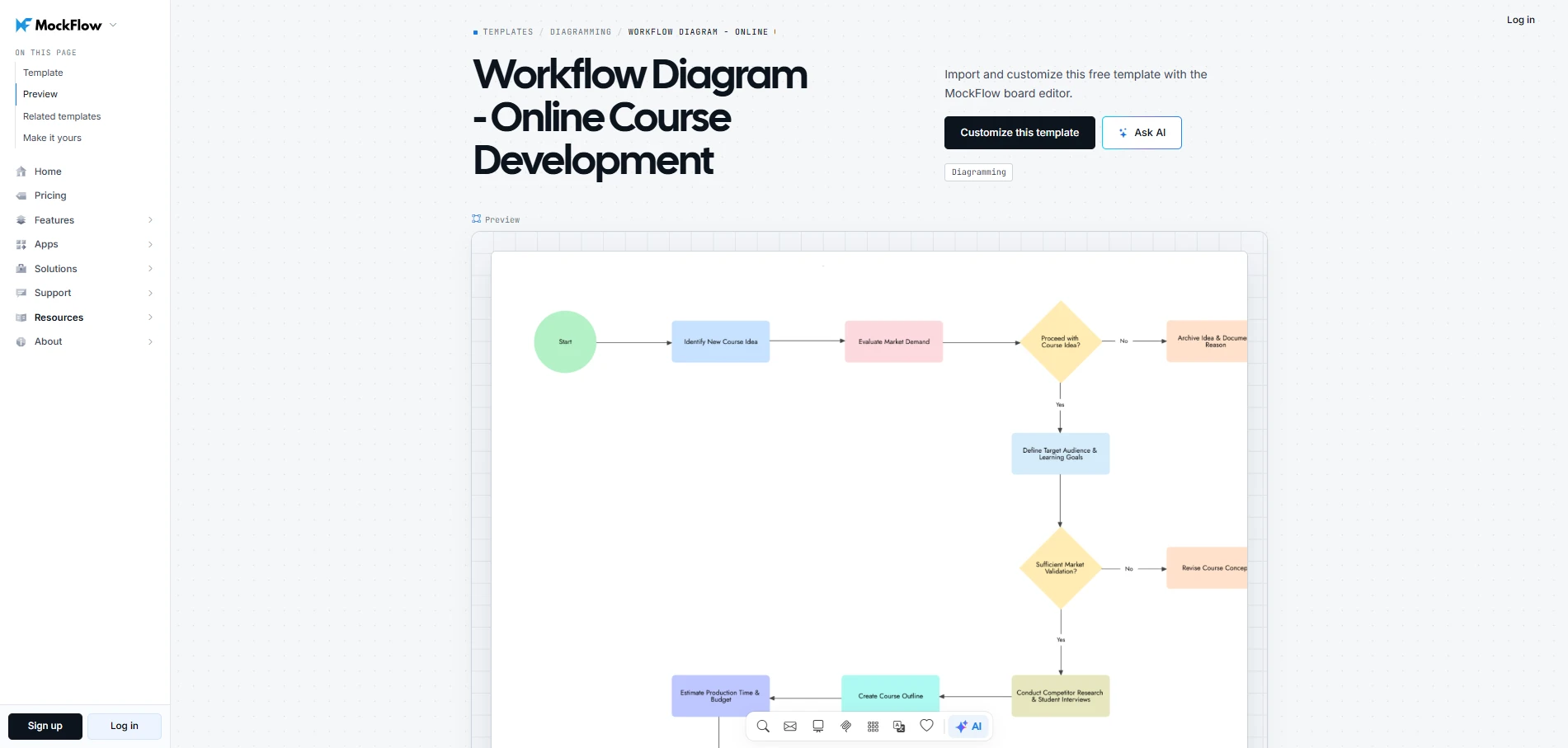
Customize this workflow diagram-online course development template
For help identifying these stages, use Mida AI within MockFlow to generate an initial workflow. Enter a prompt such as "Create a high-level workflow for resolving customer support tickets, from receiving a request to communicating the resolution."
For the customer-support example, the process could follow these five steps:
- Receive the support ticket
- Categorize the issue
- Assign the ticket
- Investigate and resolve the issue
- Communicate the resolution
Review the suggested activities and add the relevant steps to the Process column of your MockFlow SIPOC template, using text and connectors to show their sequence.
For processes with unclear steps, MockFlow's AI Prompt Box lets you keep a reusable prompt directly on the board. Stakeholders can refine the process description and generate updated results as they clarify how work happens.
Step 4: Identify Outputs and Customers
Identify what the process produces and who receives each result. In your MockFlow SIPOC template, add the following to the Outputs column:
- Resolved issue: Delivered to the customer who raised the request.
- Closure notification: Sent to the customer to confirm the resolution.
- Case documentation: Shared with internal support or product teams for future reference.
In the Customers column, add the requesting customer as the recipient of the resolution and notification. Include the support and product teams as recipients of case documentation. Keep the diagram simple enough for stakeholders to verify who receives each output without getting into detailed workflow steps.
Step 5: Identify Inputs and Suppliers
Now work backward from the process to identify what the team needs to complete each stage. Keep the input mapping easy to follow by recording only the resources essential to the process. Leave detailed system interactions for later analysis.
In the Inputs column of your MockFlow SIPOC template, add:
- Support ticket details: The customer's description of the issue.
- Account information: Customer records needed to investigate the request.
- Troubleshooting documentation: Information that helps the support team identify and resolve the problem.
Complete the Suppliers column by identifying where each input comes from. Add the customer for ticket details, the CRM system for account information, and the support knowledge base for troubleshooting documentation. Flag any input without a clear supplier for review before finalizing the chart.
Step 6: Complete and Organize the SIPOC Chart
With all five components filled in, review your SIPOC chart from left to right to make sure the workflow is complete and easy to follow.
With all five components filled in, review your SIPOC chart from left to right. APQC's 2026 survey found that 31% of respondents considered end-to-end process mapping a leading challenge. This makes it important to check that no major activities or handoffs are missing, so your team can work from an accurate process overview.
Check the following before finalizing the diagram:
- Suppliers and Inputs: Confirm that every essential input has an identified source.
- Process: Check that the major activities follow a logical sequence and lead to the expected results.
- Outputs and Customers: Make sure each important output has a clear recipient.
For processes involving multiple departments or complex decision paths, a BPMN diagram helps map activities and responsibilities in greater detail. To see how this works in another setting, MockFlow's Employment Application BPMN Diagram template illustrates how hiring decisions affect the process flow, with an editable layout you can adapt to your own workflow.
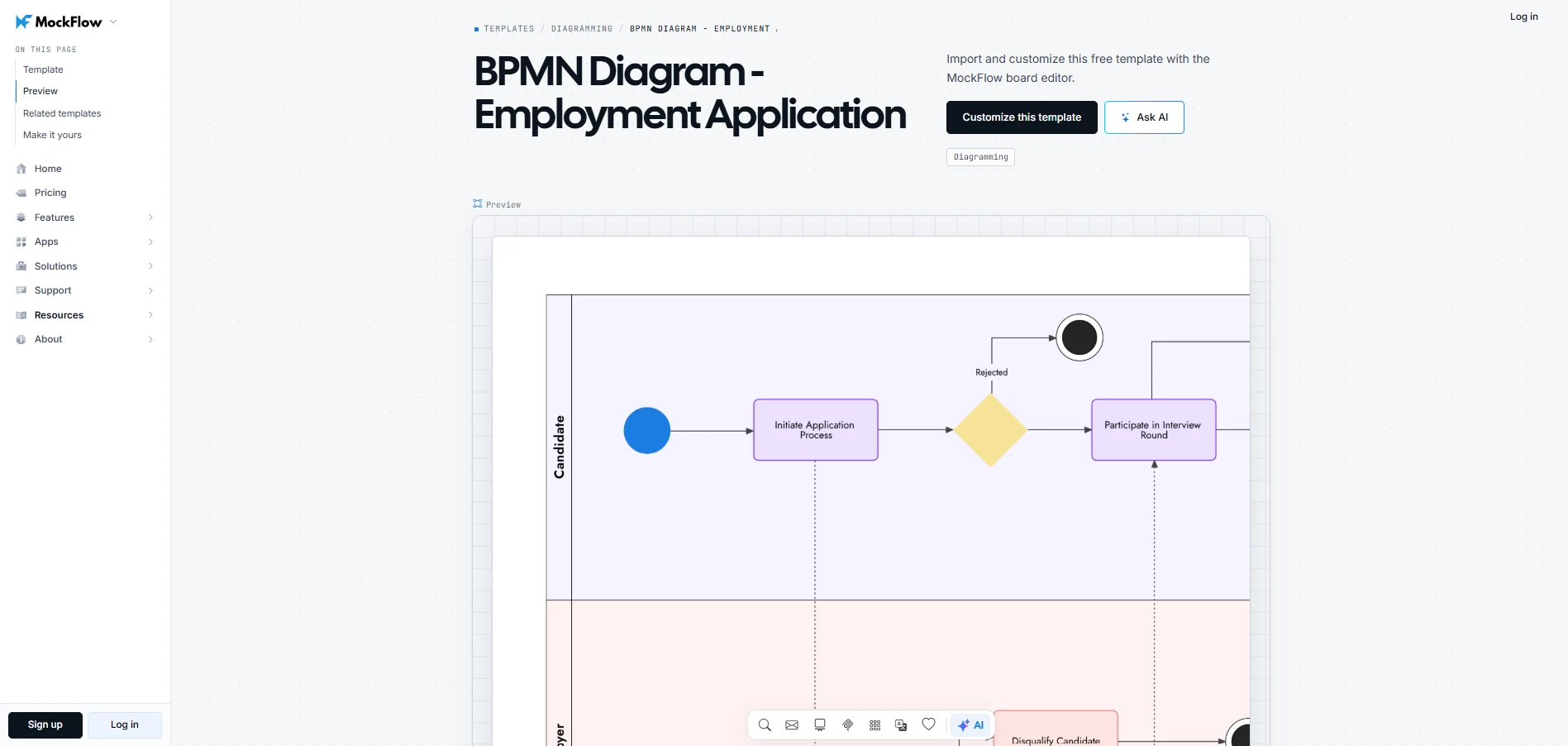
Customize this employment application BPMN diagram
Step 7: Collaborate, Validate, and Share the Diagram
Invite process owners and stakeholders to review the completed SIPOC template in MockFlow. If your team uses Microsoft Teams, MockFlow for Microsoft Teams lets participants review the diagram on a shared canvas during meetings.
Focus the review on three areas:
- Process accuracy: Do the stages reflect how work happens, including where it begins and ends?
- Input and output accuracy: Are the required resources correctly linked to their suppliers, and do the outputs reach the intended customers?
- Unclear responsibilities: Are there any missing handoffs or disagreements about ownership that need to be resolved?
Use MockFlow's real-time collaboration features to make corrections together. Teams using Microsoft Teams can also pin the board as a channel tab for future reference. Once stakeholders approve the diagram, save and share the validated board with everyone involved in the next stage of process analysis.
Conclusion
Once your SIPOC chart is complete, use any unresolved questions to plan the next stage of your improvement project. Assign owners to investigate missing information and identify which parts of the process need closer examination.
MockFlow helps you carry this work forward by expanding your SIPOC chart into detailed process flows and documenting findings alongside the original diagram. Your team can build on the existing work as the project progresses without starting from scratch.
Start your free MockFlow workspace and turn your SIPOC diagram into a working reference for planning and improving business processes.
FAQs
1. What is a SIPOC diagram used for?
A SIPOC diagram is used to define the scope of a business process and understand how work moves from suppliers to customers. It helps teams identify key stakeholders and document the expected outcomes. This provides a useful starting point for planning process improvements or investigating workflow issues.
2. Is SIPOC Lean or Six Sigma?
SIPOC is commonly associated with Six Sigma and Lean Six Sigma, particularly during the Define phase of DMAIC. However, the framework isn't limited to these methodologies. Teams can use SIPOC independently to understand existing workflows or plan operational improvements without following a formal Six Sigma project.
3. Is SIPOC still used?
Yes, SIPOC remains a useful tool for documenting and improving business processes. Its simple five-column structure helps teams understand how a workflow operates before examining individual tasks. This makes it relevant for process improvement workshops and projects where teams need a shared understanding of the workflow.
4. What is the difference between DMAIC and SIPOC?
DMAIC is a structured process improvement methodology with five phases: Define, Measure, Analyze, Improve, and Control. SIPOC is a process mapping tool commonly used during the Define phase to establish process scope and identify key stakeholders. SIPOC supports DMAIC by providing an initial overview of the workflow.
5. How many steps should a SIPOC diagram include?
The Process column of a SIPOC diagram typically contains four to seven high-level steps. The exact number depends on the complexity of the workflow. Each step should represent a major activity, keeping the diagram focused on the overall process rather than individual tasks or detailed decisions.
6. What is the difference between SIPOC and COPIS?
SIPOC and COPIS use the same five components but approach process mapping from different directions. SIPOC starts with suppliers and follows the workflow toward customers. COPIS begins with customers and their expected outcomes, making it useful when teams want to understand or improve a process from the customer's perspective.

What are Spider Diagrams? Examples, Templates, & How to Create One
Introduction We have all been there. A brainstorming session starts strong, ideas are presented, notes pile up, and then...
8 Types of Storyboards for Film, Animation, UX, Games, and Marketing
TL;DR Storyboards are visual plans that organize scenes, actions, timing, flow, and ideas before production. Common storyboard...

Wireframing Process: A 5-Stage Practical Workflow for Product Teams
A wireframe can either save a project weeks of rework or create the confusion that causes it. The outcome usually comes down to...
