
What is a Swimlane Diagram? Definition, Examples, & When to Use It
Introduction
Have you ever sat in a meeting where everyone agrees the process is “clear,” but somehow work still gets stuck? It’s frustrating, and it happens more often than teams like to admit.
Most of the time, the problem isn’t effort. It’s visibility. People don’t see how their work connects to others, or where their responsibility starts and ends. That’s where swimlane diagrams quietly make a big difference.
A swimlane diagram helps you lay out a process in a way that mirrors real work. It doesn’t just show steps. It shows who is involved at each point and how work moves across roles, teams, or departments. When you can see responsibilities side by side, gaps and overlaps become obvious, and conversations get a lot more productive.
In this guide, we’ll keep things practical. We’ll explain swimlane diagrams in simple terms, walk through real examples, and show how you can create editable diagrams for your own workflows using tools like MockFlow IdeaBoard.
What is a Swimlane Diagram?
A swimlane diagram is a visual process diagram that maps a workflow across roles, teams, or systems using parallel lanes. Each lane represents responsibility and ownership for specific tasks. The diagram shows how activities move between actors and departments.
Swimlane diagrams clarify handoffs, reduce confusion, and expose bottlenecks in cross-functional processes. Teams use swimlane diagrams to document workflows, align responsibilities, and improve process accountability across business operations.
What makes a swimlane diagram different from a basic flowchart is this focus on who does the work, not just what happens next. Tasks are grouped into lanes based on roles or functions, making ownership explicit at every step. This structure is why swimlane diagrams are also referred to as swimlane charts, swim lane flowcharts, or swimming lane diagrams in business process mapping.
Because they show parallel work and interactions between roles, swimlane diagrams are especially useful for complex workflows where multiple teams collaborate, approvals cross boundaries, or delays are hard to trace.
Research consistently shows that visual representations improve understanding. A 2024 meta-analysis published in ScienceDirect, covering over 10,000 learners, found a medium positive effect of learning with external visualizations on comprehension and outcomes, reinforcing why role-based visuals like swimlane diagrams are easier to understand than text-heavy process descriptions.
Attributes of a Swimlane Diagram
A swimlane diagram works because it brings structure to chaos. Instead of overwhelming you with steps, it focuses on ownership, coordination, and clarity. These core attributes are what make it effective for cross-functional workflows.
At a high level, every swimlane diagram is built around parallel process lanes. Each lane represents a role, team, department, or system involved in the workflow. This immediately answers a critical question: who is responsible for what?
Here are the key attributes that define a swimlane diagram:
- Parallel process lanes: Lanes run side by side, allowing multiple roles to operate within the same workflow while keeping responsibilities clearly separated.
- Responsibility assignment: Every activity sits inside a specific lane, making task ownership explicit and reducing confusion during handoffs.
- Activity coordination: Arrows crossing lanes show interactions, approvals, and dependencies between roles, helping teams understand how work moves across functions.
- Workflow separation with continuity: Tasks are divided by role without breaking the end-to-end flow, ensuring clarity without fragmenting the process.
Together, these attributes make swimlane diagrams especially effective for improving process accountability, exposing gaps, and documenting role-based workflows that reflect how work actually happens.
Benefits of Using Swimlane Diagrams
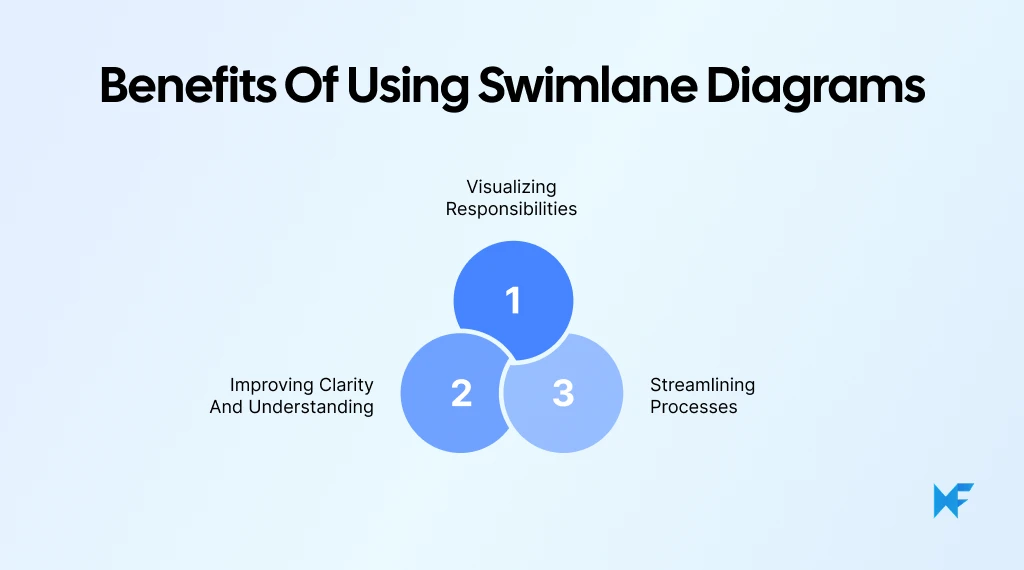
Swimlane diagrams don’t just document processes. They surface clarity where teams usually struggle: ownership, handoffs, and execution gaps. By visually separating responsibilities while keeping the workflow connected, they make complex processes easier to understand and improve.
Here’s how those benefits show up in practice.
1. Visualizing Responsibilities
One of the biggest advantages of a swimlane diagram is how clearly it shows who owns each task. Every activity sits within a defined lane, leaving little room for assumptions or blurred accountability.
When responsibilities are visible:
- Teams know exactly where their work begins and ends
- Handovers between roles become explicit
- Delays can be traced back to a specific step and owner
This level of responsibility assignment is especially useful in role-based workflows where multiple teams contribute to the same outcome.
2. Improving Clarity and Understanding
Swimlane diagrams improve understanding by showing how work flows across roles, not just what happens next. When activities move between lanes, teams can immediately see dependencies, approvals, and interactions.
This clarity helps:
- New team members understand processes faster
- Stakeholders spot unnecessary back-and-forth
- Teams align on how work actually happens versus how it’s assumed to happen
Compared to a standard process workflow diagram, swimlanes make cross-functional coordination far easier to follow.
3. Streamlining Processes
Because swimlane diagrams expose handoffs and transitions, they naturally reveal bottlenecks, redundant steps, and breakdowns in activity coordination.
Teams often discover:
- Tasks that bounce between roles unnecessarily
- Approval steps that slow progress
- Gaps where ownership isn’t clearly defined
By visualizing these issues, swimlane diagrams support smarter process improvements and more efficient business process mapping.
This visibility matters more than many teams realize. A 2024 McKinsey study on operational handovers found that nearly 70% of time in complex workflows is spent resolving issues caused by “blind handoffs,” where ownership is unclear or undocumented.
If you’re wondering when these benefits matter most, the next section breaks down the exact scenarios where using a swimlane diagram makes the biggest impact.
When to Use a Swimlane Diagram
Swimlane diagrams are most useful when a process involves multiple roles, teams, or systems and clarity around ownership matters as much as the sequence of steps. If a workflow feels confusing, slow, or hard to explain across functions, that’s usually a sign a swimlane diagram can help. Below are the most common scenarios where using one delivers immediate value.
1. Business Process Mapping
Swimlane diagrams are ideal for business process mapping when work moves across departments. By laying out tasks in role-based lanes, teams can see how responsibilities are distributed and where handoffs occur. This makes it easier to document processes accurately and spot breakdowns in coordination.
2. Project Management and Workflows
In project environments, multiple contributors often work in parallel. A swimlane chart helps project teams track ownership, approvals, and dependencies without relying on lengthy documentation. It provides a shared visual reference that keeps everyone aligned on who is responsible at each stage.
Teams managing cross-functional projects often find that task lists and kanban boards break down once work spans multiple roles. Visualizing swimlanes alongside tasks helps everyone see not just what is pending, but how work moves between people, reducing follow-ups and misalignment during execution.
3. Organizational Process Optimization
When organizations look to improve efficiency, swimlane diagrams expose friction points that slow execution. This kind of visibility is still missing in many organizations. According to BearingPoint’s 2024 Process Management Study, only 20% of companies use process mining operationally, highlighting how few teams have a clear, end-to-end view of their workflows.
By visualizing workflow separation and activity coordination, teams can identify redundant steps, unclear ownership, and delays between functions; key inputs for meaningful process optimization.
In fact, organizations that gain workflow visibility see measurable gains. The same BearingPoint study reports improved quality (36%), cost savings (33%), and better identification of automation opportunities (32%), outcomes that often start with clear process mapping before advanced tooling is introduced.
4. Swimlane vs Other Tools
While flowcharts, Gantt charts, and process maps show sequence or timelines, swimlane diagrams focus on responsibility assignment. They are best used when accountability and cross-functional visual collaboration are critical, rather than simple task order or scheduling.
For instance, in a project management flowchart, tasks like design review, development, and QA testing appear in sequence, but it’s often unclear who owns each step. A swimlane diagram shows the same workflow with separate lanes for Product, Engineering, and QA, making ownership and handoffs visible. When a task stalls, the team can immediately see which role is responsible, not just where the sequence breaks.
Here’s a quick comparison table:
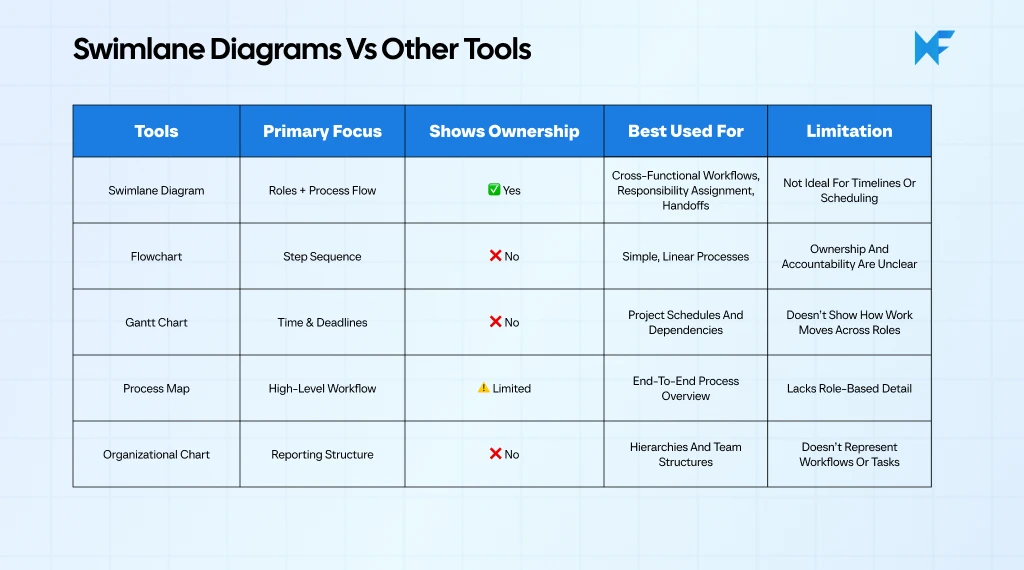
In product and engineering teams, swimlane diagrams are often preferred over sequence diagrams when the goal is ownership clarity rather than technical order. While sequence diagrams excel at showing system interactions, swimlanes make it easier to reason about responsibility boundaries and handoffs across teams during real-world execution.
Bottom line: Use a swimlane diagram when who does the work matters as much as what happens next.
Swimlane Diagram Examples
Swimlane diagrams become far more intuitive when you see how they translate real workflows into a visual structure. Instead of listing steps in text, these examples show what the swimlane diagram would actually look like and how responsibilities are distributed across lanes.
Example 1: Cross-Functional Flowchart in Product Development
In a product development process, the swimlane diagram would be divided into separate horizontal lanes for Product, Design, Engineering, and Marketing. The workflow would start in the Product lane with requirement definition, move into Design for wireframes, then shift into Engineering for development and testing.
Key characteristics of this swimlane diagram:
- Each team has a clearly labeled lane showing ownership
- Arrows move horizontally across lanes to show handoffs
- Feedback loops appear as arrows returning to earlier lanes
This layout makes it easy to spot where work slows down, especially during reviews or rework cycles. As a cross-functional flowchart, it visually explains how parallel teams contribute without overlapping responsibilities.
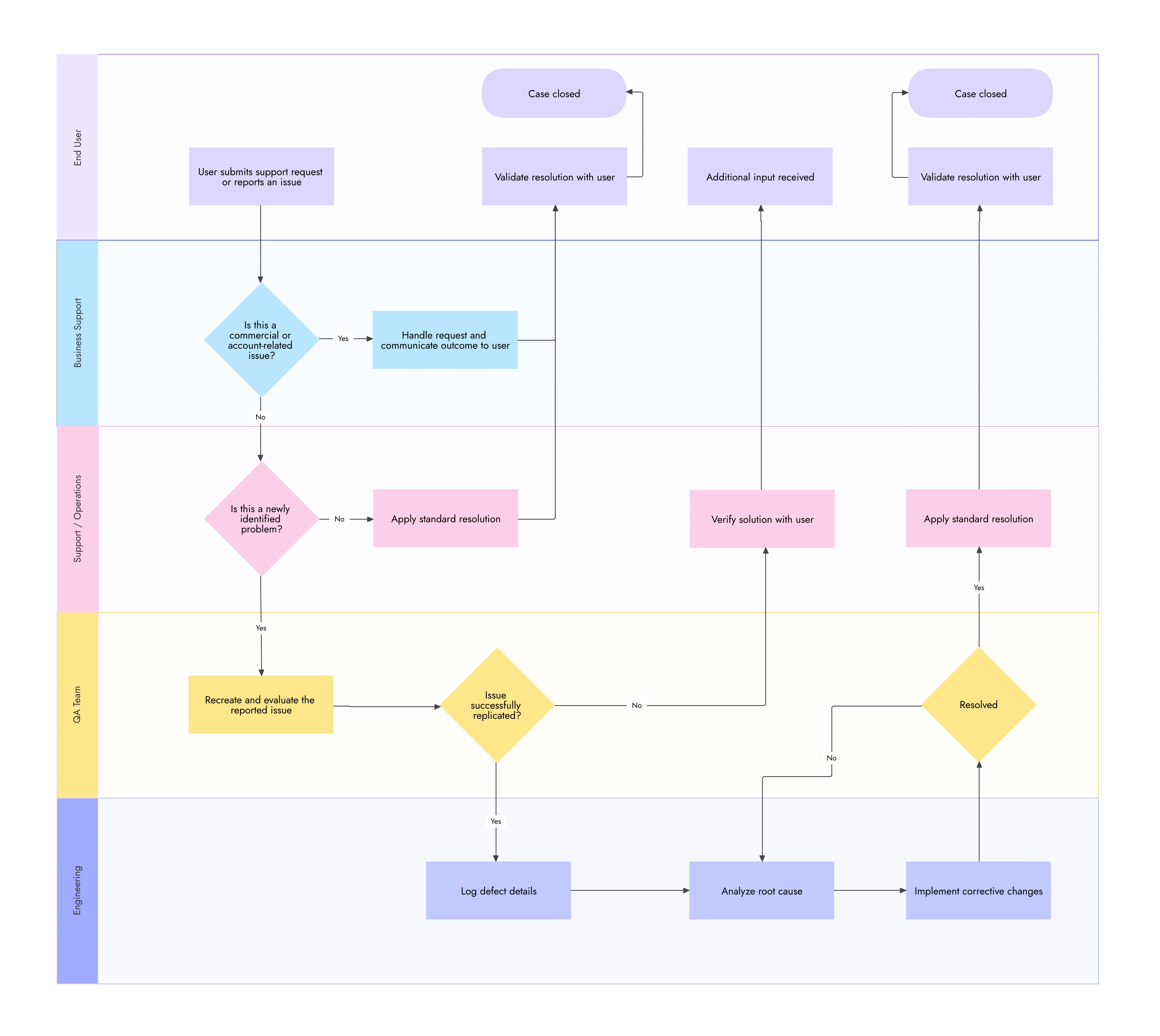
Example of cross-functional flowchart in product development
Example 2: Approval Process Workflow in a Marketing Campaign
For a marketing approval workflow, the swimlane diagram would include lanes for Content, Design, Legal, and Management. The process would flow left to right, starting with content creation, moving through design, then passing into legal and management lanes for approvals.
What this swimlane diagram highlights:
- Each approval step sits inside the reviewer’s lane
- Rejected approvals loop back to the originating lane
- Final sign-off appears as the last activity in the management lane
By showing these movements clearly, the swim lane process diagram reveals exactly where approvals stall and which handoffs cause delays.
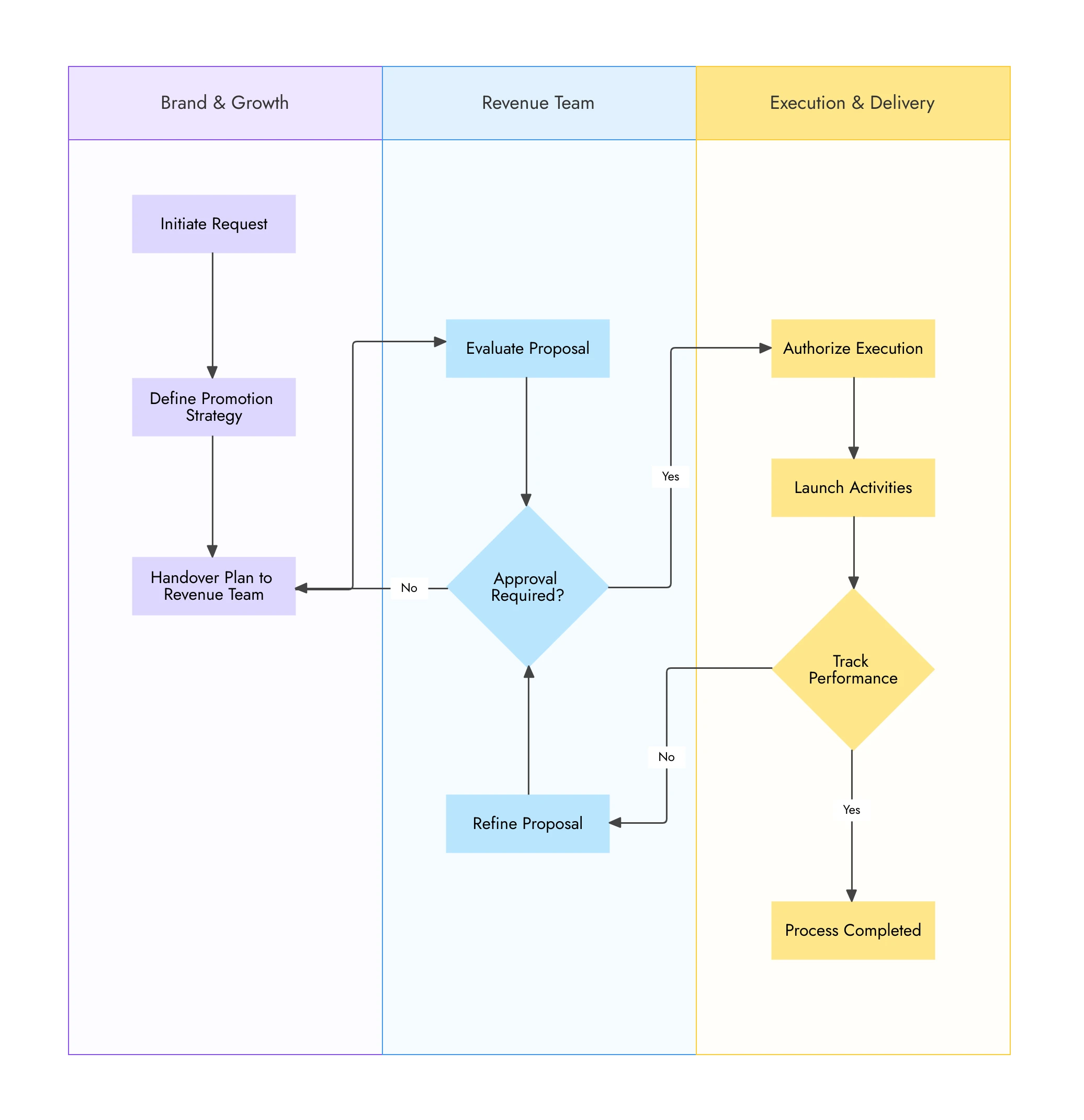
Example of approval process workflow in a marketing campaign
Up next, we’ll walk through how to create a swimlane diagram step by step, so you can build one that mirrors these examples for your own processes.
How to Create a Swimlane Diagram
Creating a swimlane diagram isn’t about drawing boxes first. It’s about understanding the workflow and ownership before you visualize anything. The steps below help you translate a real process into a clear, role-based diagram that teams can actually use.
Step 1: Define the Process
Start by clearly defining what process you’re mapping and where it begins and ends. This keeps the diagram focused and prevents scope creep.
At this stage:
- Identify the trigger that starts the process
- Clarify the outcome you’re trying to achieve
- Keep the scope limited to one workflow
A swimlane diagram works best when it represents a single, well-defined swim lane process rather than multiple unrelated activities.
Quick Tip: Teams often get better swimlane diagrams by clarifying the workflow in plain language before visualizing it. Writing out the process steps as short, sequential actions helps surface gaps, ambiguous ownership, and missing handoffs early, making the transition from text to lanes far more accurate and efficient when teams later move to visual mapping.
Step 2: Identify Roles or Departments
Next, list all roles, teams, or systems involved in the process. Each of these will become a lane in your diagram.
To do this well:
- Group responsibilities logically, not by job titles
- Avoid creating too many lanes, which can reduce clarity
- Include systems or tools if they perform actions automatically
This step establishes responsibility assignment and sets the foundation for workflow separation.
Step 3: Map Out the Process Steps
Now break the process into individual actions and place each step inside the lane of the role responsible for it.
As you map steps:
- Keep actions clear and action-oriented
- Place tasks sequentially from left to right or top to bottom
- Ensure each step belongs to one clear owner
This is where the swimlane diagram starts revealing how work actually flows across roles. Most swimlane diagrams use a consistent set of shapes to keep the process easy to scan: rounded rectangles mark the start and end points, rectangles represent individual tasks, diamonds show decision points, and circles indicate connectors between lanes. Sticking to these standard shapes keeps the diagram readable even as the process grows more complex.
Step 4: Connect the Steps
Finally, connect the activities using arrows to show task flow, handoffs, and dependencies.
Pay close attention to:
- Arrows crossing lanes, which indicate coordination points
- Loops that show rework or approvals
- Gaps where ownership or transitions are unclear
These connections often expose bottlenecks and delays that weren’t obvious before.
Swimlane Diagrams in BPMN and Activity Diagrams
Swimlane diagrams are not a standalone notation. They are a structural concept used within formal modeling standards like BPMN and UML activity diagrams to clarify responsibility and ownership.
In BPMN (Business Process Model and Notation), swimlanes appear as pools and lanes. A pool represents a major participant, such as an organization or external system, while lanes divide that pool into roles or departments. The process flows across these lanes, making it clear who performs each activity without changing the underlying process logic.
Similarly, in UML activity diagrams, swimlanes are used to group actions by actor or responsibility. They help teams understand how activities are coordinated across roles while keeping the focus on behavior and flow.
What’s important to note is this: Swimlanes do not define how a process works. They define who owns each part of it.
That distinction is why swimlanes are so valuable in complex workflows. They add clarity to responsibility assignment, support activity coordination, and make cross-functional processes easier to review, audit, and improve, especially when multiple teams or systems are involved.
Next, we’ll look at tools for creating swimlane diagrams and how platforms like IdeaBoard simplify building, collaborating on, and sharing them.
Tools for Creating Swimlane Diagrams – Try IdeaBoard
Creating a swimlane diagram is much easier when the tool supports structure, design collaboration, and flexibility. This is where MockFlow IdeaBoard fits naturally into the workflow. Instead of forcing you to draw lanes and connections from scratch, IdeaBoard helps you move from process thinking to a clean, editable swimlane diagram faster.
Below are the key ways IdeaBoard supports swimlane diagram creation.
Using the Swimlane Diagram Template
IdeaBoard offers ready-made swimlane diagram templates, such as this Document Approval Workflow Swimlane Diagram. These templates give structured approval workflows that already divide activities into role-based lanes. You can import a template, adjust the lanes, rename roles, and map steps quickly, which helps you move from idea to usable diagram without starting from scratch.
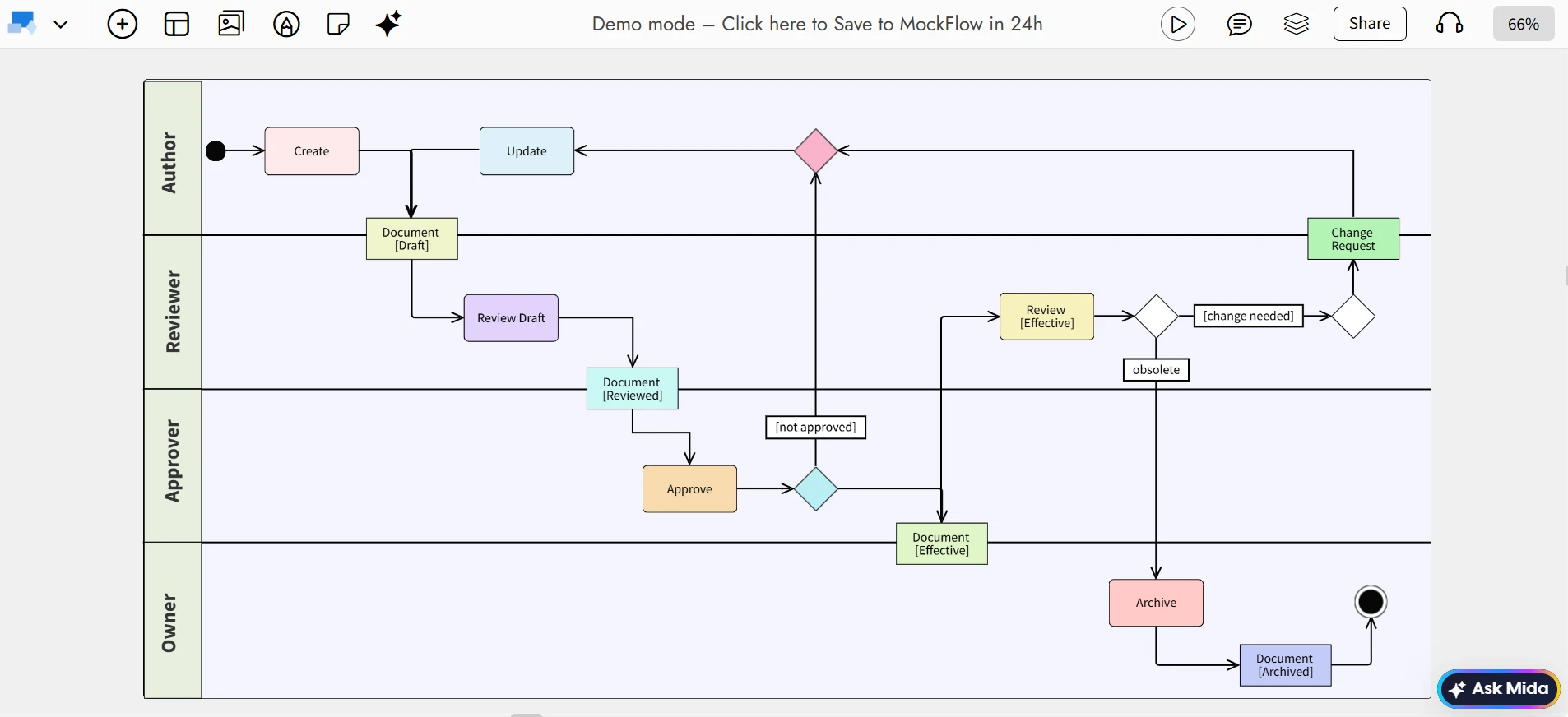
Edit this document approval workflow swimlane diagram on IdeaBoard
AI-Assisted Swimlane Diagram Generation
IdeaBoard’s AI Toolbox allows you to generate process flows from simple text prompts. By describing the workflow in plain language, you can create an initial diagram layout and then refine it into a swimlane diagram. This is especially useful when documenting processes for the first time or accelerating early drafts.
Infinite Canvas for Seamless Workflow Mapping
Swimlane diagrams often expand as processes grow. IdeaBoard’s infinite canvas lets your workflow extend in any direction without layout constraints, making it easier to map large cross-functional processes or multi-stage approvals in a single view.
Collaboration and Feedback Features
IdeaBoard supports real-time collaboration, allowing multiple stakeholders to edit the same swimlane diagram together by sharing the boards. Multimedia comments can be added directly to specific lanes or steps, keeping feedback contextual and reducing misalignment during reviews.
If your team already meets in Microsoft Teams, IdeaBoard's Microsoft Teams integration lets you pin the board as a channel tab or open it live during the call, so swimlane reviews and updates happen right where the discussion is already taking place.
Exporting Your Swimlane Diagram
Once your diagram is complete, IdeaBoard lets you export it in formats like PNG. This makes it easy to share swimlane diagrams across teams, include them in documentation, or present them during process discussions.
With the right tool in place, swimlane diagrams move from being documentation artifacts to living workflows. Let’s wrap up with how all of this comes together and what your next step should be.
Conclusion
Swimlane diagrams bring clarity to workflows by clearly showing who owns each step, how work moves across roles, and where handoffs happen. They replace assumptions and scattered explanations with a shared visual that teams can quickly understand and act on.
Used consistently, swimlane diagrams surface process gaps, reduce delays caused by unclear ownership, and support smarter process optimization. Whether you’re mapping business processes, managing cross-functional workflows, or documenting approvals, they provide a practical structure for keeping work aligned and moving forward.
If you’re ready to put this into practice, try creating your next swimlane diagram with MockFlow IdeaBoard. You can start with ready-made templates, collaborate with your remote team in real time, and turn workflows into clear, editable diagrams.
Sign up to try IdeaBoard for free and start mapping processes with clarity. You can also install our Chrome extension to get started quickly.
FAQs About Swimlane Diagrams
1. What is a swimlane diagram and how does it work?
A swimlane diagram is a visual process diagram that shows how a workflow moves across different roles, teams, or systems using clearly separated lanes. It works by dividing a process into horizontal or vertical lanes, with each lane assigned to a role, department, or system. Process steps are placed inside the relevant lanes and connected in sequence. As tasks move from one lane to another, the diagram clearly shows handoffs, dependencies, and interactions across teams.
2. When should I use a swimlane diagram?
A swimlane diagram should be used when a process involves multiple roles, departments, or systems and responsibility needs to be clearly defined. It is especially useful for business process mapping, approval workflows, project coordination, and operational processes where visibility into handoffs and accountability is critical.
3. What is the difference between a flowchart and a swimlane diagram?
A flowchart focuses on the sequence of steps in a process. A swimlane diagram adds an extra layer by assigning each step to a specific role or department. This makes swimlane diagrams better suited for cross-functional workflows where understanding responsibility, ownership, and collaboration matters.
4. What are common mistakes teams make when creating swimlane diagrams?
A common mistake is creating too many lanes, which makes the diagram hard to read. Another issue is grouping tasks by job title instead of responsibility, which blurs accountability. Teams also forget to show feedback loops, making the process look cleaner than it actually is.
5. How do swimlane diagrams help identify bottlenecks?
Swimlane diagrams help identify bottlenecks by visually exposing where tasks slow down, wait for approvals, or move back and forth between roles. Repeated handoffs, overloaded lanes, or long gaps between steps become easy to spot, allowing teams to improve process efficiency and accountability.
6. How does IdeaBoard support collaboration on swimlane diagrams?
MockFlow IdeaBoard allows multiple stakeholders to work on the same swimlane diagram in real time. Teams can edit lanes, add comments directly to steps, and review workflows together. This makes it easier to validate ownership, gather feedback, and keep process documentation aligned as workflows evolve.

What are Ecosystem Maps? Examples, Template, and How to Create One
When teams talk about how a business or product really works, the conversation rarely stays within one function. Someone...
Team Planning Process Guide: Steps & Best Practices in 2026
Team planning often starts when the team already feels the pressure. A new quarter is approaching. A major project is about to...

Wireframe vs Mockup vs Prototype: What’s the Difference?
Wireframes, mockups, and prototypes are three stages of the product design process. Wireframes define layout and structure,...
