
What is a Spaghetti Diagram? Examples and How to Create One in 2026
Introduction
If you have ever watched people move around a workspace and wondered why it feels unnecessarily messy, you are already thinking about a spaghetti diagram.
Spaghetti diagrams are used when work looks organized on paper but feels inefficient in practice. A worker walks across the floor to pick up a part, comes back, realizes something is missing, and repeats the same path. Documents move between desks in loops. Equipment placement forces extra walking. These problems rarely appear in process documents, but they quietly slow work down.
A spaghetti diagram makes this visible. It maps the actual movement of people, materials, or information on top of a real layout. When those paths are drawn out, the result often looks tangled, like a plate of spaghetti. That visual clutter is the insight. It exposes wasted motion, inefficient flow, and layout decisions that create friction.
In this guide, we explain what a spaghetti diagram is, when it is useful, and how teams use it to improve real workflows. You will also see practical examples, templates, and tools like IdeaBoard to help you map movement in your own workspace.
What is a Spaghetti Diagram?
A spaghetti diagram is a visual map that traces the actual movement of people, materials, or information across a workspace or process. The diagram overlays movement paths on a floor plan or layout to reveal inefficient flow, unnecessary travel, and hidden bottlenecks. Overlapping lines expose wasted motion and poor layout decisions.
Teams use spaghetti diagrams in lean manufacturing, healthcare, offices, and warehouses to diagnose inefficiency and improve workflows. The method relies on observed behavior, not assumptions, which makes improvement opportunities clear and actionable.
At its core, the spaghetti diagram shifts attention from task order to physical movement. Unlike a flowchart or standard process map, it focuses on where work goes, how often it doubles back, and how much distance is covered to complete a single activity. The more tangled the lines appear, the more friction exists in the system.
This is why the spaghetti diagram is widely used as a practical process improvement tool. It surfaces problems that data alone cannot show and creates a shared visual reference teams can act on quickly.
Key Elements of a Spaghetti Diagram
Every spaghetti diagram begins with a real-world layout. This could be a factory floor, office plan, hospital ward, or service area. The layout acts as the fixed reference point for analyzing movement.
On top of this layout, teams draw actual movement paths observed during normal work. These paths are not ideal routes; they reflect what truly happens on the ground.
Key elements typically include:
- Movement lines showing how people, materials, or information travel
- Start and end points that mark where work begins and where value is delivered
- Directional flow that reveals backtracking, repeated trips, and congestion
- Overlapping paths that signal inefficiency and layout friction
Together, these elements turn invisible movement into something teams can see, question, and improve.
Benefits of Using a Spaghetti Diagram
The biggest advantage of a spaghetti diagram is that it creates instant visibility. Problems that felt vague or subjective suddenly become obvious once movement is drawn out.
This visibility has a measurable impact. A 2025 study published in Sustainability found that lean interventions using spatial movement analysis tools, including spaghetti diagrams, improved process cycle efficiency by 8.6% through workflow bottleneck reduction.
Key benefits include:
- Making wasted motion visible, especially unnecessary walking or handling
- Highlighting poor layout decisions that force repeated or longer paths
- Supporting data-backed workflow changes without complex analysis
- Creating shared understanding across operations, engineering, and leadership teams
Because spaghetti diagrams are simple and visual, they encourage faster alignment and practical action. Teams spend less time debating opinions and more time fixing what the diagram clearly shows.
A 2025 systematic review on business process visualization also found that visual tools such as diagrams and maps play a central role in improving operational efficiency, decision-making, and shared understanding of workflows, reinforcing why visual movement analysis remains so effective.
When to Use a Spaghetti Diagram
A spaghetti diagram is useful when inefficiency exists, but the source is unclear. Processes may appear correct in documentation, yet execution involves excessive walking, repeated trips, or unnecessary handoffs. In these cases, the issue is usually physical movement rather than task sequence.
Teams often use spaghetti diagrams during layout changes or redesigns. Mapping current movement before relocating equipment, desks, or workstations helps prevent inefficient paths from being built into the new layout. It shows which movements are required for the work and which exist only due to poor placement.
Spaghetti diagrams are also effective during process audits and lean improvement initiatives. They help identify motion waste that standard process maps do not capture. By comparing current-state and future-state diagrams, teams can visually confirm whether layout or workflow changes actually reduce movement.
You should consider using a spaghetti diagram when:
- People or materials travel long distances to complete simple tasks
- Work involves frequent backtracking or repeated handoffs
- Congestion or interruptions occur in specific areas
- Teams disagree on where inefficiency actually exists
By focusing on observed behavior rather than assumptions, the spaghetti diagram provides a grounded starting point for workflow mapping and efficiency optimization.
Spaghetti Diagram Examples
Below are two common scenarios where spaghetti diagrams are frequently used and deliver clear value.
Example 1: Manufacturing Floor Layout
In a manufacturing environment, a spaghetti diagram is often used to track how operators or materials move between machines, storage areas, and inspection points. On paper, the production sequence may look efficient. In reality, operators may walk long distances to fetch parts, cross the same aisle multiple times, or queue around shared equipment.
When these movements are traced on a factory floor layout, patterns emerge quickly. Long, looping paths highlight poor machine placement. Dense clusters of overlapping lines reveal congestion points. Repeated back-and-forth between stations often signals missing tools, unclear task sequencing, or inefficient material flow.
Manufacturing teams use this insight to reposition equipment, bring frequently used materials closer to the point of use, or redesign work cells. The result is reduced travel time, lower fatigue, and smoother flow without changing the actual production steps.
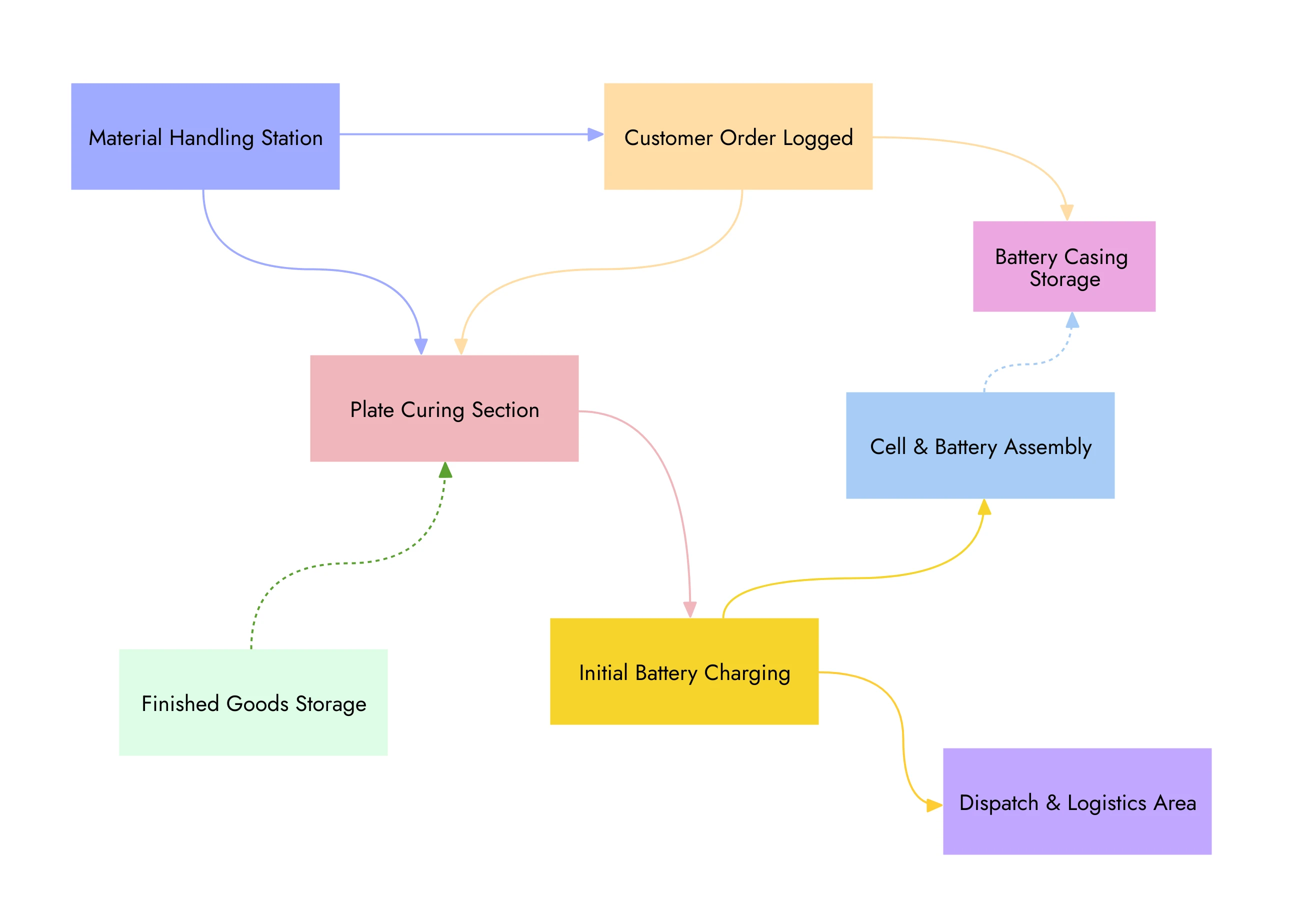
A car battery manufacturing unit spaghetti diagram
Example 2: Office or Service Workflow
Spaghetti diagrams are equally effective in offices, healthcare settings, and service environments, where inefficiency often hides behind digital systems and paperwork. In these cases, the diagram tracks how employees, documents, or customers move through a space.
For example, mapping how a form moves between desks or how staff move between departments can reveal unnecessary approvals, poorly placed resources, or layout-driven delays. In healthcare, it may expose excessive walking between patient rooms, supply stations, and workstations.
By visualizing these movement patterns, teams can reduce handoffs, reposition shared resources, and simplify service workflows. Even small layout or routing changes often lead to noticeable improvements in speed and consistency.
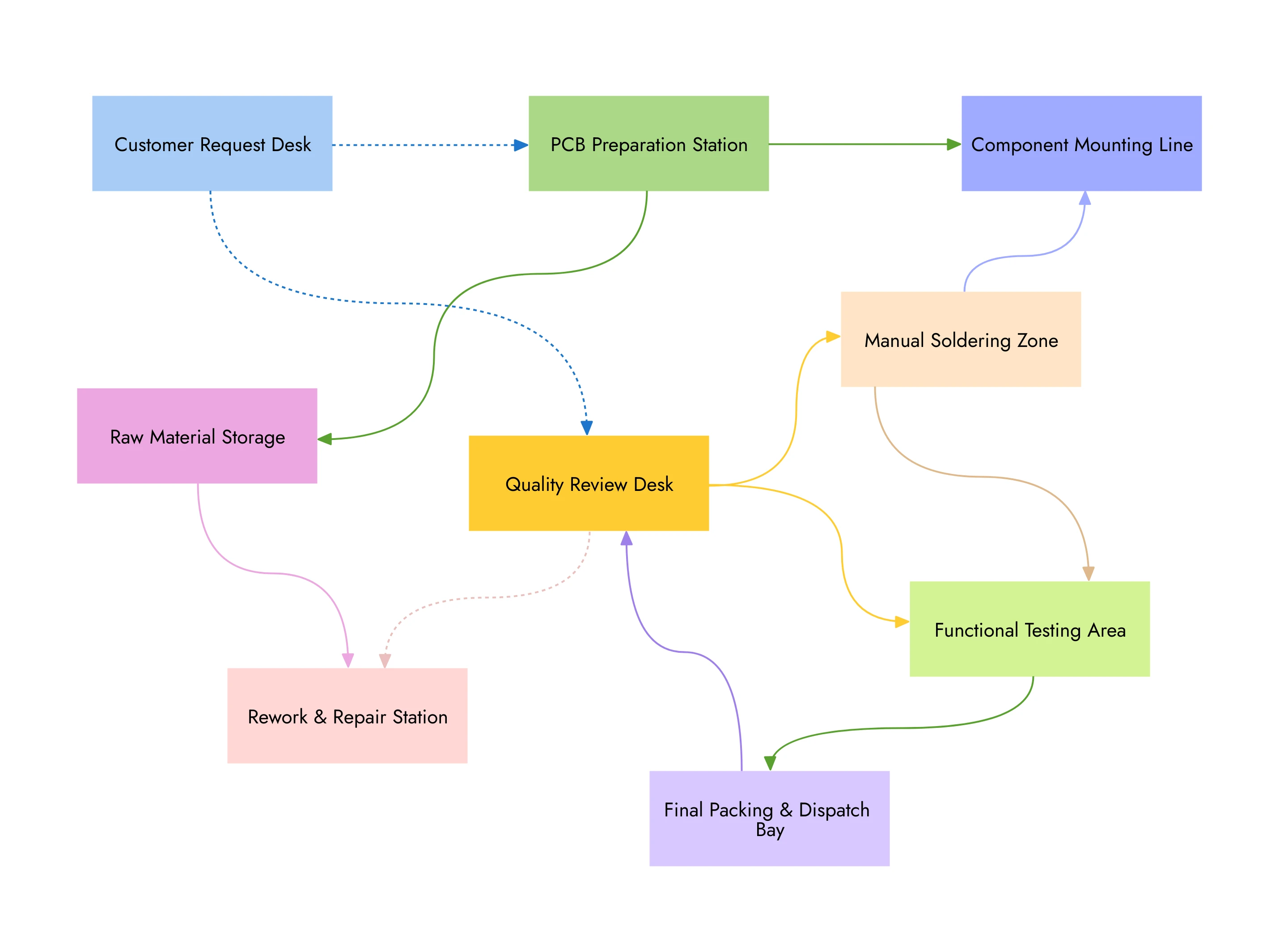
An electronics assembly plant workflow spaghetti diagram
How to Create a Spaghetti Diagram
Creating a spaghetti diagram is a practical, observation-led exercise. The goal is not to design a perfect process on paper, but to document how work actually moves today. The steps below walk through how teams capture real movement, interpret what they see, and turn those insights into meaningful layout or workflow improvements.
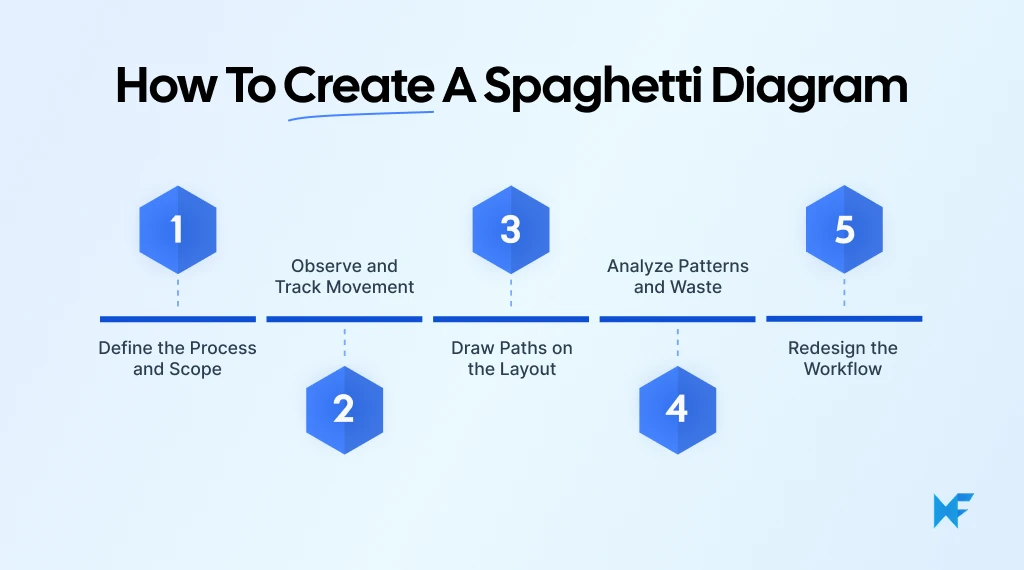
Step 1: Define the Process and Scope
Start by clearly defining what you are mapping. A spaghetti diagram works best when the scope is narrow and focused. Trying to track everything at once often leads to clutter without insight.
Be explicit about:
- Who or what you are tracking, such as a specific role, material, or document
- Where the process begins and ends, so movement has clear boundaries
- When observation will happen, ideally during normal operating conditions
This clarity ensures the diagram reflects meaningful movement patterns rather than noise.
Step 2: Observe and Track Movement
Next, observe real activity as it happens. This step relies on watching actual behavior, not asking people to describe what they usually do.
During observation:
- Track movement continuously, without skipping steps
- Note repeated trips, pauses, or detours
- Avoid correcting or influencing how work is done
The accuracy of this step directly affects the value of the diagram. What you capture here becomes the foundation for every improvement decision that follows.
Step 3: Draw Paths on the Layout
Once movement is observed, draw each path directly onto the layout. Lines should follow the exact routes taken, even if they look inefficient or chaotic.
At this stage:
- Use a single color per role or item to maintain clarity
- Mark start and end points clearly
- Allow paths to overlap naturally
The resulting “spaghetti” effect is intentional. It visually communicates how movement actually behaves within the space.
Step 4: Analyze Patterns and Waste
With the diagram complete, step back and look for patterns rather than individual lines. Focus on where complexity concentrates.
Common signals include:
- Dense clusters of overlapping paths
- Long routes for simple tasks
- Frequent backtracking or loops
- Areas where multiple paths intersect
These patterns indicate motion waste, layout friction, or poorly sequenced tasks that deserve attention.
Step 5: Redesign the Workflow
Finally, use the insights to redesign the layout or workflow. This may involve moving equipment, repositioning shared resources, or changing task order.
Effective redesign focuses on:
- Reducing total travel distance
- Minimizing backtracking
- Simplifying handoffs
- Improving flow between related tasks
After changes are made, teams often create a future-state spaghetti diagram to confirm whether movement has actually improved.
When creating a context diagram, most teams realize they do not want to start from a blank layout every time, which is why templates play an important role.
Spaghetti Diagram Templates
Spaghetti chart templates reduce setup time and keep the focus on observation and analysis. Instead of creating layouts from scratch, teams start with a ready structure and map real movement directly on top of it.
Most templates provide a basic layout framework that represents a physical space such as a factory floor, office area, or service environment. Teams adapt the layout to match reality and then trace actual movement paths as they observe work.
A practical spaghetti diagram template usually includes:
- Pre-defined layout grids or zones to help scale movement accurately
- Clear space for drawing paths without visual clutter
- Simple legends or color cues to distinguish roles, materials, or document flow
- Reusable structure for comparing current-state and future-state layouts
Templates also help maintain consistency. When teams use the same format across audits or improvement cycles, it becomes easier to compare findings and track progress over time.
If you want a ready starting point, IdeaBoard offers pre-built templates that can be quickly adapted for spaghetti diagrams. For example, this network troubleshooting workflow spaghetti diagram template can be duplicated and customized to map movement in your own workflow.
Templates do not replace observation. They simply remove setup friction so teams can move faster from insight to improvement.
How IdeaBoard Helps Create Efficient Spaghetti Diagrams
Creating a spaghetti diagram works best when teams can observe, draw, revise, and discuss movement patterns without friction. This is where MockFlow's IdeaBoard fits naturally into the process. It provides just enough structure to support diagramming, without forcing teams into rigid formats.
- One of the biggest advantages is flexible diagramming. Teams can freely draw paths, arrows, and connectors on top of a layout, which is essential for spaghetti diagrams where lines overlap, loop, and cross naturally.
- The infinite canvas removes space limitations. Whether you are mapping a small office area or a complex operational layout, paths can expand without forcing compression or simplification.
- IdeaBoard’s AI tools can generate basic layouts or flow structures from text prompts. This can speed up setup before refining paths manually.
- IdeaBoard includes spaghetti diagram templates that teams can import and customize as a starting point. This removes setup effort and provides a clean structure for mapping current-state and future-state movement.
- IdeaBoard also supports real-time visual collaboration. Multiple team members can work on the same diagram simultaneously, add voice/video comments, and discuss problem areas directly on the board. This is especially useful during audits, lean workshops, or cross-functional reviews where alignment matters.
- Finished diagrams can be exported as images, making it easy to share findings in reports, presentations, or improvement reviews.
Overall, MockFlow supports the way teams already work: observe reality, visualize movement clearly, and iterate until the flow improves.
Conclusion
Spaghetti diagrams work because they show what usually stays hidden. By tracing real movement instead of ideal workflows, they make inefficiencies visible and easier to fix. Whether you are analyzing a factory floor, an office layout, or a service process, the value comes from observing reality and acting on what the diagram reveals.
The key is consistency. Use the same approach to capture current-state movement, test improvements, and compare results over time. Tools that support quick setup, free-form drawing, and remote collaboration make this process far more effective.
If you are looking to map movement without friction, MockFlow's IdeaBoard provides a practical way to create, review, and refine spaghetti diagrams with your team. Try IdeaBoard for free and build your first spaghetti diagram with your team.
FAQs about spaghetti diagram
1. What is a spaghetti diagram in lean manufacturing?
A spaghetti diagram is a visual map that traces the actual movement of people, materials, or information across a workspace. In lean manufacturing, it helps teams see inefficient flow, excessive travel, and poor layout decisions by drawing movement paths over a floor plan.
2. How does a spaghetti diagram help identify process inefficiencies?
A spaghetti diagram highlights inefficiencies by making movement visible. Overlapping lines, backtracking, long travel distances, and repeated paths reveal wasted motion, bottlenecks, and layout problems that are difficult to spot in traditional process maps.
3. When should I use a spaghetti diagram vs a flowchart?
Use a spaghetti diagram when physical movement and layout efficiency matter. Use a flowchart when documenting task sequences or decision logic. Spaghetti diagrams focus on where movement happens, while flowcharts focus on what steps occur.
4. How do I create a spaghetti diagram step by step?
Start by defining the process and scope. Observe real movement during normal operations. Draw actual paths on a layout or floor plan. Analyze overlapping routes and travel distance. Redesign the layout or workflow to reduce unnecessary movement. Use tools like IdeaBoard for better diagramming.
5. Can spaghetti diagrams be used outside manufacturing?
Yes. Teams use spaghetti diagrams in offices, healthcare, warehouses, and service environments. Common use cases include tracking staff movement, document flow, patient pathways, and customer interactions to improve operational efficiency.
6. What are the limitations of a spaghetti diagram?
A spaghetti diagram shows movement patterns but does not measure time, cost, or workload. The accuracy depends on real observation. It works best as a diagnostic tool and should be paired with redesign and validation steps for improvement.

Design Collaboration: How Teams Work Better From Idea to Handoff
Introduction Design rarely moves forward because one person has the perfect idea. It moves forward when the right people...

What is a Swimlane Diagram? Definition, Examples, & When to Use It
Introduction Have you ever sat in a meeting where everyone agrees the process is “clear,” but somehow work still gets stuck?...

How to Run a Sailboat Retrospective Step by Step (With Template)
Retrospectives can start to feel predictable after a while. We ask similar questions, collect familiar feedback, and sometimes...
