5 Storyboard Examples for Film, UX, Animation, and Marketing Teams
TL;DR Storyboard examples show how an idea moves panel by panel before production or execution begins. This guide covers examples for film, animation, UX, marketing, and lessons, then explains what makes each format useful and how to create your own storyboard in five simple steps. |
Whether you are planning a scene, user journey, video, campaign, or classroom lesson, a storyboard gives the work a clear visual path before time and budget go into execution.
That is why creative teams often look at examples first. Storyboard examples show how an idea can be structured panel by panel, so you can understand the sequence before sketching your own.
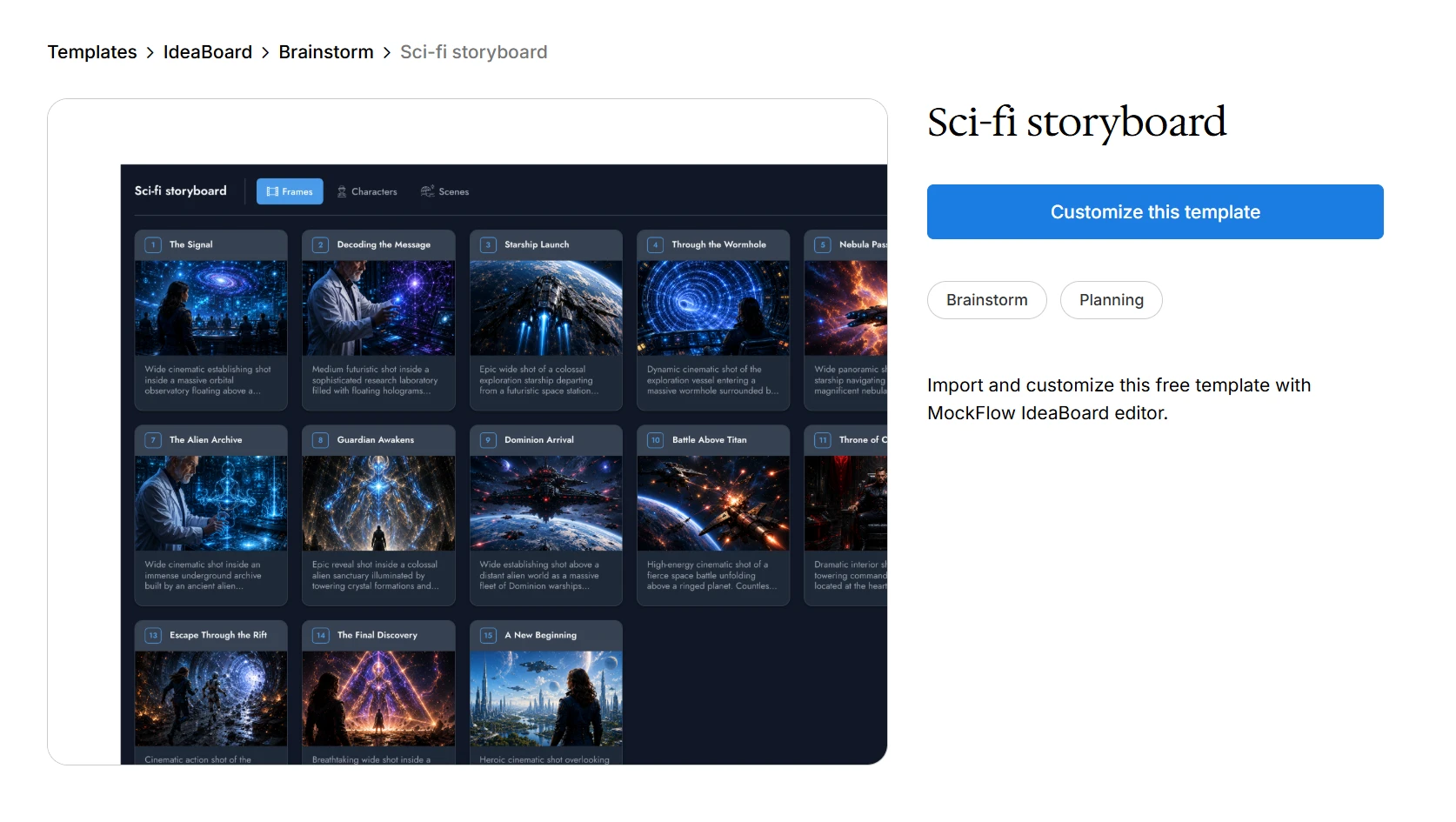
In this guide, we'll look at storyboard examples across film, animation, UX, and marketing, and explain how you can create one in 5 easy steps. You'll also find multiple IdeaBoard templates to get started quickly, like this Sci-fi storyboard example below that can be easily customized:
What are storyboard examples?
Storyboard examples are visual references that show how a story, scene, user journey, video, lesson, or campaign can be planned panel by panel. They help us understand how frames, camera angles, dialogue, motion, and sequence work together before the final production or design begins.
A good storyboard example acts as a visual blueprint that turns an idea into a clear, reviewable flow.
Storyboard Type | Best Used For | What It Shows |
Film storyboard | Scene planning and pre-production | Shots, camera angles, action, dialogue |
Movie storyboard | Larger cinematic sequences | Scene flow, dramatic beats, camera direction |
Animation storyboard | Animated stories and motion planning | Character action, timing, transitions |
UX storyboard | Product and user journey planning | User context, pain points, interactions |
Marketing storyboard | Campaign and ad planning | Message flow, audience emotion, CTA |
The right storyboard example depends on what you are planning. A filmmaker may need camera direction, shot sequence, and action notes, whereas a UX designer may need user context, emotional friction, and product interactions.
For teams that want to move from reference to creation faster, an AI-assisted storyboard workflow can help turn a rough prompt into a structured visual sequence.
What makes a good storyboard example?
A good storyboard example makes the idea easy to understand at a glance. It shows the sequence clearly enough for collaborators to see what happens, why it happens, and what needs to be created next.
Canva’s 2024 Visual Economy Report found that 77% of global business leaders say visual communication has improved business performance, which is exactly why storyboard panels and frames should make ideas easier to review before work begins.
Here are the core elements that make a storyboard easy to understand and useful in review:
- Clear panel sequence: Each frame should move the story, scene, user action, or campaign message forward.
- Strong visual storytelling: The visuals should show the core action without depending too much on long notes.
- Useful notes: Add short notes for camera angles, action, dialogue, narration, timing, or interaction behavior.
- Context: The storyboard should match the audience. A film storyboard needs scene direction, while a UX storyboard needs user motivation and pain points.
- Readable layout: The frame layout should follow a logical flow, so stakeholders can quickly read the storyboard panels and frames.
- Purpose over polish: Rough sketches, wireframes, icons, or screenshots can work if the storyboard communicates the intent and narrative structure clearly.
Once these basics are in place, the format can change based on the project. A film team, UX team, animation team, and marketing team may all use storyboards differently, but the goal stays the same: make the idea easier to review before anyone starts building it.
Storyboard examples for different creative projects
The best storyboard examples show how a specific kind of project should be planned.
Where a film scene needs to prioritize shot direction, a marketing video would focus more on message flow. So instead of copying one format for every project, you can customize the example to match your project needs.
1. Film storyboards
Film storyboards help directors, cinematographers, editors, and production teams plan a scene before filming starts. They are useful in film pre-production because they turn the script into a visible shot sequence, helping the team align on framing, action, movement, and transitions. A good film storyboard should include:
- Shot-by-shot scene flow
- Camera angle or shot size
- Character position and movement
- Action notes
- Dialogue or sound cues
- Scene transitions
What to notice in a film storyboard example is how each panel supports the next shot. The drawings can be simple, but the frame layout should make the camera direction, character movement, and scene rhythm easy to follow.
For example, a suspense scene storyboard could include six panels:
- A wide shot of an empty hallway
- A close-up of a hand turning a doorknob
- An over-the-shoulder shot of the character entering
- A shadow crossing the wall
- A reaction close-up
- A final cut to black
This kind of storyboard example helps the team understand tension, pacing, and visual focus before anyone arrives on set.
Filmmakers and videographers often talk about storyboards this way in practice. They point out that a detailed script and storyboard can act as a fallback when the shoot gets chaotic, helping the crew remember important shots and stay aligned under pressure.
Teams can customize and get started with this film storyboard template without creating one from scratch:
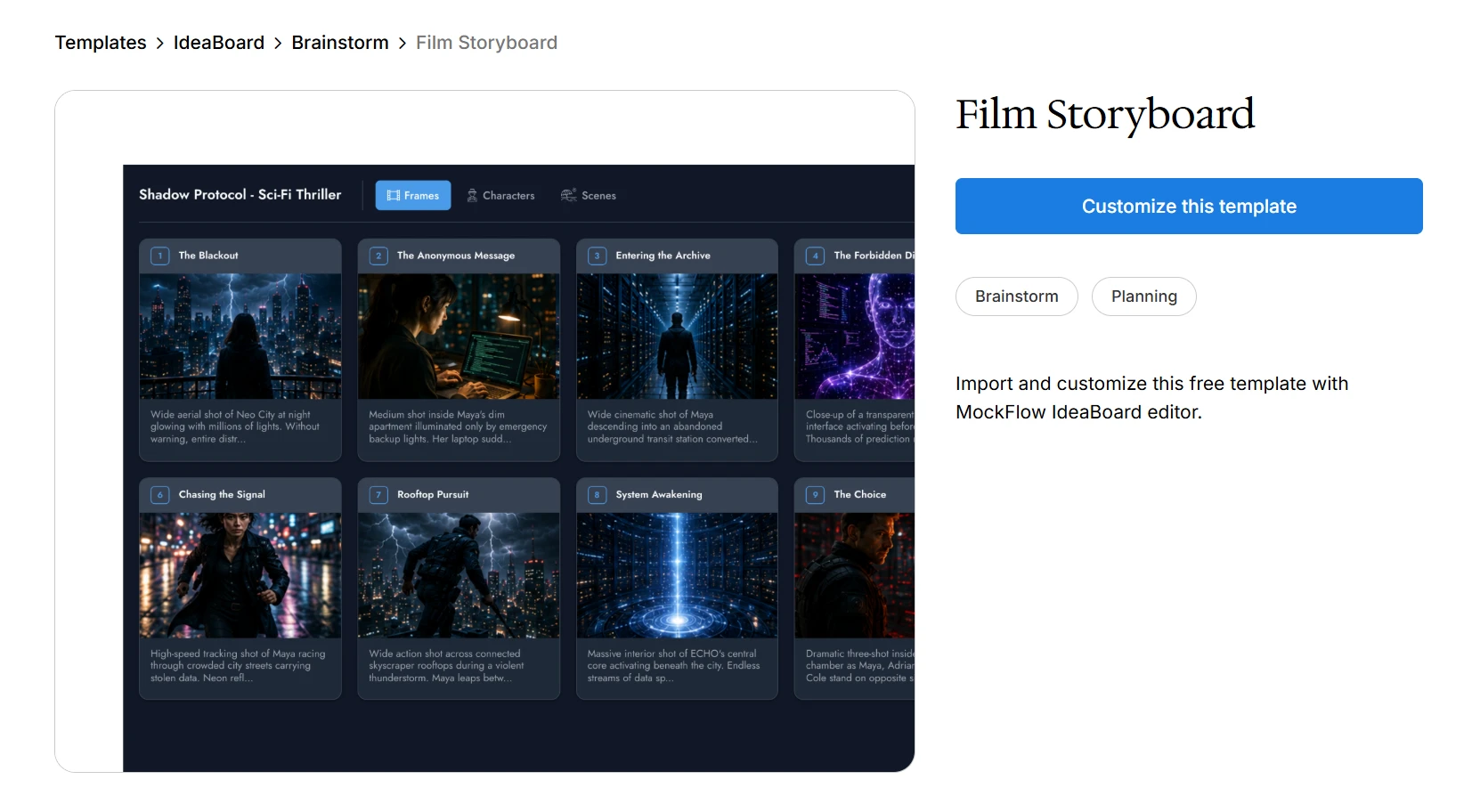
Customize this film storyboard template without starting from scratch
2. Movie storyboards
Movie storyboards are often used for larger cinematic sequences. These may involve action, emotional shifts, special effects, fast cuts, or scenes where visual continuity matters. While film storyboards can cover any scene, movie storyboard examples usually show how a bigger sequence is structured before production begins.
When reviewing movie storyboard examples, look for:
- Scene pacing
- Dramatic beats
- Camera movement
- Visual continuity
- Character reactions
- Transition from one shot to another
For example, IdeaBoard’s Chase Sequence Storyboard shows the subject entering the frame, the pursuer appearing behind them, a cutaway to an obstacle, a low-angle running shot, a close-up reaction, and a wide shot showing the escape or collision.
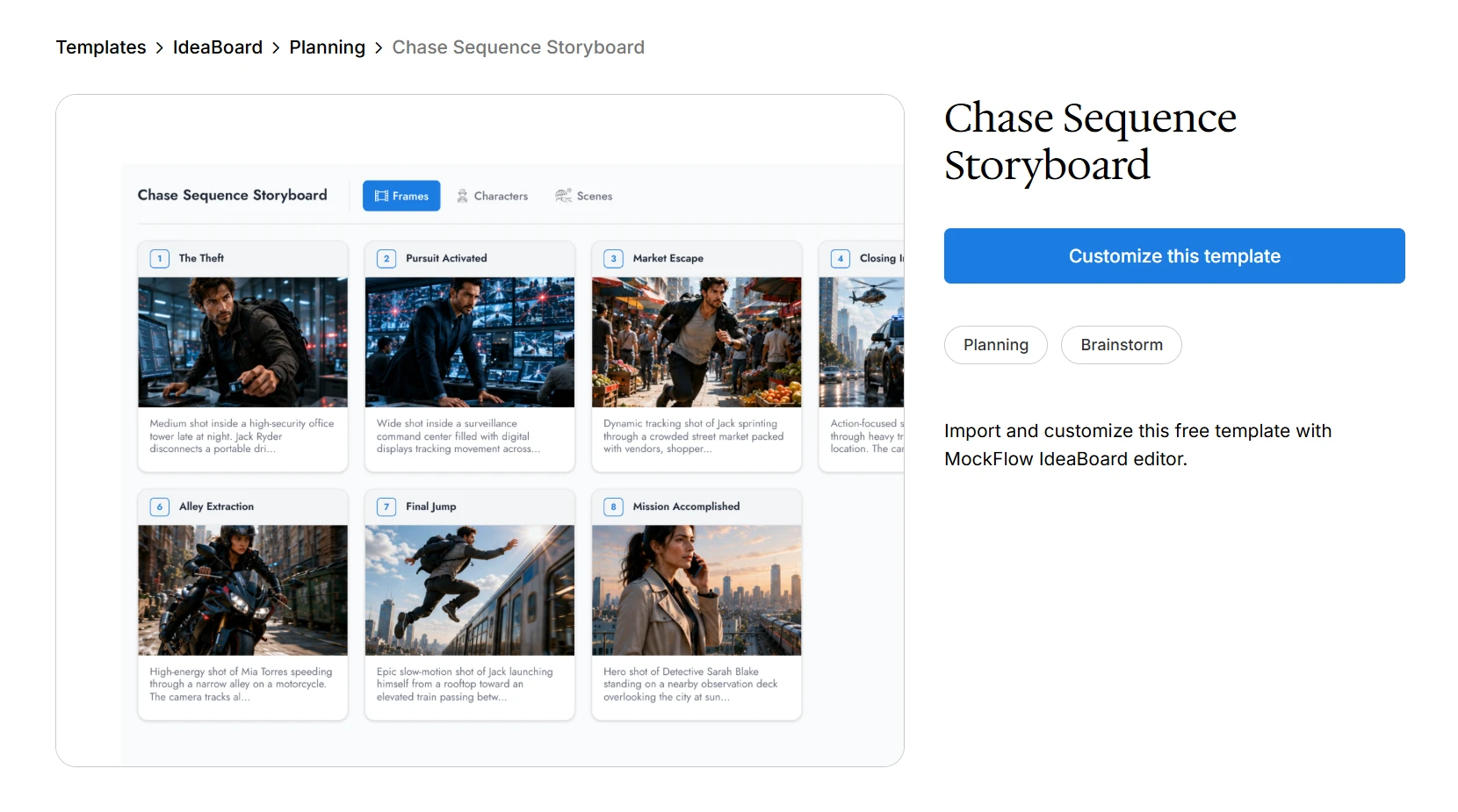
Customize this chase sequence storyboard template without starting from scratch
This format works well when the team needs to understand how tension builds across multiple shots. It also helps editors and production teams see where the sequence needs coverage, where the emotional beat lands, and where movement should carry the viewer’s attention.
3. Animation storyboards
Animation storyboards help plan character motion, timing, expressions, scene transitions, and visual rhythm before animation begins. Since animation depends heavily on movement and timing, these storyboards often become the foundation for an animatic later in the workflow.
An animation storyboard should include:
- Character action and expression
- Scene-to-scene progression
- Timing or beat notes
- Motion arrows
- Dialogue or sound cues
- Environment or background notes
What makes animation storyboard examples useful is the way they show change between frames. A small shift in posture, expression, or direction can explain the action more clearly than a long note.
For game scenes, animation concepts, or student projects, IdeaBoard’s Game Design Storyboard gives you a ready structure for mapping scenes visually. You can use it to place each beat in order, add notes for movement or timing, and keep character actions connected to the larger scene flow.
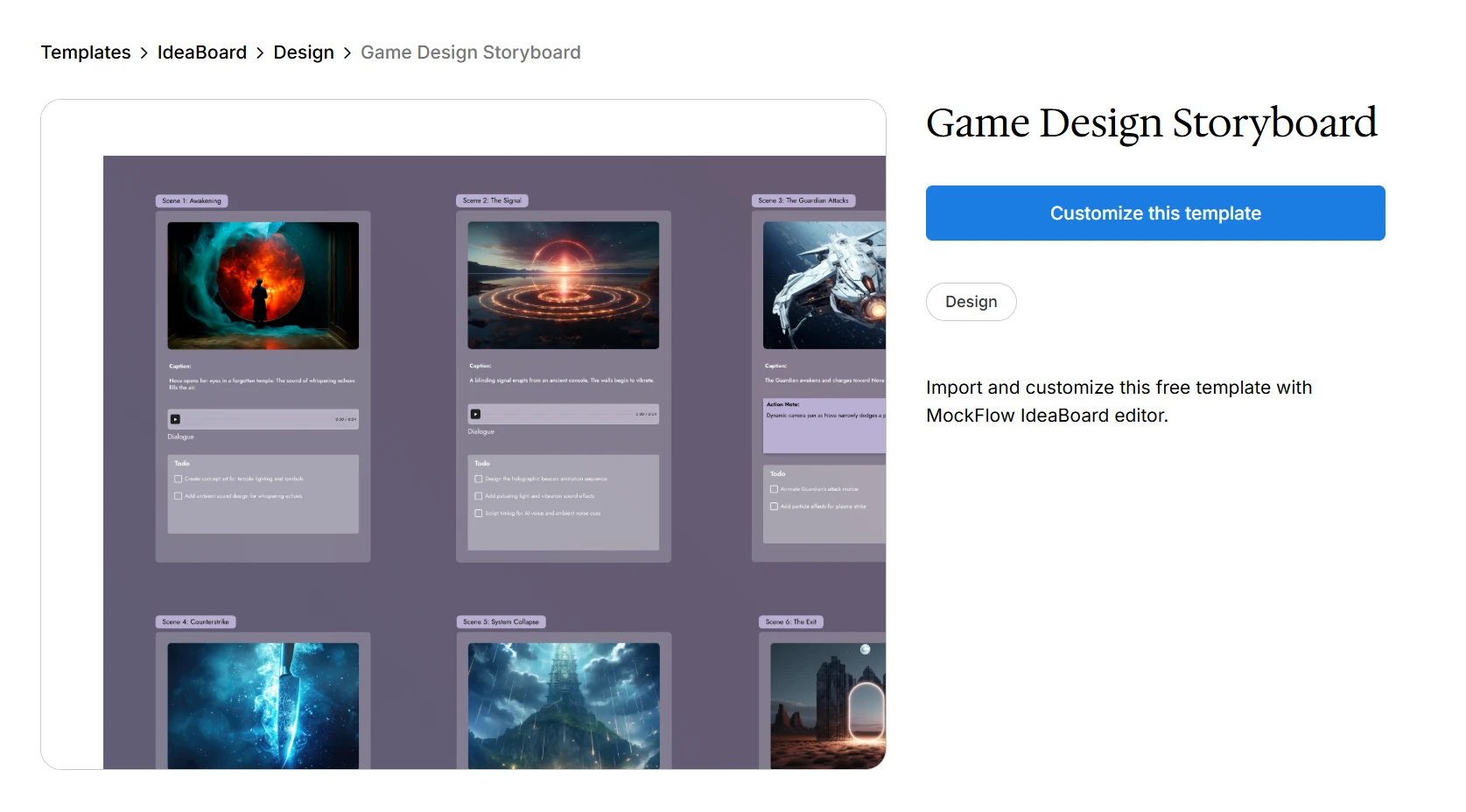
Try the Game Design Storyboard template for animating visual scenes.
4. UX storyboards
UX storyboards show how a user experiences a problem, interacts with a product, and reaches an outcome. They focus on user context, motivation, friction, behavior, and emotional state. A UX storyboard should include:
- User persona or context
- Trigger or problem
- User action
- Pain point or friction
- Product interaction
- Desired outcome
- Emotional state where relevant
What to notice in UX storyboard examples is the link between the user’s situation and the product response. The storyboard should make it easy to see what the user is trying to do, where they get stuck, and how the experience can be improved.
For example, a food delivery UX storyboard could show a hungry user discovering the app, searching nearby restaurants, filtering options, facing checkout confusion, receiving delivery updates, and completing the order. This type of storyboard helps product teams stay grounded in real user behavior before discussing screens or features.
5. Marketing storyboards
Marketing storyboards help teams plan ads, campaign videos, product launch videos, social media reels, explainer videos, and pitch narratives. The goal is to clarify the message before production begins. A marketing storyboard should include:
- Audience pain point
- Opening hook
- Product or offer reveal
- Key benefit
- Proof or emotional payoff
- CTA
- Channel-specific notes, such as reel, ad, landing page video, or pitch deck
In marketing storyboard examples, notice how the message moves from problem to action. In fact, Wyzowl’s State of Video Marketing 2026 report found that 93% of video marketers say video has helped increase user understanding of their product or service, and that clarity often starts with the storyboard.
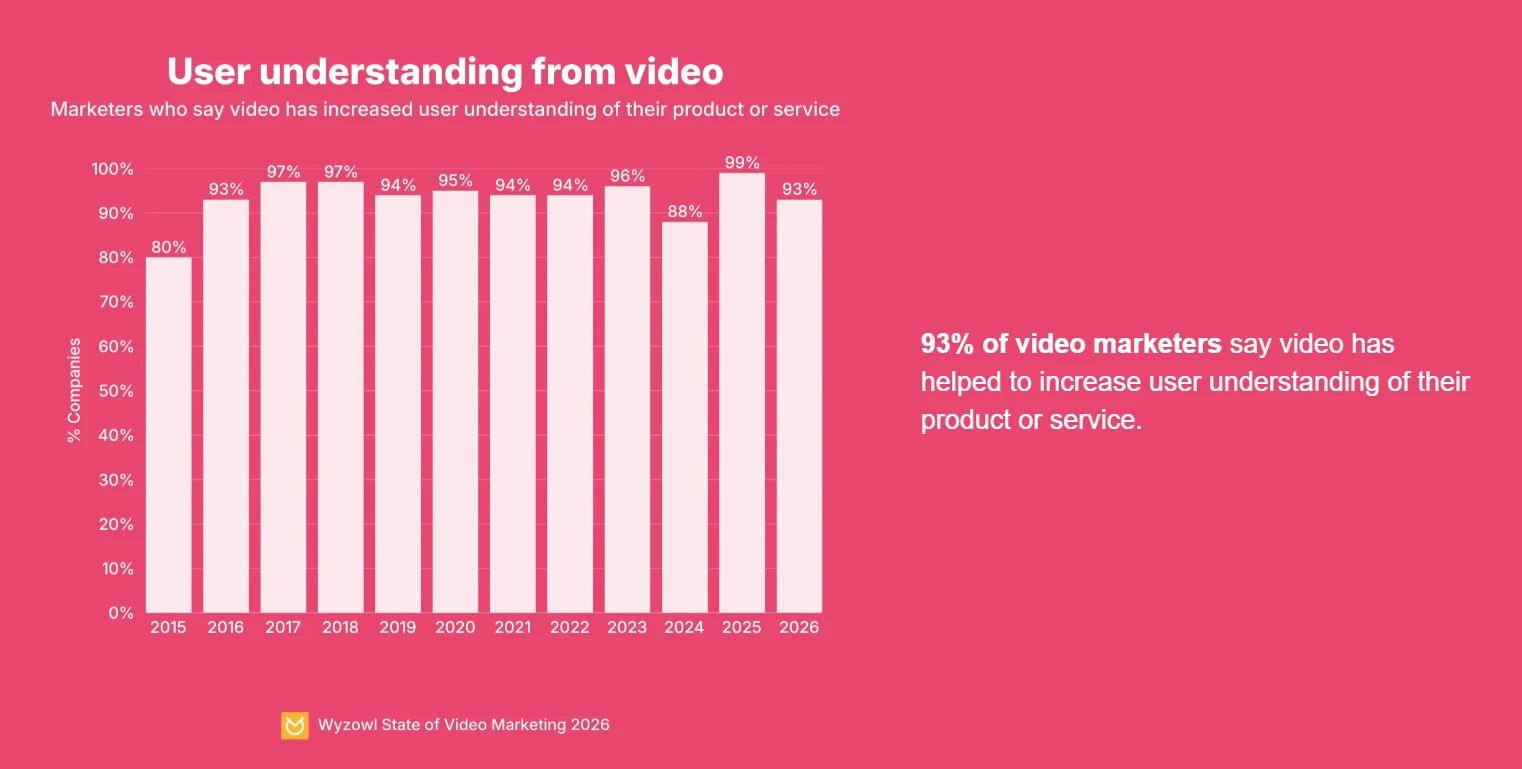
Image Source: Wyzowl State of Video Marketing 2026
For example, a product launch video could show the customer struggling with a problem, trying a poor workaround, discovering the product, seeing the feature in action, understanding the benefit, and clicking the final CTA.
For agency teams handling multiple campaign concepts, IdeaBoard’s agency-focused workflows can help keep ideas, storyboards, and feedback easier to organize.
Once you find a storyboard example that matches your project, the next step is to adapt its structure to your own idea. That starts with breaking the story, scene, journey, or campaign into clear moments you can turn into panels.
How to create a storyboard from an example?
A storyboard example gives you a useful starting point, but the goal is to adapt the structure to your own project. Use the example to understand the flow, then rebuild it around your story, user journey, campaign, or scene.
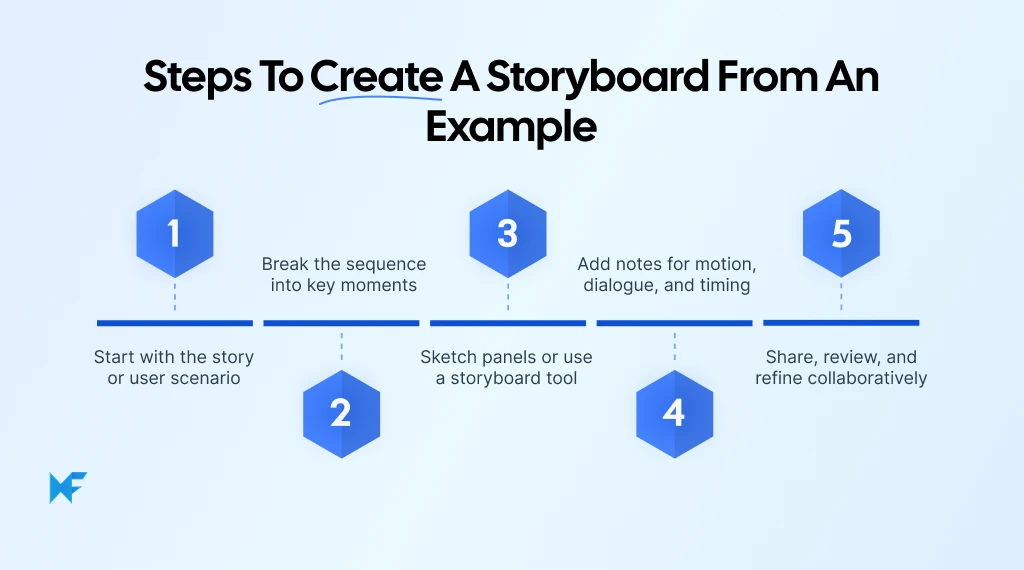
Step 1: Start with the story or user scenario
Before you follow the structure of a storyboard example, define what you are trying to communicate. This could be a film scene, product journey, marketing campaign, animation sequence, lesson, or user flow.
Write one simple sentence that captures the idea:
- “A customer discovers and signs up for our product.”
- “A character escapes a locked room.”
- “A user completes onboarding in a mobile app.”
- “A product launch video explains the main benefit in 30 seconds.”
This sentence keeps the storyboard focused and helps you decide which moments belong in the sequence and which details can be left out.
Step 2: Break the sequence into key moments
The easiest way to create a storyboard from an example is to identify the major beats first, because these beats become your panels. Here’s how you can approach it:
- For film and animation, the beats may include setup, action, reaction, conflict, and transition.
- For UX, they may include trigger, user action, friction, interaction, and outcome.
- For marketing, they may include hook, problem, solution, benefit, proof, and CTA.
At this stage, keep the sequence simple, because you are deciding what the viewer, user, or audience needs to understand from one moment to the next.
Step 3: Sketch panels or use a storyboard tool
Once the key moments are clear, turn them into panels. You can sketch them by hand, use a template, or work in a visual planning tool. The aim of creating panels is to make the sequence understandable, not to create polished illustrations.
Each panel should represent one clear moment, so you can add rough sketches, simple shapes, screenshots, icons, or placeholder visuals. What matters is that collaborators can follow the flow without needing a long explanation.
This is a common concern for creators who do not see themselves as strong illustrators. Filmmakers emphasise that storyboards do not need polished art to be useful; rough sketches or stick figures can work as long as the people reviewing the storyboard can understand the shot, action, and sequence.
Step 4: Add notes for motion, dialogue, and timing
Notes help explain anything the drawing does not fully communicate. They are especially useful when a panel needs movement, sound, timing, interaction behavior, or production direction. Depending on the storyboard type, notes may include:
- Camera angle
- Shot size
- Character action
- Dialogue
- Voiceover
- Sound effect
- Timing
- Transition
- UI interaction
- CTA
Keep the notes short and practical so every panel can answer one simple question: “What happens here?”
Step 5: Share, review, and refine collaboratively
Storyboards are most useful when they are reviewed before production, design, or campaign execution begins. Share the storyboard with collaborators, clients, stakeholders, or classmates so they can spot gaps early.
During review, look for unclear moments, missing transitions, weak pacing, or panels that do not move the sequence forward. A strong review process helps teams fix the idea before they invest time in filming, designing, animating, or building campaign assets.
IdeaBoard supports this kind of collaborative workflow through shared visual spaces and feedback features. It allows teams to collaborate remotely and leave voice or video comments to make storyboard feedback easier to capture and act on.
How IdeaBoard helps create storyboards faster
Once you have reviewed a few storyboard examples, the next step is turning your own idea into a clear visual sequence.
IdeaBoard gives teams a flexible workspace to plan, organize, and refine storyboards without keeping scripts, sketches, references, and feedback in separate places.
Teams can turn a rough prompt into a structured visual sequence with AI-assisted creation support. This helps when you have the core idea but need support shaping it into scenes, steps, or story beats.
IdeaBoard also includes features that make the storyboarding process smoother once the first version is ready to build, review, and refine:
- Create visual sequences on a flexible canvas: Arrange storyboard panels, notes, references, screenshots, and supporting visuals in one workspace. This makes it easier to see how the sequence moves from one moment to the next.
- Use the Storyboard component: IdeaBoard’s storyboard component supports narratives, scenes, product journeys, campaign concepts, and other visual planning workflows. It gives teams a structured panel format instead of starting from a blank canvas.
- Organize storyboards by use case: Film and movie teams can map scenes and shot flow. UX and animation teams can map user journeys, motion, and interaction points. Marketing teams can map campaign narratives, message flow, and CTAs.
- Use templates: IdeaBoard offers a variety of templates to help teams start with ready-made structures for planning scenes, journeys, campaigns, and visual workflows.
- Collaborate in real time: Storyboards become more useful when teams can review them early. IdeaBoard supports shared visual spaces where teams can comment, discuss, and refine storyboard flows together.
- Use prompt libraries: You can also use the AI prompt library for a faster way to generate storyboard directions, explore variations, and shape rough ideas into clearer sequences.
When you already know what kind of storyboard you need, IdeaBoard helps you move from reference to working draft with less friction. The result is a storyboard your team can see, discuss, improve, and confidently use as the plan for what comes next.
Conclusion
A good storyboard helps you spot what is unclear before the work becomes expensive to fix.
Your next step is to choose the storyboard example closest to your project, then adapt its structure to your own scene, user journey, animation, or campaign.
IdeaBoard can make that process faster by giving your team one place to create panels, arrange references, add notes, use AI for a first draft, and review the flow together. Instead of managing storyboards across sketches, documents, and feedback threads, you can keep the whole visual plan in one workspace.
Sign up for a free IdeaBoard demo to see how it can fit into your team’s storyboarding process, from early examples and rough prompts to shared visual plans your team can review and refine together.
FAQs
1. What are storyboard examples?
Storyboard examples are sample visual plans that show how scenes, actions, or user steps are arranged in sequence. They usually include panels, short notes, dialogue, scene descriptions, camera directions, or transitions to help creators understand how a story or idea will flow.
2. What does a good storyboard example look like?
A good storyboard example clearly shows the order of events, what happens in each panel, and how one scene connects to the next. It does not need polished artwork, but it should include enough visual and written detail to make the sequence easy to understand.
3. How can I use AI to create storyboard examples?
You can use AI to create storyboard examples by starting with a short prompt, script, scene idea, or campaign concept. IdeaBoard’s AI-assisted storyboard creation feature can help generate a first draft, which teams can then edit, arrange into panels, add notes, and refine collaboratively.
4. What are storyboard examples for video projects?
Storyboard examples for video projects show how each shot or scene will appear before filming begins. They may include camera angles, dialogue, action notes, transitions, and timing cues so teams can plan the video more clearly and avoid confusion during production.
5. How do storyboard examples help in UX design?
In UX design, storyboard examples help show how a user moves through a situation, problem, task, or product experience. They make user journeys easier to understand by showing context, user actions, emotions, pain points, and outcomes in a visual sequence.
6. How can I create a storyboard from an example?
To create a storyboard from an example, study its panel structure, then adapt the sequence to your own idea. Start with the main goal, break the story into key moments, add simple visuals, write short notes, and review the flow before refining it.

What are Spider Diagrams? Examples, Templates, & How to Create One
Introduction We have all been there. A brainstorming session starts strong, ideas are presented, notes pile up, and then...
Round Robin Brainstorming: Steps, Benefits, and Use Cases
Introduction Brainstorming sessions that don't lead to clear, actionable ideas typically have a structure problem, not a lack of...

Wireframing Process: A 5-Stage Practical Workflow for Product Teams
A wireframe can either save a project weeks of rework or create the confusion that causes it. The outcome usually comes down to...
