
What are Spider Diagrams? Examples, Templates, & How to Create One
Introduction
We have all been there. A brainstorming session starts strong, ideas are presented, notes pile up, and then suddenly, everything feels messier than when we began. The problem is rarely a lack of ideas. It is the lack of structure while those ideas are still forming.
This is where visual thinking works. The moment we move past bullet points to place a central idea on a canvas and let related thoughts branch out, patterns start to appear. Priorities become clearer. Gaps become obvious. That is exactly what a spider diagram helps us do.
A spider diagram is not about making things look neat for the sake of it. It is about thinking out loud, visually. By mapping a central topic with connected nodes around it, we can explore ideas freely without losing context.
In this guide, we break down what a spider diagram is, when it works best, and how to create one effectively. We will also walk through practical examples and templates you can reuse, including how tools like MockFlow IdeaBoard make spider diagramming faster and more collaborative.
What Is a Spider Diagram?
A spider diagram is a visual thinking tool that organizes ideas around a central topic using connected nodes. The main idea sits at the center, while branches expand outward to show related concepts and relationships. This radial structure supports brainstorming, planning, and idea mapping.
A spider diagram simplifies complex information, improves visual organization, and encourages non-linear thinking. Teams, educators, and creators use spider diagrams to explore ideas clearly and structure thoughts before formal analysis or documentation.
You may also see spider diagrams referred to as a spider web diagram, especially in educational and brainstorming diagram contexts. While they are often grouped alongside mind maps and concept maps, spider diagrams are typically more open-ended. They focus less on predefined logic and more on free-flowing idea mapping, which makes them especially effective during early-stage thinking.
At its core, a spider diagram helps us externalize complex thinking. By placing ideas into a shared visual space, it becomes easier to spot overlaps, missing connections, and opportunities to refine or regroup concepts before moving into structured execution.
Benefits of Using Spider Diagrams
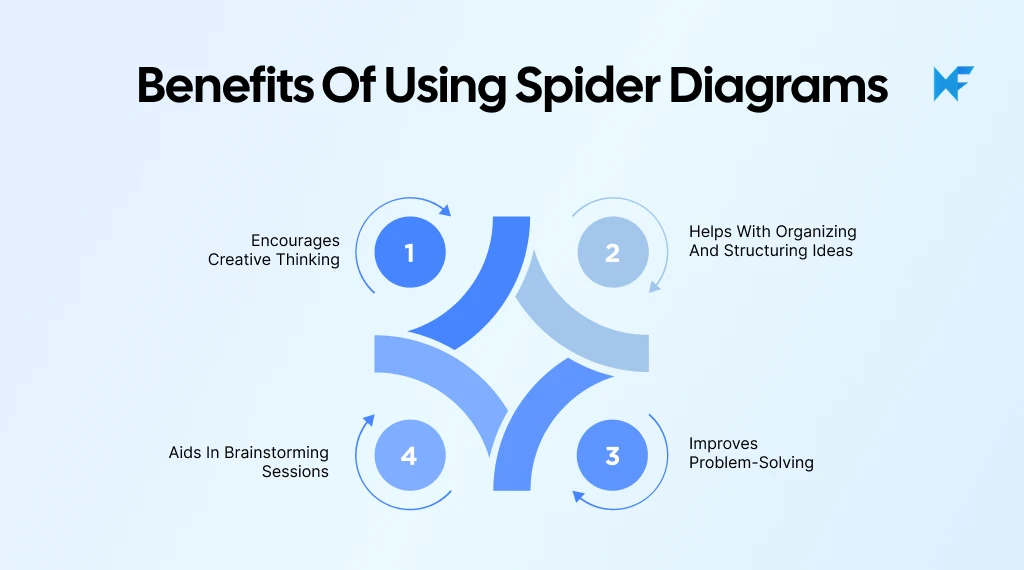
Spider diagrams are more than just a way to make ideas look organized. They support how we naturally think, especially when we are dealing with open-ended problems or early-stage ideas. By placing a central topic at the core and letting related thoughts branch out, spider diagrams help us explore ideas without losing context.
Here are the key benefits that make them such an effective visual thinking tool.
1. Encourages Creative Thinking
Spider diagrams create space for ideas to grow freely. Instead of forcing thoughts into predefined categories, the open, radial structure allows us to add connections as they emerge. This encourages lateral thinking and helps surface ideas that may not appear in linear notes or lists. Because everything stays visually connected to the central topic, creativity feels guided rather than chaotic.
2. Helps with Organizing and Structuring Ideas
As ideas expand, spider diagrams naturally bring order to complexity. Connected nodes make it easy to group related thoughts, identify overlaps, and spot gaps in reasoning. This makes the diagram structure especially useful when ideas feel scattered or overwhelming, turning raw inputs into a clearer, more structured view.
3. Improves Problem-Solving
Breaking a problem into smaller, connected parts makes it easier to understand and solve. Spider diagrams help visualize different dimensions of a problem at once, which supports better analysis and more balanced decision-making.
This aligns with findings from a 2024 meta-analysis published on ScienceDirect, which showed that visualization-based learning interventions produced a medium positive effect on learning outcomes (Hedges’ g = 0.504), reinforcing the value of external visual structures when working through complex problems.
Seeing relationships side by side often reveals root causes or dependencies that are easy to miss in text-heavy formats.
4. Aids in Brainstorming Sessions
In collaborative settings, spider diagrams keep brainstorming focused without limiting participation. Everyone can contribute ideas around the same central topic, while the visual layout prevents duplication and confusion. This shared visual organizer helps teams stay aligned and build on each other’s thinking more effectively.
This growing emphasis on visual and creative workflows reflects broader workplace trends. According to Microsoft’s 2024 Work Trend Index, 84% of global knowledge workers say AI tools help them be more creative, signaling strong demand for structured ideation methods that support brainstorming and collaboration.
And this collaborative approach is also backed by research. A 2025 meta-analysis published by Springer found that collaborative concept mapping produced stronger learning effects (g = 1.543) compared to individual mapping, suggesting that shared visual thinking leads to deeper understanding and better outcomes.
When to Use a Spider Diagram
A spider diagram works best when ideas are still fluid and need room to expand without losing their connection to a central theme. Here are the most common and effective situations where a spider diagram adds real value.
1. Brainstorming
During brainstorming, speed and freedom matter more than perfection. A spider diagram allows ideas to branch out naturally from a central topic, capturing both obvious and unexpected connections. This makes it easier to explore multiple directions at once without interrupting the creative flow or worrying about order.
Example: During a content planning session, teams often place the campaign theme at the centre and branch out into topics, formats, distribution channels, and audience segments, capturing ideas quickly without slowing momentum.
2. Problem-Solving
When a problem feels complex or multi-layered, a spider diagram helps break it down visually. By mapping contributing factors, constraints, and possible solutions around the core issue, we can see how different elements interact. This often reveals root causes or overlooked angles that are hard to spot in written notes.
Example: A team analyzing declining product adoption may map factors like onboarding, pricing, usability, and support around the core problem to understand where friction is really coming from.
3. Note-Taking and Meetings
Spider diagrams are useful when discussions jump between topics, which happens often in meetings. Instead of linear notes, ideas can be grouped around key themes in real time. This creates a clearer visual record of the conversation and makes it easier to revisit decisions or action points later.
Example: In a strategy meeting, the main goal can sit at the centre, with branches for risks, opportunities, dependencies, and next steps, creating a clear visual summary of the discussion.
4. Presentations
For presentations that focus on concepts rather than step-by-step processes, a spider diagram helps communicate relationships quickly. It gives audiences a clear overview of how ideas connect, making complex information easier to understand at a glance.
Example: When explaining a new product roadmap, teams often use a spider diagram to show how features, user needs, timelines, and business goals link back to the core vision.
At the same time, spider diagrams are most effective in presentations when they are used to show relationships rather than precise comparisons. Keeping branches focused and avoiding overcrowding helps maintain clarity, reinforcing best practices around using spider-style visuals for conceptual mapping instead of detailed measurement.
5. Studying and Note-Taking
Spider diagrams are widely used for studying, revision, and essay planning. Placing a topic at the centre and branching out into key themes, arguments, or supporting details makes it easier to see the full picture before writing or reviewing material.
Example: A student preparing for an exam might place the exam topic at the centre, with branches for key concepts, definitions, and practice questions, making it easier to spot gaps before test day.
Spider Diagram Examples & Template
Seeing spider diagrams applied to real scenarios makes their usefulness much easier to grasp. While the core structure stays the same, a central topic with connected nodes radiating outward, the way information is grouped changes based on the goal.
Examples of Spider Diagrams
Below are two practical examples that combine explanation with clear visual groupings, showing how spider diagrams support planning and alignment.
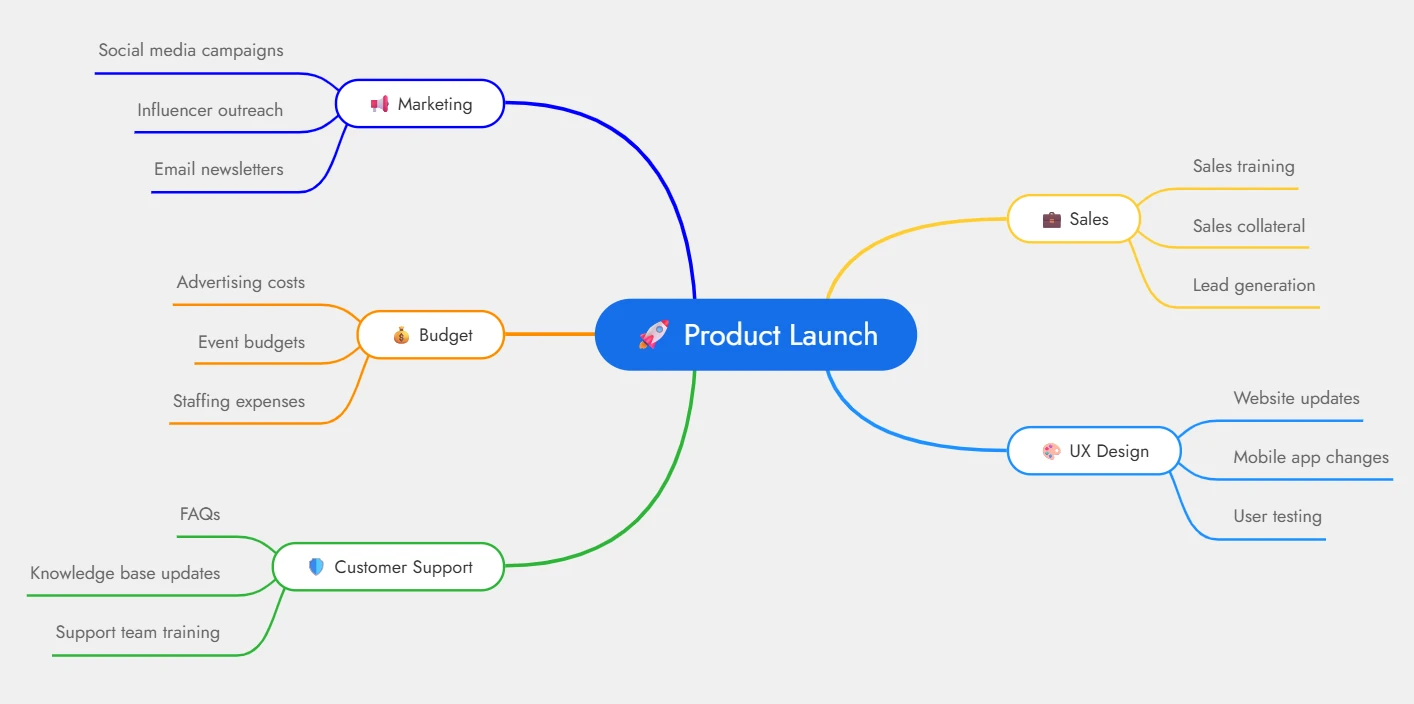
In a product launch, multiple teams work in parallel, often with overlapping responsibilities. A spider diagram helps bring everything into a single visual view. The central topic may be the product name or launch milestone, with main branches representing core functions.
Typical branches and subtopics include:
- Marketing: Social media campaigns, influencer outreach, email newsletters
- Sales: Sales training, sales collateral, lead generation
- Budget: Advertising costs, event budgets, staffing expenses
- UX Design: Website updates, mobile app changes, user testing
- Customer Support: FAQs, knowledge base updates, support team training
This structure helps teams see how their work connects to others, making dependencies, gaps, and timelines easier to manage.
Example diagram:
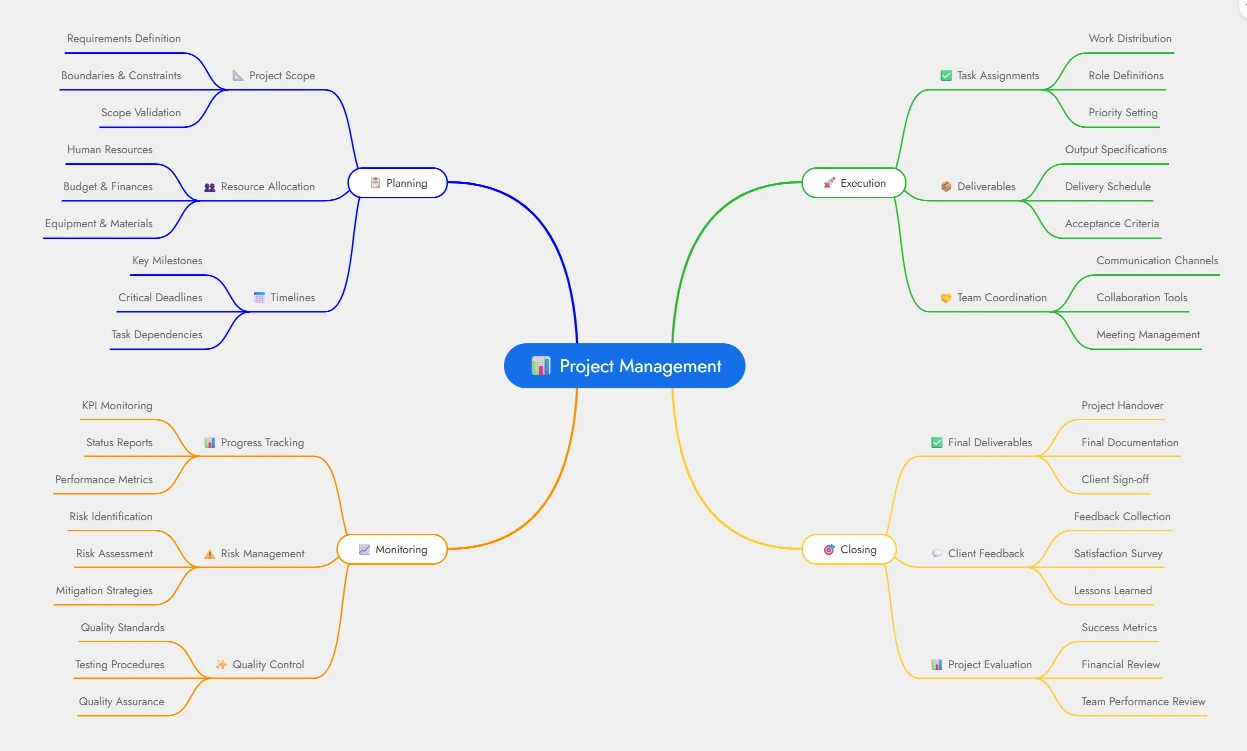
For project management, a spider diagram acts as a visual roadmap that keeps work organized across phases. The project name sits at the centre, with branches for each major stage of the project lifecycle.
Common branches and details include:
- Planning: Project scope, resource allocation, timelines
- Execution: Task assignments, deliverables, team coordination
- Monitoring: Progress tracking, risk management, quality control
- Closing: Final deliverables, client feedback, project evaluation
By combining high-level phases with detailed subtopics, this spider diagram ensures nothing is overlooked and keeps stakeholders aligned from start to finish.
Example diagram:
Spider Diagram Template
Starting from a blank canvas can slow down thinking. This is where templates add real value. With ready-made layouts, teams can focus on ideas instead of structure. You can explore and customize spider diagram templates directly within MockFlow IdeaBoard, which offers a dedicated template library for visual brainstorming.
You can browse the full IdeaBoard template collection to get started quickly. For a ready-to-use option, this spider diagram template can be customized immediately for brainstorming, planning, or problem-solving.
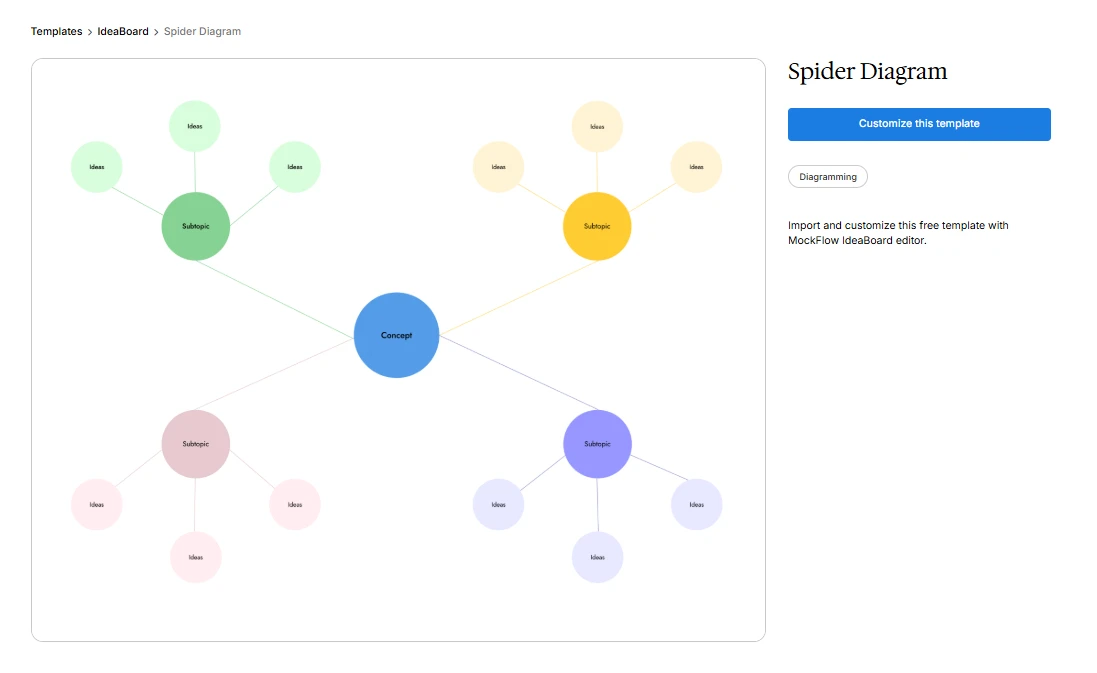
Using templates ensures consistency, saves time, and keeps spider diagrams clean and easy to evolve as ideas grow.
How to Create a Spider Diagram
Creating a spider diagram is a straightforward process, but the value comes from how intentionally each step is approached. The goal is not to make the diagram perfect, but to make thinking visible. By starting broad and gradually adding detail, we can move from scattered ideas to a clear, connected structure that supports decision-making and planning.
Step 1: Choose a Topic
Every spider diagram begins with a clear central topic. This could be a problem you are trying to solve, a concept you want to explore, or a goal you want to plan around. Placing this topic at the centre creates a single reference point that keeps all ideas anchored and prevents the diagram from drifting in multiple directions.
The more focused the central topic is, the more useful the spider diagram becomes. Vague topics often lead to cluttered branches that are harder to interpret later.
Step 2: Identify Related Subtopics
Once the central topic is defined, the next step is to add broad subtopics that connect directly to it. These become the main branches of the spider diagram and usually represent themes, categories, or major areas of consideration.
At this stage, it helps to think expansively rather than critically. The purpose is to capture all relevant ideas, not to evaluate them yet. This approach keeps the diagram open and flexible, which is essential during early exploration.
Step 3: Get More Detailed
With the main branches in place, each subtopic can be expanded further. These connected nodes might include tasks, examples, risks, questions, or supporting details. This is where hierarchical relationships start to emerge naturally.
As details are added, patterns often become visible. Some branches grow quickly, while others stay small, offering useful insight into priorities and gaps.
Step 4: Review and Finalize
The final step is to review the entire diagram as a whole. This is the moment to reorganize branches, merge overlapping ideas, or remove anything that no longer feels relevant. The result should be a clear, readable visual organizer that reflects how the ideas connect, not just what they are.
At this point, the spider diagram is ready to guide next steps, whether that means planning, discussion, or execution.
Tools for Creating Spider Diagrams – Try IdeaBoard
As spider diagrams grow in complexity, especially during collaborative brainstorming or planning sessions, using the right tool becomes critical. Digital whiteboards remove the friction of redrawing, reorganizing, and sharing ideas, allowing spider diagrams to evolve naturally as thinking deepens. This is where purpose-built diagramming and design tools offer a clear advantage over static documents or manual sketches.
Why Use IdeaBoard for Spider Diagrams
MockFlow IdeaBoard supports spider diagrams in a way that aligns closely with how teams actually brainstorm and organize ideas.
- IdeaBoard offers a vast template library including a ready-made Spider Diagram template under the Diagramming category, allowing users to start with a clean, structured layout and customize it instantly rather than building from scratch.
- For teams that want to move even faster, IdeaBoard’s AI Toolbox enables AI-assisted generation of spider diagrams. By simply describing the central topic and major branches in text, such as a product launch or strategic initiative, the AI generates an editable spider diagram that can be refined further. This is particularly useful when ideas need to be structured quickly without interrupting momentum.
- IdeaBoard’s infinite canvas ensures that spider diagrams never feel constrained. Central ideas can be placed anywhere, and branches can expand freely as connected nodes grow, supported by drag-and-drop shapes and connectors.
- Collaboration is built directly into the experience. Remote teams can collaborate and work on the same spider diagram in real time by sharing the boards and leave multimedia comments, including voice or video, on specific branches to add context without cluttering the diagram.
- Once complete, spider diagrams can be exported as images or PDFs, making them easy to share, present, or reuse across workflows.
Taken together, these features turn spider diagrams from one-off brainstorming artefacts into living working documents. Instead of recreating diagrams every time ideas change, teams can continuously refine, discuss, and reuse them as thinking evolves. With templates, AI assistance, real-time collaboration, and flexible exports, tools like IdeaBoard supports the entire lifecycle of a spider diagram, from early exploration to clear, shareable outcomes.
Conclusion
Spider diagrams help us think more clearly when ideas feel scattered or overwhelming. By anchoring everything to a central topic and visually mapping connected nodes, they make complex thinking easier to explore, organize, and communicate. Whether we are brainstorming new ideas, solving problems, or planning projects, spider diagrams offer a flexible structure that supports creative and structured thinking at the same time.
When combined with digital tools like MockFlow Ideaboard, spider diagrams become even more powerful. Features such as ready-made templates, AI-assisted generation, real-time collaboration, and easy exports turn idea mapping into a repeatable, team-friendly workflow.
If visual thinking plays a role in how you plan or collaborate, it is worth experiencing this approach firsthand. You can sign up to try IdeaBoard for free or install our Chrome extension and start building spider diagrams that evolve with your ideas.
FAQs about Spider Diagram
1. What is a spider diagram?
A spider diagram is a visual thinking tool used to organize ideas around a central topic. The main idea sits at the center, with branches extending outward to represent related concepts or subtopics. This radial structure helps users visualize relationships, simplify complex information, and explore ideas clearly during brainstorming or planning.
2. How is a spider diagram different from a mind map?
A spider diagram focuses on a single central topic with evenly spaced branches that represent related ideas at the same level. A mind map often introduces hierarchy and deeper branching to show priority or flow. Spider diagrams work best for early-stage idea exploration, while mind maps suit more structured thinking.
3. When should I use a spider diagram?
A spider diagram works best during brainstorming, problem-solving, note-taking, meetings, and early planning stages. It helps capture ideas quickly, organize thoughts visually, and explore relationships before moving into formal documentation or structured workflows.
4. Can spider diagrams be used for team collaboration?
Yes, spider diagrams are well-suited for collaboration. Teams can use them during workshops or planning sessions to capture ideas from multiple contributors while keeping everything aligned around the same central topic.
5. What tools can I use to create a spider diagram online?
Spider diagrams can be created using online whiteboards and diagramming tools like MockFlow IdeaBoard. These tools offer ready-made spider diagram templates, drag-and-drop editing, infinite canvas space, collaboration features, and export options for sharing diagrams.
6. Can I create and share spider diagrams with my team using IdeaBoard?
Yes. With MockFlow IdeaBoard, you can create spider diagrams on a shared canvas and collaborate with your team in real time. Team members can edit branches together, leave comments directly on specific nodes, and review changes as ideas evolve. Once the diagram is ready, it can be exported as an image or PDF and shared outside IdeaBoard for presentations or documentation.

The UI Design Process: 9 Steps to Build Better Interfaces
Think back to your earliest experiences with a digital interface. Can you recall that pivotal moment when you first engaged with...
Bubble Map: Templates, Comparisons, and Practical Uses
Introduction There’s something about seeing ideas laid out visually that just feels easier to follow. You’re not reading line by...

How to Create a Landing Page Wireframe (Step-by-Step Guide)
Your SEO team has executed a brilliant strategy, ensuring your website receives the impressions and clicks it deserves. The...
