BPMN Diagram Explained: Core Elements, Example, and Steps
Introduction
When processes live in scattered documents or conversations, one team relies on meeting notes, while another builds on assumptions. Over time, these gaps turn into delays, rework, and constant back-and-forth.
In a 2024 Camunda report, 68% of IT decision-makers and business leaders said miscommunication between teams leads to the wrong thing being built and rolled out, while 73% said the time required to design and agree on process changes is a bottleneck. Those numbers help explain why teams need a clearer, shared way to model workflows.
A BPMN diagram solves this by giving teams a standardized way to visualize workflows using clear, structured notation that both business and technical stakeholders understand. Instead of guessing how work flows, everyone sees the same structure, decisions, and responsibilities.
In this guide, we’ll break down what a BPMN diagram is, how it works, and how you can create one step by step. You’ll also see how tools like IdeaBoard help you move from scattered workflows to structured, actionable process diagrams.
What is a BPMN Diagram?
A BPMN (Business Process Model and Notation) diagram is a standardized visual model of a business process that uses defined symbols like events, tasks, and gateways to map workflows clearly. It shows how activities, decisions, and participants connect across a process.
BPMN diagrams help teams design, document, and optimize workflows while supporting automation in workflow engines. This notation improves clarity, aligns business and technical teams, and enables consistent process execution across enterprise systems.
Instead of relying on scattered documentation or verbal explanations, teams get a clear, shared view of the process. Everyone sees where a task starts, how it moves forward, and what decisions shape the outcome. That clarity becomes especially important when processes involve multiple teams or systems.
Another way to think about BPMN is as a bridge between intent and execution.
- Intent: Business teams define how a process should work.
- Execution: Technical teams implement how it runs in systems.
BPMN connects both sides using a common, visual language that reduces back-and-forth and misinterpretation.
Why BPMN Diagrams are Important in Business Process Modeling
By bringing consistency and structure to how processes are defined, shared, and executed, BPMN diagrams offer several benefits to team workflows:
- Standardized communication across teams: BPMN creates a shared visual language that both business and technical teams understand, improving collaboration. Analysts, developers, and operations teams can work from the same diagram, which reduces misalignment during design and implementation.
- Improved process visibility and clarity: Once a workflow is visualized, it becomes much easier to understand how tasks, decisions, and roles interact. Bottlenecks and redundant steps are easier to spot, which helps teams fix issues early.
- Foundation for automation and system integration: BPMN diagrams can serve as the foundation for workflow automation, where processes are executed directly in systems. This makes it easier to move from design to implementation without rebuilding the logic.
- Better process optimization and efficiency: When a process is clearly mapped, improving it becomes more straightforward. Teams can identify delays, remove unnecessary steps, and streamline execution without disrupting the entire workflow.
In fact, BPMN diagrams matter even more as workflows stretch across different systems and tools. According to Camunda’s 2025 report, the most common process endpoints included enterprise applications (70%), task-automation technologies such as RPA and decision tools (65%), AI/ML applications (48%), and APIs (41%), which shows why teams need a clear process model before they automate.
Clear process mapping changes how teams operate by shifting workflows from being reactive and inconsistent to structured and repeatable. To make that possible, you need to understand the building blocks that make up every BPMN diagram.
Core Elements of a BPMN Diagram
BPMN can feel complex at first, but it becomes much easier to understand once you break it down into a few core components. Every BPMN diagram, no matter how simple or detailed, is built using the same set of elements.
Once you understand how these pieces work together, reading and creating process diagrams becomes far more intuitive.
That consistency becomes important quickly, as business analysts emphasize that you should stick to BPMN’s core elements like events, gateways, and message flows to keep diagrams consistent and portable, even if you simplify visuals for stakeholders.
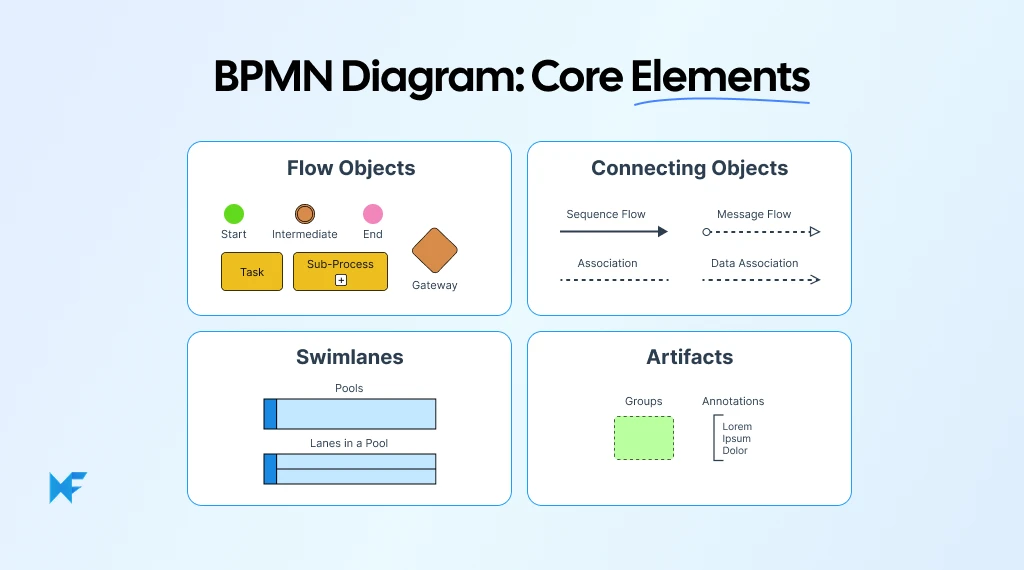
1. Flow Objects
Flow objects form the foundation of any BPMN diagram. These are the elements that define what actually happens within a process.
- Events represent triggers and outcomes. A start event marks where the process begins, while an end event shows where it finishes. In between, intermediate events can capture things like messages, delays, or exceptions.
- Activities represent the work itself. These can be simple tasks, such as reviewing an application, or more complex subprocesses that include multiple steps within a larger workflow.
- Gateways introduce decision-making into the process. They determine how the workflow branches based on conditions, such as approval versus rejection or parallel versus sequential paths.
Together, these elements define the structure and logic of the workflow.
2. Connecting Objects
While flow objects define what happens, connecting objects define how everything is linked.
- Sequence flows show the order in which activities occur. These are the solid arrows that guide the process from one step to the next.
- Message flows represent communication between different participants or systems. These are typically shown as dashed lines and are especially useful in cross-functional collaborative workflows.
- Associations provide additional context by linking data, annotations, or artifacts to specific elements in the diagram.
These connections ensure that the process flows logically and that relationships between steps are clearly understood.
3. Swimlanes
As processes grow more complex, clarity around ownership becomes critical, and that’s where swimlanes come in. Pools represent major participants, such as an organization, system, or external entity. Within each pool, lanes divide the process into roles, teams, or departments.
This structure makes it immediately clear who is responsible for each activity. Instead of guessing ownership, teams can see exactly where responsibilities begin and end, which reduces confusion during execution.
4. Artifacts
Artifacts add an extra layer of context to the diagram without affecting how the process flows.
- Data objects show what information is required or produced at different stages.
- Groups allow you to visually cluster related elements for better readability.
- Annotations provide notes or explanations that help clarify specific steps.
While artifacts don’t change the logic of the workflow, they make the diagram easier to understand, especially for stakeholders who may not be deeply involved in the process.
When you combine these elements, a BPMN turns into a visual diagram of how work actually flows across people, systems, and decisions. Seeing these elements in action makes their value even clearer, especially when applied to a real workflow example.
BPMN Diagram Example: Employment Application Process
Starting from a blank canvas can feel overwhelming, especially when you’re still getting familiar with BPMN notation. That’s why working with a structured template is often the fastest way to get started. It removes the guesswork and gives you a clear foundation to build on.
You can use IdeaBoard’s pre-built BPMN diagram template designed for an employment application process, and customise it for your own workflow.
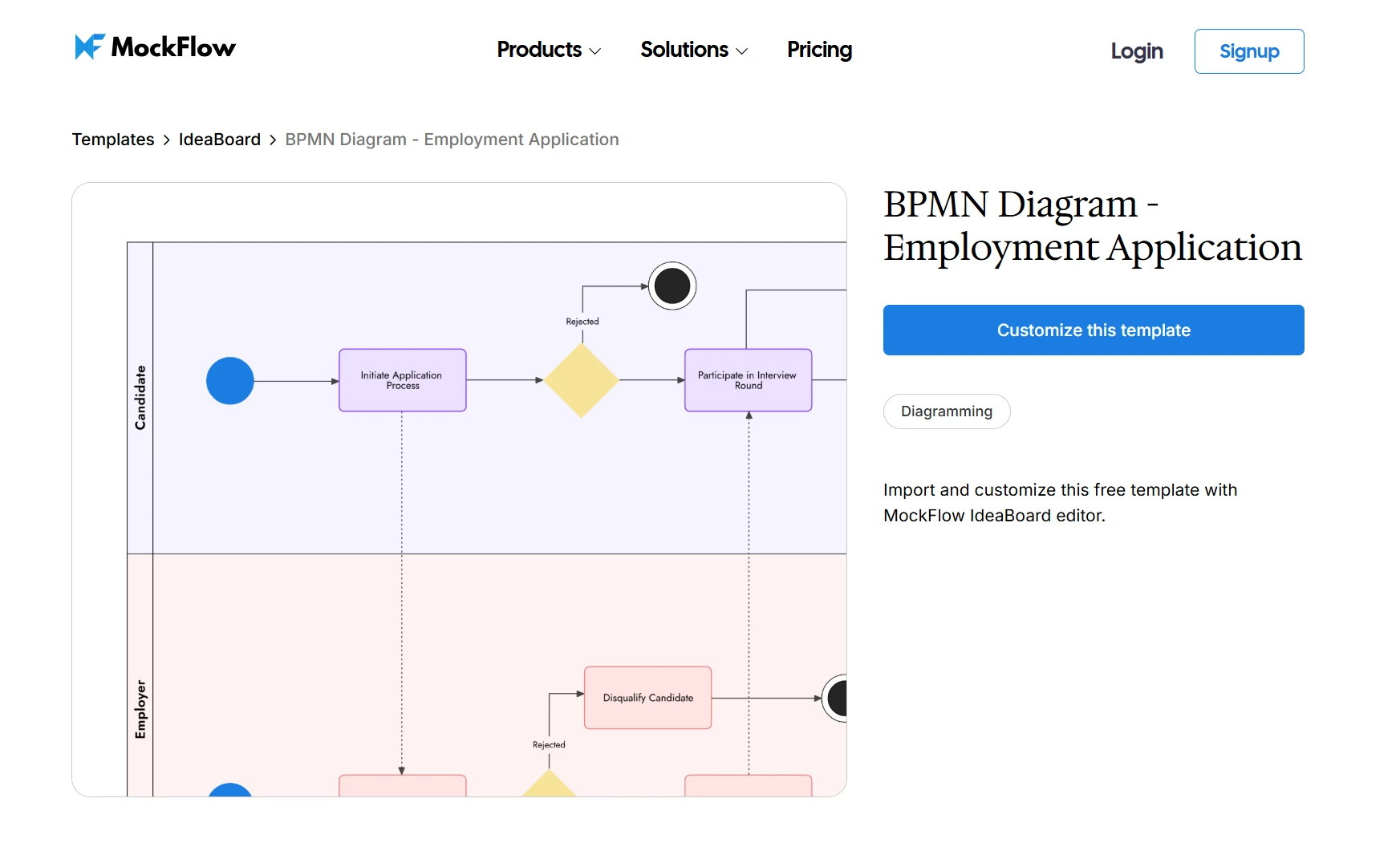
Click on this image to customize the BPMN Diagram template
This template sits on a visual canvas where you can easily edit, move, and extend elements without rebuilding the diagram from scratch. It’s especially useful when you want to focus on understanding the flow rather than worrying about structure.
To make this practical, let’s break down how this workflow is designed and how each BPMN element comes into play.
Step-by-Step Breakdown of the Workflow
At a high level, this example captures a standard hiring process. But what makes it useful is how clearly each step, decision, and transition is mapped.
- Candidate submits application: The process begins with a start event that triggers when an application is received. This marks the formal entry point into the workflow.
- HR reviews application: This step is represented as a task. HR evaluates whether the application meets the basic criteria before moving forward.
- Interview process is initiated: If the application passes initial screening, the workflow moves into interview-related tasks. This can include scheduling and conducting interviews.
- Decision gateway (accept or reject): A gateway introduces a decision point. Based on interview outcomes, the process splits into two possible paths.
- Offer or rejection is sent: The process concludes with an end event. The candidate either receives an offer or a rejection, completing the workflow.
What stands out here is how BPMN makes decision points and transitions explicit. Instead of guessing what happens next, the flow is clearly defined at every step.
However, that clarity is not guaranteed unless the diagram is structured well. Practitioners point out that poorly designed BPMN diagrams can actually confuse stakeholders when they mix business and technical layers, which is why keeping flows simple and structured matters.
Key BPMN Elements Used in the Example
This template brings together multiple BPMN elements in a way that feels structured without being overly complex.
The process starts with a start event, which anchors the workflow. From there, tasks such as application review and interviews represent the actual work being done, and a gateway introduces conditional logic, allowing the process to branch based on outcomes.
Swimlanes add another layer of clarity, and by separating roles like HR, candidate, and hiring manager, the diagram makes ownership visible. You can immediately see who is responsible for each step, which reduces ambiguity during execution. Each of these elements works together to create a flow that is both easy to follow and ready to scale.
How to Adapt This Template for Your Own Process
The true value of a template shows up when you start customizing it for your own workflows.
For instance, you can replace roles like HR or hiring manager with your own teams. Tasks can be modified to reflect your specific process steps, and decision points can be expanded to include more complex conditions, such as multi-level approvals or automated checks.
MockFlow’s IdeaBoard makes this adaptation seamless. You can drag and rearrange elements, extend flows, and adjust swimlanes directly on the canvas. This flexibility allows you to evolve the diagram as your process changes, without needing to start over each time.
Over time, this approach helps you move from static documentation to a living process map that reflects how work actually happens.
Seeing a complete example makes BPMN easier to understand, but applying it to your own workflows is where the real value begins. Once you know how to read and adapt a diagram, creating one from scratch becomes a much more structured exercise.
How to Create a BPMN Diagram: A Step-by-Step Guide
Creating a BPMN diagram becomes much easier when you approach it step by step. Instead of trying to map everything at once, you focus on structure first, then refine the details. This way, the process stays clear, scalable, and easy to adapt as workflows evolve.
The shift toward smarter process design is already underway. A recent Deloitte survey found that 25% of respondents are already using AI alongside process mining, and 74% plan to include AI in future initiatives, which signals a growing need for process diagrams that are both structured and easy to refine.
Step 1: Define the Process Scope and Participants
Start by clearly defining where the process begins and where it ends. Without this boundary, workflows tend to expand unnecessarily and lose focus. At the same time, identify all the key stakeholders involved, so you know who participates at each stage.
With IdeaBoard’s BPMN diagram template, you can map this out visually on an infinite canvas. You are not restricted by space, which makes it easier to explore the full scope before narrowing it down. Adding participants as swimlanes early on also helps you anchor responsibilities from the start.
Step 2: Identify Key Activities and Decision Points
Once the scope is clear, shift your focus to the actual steps within the process. List out all tasks, along with the points where decisions need to be made. This is where the logic of the workflow begins to take shape.
Instead of jumping straight into formal notation, it often helps to sketch things out first. IdeaBoard’s sticky notes and visual components make it easy to outline steps quickly, rearrange them, and test different flows before locking in the structure.
Step 3: Map Flows Using BPMN Notation
With your steps defined, you can now translate them into BPMN elements. Connect events, tasks, and gateways using sequence flows so the process follows a clear and logical progression.
If you need further assistance, IdeaBoard offers a prompt library in its AI Toolbox that can help generate an initial layout based on your inputs, giving you a starting point that you can refine.
This combination of automation and manual control helps you move faster without losing accuracy. It also reflects a broader shift in how companies are approaching workflow design. PwC’s 2025 Global CEO Survey found that almost 50% of CEOs say their biggest priority over the next 3 years is integrating AI into technology platforms, business processes, and workflows.
Step 4: Organize With Pools and Swimlanes
As the diagram takes shape, organizing it becomes critical. Group tasks into pools and lanes to reflect ownership across teams, systems, or roles. This step brings clarity to who is responsible for each part of the process.
One of the advantages of working with pre-built templates is the flexibility to rearrange elements without rebuilding the diagram. You can move tasks, adjust lanes, and refine the structure as the process evolves, which is especially useful during iterations.
Step 5: Validate and Optimize the Process
Once the diagram is complete, you can review it with stakeholders to ensure it reflects how the process actually works. This step often uncovers gaps, inefficiencies, or unnecessary steps that were not obvious earlier.
IdeaBoard supports real-time collaboration, allowing teams to comment, add video and voice notes, suggest changes, and align quickly. You can also share diagrams through secure links, making it easier to gather feedback and finalize the workflow without delays.
A well-structured BPMN diagram creates a shared understanding that teams can rely on and improve over time. When the structure is clear and validated, workflows become easier to execute, optimize, and scale.
Conclusion
When teams rely on assumptions instead of structure, even simple processes become slow, inconsistent, and hard to scale. That’s where a visual, standardized approach like BPMN starts to make a real difference.
Now think about what this could look like in practice with a tool like IdeaBoard:
- You open a ready-to-use BPMN template instead of starting from scratch
- You map your process visually on a flexible canvas without constraints
- You collaborate with your team in real time and gather feedback instantly
- You refine workflows continuously as your process evolves
Instead of static documentation, you get a living workflow that your entire team can understand and use.
If your current processes feel unclear or hard to manage, it might be time to rethink how you’re mapping them. Schedule a demo with IdeaBoard today and see how you can turn your workflows into structured, scalable diagrams that actually work.
FAQs
1. What is a BPMN diagram?
A BPMN diagram is a standardized visual representation of a business process using defined symbols like events, tasks, and gateways. It helps teams map workflows, understand process logic, and align business and technical stakeholders.
2. How do you create a BPMN diagram step by step?
To create a BPMN diagram, you can use IdeaBoard’s pre-built BPMN diagram template. Define the process scope, identify key activities and decisions, map flows using BPMN notation, organize participants with pools and lanes, and validate the workflow to ensure accuracy and efficiency.
3. What are BPMN symbols and meanings?
BPMN symbols represent process elements such as events, tasks, gateways, and flows. Events indicate triggers, tasks show activities, gateways control decisions, and flows define the sequence and communication between steps.
4. How is BPMN different from a flowchart?
A BPMN diagram uses standardized notation designed for business process modeling, while a flowchart uses basic shapes for general workflows. However, a BPMN diagram provides more detail, supports automation, and aligns with enterprise process standards.
5. Can BPMN diagrams be used for automation?
Yes, BPMN diagrams support automation by defining executable workflows that integrate with workflow engines. They allow organizations to move from process design to automated execution across systems and applications.
6. What are common mistakes in BPMN modeling?
Common mistakes include overcomplicating diagrams, misusing symbols, ignoring process boundaries, and not validating workflows. Clear structure, correct notation, and stakeholder review help ensure accurate and effective BPMN diagrams.

Trello Whiteboard Guide: How to Add Visual Collaboration to Trello
Trello already gives us a clear way to organize work, track progress, and keep projects moving. But when a discussion shifts...
How to Implement Cross Functional Collaboration in Modern Teams
Introduction If you have ever been in a meeting where everyone agrees collaboration matters, but no one is quite sure how it...

What Is a UI Kit? Definition, Benefits, Types, and Examples
UI kits are one of the most widely used tools in modern UI design — yet they’re often misunderstood or underutilized. At their...
