5 Asynchronous Collaboration Strategies for Modern Remote Teams
Introduction
When our teams work across different time zones, schedules rarely line up perfectly. Someone is starting their day while someone else is signing off, and even simple updates can turn into another calendar invite.
That is where asynchronous collaboration starts to make sense as a working approach. It gives remote and distributed teams more room to keep work moving without making constant availability the default.
In this guide, we’ll look at how async collaboration compares with real-time teamwork, where it works best, which strategies make it effective, and how the right tools can support better remote collaboration without adding more meetings.
What is asynchronous collaboration?
Asynchronous collaboration is a way of working where we contribute to shared work at different times instead of needing to be online together. We can review context, add feedback, make decisions, and move projects forward across different schedules and time zones.
The workflow is simple:
Context → Contribution → Feedback → Decision → Next step
Good async collaboration depends on clear context, visible ownership, accessible documentation, and realistic response expectations.
It is more than simply sending messages and waiting for a reply. Asynchronous collaboration means working together on the same project at different times by using shared documents, project boards, comments, and other remote collaboration tools.
Here’s one way async collaboration can look in practice: a rough idea becomes a shared prototype teammates can review, discuss, and refine on their own time.
Asynchronous vs. synchronous collaboration
The main difference between asynchronous and synchronous collaboration is timing. Async work lets us contribute at different times, while synchronous work requires everyone to participate at the same time.
Factor | Asynchronous collaboration | Synchronous collaboration |
Timing | Different times | Same time |
Response | Within an agreed period | Immediate |
Scheduling | Minimal overlap needed | Shared availability needed |
Common formats | Documents, comments, boards, recordings | Calls, workshops, live chat |
Best for | Updates, reviews, planning, focused work | Urgent or highly interactive work |
Time-zone flexibility | High | Lower |
A useful question is: Does this work genuinely require everyone to interact at the same time?
When asynchronous collaboration works best
Async collaboration works well when people need time to review, think, or contribute independently. Common examples include:
- Project and status updates
- Document or design reviews
- Research and planning
- Detailed feedback
- Brainstorming preparation
- Cross-time-zone handoffs
- Non-urgent questions
It is especially useful when thoughtful input matters more than an immediate response.
When synchronous collaboration works better
Real-time collaboration makes more sense when speed or back-and-forth discussion matters. Think urgent decisions, sensitive conversations, conflict resolution, troubleshooting, or issues that keep generating follow-up questions.
We can also combine both approaches. For example, a team can collect ideas, comments, and questions on a visual board asynchronously before a workshop. Once everyone has contributed, only the unresolved points need live discussion.
If that discussion happens in Google Meet, IdeaBoard can be used directly inside the meeting. The team can bring the visual context they have already built into the live conversation, work through open questions together, and avoid spending meeting time recreating background that participants could review beforehand.
Benefits of asynchronous collaboration
Asynchronous collaboration gives teams more control over when and how they contribute. That matters most when schedules do not line up cleanly.
- Greater flexibility across schedules and time zones: We can contribute during our own working hours instead of constantly coordinating calendars around shared availability.
- Fewer unnecessary meetings: Routine updates, reviews, and planning can often happen without another call. Live time can then be reserved for conversations that genuinely need discussion. In Owl Labs’ 2025 U.S. workplace study, 77% of workers said they had lost time to technical difficulties in meetings.
- More uninterrupted focus time: When every message does not require an immediate response, we can protect longer blocks of time for concentrated work.
- More thoughtful input: Async workflows give us time to review context, consider our response, and provide more useful feedback instead of reacting on the spot.
- Better documentation and knowledge retention: Comments, boards, documents, and recorded context remain available after the interaction. This makes decisions easier to revisit and reduces repeated explanations.
- Broader participation: People who cannot attend a meeting, work different hours, or need more time to think still get a meaningful opportunity to contribute.
- Better continuity when availability is uneven: Async work is also useful when connectivity is inconsistent. For example, IdeaBoard’s offline desktop mode lets teams continue working on boards locally, so progress does not have to stop simply because someone cannot stay continuously connected.
The need for flexibility applies to a large share of remote-capable teams. As of May 2026, Gallup found that 52% of U.S. employees with remote-capable jobs worked hybrid, while another 26% worked exclusively remote.
Asynchronous collaboration strategies teams can use
There is no single async workflow that fits every team. The right approach depends on how much overlap we have, how quickly decisions need to move, and how much context people need before they can act independently.
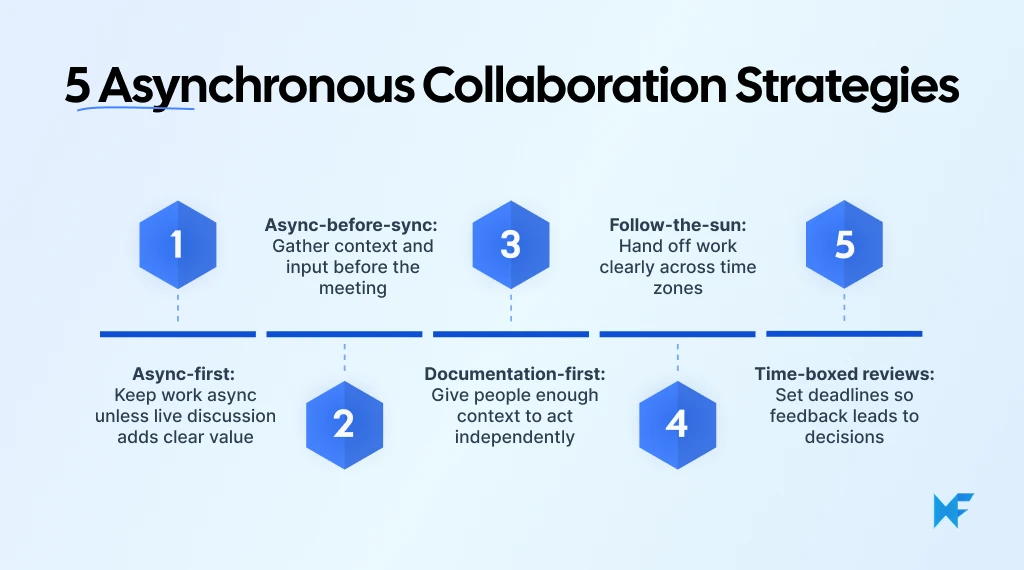
1. Async-first collaboration
With an async-first approach, we assume work can happen asynchronously unless a live conversation adds clear value.
A simple rule helps: Can someone understand and act without immediate discussion? → Keep it async
Is the issue urgent, sensitive, or highly ambiguous? → Move it live
This keeps meetings focused on work that genuinely needs real-time interaction.
2. Async-before-sync collaboration
Here, we do the preparation asynchronously before meeting:
Share context → Collect input → Identify unresolved questions → Discuss those questions live
This works well for planning sessions, design reviews, retrospectives, and brainstorming. Instead of spending the first half of a meeting getting everyone up to speed, we arrive ready to discuss.
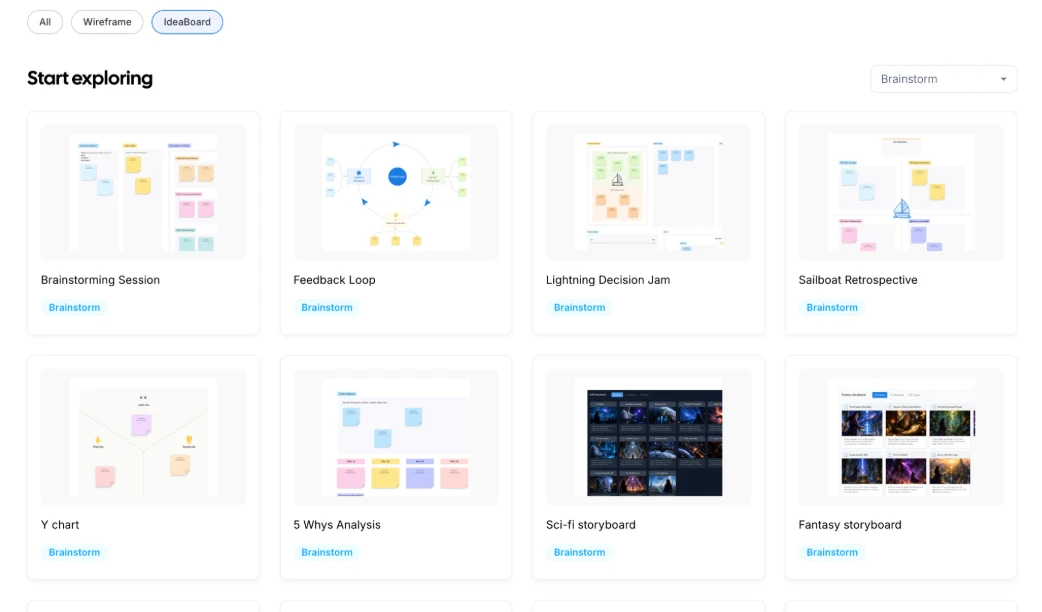
For brainstorming, teams can use IdeaBoard templates to give everyone the same visual structure beforehand. People can add ideas in their own time, so the live session starts with material to evaluate rather than a blank board.
3. Documentation-first collaboration
Documentation-first teams provide the context before asking for feedback.
A useful async brief should make the goal clear, show the current state, include supporting material, explain what input is needed, and set a deadline.
This reduces the back-and-forth that happens when someone opens a request and immediately needs more explanation. For work that mixes written reasoning with visual context, IdeaBoard's Docs component lets us keep written information and visuals together, giving later contributors more of the context they need in one place.
4. Follow-the-sun collaboration
Distributed teams can use time-zone differences as part of the workflow by deliberately handing work from one region to the next.
A good handoff should answer:
- What was completed?
- What is still open?
- Are there blockers?
- What should happen next?
- Who owns the next action?
The goal is continuity. When the next person starts their day, they should be able to pick up the work without waiting for someone else to come online.
5. Time-boxed async review cycles
Async feedback works better when it has a clear end point.
A simple review cycle looks like this: Share work → Set a feedback deadline → Collect comments → Consolidate input → Resolve conflicts → Decide
This works particularly well for proposals, diagrams, planning documents, and design reviews.
When written comments do not carry enough context, IdeaBoard's voice and video comments let reviewers explain feedback directly on the board. The next person can hear the reasoning behind a comment without scheduling another call just to clarify it.
Best practices and tools for effective asynchronous collaboration
Async collaboration works best when people can understand the work, act independently, and see what happens next. Clear context and predictable expectations matter more than adding more tools.
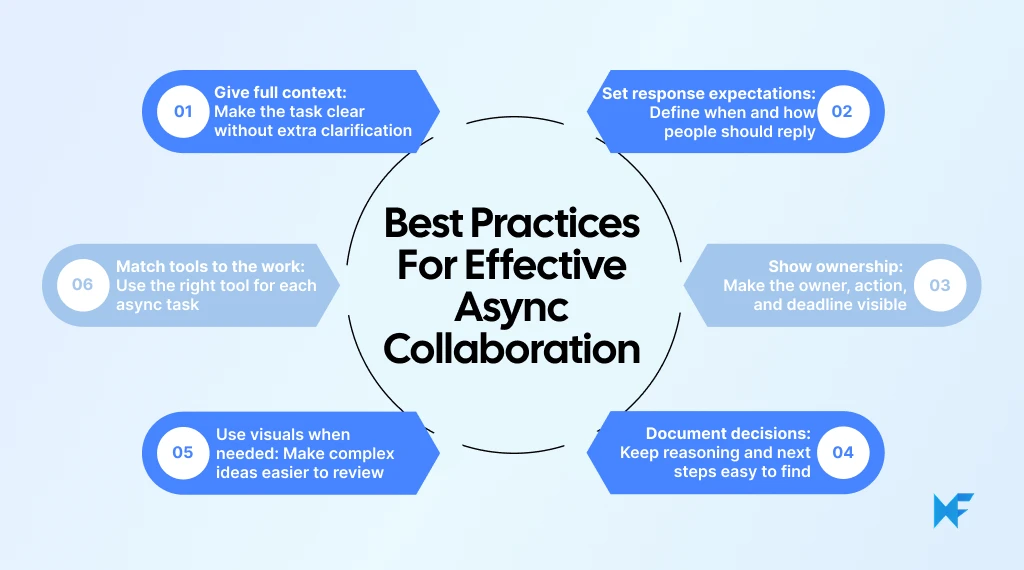
1. Share enough context for independent action
Every async request should explain:
- What we are discussing
- Why it matters
- What has already happened
- What input is needed
- Where supporting information lives
- When a response is expected
A useful test is: Could another teammate open this later and know what to do without immediately asking for clarification?
For visual planning, IdeaBoard’s AI Toolbox can generate structured boards from prompts, giving teams a clearer starting point for async review.
2. Set clear response times and communication expectations
Async work should not mean “reply whenever.”
Teams should agree on expected response windows, which channels handle different types of work, what counts as urgent, and when an async discussion should move to a live conversation.
There is no universal response time. What matters is predictability, so people know when input is expected without constantly checking every channel.
3. Make ownership and next steps visible
Async discussions lose momentum when everyone contributes but nobody owns the outcome.
A simple structure helps: Owner → Action → Deadline → Next review point
When visual planning and task management happen in different places, the connection between them should remain clear. For instance, if a team uses Trello to manage workflows, IdeaBoard’s Trello integration can help keep brainstorming closer to execution.
4. Keep decisions and documentation accessible
Important decisions should not disappear into private messages, unrecorded meetings, or personal notes.
Preserve: Decision + reasoning + supporting context + owner + next action
This makes it easier for teammates joining later to understand what changed and why. IdeaBoard also supports exporting boards when visual work needs to be shared or documented elsewhere.
5. Use visual collaboration for planning and feedback
Written threads become harder to follow when people need to understand workflows, mind maps, customer journeys, diagrams, or relationships between ideas.
A shared visual workspace helps teammates arrive later, understand the structure, review existing input, and add their own contribution.
MockFlow IdeaBoard supports this kind of asynchronous planning, brainstorming, diagramming, and feedback in one visual workspace.
6. Choose tools based on the type of async work
Instead of looking for one tool to handle everything, match tools to the work:
- Messaging: questions and lightweight discussions
- Project management: ownership, tasks, and deadlines
- Documentation: context, decisions, and shared knowledge
- Recorded communication: detailed explanations
- Visual collaboration: brainstorming, planning, mapping, and feedback
A strong async stack connects these workflows so people can find context, contribute in the right place, and understand the next step without chasing information across disconnected tools.
Conclusion
Asynchronous collaboration works when teams make context, ownership, and next steps easy to follow without waiting for another meeting.
If your team is still relying on scattered messages and live calls for planning, reviews, or brainstorming, move that work into a shared visual space.
Use IdeaBoard to organize ideas, map workflows, collect feedback, and keep decisions visible for teammates working at different times.
Start your IdeaBoard workspace and turn your next async discussion into a shared board your team can actually act on.
FAQs
1. Can asynchronous collaboration replace meetings?
Asynchronous collaboration can replace meetings used mainly for updates, reviews, information sharing, or collecting feedback. Live meetings still make sense when we need rapid discussion, sensitive conversations, or immediate problem-solving.
2. What does async-first mean at work?
Async-first means we start with asynchronous collaboration by default and schedule real-time interaction only when it adds clear value. The goal is to reduce unnecessary coordination while keeping synchronous communication available when needed.
3. How quickly should teams respond to asynchronous messages?
There is no single ideal response time. Teams should set expectations based on urgency, working hours, and time-zone differences. Clear response windows help us avoid both delayed work and the pressure to stay constantly online.
4. Is email an asynchronous collaboration tool?
Email supports asynchronous communication because people can respond at different times. It becomes less effective for complex collaboration when feedback, decisions, files, and next steps are spread across long threads rather than kept in a shared workspace.
5. How do you know if asynchronous collaboration is working?
Look at whether work moves forward without unnecessary meetings or repeated clarification. Useful signals include clearer handoffs, fewer blocked tasks, easier access to decisions, predictable response times, and less dependence on everyone being online together.
6. What is an async-first team culture?
An async-first team culture makes documentation, clear ownership, and accessible shared work part of everyday collaboration. We do not assume immediate replies or constant availability. Instead, we give teammates enough context to contribute independently and use live conversations intentionally.
Team Planning Process Guide: Steps & Best Practices in 2026
Team planning often starts when the team already feels the pressure. A new quarter is approaching. A major project is about to...

Wireframing Process: A 5-Stage Practical Workflow for Product Teams
A wireframe can either save a project weeks of rework or create the confusion that causes it. The outcome usually comes down to...

18 Common UI Design Mistakes and How to Fix Them
UI design mistakes are design decisions that make an interface harder to use, understand, or navigate — even when the visual...
