
PID Diagram Explained: Meaning, Symbols, Examples, & Uses
If you have ever opened an engineering drawing and felt unsure where to start, you are not alone. Most process systems look simple at a distance, but the moment you dig in, the details pile up fast. Pipes branch out, valves sit in unexpected places, instruments send signals back and forth, and suddenly one small change feels risky.
That is exactly why PID diagrams exist.
A good piping and instrumentation diagram removes guesswork. It shows how everything in a process system connects and, more importantly, how the system is controlled. When teams rely on clear P&ID drawings, conversations become easier. Design reviews move faster. Maintenance teams know what to isolate. Operators understand what happens when something goes off-spec.
In this guide, we walk you through PID diagrams in plain language. We explain what they are, examples, how they differ from flow diagrams, and how to create one step by step using standard symbols. By the end, you will know how to use a P&ID diagram not just as documentation, but as a practical tool for safer, smoother operations.
What Is a PID Diagram?
A PID diagram is a detailed piping and instrumentation diagram that maps equipment, pipelines, valves, and instruments in a process system. It uses standard P&ID symbols and instrumentation tags to show flow paths and control loops.
A P&ID diagram documents how a plant operates and how sensors, controllers, and actuators regulate pressure, flow, and temperature. It supports design reviews, safe operations, maintenance, and troubleshooting across industrial systems.
What sets a P&ID apart is its level of detail. It does not just show where material flows, like a process flow diagram does. It shows how the process is controlled, monitored, and protected in real-world conditions. Engineers use PID diagrams to define control logic, operators rely on them to understand system behavior, and maintenance teams use them to locate components quickly and safely.
In short, a P&ID diagram acts as the shared reference that keeps design, operations, and maintenance aligned around how the system truly works.
Key Components in a PID Diagram
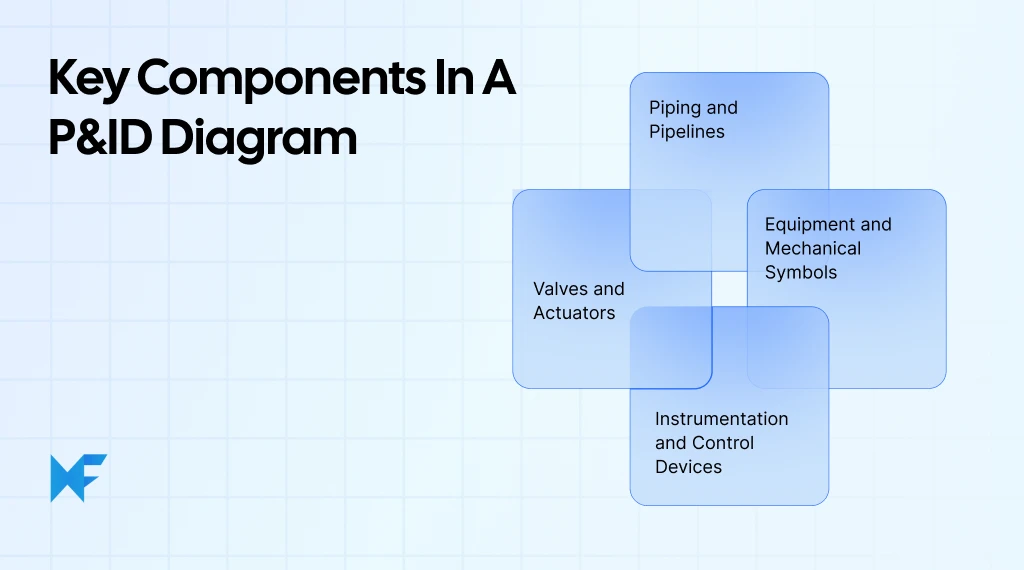
Every PID diagram is built using a small set of core components. Once you understand these, reading a P&ID becomes far more intuitive. Instead of seeing a complex drawing, you start seeing how the system flows, where it is controlled, and how it can be safely operated or shut down.
Below are the four building blocks that appear in almost every piping and instrumentation diagram.
1. Piping and Pipelines
Piping shows how fluids or gases move through the system. Lines represent physical pipes, arrows show flow direction, and annotations often indicate size, service, or line numbers. Different line styles distinguish process flow from utility, drain, or signal lines. This makes it easier to trace flow paths and identify isolation or bypass routes during operations and maintenance.
2. Valves and Actuators
Valves control flow, pressure, and direction within the process. PID diagrams clearly differentiate manual valves, control valves, check valves, and safety valves using standard symbols. Actuators indicate how a valve operates, such as pneumatic or electric. This information is critical for understanding control behavior and emergency shutdown scenarios.
3. Instrumentation and Control Devices
Instrumentation shows how the process is monitored and controlled. Sensors, transmitters, controllers, and indicators are labeled using standardized instrumentation tags. These tags reveal what is measured and how signals move through control loops, helping teams quickly understand how pressure, temperature, flow, or level is regulated.
4. Equipment and Mechanical Symbols
Equipment symbols represent pumps, tanks, heat exchangers, compressors, and other major assets. While not dimensionally accurate, they define how equipment connects to piping and instruments. This makes PID diagrams reliable references for design reviews, safety analysis, and system modifications.
Once you can identify these components, a P&ID diagram stops feeling complex and starts feeling logical. You can trace flow paths, understand control behavior, and spot potential issues without guessing.
Understanding P&ID Symbols and Notations
Symbols and notations are what turn a PID diagram from a sketch into a shared language. Instead of relying on text explanations, P&IDs use standardized visual cues so different teams can read the same diagram and reach the same conclusions. This is especially important in large plants, where diagrams are used across design, operations, maintenance, and safety reviews.
At a high level, P&ID symbols fall into a few clear categories. Each category answers a different question about the system: What is this component? What does it do? How is it controlled?
Here is how that clarity comes together in practice:
- Standard symbols communicate function instantly
Valves, instruments, pipelines, and equipment all have defined shapes. A control valve, a manual valve, and a safety valve look different on purpose, so their role is clear without explanation.
- Instrumentation tags explain what is measured and controlled
Tags show whether an instrument measures pressure, temperature, flow, or level, and whether it senses, transmits, controls, or displays that value. This makes control loops easy to follow.
- Signal and line notations show system behavior
Different line styles indicate process flow, electrical signals, or pneumatic connections. Arrows show direction, while line numbers and notes help teams trace connections accurately.
According to a 2024 study published in Hep Journals, automated systems digitizing image-based P&IDs achieved over 90% accuracy in character recognition and nearly 93% accuracy in pipeline identification, but only when symbols and line conventions were clearly defined and consistently applied.
This highlights how clean notation directly affects downstream interpretation and reuse of P&ID data.
- Consistency reduces risk and confusion
Using standardized control instrumentation symbols ensures that design intent is not lost during handoffs between engineering, operations, and maintenance.
Most P&ID symbols are not arbitrary; they follow international standards that keep diagrams readable across teams, tools, and countries. The most widely used is ANSI/ISA 5.1, which defines instrumentation symbols and tag identification, while ISO 14617-6 and ISO 10628 cover graphical symbols for process measurement, control, and equipment. Following a recognized standard means an engineer, operator, or contractor can pick up your P&ID and read it the way you intended, which is exactly why teams that lock symbol conventions early tend to face fewer review cycles later.
Common P&ID Symbols You’ll See
Here are the most widely used symbol groups and what they represent:
- Piping symbols: Lines represent pipes, with arrows showing flow direction. Variations in line style indicate process lines, utilities, drains, or signal connections.
- Valve symbols: Different symbols identify manual valves, control valves, check valves, and safety relief valves. These symbols show how flow is started, stopped, or regulated.
- Instrumentation symbols: Circles and bubbles represent instruments such as pressure, temperature, flow, and level devices. The symbol shape and tag together explain whether the instrument measures, indicates, transmits, or controls.
- Control loop symbols: Signal lines and controller symbols show how sensors connect to controllers and actuators. This helps you follow how the system automatically maintains setpoints.
- Equipment symbols: Standard shapes represent pumps, tanks, heat exchangers, compressors, and other major equipment. These symbols anchor the diagram and show how everything connects.
Understanding Instrumentation Tagging
Beyond symbols, instrumentation tagging adds precision. Each tag encodes the measurement type, function, and loop association. Once you learn the tagging logic, you can quickly tell what a device does and how it fits into the control strategy, without reading supporting documents.
Together, symbols and notations make P&ID drawings compact, consistent, and reliable. They allow complex process control systems to be communicated clearly, even as plants evolve and teams change over time.
P&ID Diagram vs PFD: What’s the Difference?
P&IDs and PFDs are often mentioned together, but they serve very different purposes. Confusing the two can lead to gaps in design reviews, incomplete documentation, or misunderstandings during operations. The key difference comes down to level of detail and intent.
A Process Flow Diagram (PFD) gives you the big picture. It shows the main process steps, major equipment, and how materials move from one stage to the next. Engineers use PFDs early in design to explain process intent, mass balance, and energy flow. What it does not show is how the process is controlled or operated.
A P&ID diagram, on the other hand, is where execution begins. It documents every pipe, valve, instrument, and control loop needed to run the system safely and consistently. This is the diagram operators, maintenance teams, and safety reviewers rely on once the plant is built.
Quick Comparison
Aspect | PFD (Process Flow Diagram) | P&ID (PID Diagram) |
Purpose | Shows overall process flow | Shows how the process is controlled and operated |
Level of detail | High-level | Highly detailed |
Includes piping | Basic flow paths | Exact piping, sizes, and connections |
Includes instrumentation | No | Yes, with tags and control loops |
Used by | Process designers | Engineers, operators, maintenance, safety teams |
PID Diagram Examples
Here are a few examples that make PID diagrams easier to understand because they show how symbols, tags, and control logic come together in real systems. Instead of reading symbols in isolation, you can see how equipment, piping, and instrumentation interact to keep a process running safely and predictably.
Below are two common Piping and Instrumentation Diagram examples you will encounter, starting simple and then scaling up.
Example 1: Simple Process Control PID
A simple PID diagram usually focuses on a single control loop. You might see a pump moving fluid through a pipeline, a control valve regulating flow, and an instrument measuring pressure or flow downstream. The sensor sends a signal to a controller, which then adjusts the valve to maintain the desired setpoint.
This type of P&ID is often used to explain basic process control concepts. It clearly shows how measurement, control logic, and actuation work together. For new team members or early-stage design reviews, simple P&ID drawings help build confidence without overwhelming detail.
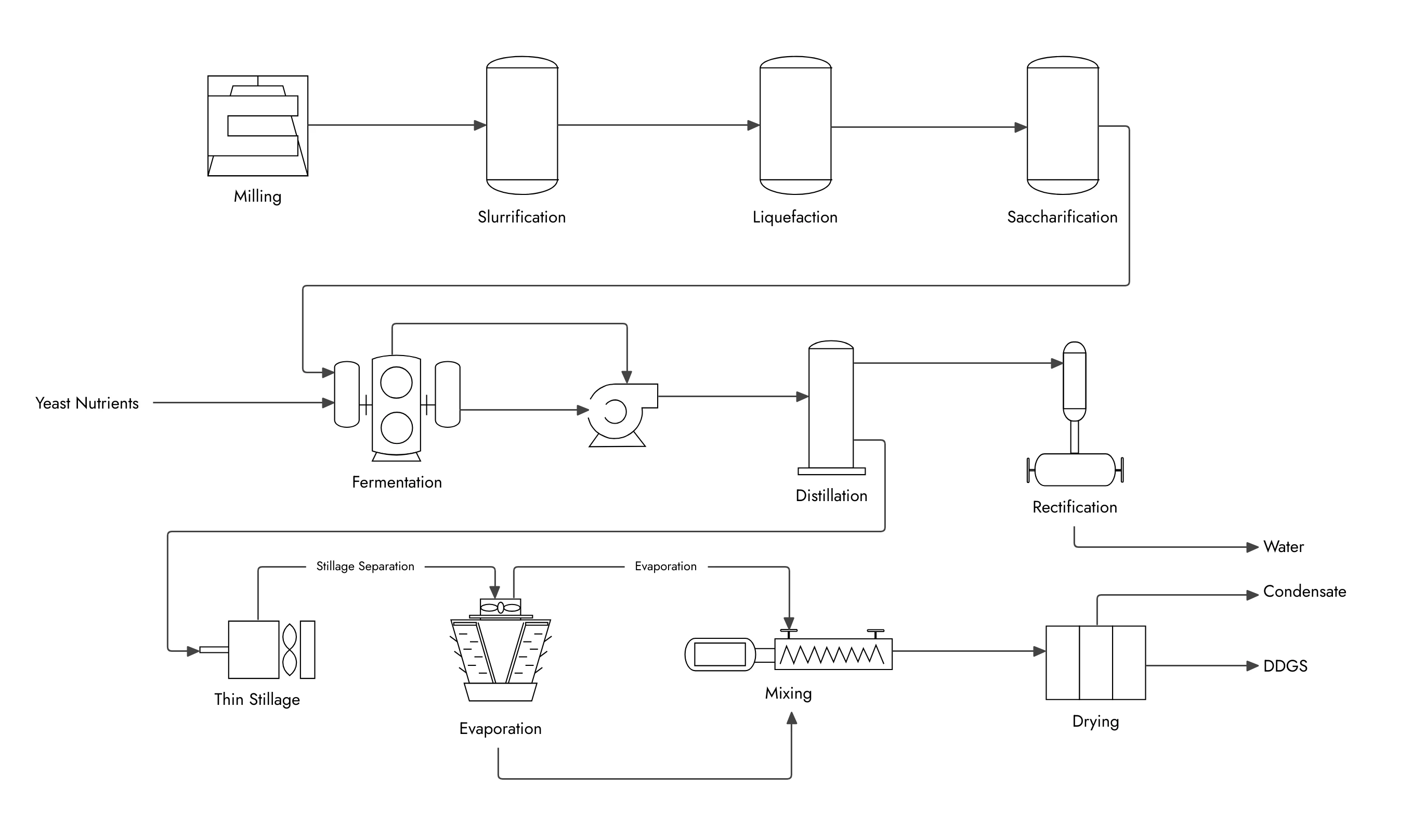
Example of a simple process control P&ID diagram
Example 2: Industrial Plant PID Diagram
An industrial plant P&ID diagram is far more detailed. It includes multiple equipment units such as pumps, tanks, heat exchangers, and compressors, all connected through complex piping networks. You will also see safety valves, bypass lines, drains, vents, and multiple control loops interacting across the system.
These diagrams support real-world operations. Operators rely on them during startups and shutdowns. Maintenance teams use them to isolate equipment. Engineers reference them during modifications and safety studies. In large plants, this level of detail is essential to prevent errors and maintain consistency across teams.
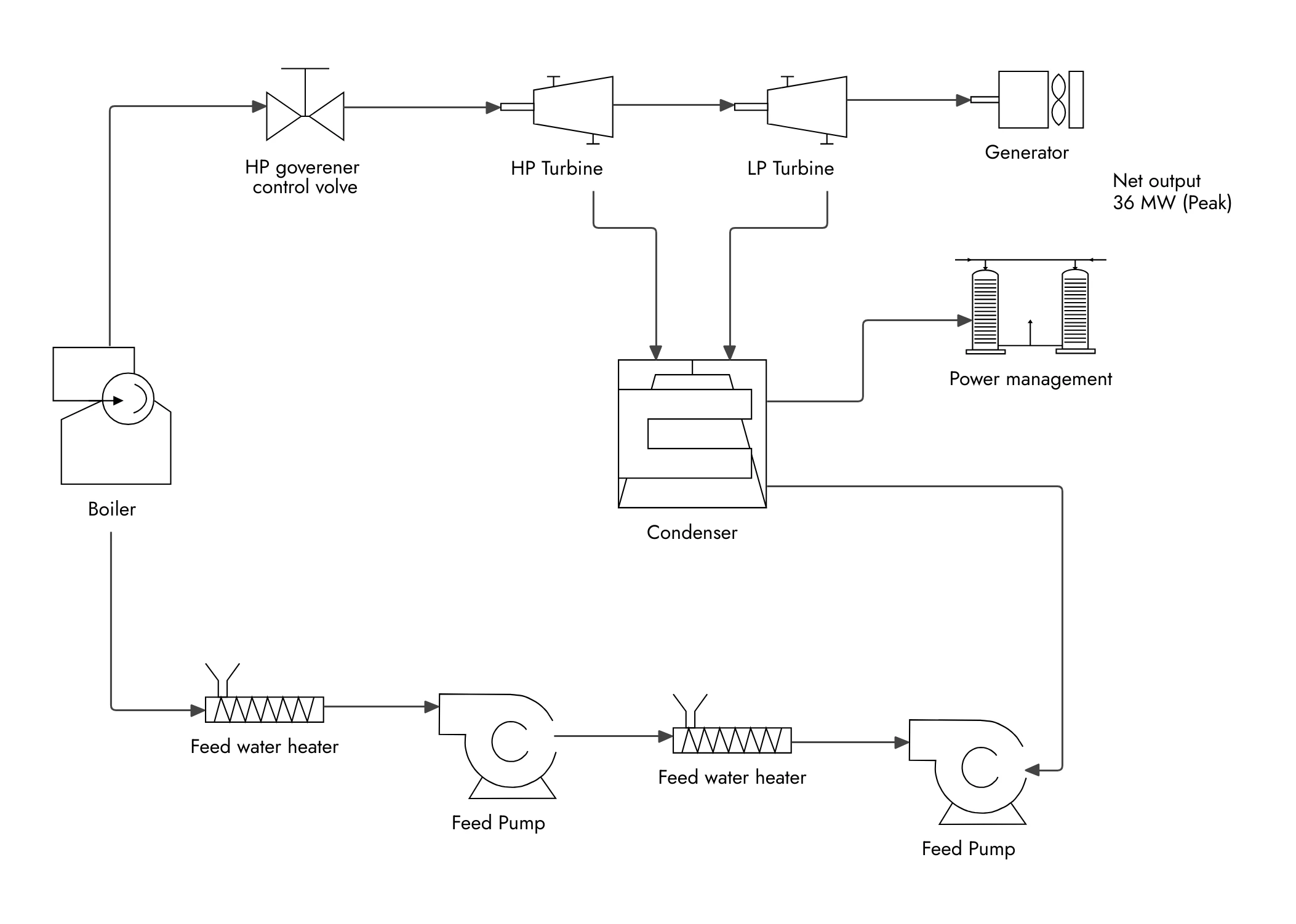
Example of a power plant cycle P&ID diagram
Common Use Cases of PID Diagrams
A Piping and Instrumentation Diagram is not created for a single moment in time. It is used repeatedly across the entire lifecycle of a process system, from early design decisions to day-to-day operations and long-term maintenance. Its value comes from being a reliable reference that different teams can return to whenever clarity is needed.
Here are the most common and practical use cases of P&ID drawings:
- Plant and process design
Engineers use PID diagrams to define piping layouts, instrumentation placement, and control logic before construction begins. This helps catch design gaps early and align teams around a single operating model.
- Operations and control
Operators rely on P&IDs to understand how the system responds to changes in pressure, flow, or temperature. During startups, shutdowns, or abnormal conditions, the diagram shows what actions affect which parts of the process.
- Maintenance planning and troubleshooting
Maintenance teams use PID diagrams to locate valves, instruments, and isolation points quickly. This reduces downtime and lowers the risk of incorrect interventions.
- Safety reviews and compliance
P&IDs are central to safety studies such as HAZOPs. They help teams identify hazards, verify safeguards, and document control strategies for audits and regulatory reviews.
- System modifications and upgrades
When processes evolve, updated P&ID diagrams ensure changes are understood, documented, and communicated across teams without relying on tribal knowledge.
How to Create a PID Diagram
Creating a P&ID (Piping and Instrumentation Diagram) diagram is less about drawing symbols and more about thinking clearly about how a process should operate. A good P&ID builds up logically, starting with scope and structure, then layering in flow, control, and standardization. The steps below follow the same sequence used in real engineering workflows.
Step 1: Define the Process Scope
Start by deciding what the diagram will and will not cover. This includes system boundaries, operating intent, and interfaces with upstream or downstream processes. A clearly defined scope prevents overcrowded diagrams and keeps the P&ID focused on the process control system it is meant to document.
Step 2: Add Major Equipment
Next, place the main equipment such as pumps, tanks, heat exchangers, or reactors. These components form the backbone of the diagram and establish how the process is physically arranged. At this stage, the goal is layout clarity, not detail.
Step 3: Map Piping and Flow Paths
Once equipment is in place, connect them using pipelines. Add flow directions, line connections, and branches. This step defines how material moves through the system and sets the foundation for valve placement and control logic.
Step 4: Insert Instruments and Control Loops
Now layer in instrumentation. Add sensors, transmitters, controllers, and actuators that monitor and regulate the process. Control loops should clearly show how measurements feed into controllers and how controllers adjust valves or equipment to maintain setpoints.
Quick Tip: Many engineers find it easier to build accurate P&ID diagrams by starting from an existing process flow and layering instrumentation gradually, instead of trying to define every control loop upfront. Treating the P&ID as an evolving document helps teams validate flow logic first, then refine control details with fewer revisions.
Step 5: Apply Standard Symbols and Tagging
Consistency is critical at this stage. Use standard P&ID symbols, line types, and instrumentation tagging conventions throughout the diagram. This ensures the P&ID can be understood, reviewed, and maintained by different teams over time.
A 2025 Scientific Reports found that structured inspection of P&ID symbols, text, and line elements reduced overall error-correction time by approximately 40%, with symbol recognition reaching an F1 score of 96.7% and line inspection achieving 100% accuracy. The findings reinforce why consistent tagging and validation significantly cut rework during reviews.
Using Diagramming Tools to Create PID Diagrams
As PID diagrams evolve over time, manual sketches quickly become hard to update, review, and share. Digital diagramming tools solve this by making P&IDs easier to build, revise, and collaborate on, without losing structural clarity. They also reduce errors by keeping layouts consistent and changes traceable.
One flexible option for creating P&ID-style diagrams is MockFlow IdeaBoard, which supports the way engineers actually work through process layouts.
Here’s how it helps in practice:
- Drag-and-drop diagramming capabilities: You can manually build P&ID elements using shapes, connectors, and arrows to represent process lines, valves, instruments, tanks, and flow connections. This gives you full control over how the diagram is structured.
- Infinite canvas for large systems: Complex process systems often do not fit neatly on a fixed page. IdeaBoard’s infinite canvas lets you expand freely as you add equipment, control loops, and auxiliary lines.
- Adaptable P&ID templates: IdeaBoard provides a range of P&ID-specific templates, including designs for systems like mixing stations and heat exchangers, along with built-in flowchart and workflow templates. These templates offer a strong starting point for your diagrams, and you can easily customize them with your own symbols, annotations, and control loops.
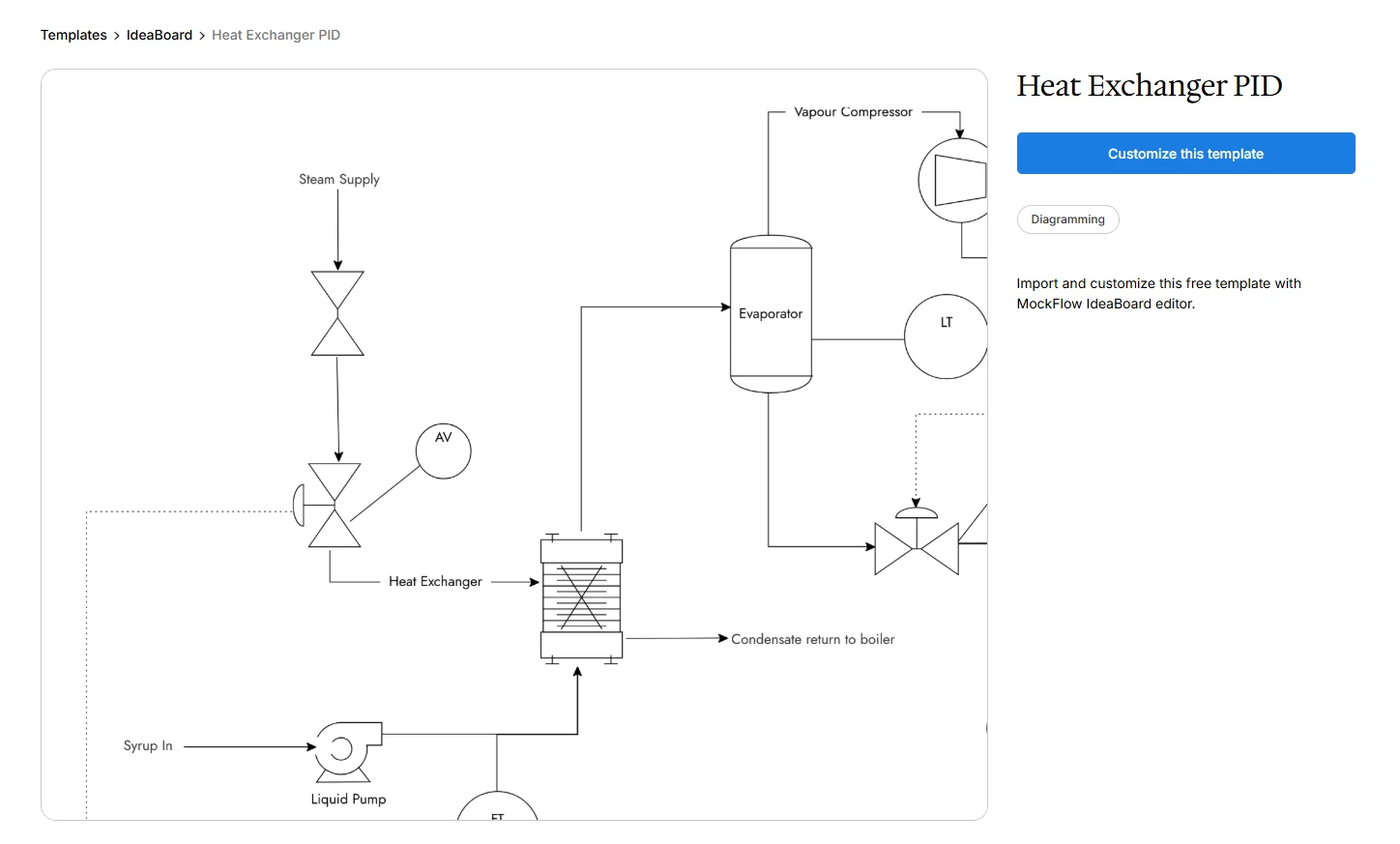
Customize this heat exchanger P&ID diagram template
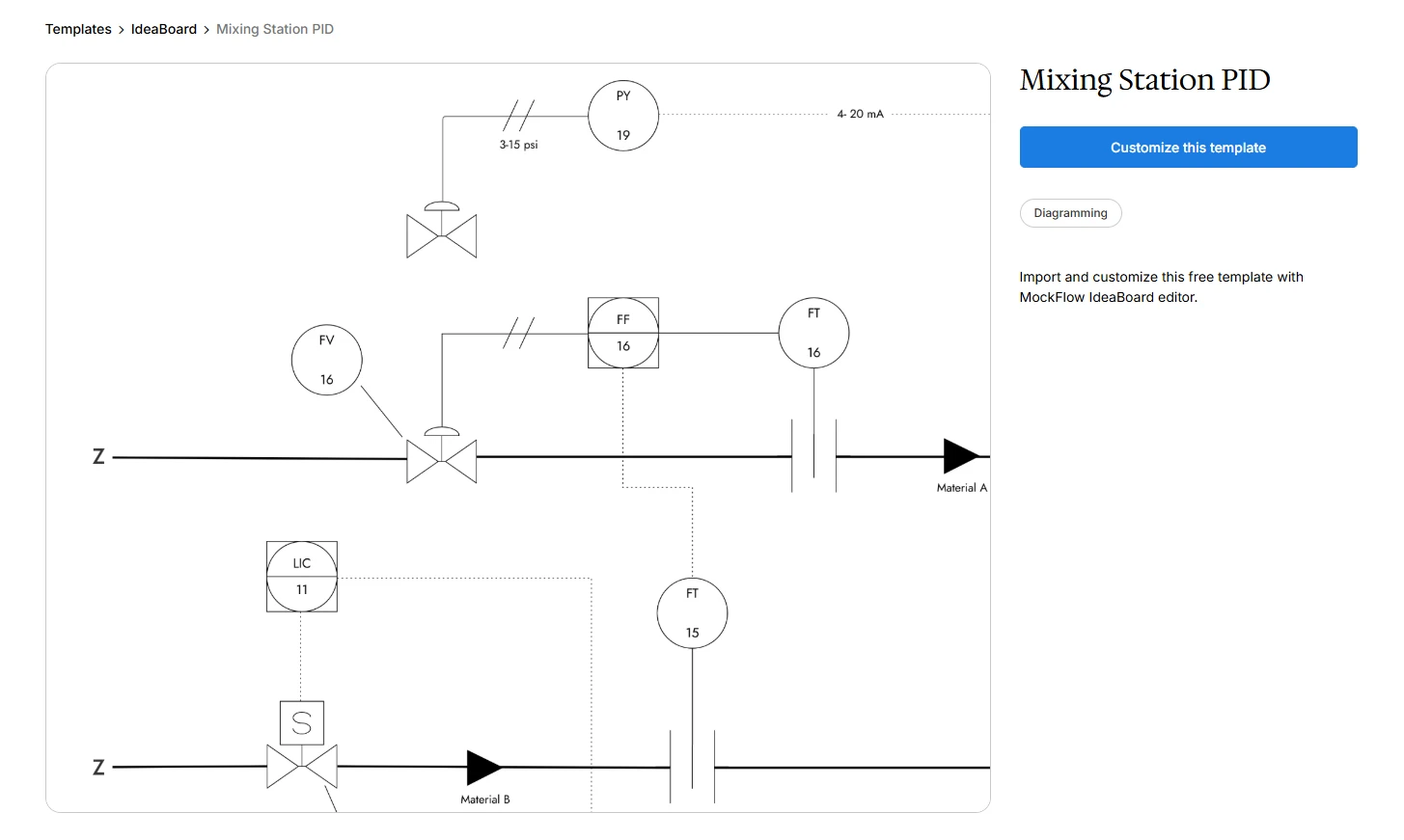
Customize this mixing station P&ID diagram template
- AI-assisted diagram generation: IdeaBoard’s AI toolbox can generate an initial process layout from a text description, which you can then refine into a detailed P&ID-style schematic.
- Real-time collaboration: Multiple stakeholders can review, add multimedia comment, edit, and annotate the diagram together, making it easier to align during design reviews and iterative refinements.
- Export and sharing options: Finished diagrams can be exported as PNG files for reports, documentation, and presentations, keeping P&IDs usable beyond the whiteboard.
Using a digital tool like this helps keep PID diagrams clear, collaborative, and maintainable as systems grow and change.
Conclusion
A PID diagram is more than documentation. It is the reference that keeps process design, operations, maintenance, and safety aligned as systems grow and change. When P&IDs are clear and up to date, teams can understand control logic faster, respond to issues with confidence, and avoid costly missteps caused by missing or outdated information.
The real value of a piping and instrumentation diagram lies in how well it is maintained. As processes evolve, using structured, digital tools helps ensure diagrams stay accurate, readable, and easy to collaborate on. That consistency is what turns a P&ID into a dependable source of truth rather than a static drawing.
If you are creating or updating P&ID diagrams today, try MockFlow IdeaBoard to build, refine, and share P&ID-style diagrams with your team. Sign up and get started for free.
FAQs About PID Diagrams
1. What is a P&ID diagram and what does it represent?
A PID diagram, also called a piping and instrumentation diagram, is a detailed schematic that shows piping, equipment, instruments, and control logic within a process system. It explains how a system operates and how flow and control are managed, not just how materials move.
2. What does PID stand for in engineering diagrams?
PID stands for Piping and Instrumentation Diagram. It is an engineering drawing used to represent piping layouts, instrumentation, control devices, and their relationships within industrial and process systems.
3. How is a P&ID diagram different from a piping layout drawing?
A piping layout drawing focuses on physical routing, dimensions, and spatial placement. A P&ID, on the other hand, focuses on function and control. It explains how flow is regulated, where measurements are taken, how control signals move, and how the system behaves under normal and abnormal conditions.
4. What symbols are used in a PID diagram?
PID diagrams use standardized symbols to represent pipelines, valves, actuators, sensors, controllers, and equipment like pumps and tanks. These symbols replace text and ensure consistent interpretation across engineering, operations, and maintenance teams.
5. Why are PID diagrams important in industrial automation?
PID diagrams provide a clear view of process control systems, showing how sensors, controllers, and actuators interact. They support plant design, safe operations, maintenance planning, troubleshooting, audits, and long-term engineering documentation.
6. How does MockFlow IdeaBoard support iterative PID diagram reviews after process changes?
IdeaBoard allows teams to update P&ID-style diagrams visually, comment directly on control logic or piping changes, and review revisions together in real time. This makes post-change validation easier, helps capture decisions during reviews, and ensures updated diagrams can be shared quickly as PDFs or images.

How to Make a Flowchart: Symbols, Types, Steps, and Templates
When a process has too many steps, decisions, or handoffs, it becomes harder to explain and even harder to improve. A flowchart...

5 Asynchronous Collaboration Strategies for Modern Remote Teams
Introduction When our teams work across different time zones, schedules rarely line up perfectly. Someone is starting their day...
BPMN Diagram Explained: Core Elements, Example, and Steps
Introduction When processes live in scattered documents or conversations, one team relies on meeting notes, while another builds...
