Storyboard vs Wireframe: When to Use Each in UX Design
TL;DR A storyboard breaks the experience into scenes: who the user is, what triggers the need, what steps they take, where friction appears, and what outcome they expect. A wireframe turns that into screen decisions: page sections, navigation, content hierarchy, forms, CTAs, and basic interaction notes. |
A strong product idea can still leave the team unsure about what to create next. Should you map the user’s situation first, or start shaping the screen?
Both are early UX design deliverables, but they answer different questions. A storyboard shows the user’s experience, context, and pain points. A wireframe defines the interface structure, layout, navigation, and content hierarchy.
This guide explains storyboard vs wireframe in a practical way, including when to use each one and how both fit into the product design process.
Storyboard vs wireframe: what’s the difference?
A storyboard shows the user’s journey, context, emotions, and sequence of actions. A wireframe shows the structure, layout, navigation, and hierarchy of a product screen. You use a storyboard to understand the experience around the product, and you use a wireframe to define how the product interface should work.
Use this table to compare storyboard vs wireframe at a practical level:
Factor | Storyboard | Wireframe |
Primary purpose | Explains the user journey and experience. | Defines screen layout and interface structure. |
Core focus | Context, sequence, emotion, scenario. | Navigation, hierarchy, content placement, functionality. |
Best used for | Understanding what happens before, during, and after product use. | Planning how each product screen should be organized. |
Format | Panels, scenes, captions, user actions. | Boxes, placeholders, labels, UI blocks. |
Design stage | Discovery, ideation, journey exploration. | Interface planning, early screen design. |
Main question answered | What is the user experiencing? | What should the screen contain and how should it work? |
Output | Narrative flow. | Interface blueprint. |
The difference between wireframe and storyboard is easier to understand as wireframe structure vs narrative flow.
Maze’s 2026 Future of User Research Report found that 69% of participants use AI in at least some research projects, which shows that AI-assisted wireframing and early design exploration are becoming common in product workflows.
What is a wireframe in UX design?
A wireframe is a low-fidelity visual blueprint of a digital product screen. It shows structure before colors, typography, imagery, or branding. You use it to make early interface decisions without letting polish drive the discussion.
A wireframe usually includes:
- Page sections: Show major screen areas, such as the header, content area, sidebar, form section, or footer.
- Navigation: Shows where users can go next and how key paths connect across screens.
- Content hierarchy: Helps you decide which information appears first, what needs emphasis, and what can move lower.
- Buttons and CTAs: Mark the main actions users should take.
- Forms and input fields: Show what users need to enter and where friction may appear.
- Interaction notes: Explain basic behaviors such as dropdowns, filters, errors, or next-screen actions.
In UX design, wireframes help teams turn early ideas into screen structure. They are useful for:
- Agreeing on what each page needs.
- Reviewing user flows before visual design.
- Checking whether the content order makes sense.
- Catching missing steps early.
- Aligning designers, product managers, developers, and stakeholders.
To create one faster, this video shows how to create wireframes instantly using Claude Code.
You can also start with a pre-built wireframe template. For example, a sketchy pricing page wireframe template helps you compare pricing tiers, CTA placement, feature grouping, and FAQ placement before discussing final visuals.
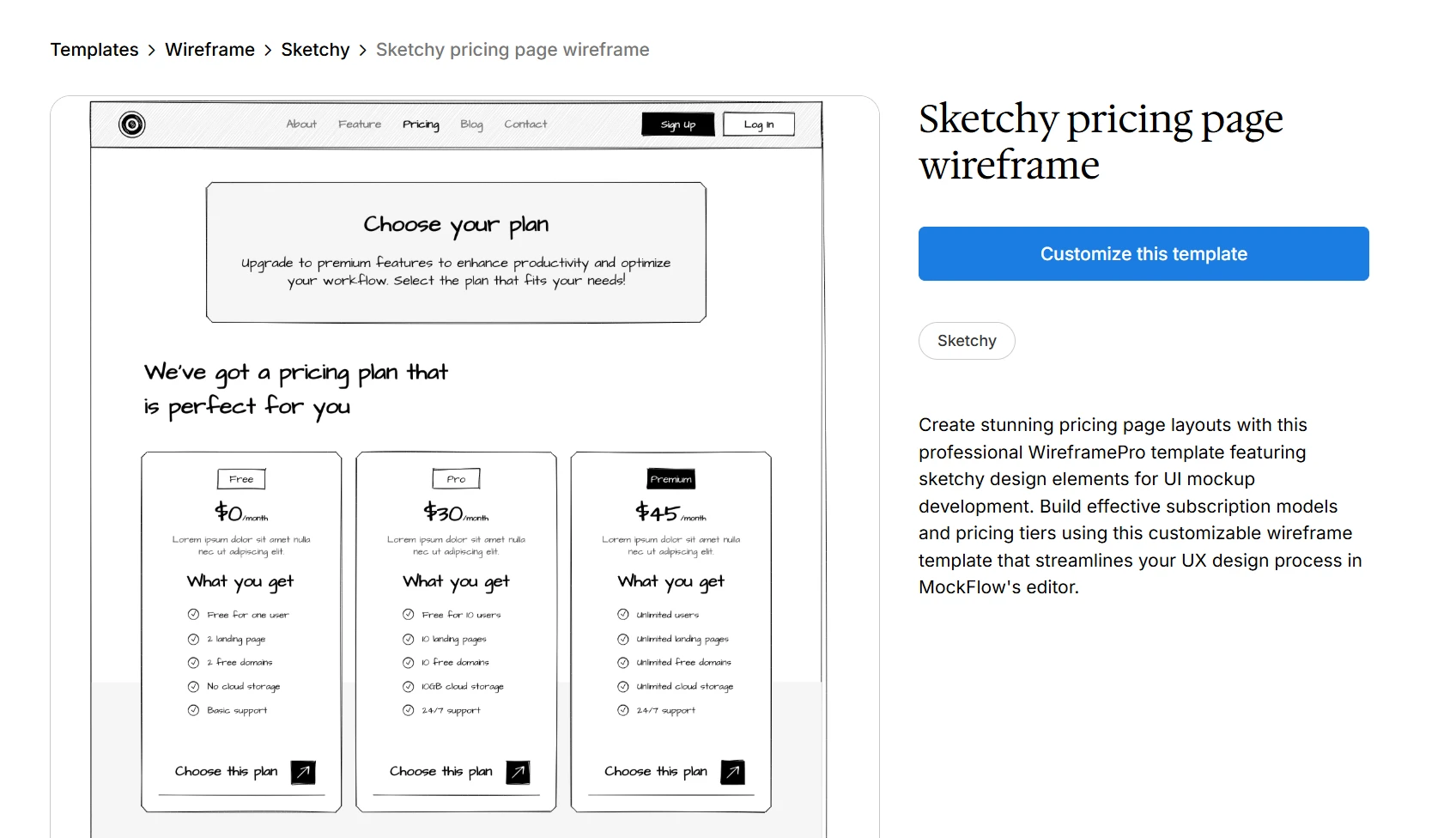
Customize this sketchy pricing page wireframe template
Also read → Step-by-step guide to create a wireframe
What is a storyboard in UX design?
A UX storyboard is a sequence of panels or frames that visually explains a user’s experience with a product. It focuses on the situation around the product, not the screen layout. You use it to understand what the user is doing, feeling, and trying to solve.
A storyboard usually includes:
- User or persona: Shows who is involved and what goal, role, or need shapes the experience.
- Context or environment: Explains where the situation happens and what external factors affect the user.
- Problem or trigger: Identifies the moment that creates the need for the product.
- Key actions: Shows the sequence of steps the user takes before, during, or after product use.
- Emotions and pain points: Captures frustration, uncertainty, urgency, confidence, or relief across the journey.
- Product touchpoints: Marks where the product appears in the user’s path.
- Outcome or resolution: Shows what the user expects to achieve by the end of the experience.
In UX design, storyboards help teams explore the user experience before designing screens. They are useful for:
- Understanding the user’s context, motivation, and goals
- Spotting friction points across the journey
- Revealing gaps in team assumptions
- Building shared clarity before interface decisions begin
To create one faster, this video shows how to generate a storyboard with AI and turn a scenario into visual frames.
You can also start with a pre-built game design storyboard template. It gives you a simple frame for mapping scenes, user actions, decision points, and outcomes. The same structure can support product onboarding, feature discovery, and other UX scenarios where sequence matters.
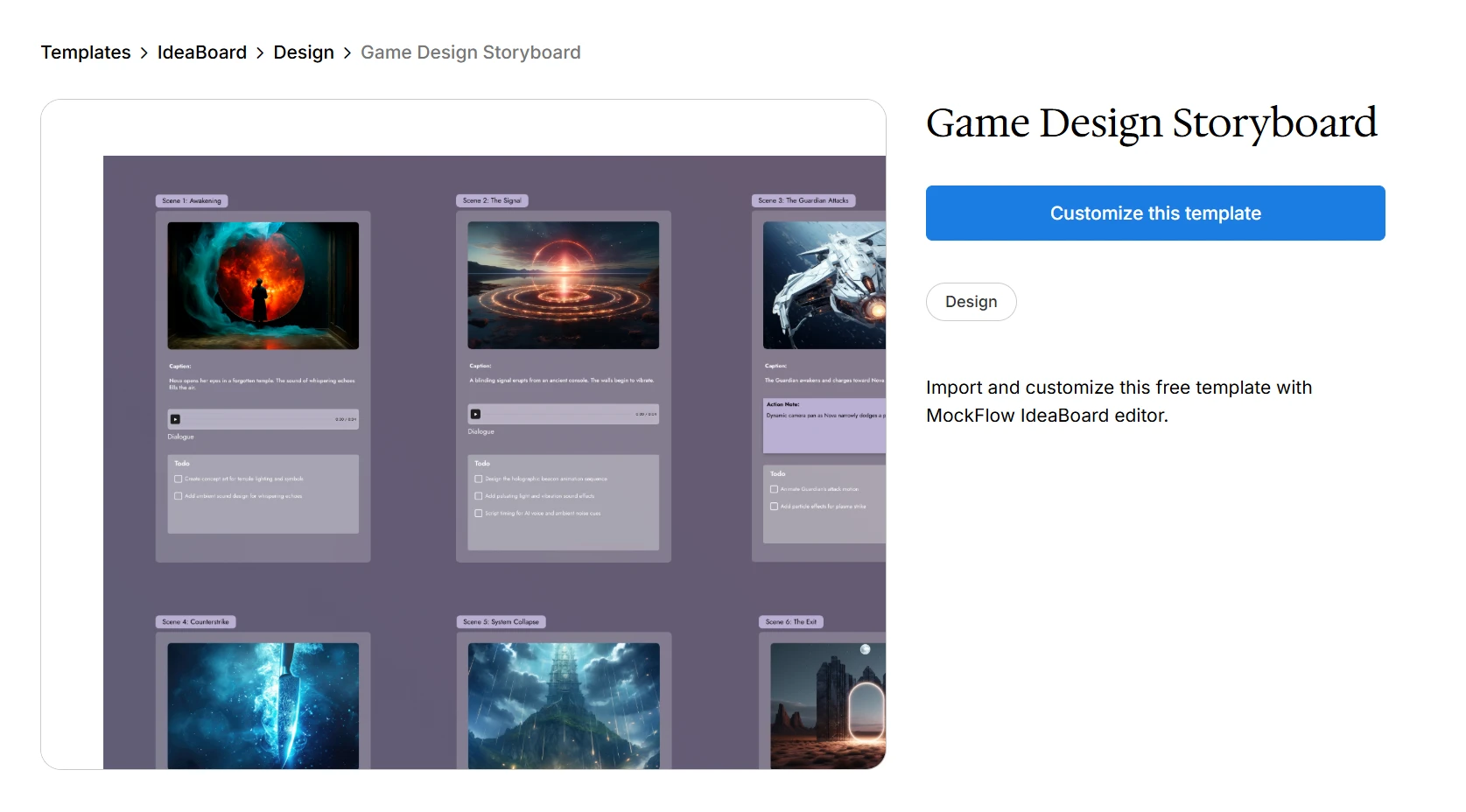
Customize this game design storyboard template
Wireframe vs storyboard: detailed UX comparison
The wireframe vs storyboard choice depends on what you need to clarify first. Use a storyboard when the user’s situation is still unclear. Use a wireframe when you are ready to shape the product screen.
Use this comparison to decide which UX artifact fits your next design step:
Comparison point | Wireframe | Storyboard |
Purpose | Defines product screen structure. | Explains the user’s experience. |
Focus | Interface layout and hierarchy. | User context and journey. |
Best stage | After the problem and flow are reasonably clear. | During discovery, ideation, or journey exploration. |
Main audience | Designers, PMs, developers, stakeholders. | Designers, PMs, researchers, stakeholders. |
Level of detail | Screen elements and layout logic. | Scenario, emotion, sequence, motivation. |
Output | Screen blueprint. | Narrative sequence. |
Best next step | Mockup, prototype, or design handoff. | User flow, wireframe, or journey map. |
Storyboard vs wireframe vs wireflow vs mockup vs prototype
These UX outputs answer different design questions. A storyboard explains the user’s situation. A wireframe shapes the screen. A wireflow connects screens into a task path. A mockup shows the visual direction. A prototype lets the team test behavior.
Use this table to choose the right output without mixing their roles:
UX output | What it shows | When you use it |
Storyboard | User journey, context, emotion, sequence | When you need to understand or explain the experience |
Wireframe | Screen structure, layout, navigation, hierarchy | When you need to plan the interface |
Wireflow | Screen-by-screen flow with interaction paths | When you need to connect wireframes into a task flow |
Mockup | Visual design, branding, typography, colors | When you need to review look and feel |
Prototype | Clickable or interactive product behavior | When you need to test interactions or usability |
Use a storyboard when the team still needs to understand the user’s situation. Use a wireframe or wireflow when the team is ready to organize screens and paths. Move to mockups and prototypes only when structure is clear enough to review visuals or test interactions.
Also read → Know the difference between wireframe vs mockup vs prototype
Similarities between wireframes and storyboards
Wireframes and storyboards are different, but they overlap as early-stage UX planning tools. You use both to make ideas visible before the team invests in polished design or development.
Here is where they work in similar ways:
- Visual planning: Both help you turn abstract product ideas into something the team can review, question, and improve.
- Stakeholder alignment: Both make it easier to explain decisions without relying only on verbal descriptions.
- Low-fidelity creation: Both can be rough, fast, and simple enough for early discussion.
- Gap detection: Both help expose missing steps, unclear assumptions, or weak points early in the product design process.
- Team collaboration: Both support input from designers, PMs, researchers, developers, and stakeholders.
- Next-step planning: Both can lead into user flows, mockups, prototypes, or design handoff.
Treat them as related, not interchangeable. A storyboard is stronger for explaining why and when a user needs something. A wireframe is stronger for explaining what the interface should contain and how it should be structured.
When to use a storyboard vs wireframe?
Use a storyboard when you need more clarity around the user’s situation. Use a wireframe when you already understand the problem and need to plan the screen. The right choice depends on the decision in front of you.
Use this table to choose the right direction:
Use case | Use storyboard | Use wireframe |
We are still exploring the problem | Yes | Not yet |
We need to explain user context | Yes | Sometimes |
We need to map emotions and pain points | Yes | No |
We need to define screen layout | No | Yes |
We need to plan navigation and hierarchy | Sometimes | Yes |
We need developer feedback on structure | No | Yes |
We need stakeholder buy-in on the journey | Yes | Sometimes |
We need to move toward mockups or prototypes | Sometimes | Yes |
A tool choice can follow the same logic. Use a visual board when you are mapping the story around the user, and use MockFlow WireframePro when the team is ready to turn that story into screen layouts, navigation, and interface structure.
Use a storyboard when the experience needs more definition:
- User situation: You need to understand what the user is doing before designing screens.
- Journey clarity: You want to map pain points, emotional context, triggers, and outcomes.
- Concept validation: You are testing whether the product idea fits the user’s actual need.
- Stakeholder buy-in: You need to show the moment that makes the experience worth solving.
- Scenario planning: You are exploring onboarding, service design, product discovery, or a new feature.
Use a wireframe when the interface needs more structure:
- Screen planning: You already understand the user problem and need to design the interface.
- Layout decisions: You need to define navigation, content placement, hierarchy, and functionality.
- Early feedback: You want quick input before visual design adds extra detail.
- Team alignment: You need designers, PMs, and developers to agree on screen structure.
- Delivery path: You are preparing for mockups, prototypes, or design handoffs.
A practical workflow looks like this:
Storyboard → user flow → wireframe → mockup → prototype.
This order is not fixed. It gives you a simple way to move from user context to product structure without skipping the thinking that each stage needs.
A Reddit discussion among UX designers makes a similar point: teams may skip wireframes when they already have a mature design system or familiar product patterns, but wireframes still help when the problem, flow, or feature is complex.
How MockFlow helps create effective storyboards and wireframes
Creating a storyboard or wireframe is not usually the hardest part. Most teams can sketch scenes, map flows, or block out a screen when the idea is still small.
The challenge appears when the work starts growing. Storyboards collect more scenes. Wireframes collect more screens. Feedback starts coming from product, design, engineering, and stakeholders. Versions begin circulating across docs, slides, screenshots, and chat threads.
That is where MockFlow can help keep the early UX workflow easier to manage.
- Start with the user story: In IdeaBoard, teams can map context, actions, pain points, and product touch points on a shared visual canvas. This helps everyone review the journey before discussing screen layout.
- Create storyboard frames faster with AI: A rough scenario can be turned into visual storyboard frames with AI that the team can review, reorder, and refine instead of starting from a blank canvas.
- Keep storyboard details organized: As the storyboard grows, teams need a way to keep scenes, notes, feedback, and revisions connected. A structured storyboard workspace makes it easier to review pacing, reorder scenes, and avoid losing context.
- Move into screen planning: Once key product moments are clearer, teams can turn them into low-fidelity layouts for pages, mobile screens, dashboards, forms, or product flows using WireframePro.
- Use AI wireframing when screen structure needs a faster start: Teams can generate editable wireframes instantly with AI from text prompts, screenshots, rough sketches, whiteboard drawings, or URLs. This gives the team a draft structure to review instead of starting from scratch.
- Avoid rebuilding common UI patterns: Reusable UI kits help teams place familiar interface elements quickly, so the discussion stays focused on structure, flow, and missing steps.
- Keep feedback close to the work: Design collaboration features help teams discuss layout, flow, and open questions directly around the storyboard or wireframe being reviewed.
For teams already working inside AI tools, MockFlow’s MCP support can also reduce context switching. Teams can run visual brainstorming into tools like Claude, Cursor, and VS Code Copilot, and also create wireframes from prompts, docs, specs, tickets, or codebase context. This is useful when requirements already live in an AI assistant or developer workflow, and the team needs a visual output they can still edit and review in MockFlow.
Is your team still debating the journey while reviewing screens? Start with MockFlow for free to map the user story first, then move into wireframes when the product moments are clear.
FAQs
1. What is the main difference between a wireframe and a storyboard?
A wireframe shows the structure, layout, navigation, and content hierarchy of a product screen. A storyboard shows the user’s journey, context, actions, emotions, and product touch points across an experience.
2. What are the three types of storyboards?
The three common types of storyboards are big-picture storyboards, close-up storyboards, and user journey storyboards. Big-picture storyboards show the full user context, close-up storyboards focus on specific product interactions, and user journey storyboards map the steps a user takes to reach a goal.
3. Is wireframing still relevant in modern UX?
Yes. Wireframing is still useful when you need to plan layout, test structure, align teams, or discuss functionality before visual design. It is especially helpful for complex flows, new features, dashboards, and products without a mature design system.
4. What are the 7 steps in a storyboarding template?
A basic storyboarding template includes seven steps: define the user, set the context, identify the problem, outline key actions, show product touchpoints, capture emotions or pain points, and end with the outcome.
5. What are the disadvantages of a storyboard?
A storyboard can become too broad, subjective, or time-consuming if the scenario is unclear. It may also miss interface-level details, so teams usually need wireframes after storyboarding to define the actual screen structure.
6. Which tool is best for creating storyboards and wireframes?
For storyboards, journey maps, and visual planning, you can use MockFlow IdeaBoard. For screen-level wireframes, UI layouts, and interface planning, you can use MockFlow WireframePro.
Process Mapping Explained: 7 Types, Examples, Uses, and Best Practices
An approval sits untouched because no one knows who owns it. A customer request moves between departments without resolution. A...
Miro vs Milanote: Full Comparison of Features, Pricing & Workflows
Introduction When teams compare Miro and Milanote, the discussion usually isn’t just about features - it’s about how each tool...
Miro vs Microsoft Whiteboard: A Breakdown of Features, Pricing & Fit
Choosing between digital whiteboard tools often comes down to how much structure your team needs. A simple canvas may work well...
