Lotus Diagram: Step-by-Step Guide with Examples & Benefits
Introduction
Brainstorming sessions tend to fall apart when ideas are scattered or too shallow to build on. The lack of a clear structure makes it feel like a collection exercise instead of a thinking process.
A lotus diagram helps teams build that structure. It offers thinking direction without limiting creativity. Instead of jumping between disconnected ideas, you build depth around a central concept and explore it from multiple angles.
In this guide, we’ll walk you through what a lotus diagram is, how the lotus blossom technique works, how it compares to a mind map, and how to create one step by step so you can turn brainstorming into structured, actionable outcomes.
What is a Lotus Diagram?
A lotus diagram is a structured brainstorming technique that expands a central idea into related themes using a 3x3 grid. It organizes ideas into clusters and then extends each theme into deeper subtopics.
The lotus blossom technique helps teams explore problems from multiple angles and generate actionable ideas. It provides a more guided approach than mind mapping. Teams, educators, and designers use lotus diagrams for planning, ideation, and problem-solving across workshops and projects.
At its core, the method follows a simple structure:
- A central idea sits in the middle
- Eight related themes surround it
- Each theme expands into another 3x3 grid
What makes this method effective is how it balances structure with exploration. Instead of letting ideas branch out randomly, it creates a clear system for expanding thinking in layers.
That need for structure shows up clearly in how teams actually brainstorm. Designers discussing brainstorming methods point out that unstructured sessions often end up favoring the fastest or loudest voices, which can unintentionally limit the range of ideas explored before the group settles on a direction.
The method was developed by Yasuo Matsumura at Clover Management Research in the 1980s’ to improve problem-solving through structured idea expansion. It also reflects lateral thinking principles described by Michael Michalko, where guided exploration helps generate more diverse and meaningful ideas.
Once you understand the structure, the real value comes from how ideas expand and connect across layers. That is where the technique starts to move from a simple grid to a full idea expansion system.
How Does the Lotus Blossom Technique Work?
The lotus blossom technique works by expanding ideas outward in layers while maintaining structure. You begin with a central idea and then systematically explore it from multiple angles.
The process starts with placing a single concept in the center of a 3x3 grid. Around it, you define eight sub-themes. Each sub-theme represents a different direction of thought. These are not final ideas, but the starting points for deeper exploration.
Each of those eight themes then becomes a new center. You repeat the same grid expansion for each one, creating a multi-layered structure often referred to as a lotus chart or idea expansion map.
This approach balances creativity and structure in three important ways:
- It enables free association without losing direction.
- It encourages lateral thinking by forcing diverse perspectives.
- It supports iterative expansion, where ideas evolve layer by layer.
That balance matters because people often stall once the obvious ideas run out. A 2024 peer-reviewed study found that participants generated at least one new response after a prompt in 64% of trials, and 95% responded after a prompt at least once, suggesting that structured cues can help people push past creative fixation and produce more original ideas.
Over time, a single idea turns into a network of connected insights, and that is what makes it more powerful than linear brainstorming.
Lotus Diagram vs Mind Map: What’s the Difference?
Both tools help with idea generation, but they serve different purposes.
A mind map works well for quick, free-flow thinking as ideas branch out organically without constraints. This makes it useful when you want speed and flexibility, especially in early-stage ideation, but structured brainstorming methods tend to go deeper.
A 2025 meta-analysis found that brainstorming techniques had a strong effect on creative thinking (effect size = 2.267) and a moderate impact on performance outcomes, highlighting the value of guided idea expansion when depth matters.
A lotus diagram, on the other hand, acts as a structured brainstorming diagram. It ensures that each idea is explored in depth. Instead of jumping between branches, you expand each direction fully before moving on, which makes it more effective for complex problem-solving.
Here’s a quick comparison to make the difference clearer:
Feature | Lotus Diagram | Mind Map |
Structure | Fixed 3x3 grid | Free-form |
Expansion | Systematic and layered | Organic and flexible |
Thinking style | Structured + divergent | Associative |
Best use case | Deep exploration | Idea visualization |
This makes the lotus diagram a strong mind map alternative when:
- You need deeper exploration instead of surface-level ideas.
- You want structured ideation for complex problems.
- You are working in a team setting where clarity matters.
The real shift happens when you move from capturing ideas to expanding them with intent. That is where structure starts to influence the quality of thinking, not just the quantity of ideas.
How to Create a Lotus Diagram Step-by-Step
Once you understand the structure, the real value of a lotus diagram comes from how you apply it in practice. The method is simple to set up, but the way you expand and refine ideas is what determines the quality of outcomes.
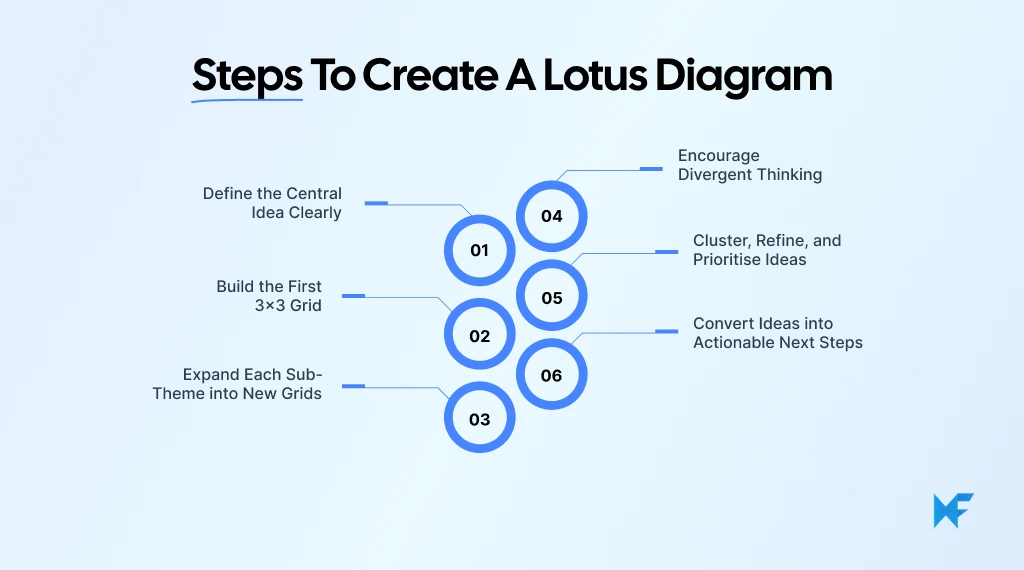
Step 1: Define the Central Idea Clearly
Everything starts with clarity, and this is where most teams go wrong. If the central idea is vague, the entire diagram loses direction, so it’s important to define a specific problem or objective before you begin.
To make this easier, you can start with a pre-built Lotus Diagram template in IdeaBoard. Instead of setting up the structure manually, the template gives you a ready-to-use 3x3 grid, so you can focus entirely on thinking and not formatting.
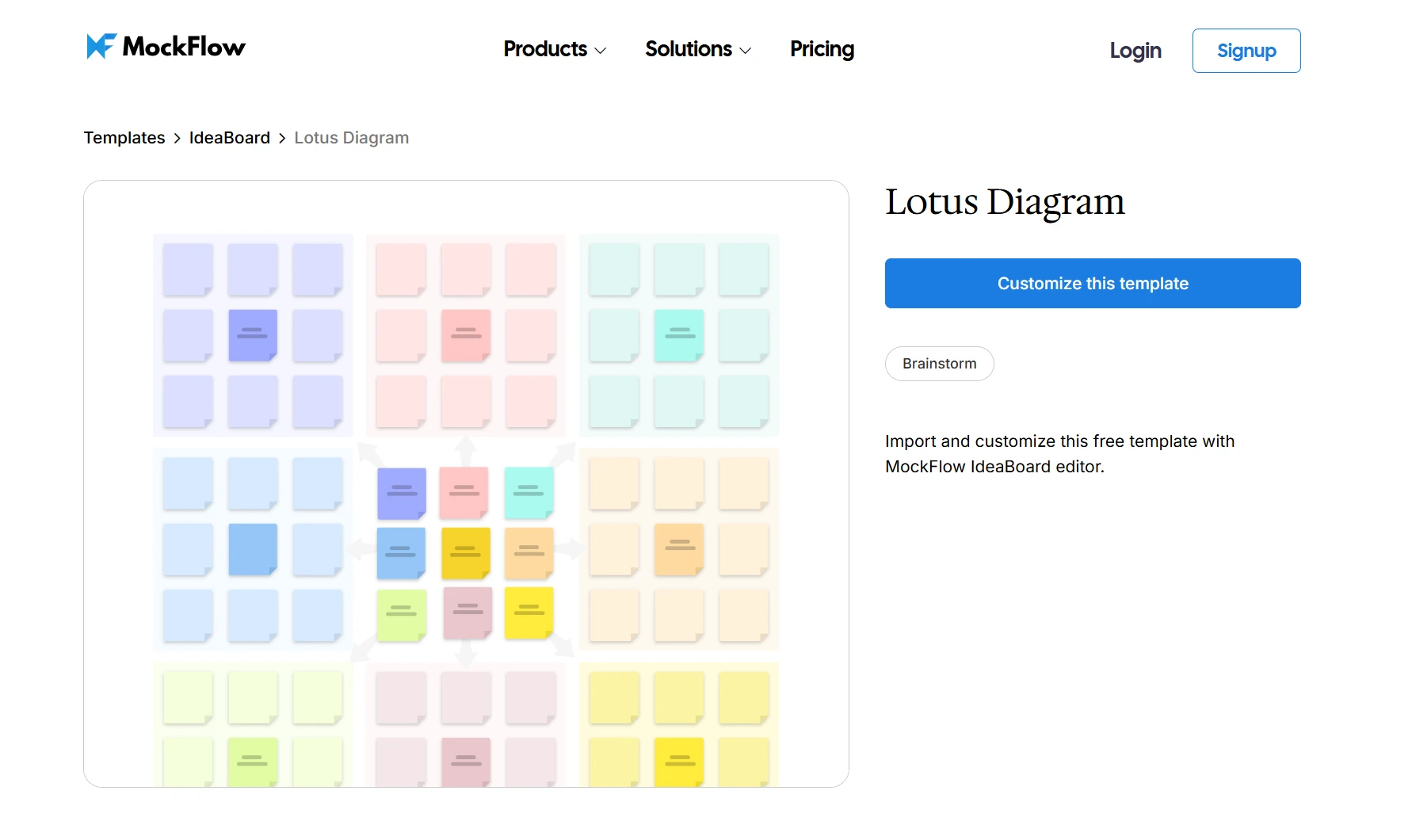
Customize this lotus diagram template on IdeaBoard
Step 2: Build the First 3x3 Grid
Once your central idea is in place, build the first layer by filling the eight surrounding boxes with related themes. Each of these should represent a distinct angle, not variations of the same thought.
This is where the method starts to guide your thinking. You are no longer listing ideas randomly, but defining clear directions for exploration, which makes the process far more intentional and structured.
Step 3: Expand Each Sub-Theme into New Grids
Now comes the step where the lotus blossom method starts to show its depth. Each of the eight themes becomes a new central idea, and you repeat the same 3x3 expansion around it.
As you move outward, ideas begin to connect in more meaningful ways. What started as a simple theme often evolves into multiple layers of insights, helping you uncover patterns that would not surface in linear brainstorming.
Using a visual canvas like IdeaBoard helps here, especially with drag-and-drop elements that make it easy to organize and adjust themes as your thinking evolves.
Step 4: Encourage Divergent Thinking
At this stage, the focus shifts from structure to exploration. You want to generate as many ideas as possible without filtering too early.
This is where prompts can help push your thinking further:
- What is the opposite approach?
- What if we changed the assumptions?
By deliberately exploring different directions, you avoid repeating the same types of ideas and make the diagram more diverse and valuable.
Step 5: Cluster, Refine, and Prioritise Ideas
After expanding multiple layers, the diagram starts to feel dense. This is a good sign because it means you have enough material to work with.
Now, shift your focus to identifying patterns. Group similar ideas together, look for high-impact themes, and start narrowing down what is worth pursuing.
Collaboration tools make this easier by allowing teams to visually cluster ideas, add context, and refine them together in real time.
That matters because collaborative ideation is now part of everyday product work. In Figma’s 2025 designer-developer trends report, 84% of designers said they collaborate with developers at least weekly, and 67% of developers and 63% of designers rated that collaboration as effective or very effective, which reinforces the value of tools that support shared thinking and refinement.
Step 6: Convert Ideas into Actionable Next Steps
This is the step where most brainstorming methods fall short, but the lotus diagram makes it easier to move forward. Once you have refined your ideas, convert them into clear next steps such as tasks, experiments, or roadmap items.
The goal is simple. Every idea should lead to something actionable, so the session does not end as just a collection of thoughts.
At this point, the diagram becomes a decision-making tool that connects ideas to outcomes. And that is where its real impact starts to show.
Benefits of Using a Lotus Diagram for Brainstorming
The lotus diagram stands out because it brings structure to creativity without limiting it. Instead of stopping at surface-level ideas, it pushes you to explore each direction in depth, which makes it especially useful for complex problems and team-based thinking.
Here are some key benefits:
- Deeper idea exploration: The layered 3x3 structure forces you to move beyond obvious ideas and uncover insights that would otherwise go unnoticed
- Better organization: Ideas stay grouped and connected, making it easier to track how different themes evolve
- Improved collaboration: Teams work within a shared structure, which reduces confusion and keeps discussions focused
- Reduced repetition: Each grid encourages new directions, preventing the same ideas from repeating across the session
- Scalability: The method works just as well for a simple topic as it does for large, multi-layered problems
In practice, this makes the lotus blossom method particularly valuable for product teams, UX designers, and strategists who need structured ideation that leads to clear outcomes.
Tools like IdeaBoard take this further by making the method easier to execute at scale. The infinite whiteboard canvas allows you to expand ideas without constraints, while pre-built templates remove the friction of setting up the structure.
Teams can collaborate in real time, use sticky notes to cluster ideas, and add comments, video notes, and voice notes directly within the board. Export options also ensure that ideas do not stay locked in the session but can be shared and acted on.
When structure, collaboration, and execution come together, brainstorming stops being an isolated activity. It becomes a repeatable system that consistently produces clearer, more actionable ideas.
Conclusion
A lotus diagram brings structure to your thinking, ensuring that your brainstorming sessions are always a success. It allows ideas to connect, evolve, and lead somewhere meaningful.
MockFlow’s IdeaBoard makes this process seamless. Instead of managing scattered notes or static diagrams, you get a dynamic space where ideas can grow, cluster, and turn into clear next steps. With ready-to-use templates, real-time collaboration, and an infinite canvas, it becomes much easier to move from ideation to execution without losing context.
If you want your next brainstorming session to actually lead to outcomes, try building your first lotus diagram on IdeaBoard. Sign up for a free trial and see how structured thinking changes the way your team works.
FAQs
1. What is a lotus diagram?
A lotus diagram is a structured brainstorming technique that expands a central idea into related themes using a 3x3 grid. Each theme becomes a new center for deeper idea exploration, helping teams organize and develop ideas systematically.
2. How does a lotus diagram work?
A lotus diagram starts with a central concept placed in the middle of a grid. Surrounding boxes capture related themes. Each of those themes expands into its own grid, allowing teams to explore subtopics and generate detailed ideas.
3. How do I create a lotus diagram step by step?
To create a lotus diagram, define a central idea, build a 3x3 grid around it, and fill surrounding boxes with related themes. Expand each theme into new grids, generate ideas, then cluster and prioritize them into actionable steps.
4. What is the difference between a lotus diagram and a mind map?
A lotus diagram uses a structured grid to expand ideas in layers, while a mind map uses free-form branches. Lotus diagrams guide deeper exploration of each idea, whereas mind maps focus on quick, flexible idea connections.
5. When should I use a lotus diagram for brainstorming?
Use a lotus diagram when you need structured brainstorming for complex problems, project planning, or idea expansion. It works well in workshops, design thinking sessions, and team discussions where deeper exploration is required.
6. What are the benefits and limitations of a lotus diagram?
A lotus diagram improves idea organization, encourages deeper thinking, and supports structured collaboration. However, it can feel restrictive for free-flow brainstorming and may require facilitation to guide teams effectively.

Asana Whiteboard: How to Add Visual Planning to Asana
Ever had a project that looked clear in Asana, but still felt hard to talk through as a team? That usually happens when the...

5 Storyboard Examples for Film, UX, Animation, and Marketing Teams
TL;DR Storyboard examples show how an idea moves panel by panel before production or execution begins. This guide covers...

8 SaaS Website Design Trends to Watch in 2026
Introduction If your SaaS website is due for a refresh, the hardest part is often knowing which design ideas are worth...
