What is a Context Diagram? A Guide with Examples & How to Create One
Introduction
Launching a new system or improving an existing one?
You’ll want to know exactly how everything fits together, right? How your system interacts with customers, partners, or third-party tools. Without this clarity, things can quickly spiral out of control.
That’s when a context diagram can really help.
It’s a simple yet powerful and straightforward visual that shows how your system interacts with everything around it, whether it’s users, third-party apps, or other systems. No need to dive into all the technical details, just a simple snapshot of how things fit together and a clear visual of the big picture.
In this guide, we’ll break down exactly what context diagrams are, why they’re essential for system design, and how you can create one that makes communication and planning much easier for everyone involved. Plus, we'll introduce MockFlow IdeaBoard, a tool that makes creating context diagrams quick, intuitive, and collaborative.
Let’s dive in.
What is a Context Diagram?
A context diagram is a high-level visual representation that illustrates the interactions between a system and its external entities. It defines the system’s boundaries, showing what is inside and outside the system. By mapping data flows and relationships, it helps clarify complex system designs and improves stakeholder communication.
Context diagrams provide a simplified, abstract view, making them essential for system planning and early-stage design. They are widely used to map external interactions, enabling teams to visualize system components and their dependencies, laying the groundwork for more detailed system modeling.
It’s a powerful tool used primarily during the early stages of system design to provide clarity before diving into more intricate models, like Data Flow Diagrams (DFDs).
The diagram typically includes:
- The System: Represented at the center, this is the core system you're designing or analyzing.
- External Entities: These are the components outside the system that interact with it, such as users, other systems, or external databases.
- Data Flows: Arrows or lines showing how information or data moves between the system and external entities.
By presenting a simplified, abstract view of the system, context diagrams ensure that everyone, including developers, business analysts, project managers, can quickly grasp the essential interactions and boundaries before tackling the more detailed work.
While it might be tempting to draw separate diagrams for different scenarios, many teams find more value in a single unified context diagram covering all external entities and interactions as this gives a cleaner “big picture,” helps spot overlaps or redundancies, and avoids fragmented documentation.
In the next section, we'll take a closer look at what exactly a context diagram illustrates and how it helps in system design.
What Does a Context Diagram Illustrate?
A context diagram provides a high-level view of how a system interacts with external entities, highlighting key relationships, system boundaries, and the flow of data. It’s designed to simplify complex systems, offering a clear snapshot of the system’s place within a larger environment.
Let’s break down the essential elements that a context diagram illustrates:
1. System Boundaries
One of the core elements a context diagram illustrates is the system boundary. This boundary defines the scope of what is included in the system and what lies outside.
- The system itself is represented in the center, typically as a rectangle or circle.
- Everything inside the boundary represents the internal components and processes that make up the system.
- External entities, such as users or third-party services, are placed outside the system boundary to clearly show what is not part of the system but interacts with it.
For example, in an e-commerce system, the boundary would encompass internal components like the shopping cart and payment system, while external entities like customers and payment gateways lie outside the boundary.
2. External Entities
External entities are the individuals, systems, or organizations that interact with the system but are not part of it. These are represented as ovals or rectangles placed outside the system’s boundary.
- These entities could include customers, third-party applications, or other systems that feed data into or receive data from the system.
- In a banking system, for instance, external entities might include customers, ATMs, and external credit bureaus.
By identifying and representing these external entities, a context diagram helps clarify who or what interacts with the system.
3. Interactions and Data Flows
Context diagrams also illustrate how data flows between the system and its external entities. Arrows or lines are drawn between the system and external entities to show the direction of data flow, and each arrow is typically labeled to indicate the type of data being exchanged.
- Data flow could represent actions like placing an order, processing payment, or updating inventory.
- In an e-commerce example, you might see arrows indicating that customers place orders, the system processes payments, and payment details are sent to a payment gateway.
This visualization of data flows helps stakeholders understand how information moves through the system and its interactions with external components.
4. High-Level Overview
The key benefit of a context diagram is that it provides an abstract overview of the system. It avoids going into granular details, which are typically addressed in other diagrams like Data Flow Diagrams (DFDs).
- It focuses on major components and their interactions, making it accessible for both technical and non-technical stakeholders.
- This simplified approach ensures that the diagram serves as a clear starting point for system design, leaving more detailed analysis for later stages.
A ScienceDirect survey on the practical use of UML revealed that functional (96%) and information (99%) viewpoints are the most popular among practitioners. This widespread use of diagrams across multiple viewpoints in UML underscores the importance of system diagrams, such as context diagrams, in streamlining complex analysis and facilitating clear communication across diverse teams.
Now that you know what a context diagram illustrates, let’s look into a few practical examples to understand it better.
Context Diagram Examples
Real-world examples of context diagrams help demonstrate their practical application across various industries. Here, we’ll explore three examples to illustrate how context diagrams simplify system design and improve stakeholder understanding.
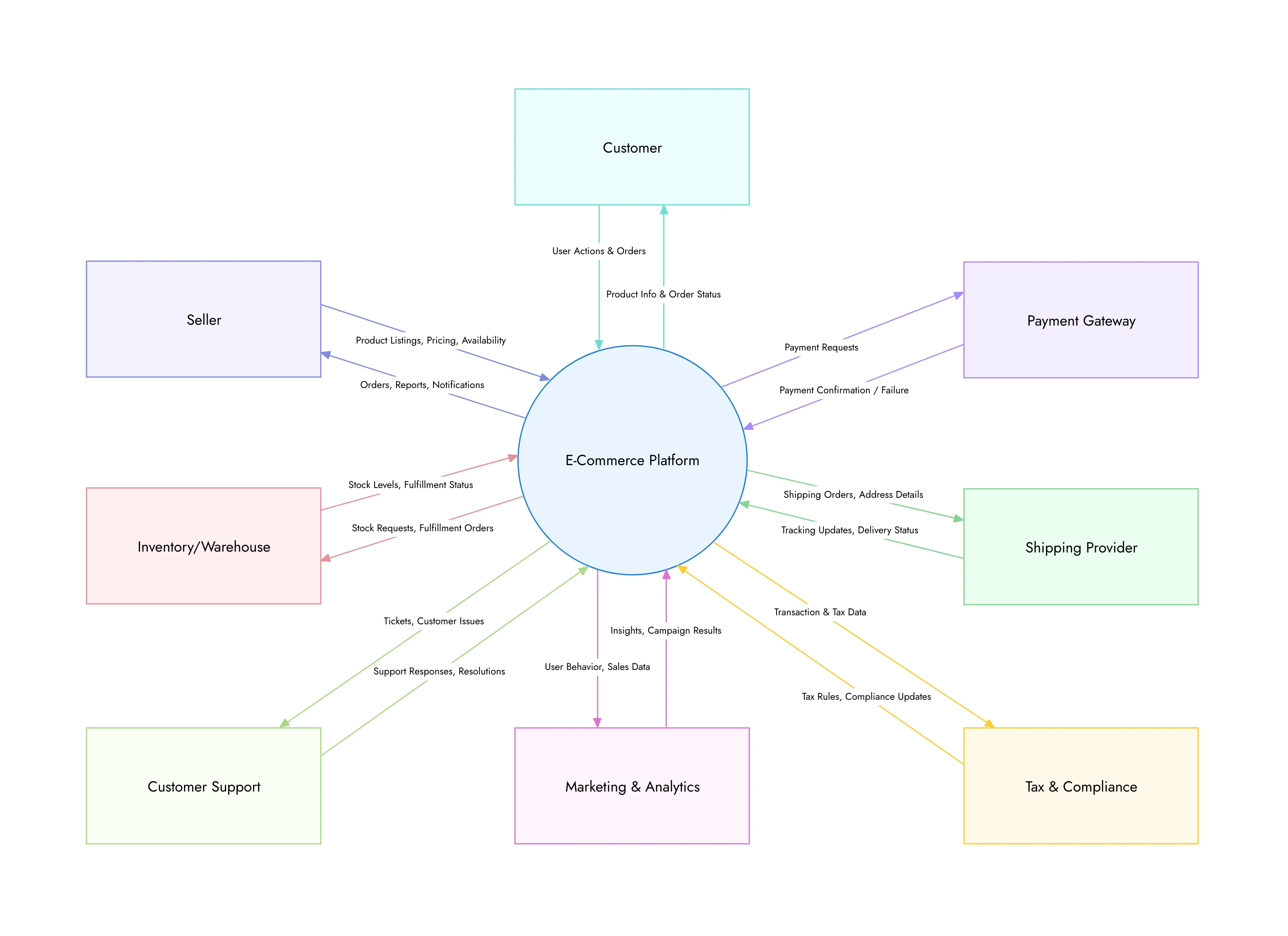
Example 1: E-commerce System
In an e-commerce system, the system could be the online store, and external entities might include:
- Customers (who place orders)
- Payment Gateways (for transaction processing)
- Shipping Providers (for order delivery)
The data flow would show how customers place orders, the system processes them, and sends payment details to the payment gateway. Shipping requests are then sent to the shipping provider.
Here's the example diagram:
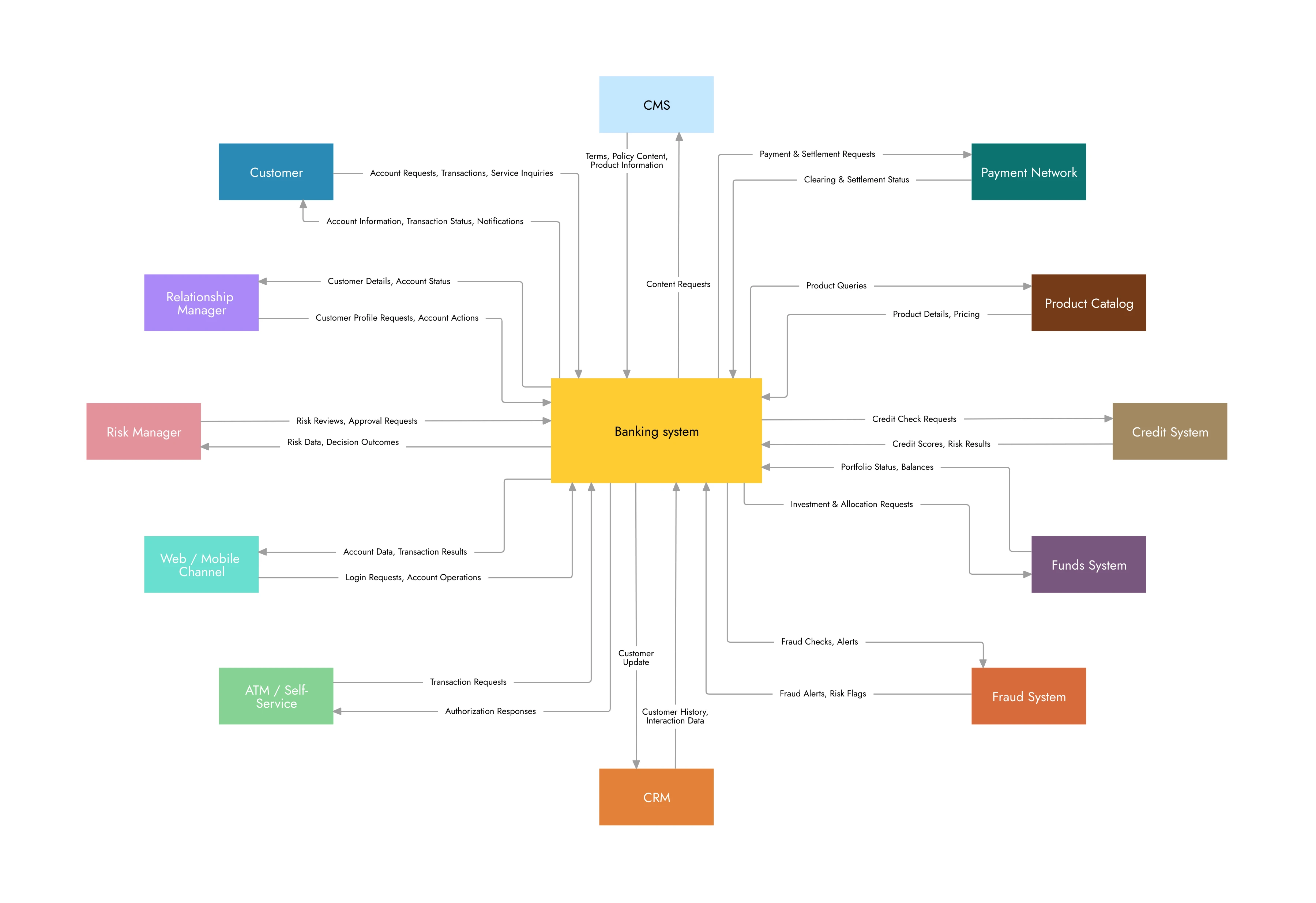
Example 2: Banking System
In a banking system, the system might be the core banking application, with external entities like:
- Customers (who access accounts)
- ATMs (for withdrawals)
- Credit Bureau (for credit checks)
The diagram would illustrate data flows such as customer transactions, account queries, and credit checks.
Here's the example diagram:
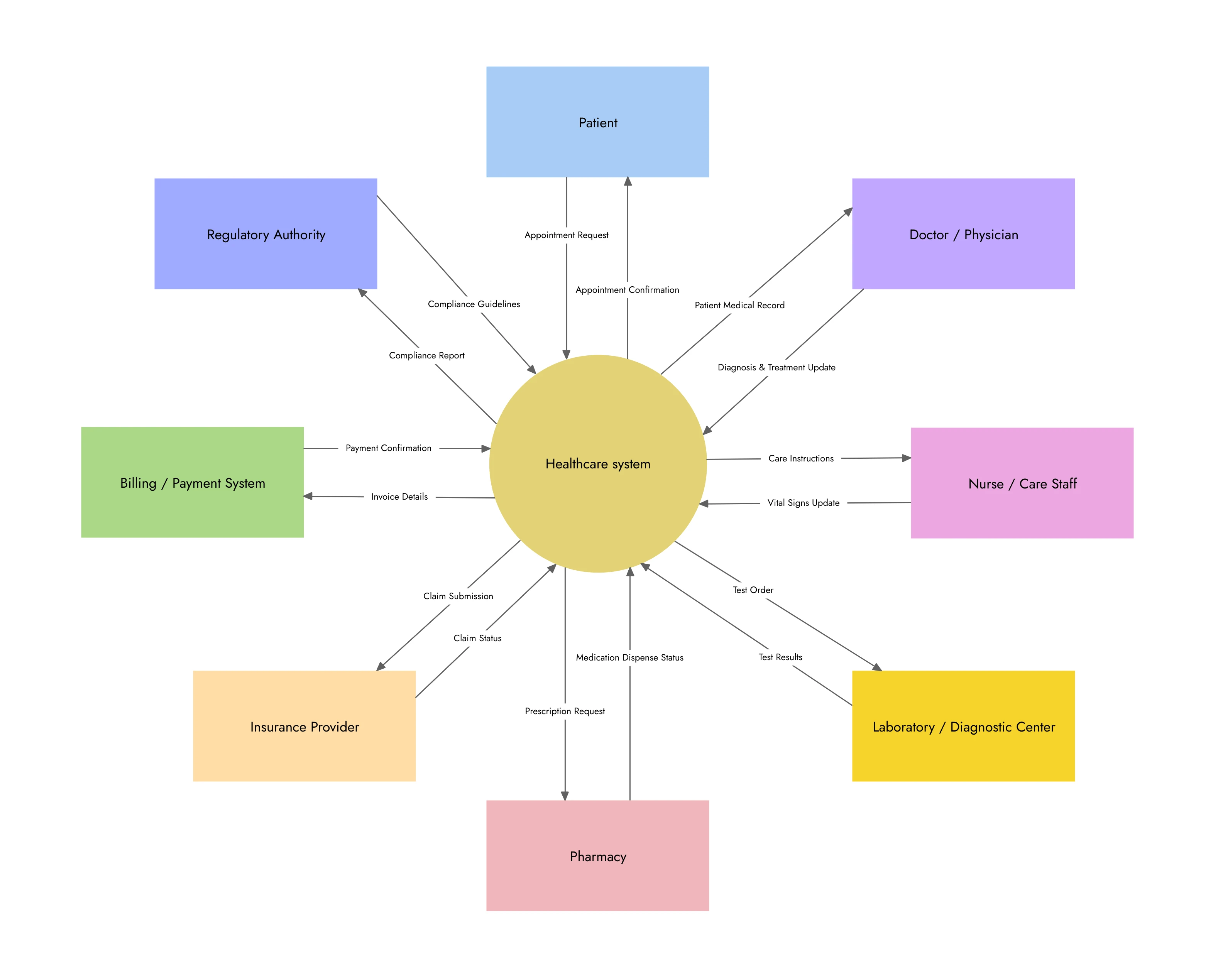
Example 3: Healthcare System
In a healthcare system, the system could be the hospital management system, interacting with entities like:
- Patients (who receive care)
- Insurance Companies (for billing and claims)
- Medical Databases (for patient records)
Data flow would include patient information being sent to insurance companies for billing, or medical data being retrieved from databases for patient care.
Here's the example diagram:
These examples show how context diagrams provide a clear, simplified overview of system interactions, making complex systems easier to understand.
What are the Benefits of System Context Diagrams?
The purpose of context diagrams is not just simple visual aids; they offer a host of benefits that make them invaluable during the system design process. By providing a clear, high-level view of how a system interacts with external entities, they serve as a foundational tool that enhances communication, simplifies complex information, and drives system design efficiency.
Here are some key benefits of context diagrams:
1. Simplifying Complex Systems
At the start of any project, especially one involving intricate systems or multiple integrations, it can be overwhelming to understand how all the components interact.
- Context diagrams provide a clear overview by simplifying complex systems into essential components: the system, its external entities, and the data flow between them.
- This high-level view makes it easier for stakeholders, whether technical or non-technical, to grasp the key interactions without getting lost in the details.
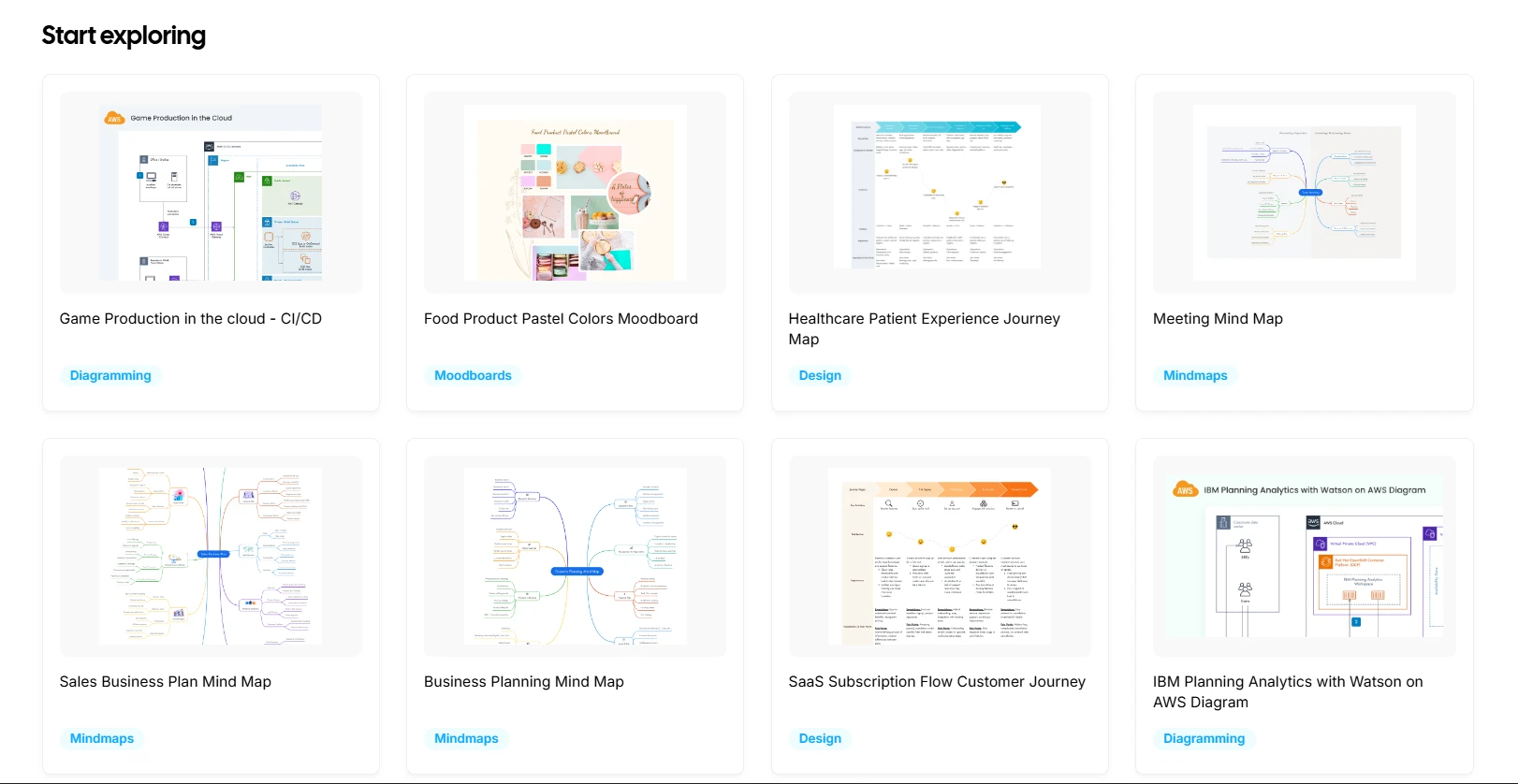
For instance, MockFlow IdeaBoard is a diagramming platform that makes this process easier with its drag-and-drop canvas, allowing you to easily add system components, external entities, and data flow arrows. You can start with a blank canvas or choose from ready-made templates tailored for system diagrams and flowcharts, helping you get started without the need for complex design expertise.
2. Improving Stakeholder Understanding
In any project, you’ll likely be working with a variety of people: business analysts, developers, product managers, and possibly even end users. Each of these stakeholders may have a different understanding of the system’s scope and how it interacts with other entities.
- A context diagram ensures that everyone is on the same page by providing a simple, shared visual representation of the system's interactions.
- It fosters clear communication between different teams, helping to avoid misunderstandings and clarifying the system’s purpose and boundaries.
A good example is how IdeaBoard supports real-time collaboration, allowing multiple team members to edit and add multimedia comments on the diagram simultaneously. Whether your team is co-located or working remotely, you can stay aligned and continuously refine the system’s boundaries and data flows.
3. Enhancing Communication
Context diagrams create a common visual language that all team members can refer to, regardless of their background.
- With its clear, standardized format, a context diagram ensures that all stakeholders, whether developers or business owners, can discuss the system with a shared understanding.
- It also acts as a reference point throughout the project, helping to keep discussions focused on the system’s core functions and interactions with external entities.
To add to this, platforms like IdeaBoard offer collaborative whiteboards and AI-assisted diagram generation, helping even non-designers create context diagrams quickly. With just a description, IdeaBoard can generate a basic diagram that can be refined and customized, speeding up the design process.
4. Identifying Integration Points
Since context diagrams clearly show the system’s external entities and the flow of data between them, they make it easier to see where the system needs to connect with other systems, platforms, or services.
- For instance, in an e-commerce system, the context diagram might highlight integration points with payment gateways, inventory management systems, or shipping partners.
- Recognizing these points early helps teams plan for potential challenges and integration requirements before development begins.
5. Time and Cost Efficiency
By providing clarity early in the project, context diagrams can save time and costs down the line.
- It provides a clear understanding of what’s included in the system and what’s outside it, reducing the risk of misunderstandings as the design and development process moves forward.
- By identifying integration points early, it also reduces the risk of costly integration issues that might arise during later stages of development.
With IdeaBoard, you can quickly update and adjust the diagram as the system evolves, making it easy to reflect changes without starting from scratch. This iterative process ensures that the system boundaries and interactions are always up-to-date, minimizing the need for costly revisions.
A recent empirical experiment found that providing participants with a Data Flow Diagram (DFD) improved their accuracy in security analysis tasks by approx. 41% compared to relying solely on source code. This highlights how even high-level diagrams like DFDs and context diagrams can significantly improve the clarity and accuracy of system analysis, making them a valuable tool in both software security and system design.
Limitations of Context Diagrams
Context diagrams are deliberately high-level, which is also their main limitation. They don't show timing, sequencing, or the order in which interactions happen, so they can't answer questions like "what happens first?" or "how long does this step take?" They also don't capture internal processes or how components within the system relate to each other. For that level of detail, teams pair a context diagram with a Data Flow Diagram or a more detailed architectural diagram.
Context Diagram vs Data Flow Diagram (DFD)
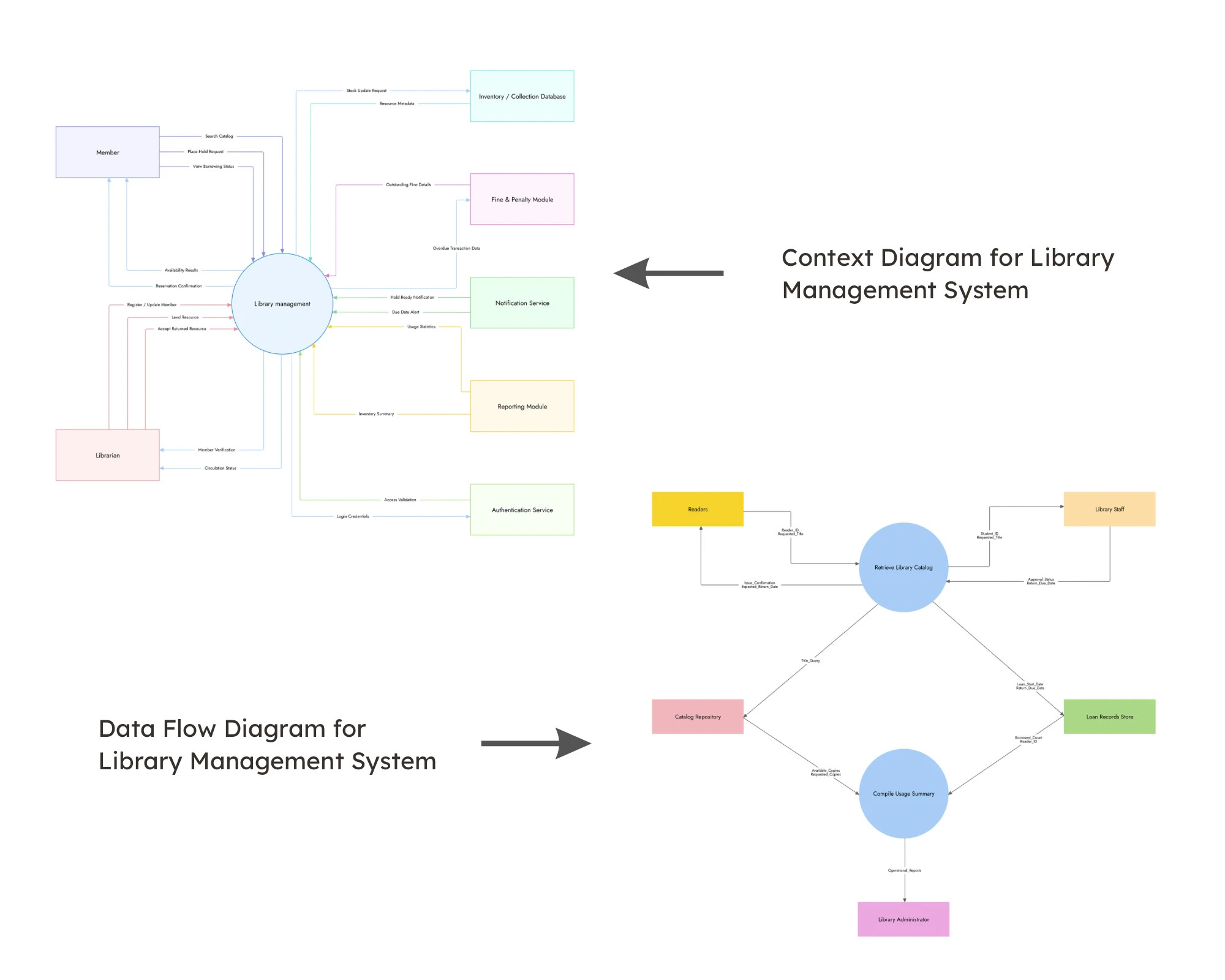
While both context diagrams and Data Flow Diagrams (DFDs) are used to visualize systems, they serve distinct purposes and are used at different stages of system design.
Context diagrams provide a high-level snapshot of the system’s external relationships, focusing on what’s inside and outside the system's boundaries. On the other hand, DFDs dive deeper into the internal workings of the system, breaking down processes and data flow in greater detail.
Understanding their differences can help you choose the right tool for the task at hand, ensuring clarity and efficiency in your design process.
Below is a comparison of the two, highlighting their purpose, level of detail, and when to use each:
Aspect | Context Diagram | Data Flow Diagram (DFD) |
Purpose | Provides a high-level overview of the system and its external interactions. | Focuses on the internal processes, data flow, and data stores within the system. |
Level of Detail | Simple, abstract view showing system boundaries and external entities. | Detailed, breaking down system components, processes, and data flow. |
When to Use | Early in the design process to define system scope and interactions. | Later in the design process to analyze system processes and internal data flow. |
Audience | Suitable for both technical and non-technical stakeholders to understand system boundaries. | Primarily for technical stakeholders to analyze internal workings of the system. |
Data Flow | Data flow is shown at a high level, with minimal detail. | Data flow is shown in detail, illustrating how data moves within the system. |
This table clearly outlines how context diagrams and DFDs serve different stages of system design, helping you choose the right diagram for your project’s needs.
How to Create a Context Diagram
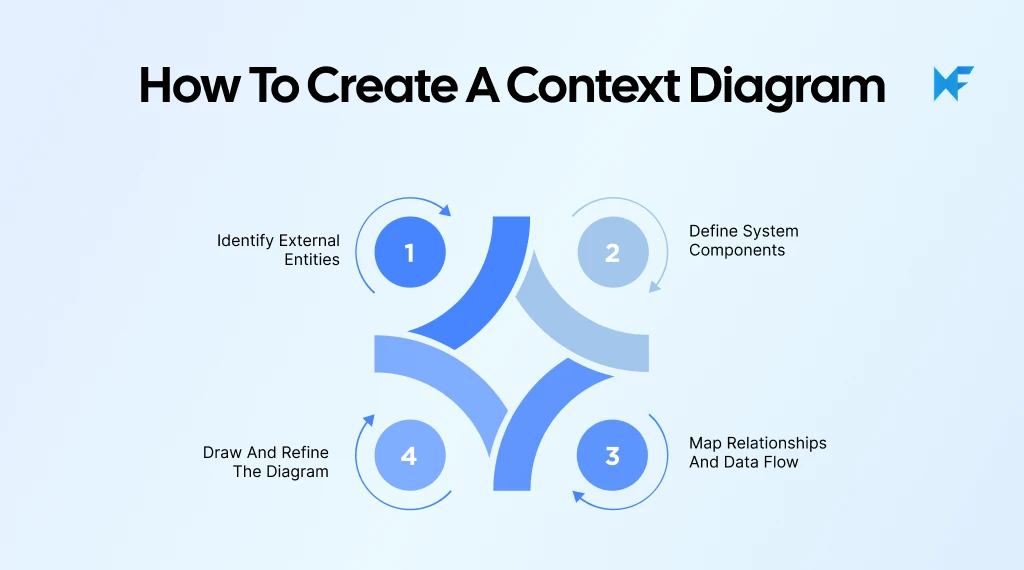
Creating a context diagram involves several steps to ensure that the system, its boundaries, and interactions with external entities are accurately represented. By following a clear process, you can ensure your diagram provides value in defining the system's scope and communication flow.
Here’s a detailed guide to help you create a context diagram:
Step 1: Identify External Entities
The first step in creating a context diagram is to identify all external entities that interact with the system. These are components that aren't part of the system itself but still play a crucial role in its operation. External entities could be:
- Users (customers, employees, system administrators)
- Third-party services (payment gateways, APIs, external data sources)
- Other systems (CRM software, third-party databases)
It’s essential to capture all interactions, including indirect ones that might not be immediately obvious but are important for the system’s functioning. You can identify these external entities through:
- Stakeholder interviews
- Requirement gathering workshops
- Reviewing system documentation and integration points
Once you’ve identified the entities, group them by their role (e.g., customers, external systems) to keep the diagram organized and easy to understand.
Quick Tip: As a best practice, start with a single comprehensive context diagram before creating use‑case–specific diagrams. This ensures everyone aligns on system boundaries and external interactions first. Then if needed, you can create more detailed or scenario-specific diagrams without risking duplication or conflicting models.
Step 2: Define System Components
Next, clearly define the core components of the system. These are the internal elements that the system directly controls or operates. In this step:
- Identify key processes (e.g., order processing, payment handling, user authentication)
- Define services or subsystems (e.g., inventory management, customer data storage)
It’s important to keep this step high-level. The system components should be broad enough to represent the overall functionality of the system, but not get into specific technical details or operational steps. The purpose here is to define the system’s scope without overwhelming the diagram with unnecessary detail.
Step 3: Map Relationships and Data Flow
Once the external entities and system components are identified, it’s time to map the relationships and data flows between them. This is the core of the context diagram, as it visually illustrates how data and control flow through the system and its interactions with external entities.
- Data flow represents how information moves between the system and external entities. For example, you might show that a customer places an order, the system processes the order, and then the order data flows to a shipping provider.
- Use arrows to represent the direction of data flow. For instance, an arrow from the customer to the system could represent the “order request,” and another arrow could show the “order confirmation” from the system back to the customer.
- Label each arrow with the type of data being exchanged, such as “order request,” “payment confirmation,” or “shipping details.”
This step is crucial as it outlines the interactions clearly, showing how data is transferred between the system and the external entities.
Quick Tip: Users say it helps to treat each arrow strictly as a data flow (a noun), not as a verb or action. For example, label an arrow “Login Credentials” rather than “User Logs In.” This keeps the diagram focused on what data is exchanged, not when or how, preserving clarity and making the context diagram more precise and useful.
Step 4: Draw and Refine the Diagram
With all components and relationships mapped out, the next step is to draw the diagram. Start by using simple shapes to represent:
- The system: Usually placed in the center, represented by a rectangle or circle.
- The external entities: Placed outside the system boundary, often represented by ovals or rectangles.
- Data flows: Arrows connecting external entities to the system and vice versa, labeled with the data being exchanged.
A context diagram should be a high-level overview, so avoid including too many details or adding unnecessary complexity. Keep it clean and easy to interpret. The goal is to provide a clear and simple representation of how the system interacts with its external environment.
Once you’ve drawn the diagram, refine it iteratively to ensure it accurately represents the system and its interactions. Consider reviewing the diagram with stakeholders to get feedback and make necessary adjustments.
Step 5: Choose a Context Diagram Software to Get Started Today
If you are looking for a tool that simplifies creating context diagrams, MockFlow IdeaBoard is an excellent tool you can consider. With its drag-and-drop interface, users can easily build context diagrams by adding shapes, arrows, and connectors, which are essential elements for illustrating the system, external entities, and data flows.
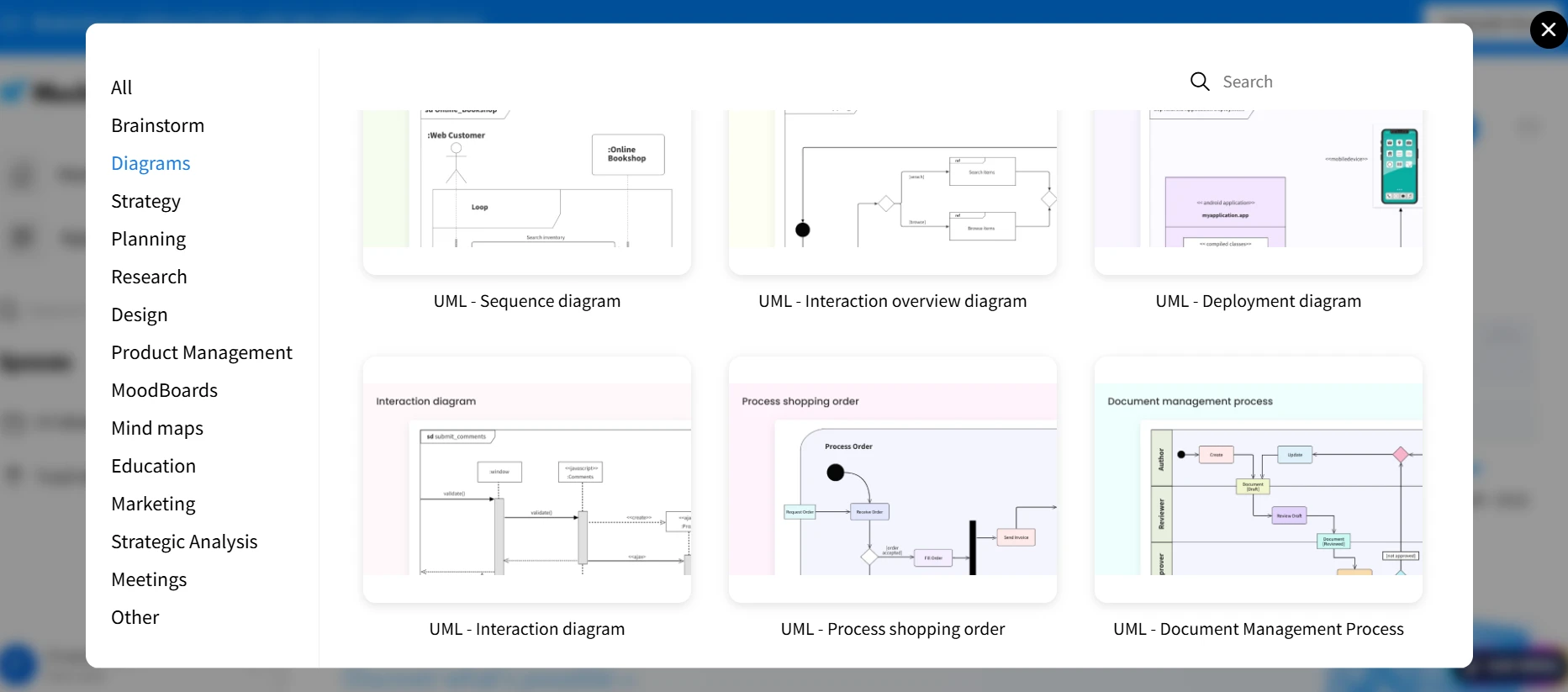
You can start with a blank canvas or use pre-built templates and diagramming packs, such as flowcharts, architecture diagrams, and data-flow diagrams, tailored for system design. This ensures you don’t have to start from scratch but can adapt a template close to your needs.
IdeaBoard supports real-time collaboration, making it ideal for teams working remotely or in hybrid environments. Multiple team members can view, edit, and comment on the diagram simultaneously, keeping everyone aligned on the system’s boundaries and interactions.
Furthermore, the AI assisted diagram generator feature and prompt library allows you to quickly generate a base diagram by simply describing the entities and data flows in text form, speeding up the creation process.
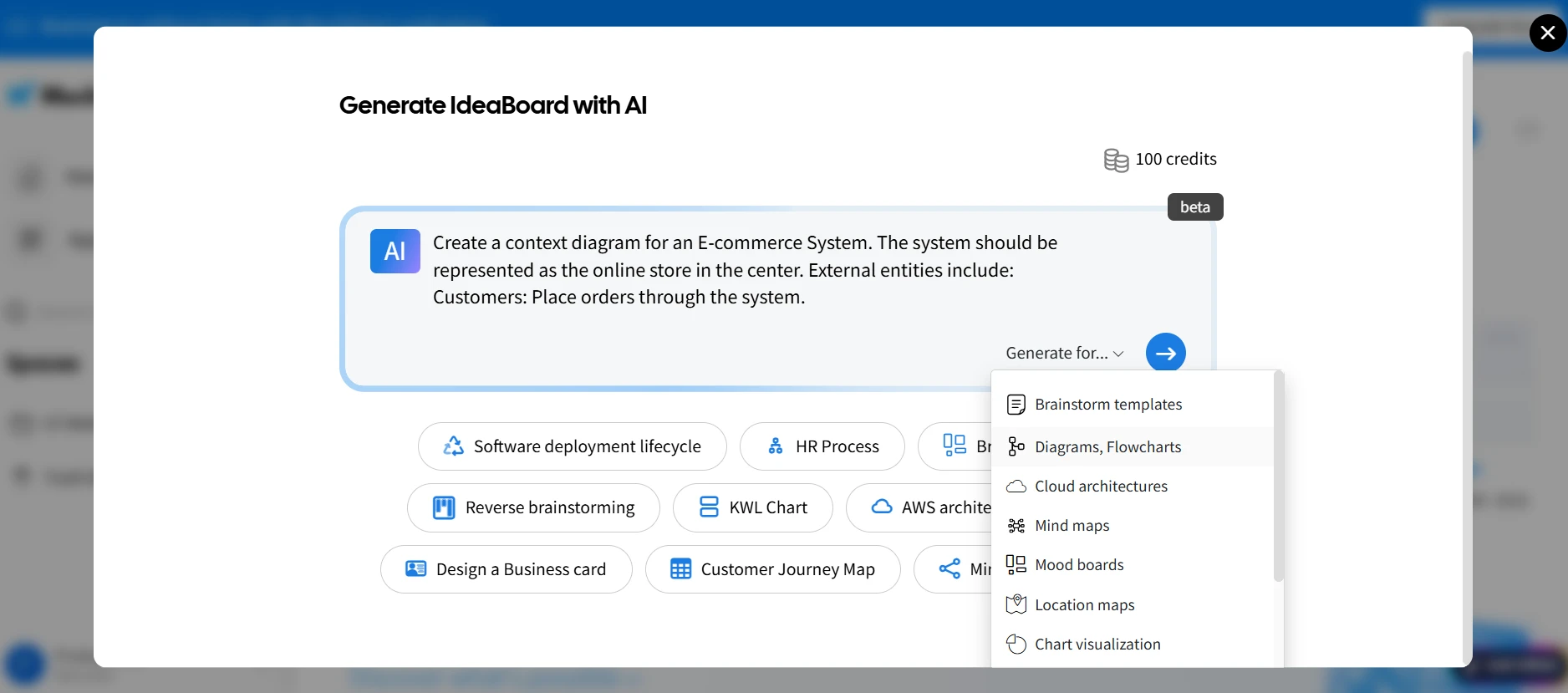
Once the diagram is ready, you can easily adjust elements, add labels, or change layouts to match evolving ideas and feedback.
Sign up and start using IdeaBoard for free today to create context diagrams. For quick browser access, install our Chrome extension to get started instantly.
Conclusion
Context diagrams are invaluable tools for simplifying complex system designs, providing a clear view of system boundaries, interactions with external entities, and data flows. By defining the scope early in the process, they set the foundation for more detailed system design, improving communication across teams and reducing potential integration issues down the line.
Creating context diagrams doesn’t have to be difficult. With tools like IdeaBoard, you can easily build, refine, and collaborate on context diagrams that accurately represent your system’s interactions. Whether you’re working alone or as part of a team, IdeaBoard’s intuitive interface, pre-built templates, and AI-assisted features make it an ideal choice for efficient and effective diagramming.
Start creating your context diagrams with MockFlow IdeaBoard today and experience how it can streamline your system design process.
Try IdeaBoard for free and enhance your design workflow!
FAQs about Context Diagram
1. What is a context diagram?
A context diagram is a high-level visual representation that shows the interactions between a system and its external entities. It defines the system's boundaries and highlights the data flow between the system and external entities such as users, other systems, or devices. This diagram provides an abstract overview of how a system interfaces with the outside world.
2. Why is a context diagram important for system design?
A context diagram is crucial for system design because it helps define the boundaries of the system and clarifies interactions with external entities. It provides a simplified, visual overview, making it easier for stakeholders to understand complex systems. By identifying the scope of the system early in the design process, it ensures alignment across teams and reduces the risk of scope creep.
3. How do I create a context diagram for my system?
To create a context diagram, start by identifying the system’s external entities (such as users or third-party applications). Define the key components of the system, then map how these components interact with the external entities. Finally, use diagramming tools like Lucidchart or MockFlow IdeaBoard to visualize these relationships, ensuring that the diagram remains clear and simple.
4. What are the components of a context diagram?
A context diagram typically includes the system (represented as a central box or circle), external entities (such as users, applications, or devices), and data flows (arrows representing information exchange between the system and the entities). The diagram avoids internal details, focusing only on the high-level interactions and boundaries.
5. How can a context diagram be used to represent system boundaries?
A context diagram clearly defines the system’s boundaries by showing what is included in the system and what lies outside of it. It helps to demarcate the system’s scope, illustrating which external entities interact with the system and how, which is critical for understanding system integration and planning.
6. What is the best tool for creating context diagrams?
One of the best tools for context diagrams is MockFlow IdeaBoard. It offers drag‑and‑drop diagramming, pre-built context diagram templates, collaborative editing for multiple users, real-time commenting, sharing via secure links, and export options. Its AI-assisted diagram generation capability helps generate custom diagrams from textual descriptions, speeding up the process. IdeaBoard’s simple interface makes diagram creation quick and intuitive.

Best UI Kits for Designers: Compare 14 UI Kits for Design Workflows
Every designer has a slightly different relationship with UI kits. Sometimes we need one because a blank canvas is slowing us...

8 SaaS Website Design Trends to Watch in 2026
Introduction If your SaaS website is due for a refresh, the hardest part is often knowing which design ideas are worth...

Design Collaboration: How Teams Work Better From Idea to Handoff
Introduction Design rarely moves forward because one person has the perfect idea. It moves forward when the right people...
