
UX audit: 5 step-by-step guide to evaluate and improve UX
Once you have a website, app, or software prepared, you need to perform an audit throughout the product life cycle. A UX audit involves a comprehensive review of a digital product’s user experience.
It involves identifying areas where users may struggle by examining every aspect of your digital product — from how easy it is to navigate to how effectively it helps users achieve their goals.
Typically, a UX audit is performed when user engagement, conversion rates, or overall satisfaction noticeably decline.
In this post, we’ll discuss the step-by-step process of conducting a UX audit and the necessary tools.
What is UX Audit?
A UX audit is a process that reviews and evaluates the user experience of a website, app, or digital product to find areas for improvement. It involves examining how users interact with the product, identifying pain points, and analyzing design elements like navigation, content, and layout. The goal is to understand what might be confusing or frustrating for users and to suggest changes that make the experience smoother and more enjoyable.
When Should You Conduct a UX Audit?
A UX audit is most effective when you have an existing product with real user data to analyze. Unlike usability testing, which works for new prototypes, a UX audit requires enough behavioral data to identify patterns. The following situations are the most common triggers.
Low Conversions or High Drop-off Rates
If analytics show users consistently abandoning a signup flow, checkout funnel, or onboarding sequence, a UX audit can identify exactly where and why the friction occurs. Quantitative data tells you where users leave. The audit connects that to qualitative analysis of why they leave, so you can fix the actual problem instead of guessing.
Before a Redesign
Running a UX audit before a redesign prevents the common mistake of fixing the wrong things. The audit shows what to keep, what to change, and what to remove based on real user behavior rather than stakeholder opinions. This is one of the highest ROI uses of the process.
Stagnant or Declining Engagement
When session durations drop, return visits decline, or feature adoption stalls, the cause often sits in the user experience. Products that evolve through frequent small updates are especially prone to gradual UX degradation. An audit surfaces the invisible friction points that accumulate over time.
After a Major Product Launch
Real users almost always interact with a product differently than internal teams expect. A post-launch UX audit, ideally 4 to 8 weeks after release, catches usability problems early before they become entrenched or drive users to competitors.
Rising Support Ticket Volume
A spike in support requests around the same features or flows usually points to a UX problem, not a bug. A UX audit traces these recurring issues back to their design root cause, whether that is unclear labels, missing feedback, or confusing navigation. Fixing the UX issue reduces support load and improves satisfaction simultaneously.
How to Conduct a UX Audit?
Conducting a UX audit involves viewing your website or app through the user’s eyes to see what works and what doesn’t. It’s a structured look at usability, design consistency, and accessibility, uncovering any spots where users might face challenges or get frustrated.
By exploring each interaction point, you’ll find areas that may impact user satisfaction or slow down conversions.
We’ll check out the process, goals, metrics, and tools used at each step.
Step 1: Define scope and collect data
Before you jump headfirst into your UX audit, take a step back and define the scope. Here, you’ll determine the areas of your product that need a solid evaluation to enhance its UX.
What exactly are you hoping to achieve with this audit? Are you focusing on the entire product or just a specific section?
For this, outline the main objectives for the audit, which will involve tracking key product features (or webpages), monitoring engagement, and analyzing interactions to see where users might struggle or leave the site.
Goal: In this first step, focus on the following:
- Clarity: Clearly define the objectives and scope of your UX audit.
- Focus: Decide which areas of your website or app you'll be evaluating.
- Alignment: Confirm your goals are aligned with your overall business objectives.
Metrics: When defining scope and collecting data, pick out the UX metrics that suggest displeasure among users. For instance, if it's a website, you should check for bounce rates, time on page, exit rates, conversion rates, and heat maps showing user interaction to have a clear picture of user behavior.
At this stage, you’ll essentially be using:
- Google Analytics to track website traffic and user behavior.
- Mixpanel for in-depth insights into user interactions with your website or app.
- Hotjar will visualize user behavior with heat maps, recordings, and surveys.
Step 2: Perform Heuristic Evaluation
Performing a UX design audit will require assessing the website or app against established usability principles. These are good UX design guidelines.
Evaluate the interface against a set of usability guidelines to identify usability issues that might hinder a seamless user experience. One widely recognized set of principles is Jakob Nielsen's 10 Usability Heuristics.
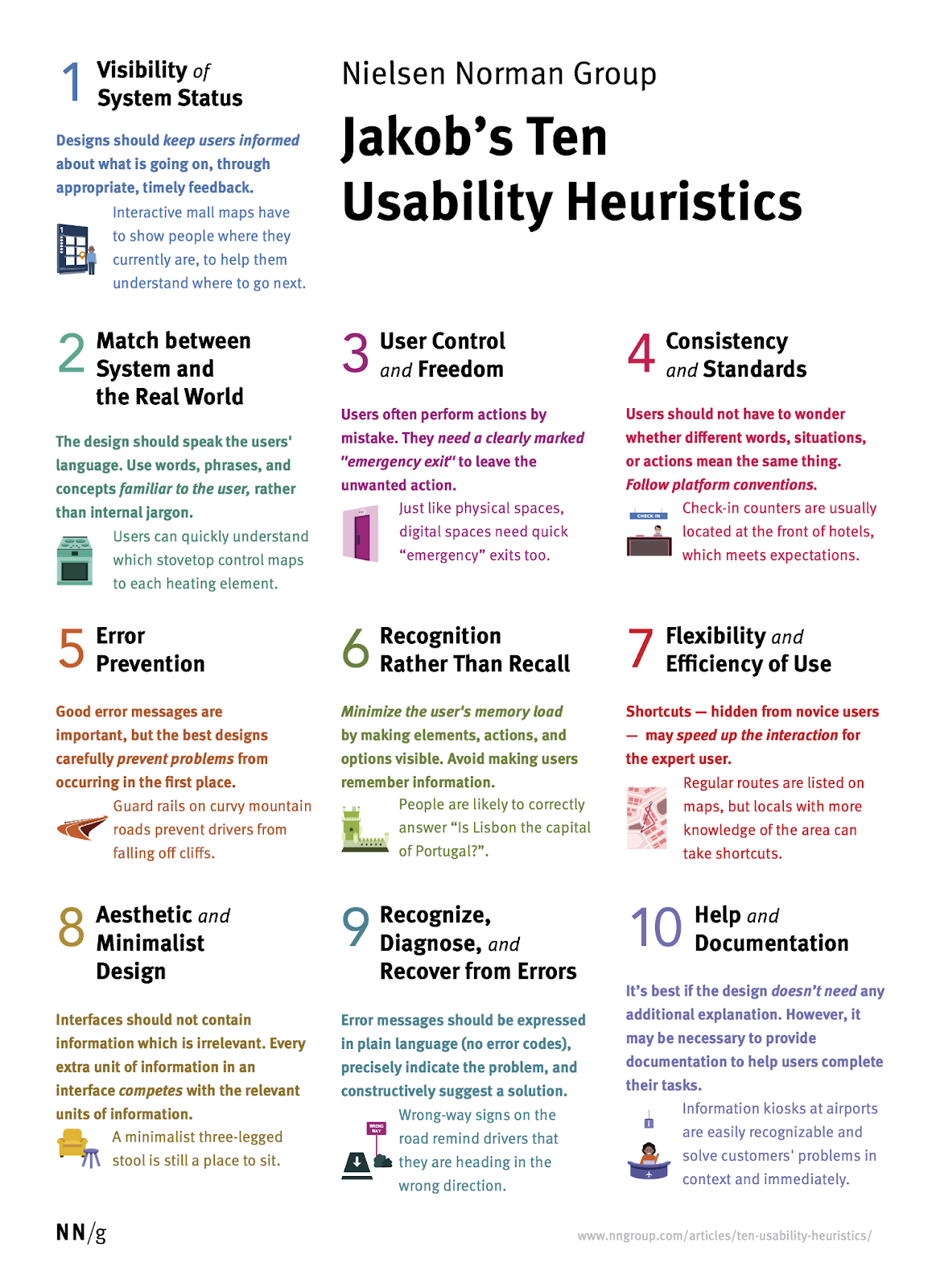
These heuristics cover a wide range of usability factors, from visibility of system status to error prevention and help documentation.
Process: Each evaluator assesses individual elements, such as navigation, layout, and feedback, for consistency, ease of use, and clarity of process. Ultimately, you’ll capture usability problems that may lead to user frustration and create a checklist covering critical areas like error prevention, visibility of system status, and flexibility of interaction.
- Identifying usability problems by checking for areas where your product is not user-friendly or intuitive.
- Benchmarking against best practices by measuring your design against established usability heuristics.
- Prioritize problems to determine usability issues.
- Severity scores that range from minor to critical issues.
- Number of usability violations per page/screen.
- Consistency checks how well elements match user expectations.
- A manual guideline of Nielsen's 10 Heuristics Checklist
- UXCheck to get a structured framework for conducting heuristic evaluations
- ZebraTester for automated accessibility testing
Step 3: Identify and Document UX Issues
The UX audit process will require compiling and documenting the issues or findings. The UX site audit will require categorizing each issue based on impact, priority, and potential solutions.
Proper documentation would help stakeholders and designers clearly understand the problems affecting user experience, which in turn would cause systematic improvements.
Also, visual evidence (screenshots or annotated images) for each problem should be captured to provide clarity.
Each issue should also include suggested recommendations for improvement, giving a roadmap for design adjustments.
- Create a clear record: Documenting all identified UX issues in a structured and organized manner.
- Provide context: Explain the impact of each issue on the user experience.
- Facilitate communication: Ensuring everyone involved in the project understands the UX issues and their importance.
- Number of issues identified: Giving you an overall picture of the usability of your website or app
- Severity of issues: Categorizing issues based on critical, major, or minor?
- Areas of recurrence: Requires checking high-impact issues in certain sections or functions.
- Google Sheets/Microsoft Excel to create organized lists and tables of UX issues.
- MockFlow UX Documentation that keeps everyone on the same page by building, organizing, and sharing your UX information in one place
- Bugzilla for teams to document and prioritize UX issues based on their severity.
- MantisBT as a bug tracking system to manage UX issues.
- UXPin for collaborative documentation and prototyping features.
Step 4: Communicate Recommendations
After documenting the UX issues, communicate actionable recommendations to the design and development teams. By painting a picture of how users interact with your website or app, you don't just list problems but tell a story about the user experience.
The focus here is on translating data and insights into practical design recommendations that can enhance the user experience.
- Secure buy-in: Get everyone on board with your recommendations and the need for UX improvements.
- Driving action: Inspire and motivate teams to implement recommendations.
- Demonstrate value: Show how UX audits and recommendations can contribute to business goals.
- Clarity of communication: Conduct surveys or take feedback on whether the communicated changes are easy to understand and follow.
- Level of engagement: Check if the recipient is interested and invested in your findings by asking follow-up questions.
- Impact on decision-making: Make sure your UX recommendations directly influence design and development decisions.
- MockFlow Design Collaboration lets you share wireframes in real-time with a built-in team chat feature.
- Leverage MockFlow integrations with Slack, Microsoft Teams, Trello, and others to start brainstorming design ideas on the go.
Step 5: Provide User Testing Opportunities
This is the final stage in a UX audit wherein you validate recommendations by gathering direct feedback through user testing. You’ll provide opportunities for real users to interact with the updated design or interface, allowing you to assess the effectiveness of the changes.
This way, you get to see firsthand where they struggle, and confirm whether your recommendations actually improve the user experience.
Process: Implement user testing by focusing on areas previously identified as pain points. Ask users to perform key tasks, observe their actions and collect feedback to see if the changes improve usability.
Goals: The primary goal here is to confirm that the design updates enhance user experience and address previously identified issues by —
- Validating your findings as you confirm whether the identified UX issues are actually impacting real users.
- Testing your recommendations to see if the proposed solutions actually improve the user experience.
- Task success rate: What percentage of users are able to complete specific tasks successfully?
- User satisfaction scores: Based on responses in post-session feedback.
- Error rate: How many errors do users make while interacting with your website or app?
- Lookback to conduct moderated and unmoderated user testing sessions remotely.
- UsabilityHub supports remote user testing that has tools for preference testing, click tests, etc.
- Axe Accessibility Tool to identify accessibility issues that may hinder users with disabilities.
Benefits of Conducting a UX Audit
A UX audit replaces assumptions with evidence. It gives product teams a prioritized list of usability issues backed by real user data, behavioral analytics, and established design principles. This leads to smarter decisions, faster fixes, and measurable improvements in conversion, retention, and user satisfaction.
Data Driven Decisions Over Guesswork
Design teams often disagree about what is causing user frustration. A UX audit settles those debates by showing exactly where users struggle, how severe each issue is, and what the likely impact of fixing it will be. Your team spends time on changes that actually move metrics instead of redesigning elements that were not broken.
Higher Conversion Rates
A UX audit identifies the specific friction points that cause users to abandon a funnel. These could be confusing form fields, unclear calls to action, or unexpected navigation patterns. Even fixing a handful of high severity issues from the audit can produce measurable conversion lifts within weeks of implementation.
Improved User Retention
Users who have a smooth experience are more likely to return. A UX audit identifies the moments where frustration builds and satisfaction drops. These are often small issues like a confusing label or a flow that requires one too many steps that individually seem minor but collectively drive users away.
Reduced Development and Support Costs
Identifying UX problems early saves both time and money. Many recurring support tickets trace back to UX issues rather than product bugs. Fixing the underlying design problem eliminates the root cause, reducing your support team's workload while improving the user experience.
Alignment Between UX and Business Goals
A UX audit evaluates the user experience against specific business objectives like revenue targets, retention benchmarks, and onboarding completion rates. Every recommendation in the audit report ties back to a measurable outcome, making it easier to secure budget and align teams around what needs to change and why.
Conclusion
A UX audit offers a direct path to refining your product by zeroing in on what users need and where they may struggle. By defining clear goals, evaluating usability step-by-step, documenting issues, and testing changes with real users, you lay out a clear plan for ongoing improvement.
Each part of the process builds toward creating a product that’s both intuitive and satisfying. With the right approach and tools, a thoughtful UX audit not only enhances usability but also elevates the entire user experience, making your product something users connect with and enjoy.
FAQs
What is the difference between a UX audit and usability testing?
A UX audit is an expert led evaluation that assesses a product against established usability principles, analytics data, and business goals. Usability testing observes real users interacting with a product to identify where they struggle. The key difference is direction. An audit infers problems from standards and data. Testing infers problems from user behavior. Most comprehensive audits include usability testing as one of several research methods.
How long does a UX audit take?
Most UX audits take two to four weeks depending on the product's complexity and the scope of the evaluation. A focused audit covering a single user flow or feature can be completed in one to two weeks. A full product audit covering multiple platforms, user journeys, and accessibility checks may take four to six weeks. Setting a clear scope and timeline before starting prevents the audit from expanding indefinitely.
How much does a UX audit cost?
UX audit costs vary based on scope, product complexity, and whether you use an internal team or an external agency. A basic audit by a freelancer typically ranges from $1,000 to $5,000. A comprehensive agency led audit with detailed reporting and implementation guidance can cost between $5,000 and $15,000. Companies with an in house UX team can conduct audits internally with minimal additional cost using tools they already have.
Who should conduct a UX audit?
A UX audit is ideally conducted by UX researchers, UX designers, or usability specialists who understand both user behavior and design best practices. For the most objective results, use someone who was not involved in designing the product being audited. External consultants or agencies can provide an unbiased perspective, while internal teams bring deeper product knowledge. Many organizations use a combination of both for the best results.
What does a UX audit report include?
A UX audit report typically includes a summary of the audit scope and objectives, a list of identified usability issues with severity ratings, supporting evidence such as screenshots and analytics data, and prioritized recommendations for improvement. The best reports organize findings by impact so that teams can address the most critical issues first. Some reports also include competitive benchmarks and a proposed implementation roadmap.
How often should you conduct a UX audit?
Conduct a full UX audit at least once a year as a baseline health check. Products with frequent feature releases or high shipping velocity benefit from quarterly audits. You should also run an audit before any major redesign, after a significant product launch, or when key metrics like conversion rates or user retention show a decline. Regular audits prevent small UX issues from compounding into larger problems over time.
